Specs are compiled from manufacturer listings and verified buyer reviews and can change over time — please confirm the key details on the product page before buying.
You love the offset stick layout of an Xbox pad, but you game on a PlayStation 5. That leaves you in an annoying gap: Sony’s own DualSense puts both thumbsticks side by side, and most third-party pads either copy that or feel cheap. The short answer: the HEXGAMING RIVAL PRO is the strongest all-round pick for most players. It pairs true Hall Effect joysticks (magnetic sticks that resist wear and drift) with four mappable back buttons in a body built for competitive play. Below are five pads that actually deliver the Xbox-style asymmetric layout on PS5, sorted so you can pick the right one in minutes instead of hours.
This guide is built by comparing the manufacturers’ published specifications and the patterns across verified customer reviews, so you get each pick’s real strengths and trade-offs instead of marketing spin.
You will see which pads carry Hall Effect sticks (magnetic sticks that resist wear), how many buttons you can remap, and where each one cuts a corner. The right pick depends on how many remappable buttons and stick options your hands actually need.
Top Picks
How To Choose The Best Xbox Style PS5 Controller
Three things decide whether an Xbox-style pad feels like an upgrade or a compromise on your PS5: the stick technology inside it, how many buttons you can remap, and whether the shell actually fits your hands. Get the stick sensor, button count, and shell fit right and everything else is detail.
Start with the stick sensor, not the colorway
A Hall Effect joystick (a magnetic sensor that reads stick position without any parts rubbing together) is the reason to pay more. Ordinary analog sticks wear down where the metal wiper meets the carbon track, which is what produces drift over months of use. Hall Effect sticks skip that friction entirely. If a pad in your shortlist does not name Hall Effect technology, treat drift as a question you will eventually face.
Count your remappable buttons before you buy
Back buttons and extra bumpers are what let you keep your thumbs on the sticks while you jump, crouch, or reload. Some pads give you four, some give you six, and the mapping happens on the controller itself or through a companion app. More buttons is not automatically better — two fingers can realistically run four paddles, but six takes practice. Match the count to the games you actually play.
Decide if you want a fixed shell or a modular one
Modular controllers ship with swappable modules, sticks, D-pads, and gates, so you can physically rearrange the pad between a shooter layout and a fighting-game layout. That flexibility is genuinely useful if you play several genres. The trade-off is more parts to keep track of and more connections that can loosen. A fixed shell is simpler and usually more solid in the hand.
Side-by-Side Comparison
| Model | Best For | Remappable Buttons | Stick Technology | Connectivity | Amazon |
|---|---|---|---|---|---|
| HEXGAMING RIVAL PRO★ Best Overall | All-round competitive play | 4 back buttons | Hall Effect | Wireless | Amazon |
| Turtle Beach Victrix Pro BFG ReloadedMost Modular | Modular swapping on a budget | 4 quick-action buttons | Hall Effect | Wired and wireless | Amazon |
| Razer Wolverine V2 Pro | Fast mecha-tactile inputs | 6 remappable buttons | Interchangeable caps | 2.4GHz wireless dongle | Amazon |
| HEXGAMING ULTIMATE PRO | Multi-profile tournament play | 4 back buttons | Hall Effect | Wireless | Amazon |
| PDP Victrix Pro BFG (COD Field Op) | Swapping PS5 and Xbox layouts | 4 back buttons | Interchangeable sticks | Bluetooth and USB-C | Amazon |
Detailed Reviews
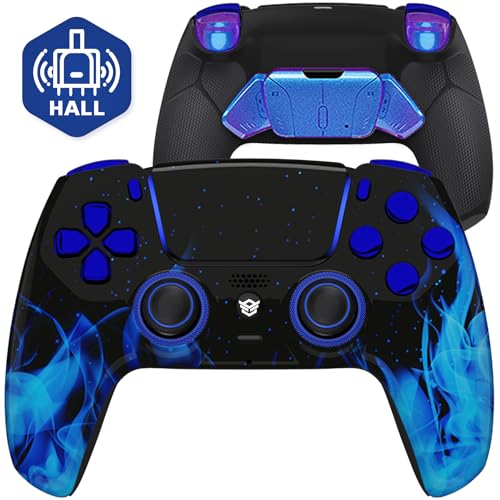
1. HEXGAMING RIVAL PRO Wireless Controller, Blue Flames
Our pick — 4.0+★ from 50+ verified ratings; the strongest balance of quality and price.
Hall Effect sticks and four back paddles in a shell built for the shooter crowd.
This is the pick that gets the fundamentals right in one box. Four rear buttons can be mapped to any of 15 face and shoulder inputs — X, O, Triangle, Square, the four directions, L1, L2, R1, R2, L3, R3 and the touchpad — so you can move jump and crouch off the face buttons and keep your thumbs planted on the sticks. That is the whole point of an Xbox-style pad on PS5, and all four back buttons are built in rather than sold as an add-on.
The joysticks use Hall Effect sensing, which means the position of the stick is read magnetically instead of by parts scraping together. In plain terms, the usual wear path that leads to drift is gone. Triggers and bumpers are mouse-click style, so each pull has a short, crisp break rather than a long mushy squeeze. You also get eight swappable thumbsticks across two heights and three styles — domed, concave, and concave widened — which is a lot of grip tuning for one purchase.
Owners consistently call it high quality and reliable, and the mouse-click triggers are the feature that comes up most in praise. The honest caveat is stick durability, where opinions split: some players report zero drift, others hit problems, so treat the Hall Effect design and eight swappable sticks as insurance rather than a guarantee. Note that no cable is included and the pad will not sit on the official charging dock.
Where This Pad Wins
- Hall Effect joysticks remove the friction-based wear that causes drift
- Four back buttons remap across 15 different inputs
- Eight swappable sticks in two heights and three styles
- Mouse-click triggers and bumpers with a crisp short pull
What To Plan Around
- No cable or accessories in the box
- Will not work with the official charging dock
- Stick durability draws split feedback
Reach for this if: you want the full competitive package — remapping, Hall Effect sticks, and grip tuning — in a single purchase without hunting for extras.
Keep in mind: you will need to supply your own cable and charge it your own way, so budget for that before it arrives.
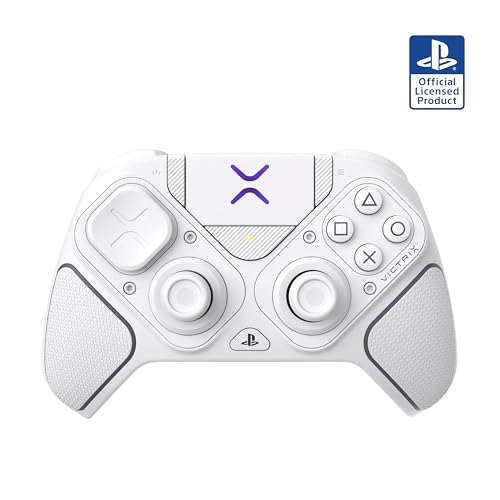
2. Turtle Beach Victrix Pro BFG Reloaded
A build-your-own pad with three swappable modules and a fightpad hiding in the case.
If you switch between shooters and fighting games, this is the shape-shifter of the group. Three customizable modules let you pull the left stick module and drop in a six-button fightpad module built with Kailh microswitches — the same clicky switch type you find in mechanical keyboards. You get 11 interchangeable components in total, plus a carrying case and a module tool to do the swaps. It is a PlayStation officially licensed product, which is the reassurance a lot of buyers want before spending on a third-party pad.
The triggers are a 5-stop Hall-Effect clutch design with a hair-trigger mode, so you can shorten the pull until it clicks almost instantly for twitch reactions or lengthen it for throttle control in racing games. Four quick-action buttons sit on the back for remapping. There is a built-in 3.5mm audio jack supporting Sony 3D Audio, and it runs over a 20-hour rechargeable battery on wireless or over a cable when you want the lowest latency.
A recurring note involves the R2 trigger and software compatibility. For a modular pad with this many moving parts, some variance in feel is expected — the case and tool exist precisely because modules are meant to be handled.
Why it earns its slot: no other pad here gives you a genuine fightpad module, 5 trigger stops (screws that shorten trigger travel for faster presses), and a 20-hour battery in one package. The official PlayStation licensing also takes some of the risk out of going third-party.
The trade-off to weigh: more modules means more parts to keep track of, and the value question is the loudest gripe in the feedback — this pad rewards players who will genuinely use the swaps.
This one is for: genre-hoppers who want a fightpad and a shooter pad from the same purchase, and who like the idea of tuning trigger travel five ways.
Think twice if: you want one fixed shell you never have to open — the modularity that makes this special is also maintenance you did not have before.
3. Razer Wolverine V2 Pro

Twenty-three buttons of clicky, short-throw input for players chasing reaction time.
This is the busiest pad on the list, and deliberately so. Razer fits 23 buttons onto the Wolverine V2 Pro — compare that to the 10 on the Turtle Beach Victrix Pro BFG Reloaded and you can see how far the input count stretches. Six of those are remappable: four extra triggers plus two custom bumpers. The action buttons use a mecha-tactile design with a shorter actuation distance, so each press registers with less travel and a more defined click under your thumb.
The D-pad is an 8-way microswitch unit, which means you hear and feel every directional press engage — helpful when you are dialing in precise combo inputs rather than rolling the pad around. HyperTrigger lets you switch the triggers between measured full-range pulls and quick clicks depending on the game. Around the shell, Razer’s Chroma RGB gives you 16.8 million colors through the Razer Controller app on iOS and Android, and there are two extra thumbstick caps to swap in.
Hand feel is the strength that carries this one — the ergonomics land well and the controller sits comfortably over long sessions. The catch is the broader picture: buyers report rocky connectivity depending on whether they are on PC or console. Drift (the stick moving on its own) and long-term reliability also show up often enough in the feedback to be a real consideration. A firmware update has since added deadzone customization (a setting that ignores tiny stick movements) and improved anti-stick-drift calibration, so it is worth updating before you judge it.
What you are really paying for: speed. Short actuation buttons, an 8-way microswitch D-pad, and adjustable HyperTriggers give you the fastest-feeling inputs in this lineup, and the ergonomic shell stays comfortable when a session runs long.
The follow-up question: do you want 23 buttons and app-controlled lighting? That extra complexity is exactly what makes connectivity and reliability the talking points here.
Pick this when: your priority is a tactile, short-travel button feel and you want more remappable inputs than most pads offer.
Less ideal for: players who want a simple set-and-play pad — this one asks you to manage firmware, an app, and a dongle connection.
4. HEXGAMING ULTIMATE PRO Controller, Quantum Gray

Extended rubberized grips and six saved profiles for players who go long and hard.
Where the RIVAL PRO spreads its money across modularity and sticks, this pad spends it on grip and endurance. Extended rubberized grips run further around the shell to hold your palms steady and cut the fatigue that creeps in during a long session. The rear has four back buttons you can reach with just two fingers, and each one carries raised anti-slip dots so a panicked press does not slide off the button you meant to hit.
Six fully swappable profiles are the headline here — you set up a layout for one game and store it, then switch to another without remapping. The trigger switches are enlarged and textured, letting you flip between digital mode with a short 1.5 to 2mm travel for shooters and adaptive mode for throttle control in racing games. Eight interchangeable textured sticks in concave, domed, and extended shapes cover the thumb-grip side. Hall Effect joysticks with adjustable centering points and outer range calibration round out the tuning.
Build quality is what owners respond to most, and the back paddles get singled out for working exactly as they should. Button placement is the next thing people bring up — the rear layout stays reachable without your grip shifting. The same box caveat applies as on the RIVAL PRO: no cable or accessories ship with it.
Reasons This Lands
- Extended rubberized grips reduce fatigue across long sessions
- Four back buttons run by two fingers, with anti-slip dots
- Six saved profiles switch between game setups instantly
- Triggers toggle between 1.5 to 2mm digital and adaptive modes
- Hall Effect sticks with adjustable centering and range
Points To Note
- Cable and accessories are not included
- Six profiles take time to set up before they pay off
Built for: marathon sessions where hand fatigue decides the last round, and players juggling several games who want their layouts stored rather than rebuilt.
The catch: the profile system rewards upfront setup, so expect to spend an evening configuring it before it feels tuned to you.
5. PDP Victrix Pro BFG Wireless Gaming Controller, COD Field Op

The modular pad that lets you flip between PlayStation and Xbox stick positions.
Here is the twist that makes this pad worth a look: the left module is reversible. You can run the Xbox-style offset layout or flip it to the symmetrical arrangement, and pair it with a standard right module, a six-button fightpad module, four interchangeable sticks, three different D-pads, and four gates. That is the deepest hardware customization in this group — the controller is genuinely a platform you reconfigure rather than one fixed shape.
Patented Clutch Triggers carry five trigger stops plus a hair trigger mode, and four back buttons are mappable for fast reactions. Over on PC, the free Victrix Control Hub app lets you remap buttons, reconfigure triggers, and adjust deadzones. You can play wirelessly on console through the USB dongle, or plug in the included cable for tournament play and the most direct inputs. Connection options cover Bluetooth and USB-C, and it works across PS5, PS4, and PC.
Controller quality is the thing that wins people over, and it is a Call of Duty and PlayStation officially licensed product. The ability to swap configurations is the whole appeal — the review pages sum it up as a pad that improves on its Xbox counterpart for some players. Value is the divided topic, with a portion of buyers feeling the spend is high for what the pad is. Trigger control is the point to watch if you are fussy about pull feel.
What makes it different: reversible left module, four gates, three D-pads, and a fightpad option — nothing else here lets you physically switch between offset and symmetrical stick positions on the same shell.
The honest limit: all that configurability makes the value debate louder, and trigger feel is the detail most worth checking against your own preferences before committing.
Choose it for: the reversible module alone — if you split time between Xbox-style and PlayStation-style stick positions, this is the only pad here that gives you both.
Look elsewhere if: you already know you want one fixed layout and do not plan to open the shell, since you would be paying for swaps you never use.
Know the Specs
Hall Effect Joysticks
A Hall Effect stick reads its position with a magnetic field instead of a metal wiper sliding along a carbon strip. The practical payoff is that the usual wear path behind thumbstick drift is removed, so the stick keeps reporting the same positions over time. It is the difference between a stick that still centers cleanly after a year of play and one that slowly drifts. Several pads here use it, and Razer has also added anti-stick-drift calibration through firmware.
Trigger Stops and Hair Trigger Mode
Trigger stops physically limit how far the trigger travels before it registers. A short stop means less finger movement between seeing a target and firing, which is why shooter players favor it. Hair trigger mode pushes that to the extreme, while adaptive or full-range mode restores the longer pull for throttle control in racing games. Five-stop designs let you pick the exact travel that suits the game in front of you.
Remappable Back Buttons
Back buttons sit under your middle or ring fingers so your thumbs never leave the sticks. How many you get varies widely — from four quick-action buttons up to Razer’s six remappable inputs. What matters more than the count is how easily you can reach them without shifting your grip, which is exactly what raised anti-slip dots and reachable rear layouts are for.
Modular Modules and Swappable Sticks
A modular pad lets you remove and replace parts: stick modules, D-pad caps, gates, and in some cases a full six-button fightpad. This is what makes one controller serve several genres. The cost is complexity — more parts to track and more connections to check. Swappable thumbsticks are the simpler version of the same idea, letting you change height and surface shape to suit your hands.
Common Questions
Will an Xbox-style third-party controller work with every PS5 game?
What actually causes thumbstick drift on a PlayStation controller?
How many back buttons can I realistically use at once?
Is a modular controller worth it over a fixed one?
Do these controllers come with a charging cable?
Will my controller fit the official PlayStation charging dock?
Can I adjust the trigger travel for shooters versus racing games?
Do these pads need an app to remap buttons?
Is wireless or wired better for competitive PS5 play?
Can I swap the thumbsticks to suit how I grip the controller?
The Bottom Line
For most players hunting the best xbox style ps5 controller, the HEXGAMING RIVAL PRO is the one to buy. It combines Hall Effect joysticks (magnetic sticks that resist wear), four mappable back buttons, and eight swappable sticks without asking you to assemble anything. If you want a fightpad module and five trigger stops in the same box, the Turtle Beach Victrix Pro BFG Reloaded is the modular route. And for anyone who genuinely needs to flip between offset and symmetrical stick positions, the PDP Victrix Pro BFG is the only pad here that lets you do it.
One last thought worth acting on: the RIVAL PRO carries a crowd of satisfied owners behind its quality reputation, and the pads that hold up best are the ones whose features match how you actually play. Buy for the one feature you will use every session — back buttons, trigger stops, or swappable sticks — and the rest of the spec sheet stops mattering.
How we choose
We do not accept paid placement. Every pick is matched to a real buyer and a real use-case; we do not hands-on test units.
Sources
Specifications: manufacturer listings and product documentation. Review insights: verified customer reviews, as of November 2026. Pricing: not shown on this page (it changes often); check the current price via the retailer link.
As an Amazon Associate, Tactical Gear Guy earns from qualifying purchases. This does not affect which products we feature.