Specs are compiled from manufacturer listings and verified buyer reviews and can change over time — please confirm the key details on the product page before buying.
You want one base that holds your Series X upright, keeps the air moving, and gets your controllers off the floor — without buying three separate gadgets. That is exactly what these stands do, and the differences come down to which extras you actually need. Some are pure airflow and nothing more. Others bundle a dual controller charger, batteries, a headset hook, and disc storage into a single tower.
This guide is built by comparing the manufacturers’ published specifications and the patterns across verified customer reviews, so you get each pick’s real strengths and trade-offs instead of marketing spin.
Match the stand to your setup: side- or top-mounted fans, bundled batteries or not, and the shelf space you can spare. Below you’ll find the strongest xbox series x stand options ranked for real rooms and real gaming sessions.
Top Picks


How To Choose The Best Xbox Series X Stand
A stand sounds simple until you realize every one of them does a different job. Some cool, some charge, some just lift the console so it can breathe. Figure out which of those problems you actually have before you compare feature lists.
Fan placement beats fan count
A top-mounted fan blows down into the console’s own top vent and pushes hot air out of the way. A side-mounted fan runs along the intake side instead, accelerating circulation rather than sitting on the exhaust. Both work — they just suit different shelves. Check where your console sits and pick the fan that points the right direction.
Battery packs only work with their own dock
A bundled rechargeable pack replaces disposable AAs in your controller. The catch: most docks are built to charge only the packs that ship with them. If you already run a third-party battery, confirm compatibility before you rely on the charging cradle.
Count the extras against the space they take
Disc slots, headset hooks, and expansion card storage keep your shelf clear but make the base wider. A six-in-one tower takes up roughly a corner of a media unit. A slim horizontal stand barely registers. Measure your shelf first, then pick.
Side-by-Side Comparison
| Model | Best For | Cooling | Controller Charging | Lighting | Amazon |
|---|---|---|---|---|---|
| MENEEA RGB Charging Stand (XSX45)★ Best Overall | All-in-one tidy setup | Side-mounted fan | 2 controllers, 2×1400mAh packs | 15 modes | Amazon |
| Raryars Cooling Fan 78FAMost Airflow | Maximum airflow only | Two fans, 5300 rpm | — | — | Amazon |
| Glistco Skates Horizontal StandDesk Setup Pick | Desk and horizontal setups | Elevation airflow | — | — | Amazon |
| GAMFAMI Vertical Stand | Vertical storage plus charging | Metal base ventilation | 2 controllers, 2×800mAh packs | LED indicator only | Amazon |
| TanReginal Smart Cooling Fan | Dust control in pet homes | Auto-thermo, 3-speed, up to 2200 rpm | — | RGB on/off | Amazon |
| MENEEA Cooling Fan Dust Proof (XSX34) | Dust-proofing a big setup | Top fan, 3 gears | — | 6 monochromes + 1 mixed | Amazon |
| KEPLUG Dual Cooling Fan Stand | RGB lovers with controllers | Dual fans, 3500/5000 rpm | 2 controllers via Type-C | 16 modes via app | Amazon |
| MENEEA Auto Cooling Fan Charge Stand | Hands-free auto cooling | Auto + 3-speed top fan | 2 controllers, 2 packs | 15 modes | Amazon |
| MENEEA Top Auto Cooling Fan Stand | Compact auto-cooling setup | Auto + 3-speed top fan | 2 controllers, 2×1400mAh packs | 11 modes | Amazon |
Detailed Reviews
1. MENEEA RGB Charging Stand with Cooling Fan for Xbox Series X
Our pick — 4.5+★ from 550+ verified ratings; the strongest balance of quality and price.
One tower that cools the console, charges two pads, and swallows your discs
If you want to stop tripping over controllers and loose game cases, this is the stand to beat. It stacks six jobs into one base: a cooling fan, a dual controller charger, 2 x 1400mAh rechargeable batteries, 15 RGB light modes, 10 game disc slots, and a headset hook. That 1400mAh pack is the biggest battery capacity in this lineup — the GAMFAMI stand below ships 800mAh packs, so you get a good deal more charge per battery here.
The cooling fan sits on the side rather than under the console, which pushes air through the system instead of just blowing at the base. A metal base with four reserved vents lets hot air escape the top without blocking the console’s own circulation. You control the fan with a button and the whole thing sits on anti-slip rubber so it stays put. Charging runs through a smart chip with over-current, over-voltage, and over-heat protection, and two controllers fill up together in about 3.5 hours.
The honest catch: the charger only works with the batteries MENEEA provides, so your own rechargeable packs won’t charge on it. It’s also the heaviest stand on this list at 0.87 kg — the GAMFAMI below comes in at 0.7 kg — which helps stability but makes it less portable between rooms. The fit gets mixed feedback from owners, so check your console settles squarely before you tighten everything down. Rated 4.5+ stars across 500+ buyers, it earns the top spot by covering six jobs in one base.
Where It Pulls Ahead
- Six functions in one footprint: fan, dual charger, batteries, lights, disc slots, headset hook
- Side-mounted fan with four base vents keeps hot air moving out the top
- 2 x 1400mAh batteries — the largest capacity in this lineup
- Smart chip guards against over-current, over-voltage, and over-heat
What To Weigh Up
- Only charges the included MENEEA batteries, not your own packs
- At 0.87 kg it’s the heaviest stand here — stable, but not something you move around
- Fit feedback is mixed, so seat the console carefully
Reach for this if: you want one base that handles cooling, charging, and storage at once and you’re fine adopting MENEEA’s battery packs.
Think twice if: you already own third-party rechargeable batteries you want to keep using.
2. Raryars Cooling Fan for Xbox Series X with 3 USB Port
The airflow brute that spins faster than anything else here
Two fans, one job: move air. The Raryars runs at 5300 rpm, and that is the fastest rotational speed in this entire lineup — the TanReginal smart fan tops out at 2200 rpm, so this one is built for raw push rather than quiet automation. If your console sits in a warm room and you want maximum wind, this is the pick.
It’s genuinely simple to live with. Power comes from the console’s own USB port at DC 5V, so there’s no extra adapter and no cable run to the wall — plug and play. It doubles as a vertical stand too, so it holds the console up while it cools. The 30 db noise rating keeps it from dominating a quiet room, and the plastic-and-metal build is light enough to reposition without a fuss. Raryars covers shipping damage or normal-use breakage within 40 days with a free replacement.
Here’s where you should temper expectations. The Amazon customers-say summary on this one is genuinely split on cooling — some say it keeps the unit cool and works fine, others say it doesn’t push enough air to matter. That’s the most-discussed point on this product, so buy it for the airflow ceiling it promises, not as a guaranteed fix for a console that’s already struggling. There’s no charging, no disc storage, and no headset hook either — this is a cooler and a stand, nothing more.
The one honest warning: cooling results divide owners, so treat 5300 rpm as the spec you’re paying for and set your expectations to match. It’s the most focused fan-first stand here.
Who it fits: anyone who wants extra airflow and a vertical perch without paying for chargers or lights they won’t use.
Buy it for: the fastest fan speed on this list and a no-fuss USB-powered setup.
Look past it if: you need controller charging or storage built in.
3. Glistco Skates Horizontal Desk Stand for Xbox Series X
Barely-there feet that lift a laid-down console so it can breathe
Not every setup has room for a tower. If your Series X lies flat on a desk or in a media cabinet, the Skates slide onto the side corners and raise it just enough for surrounding airflow — no fan, no charger, just elevation. Setup is literally sliding them on, which is about as low-effort as a console accessory gets.
Anti-vibration rubber pads hold them in place so the console doesn’t budge or rattle. The well-made build is what people notice most, and the general simplicity is praised almost as much. It’s the lightest, least intrusive option here by a wide margin — nothing to plug in, nothing to configure.
Two things to know before you commit. The fit is genuinely mixed: plenty of owners say it’s perfect, but some report it doesn’t work with their console, so measure your model’s footprint first. And the rubber is soft enough that careful owners have flagged scratches and a less-than-flush mount — treat it as a light lift, not a tight clamp. Value is the most contested point on this product, so weigh whether elevation alone is worth it to you.
Best use case: a laid-flat console on a desk or shelf where a tower stand simply won’t fit.
Fair caveat: rubber pads can leave marks and don’t always mount flush, so fit and finish need checking on arrival.
Go with this if: your console lives horizontally and you just want it lifted for airflow.
Pass if: you want a fan or any charging capability baked in.
4. GAMFAMI Vertical Stand Xbox Series X
A metal-footed tower that tidies discs, pads, and a headset in one column
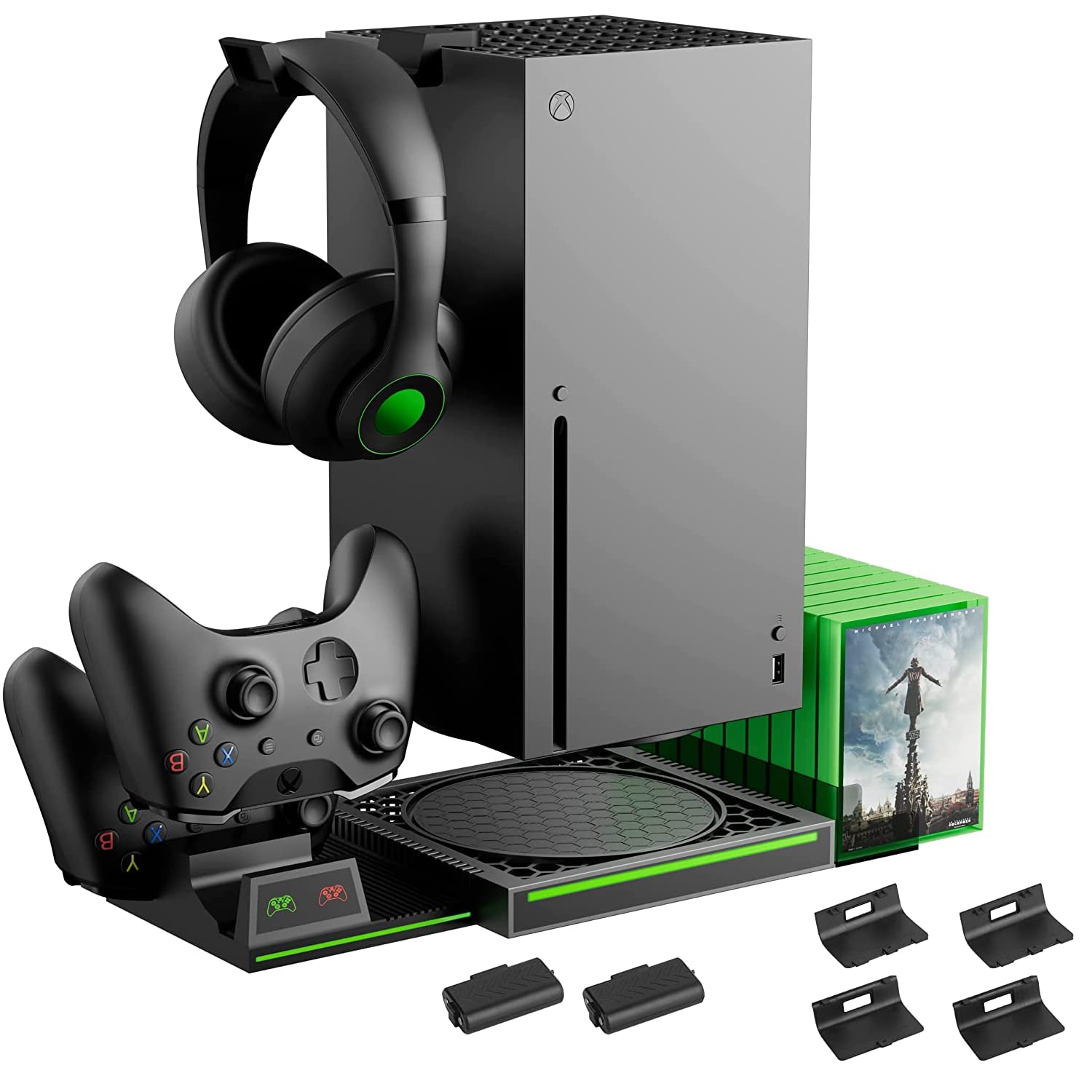
Two controller charging bays, 2 x 800mAh rechargeable packs, 10 game disc slots, a headphone hook, and a USB cable — this GAMFAMI stand pulls your whole gaming corner into one vertical column. At 4.5+ stars across a smaller buyer pool, it trails the MENEEA towers on volume but matches them on features.
Charging is a strong point. Two controllers top up together in about 3 hours, and LED indicators tell you the status at a glance — red while charging, green when done or on standby. The 800mAh packs are rated for 2000 full-load cycles, and four battery covers let you swap packs across controllers. The charger also carries over-current, over-voltage, and over-heat protection.
Where it trims back versus the top pick: the 800mAh packs hold noticeably less than MENEEA’s 1400mAh batteries, and at 0.7 kg it’s lighter, which helps portability but gives up a little footing. There’s no dedicated cooling fan — the metal base with galvanized metal underside is there for heat dissipation and stability rather than active airflow. If you want a fan, look at the MENEEA or KEPLUG stands instead.
What lands well: the metal-bottomed base and the tidy 10-disc plus headset storage make it a genuine organizer, not just a perch.
What it lacks: no active cooling fan, so this one is about organization and charging rather than airflow.
A smart match for: disc-owning players who want a vertical stand, dual charger, and storage in one.
skip it if: a dedicated cooling fan is a must for your setup.
5. TanReginal Smart Cooling Fan for Xbox Series X
A fan that only wakes up when the console actually gets hot
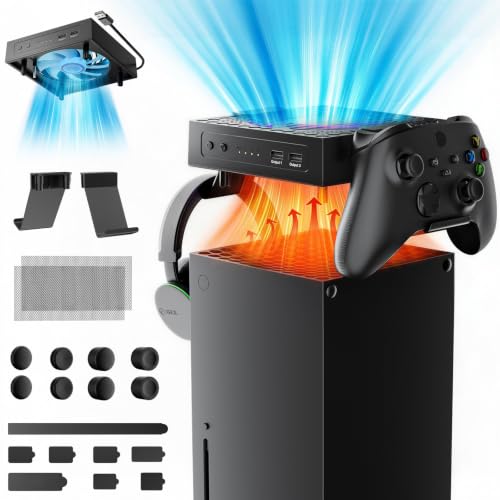
The pitch here is hands-off cooling. In auto mode, a temperature sensor kicks the fan on when the console hits 104°F/40°C and shuts it down as it cools. No buttons to remember, no leaving it running. For marathon sessions or a warm living room, that automatic trigger is the feature worth paying for.
You can still take manual control with three speeds — Low, Medium, and High — up to 2200 rpm. The nine-blade hydraulic bearing design is meant to run near-silently, which matters for late-night play. And the dust kit is unusually thorough for a fan: two dustproof mesh filters, eight custom dust plugs sealing the vents and ports, plus four pairs of height-boosting joystick caps with different textures for grip and control.
Two USB 3.2 ports add back connectivity for controllers and headsets, and RGB lighting turns on or off with a long press. Installation needs no tools — place the fan on top, snap on the dual stands, attach the mesh, insert the plugs. It’s a compact pick with a small buyer base so far, so treat it as the clever option rather than the proven crowd favorite. If dust and pet hair are your real enemy, this is the one built to fight it.
Why It Earns A Spot
- Auto mode triggers at 104°F/40°C and stops on its own — set-and-play cooling
- Three manual speeds up to 2200 rpm with a 9-blade hydraulic bearing for quiet running
- Full dust kit: 2 mesh filters, 8 dust plugs, plus 4 pairs of joystick caps
- 2 USB 3.2 ports and RGB you can enable or kill with a long press
Where It Falls Short
- No controller charging or disc storage
- Newer to the market with a smaller owner base than the MENEEA fans
Best for: dusty rooms, pet owners, and anyone who wants the fan to decide when to run.
Not built for: players who need charging bays and disc storage in the same stand.
6. MENEEA Cooling Fan Xbox Series X
The dust-screening top fan with the biggest following on this list
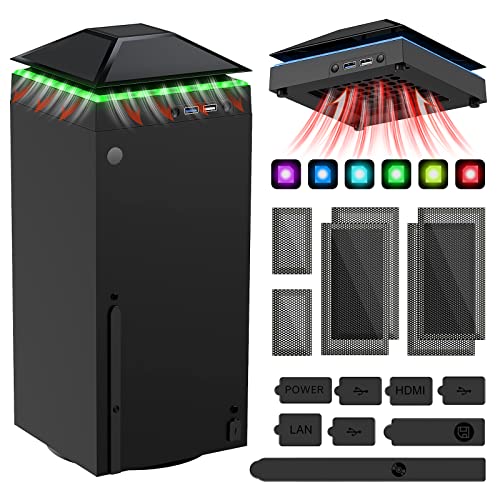
It’s the most-established stand here — 4.0+ stars across thousands of owners. What draws people in is the combination: a top-mounted fan that pulls hot air off the exhaust, a dust-proofing kit, a colorful light strip, and two USB ports, all in one bracket. It sits on top of the console rather than underneath it.
The fan is a touch-switch design with three gears. Power on and it starts at low speed (orange indicator), then each touch cycles Medium (blue), High (green), and Off. The light strip runs six monochromes plus one mixed color, changed with its own independent touch switch. Dust protection is serious here: two sets of dust covers plus a set of silicone dust plugs in an accurate size that install without tools. Two USB interfaces round it out — one blue 3.0 port for data transfer and one white 2.0 port that charges controllers, phones, or small desk lamps.
Here is the part that deserves a straight answer. Cooling, noise, and airflow all draw mixed feedback across the huge owner base — plenty are happy, plenty find the push underwhelming — and power management is the weakest point: the device runs off the console’s USB port, so it shuts off entirely when the console drops into standby or power-saving mode. Buy it for the dust screening, lights, and USB expansion rather than as a hardcore cooling upgrade, and it makes a lot of sense.
The real strength: dust protection done properly — covers and plugs for the ports, installed tool-free — is why this stays popular.
The recurring gripe: it only runs while the console is powered on, so it won’t cool or light up in standby.
Made for: players who want dust defense and a colourful top fan with USB expansion, from a maker with a big track record.
Not your match if: you need the fan to run independently of the console’s power state.
7. KEPLUG Dual Cooling Fan Xbox Series X/S

Two speeds, sixteen light modes, and controls from your phone
The KEPLUG runs two bottom-mounted fans with two selectable speeds — 3500 and 5000 rpm — so you can dial cooling up when a game loads heavy and back down when you’re idling. It’s the fan-down design, which contrasts with the top-mounted MENEEA fans above. The lighting is the headline for a lot of buyers: 16 modes split across 7 static, 5 dynamic, and 4 musical, all reachable through a Bluetooth app or the manual controls.
It also charges two controllers through Type-C ports, each with its own LED status light — green when done or on standby, red while charging. Three USB hubs expand connectivity, and the stand adds 5Gbps data transfer plus room to store your accessories. Value, cooling, and lighting are the three things that land best across owners. Two headphone hooks keep headsets off the shelf, and KEPLUG backs the stand with a two-year quality guarantee.
The split you should know about is charging reliability. While plenty say the charger handles controllers well, others report controllers that won’t charge on it — so confirm your controllers seat properly in the Type-C ports. The port layout also draws a few mixed notes. As a light show that also cools and charges, it’s tough to match; as a guaranteed charger, test it the day it arrives.
Signature feature: app-controlled lighting with 16 modes turns the stand into a setup centrepiece, not just hardware.
Watch point: a minority report controllers that won’t charge — seat each one firmly and verify before relying on it nightly.
Choose this if: RGB atmosphere and phone-app control matter as much as cooling to you.
Consider alternatives if: bulletproof controller charging is the whole reason you’re buying.
8. MENEEA Auto Cooling Fan Xbox Series X

Auto cooling, dual charging, and serious storage in the premium tier
This MENEEA belongs in the premium corner for a reason: it bundles an auto-sensing top fan, a dual charging station with two rechargeable batteries, 15 RGB light modes, a headset stand, two expansion card slots, and eight game disc slots. If you want the console, pads, headset, cards, and discs all handled in one tower, this is the fullest pre-packaged answer here.
The fan defaults to automatic mode. Five seconds after it powers on, a temperature sensor checks the console and decides whether to keep running and at what speed, kicking in around 36 degrees Celsius. You can switch to manual with three speeds — low, medium, and high — when you want direct control. The charging dock powers from the console through a cable, and its red-to-green indicator shows charging status clearly.
The honest limits sit in two places. The charger only works with the Series X’s original battery and the pair MENEEA supplies — third-party packs won’t charge, so don’t plan on mixing. And the fan only works while it’s connected to the charging stand; the two are a set. Note too that the charge station itself has no fan, but it does have four air intakes to keep things breathing. For the money, you’re paying for automation and organization, and by owner accounts that combo delivers.
Why It Commands The Premium Tier
- Auto mode senses temperature and adjusts fan speed on its own, around 36°C
- Manual override with three speeds when you want direct control
- 15 RGB modes with a memory function that saves your last setting
- Two expansion card slots plus eight disc slots organize a full collection
Trade-offs To Accept
- Charges only the original Series X battery and MENEEA’s included packs
- The fan only runs when connected to the charging stand
- Charge station has no fan of its own, just four air intakes
Fits best: players with a large disc and expansion-card collection who want cooling that thinks for itself.
Look elsewhere if: you run third-party controller batteries or want the fan independent of the dock.
9. MENEEA Top Auto Cooling Fan Xbox Series X

Auto cooling and 1400mAh packs, with a tighter storage footprint
This is the sibling of the premium MENEEA pick above, and the differences are worth knowing if you’re comparing the two side by side. Both run an auto-sensing top fan that triggers around 36 degrees Celsius after a five-second check, and both offer manual three-speed control. The main split is capacity and lighting: this one runs 11 RGB light modes against the other’s 15, and offers six game disc slots versus eight, in exchange for the same 2 x 1400mAh rechargeable batteries.
So why pick this one? The slightly leaner storage layout keeps the tower from sprawling as wide if your media unit is tight. It still gives you two expansion card slots and a headset holder, and the controller charger shows red while charging and green when done. The fan’s default auto mode means it handles the cooling decisions for you once the console powers on.
The same honest caveats carry over from the platform: the charger works only with the original Series X battery and MENEEA’s included packs, and the fan runs only while connected to the charging stand. Cooling and appearance are what owners respond to most on this model, and the setup is quick. If you want the biggest light show and most disc slots, the premium MENEEA is the pick; if storage space is the priority with the same auto cooling, this one fits better.
Why it’s here: the tighter six-disc layout and 11 light modes suit a smaller shelf while keeping the auto fan and 1400mAh packs.
Same catch as its sibling: battery and fan both depend on MENEEA’s own hardware and the dock connection.
Pick this when: shelf space is tight but you still want auto cooling and dual 1400mAh charging.
Go bigger if: you want the maximum light modes and disc slots in the lineup.
Know the Specs
Fan speed and placement
Fan speed is measured in rpm — revolutions per minute, or how fast the fan blade spins. Higher rpm usually means more air pushed, though not always quieter. Placement matters just as much: a top-mounted fan blows down through the console’s own exhaust vents, while a side-mounted fan accelerates circulation around the body. A bottom fan design pushes air up from underneath. Match placement to how your console sits and you’ll get more out of the spec.
Battery capacity in mAh
mAh stands for milliamp-hours — a measure of how much charge a controller battery holds. A bigger number means longer play between charges. Bundled docks usually ship with their own packs, and many only charge the packs they supply, so the capacity number tells you what you’re getting per battery. Check that the dock supports your existing batteries if you don’t want to switch.
USB ports and data speed
USB ports on a stand give back the connectivity the console’s own limited ports don’t. A USB 3.0 or 3.2 port handles data transfer at higher speed — useful for drives — while a USB 2.0 port typically handles charging only, for controllers, phones, or small desk lamps. Knowing which port does what stops you plugging a drive into a charge-only slot.
Auto versus manual cooling
An auto-mode fan uses a temperature sensor to decide when to run and how fast, often kicking in once the console warms past a set point like 36°C or 104°F. A manual fan leaves the speed choice to you across a few gears. Auto suits players who’d rather not think about it; manual suits those who want cooling on demand. Many stands offer both.
Common Questions
Will a stand actually keep my Xbox Series X cooler?
Do these stands charge third-party controller batteries?
Can I use a stand with the console lying horizontal?
What does mAh mean on a controller battery pack?
Do these stands need a separate power adapter?
Is a dual fan better than a single fan stand?
How long does it take to charge two controllers on a stand?
Can a stand damage my Xbox Series X?
Do the lights on these stands stay on in standby?
The Bottom Line
For most setups, the xbox series x stand winner is the MENEEA RGB Charging Stand because it packs a side cooling fan, dual 1400mAh charging, 15 lighting modes, and 10 disc slots into one tower — the most useful single purchase on this list, and rated 4.5+ stars across 500+ buyers. If you just want maximum airflow and nothing else, the Raryars Cooling Fan spins faster than every other stand here. And if hands-free auto cooling with a bigger storage bay is what you’re after, the premium MENEEA Auto Cooling Fan Charge Stand is the one to reach for.
How we choose
We do not accept paid placement. Every pick is matched to a real buyer and a real use-case; we do not hands-on test units.
Sources
Specifications: manufacturer listings and product documentation. Review insights: verified customer reviews, as of November 2026. Pricing: not shown on this page (it changes often); check the current price via the retailer link.
As an Amazon Associate, Tactical Gear Guy earns from qualifying purchases. This does not affect which products we feature.