Specs are compiled from manufacturer listings and verified buyer reviews and can change over time — please confirm the key details on the product page before buying.
Your Xbox Series X pushes hot air out of one big vent on top, and a cooling stand either helps that heat leave faster or just adds noise. The right pick depends on one choice: an auto sensor that ramps the fan by temperature, or a manual switch you set yourself. Below you get seven stands that actually fit the Series X, sorted by what each one does best, with the honest catch spelled out for every single one.
This guide is built by comparing the manufacturers’ published specifications and the patterns across verified customer reviews, so you get each pick’s real strengths and trade-offs instead of marketing spin.
A stand can only help if it moves air the way your console’s vents expect. The picks below cover both approaches, and each one names its real limits so you can match it to your setup. Here are seven Series X cooling stands, each with its real trade-off spelled out.
Top Picks


How To Choose The Best Xbox Series X Cooling Stand
The Series X breathes through one large circular vent on top, so a stand that sits underneath and pushes air up fights the console’s own design. A stand that sits on top and pulls heat out works with it. That single difference decides more than any spec sheet number.
Top-mounted versus bottom-mounted airflow
A top fan pulls hot air away from the vent the console already uses, which is the path of least resistance. A bottom stand pushes air up through the base and relies on the console’s own fan to finish the job. Both can help, but a bottom unit has to work harder to show a result, and that is why some owners of bottom-style fans report the air movement feels weak.
Auto mode versus a manual speed switch
Auto mode uses a temperature sensor to decide when the fan runs and how fast. That means quiet idle time when the console is cool and full speed during a long session. A manual switch hands you three speeds you pick yourself. Auto suits people who never want to think about it; manual suits people who like running the fan low for silence and ramping it up for a heavy game.
What the extra USB ports really give you
Most stands borrow power from the console’s own USB port and hand a few ports back. Read the listing closely: some ports carry data, others only charge. A charge-only port still tops up a controller or a headset, but it will not read a flash drive. Check which is which before you plan your setup around it.
Side-by-Side Comparison
| Model | Best For | Cooling Control | Max Fan Speed | Extra Ports | Amazon |
|---|---|---|---|---|---|
| KOVA Auto Cooling Fan★ Best Overall | Hands-off cooling with a live readout | Auto by temperature plus manual | — | 2.0 USB hub at 5V/2A | Amazon |
| Raryars Cooling FanMost Airflow | Raw airflow on a tight budget | Manual on/off | 5300 rpm | 3 USB ports | Amazon |
| Iesooy 3-Level Cooling Fan | Quiet three-speed control | 3-speed touch switch | 2000 rpm | 3 USB ports | Amazon |
| TanReginal Smart Cooling Fan | Dust protection plus cooling | Auto at 104°F/40°C plus 3 speeds | 2200 rpm | 2 USB 3.2 ports | Amazon |
| MENEEA RGB Cooling Fan | Auto cooling with a sliding dust cover | Auto plus manual touch | — | 2 USB 2.0 ports | Amazon |
| MENEEA RGB Charging Stand | One dock for console, controllers and discs | Side fan, button controlled | — | 2 USB ports | Amazon |
| MENEEA Auto Cooling Charge Stand | Full station with charging and storage | Auto at 36°C plus 3 speeds | — | USB data and charging ports | Amazon |
Detailed Reviews
1. KOVA Auto Cooling Fan for Xbox Series X with LED Display
Our pick — 4.5+★ from 900+ verified ratings; the strongest balance of quality and price.
The stand that tells you the console temperature instead of asking you to guess.
The number that defines this one is the display accuracy: it reads out to 0.1°F, and you can flip it between Fahrenheit and Celsius with a double press of the fan button. What that buys you is visibility. You see the console’s temperature in real time and watch it fall as the fan ramps up, which turns a vague worry about heat into something you can actually check mid-session.
The auto logic is where it earns its place at the top. The fan kicks in once the console passes 96.8°F (36℃) and steps through Low between 96.8℉ and 107.6℉, Medium between 107.6℉ and 118.4℉, and High above 118.4℉ (48℃). In plain terms: it stays quiet when the console is cool and pushes harder on its own as things warm up. If you would rather take the wheel, a manual switch gives you the same three speeds by hand.
Around the back of the cooling job, the extras are real rather than decorative. A 2.0 USB hub feeds 5V/2A to a controller or headset while you play, an anti-slip silicone headset hook keeps headphones off your desk, and the body is built from plastic with silicone pads. It is also described as 20% more compact than others, which matters if your TV unit is crowded. The build weight sits at 0.36 kg, so it is not going to slide around.
What the readout and auto mode deliver
- Real-time temperature display accurate to 0.1°F, switchable between ℉ and ℃
- Three-stage auto fan curve tied to exact temperature bands
- 9 lighting presets — 7 colors plus 2 dynamic effects — with a saved setting
- 5V/2A USB hub plus an anti-slip headset hook
Where it asks a little of you
- Crowded vent area once the headset hook and hub are loaded up
- The saved lighting preset resets to a long-press routine rather than a memory chip you can trust blindly
Buyers most often praise the auto mode: the fan stays off until the console passes 96.8°F, so light sessions stay quiet. A couple of owners note the lighting is the fun part rather than the point — several modes, and the finish reads clean enough to look factory-installed. The honest catch is that a busy top plate with a hook and a hub can crowd the area around the console’s own vent, so leave room around it rather than tucking it into a tight shelf.
Reach for this if: you want the fan to decide for itself and you like being able to see the temperature instead of trusting a marketing line.
Look elsewhere if: you would rather have a manual dial and nothing else — the auto sensor and screen are the whole point here.
2. Raryars Cooling Fan for Xbox Series X with 3 USB Ports
Two fans spinning at 5300 rpm — the airflow king of this list, and the loudest.
If you want raw air movement and nothing fancy in between, this is the number to beat. Two fans push at up to 5300 rpm, which is well beyond the 2000 rpm the Iesooy stand tops out at — meaningful headroom when you are deep into a heavy game and the console is working hard. The rated noise sits at 30 db, which is a whisper in a quiet room but noticeable once the fans spool up.
Setup is genuinely plug-and-play. It draws DC 5V from the console’s own USB port, so there is no wall adapter to hunt for, and it doubles as a vertical stand for the Series X. Three USB ports ride along on the back, so you are not giving up a port to gain a fan. The size helps here — at 5.91″L x 3.94″W x 1.18″H it is compact enough to sit under the console without dominating your shelf.
Here is the honest part. Owners split on whether the extra airflow actually cools the console meaningfully. Some find it keeps things cool and works well; others say it does not push enough air to make a difference. That split is the real story with this pick. It is a solid little accessory for the money, but if you want a fan that visibly moves the temperature needle, the KOVA above with its live readout is the more honest buy. If you just want airflow and a stand in one, this does the job.
The budget case for it: two fans, a vertical stand, three extra USB ports and plug-and-play power from the console itself, all in a compact body. It is the cheapest way onto this list with real airflow numbers behind it.
The catch worth knowing: cooling results are the most debated part of this stand — some owners feel a clear difference, some do not. Treat the airflow as a helpful nudge rather than a guaranteed fix.
Reach for this if: you want maximum fan speed and extra ports on a tight budget and can live with a little noise.
Look elsewhere if: you want proof the temperature actually dropped — this one asks you to trust the airflow, not read it.
3. Iesooy Cooling Fan for Xbox Series X with 3 Levels

Three speeds tuned for hush, with vertical ducts that follow the console’s own corners.
This is the stand for people who game late with someone asleep in the next room. The fan runs between 1800 and 2000 rpm — noticeably slower than the Raryars’ 5300 rpm — and the design leans hard into keeping noise down. Three touch-switched speeds are marked by colored LEDs: green for the quickest gear, blue for medium, orange for low. Off means stop, which is a clean, glanceable system.
The airflow path is the clever part. Vertical ducts are designed to line up with the air channels at the four corners underneath the console, so heat moves smoothly from bottom to top rather than getting trapped. It adds a colorful touch too, with 6 single colors plus one mixed color you can set with an independent touch switch.
The trade-off is speed. At 2000 rpm it will not get anywhere near the raw airflow of a 5300 rpm turbo fan, and owners who wanted a dramatic drop in temperature sometimes say the air volume feels modest. Reliability is the loudest positive here — it generally works first time and keeps working — with performance right behind it. Where it slips is noise, which some buyers expected to be quieter than it turned out. And it is a big body: 8.27″L x 7.87″W x 2.36″H is roughly 40% more footprint than the Raryars’ compact 5.91″ x 3.94″ x 1.18″, so give it space.
Why the styling earns its keep: six solid color choices plus a mixed mode let you match your setup instead of settling for one fixed glow. The three LED gear indicators mean you always know which speed you are on without a screen.
The honest limit: if you are chasing maximum airflow, this slower, quieter design is working against you. It cools gently rather than aggressively.
Best for: late-night players who value a calmer fan over a hurricane and want color control without a separate app.
Think twice if: your shelf is narrow — this is one of the larger footprints on the list, and it needs room around the base vents to breathe.
4. TanReginal Smart Cooling Fan for Xbox Series X
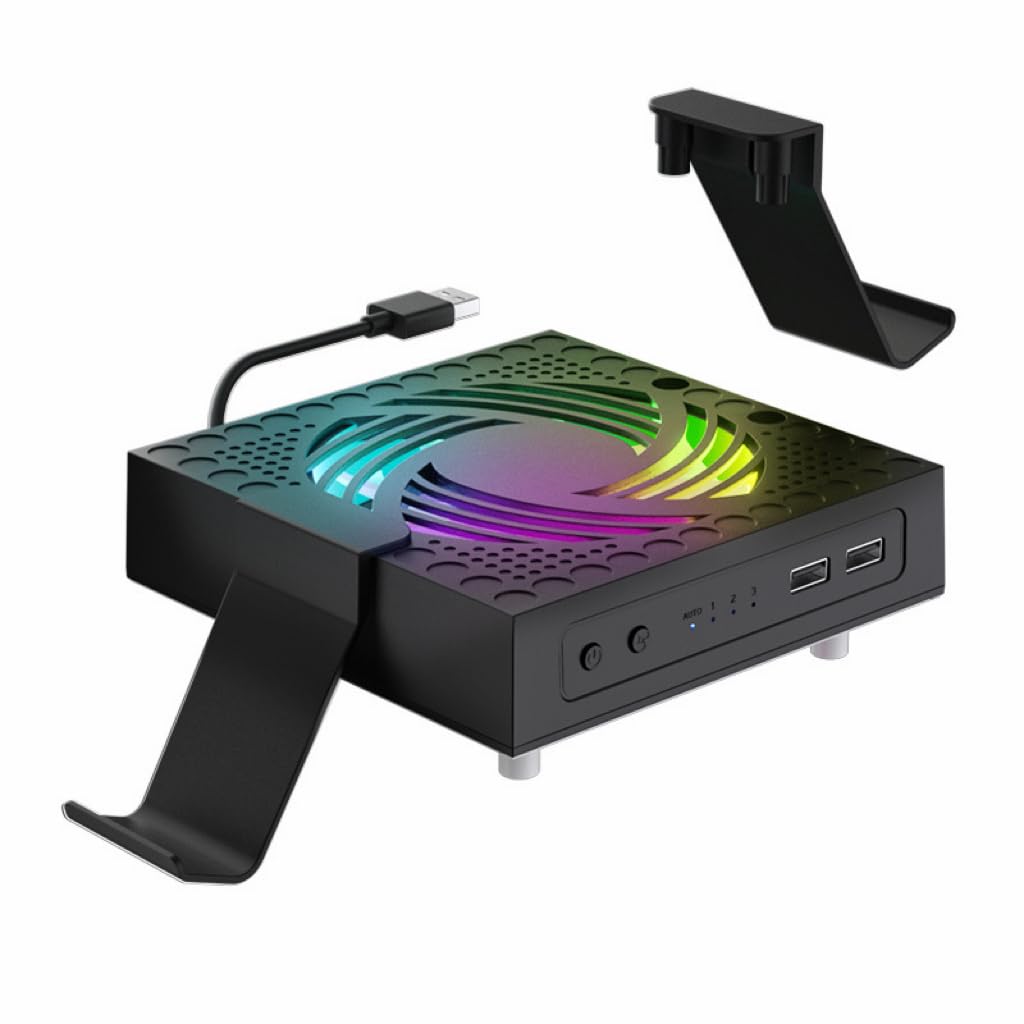
The only stand here that treats dust as the enemy, with mesh filters and eight port plugs.
Most cooling stands ignore the reason a console runs hot in the first place. This one goes after it directly: premium dustproof mesh filters plus 8 custom dust plugs seal every vent and port on the console, so pet hair and debris stay out of the case. In a home with a shedding dog or a dusty living room, that is the feature that earns its place.
Cooling is handled one of two ways. Auto mode fires up on its own once the console hits 104°F (40°C) and shuts off as it cools, so you never think about it. Or you pick from Low, Medium and High by hand, up to 2200 rpm, using an upgraded 9-blade hydraulic bearing design built to keep noise nearly inaudible. Owners who game at night with a headset on will notice the difference.
The bundle is where this one separates itself. You get the fan, two stands that double as controller and headphone holders, two dustproof mesh panels, four pairs of height-boosting joystick caps in different textures for better grip, and the eight dust plugs. Installation is tool-free and takes minutes. The trade-off is that it is a lot of small parts to keep track of, and the two extra USB 3.2 ports are a nice touch but not the reason to buy. If dust and pet hair are the real problem, the mesh filters and 8 port plugs make this the pick.
Choose this when: dust and pet hair are your actual enemy and you want cooling that turns itself on at 104°F without a thought.
Pass if: you want a single simple fan — the mesh filters, plugs and joystick caps are a small-parts commitment you will need to keep track of.
5. MENEEA RGB Cooling Fan for Xbox Series X with Dust Filter

A sliding cover that doubles as a game shelf, and seven lighting modes to match it.
The clever bit here is the sliding dust cover. Open it and air moves freely to help heat escape; close it and the console is sealed against dust and splashes, and the top becomes a flat platform you can set things on. That dual job is unique on this list, and for a console living under a TV cabinet it solves a real problem no fan alone fixes.
Cooling itself is automatic by default. A built-in smart chip senses the console’s outlet temperature and picks one of three fan speeds on its own, after a five-second medium-speed warmup. Prefer control? Touch the switch and you move to manual medium (blue light), again for manual high (orange), again to turn off. The 7 RGB modes — running lights, water running lights, breathing lights, and red, green, blue and cyan solid colors — are cycled by their own switch and can be saved with a long press.
Cooling performance is the most praised part of this stand in verified reviews. It is also the most flexible here: you can stand the console vertically or lay it flat, so it fits under a cabinet or on a desk. The two USB 2.0 ports split into one data port and one charge-only port, so a controller or small lamp can top up but a flash drive needs the black one. The recurring gripe is noise — the fan is not silent at full tilt, and that is the price of the airflow.
Where it pulls ahead
- Sliding cover works as both dust shield and a flat resting platform
- Auto mode with three speeds, or manual touch control if you prefer
- 7 RGB modes you can save with a long press
- Two dust covers and silicone port plugs included
What to plan around
- Fan noise climbs at the higher speed
- Only one of the two USB 2.0 ports carries data; the other charges only
Reach for this if: you want the cover-plus-cooler combination and you like tucking the console under furniture where dust collects.
Look elsewhere if: a quiet room matters more than a sliding cover — the higher speed is audible.
6. MENEEA RGB Charging Stand with Cooling Fan for Xbox Series X

Console, controllers, discs and headset on one base — the space-saving heavyweight.
This is less a fan and more a headquarters. The stand combines a console cooler, a dual controller charger with two 1400mAh rechargeable batteries, 15 RGB lighting effects, 10 game disc storage slots, a headset stand and an extra USB port into one vertical footprint. For a setup buried under clutter, that consolidation is the whole pitch.
This stand cools from the side instead of the bottom, so it drives air through the console without blocking the top vent. A metal base with 4 vents lets hot air rise out of the top, keeping the console’s natural flow open. The fan has its own button, and an anti-slip rubber bottom holds everything steady. It charges two controllers at the same time within 3.5 hrs, with a smart chip guarding against over current, over voltage and overheat.
The 15 lighting effects split into 7 monochrome and 8 adjustable modes, saved with a long press. Where it asks for patience: it only charges the batteries supplied with it, and the charger stops when the console is off — sleep mode still charges, but a full power-down does not. Some buyers also feel the value is only fair given what is included. Buy it to consolidate controllers, discs and a headset on one base, not as a step up in cooling power.
The case for consolidating: two controllers charged, ten discs stored, a headset hung and the console cooled, all in one footprint — quality and functionality are the parts that land with owners.
Know before you buy: the dock only charges its own included batteries, and it will not charge once the console is fully off. Plan your setup around that.
Best for: anyone drowning in controllers, discs and headsets who wants one base to hold all of it.
Think twice if: you already own third-party rechargeable packs — the dock will only charge the ones in the box.
7. MENEEA Auto Cooling Fan Charge Stand for Xbox Series X
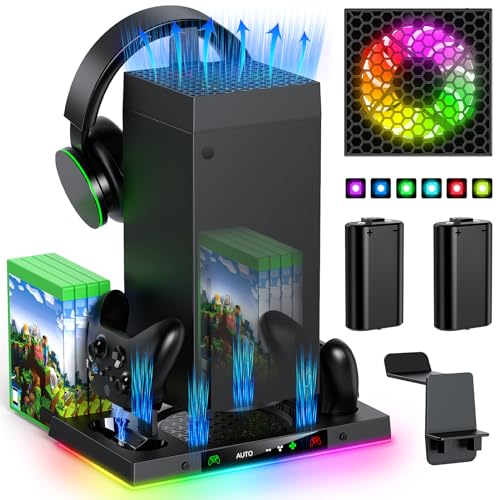
The most storage of any stand here — eight discs, two cards, a headset and two controllers.
Take everything the previous MENEEA does and add more places to put things. This station packs 8 game disc slots and 2 expansion card slots alongside a headset holder and the dual controller charger, giving you the most storage capacity on the list. If your shelf is a tangle of cases and cables, this is the one that brings order to it.
Cooling runs on an auto sensor by default. After five seconds of operation, the temperature sensor checks the console and decides whether to keep the fan going and at what speed. It kicks in automatically once the console reaches 36 degrees Celsius. Need more or less? A manual button gives you low, medium and high. The light strips offer 15 RGB modes, with an independent light switch and a long-press save.
One detail to read carefully: the charge station itself has no fan, but it does have 4 air intakes. The fan sits on top and only runs when it is connected to the charging stand via the rear Type-C port. Charging works the same way as the sibling model — the indicator turns red while charging and green when full, and it only charges the original Xbox battery or the one supplied. Setup is tool-free and takes minutes, and the 15 RGB modes are a bonus rather than the reason to buy. The catch: with 8 disc slots, 2 card slots, a headset hook and a dual charger, this station needs a desk corner of its own.
Choose this when: you want the maximum storage on this list and you are happy with auto cooling plus a manual override.
Pass if: you want a simple, compact fan — the two card slots, eight disc slots and charger make this a desk-centerpiece, not a hidden accessory.
Know the Specs
Fan speed in RPM (revolutions per minute)
RPM measures how fast the fan blades spin — it is the raw airflow number. Higher is not automatically better: the Raryars hits 5300 rpm, while the Iesooy tops out at 2000 rpm, but the slower one is tuned for quiet. A high-RPM fan moves more air but tends to make more noise, and on a console the size of a Series X, airflow direction often matters as much as raw speed.
Auto versus manual control
Auto mode uses a temperature sensor to decide when the fan runs and how hard. The KOVA ramps through its three speeds based on exact temperature bands, while the TanReginal kicks on at 104°F/40°C. Manual mode puts those same speeds on a switch you press. Auto suits hands-off owners; manual suits people who want a quiet low speed for light play and full power for heavy games.
USB ports — data versus charge only
Extra ports are one of the best reasons to buy a stand, but they are not all equal. Some stands split their ports: one carries data for a flash drive, the other only charges a controller or a small lamp. Read the listing before you count on a port for anything more than topping up. A charge-only port still does useful work during a gaming session.
Dust protection — filters, plugs and covers
Dust is a big cause of a hot console, which is why some stands ship with mesh filters and silicone port plugs. The TanReginal includes mesh filters and 8 dust plugs, while the MENEEA RGB fan uses a sliding cover that seals when closed and vents when open. If your console sits in a dusty room or a pet-friendly home, weigh these extras heavily.
Common Questions
Will these cooling stands fit the Xbox Series X specifically, or do they work on other consoles?
Do I need an extra power adapter for a cooling stand?
Can I charge my controllers on these stands?
What does auto mode actually do on a cooling fan for Xbox Series X?
Are higher-RPM fans always better at cooling the console?
Can I use the extra USB ports on these stands to charge my phone?
Will a cooling stand actually lower my console temperature?
Do I need to clean the dust filters on these stands?
Can I stand the console upright on these stands?
The Bottom Line
For most people, the xbox series x cooling stand winner is the KOVA Auto Cooling Fan because it reads the real temperature to 0.1°F and adjusts its own three speeds to match, so you get cooling you can see instead of trust. If dust and pet hair are your actual problem, grab the TanReginal Smart Cooling Fan with its mesh filters and eight port plugs. And for a setup that needs a home for controllers, discs and a headset, the MENEEA Auto Cooling Charge Stand is the one to reach for.
The one honest nudge: the KOVA is the pick that earns its place with a live readout and hands-off auto cooling. If you want a calmer, quieter fan for late nights, the Iesooy three-speed stand is the gentler companion.
How we choose
We do not accept paid placement. Every pick is matched to a real buyer and a real use-case; we do not hands-on test units.
Sources
Specifications: manufacturer listings and product documentation. Review insights: verified customer reviews, as of November 2026. Pricing: not shown on this page (it changes often); check the current price via the retailer link.
As an Amazon Associate, Tactical Gear Guy earns from qualifying purchases. This does not affect which products we feature.