Specs are compiled from manufacturer listings and verified buyer reviews and can change over time — please confirm the key details on the product page before buying.
If your Xbox Series X is pushing hot air out the top vents and the fan noise climbs during long sessions, a clip-on or stand-style cooler is the cheapest way to move that heat away from the console. This guide gives you the honest, spec-backed shortlist of the xbox series x cooling pad picks worth your attention — including which ones actually fit the console’s airflow design and which ones quietly fail to push enough air.
This guide is built by comparing the manufacturers’ published specifications and the patterns across verified customer reviews, so you get each pick’s real strengths and trade-offs instead of marketing spin.
Most cooling pads clip on, draw power from the console’s USB port, and blow air across the vents. What separates them is how smart the fan control is, how loud they run, and whether extra ports and dust filters add real value. Here is the honest breakdown of the best Xbox Series X cooling pad for your setup.
Top Picks


How To Choose The Best Xbox Series X Cooling Pad
The Series X pushes heat straight up through the top grille. A cooler that sits on top and pushes air down into that column works differently from one that clips onto the back and pulls air out. Both styles appear here, and both can help, but they solve different problems. Know what your console needs before you buy.
Auto mode vs. manual speed control
An auto-mode fan reads the console’s temperature and ramps up only when things get hot. That matters because a fan that runs full-blast from the moment you power on adds noise for no benefit during light use like menus or streaming. A manual-only fan is simpler and cheaper, but you have to remember to bump it up before a heavy session. Some pads here give you both — auto for hands-off cooling, manual for when you want to pin the fan at high speed during a ranked match.
RPM, noise, and the airflow trade-off
RPM (revolutions per minute) tells you how fast the fan blades spin, but faster is not automatically better. A 5300 RPM fan can move more air, but it can also whine. A 2000 RPM fan with larger blades might push a comparable amount of air at a lower pitch. Check the noise level in the spec sheet (measured in decibels, or dB) and the blade design — hydraulic bearings and 9-blade fans tend to run quieter at the same speed.
Extra USB ports and what they actually do
Most pads here add USB ports so you can charge a controller or plug in a headset without reaching around the back of the console. But not all ports are equal — some support data transfer (for a wired controller or storage drive) while others are charging only. If you plan to plug in a keyboard or a wired headset, check which port is the data port. If you just want to top up a controller, any port will do.
Side-by-Side Comparison
| Model | Best For | Fan Speed | Extra Ports | Lighting | Amazon |
|---|---|---|---|---|---|
| KOVA Auto Cooling Fan★ Best Overall | Hands-off auto cooling with LED readout | Auto low/med/high by temp | 2.0 USB hub (5V/2A) | 9 RGB modes | Amazon |
| KEPLUG Dual Cooling StandTop Rated | Dual fans plus controller charging dock | 3500 / 5000 RPM (2 speeds) | 3 USB hubs | 16 RGB modes | Amazon |
| Mviioe Cooling StandBest All-Rounder | Big fan plus dust filter and 3 USB ports | 1800–2000 RPM (3 speeds) | 3 USB ports | 6 colors + 1 mixed | Amazon |
| Iesooy Cooling Fan | Quiet 3-speed cooling with data-capable USB | 1800–2000 RPM (3 speeds) | 3 USB (1 data, 2 charge) | 6 colors + 1 mixed | Amazon |
| TanReginal Smart Fan | Dust protection bundle with joystick caps | Up to 2200 RPM (3 speeds) | 2 USB 3.2 ports | RGB on/off | Amazon |
| MENEEA RGB Cooling Fan | Sliding dust cover with 7 lighting modes | Auto + 3 manual speeds | 2 USB (1 data, 1 charge) | 7 RGB modes | Amazon |
| Qixun Auto Cooling System | 11 lighting modes with temperature display | 1600–2400 RPM (3 speeds) | Type C + USB 2.0 | 11 modes | Amazon |
| Raryars Cooling Fan | High-RPM airflow with a vertical stand | 5300 RPM | 3 USB ports | — | Amazon |
| U/D Turbo Cooling Fan | Budget clip-on twin fan | — | — | — | Amazon |
Detailed Reviews
1. KOVA LED Display Auto Cooling Fan for Xbox Series X
Our pick — 4.5+★ from 900+ verified ratings; the strongest balance of quality and price.
The one that reads the console’s temperature and steps through three fan bands, so it stays quiet until the heat actually climbs.
Here is the number that matters: 96.8℉ (36℃). That is the trigger point where this KOVA pad automatically wakes its fan. Below that, the fan stays low; between 96.8℉ and 107.6℉ (36℃–42℃) it steps to medium, and above 118.4℉ (48℃) it goes full high. The result is a cooler that does not blast noise at you during a menu screen — it waits until the console genuinely needs help. For a marathon session, that means you get the cooling exactly when the heat climbs and quiet when it does not.
The LED display on top shows the console temperature in real time, and you can flip it between Fahrenheit and Celsius with a double-press of the fan button. That is a genuinely useful readout if you like knowing whether your airflow setup is working — you can watch the number drop after you move the console off a carpeted shelf. Nine lighting presets (7 colors plus 2 dynamic effects) let you match the pad to your gaming setup, and a long press saves whatever effect you land on. What wins people over, though, is the hands-off behavior: the fan does its job without you touching it.
The catch is the display and the lighting add a little visual busywork — if you want a stealthy black box that vanishes under the console, this is not it. The fan mount is also fixed on top, so you need clearance above the console for the pad to sit properly. The 2.0 USB hub (5V/2A) is enough to top up a controller, and the anti-slip silicone headset hook is a nice touch for keeping headphones off the floor. At 0.36 kg, it is light enough to move between rooms without hassle.
What earns it the top spot
- Temperature-triggered auto mode with three speed bands keeps fan noise down until the console actually heats up
- Real-time LED display shows console temperature and lets you switch between Fahrenheit and Celsius
- 9 RGB lighting presets with a save-and-hold function
- 2.0 USB hub at 5V/2A for controller and headset charging
- Headset mount with anti-slip silicone pads
Where it asks for patience
- Display and lighting are always visible — not a stealthy look
- Top-mount design needs clearance above the console
Go for this if: you want a cooler that thinks for itself and shows you the temperature readout.
Pass if: you want a hidden, blacked-out pad that does not draw attention to the console.
2. KEPLUG Dual Cooling Fan and Cooling Stand
Two fans, a controller dock, and 16 light modes — the all-in-one station for a full Xbox setup.
If you want one accessory to replace the tangle of cables behind your TV, this KEPLUG stand is the most complete package here. It pairs two cooling fans running at 3500 RPM and 5000 RPM (two gears) with a charging dock that takes two controllers via Type C. The LED charging lights on the front show green when a controller is full and red while it charges, so you can see the status at a glance. For a shared living-room setup with two controllers, that is a real convenience.
The lighting is the flashiest part: 16 RGB modes split across 7 static, 5 dynamic, and 4 musical presets, and you can set them through a Bluetooth app or manually. That is more control than most pads here offer, and it makes the stand a feature of the room rather than a hidden utility. The three USB hubs add 5Gbps data transfer, so you can plug in a wired controller or an external drive without losing the charging ports. Sturdiness and fit are what people mention most — it holds the console securely on a tabletop.
The honest trade-off is the controller charging. The charging capability is the most divided part of the feedback — some docks work flawlessly and others have controllers that do not charge. If your main goal is cooling, the fans are the reliable part; if you are buying primarily for the charging dock, test it thoroughly in the first week. The 2-year quality guarantee gives you some cover there.
The real draw: one stand that cools, charges two controllers, and adds three USB hubs at 5Gbps — the hub count and data speed beat the simpler clip-on pads.
What to watch: controller charging is the split point in owner experience, so give the dock a full test cycle early.
This is your pick if: you want a single station for cooling, charging, and lighting without buying separate pieces.
Think twice if: you only care about fan performance and do not need the controller dock.
3. Mviioe Cooling Fan for Xbox Series X with LED Indicator
One large 1800–2000 RPM fan plus a removable dust filter — steady airflow and a cleaner intake in a single pad.
Cooling wins people over here, and the spec backs it: a single large fan with three speed settings at 1800, 1900, and 2000 RPM (revolutions per minute, a measure of fan spin speed) moves a lot of air without a frantic pitch. The trade-off is honest: higher speed means more noise, so the top setting suits heavy sessions while the low setting stays calm for streaming. Three indicator lights (orange for regular, blue for medium, green for high) show which band you are in without a screen.
The dust filter is the quiet differentiator. A removable filter traps dust before it reaches the console’s intake, which matters in a home with pets or a room with a lot of foot traffic. The three USB ports add charging for accessories (not data), and the touch switch cycles six solid colors plus one mixed color for lighting. At 440 g it sits solidly without sliding around.
The recurring gripes are worth knowing before you buy. The fan sometimes turns on by itself, so treat the auto behavior as something you will toggle manually, and a few owners find the airflow weaker than expected at the low setting. Neither is a dealbreaker for a pad that cools this well, but they are the reasons to check the return window if you get a unit that behaves oddly. The note about not exceeding 5V 1A on power is worth following — an oversized power brick is what causes erratic behavior.
Why it lands high
- Large fan with three speeds from 1800 to 2000 RPM
- Removable dust filter protects the console intake
- Three USB ports for accessory charging
- Easy-to-read orange/blue/green speed indicators
Downsides to weigh
- Higher speed brings noticeable noise
- Fan can switch on unexpectedly on its own
- Airflow at the lowest setting feels light to some
The best fit: busy households with pets or dust where keeping the vents clear matters as much as cooling.
Skip if: you want a fully silent fan — the high setting is audible.
4. MENEEA RGB Cooling Fan for Xbox Series X with Dust Filter

The sliding dust cover is the smart touch — open it for airflow during play, close it to seal dust out when the console is off.
A cooler that also works as a dust cover is a clever idea, and this MENEEA pad does it with a sliding top. Open the cover and the fan pushes air across the console; close it and the pad seals dust away and doubles as a flat surface for setting things on. That is genuinely useful for a console in a living room. Cooling performance is the strongest part of the feedback, and the specs support it: auto mode reads the air-outlet temperature and picks from three fan speeds, with manual override through the touch switch (blue for medium, orange for high).
The lighting runs seven RGB modes — running lights, water running lights, breathing lights, and four solid colors (red, green, blue, cyan) — controlled by an independent switch so you can change the mood without touching the fan. Two USB ports split the work: the black 2.0 port handles data transfer and the white 2.0 port charges controllers or small accessories. The kit includes two sets of dust covers and silicone dust plugs that block dust from the USB and HDMI ports, so the console stays cleaner over time.
Noise is the split point — some find it super quiet and others call it a bit noisy, so expect a low hum rather than total silence. The remote control feature also gets mixed reports, which suggests it works for some setups and not others. Neither issue stops this from being a strong cooler; it just means the auto mode is the safer way to run it.
Standout spec: the sliding cover plus included dust covers and silicone plugs make this the best-maintained pad of the group for a console that lives in the open.
Worth knowing: noise and remote control are the two split points in owner feedback — run it in auto mode and treat the remote as a bonus.
Reach for this one if: your console sits out in the open and you want dust protection plus a clean look when it is off.
Maybe not if: you need near-silent operation at high fan speed.
5. TanReginal Smart Cooling Fan with Dust Protection Bundle
One box with the 2200 RPM fan, two dust mesh filters, eight vent plugs, and four pairs of joystick caps — the complete starter kit.
The spec that stands out is the fan itself: a 9-blade hydraulic bearing design that tops out at 2200 RPM across three speeds. Hydraulic bearings are a quieter type of fan bearing, and the nine-blade setup is meant to move air steadily rather than in a choppy burst. The auto mode kicks in at 104°F (40°C) and shuts off once the console cools, which is the hands-off behavior you want during long sessions. It is one of the few pads here that names its own trigger temperature in the spec sheet.
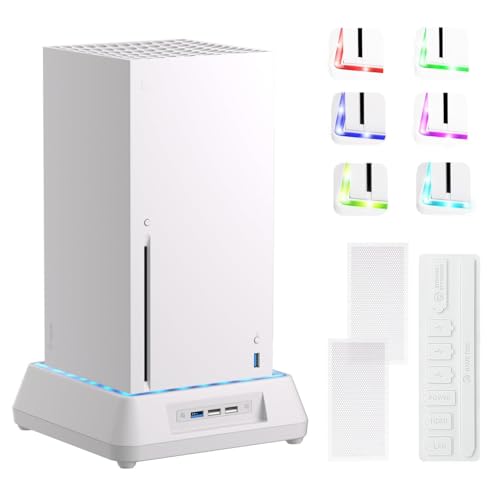
What sets this apart from the other pads is the accessory bundle. You get two dust mesh filters, eight vent plugs, and four pairs of height-boosting joystick caps with different textures for better grip. That is a lot of small extras that would cost more if bought separately, and it makes the pad a one-stop upgrade for a new console. The dual stands are rated for controllers and headphones, and the two extra USB 3.2 ports give you room for wired accessories.
The honest limit is that the fan is the only cooling element — there is no display showing the exact temperature, so you trust the auto mode rather than watch it. Setup is tool-free, but the dust mesh and plugs add a few minutes of first-time installation. If you want a full clean-out of your console’s vents and a cooler in one purchase, the bundle is the reason to pick this over a bare fan.
In the box
- 9-blade hydraulic bearing fan up to 2200 RPM
- Auto mode triggers at 104°F (40°C) and shuts off when cool
- Dust mesh, eight vent plugs, and four pairs of joystick caps included
- Two USB 3.2 ports and dual stands for controllers and headphones
The trade-offs
- No temperature display — you rely on auto mode
- Dust mesh install adds setup time
- Lighting is simple compared to multi-mode pads
Best for: buying for a new console when you want cooling and dust protection in a single order.
Look elsewhere if: you want a temperature readout on the pad itself.
6. Iesooy Cooling Fan for Xbox Series X with 3 USB Ports

Vertical air ducts line up with the console’s four bottom corner vents, and the 2000 RPM cap keeps the noise down.
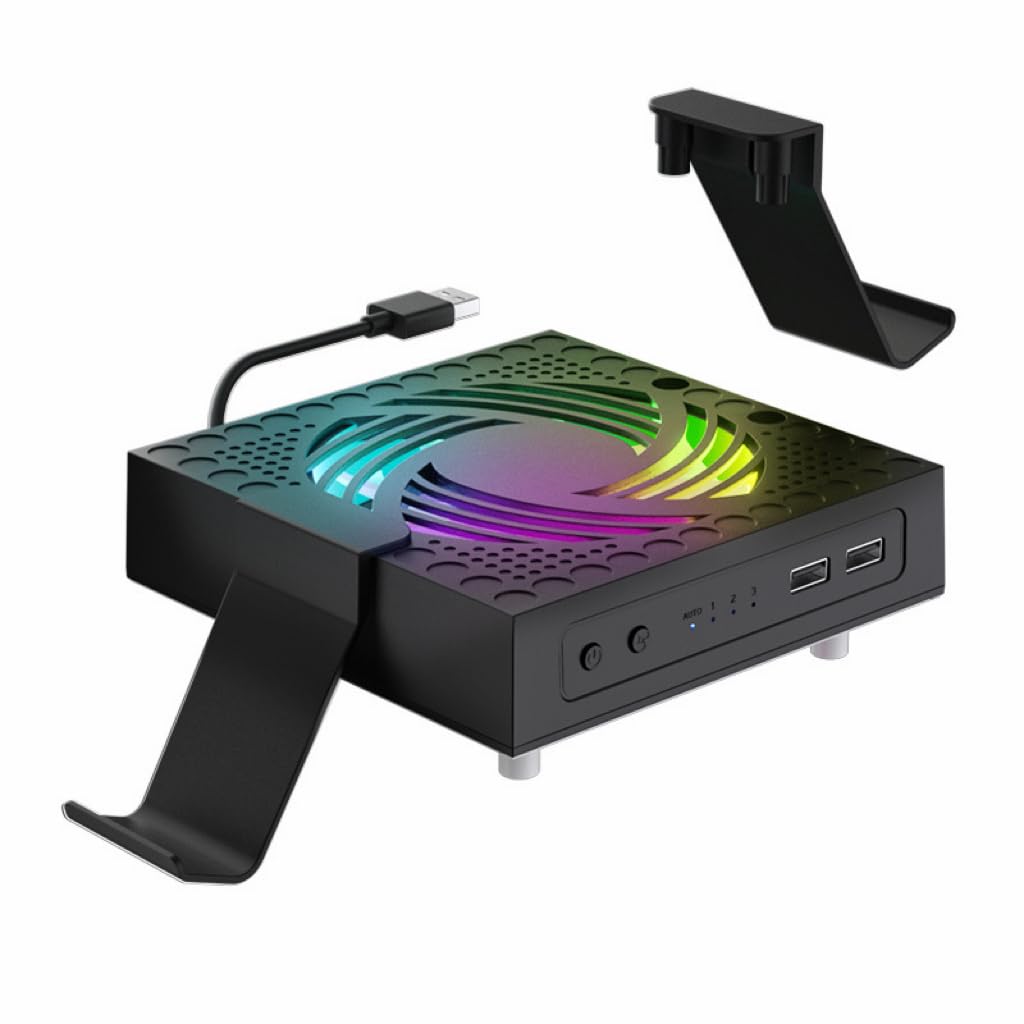
The cooling design is the detail that matters: vertical air ducts are shaped to match the four corner vents on the bottom of the console, so airflow travels smoothly from bottom to top instead of hitting the case and scattering. The fan tops out at 2000 RPM (revolutions per minute, a measure of fan spin speed) across three speeds, a moderate spin that prioritizes a low noise floor over raw air volume. Three touch-switch speeds (green, blue, orange indicators) let you match the fan to the game: low for streaming, high for a heavy session.
The three extra USB ports are the second reason this pad earns its place. One blue USB 2.0 port supports data transfer and the other two white ports handle charging only, so you can plug in a wired controller and still top up a headset. The RGB lighting covers six single colors plus one mixed color with an independent touch switch. Reliability and performance are the strongest parts of what buyers report, and the plug-and-play setup — the fan draws power from the console’s rear USB port — means no extra power brick.
The limit is the cooling ceiling. The 2000 RPM cap means this pad is not built to force huge air volumes, so in a very hot room the fan can feel like it is doing a moderate job rather than a dramatic one. It is the right pick if you value a low noise floor and data-capable ports over maximum airflow.
What to like: the vertical duct design and 2000 RPM cap make this one of the calmest pads here, and the data-capable USB 2.0 port is a step above charge-only hubs.
The honest limit: a moderate 2000 RPM ceiling means it cools gently, not aggressively, in a hot room.
Pick this if: you want quiet cooling and a USB port that can carry data, not just charge.
Not for you if: you need maximum airflow in a warm room.
7. Qixun Auto Cooling System with LED Temperature Display

Three fan gears from 1600 to 2400 RPM, an LED readout showing temperature and fan level, and eleven lighting modes in one unit.
The fan speed ladder is the useful part of the spec: 1600 RPM at level one, 2000 RPM at level two, and 2400 RPM at level three, all driven by nine blades. That gives you a genuine choice between a gentle low setting and a strong high setting, and the auto mode reads the console temperature and picks the gear for you. The anti-touch guard over the rotating fan is a small safety detail that matters if the pad sits where kids or pets are around.
The LED screen shows the console temperature and the current fan level at all times, with two touch buttons — one for lighting and one for fan gear. The lighting covers 11 modes including 7 solid colors, and a long press turns it all off. The port setup is a Type C for connecting the fan to the console for power plus a USB 2.0 for charging controllers during play. The kit also includes silicone dust screens and eight dustproof buttons for the ports.
The honest note is that the cooling performance is the divided part of the feedback — some consoles cool well and others report the system running hot. That is worth weighing if your console already has a history of heat issues. The appearance and easy install are the strong points, and the quiet operation is a genuine plus for a living-room setup.
Why it is on the list
- Three fan gears from 1600 to 2400 RPM with 9 blades
- LED display shows temperature and current fan level
- 11 lighting modes with a long-press off
- Anti-touch guard over the rotating fan
Where it can disappoint
- Cooling results split between great and not enough
- Lighting is described as subtle rather than bright
Choose it for: a visual temperature readout and a fan that steps cleanly from gentle to strong.
skip it if: your console already runs hot and you need proven cooling above all else.
8. Raryars Cooling Fan for Xbox Series X with 3 USB Ports

The 5300 RPM twin-fan unit that spins faster than anything else here — rated at 30 dB, so expect an audible hum.
On raw spin speed, this Raryars fan leads the group at 5300 RPM, well above the 1800–2400 RPM ceiling most pads here use. Two fans are the reason: one for everyday play and two for heavy sessions, with the higher speed meant to pull more air through the console. It also doubles as a vertical stand, so the console sits in the pad rather than on top of it. Plug-and-play power comes from the console’s USB port at DC 5V, and it works with most vertical charger stands on the market.
The 30 dB (decibel, a measure of sound level) noise rating is the number to keep in mind. That is a moderate hum: not silent, but not a jet engine either. The catch is that higher RPM (revolutions per minute, a measure of fan spin speed) tends to sharpen the pitch, and feedback on cooling is genuinely split: some find it keeps the console comfortably cool, while others say it does not push enough air to make a measured difference. That split signals that fan performance depends heavily on how much clearance the console has and how hot the room runs.
The 40-day replacement window is a genuine safety net if your unit arrives damaged or stops working in normal use. If you want the highest spin speed on paper and a stand that holds the console vertically, this is a reasonable choice. Just keep expectations realistic about how much a 5300 RPM (revolutions per minute, a measure of fan spin speed) fan can lower a well-ventilated console.
The headline number: 5300 RPM makes this the fastest-spinning fan on the list, and the vertical stand design keeps the console stable.
The honest catch: cooling results are genuinely divided, and 30 dB is audible — it is not a silent pad.
Good match for: a buyer who wants a vertical stand and the highest RPM figure available.
Look past it if: you need guaranteed cooling results rather than raw spin speed.
9. U/D Turbo Cooling Fan for Xbox Series X

The simplest entry pad — two fans drawing 5V/3W from the console’s USB port, clipping on vertically or horizontally with no setup.
The pitch is straightforward: two turbo fans for heavy games and hardcore sessions, drawing 5V (volts, a measure of electrical pressure) from the console’s own USB port at 3 watts total. No extra power supply, no setup menu, no app. It clips on and works in either vertical or horizontal orientation, and it plays nicely with most vertical charger stands. At 30 dB (decibel, a measure of sound level), it is in the same noise band as the other fans here, but feedback is less kind: the noise is described as more grinding than hum, a sign the bearings are not as refined as the pricier pads.
Reliability is the most-discussed part of this pad, and it is the honest weak point. Some units work great for months, while others stop after a week. Build quality gets similar mixed marks. That does not make it a bad pick — the 30-day replacement window covers shipping damage and normal-use failures — but it does mean you are buying with less margin for error than the higher-rated pads. Check it thoroughly in the first week.
The upside is real for a budget entry point: if you just want extra airflow over the top vents and a clip-on fit, this does the basic job at the lowest cost of anything here. For a first cooling pad or a secondary console, that is enough.
The value case: two fans, 5V/3W USB power, and a clip-on fit that works vertically or horizontally — no extra brick, no setup.
The honest risk: reliability is the most-discussed issue, with some units failing early; the 30-day replacement window is your backstop.
The budget call: a first cooling pad or a second console where the lowest cost and simplest fit matter most.
Step up if: you want a fan with a stronger reliability record and quieter bearings.
Know the Specs
Fan speed (RPM) and airflow
RPM stands for revolutions per minute — how fast the fan blades spin. A higher number can move more air, but it can also add noise and pitch. The pads here range from 1600 RPM on the low setting to 5300 RPM at the top. The fastest fan is not automatically the best cooler; blade shape, duct design, and how much clearance the console has all decide how much air actually reaches the vents. Treat RPM as one input, not the whole story.
Auto mode and temperature triggers
Auto mode uses a temperature sensor to decide when the fan should spin. One pad here triggers at 96.8℉ (36℃) and steps through three speed bands, another at 104°F (40°C), and another reads the air-outlet temperature to pick a gear. The benefit is quiet operation when the console is idle and full cooling when a game pushes it. If you play in a warm room, an auto mode with a low trigger point is the one you want.
USB hub ports: data vs. charging
Many pads add extra USB ports, but they do not all do the same job. A data-capable port (often a blue USB 2.0 or USB 3.2 port) can carry a signal for a wired controller or a storage drive. A charging-only port will only supply power. If you plan to plug in a wired headset, check which port handles data before you buy. For controller charging, any port will do.
Noise level in decibels (dB)
Decibels measure how loud a fan runs. A 30 dB fan is a moderate hum — noticeable in a quiet room but not disruptive during gameplay. Lower-speed settings on multi-speed pads bring the noise down further, which is why auto mode is worth having. The trade-off is that quieter usually means less airflow, so a pad that runs at 2000 RPM will be calmer than one at 5300 RPM.
Dust filters and sliding covers
Dust is a slow killer of console airflow. A removable dust filter traps debris before it reaches the intake, and a sliding cover seals the vents when the console is off. Both features reduce how often you need to clean the console’s vents, and they are why some pads here come bundled with mesh filters, silicone plugs, and port covers. If your console sits in a pet-friendly or high-traffic room, prioritize a pad with dust protection.
RGB lighting modes
Lighting is cosmetic, but it changes the look of a setup. The pads here range from a simple RGB on/off to 16 modes across static, dynamic, and musical presets. More modes give you more control, and some pads let you save your favorite effect. None of this affects cooling — pick the lighting you enjoy, not the one with the biggest number.
Common Questions
Will a cooling pad fit the Xbox Series X console only, or Series S too?
Does a cooling pad actually lower console temperature?
Will a 5300 RPM fan be louder than a 2000 RPM fan?
Can I use the extra USB ports on a cooling pad to charge my controller?
Does a cooling pad plug into the console or the wall?
Can the console sit on the cooling pad horizontally instead of vertically?
How often should I clean the dust filter on a cooling pad?
Is a dual-fan stand better than a single-fan pad?
Will the RGB lighting on a cooling pad stay on when the console is off?
What should I do if the cooling fan stops working after a short time?
The Bottom Line
For most setups, the xbox series x cooling pad that makes the most sense is the KOVA LED Display Auto Cooling Fan. Its temperature-triggered three-band auto mode cools when the console needs it and stays quiet when it does not, and the real-time LED (light-emitting diode, a small display light) readout lets you see the difference. If you want one station that also charges two controllers and adds data-capable USB hubs, the KEPLUG Dual Cooling Stand is the fuller package. For dust protection with a sliding cover, reach for the MENEEA RGB Cooling Fan.
How we choose
We do not accept paid placement. Every pick is matched to a real buyer and a real use-case; we do not hands-on test units.
Sources
Specifications: manufacturer listings and product documentation. Review insights: verified customer reviews, as of November 2026. Pricing: not shown on this page (it changes often); check the current price via the retailer link.
As an Amazon Associate, Tactical Gear Guy earns from qualifying purchases. This does not affect which products we feature.