Specs are compiled from manufacturer listings and verified buyer reviews and can change over time — please confirm the key details on the product page before buying.
The Series X gives you three USB ports and no built-in charging, cooling or storage, so the right add-ons fill real gaps. A controller that develops stick drift, a console that sits in a hot cabinet, a desk buried in cables — these are the daily frictions this list solves. Below you’ll find the accessories worth your money: chargers, controllers, cooling stands, and one travel bag that makes moving the whole setup painless.
This guide is built by comparing the manufacturers’ published specifications and the patterns across verified customer reviews, so you get each pick’s real strengths and trade-offs instead of marketing spin.
You’ll see where each pick fits, what it fixes, and what it costs you in trade-offs. Which one you need depends on whether you are fighting stick drift, cable clutter or heat. Here is the honest shortlist of xbox series x accessories that actually earn their spot on your shelf.
Top Picks


How To Choose The Best Xbox Series X Accessories
Match the accessory to the problem you actually have. If your controller joysticks wander on their own, you need sticks that don’t wear out. If your desk is a nest of cables, you need a dock. If your console lives in a warm entertainment unit, you need airflow. Each pick below solves one of those problems rather than adding another gadget to the pile.
Start with the controller, because that is what you touch every session
A controller is the part of your Xbox setup that wears fastest, because the joysticks are mechanical and get pushed thousands of times per session. Hall Effect joysticks (magnetic sensors that never physically rub together) are the biggest single upgrade you can buy for longevity, since there’s no contact surface to grind down into drift. Wired controllers skip battery anxiety entirely and plug straight into a USB-C port with zero pairing steps.
Cooling stands: useful, but understand what the number means
A cooling fan with a temperature display reads the console’s exhaust heat and can spin up automatically once that heat crosses a threshold. That is genuinely handy if your Series X sits in an enclosed shelf where hot air pools. What it cannot do is fix a cabinet with no ventilation at all, so give the console room to breathe either way. Side-mounted fans push air through the console’s natural vent path rather than blocking it from underneath.
Docks and battery packs: check which battery they accept
A charging dock is only as flexible as the battery pack it ships with. Some docks work with their own included 1100 mAh pack; others ship two 1400 mAh packs and charge both in one slot each. Read that line carefully, because a dock that only accepts its own battery limits you to that one pack forever. Officially licensed docks are built to match first-party controller shells, which matters if the colour match bothers you.
Side-by-Side Comparison
| Model | Best For | Type | Key Spec | Connection | Amazon |
|---|---|---|---|---|---|
| Xbox Wireless Controller DOOM: The Dark Ages Limited Edition★ Best Overall | DOOM fans and collectors | Wireless controller | 9 buttons | Bluetooth, USB-C | Amazon |
| 8BitDo Charging DockDesk Tidy | Clean single-controller charging | Charging dock | 1100 mAh battery pack | USB | Amazon |
| KOVA Auto Cooling Fan with LED DisplayCool Under Pressure | Hot cabinets and long sessions | Cooling stand | 9 RGB light modes | 4-Pin power | Amazon |
| Controller Gear Pulse Red Pro Charging Stand | Matching a Pulse Red controller | Charging stand | 1100 mAh battery | Barrel connector | Amazon |
| Hyperkin DuchesS Wired Controller | Drift-proof wired play | Wired controller | 18 buttons | USB-C | Amazon |
| MENEEA RGB Charging Stand with Cooling Fan | One stand for everything | 6-in-1 stand | 2 × 1400 mAh batteries | USB | Amazon |
| PowerA Advantage Wired Controller – Fortnite Glow | FPS players who remap | Wired controller | 3-way trigger locks | USB-C | Amazon |
| Trunab Backpack for Xbox Series X/S | Gaming parties and travel | Carry backpack | 15.6-inch laptop sleeve | — | Amazon |
| Xbox Elite Series 2 Core Wireless Controller | Competitive play and tuning | Wireless controller | Up to 40-hour battery | Bluetooth, USB-C | Amazon |
Detailed Reviews
1. Xbox Wireless Controller DOOM: The Dark Ages Limited Edition
Our pick — 4.5+★ from 600+ verified ratings; the strongest balance of quality and price.
A controller cast in DOOM Slayer armour, and it doesn’t sacrifice a single button to look that way.
This is the pick for the player who wants a controller that feels like an object, not a peripheral. The shell wears matte green armour plating with 3D silver helmet spikes across the top case, and the ABXY buttons sit in the Sentinel alphabet in green. The rubberized grips carry a leather-like texture that keeps your hands planted during long sessions.
Underneath the costume it is a standard Xbox wireless pad. You get Bluetooth and USB-C connectivity (USB-C being the reversible oval plug) across Xbox Series X, Series S, Xbox One, Windows, Android and iOS. Nine buttons cover the full modern layout, and a red thumbstick nods to the DOOM Slayer’s chest port. One detail worth flagging separately: it ships with a downloadable DOOM Slayer Executioner Skin for DOOM: The Dark Ages, and the game itself is sold separately.
Owner feedback keeps returning to two things: the armour plating and the leather-feel grips. Honest trade-off: this is a cosmetic limited edition built on the same internals as a regular wireless pad, so you are paying for the armour, not extra performance. A slim minority do raise durability questions about the finish and think the premium is steep for a shell. It is a collector’s controller, so buy it for the shell, not the sticks.
What Makes It The Winner
- Layered 3D armour detailing with silver helmet spikes and plated sheathing
- Rubberized grips with a leather-like feel that hold up in long sessions
- Full standard layout — 9 buttons, Bluetooth plus USB-C, works across console, PC and cloud
- Bundled DOOM Slayer Executioner Skin for the game
Where It Asks More Of You
- Same performance internals as a standard wireless pad, so the premium is for the armour
- Some owners question how the finish holds up over time
- The bonus skin is useless without the game, which is sold separately
Go for this: you want a controller that looks like a centrepiece on your shelf and plays identically to a first-party pad.
Weigh the premium: if you only care about stick performance, a Hall Effect controller further down this list puts your money into the mechanism instead.
2. 8BitDo Charging Dock for Xbox Wireless Controllers
Drop the pad on the cradle and walk away — the magnets do the lining-up for you.
If your controller dies mid-session and you end up hunting for a cable, this is the fix. It is an officially licensed dock that takes Xbox Series X|S and Xbox One wireless controllers, and it ships with one 1100 mAh rechargeable battery pack plus two battery doors. Magnetic charging (the dock pulls the contacts together itself) means you set the controller down and let go, rather than hunting for a port in the dark.
The little things are thought through. An amber LED tells you it is charging and turns white when the pack is full, so you can read the state from across the room. There’s a storage compartment built into the base, and the light itself can be adjusted. The white shell is designed to sit alongside first-party controllers without looking like an aftermarket add-on.
The trade-off is the battery situation. Because it charges its own included pack, your spare rechargeables and disposable AAs stop being part of the routine — that’s a convenience for most, a limitation if you already own a battery setup you like. It also holds one controller, so two-player households need two docks. On a one-controller desk, the white shell and magnetic drop-and-go make charging a habit you don’t think about.
The real selling point: officially licensed, matches first-party controllers, and the magnetic contact means you never fumble a micro-USB-shaped port.
What to know before you buy: it charges one controller on its own 1100 mAh pack, so plan for a second dock if two pads live on your desk.
Made for: the one-controller desk that wants a clean, no-cable charging habit.
Look elsewhere if: you run two pads at once, or you already have battery packs you want to keep using.
3. KOVA Auto Cooling Fan for Xbox Series X with LED Display
A fan that watches the temperature for you and only spins up when the console actually gets hot.
For anyone whose Series X lives in a media cabinet or under a TV shelf, this addresses the real worry: heat with nowhere to go. The LED display shows the console temperature in real time and switches between Fahrenheit and Celsius by double-tapping the fan button. In automatic mode, the fan stays off below 96.8°F (36°C), then steps to Low between 96.8°F and 107.6°F, Medium between 107.6°F and 118.4°F, and High above 118.4°F. So the fan responds to actual load instead of running flat out all evening.
You can also take manual control through the fan switch if you’d rather pick the speed yourself. Beyond cooling, it packs a 2.0 USB hub (5V/2A) for charging a controller or headset while you play, and an ergonomic headset mount with anti-slip silicone pads. The maker describes the footprint as 20% more compact than others in its class. At 0.36 kg it adds real weight but sits solidly. Compared with the DOOM Limited Edition pad, which is a portable controller you carry around, this is a fixed piece of furniture for your shelf — different job entirely.
The lighting is the fun part: 9 lighting presets made up of 7 colours plus 2 dynamic effects, and a long press of three seconds saves your current effect and powers the lights off. What buyers value most is that it does its job quietly — the fan’s sound level and the auto behaviour both come up favourably. The honest catch is that a fan of this size works best when the console already has some breathing room; it accelerates airflow, it doesn’t replace open ventilation.
Reach for it if: your Series X sits in a warm shelf and you want the heat handled automatically, with a headset hook and USB port in the bargain.
One thing to note: the display turns the accessory into a small light-up piece of furniture — if you want a blank black shelf, this isn’t the shape for you.
4. Controller Gear Pulse Red Universal Xbox Pro Charging Stand

Built for one specific owner: the player with a Pulse Red controller who wants the stand to disappear into it.
This stand matches your Pulse Red Xbox Series X controller, so the pad and cradle look like one object on the shelf instead of a black dock with a red controller sitting on it. It is made from the same material and colour as that controller. You get a 1100 mAh rechargeable battery (a battery rated at 1100 milliamp-hours, which sets how long it runs per charge), a magnetic contact system that holds the controller firmly in place, and a 6-foot cable so you can set the stand away from the console.
The ergonomic pitch is a genuinely useful one: the stand is angled so you can navigate the Xbox dashboard with one hand while the controller sits on the dock charging. Compatibility runs across Series X|S, Xbox One X, Xbox One S, Xbox One and Elite Series 1 controllers, and it’s officially licensed by Microsoft. The colour-match is the thing buyers call out most, and it’s easy to see why — matching the first-party finish is the entire reason to pay attention to a stand with a specific name on it.
The honest caveat: this dock has a mixed reputation on function, with the consensus split between owners who find it works exactly as described and some whose units simply don’t charge. That’s a fit-note rather than a verdict — this is the pick for someone who prioritises a matched finish and the one-hand dashboard trick. If you want the most universally praised charging behaviour, the 8BitDo above is the safer functional bet.
The colour-match argument: a stand built from the same material and finish as a Pulse Red pad is a small thing that makes the whole setup look considered.
The honest split: some owners get full use out of it and some get a dead unit — buy for the matched finish, and keep the returns window in mind.
Pairs best with: a Pulse Red controller and a desire for a stand that reads as part of the hardware.
Think twice if: a rock-solid charging track record matters more to you than the finish.
5. Hyperkin DuchesS Wired Controller with Hall Effect Joysticks
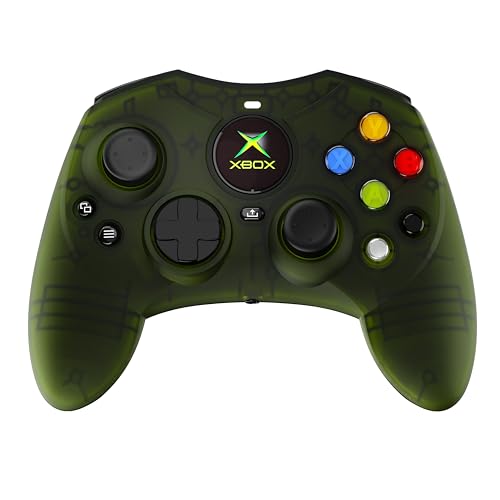
An officially licensed take on the classic Controller S shape, with magnetic sticks that won’t drift into old age.
The single number worth knowing here is 18. That’s the button count on this wired pad, against 9 on the DOOM Limited Edition controller above — this is a fully featured modern layout wrapped in the older Controller S body. The headline feature is Hall Effect sticks (magnetic sensors with no contact surface), which promise precision with zero drift and long-lasting performance. For anyone who has already thrown out a pad because the sticks started wandering, that’s the most valuable spec on this entire list.
It’s officially licensed for Xbox Series X|S, Xbox One and Windows 10 and 11, and it connects over USB-C with a 10-foot cable — long enough to sit back on a couch without an extension. You get dynamic impulse triggers with enhanced tactile feedback for the rumble and pulse of the game, a share button for capturing clips on Series X|S, and a headphone jack for a headset. The form factor is the modernised Controller S shape, and at 8.71 ounces it has real heft in the hand. Compared with the DOOM pad’s 6.91 x 5.61 x 2.76 inches, this one measures 6 x 3 x 2.5 inches — a tighter, more compact shell.
What wins people over is the controller quality itself — it’s the praise that comes up most, followed closely by the ergonomics and the nostalgia hit of that old-school shape. The comfortable grip that doesn’t dig into your fingers is a detail owners notice. Be honest with yourself about two things: it’s wired, so the cable is always part of the deal, and the Back and Start button placement divides opinion, with some finding it awkward. Neither is a flaw in the build, just a fit question.
A smart buy for: players who have been burned by stick drift and don’t mind a cable in exchange for magnetic sticks that shouldn’t wear out.
Not your pick if: you need wireless freedom or you’re particular about where Back and Start sit.
6. MENEEA RGB Charging Stand with Cooling Fan for Xbox Series X

One vertical tower that holds the console, charges two pads, hangs the headset and stacks the discs.
Six jobs in one footprint is the entire pitch: console cooling fan, dual controller charger, 15 RGB light modes, two 1400 mAh rechargeable batteries, 10 game disc storage slots, a headset stand and an extra USB port. If your TV unit is a tangle of controllers, discs and headsets, this collapses all of it into one vertical column that sits under the console. Note that the console, controllers, headset, charger cable and games are not included — this is the stand only.
This dock cools your console from the side, not from underneath. The fan sits on the side and pushes air through the console’s internal circulation, and the metal base leaves 4 vents open so hot air escapes from the top without blocking the console’s natural airflow. A button lets you switch the fan on or off whenever you like. Charging runs through the included 1400 mAh packs (rechargeable batteries rated at 1400 milliamp-hours), which slot into the controllers and line up against the type-C posts in the base. A smart chip (a small circuit that guards the battery) handles over-current, over-voltage and over-heat protection, and both controllers charge together in about 3.5 hours. Only the batteries it supplies will work with the dock.
Lighting spans 15 effects — 7 monochrome modes and 8 adjustable ones — with a memory function that saves your pick when you long-press for three seconds. Two USB ports split duties: one connects to the console, the other charges a keyboard, phone or tablet, though it doesn’t carry data. The recurring gripe is fit, with some owners finding the console doesn’t seat as cleanly as they’d like, and opinions split on whether it earns its money. What it does well, it does all at once — everything is topped up in a single go.
The Case For The Tower
- Replaces six separate accessories with one vertical footprint
- Two 1400 mAh packs charge both controllers together in about 3.5 hours
- Side-mounted fan with 4 reserved vents keeps the console’s airflow path clear
- 15 RGB effects with a memory function, plus 10 disc slots and a headset hook
The Small Print
- Only the included batteries work with the dock
- The extended USB port charges but doesn’t pass data
- Fit divides opinion — some consoles don’t seat as snugly as expected
The right call for: a cluttered TV unit where you want console, two pads, headset and discs consolidated into one column.
Skip the tower if: you only own one controller and prefer a small, dedicated dock.
7. PowerA Advantage Wired Controller – Fortnite Glow
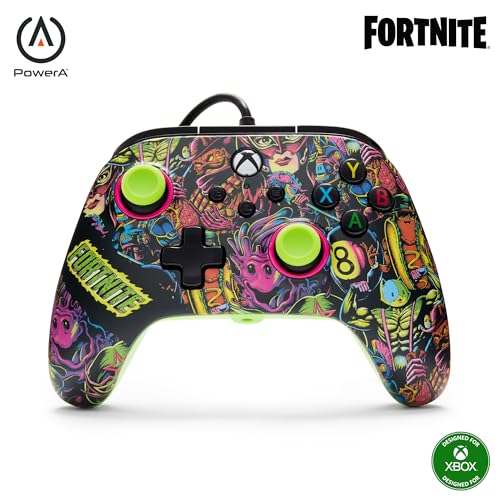
Two remappable buttons and adjustable trigger travel — for the FPS player who wants an edge without a settings menu.
This pad is built for speed. Two mappable buttons (extra buttons you assign your own commands to) can be programmed on the fly, mid-game, with no system settings to wade through, so a reload or slide can sit on the back of the controller and stay there. You also get 3-way trigger locks that set the trigger travel (how far the trigger pulls) to three different positions — a short pull for faster actions in FPS games (first-person shooters), full travel for a racing game — and 18 buttons total, matching the Hyperkin above on button count.
This controller now includes Hall Effect modules (contact-free magnetic sensors in the thumbsticks) for smoother control, enhanced precision and longer life — the same anti-drift idea as the Hyperkin, in a different shell. The Fortnite Glow finish gives you two types of glow: a glow-in-the-dark effect and a fluorescent reaction when a UV light hits it. A code for the Moon Bounce Emote is bundled in. Dual rumble motors and rich impulse triggers handle the tactile feedback, and a 3.5 mm stereo headset jack (a standard round audio socket) takes your headset. It is officially licensed for Xbox Series X|S, works with Xbox One and Windows 10/11, and carries a 2-year limited warranty. The free PowerA Gamer HQ app lets you test and calibrate the controller.
What buyers are happiest with is the overall quality and the value it represents, alongside responsive buttons and joysticks and a layout that’s easy to remap. The honest counterpoint is durability: reliability is the one aspect where feedback splits, with some reporting failures after a few weeks. Treat it as the ideal pick for the player who wants remap buttons and trigger stops at a wired price, and who accepts that a wired competitive pad is a replaceable tool rather than a forever object.
The standout spec: 3-way trigger locks plus on-the-fly remapping give you two tuning tools most pads at this level simply don’t offer.
What to weigh: durability is the mixed note here — some units fail early, so the 2-year warranty is worth registering for.
Made for the player who: wants trigger stops and back buttons now, without paying for a premium flagship pad.
Pick something else if: you want one controller to last years without thought — a wireless first-party pad is the calmer buy.
8. Trunab Backpack Compatible with Xbox Series X/S

Carries the console, the pads, the cables and the laptop — and keeps the console padded the whole way.
For the player who moves their setup regularly, the problem isn’t storage, it’s transport. This backpack’s main compartment splits into two rooms, and when it lies horizontal you can pull the console in or out through a side zipper while the top part stays stable. The lining is padded PE foam (a closed-cell foam that cushions shocks), which stops the console and accessories from knocking together in transit. It’s made from heavy-duty, scratch and tear-resistant nylon.
The pocket count is generous. Upper and lower exterior zip pockets, a lower front pocket with two elastic pockets and a mesh pouch, and side pockets — enough for controllers, headphones and game discs. Inside there’s a dedicated sleeve for a 15.6-inch laptop, so this doubles as a work bag on days when the console doesn’t come along. The padded handle and adjustable, ergonomically padded shoulder straps are built to reduce fatigue, with breathable padding at the waist, and the whole bag is meant for gaming parties and game enthusiasts who travel with their hardware.
Quality is what the feedback centres on, with capacity close behind — owners pack a power bank in alongside the Xbox Series X or S, cables and controllers and still find room. Portability and the multiple pockets come up as the reasons it works. Consider it the accessory that makes every other item on this list portable, rather than an upgrade to how your console runs.
The packing detail that matters: a 15.6-inch laptop sleeve inside a console bag means one carrier for work and play.
Worth knowing: padding gets mixed feedback, so treat it as protection against scrapes and rattles rather than a hard shell for rough handling.
Get this if: your Series X travels to friends’ houses and you want console, pads and laptop in one padded carrier.
Probably overkill if: your console stays plugged into one TV all year.
9. Xbox Elite Series 2 Core Wireless Controller

The tuner’s controller: adjustable stick tension, hair trigger locks and up to 40 hours between charges.
For the player who fiddles with sensitivity settings before every match, this is the deepest toolset on the list. Thumbstick tension is adjustable — you physically change how stiff the sticks feel — and the shorter hair trigger locks cut trigger travel for faster reactions. A wrap-around rubberized grip keeps the shell steady in your hands, and 15 buttons cover the layout. The Core edition includes just the essentials: the white controller, a USB-C cable, one D-pad and two standard thumbsticks, plus a thumbstick-adjustment tool. Extra paddles and component packs are sold separately.
You can customise more than the hardware here. Exclusive button mapping in the Xbox Accessories app even lets you choose which colour the Xbox button lights up with. You can save up to 3 custom profiles on the controller and switch between them on the fly — one profile for shooters, one for racers, one for everything else. Battery life runs up to 40 hours, the longest figure on this list by a wide margin. It plays across Xbox Series X|S, Xbox One and Windows over Xbox Wireless, Bluetooth or the included USB-C cable, with a 3.5 mm stereo headset jack (a standard round audio socket) for audio.
Here’s the honest read that separates this from the cheaper pads above: the Elite 2 Core divides opinion sharply. Some consider it the best controller they’ve owned; others question the reliability of the components and whether the price is justified. This is a premium tool aimed at competitive players who will use the profiles and the app tuning, and who want the 40-hour battery. If you mostly play casually, the DOOM pad at the top of this list does the same casual job with a far more consistent reputation.
The pro-grade parts: adjustable stick tension, hair trigger locks, 3 onboard profiles and up to 40 hours per charge are genuinely competitive-grade options.
The honest split: reliability feedback is divided, so this is a buy for someone who will use the tuning and wants the warranty to back the cost.
The tool for: competitive players who will actually use custom profiles, adjustable tension and trigger locks every session.
Overkill if: you play casually — the extra tuning and the price tag won’t buy you much over a standard first-party pad.
Know the Specs
Hall Effect Joysticks
Standard joysticks work by rubbing metal contacts together, and over thousands of inputs those contacts wear down into stick drift — the cursor wandering when you’re not touching it. Hall Effect sticks use magnetic sensors instead, with no physical contact to grind away, which is why they’re pitched as zero-drift and long-lasting. Two controllers on this list carry them (the Hyperkin DuchesS and the PowerA Advantage), and both are wired, so the trade for that durability is a cable.
Battery Packs and mAh
mAh stands for milliamp-hours, a measure of how much charge a battery holds — the higher the number, the longer the controller runs between charges. The docks here use either a 1100 mAh pack (8BitDo, Controller Gear) or two 1400 mAh packs (MENEEA). One rule to check before you buy: some docks only charge the battery pack they ship with, so a pack you already own may not fit. The Elite Series 2 Core sidesteps all of it with an internal battery rated for up to 40 hours.
Cooling Fans and Temperature Thresholds
A cooling fan with an auto mode measures the console’s exhaust heat and changes speed at set points. The KOVA fan stays off below 96.8°F (36°C), runs Low to 107.6°F, Medium to 118.4°F and High above 118.4°F. Fans also differ in placement: an under-console fan pushes air upward, while a side fan is designed to work with the console’s own circulation. Either way, a fan moves air — it can’t cool a shelf that has no opening for hot air to escape.
Wired vs Wireless Controllers
Wired pads connect over USB-C and need no pairing or charging — plug in and play, with a 10-foot cable on the Hyperkin for couch distance. Wireless pads use Bluetooth or Xbox Wireless and run on batteries or an internal cell, which is where the dock and battery-pack accessories come in. Wired tends to be lighter on your wallet and free of battery anxiety; wireless keeps your living room cable-free. Both styles support a 3.5 mm headset jack on the models listed here.
Common Questions
Will a wired Xbox controller work on Xbox Series X without a battery?
Do these charging docks work with the standard Xbox rechargeable battery pack I already own?
Is a Hall Effect joystick actually better than a standard analog stick?
How long does it take to charge two controllers on the MENEEA stand?
Can I use the KOVA cooling fan manually instead of the automatic mode?
Will the Trunab backpack fit an Xbox Series X and a laptop at the same time?
Does the Xbox Elite Series 2 Core include the paddles and extra thumbsticks?
Why does the DOOM Limited Edition controller cost more than a standard wireless pad?
Can a cooling fan overheat or damage my Xbox Series X?
Do I need to own the DOOM game to use the Limited Edition controller?
The Bottom Line
For most players, the xbox series x accessories winner is the Xbox Wireless Controller – DOOM: The Dark Ages Limited Edition. It gives you a full standard layout plus a finish you actually want to pick up, and it holds the highest score of the recommended controllers alongside the Trunab bag. If drift is what keeps costing you controllers, grab the Hyperkin DuchesS, whose Hall Effect sticks (contact-free magnetic sensors that resist drift) are the most practical anti-drift answer here. For a cluttered TV unit, the MENEEA RGB Charging Stand gathers console, two pads, headset and discs into a single column. If you would rather tune every setting than match a finish, the Elite Series 2 Core is the deepest toolset on the list, with up to 40 hours of battery behind it.
How we choose
We do not accept paid placement. Every pick is matched to a real buyer and a real use-case; we do not hands-on test units.
Sources
Specifications: manufacturer listings and product documentation. Review insights: verified customer reviews, as of November 2026. Pricing: not shown on this page (it changes often); check the current price via the retailer link.
As an Amazon Associate, Tactical Gear Guy earns from qualifying purchases. This does not affect which products we feature.