Specs are compiled from manufacturer listings and verified buyer reviews and can change over time — please confirm the key details on the product page before buying.
Here is the short answer: for most people the smart move is a USB hard drive that lets you play your Xbox One games straight from it and store your Series S titles on the side. Buy the biggest drive your budget allows, because next-gen games are not small. Whatever you pick, remember one hard truth: an Xbox Series S runs games coded for the newer consoles only from inside the console or from the official expansion card slot, not from a USB cable.
This guide is built by comparing the manufacturers’ published specifications and the patterns across verified customer reviews, so you get each pick’s real strengths and trade-offs instead of marketing spin.
Capacity is where most buyers get burned, so each pick below spells out how many games it realistically holds and which consoles it plays them on, giving you a clear read on the Best Xbox Series S External Storage.
Top Picks


How To Choose The Best Xbox Series S External Storage
Pick too small a drive and you spend your evenings shuffling installs between console and storage. Pick the right capacity and your library grows without a single uninstall. Here is what actually separates a good drive from a disappointing one.
Know the two lanes: playable vs storage-only
Your Series S plays Xbox One games from a USB drive without complaint. It also runs older titles on systems that support backward compatibility. But anything built specifically for Series X|S must live inside the console or on an expansion card to launch.
A USB drive still earns its keep here. You offload Series X|S games onto it to free up the console’s own room, then shift them back when you want to play. That swap takes a few minutes and saves you from a 100GB re-download.
Capacity is the first decision, not the last
Game sizes balloon every year, so a 1TB drive that felt huge two years ago now holds only a handful of big titles. A 2TB drive roughly doubles that breathing room. The 4TB and 6TB models turn your shelf into a vault you rarely clear out.
Speed means less than you think over USB
Most reliable USB 3.0 drives run at a data-transfer rate of five gigabits per second, which is plenty for playing backward-compatible titles. A premium drive quoting hundreds of megabytes per second simply shortens the wait when you copy a game across.
Check the drive is pre-formatted for Xbox
Some drives arrive ready to plug straight into your console. Others need a quick formatting pass first, which wipes whatever was on them. Look for Xbox-ready wording in the listing if you want to skip that step entirely.
Side-by-Side Comparison
| Model | Best For | Capacity | Drive Type | Connection | Amazon |
|---|---|---|---|---|---|
| WD_BLACK 5TB P10★ Best Overall | Big USB library | 5 TB | Mechanical HDD | USB | Amazon |
| Toshiba Canvio Gaming 2TBConsole-First Pick | Console-first design | 2 TB | Mechanical HDD | USB 3.0 | Amazon |
| Seagate Game Drive for Xbox 4TBXbox Certified | Xbox-certified vault | 4 TB | Mechanical HDD | USB 3.2 Gen 1 | Amazon |
| KIOXIA EXCERIA PLUS G2 2TB | Fast SSD storage | 2 TB | Solid State Drive | USB 3.2 Gen 2 | Amazon |
| Samsung T9 2TB | Highest-speed transfers | 2 TB | Solid State Drive | USB 3.2 Gen 2×2 | Amazon |
| Storage Expansion Card 1TB (Tianken) | Playing Series S games | 1 TB | NVMe SSD | Console card slot | Amazon |
| WD_Black 6TB P10 | Maximum capacity | 6 TB | Mechanical HDD | USB | Amazon |
| YOTUO 1TB External | Budget starter drive | 1 TB | Hybrid Drive | USB 3.0 | Amazon |
| Avolusion 1TB | Plug-and-play entry | 1 TB | Mechanical HDD | USB 3.0 | Amazon |
Detailed Reviews
1. WD_BLACK 5TB P10 Game Drive
Our pick — 4.5+★ from 25,000+ verified ratings; the strongest balance of quality and price.
Five terabytes of storage for roughly the price of one new release game.
Most Series S owners run out of room after the third or fourth big install. The P10 solves that in one shot because it holds 5TB, and Western Digital estimates that volume can hold up to 150 games. The drive is a 2.5-inch mechanical model, which means moving parts inside, so treat it as a shelf unit rather than something you toss in a backpack loose.
Speed sits at up to 130MB/s over USB. For playing Xbox One titles and stashing Series X|S games you cannot launch from USB anyway, that is more than enough. The metal top looks sharper than the plastic shells most budget drives wear and helps spread heat when you copy a big library across in one session.
The one thing to plan around is that a mechanical drive with a spinning platter rewards gentle handling. That is a fair trade for the capacity, and it is why this stays a desk or shelf drive for most people rather than a travel drive. For a large library you leave hooked up, it is the pick that removes the delete button from your routine.
Where It Delivers
- 5TB fits up to 150 games so you stop uninstalling fan favourites to make room
- Up to 130MB/s transfer makes copying a big library across quick work
- Metal-top enclosure feels sturdier than plastic entry-level drives
- Works with Xbox and PlayStation, so it follows you between consoles
Where It Gives Ground
- Mechanical internals mean moving parts, so keep it on a flat surface
- Series X|S games must be moved back to the console before they launch
Worth it if: you keep a large library hooked up at one desk and want the delete button gone.
Think twice if: you need a drive to survive being carried around loose in a bag.
2. Toshiba Canvio Gaming 2TB
A drive built with consoles in mind, right down to firmware that stays awake for you.
Toshiba ships this one with a custom “Always-On” mode written into the firmware. That means the drive does not idle into a doze and make you wait while it wakes, which is exactly the stutter a generic drive can introduce mid-session. It holds 2TB, which Toshiba estimates at around 50 games based on an average of 36GB per title.
Owners are clearly happy with how it runs, and it is the performance side that gets talked about most in the review pages. The compact 2.5-inch body slides onto a shelf beside the console without taking over the space. It handles Xbox One play and Series X|S storage, and the same caveat applies: newer games need a shuffle back to the console first.
There is one thing to walk in knowing. This drive will not launch PS5 games, and the Xbox Series S play-from-drive rule still stands. If you already own a PS5 alongside your Series S, know that this one covers your PS4 titles and Xbox One titles but not the Sony next-gen library.
What wins people over: the responsive drive and the smooth in-game access to your library without a wait while the platter spins up.
The trade-off to accept: you are still on a mechanical drive, so keep it steady and expect the usual shuffle for Series X|S titles.
Reach for this if: you want a console-tuned drive in a small footprint.
Pass on it if: you want one drive that also launches PS5 games.
3. Seagate Game Drive for Xbox 4TB
Xbox-certified for Series X, Series S and every Xbox One generation, with a built-in green LED bar.
Seagate built 4TB of vault space into this one and had it certified by Xbox, so it plays nicely with the Series X, Series S, and every generation of Xbox One. A built-in LED bar lights up your gaming corner in Xbox green, which is design detail rather than performance, but it suits a console shelf.
The form factor here is worth flagging: this is a 3.5-inch drive, while the WD_BLACK P10 above is 2.5-inch. Expect a noticeably larger footprint on your shelf, and know it is a desktop-style drive rather than a pocket one. Transfer speed runs up to 600MB/s, which speeds up the copy-across step when you shift a big game.
Buyers are split on transfer speed, with some finding it quick and others wanting more. The bigger draw is the included 3-year Rescue Data Recovery Services plan and a 1-year limited warranty, which give you a safety net if the drive ever fails and takes a library with it.
Built to match the console: Xbox certification and the green LED make it feel like part of the setup.
One honest snag: the 3.5-inch build takes real shelf space, and some owners want faster transfers.
A solid match for: Xbox loyalists who want a certified, recovery-backed vault.
Look elsewhere if: you need a small drive you can tuck out of sight.
4. KIOXIA EXCERIA PLUS G2 Portable SSD 2TB
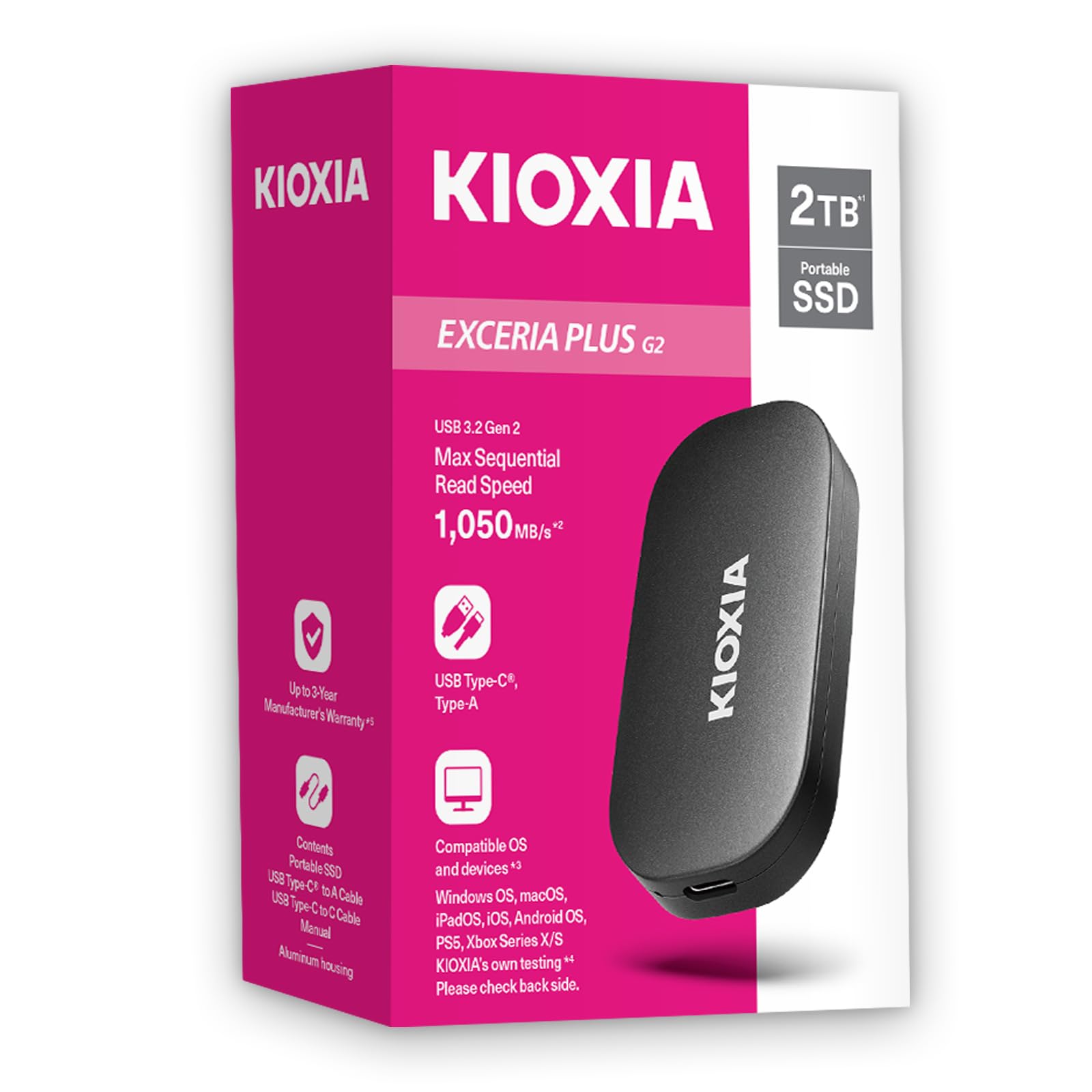
A shock-resistant SSD with no moving parts and read speeds that leave spinning platters behind.
Where the mechanical drives above spin a platter, this one has no moving parts at all. That makes it a genuinely safer choice if the drive rides in a bag between rooms. It carries 2TB of space and hits read speeds up to 1,050MB/s and write speeds up to 1,000MB/s over its USB 3.2 Gen 2 connection.
It is built on KIOXIA BiCS FLASH 3D flash memory with an aluminium housing that helps shed heat during a long copy run. You get both a USB-C to USB-C and a USB-C to USB-A cable in the box, so it plugs into your console, laptop, phone or tablet without hunting for an adapter.
The same Series S rule holds true: this plays backward-compatible titles over USB and stores your newer games. What it does not do is launch a Series X|S title straight from the cable. If you want that, the expansion card further down is the only route.
The Case For It
- Shock-resistant, no moving parts means safer transport in a bag
- 1,050MB/s read and 1,000MB/s write over USB 3.2 Gen 2
- Ships with both USB-C cables for console, laptop and phone
- 256-bit AES hardware encryption protects a stolen or lost drive
The Cost Side
- You still cannot launch Series X|S games from a USB drive
- A premium SSD carries a premium price for 2TB of space
Best for: gamers who move their library between rooms and want a rugged, fast drive.
Skip if: you need the drive to launch next-gen games.
5. Samsung T9 Portable SSD 2TB

At 2,000MB/s, a full-library copy finishes in minutes instead of hours.
Samsung puts a 2TB SSD behind a USB 3.2 Gen 2×2 connection with sustained read and write speeds up to 2,000MB/s. That is the fastest figure in this whole list, and it shows most when you shove a huge game library across in one go. The KIOXIA above hits 1,050MB/s; the T9 nearly doubles the read ceiling, so big transfers finish in far less time.
The Dynamic Thermal Guard keeps the drive cool during long sessions, which matters if you are editing or moving files for an hour straight. A compact body means it disappears into a bag or a desk drawer. Samsung’s Magician Software handles firmware updates, extra encryption, and drive health monitoring so you know when the drive is getting full.
Compatibility is the one place to slow down. It is rated for the Series S but not every device reports a clean handshake, with some users finding their machine does not recognise it. If your setup is picky about drives, test it first thing. For everything else, this is the speed king of the group.
The speed argument: 2,000MB/s transfers make a whole-library copy a coffee-break job instead of an evening.
What to watch: some devices fail to recognise it, so confirm the handshake before you commit your library.
The one to grab if: transfer speed matters more than capacity or budget.
Hold off if: your machine is known to be fussy about external drives.
6. WD_Black 6TB P10 Game Drive

One extra terabyte over the 5TB P10 above, and the largest capacity in this lineup.
Western Digital bills the 6TB version as the first 6TB 2.5-inch portable hard drive on the market, and it is the largest capacity in this lineup. It holds up to 150 games by WD’s own estimate, and the metal-top shell keeps the look clean on a shelf.
Compared with the Avolusion below, which starts at 1TB, you get far more room to keep every title without shuffling. Speeds run up to 130MB/s over USB, same as the 5TB model. The value side gets a lot of love from buyers who want maximum room per purchase, and it is easy to see why a 6TB drive is the one most likely to survive a full generation of installs.
Two things sit on the honest side of the ledger. It is a mechanical drive so durability varies over time, and some games built for Series X|S simply will not run from the cable. You move those back to the console first, as with every USB pick here.
The capacity argument: 6TB dwarfs the 1TB entry drives and gives you room to keep an entire generation’s backlog.
A quiet caveat: its own listing notes it is a mechanical drive, so treat durability as a variable over time.
A fit for: the collector who never wants to delete a game again.
Not for you if: a 1TB or 2TB drive already covers your library.
7. Storage Expansion Card for Xbox Series X|S 1TB

The only kind of drive on this list that launches next-gen games without a shuffle.
Every USB drive here shares one ceiling: Series X|S games cannot launch from the cable. This expansion card drops into the dedicated slot on the console instead, and it can play those newer titles directly. That single difference is what makes it the pick for anyone who wants the newer games to run from the expansion, not the internal drive.
It is an NVMe SSD with a data-transfer rate up to 3,500MB/s, the fastest figure in this list, and the all-aluminium body is a mere 0.3 inch thick. The thin design helps it slide into the slot without crowding the console’s vents, and it is plug-and-play with no software install needed.
Here is the honest part. Reliability feedback is genuinely mixed, with some units running fine and others failing inside a month. Some buyers also report it does not show the full advertised capacity, and compatibility with Xbox system updates is a concern. It is a niche pick that earns its spot only if launching next-gen games is the top priority.
Why It Earns A Slot
- Plays Xbox Series X|S games directly, unlike any USB drive here
- Up to 3,500MB/s transfer for fast load and resume
- Slim 0.3 inch aluminium body slides into the console slot cleanly
- Plug-and-play with no software installation needed
Where Confidence Wavers
- Reliability is the most talked-about concern, and it is not uniformly positive
- Some units fail to show the full advertised capacity
- Xbox system updates have been a compatibility problem for some
Right for: anyone who insists on launching Series X|S games from expansion, not the console.
Not right for: buyers who want a low-risk bet on a drive that just sits there and works.
8. YOTUO 1TB External Hard Drive

A budget drive wrapped in a shock-absorbing sleeve — sensible protection at the entry level.
The YOTUO stands out because of its patented built-in silicone sleeve, which cushions the drive against bumps and drops. That matters for a portable drive you carry around. It carries 1TB of space, hits USB 3.0 speeds up to 5Gbps, and weighs just 0.16 kg, lighter than a can of soda.
Buyers praise the storage room and the quick setup, with the USB 3.0 transfer handling large files without much waiting. It works with Windows, Mac and Linux as well as PS4, PS5, Xbox One and Xbox Series X|S. You get the usual Series S rule: play backward-compatible titles, store the newer ones.
The obvious limiter is capacity. With 1TB you will feel the squeeze after a few big installs, so this is best as a starter drive that frees up console space right away rather than a whole-library vault.
What stands out: the silicone sleeve and light 0.16 kg build make it an easy drive to carry.
A gentle caution: 1TB fills fast once you stack several large titles.
Pick it up if: you are on a tight budget and just need room to breathe.
skip it if: your library already spans more than a handful of big games.
9. Avolusion 1TB USB 3.0 Portable External Gaming Drive

Pre-formatted, so it is ready the second you plug it into the console.
Avolusion arrives pre-formatted for Xbox, which means you skip the format step and can start moving games immediately. It holds 1TB and runs a data-transfer rate of five gigabits per second over USB 3.0. The 2.5-inch body is slim and light enough to pack away easily.
The room here is the smallest in the lineup. That is the point of it: an entry drive that takes the pressure off your console’s internal space for someone who only needs a little headroom. It works across Xbox One X, S, the original first-generation console, and the Series S and Series X.
What buyers notice is the simplicity and the extra room it adds, and it is the value side that tends to draw attention. The honest catch is that over a year or two of heavy use, the drive can slow down or give out, which is normal for an entry-level mechanical unit. Keep important saves on the console and use this for the games you can re-download.
The simple appeal: pre-formatted and plug-and-play, so there is nothing to set up.
Size it right: 1TB holds the smallest library here, so treat it as extra breathing room rather than a vault.
A fit for: a first expansion on a lean budget.
Look on if: you want years of heavy use without reaching for a replacement.
Know the Specs
Capacity in Terabytes
The terabyte figure tells you how many games fit in the vault. A 1TB drive covers a small library while a 6TB model keeps a whole generation’s backlog. Game sizes climb each year, so always plan above your current count. When two drives cost about the same, take the larger one.
Data Transfer Rate
This figure, in megabytes or gigabits per second, is how fast files copy on and off the drive. A USB 3.0 drive at five gigabits per second handles backward-compatible play fine. A premium SSD at 2,000MB/s just shortens the wait when you copy a big game across.
USB vs Expansion Card
A USB drive plays Xbox One and backward-compatible titles and stores Series X|S games, but cannot launch those newer games. An expansion card goes into the console slot and can launch them directly. The card trades capacity for that next-gen ability.
Mechanical vs Solid State
A mechanical drive has spinning platters, so it is best kept on a flat shelf. A solid state drive has no moving parts, which makes it better for travel. Solid state is faster and more rugged, but it costs more for the same capacity.
Common Questions
Can I play Xbox Series S games straight from a USB hard drive?
How many games does a 5TB drive actually hold?
Do I need an expansion card or is a USB drive enough?
Will a regular SSD like the Samsung T9 work on the Series S?
Is a pre-formatted Xbox drive worth buying?
How fast does an external drive need to be for gaming?
Will an external drive survive being carried in a bag?
What happens if my external drive fills up with a game I want to play?
Does an external drive slow down game loading compared with internal storage?
Is the 6TB WD_Black worth the extra space over a 2TB drive?
The Bottom Line
For most Series S owners, the winner is the WD_BLACK 5TB P10 because it removes the capacity squeeze with a large library and a metal shell that suits a shelf. If console-tuned firmware matters more than raw size, the Toshiba Canvio Gaming 2TB is the sharpest console-first pick. And if you insist on launching next-gen games straight from expansion, the Toshiba/Capacity Expansion Card
How we choose
We do not accept paid placement. Every pick is matched to a real buyer and a real use-case; we do not hands-on test units.
Sources
Specifications: manufacturer listings and product documentation. Review insights: verified customer reviews, as of November 2026. Pricing: not shown on this page (it changes often); check the current price via the retailer link.
As an Amazon Associate, Tactical Gear Guy earns from qualifying purchases. This does not affect which products we feature.