Specs are compiled from manufacturer listings and verified buyer reviews and can change over time — please confirm the key details on the product page before buying.
If your Series S sits in a closed cabinet or a stuffy room, the fix is a top-mounted fan with a dust filter — not the flashiest RGB stand you can find. The models below all clip onto the console itself, pull hot air up and out of that round exhaust vent, and run off the console’s own USB port so you never hunt for a spare wall adapter. Some of them also charge controllers and hold your headset, which is where the real price difference lives.
This guide is built by comparing the manufacturers’ published specifications and the patterns across verified customer reviews, so you get each pick’s real strengths and trade-offs instead of marketing spin.
You will see which stands are pure cooling, which bundle two controller chargers with 1400mAh battery packs, and where each one makes you compromise. Every option here fits the Series S only — none of them work on a Series X or an Xbox One. Here is the honest breakdown of the xbox series s cooling station market.
Top Picks


How To Choose The Best Xbox Series S Cooling Station
Start with the shape of the thing. The Series S vents hot air out of one large round grille on top, so a cooling stand is really a shroud that sits over that grille and pulls air upward. If the shroud does not seat flat and seal, the fans just recirculate room air and you have bought a light show. Check the footprint first, then the fan count, then everything else.
Fan count and speed settings
Most stands here use two fans. The adjustable ones step through three speeds, and a few list the actual RPM figures so you know what “high” means. A touch switch or a separate physical button is the difference between changing speed mid-game and crawling behind the TV to do it.
Dust filtration is the underrated spec
A console that pulls air from below will pull dust with it. A stand with a filter or a dust-plug set catches that debris before it reaches the fan and heatsink. It is the most useful long-term feature on this list, and it costs almost nothing to add — so ask why some stands skip it.
Do you want controller charging built in
The all-in-one stands add two charging bays and ship with 1400mAh rechargeable battery packs, which replace the AA cells in your controllers. Some chargers only accept those included packs or the official Xbox rechargeable battery — a generic third-party pack may not register. If you only want cooling, a fan-only stand is simpler and less to go wrong.
Power draw and the standby question
Every stand here draws its power from the console’s USB port, so it switches off when the console does. That saves you a wall outlet, but the fans stop the moment the console sleeps. If you want airflow during a long download in standby, no stand on this list delivers it.
Side-by-Side Comparison
| Model | Best For | Fan Speed Settings | Dust Filter | Controller Charging | Amazon |
|---|---|---|---|---|---|
| Mcbazel Cooling Fan (3 Speeds, RGB)★ Best Overall | Most buyers — quiet adjustable airflow | 3 speeds (touch) | Not listed | No (USB ports only) | Amazon |
| Mcbazel RGB Cooling Fan (Dust Filter)Budget Pick | Budget cooling with filtration | 3 speeds | Yes — ABS cover | No (USB ports only) | Amazon |
| FYOUNG Vertical Cooling Fan StandBest for Controllers | Charging two controllers plus cooling | 2 fans | Not listed | Yes — 2x 1400mAh packs | Amazon |
| MENEEA Cooling Stand (15 Light Modes) | Light show plus batteries | 3 gears | Not listed | Yes — 2x 1400mAh packs | Amazon |
| Gorixer Charging & Cooling Stand (6-in-1) | Metal base, USB-C charging | Dual fans, 2200 RPM | Not listed | Yes — 2x 1400mAh packs | Amazon |
| MENEEA Upgraded Cooling Fan Stand | Organized desk, headset hook | 2 fans, 3 gears | Not listed | Yes — original battery only | Amazon |
| Klipdasse Cooling Stand (RGB Strip) | Big desk cleanup, 15 light modes | 2 fans, 3 adjustable speeds | Not listed | Yes — 2x 1400mAh packs | Amazon |
| MENEEA RGB Cooling Fan Charge Stand | Tidy vertical setup, dual charger | 2 fans, on/off button | Not listed | Yes — 2x 1400mAh packs | Amazon |
Detailed Reviews
1. Mcbazel Cooling Fan for Xbox Series S
Our pick — 4.5+★ from 950+ verified ratings; the strongest balance of quality and price.
The quiet, tool-free default — three speeds you can change mid-game without touching the console.
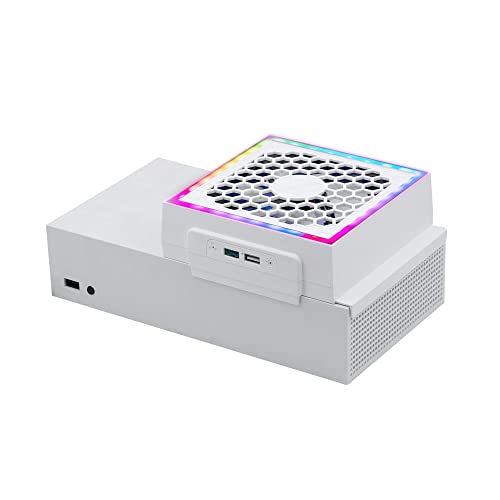
This is the stand to buy if you just want the console to breathe and everything else to stay simple. It draws hot air outward from the round exhaust vent that sits on top of the Series S, and it fits whether you run the console flat or standing up. No screws, no separate wall adapter — it clips on and takes its power from the console’s own USB port, so the fans stop when the console shuts down.
What wins people over is that they can actually hear their game instead of the fans. The touch control steps through low, medium and high, and colored indicators show which one you picked — orange, blue and green for the three speeds. The lighting is a separate button entirely, with four single-color effects and three gradient modes, so turning the lights off does not disturb your fan setting. That split only shows up after you have lived with a version that ties both to one button.
The honest catch sits on the connection side. Two USB ports are here — one USB 2.0 for charging a controller or phone, one USB 3.0 data port for a supported keyboard, gamepad or adapter — but you lose all of it the moment the console goes to standby. Automatic on-and-off is the recurring gripe, so plan to press a button rather than set and forget.
What earns its spot
- Capable of quiet running plus three adjustable speeds, which is the combination most people actually want
- Independent light button keeps your fan setting untouched
- Fits both horizontal and vertical console layouts with no tools
- Two extra USB ports at the console itself, one for charging and one for data
What to know before buying
- The fan and the USB charging both cut out in standby — no automatic switching
- No dust filter listed, so a dusty room will still feed the intake
- Series S only; it will not fit a Series X or Xbox One
Reach for this if: you want the adjustable, quiet cooling that most Series S owners are actually after, with a controller charge port thrown in.
Look elsewhere if: your console runs in a dusty spot or you want the fans to keep running while it downloads in standby.
2. Mcbazel RGB Cooling Fan for Xbox Series S
Dust protection at the entry-level end — the filter is the feature, the fans are the bonus.
Two high-speed fans sit on top of the console case and pull the running heat up and away, with three speed levels to pick from. The part that matters more in a year’s time is the ABS dust cover: it blocks dust and stray objects from dropping into the fan and the console, while still letting the heat pass through. At 7 ounces it is light enough that you forget it is clipped on.
Cooling is the thing everyone raves about here, and value runs a close second — this is one of the least expensive ways to add both filtration and airflow. The lighting adds seven modes, so you can match the strip to whatever game is on screen, and two USB ports take a mouse, keyboard or other device. One port is charge-only; the other handles both data and charging.
Here is where it splits opinion. The noise and the brightness divide people — some run it happily on the quiet end, others find the fans loud and the LEDs too strong for a dark room. Neither is a defect, but if you game late with the lights down, plan to use the lower speed and dimmer mode. It also takes 5 volts from the console USB, so no wall adapter is needed and nothing runs in standby.
Value read: filtration plus three speeds at the budget end of this list is the smartest trade on the page if dust worries you more than fan specs.
Fair warning: the LEDs are bright and the top speed is audible, so this suits a bright room and a headset more than a quiet bedroom.
Best fit: a dusty shelf, a pet-heavy room, or anyone who wants a filter without paying for a charging dock.
Think twice if: you want a whisper-quiet stand with dimmable lighting — the brightness and noise are the two split opinions here.
3. FYOUNG Upgraded Vertical Cooling Fan Stand for Xbox Series S
One stand that cools the console, charges two controllers and hangs your headset.
The pitch here is consolidation. Two high-speed fans sit in the base and pull heat out of the console, while two charging docks top up two controllers at once. You also get two 1400mAh rechargeable battery packs, so you can stop buying AA cells and stop hunting for the last pair in a drawer. A bracket on the stand holds your headset, which does more for desk clutter than any light strip.
Where it earns its keep is simply how much it does. Functionality is the thing that carries this stand in owner feedback — one unit replaces the console cooler, the controller charger and the headset stand in a single footprint, and it does it in white so the whole setup matches. Charging status is readable at a glance: red while a controller is filling, green when it is done, and you can lift the controller straight off without any extra step. Input runs at 5 volts over USB 2.0.
Two honest notes. The battery fit splits opinion — some owners find the included packs seat properly, others do not — so check that your controller is genuinely charging the first time you drop it in. And the fan noise draws real complaints, so if the console is next to your bed this will be the sound you hear.
Why it earns a spot
- Replaces three accessories with one stand — cooler, dual charger, headset holder
- Ships with two 1400mAh rechargeable packs instead of leaving you on AA batteries
- Clear red/green charge indication with no extra button to press
- Cooling is a genuine strength, with owners noticing it moves more air than the bare console
The trade-offs
- Fan noise is a real complaint, not a one-off
- Battery fit varies, so verify the charge the first time
- Costs more than a fan-only stand, and value gets argued both ways
The upgrade path: if your desk is a tangle of chargers and cables, this stand clears all of it at once.
The cost of that: a louder fan and an all-in-one design you cannot simplify later if a dock misbehaves.
4. MENEEA Cooling Stand for Xbox Series S

Fifteen lighting effects, two battery packs and a three-gear fan — one dock for the whole desk.
If the visual side of your setup matters as much as the thermals, this is the one to look at. Fifteen lighting effects break down into eight flicker patterns and seven solid colors, and they run on their own switch so the fan setting stays where you left it. Two upgraded low-noise fans pull air through the base, and an LED indicator shows which of the three gears you are in.
The batteries are the other story. Two 1400mAh packs come in the box, rated by the maker for 1500+ charge cycles and up to 20 hours of play. That is the claim, not a lab result — but it does mean you can rotate one pack into the controller while the other sits on the dock. The base is metal, which helps the stand feel less like an empty plastic shell, and the whole thing is built for the Series S footprint.
Cooling is the split. Some owners say it keeps the console noticeably cooler; others report that even the top fan gear doesn’t do much. Charging compatibility, durability and fit all attract a mix of views too, so treat the bundle as convenient rather than flawless. What stays consistent is that setup is quick and the thing works as described — that reliability is what the price is buying.
Where it shines: 15 light modes on an independent switch, two 1400mAh packs and a metal base add up to a feature-rich dock rather than a simple fan.
Set your expectations: the cooling is genuinely a coin flip according to owners — buy this for the charging and the lighting, and treat airflow as a bonus.
Ideal setup: a white console desk where the lights are half the point and two charged controllers is the weekly goal.
Choose another if: cooling performance is your only reason for buying — that is the one part of this dock with divided results.
5. Gorixer Charging & Cooling Fan Stand for Xbox Series S

The metal-base build — dual 2200 RPM fans under an aluminum heat-spreading deck.
Most stands on this list are plastic shells with fans inside. This one adds a metal thermal-conductive base and a honeycomb air duct underneath, which is the design detail you notice first when you lift it from the start. Two high-speed fans run at 2,200 RPM. The maker claims the metal base and duct cool faster than generic stands — their testing claim, not an independent result.
The charging side is the practical upgrade. Two controllers fill in 4 hours over USB-C fast charging, and the included 1400mAh packs are rated for 5000+ cycles with FCC/CE-certified overcharge, overheating and short-circuit protection. Fifteen RGB modes split into eight dynamic and seven static, and a long press of three seconds kills the lights entirely — a stealth mode that matters if the dock lives in a bedroom. Cable management is hidden, and it runs from a direct USB-C connection to the console with no external power brick.
The company also lists a 30% space reduction for the vertical layout, since console, controllers and headset stack in one tower. The one thing to check before you commit is the controller list — this is built for the Series S and its controller, not the Xbox One S. If you are mixing generations on the same desk, keep them straight.
Build note: a metal thermal base, dual 2200 RPM fans and 4-hour USB-C controller charging is the most hardware-forward combination in this premium tier.
Reality check: the faster-cooling figure is a maker claim, and the funding is a direct console USB-C connection — so no airflow while the console sleeps.
Buy this for: the metal base and USB-C charging, if you want the best-feeling stand on the desk rather than the cheapest fan.
Pass on it if: you are running an Xbox One S controller alongside — this stand is built for the Series S setup only.
6. MENEEA Upgraded Cooling Fan Stand for Xbox Series S

Built around the headset hook — the stand that finally gives your cans a home.
Two bottom fans with an independent three-gear switch handle the cooling, and the maker recommends first gear for quiet play and third for real airflow. A headset hook on the side takes the headphones off your desk and puts them within arm’s reach. Fifteen RGB effects sit on the base with a memory mode — hold the light button for three seconds and it saves your preset and switches off, then comes back the same way next time.
The charging bay is where you need to read carefully. It works with the original Xbox rechargeable battery, the one sold on the official Xbox site, and it fills two controllers in about 3 hours. Over-current, over-voltage and heat protection are built in, and the indicator is clear — green for charged or standby, red while charging. What it will not do is charge a third-party battery pack you already own, so if you have been running generic rechargeables, this dock won’t recognize them.
What keeps it steady is that it simply works. Owners consistently report the cooling stand doing its job and keeping the console temperature in check. The metal build and USB-C connector round out a stand that is more about neat organization than flash. It is the tidy option, not the loudest feature list.
The case for it
- Headset hook plus 15 RGB effects with a three-second memory save
- Two fans on an independent three-gear switch, with the quiet-first-gear recommendation spelled out
- Clear red/green charging indicator and built-in over-current, over-voltage and heat protection
- Metal construction with a USB-C connector
Read before you buy
- Only charges the original Xbox rechargeable battery — third-party packs will not register
- 3-hour full charge is slower than the 4-hour USB-C rival above in the practical sense of dual-bay throughput
- Charger is for Series S controllers, not Xbox One S
The neat-freak pick: a headset hook, a memory-lit base and metal build for a desk that stays organized.
Only snag: if you already own third-party controller batteries, this dock will not charge them.
7. Klipdasse Cooling Stand & Charge Station for Xbox Series S

The do-everything tower — dual charger, dual fan, headset hook and a light strip that remembers.
Two high-speed fans with three adjustable speeds sit under the console, and a separate switch steps through the gears while an LED indicator shows where you landed. Fifteen RGB bottom effects split into seven solid colors and eight running or blinking patterns, with a memory function that saves the current mode and restores it on power-up. Two 1400mAh battery packs and a headphone hook come in the box, along with one integrated USB data cable plus a data transfer port and a charging port.
What carries this stand is how much it consolidates. It tops the whole list for functional all-in-one coverage — the dock holds the console, both controllers, the headset and the batteries, and the light modes give you a reason to actually use the RGB rather than leave it off. It also accepts the original XBS/XBX rechargeable battery, so you are not locked into the bundled packs. Controllers fill in 2-3 hours over the Type-C ports, with red for charging and green for full.
The cooling is the honest caveat. Owners split on whether it provides adequate temperature control, so if your goal is measurable thermal improvement, this is not the most single-minded choice. It is also billed for the Series S and Series X/S controller layouts, not the Xbox One S. Buy it as a tidy, well-lit command center and the cooling becomes a supporting act rather than the headline.
What it solves: console, two controllers, a headset and two battery packs in one vertical tower is the fastest way to clear a messy gaming desk.
The honest limit: the cooling results are divided, so treat the airflow as a companion feature to the charging and storage.
Made for: the gamer whose desk has become a pile of controllers, cables and a loose headset.
Not for: anyone who needs the strongest cooling on the list — the temperature control is the widely split part here.
8. MENEEA Upgraded RGB Cooling Fan Charge Stand for Xbox Series S

The six-in-one vertical tower with the flattest footprint and a rubber base that stays put.
Six functions stack into one vertical stand: the console sits upright, two fans run underneath, two Type-C chargers feed two controllers, a headset bracket holds your cans and fifteen RGB modes run along the base. Two 1400mAh battery packs come in the box, and the light strip has a memory function — a three-second hold saves your mode and switches the lights off, and they return on power-up.
The quieter details are where this one earns trust. The metal base helps spread heat away from the console, and the anti-slip rubber bottom keeps the whole tower planted instead of sliding across a glossy desk. A dedicated power button lets you switch the fans off any time without touching the light setting. Charging fills two controllers in 3 hours with the red/green status lights, and the charger will stop when the console is off — though sleep mode still charges, which is a useful middle ground.
Two limits to plan around. The dock only charges the bundled 1400mAh packs or the original XBS/XBX battery, so a third-party pack you already own will not register. And the extended USB port is charging only, with no data pass-through — fine for a controller, no use for a keyboard. Cooling itself draws a mix of views, which is the pattern across this all-in-one tier rather than a fault unique to this stand.
Fit and finish: a metal base, anti-slip rubber feet and a six-in-one tower make this the most stable-feeling arrangement for a vertical Series S setup.
Know the terms: bundled or official batteries only, and the extra USB port is charge-only — two details worth reading before you rearrange the desk around it.
Pick it for: a vertical setup that needs to sit steady on a smooth desk and keep two controllers topped up.
skip it if: your controllers run third-party battery packs or you want a data port on the stand.
Know the Specs
Fan speed and RPM
RPM means revolutions per minute — how many times the fan blade spins in one minute. A higher figure usually moves more air, but it also tends to make more noise. That is why the stands with three gears matter: you can drop to the low setting for a quiet cutscene and jump to the top gear for a long session in a warm room. A listed 50 db noise level, like the JDGPOKOO stand, gives you a rough idea of how audible that top gear will be.
Dust filters and dust plugs
A dust filter is a mesh or cover that catches debris before it reaches the console fan and heatsink. Dust plugs cover the unused ports so dust cannot settle inside them. Both features matter because the Series S draws air in from around its body, and a dusty intake is the slow killer of any small console. Stands that include a filter or plug set are doing more long-term work than stands with more lights and no filter.
What 1400mAh means for controllers
mAh stands for milliamp-hours — the capacity of a rechargeable battery. The 1400mAh packs bundled with several stands replace the AA cells in your controller, and they recharge every time you set the controller on the dock. Some docks only accept the bundled pack or the official Xbox rechargeable battery, so a third-party pack you already own may not register at all. Check that before you commit to a charging stand.
USB power and standby behavior
Every stand here draws its power through the console’s USB port, which means no separate wall adapter to find. The flip side is that the fans and the charging stop when the console is fully off. Some stands keep charging in sleep mode, which is useful if you leave a controller on the dock overnight. None of them run the fans while the console is in standby, so plan your airflow around active play.
Common Questions
Will any of these stands fit an Xbox Series X?
Do these cooling stands actually lower the console temperature?
Can I charge my controller on a stand if I already use my own rechargeable battery?
Do the fans keep running when the console is in standby?
Is a dust filter worth it on a Series S stand?
How much noise do these stands make on the highest setting?
Will a charging stand damage my controller batteries?
What is the difference between a fan-only stand and a 6-in-1 charging dock?
Do I need an extra power adapter for these stands?
Can the RGB lights be turned off completely?
The Bottom Line
For most Series S owners, the xbox series s cooling station to buy is the Mcbazel 3-Speed Cooling Fan — adjustable airflow you can hear over your game, a light button that stays out of the fan’s way, and two extra USB ports at the console. It also carries the strongest owner record on this list: 4.5+ stars across 900+ ratings. If dust is your bigger worry, the Mcbazel RGB fan with the ABS dust cover gives you filtration for less. And if you want the controllers and headset handled too, go the all-in-one route with the Gorixer stand for its metal base and USB-C charging.
How we choose
We do not accept paid placement. Every pick is matched to a real buyer and a real use-case; we do not hands-on test units.
Sources
Specifications: manufacturer listings and product documentation. Review insights: verified customer reviews, as of November 2026. Pricing: not shown on this page (it changes often); check the current price via the retailer link.
As an Amazon Associate, Tactical Gear Guy earns from qualifying purchases. This does not affect which products we feature.