Specs are compiled from manufacturer listings and verified buyer reviews and can change over time — please confirm the key details on the product page before buying.
Your Series S is the smallest Xbox ever built, and its single round exhaust vent does all the breathing. When a long session starts pushing hot air back through that vent, the console gets loud and the frame rate starts to wobble. A clip-on or stand-mounted fan that pulls heat out of that round vent keeps the console cooler and quieter. Below you get nine options that actually fit the Series S — not the Series X, not the Xbox One — with the ones that work hardest sorted to the top.
This guide is built by comparing the manufacturers’ published specifications and the patterns across verified customer reviews, so you get each pick’s real strengths and trade-offs instead of marketing spin.
You will see which fans run on the console’s own USB power, which add controller charging and RGB lighting into the same footprint, and which ones are just plain airflow. By the end you can pick the right Xbox Series S Cooling Fan without guessing at RPM figures or fitting brackets.
Top Picks


How To Choose The Best Xbox Series S Cooling Fan
The Series S pulls cool air in through side vents and pushes hot air out of one round exhaust port on top. A cooling fan helps most when it sits right over that port and pulls air outward instead of blowing more air into a sealed plastic shell. Start there, then decide how much extra hardware you want bolted to your console.
Fitment comes before fan speed
Every fan here is built for the Series S chassis only, and several listings say outright that they will not fit the Series X or the Xbox One. Check the mounting style first: a clip-on fan grips the shell, a stand holds the console on its side or upright, and a wall mount needs screws. If your console lives in a media cabinet with tight clearance, a slim clip-on fan leaves more room for airflow than a full stand with a headset hook.
What the RPM number really tells you
RPM means revolutions per minute — how fast the blades spin. Higher RPM generally moves more air, but it also tends to make more noise. One fan here lists 5300RPM for maximum airflow, while a dual-fan charging stand lists 2,200 RPM. Neither number tells the whole story, because blade count, duct shape and vent distance all change real cooling. Treat RPM as a starting point for comparing fans, not a final verdict on cooling.
Power comes from the console, so plan for that
These fans run on 5V USB power drawn from the console itself, which means no wall adapter to hunt for. It also means the fan stops when the console is fully off or in standby. If you want the fan to keep running after a session, you need to think about that before you buy, because no USB-powered Series S fan can pull power from a sleeping console indefinitely.
Extra ports, chargers and lights are the real dividers
Once a unit keeps your console cool, the deciding factor is the extra ports, chargers and lights it adds. Some add a USB 3.0 port (a fast data connection) so you can plug in accessories, some charge two controllers at once with bundled 1400mAh battery packs (rechargeable packs that replace AAs), and some carry 15 RGB light modes (colored lighting effects). Each extra adds bulk and eats shelf space, so decide first if you want a cooler or a full command center, then compare specs.
Side-by-Side Comparison
| Model | Best For | Fan Speed | Mounting | Extra Ports | Amazon |
|---|---|---|---|---|---|
| Mcbazel Cooling Fan (3 Speeds, RGB)★ Best Overall | All-round pick for most setups | 3 speeds (low/medium/high) | Horizontal or vertical | USB 2.0 + USB 3.0 | Amazon |
| Mcbazel RGB Cooling Fan with Dust FilterDust Filter Pick | Dust-heavy rooms | 3 speed levels | Top of console | 2 USB ports | Amazon |
| U/D Console Cooling FanMax Airflow | Maximum airflow | 5300RPM | Clip holder | None listed | Amazon |
| ZAONOOL RGB Cooling Fan (White) | Quiet operation | 1500/1700/2000RPM | Side of console | USB 2.0 + USB 3.0 | Amazon |
| Gorixer Charging & Cooling Stand | Full charging command center | 2,200 RPM dual fans | Vertical stand | USB-C | Amazon |
| MENEEA Cooling Stand for Series S Console | Two-controller households | 1-3 gears, dual fans | Vertical stand | USB | Amazon |
| Raryars Wall Mount Cooling Fan | Wall-mounted setups | Dual fans, 7 LED modes | Wall mount, 3 screws | 3 USB | Amazon |
| MENEEA Upgraded RGB Cooling Fan Charge Stand | All-in-one black finish | Dual fans, on/off button | Vertical stand | Extended USB | Amazon |
Detailed Reviews
1. Mcbazel Cooling Fan for Xbox Series S
Our pick — 4.5+★ from 950+ verified ratings; the strongest balance of quality and price.
Three speeds you can feel through a fingertip, and no second power brick to hide behind the TV.
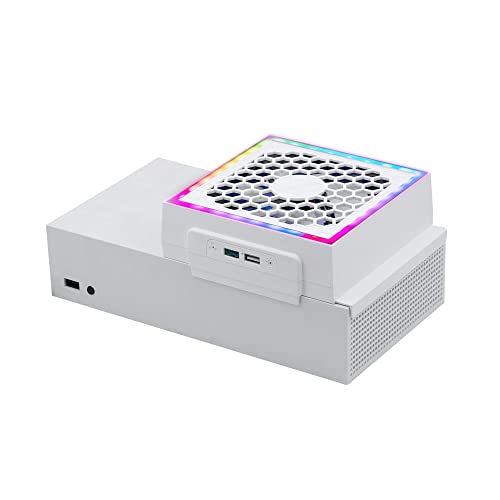
This is the fan most people should start with, and the reason is simple: it fits either console layout. Lay your Series S flat or stand it upright and the tool-free bracket still clips on, so you are not forced to rearrange your shelf to cool the machine. The fan draws hot air outward from the round exhaust vent rather than blowing into the shell, which is exactly the direction the console’s own airflow wants to go. It is built for the Series S only — the manufacturer states plainly that it will not fit the Series X or the Xbox One.
Touch controls sit on the housing, and the colored indicators tell you where you are without squinting: orange for low, blue for medium, green for high. The light button is separate from the speed control, so you can kill the four single-color effects and three gradient modes while leaving the fan exactly where you set it. Power comes from the console’s USB 5V supply and nowhere else — the maker warns that a higher-voltage source can damage the fan, so skip the fast-charge brick.
The two ports are the practical bonus. One USB 2.0 port (a standard USB connection) gives you a spot to charge a controller or phone right at the console, and the USB 3.0 data port takes a supported keyboard, gamepad or controller adapter. Plan around one catch: the fan and the USB charging both stop when the console is off or in standby. Buyers report that the fan cannot switch on and off automatically, and that is the recurring gripe in the review pages. Set that against 4.5+ stars from a large body of owners, and it reads as a small trade for a fan this flexible.
Where this one earns its keep
- Works flat or upright, so your existing shelf layout stays intact.
- Touch speed control with color-coded indicators for low, medium and high.
- Independent light button keeps the RGB separate from the fan setting.
- Runs off the console’s USB 5V supply with no wall adapter.
What to plan around
- Fan and charging both cut out once the console is off or in standby.
- No automatic on/off switching, which some owners want.
- Series S only — it will not fit Series X or Xbox One consoles.
Go for it if: you want one fan that handles cooling, controller charging and a data port without a separate power adapter.
Check first: if you expect the fan to keep running while the console sleeps, this one stops with it.
2. Mcbazel RGB Cooling Fan for Xbox Series S
A dust cover over the blades, for anybody whose console lives near a radiator, a window or a shedding pet.
Sitting on top of the console, this dual-fan unit pulls heat up and out instead of pushing more air down into the shell. What separates it from the pack is the ABS dust-proof cover: it blocks dust and small debris from dropping into the fan and the console, while still letting heat pass through. If your Series S sits on a floor-level shelf where dust settles, that cover is the whole argument for choosing this over a bare fan.
The twin fans run at three speed levels, and the built-in light strip offers 7 modes so you can match the glow to whatever you are playing. Two extra USB ports come along for the ride — one for charging only, the other carrying both data and charging — which covers a mouse, keyboard or another USB device. Power is the console’s USB 5V, so there is no adapter or extra cable to source. Cooling is what wins people over here, with value for money running a close second in how owners talk about it.
Honest note before you commit: noise and brightness both split opinion. Some find the fans super quiet and the LEDs a welcome glow; others say the fans get loud and the lighting runs too bright for a dark room. Neither is a defect — it is a fit question. If you game late in a small room, plan to run a lower speed setting.
Filter-first thinking: the ABS cover is the feature that earns this pick its slot, because dust is what quietly chokes a small console’s airflow over months of use.
The honest trade-off: brightness and fan noise sit in mixed territory, so treat the light modes as optional rather than a reason to buy.
Reach for this if: dust control matters more to you than absolute silence.
Look elsewhere if: your console sits in a shared bedroom where any fan hum at high speed is a problem.
3. U/D Console Cooling Fan for Xbox Series S
The spinner in this bunch: 5300RPM against the 2,200 RPM of the charging stands further down.
If pure airflow is your goal, the numbers here speak loudest. This dual-fan unit is rated at 5300RPM — versus 2,200 RPM on the Gorixer charging stand lower in this list — so it is chasing maximum air movement rather than quiet ambience. The maker is explicit that the high speed is there for heavy games and hardcore sessions, with the aim of keeping the console from overheating during long stretches.
Setup is genuinely hands-off. It draws DC 5V (standard low-voltage power) from the console’s own USB port, so you plug it in and go. It is designed to work with most Series S vertical charger stands on the market, which helps if you already own one and just want more airflow on top. The clip-holder mount grips the console itself instead of adding a full base under it.
Quality is the theme in how buyers talk about this one, with functionality drawing a more mixed read. A 40-day replacement window covers units damaged in shipping or during normal use, which softens the risk on a smaller-review-count accessory. Want maximum air movement over a quiet hum? This is your pick. Want a fan you forget is running? Look at the ZAONOOL below instead.
The speed case: at 5300RPM this is the most aggressive fan in the roundup, and the maker positions the speed squarely at heavy-game sessions.
The caveat: high RPM usually means audible noise, and functionality feedback is mixed — so buy it for airflow, not for silence.
Built for: marathon sessions where you want maximum airflow and already have a vertical stand you like.
Think twice if: your setup shares a room with someone who needs quiet.
4. Cooling Fan for Xbox Series S White

Nine blades, three speeds and a noise rating low enough to sit beside an open mic.
Nine large fan blades push the air here, with three adjustable speeds listed at 1500, 1700 and 2000RPM. The spec that matters more for most rooms is the noise figure: 16-24 dB, which the maker describes as running fast but quietly. For context, that is in the range of a soft whisper, so a late-night session stays plausible without headphones clamped on.
The design is white to match the console, and it fixes to the side of the Series S with eight lock points on the bottom of the housing. Those locks are what let you place the console vertically or horizontally without the fan shifting — a small detail that saves you re-seating it every time you nudge the shelf. A USB 2.0 port handles charging for a controller, headphone, mouse or phone, and a USB 3.0 port carries 4.8Gbps data transfer for moving game data on and off the console quickly.
Lighting runs to 7 RGB modes (colored light settings) on a touch switch, and the LED indicator (a small status light) shifts color with the speed setting — green for fast, blue for medium, orange for low — so one glance tells you where things stand. Buyers keep coming back to quality, with functionality right behind it, and owners mention the install is simple enough that it clips straight onto the top. One limitation to note: some buyers find the auto shut-off behavior inconvenient, so set your expectations on how the fan behaves when the console goes idle.
Why the quiet crowd likes it
- 16-24 dB noise rating keeps it unobtrusive during late sessions.
- Speed-colored LED indicator reads at a glance.
- 8 lock points hold firm whether the console stands or lies flat.
- USB 3.0 port delivers 4.8Gbps data transfer.
- 7 RGB modes on a dedicated touch switch.
The honest limitations
- Auto shut-off behavior does not suit every setup.
- Lower RPM ceiling than the U/D fan above.
Right answer for: bedrooms, dorms and shared spaces where fan noise is the deciding factor.
Wrong answer for: anyone chasing the absolute highest airflow number on the box.
5. Charging & Cooling Fan Stand for Xbox Series S

One vertical base that cools the console, charges two pads and hangs your headset.
Six functions share one footprint here: cooling, dual controller charging, a headset holder, RGB lighting, a battery pack for each pad, and cable management hidden inside the base. The two high-speed fans are rated at 2,200 RPM and sit above an aluminum heat-dissipation base with a honeycomb air duct underneath. Because the stand lifts the console into a vertical position, it takes up less shelf depth than a flat-laid console with a clip-on fan bolted to the side.
Charging is the headline for two-player homes. Both controllers top up together in 4 hours over USB-C, and the bundle includes two 1400mAh rechargeable batteries with triple safety protection — FCC and CE-certified tech to guard against overcharge, overheating and short circuits. The lighting offers 15 RGB modes split between 8 dynamic effects and 7 static colors, and a long press of 3 seconds drops it into a stealth mode that kills the glow while remembering your preset.
One thing to know before you buy: the maker states this is not for the Xbox One S or its controller, so it is a Series S-only piece of furniture. If your gaming shelf already holds two controllers and a headset tangled in cables, this consolidates all of it into one upright column. Just budget the shelf height for a standing console.
Charging without cable hunting: two pads drop onto the dock and charge in 4 hours with 1400mAh packs included, so the controller shuffle disappears.
What it costs you in space: a vertical footprint is taller than a flat console, so measure shelf clearance before you commit.
The match for: two-controller households that want charging, cooling and headset storage in one unit.
The mismatch for: a console living on a shallow shelf where a standing footprint will not fit.
6. Cooling Stand for Xbox Series S Console

Two rechargeable packs, a four-hour top-up and a light strip with fifteen moods.
Drop both controllers onto the dock and they charge together with no cables in sight, taking 4 hours to full. The indicator does the explaining: green for charged and standby, red while charging. Bundled with it are two 1400mAh replaceable packs, rated for more than 1500 charge cycles and up to 20 hours of use, so a second pad is never dead mid-session.
The base carries two upgraded low-noise fans with a 1-3 gear switch of their own, and the LED indication makes the current gear obvious. Independent switches mean the fan setting and the 15 lighting effects — 8 flicker modes and 7 monochrome constant modes — do not interfere with each other. In a metal enclosure, the stand holds the console and controllers upright to keep the desk clear.
What buyers lean on most is that it simply does what the listing says, with setup quick and the value read as fair. Cooling is the honest split point: some owners say it keeps the console cool, others find the top fan gear still falls short of what they hoped. Treat it as a supplement to good ventilation rather than a substitute for it.
The charging argument: 1500-plus recharge cycles and up to 20 hours per 1400mAh pack remove the battery scramble for a two-player household.
The fair caveat: cooling results split, so pair it with clear space around the console vents.
Worth choosing when: two controllers share the console and you want both charged without cables.
Worth passing when: cooling is the only thing you care about and you want maximum airflow instead.
7. Wall Mount Cooling Fan for Xbox Series S

Takes the console off the shelf entirely and puts it on the wall with airflow built in.
For a setup where shelf space is already spoken for, this wall mount does six jobs at once: wall bracket, cooling fan, controller holder, headphone holder, USB and LED lighting. Three wall screws anchor it, the full-bottom-covered design holds the console fully inside the bracket, and the maker rates the mount to withstand up to 10kg of weight. That is a load rating well above what a Series S itself weighs, which is the reassurance you want when the console is hovering over a desk.
Airflow comes from two fans aimed at heavy sessions, paired with 7 different LED lighting modes for the visual side. Both the controller brackets and the headphone holder are detachable, so you can strip the mount back to just the console cradle if your wall space is tight. Three USB ports sit on the unit for accessories.
This is the smallest-audience pick in the roundup, and that is by design — it only makes sense if you can put screws into a wall behind your gaming spot. Renters and anyone with a glass-front cabinet should look at the stand-mounted options instead. For a permanent desk setup in a dedicated room, though, getting the console off the surface entirely is a clean answer to cramped space.
Space reclaimed: screwing the console to the wall frees the entire shelf underneath, with 10kg of rated holding strength behind it.
The commitment: it needs three screws in a wall you control, which rules out most rental setups.
Suits you if: you have wall space behind the TV and want the console off the desk for good.
Skip if your lease forbids it: this one wants three screws in a wall you actually own.
8. Upgraded RGB Cooling Fan Charge Stand for Xbox Series S
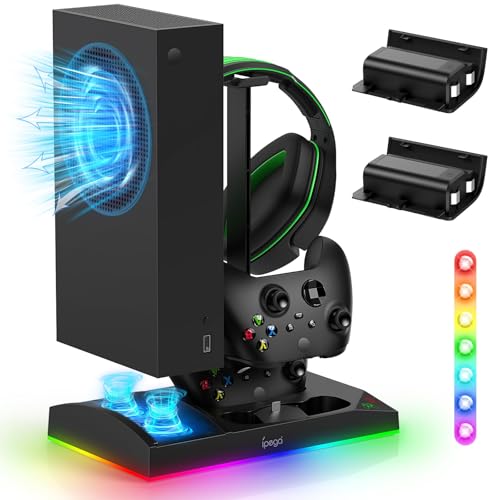
Same six-in-one job as the white stands, dressed in black to disappear behind a dark TV.
Six parts share one vertical stand: the console cradle, two built-in cooling fans, a dual Type-C charger (a two-slot charging dock) for two controllers, 15 lighting modes, a headphone bracket and two 1400mAh battery packs. The metal base is part of the cooling story — the maker claims it helps dissipate heat alongside the bottom-mounted fans. Those fans have their own power button, so you can switch airflow on or off at any moment.
A controller charges in 3 hours, with a green LED (status light) for charged or standby and red while charging. The dual charger only works with the included 1400mAh packs or an original Xbox Series S/X battery, so it is not a dock for third-party packs. Lighting runs 15 modes split into 7 monochrome effects and 8 running and blinking patterns. A long press of 3 seconds saves your current mode and shuts the glow off, and it comes back to the same preset when you power up again.
Owners lean on the charging side of this stand: two controllers filling together and holding a long charge between sessions is the takeaway, with the lighting and looks reinforcing it. Cooling gets a fairer split of opinion, so do not buy this purely as a temperature fix. Buy it for the tidy vertical stack and the dual charger, and let the fans do what they can.
The case for the black stand
- Two controllers charge together in 3 hours over USB Type-C.
- Light memory resumes your saved mode after a long-press shutoff.
- Fan power button gives instant on/off control.
- Metal base and anti-slip rubber bottom keep the stack stable.
Where it asks for patience
- Cooling results split, so clear the vents around the console.
- The charger only accepts the included packs or original Series S/X batteries.
- Extended USB port does not support data transmission.
The right stack for: a dark media setup that needs two pads charged and the console standing upright.
Not the stack for: anyone hoping the fans alone will drop console temperatures noticeably.
Know the Specs
RPM and what it does not tell you
RPM stands for revolutions per minute — how many times the blades spin in sixty seconds. A higher number generally moves more air, but it can also raise the noise a fan produces. The U/D unit lists 5300RPM, while the Gorixer charging stand lists 2,200 RPM on its dual fans. Blade count, duct shape and vent distance all change what an RPM figure means in your room, so weigh it alongside those specs.
USB power from the console
Every fan in this roundup draws 5V from the console’s own USB port, which removes the need for a wall adapter and keeps your power strip clear. The trade-off is behavioral: when the console is off or in standby, the USB feed cuts and the fan stops. One maker warns specifically against connecting a higher-voltage source, since that can damage the fan. Plan your setup around console power, not a separate brick.
Decibels and late-night gaming
A decibel is a unit for measuring sound. A quiet room sits in the low thirties, so a fan rated at 16-24 dB — as the ZAONOOL unit is — tends to blend into the background. Higher-RPM fans make more noise at full tilt. If you game with headphones, noise matters less; if the console shares a bedroom, it matters a lot. Drop the fan to its low speed setting for late-night sessions instead of running it flat out.
Dust covers and intake area
Dust is what quietly reduces a small console’s airflow over months, and a cover over the fan blades blocks debris from dropping into the shell. The Mcbazel filter model uses an ABS cover that blocks dust while letting heat through. The bottom-duct stand design takes a different approach: a gasket and air hole raise the intake area so the console can pull in more air. Both are answers to the same problem — keeping the path clear.
Common Questions
Will a Series S cooling fan fit my Series X or Xbox One?
Does the cooling fan run when the console is in standby?
Is a 5300RPM fan better than a 2,200RPM charging stand?
Do I need to install a dust filter on the fan?
Can the fan share power with a controller charger?
Will the charging dock work with my third-party controller battery?
How long does the bundled controller battery last?
Is a wall mount cooling fan hard to install?
Can I leave the RGB lighting on with the fan switched off?
The Bottom Line
Want one fan that fits flat or upright, gives you touch speed control, and adds controller charging plus a USB 3.0 data port without a wall adapter? Then the Mcbazel 3-Speed Cooling Fan is the pick to make. It holds the strongest combination of fit and function in this group. For a bedroom where fan noise undercuts a late session, the ZAONOOL white fan is the quieter way in, with its 16-24 dB rating (a measure of how loud it runs) and 8 lock points. And if two controllers and a headset are already cluttering your shelf, the Gorixer charging stand folds all of it into one vertical base with two 1400mAh batteries included. Match the mounting style to your shelf first, then pick the fan speed you can live with.
How we choose
We do not accept paid placement. Every pick is matched to a real buyer and a real use-case; we do not hands-on test units.
Sources
Specifications: manufacturer listings and product documentation. Review insights: verified customer reviews, as of November 2026. Pricing: not shown on this page (it changes often); check the current price via the retailer link.
As an Amazon Associate, Tactical Gear Guy earns from qualifying purchases. This does not affect which products we feature.