Specs are compiled from manufacturer listings and verified buyer reviews and can change over time — please confirm the key details on the product page before buying.
You bought the small white console to save space and money. Then the accessories started arriving, and half of them turned out to be plastic that does nothing except glow. The five picks below all do a real job: carry the console safely, keep air moving, stop stick drift, or keep two controllers charged. Sorting them took no more than matching each one to a physical problem you will actually have — travel, heat, dead batteries, or worn-out thumbsticks.
This guide is built by comparing the manufacturers’ published specifications and the patterns across verified customer reviews, so you get each pick’s real strengths and trade-offs instead of marketing spin.
The details that separate a keeper from a shelf-queen are cutout precision, fan airflow, and battery capacity in mAh — and every pick below is judged on exactly those. Here are the xbox series s accessories worth putting on your shelf.
Top Picks


How To Choose The Best Xbox Series S Accessories
Start with your console model. The Series S is the small all-digital white box, and its round black exhaust vent sits on one face. Cases sized for the Series X or Xbox One will not enclose it, and cooling fans built for those consoles will not clip on. Check the listing says Series S before anything else.
Fit beats features on a case
A hard travel case lives or dies on its interior mold. You want a precise cutout for the console body, separate slots for controllers, and a padded liner so the shell does not press on the vents. EVA (ethylene vinyl acetate, the dense foam-like material used in hard shells) takes knocks well when the corners are reinforced — that is what protects the console during a move or a road trip.
Batteries: read mAh and watt-hours, not adjectives
Controller power comes in two shapes. A battery pack rated in mAh (milliamp-hours) clips onto the back of the controller and feeds it directly. A dock battery rated in mWh (milliwatt-hours) is a stored-energy figure — 6200mWh is a common size. Both work, but only the dock route gives you a place to park the controller while it fills up. Check whether the listing supports official Xbox wireless controllers only; many do not touch third-party shells.
Cooling: you are buying airflow, not lights
A clip-on fan pulls heat away from the exhaust vent and needs two things to matter: adjustable speed and enough clearance so the console’s own vents stay open. Fans powered from the console’s USB 5V supply avoid an extra wall adapter. Noise is the honest trade-off — a fan rated at a low decibel level is easier to live with beside a TV, and RGB modes are a look, not a cooling spec.
Side-by-Side Comparison
| Model | Best For | Type | Key Spec | Power Source | Amazon |
|---|---|---|---|---|---|
| Mcbazel Hard Carrying Case★ Best Overall | Travel and moving the console | Hard EVA case | Holds console + 2 controllers | None (unpowered) | Amazon |
| Yuanhot Rechargeable Battery PackBattery Saver | Cutting the AA habit | Battery pack (2-pack) | 1400 mAh each | USB-C charging cable | Amazon |
| Mcbazel Cooling FanRGB Airflow | Adding airflow with RGB | Clip-on cooling fan | 3 speeds, 2 USB ports | Console USB 5V | Amazon |
| GameSir T7 Wired Controller | Drift-proof competitive play | Wired controller | Hall Effect sticks, 5M cycles | USB wired | Amazon |
| NinABXY Charger Station | Two controllers, one dock | Dual charging dock | 2x 6200 mWh batteries | USB-C dock | Amazon |
| DEPGI Auto-Speed Cooling Fan | Hands-off temperature control | Clip-on fan with display | 2000 RPM max, 25 dB | Console USB | Amazon |
| Klipdasse Cooling Stand | One tower for everything | Cooling + charging tower | 2 fans, 15 RGB modes | Integrated USB cable | Amazon |
| PowerA Advantage Fortnite Glow | Custom buttons on a licensed pad | Wired controller | Hall Effect sticks, 18 buttons | USB-C wired | Amazon |
| Xbox Storm Breaker Wireless Controller | Wireless play on every screen | Wireless controller | Up to 40 hours battery | 2x AA / USB-C | Amazon |
Detailed Reviews
1. Mcbazel Hard Carrying Case for Xbox Series S
Our pick — 4.5+★ from 450+ verified ratings; the strongest balance of quality and price.
The one accessory that makes the console genuinely portable, mold included.
If your Series S ever leaves the house, this is the first thing to buy. The interior is molded for the console alone, with a precise cutout, padded liners, and two dedicated controller slots plus a center cable compartment. The elastic cross strap holds the whole load steady, so nothing shifts when you pick the case up by the handle.
The shell is EVA — a dense, foam-like plastic that resists dents — and the upper and lower covers have anti-collision convex corners, so the console survives a bag-drop or a stacked trunk. Its footprint runs 12.2 by 7.87 by 5.71 inches, which is the kind of case that slides onto a shelf or into a car boot without needing its own corner of the room. The double zippers open wide for packing, and the soft thickened handle stays comfortable over a long walk through an airport. The whole thing weighs 496 g empty.
What wins people over is the design itself — the mold does exactly what it should. Fit is the next thing buyers notice, and it is precise enough that the console and controllers do not rattle. The honest catch: this is a Series S case and nothing else. Xbox One models and the Series X will not fit in it, so confirm your console before you buy.
What lands well
- Molded cutout made for the Series S body — no shifting in transit.
- Two controller slots plus a center cable compartment.
- EVA shell with reinforced anti-collision corners on both covers.
- Dust-resistant and cushioned for road trips, flights, and moves.
Where it stops short
- Will not fit an Xbox One or a Series X console.
- Carry capacity is the console, two pads, and cables — nothing loose.
Reach for this if: your Series S travels with you or gets moved between rooms. A 4.5+ star average across 400+ ratings makes it the best-reviewed case here.
Look elsewhere if: you only ever play at one desk — a stationary setup gets more from a stand.
2. Rechargeable Battery Pack for Xbox Series X/S, 2 Pack
Two packs, one cable, and a percentage number that kills the guessing game.
The LED readout is the reason to pick this pair over a plain battery kit. Each 1400 mAh pack shows its remaining charge as a percentage, so you can plan a swap instead of getting cut off mid-match when the controller drops from medium to zero without warning.
You get two packs in the box plus a 1.5 m (5 ft) USB-C cable, which means you can charge one pack directly while the other is in the controller — or run the cable to the pad while you play. Battery life is the thing buyers talk about most here, and it holds up: a full pack runs for days of light sessions rather than dying within an evening. The packs weigh 2.4 ounces each, so they add nothing noticeable to the controller’s balance.
The gripes are worth hearing before you commit. Fit and compatibility split opinion — some controllers snap the pack in cleanly while others feel looser than the stock cover. A few mention the pack not lasting as long as they hoped over months of use. The packs carry UL 2056, CE, RoHS, and FCC certification, with overcharge and overheat protection for overnight charging.
Why this earns a slot: the percentage display is a small feature that removes real annoyance — you stop gambling on how much play is left.
Keep in mind: it is for official Xbox wireless controllers, and the fit can be snug on some shells.
The short version: a practical two-pack for anyone tired of buying AA cells, with a readout that makes charging predictable.
Better choice elsewhere: if you want a dock to park controllers on, the NinABXY station below covers charging and storage together.
3. Mcbazel Cooling Fan for Xbox Series S
A clip-on fan that adds airflow and two USB ports without eating a wall socket.
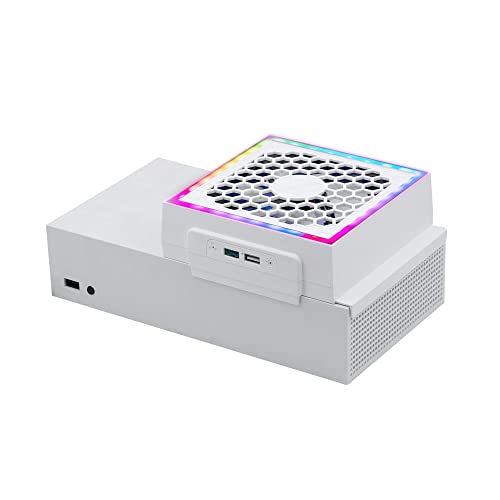
This fan draws hot air out of the Series S’s round exhaust vent and does it in either horizontal or vertical layouts, so you keep the console orientation you already like. A touch control cycles low, medium, and high, with orange, blue, and green lights marking the setting so you can read the speed at a glance.
Power comes from the console’s own USB 5V supply, which means no extra wall adapter to hunt for. There is a USB 2.0 port for charging a controller or phone and a separate USB 3.0 data port for a supported keyboard or controller adapter. The lighting is only part of the package, though — four single-color effects and three gradient modes run from their own button, so you can change the look or shut it off without touching fan speed. At 0.4 kg it is light enough to clip on and forget about.
It shares a footprint family with the Mcbazel case, but the two are not the same object — the case measures 12.2 by 7.87 by 5.71 inches, while this cooler sits at 6.5 by 5.83 by 5.83 inches. The honest catch: it needs the console to be on for power, and the fan and charging both stop in standby. A few owners wish the auto-off behavior were more flexible, so plan for manual control.
What the airflow buys you: the adjustable speed and the extra USB ports are the real value — the console is the power source and the fan is the add-on.
The honest limit: cooling only happens while the console runs, so standby time does not clear heat.
Worth it for: a Series S owner who wants an extra cold-air hand and a place to charge a pad without buying a separate hub.
Not the one if: you want lights and a charging dock in one tower — the Klipdasse stand covers that.
4. GameSir T7 Wired Controller with Hall Effect Joysticks

The wired pad you buy when one more thumbstick drift story is one too many.
Hall Effect sticks use magnets instead of physical contacts, so there is no friction surface to wear down. GameSir rates the sticks at up to 5 million cycles, and with no contact surface to wear, that is the number that keeps drift away. The analog triggers are precision-tuned with the same magnetic approach, so pulls stay consistent over a long session.
Inside there are four rumble motors — one in each grip and one in each trigger — giving you a kick to the hands rather than a buzz. The grips, bumpers, and triggers carry a laser-textured surface, so the pad stays where you put it even after a few hours. A 3.5 mm audio jack takes any headset, so microphone chat comes through the controller without a separate dongle. It weighs 0.44 kg.
Compare the weights if you care about plugging into a laptop bag: at 0.44 kg the GameSir is heavier than the Mcbazel fan at 0.4 kg. Both fit standard USB setups, but the controller is the one you will notice in a bag. The honest catch is the cord itself — it is wired-only, so you trade cable clutter for a zero-battery experience.
Why it holds up
- Hall Effect sticks rated up to 5 million cycles — drift protection built in.
- Four rumble motors across grips and triggers.
- Laser-textured grips, bumpers, and triggers for a stable hold.
- 3.5 mm jack for headsets without an adapter.
The trade-offs
- Wired only — no wireless pairing.
- Heavier than the compact fan accessory at 0.44 kg.
Best fit: competitive players who put a premium on stick accuracy and will not mind a cable.
Pass on this if: couch gaming without tethering matters more than drift resistance.
5. Upgraded Controller Charger Station
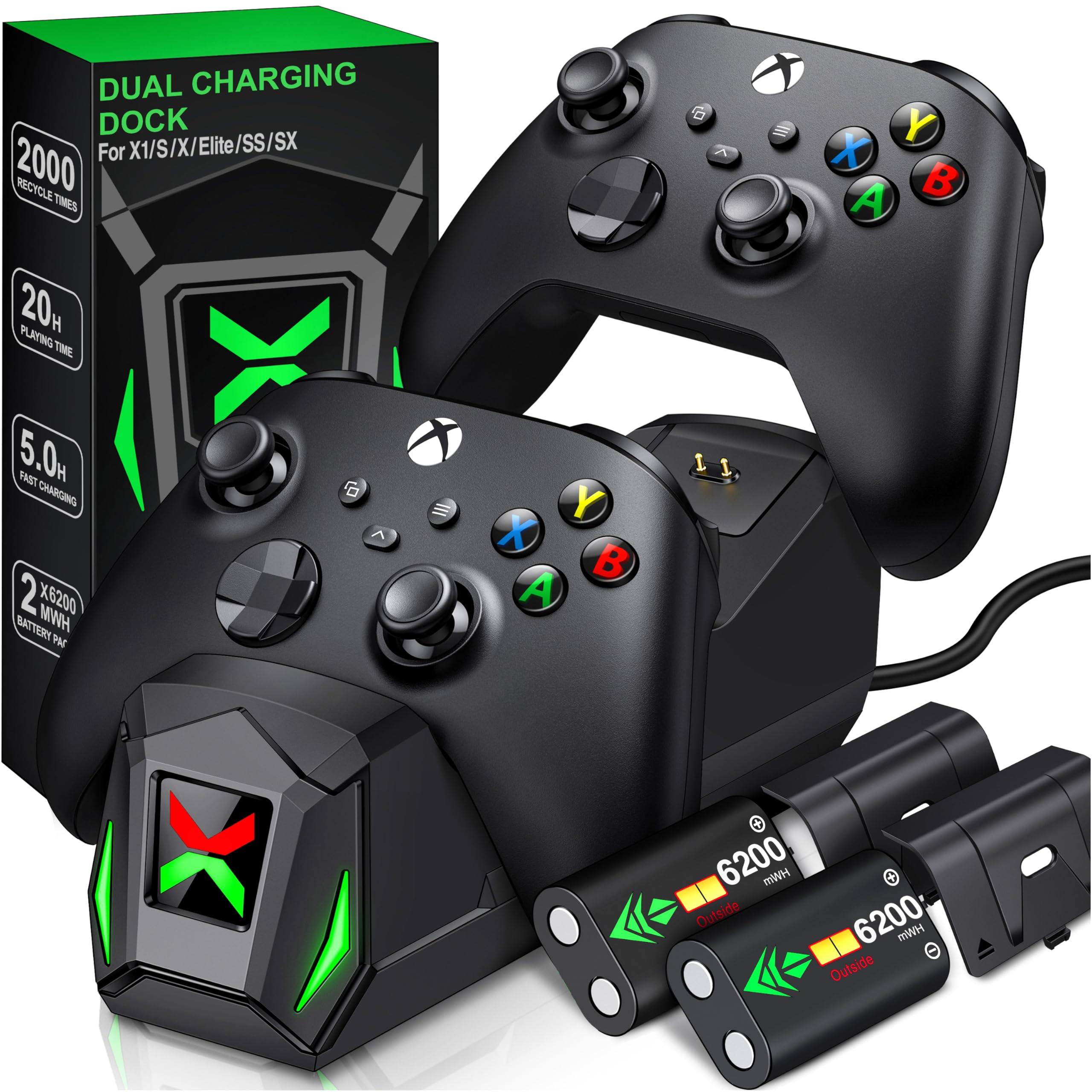
Drop two controllers on it and stop thinking about batteries for the week.
Two 6200 mWh packs ship in the box, along with battery back covers for both the older Xbox One pads and the Series X|S pads. The dock itself holds two controllers at once, so a pair of pads recharges side by side while you make dinner. NinABXY rates each 6200 mWh pack at 18 to 25 hours of play per fill, with a 4 to 5 hour recharge.
The charging status is the standout detail. Each side has its own soft ‘X’ shape indicator that glows red while charging and green when the pad is ready, so you can read both controllers without opening a menu. A built-in multi-protection system guards against overcharging, over-current, overheating, and short circuits, which matters if you leave pads docked overnight. The whole setup is a drop-and-go station rather than a cable tangle.
The honest catch: it is built for official Xbox wireless controllers only. Xbox 360, Xbox Elite Series 2, and third-party pads will not fit the dock or use the included back covers, so check your controllers first. Battery life is a mixed note — some buyers find it does not last as long as the rating in heavy use. The build quality is the thing that carries this dock, and it is the most-discussed positive for a reason.
The real win: two pads, two batteries, and a dock that makes overnight charging a habit instead of a chore.
Check before you buy: official controllers only — third-party shells simply do not fit.
Pick it for: a two-player household or a solo player who wants a spare pack always charged and ready.
Skip it for: Elite Series 2 controllers, which the dock does not support.
6. DEPGI Cooling Fan with Automatic Temperature-Based Speed

The fan that reads the console’s temperature and decides for you.
Most cooling fans make you pick a speed and live with it. This one adjusts automatically, running below 35°C/95°F before it decides the console needs help. The LED display screen shows the current temperature, which turns an invisible heat problem into a number you can watch.
If you would rather take the wheel, there are three manual speeds at 1500, 1750, and 2000 RPM, with the LED shifting green from 35-43°C, blue from 44-48°C, and red above 48°C so the setting is legible from across the room. Noise is rated at 25 dB, which is the kind of low hum that stays under the game audio. It weighs 12.32 ounces, runs from the console’s own power, and clips on with one cable — place it and go.
The honest trade-off is that a small clip-on fan cannot rewrite the console’s thermal budget. It helps move air; it will not turn a hot console cold, and a few owners find the noise more than expected at the top speed. Hold the fan button for 3 seconds to switch between auto and manual mode so you are not stuck in the wrong one.
Why the display wins: you can see the temperature, and the fan speed follows it — that is real convenience, not decoration.
Not a cure-all: treat the fan as ventilation support, not a fix for a console that cannot breathe.
Good call for: a player who wants cooling to run itself and does not want to flip through settings.
Think twice if: you want deeper airflow and adjustable speed from a touch control — the Mcbazel fan offers three speeds with its own buttons.
7. Klipdasse Cooling Stand & Charge Station

One white tower that cools, charges two pads, and holds your headset.
This is the accessory for a desk that has too many little boxes. The tower stands the Series S inside, runs two cooling fans with three adjustable speeds, charges two controllers on Type-C ports, and hangs a headset on the included hook. Two 1400 mAh rechargeable packs ship with it, so the charging dock works right from the start.
The lighting is the part you notice first: 15 RGB effects, split into 7 single colors and 8 running or blinking modes, with a memory function that returns to your last setting when you power back on. Two fans move air at three speeds you pick with an independent switch, and an LED indicator shows which level is active. A drained controller refills in about 2-3 hours on the Type-C dock, with red and green status lights per side.
The mixed note is cooling. Some buyers report it keeps the console cool; others find the airflow does not do much, and that is worth knowing before you expect a dramatic temperature drop. Charging compatibility is specific too — the dock only works with the included 1400 mAh batteries or official Series S/X batteries. For everything else, this is the cleanest all-in-one organizer on the list.
What one tower does
- Cools, charges two pads, and stores a headset in one footprint.
- 15 RGB light effects with memory of your last setting.
- Two 1400 mAh battery packs included.
- Dual charging ports with red/green status lights.
Where expectations bend
- Cooling results are split — real airflow, but not a dramatic chill.
- Dock only charges the included or official batteries, not third-party packs.
The target buyer: someone who wants one device to tidy the whole setup — lights, fans, charging, and a headset hook together.
Look elsewhere if: cooling is your only goal; a dedicated fan does that job more directly.
8. PowerA Advantage Wired Controller – Fortnite Glow
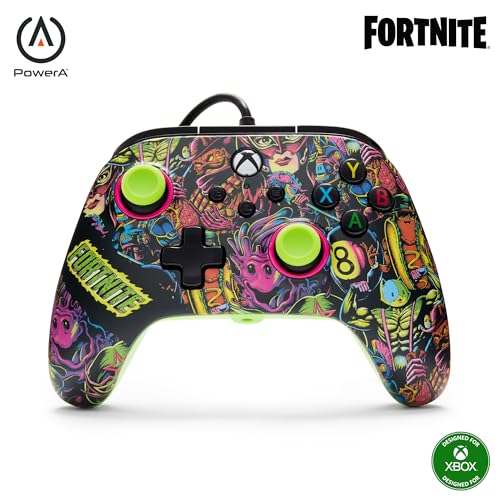
A licensed pad with two mappable buttons and a glow-in-the-dark shell.
What sets this apart from a plain wired controller is the control you get over the buttons. Two extra buttons on the back can be mapped on the fly, mid-game, with no menu dive. The triggers have three lock positions, so you can shorten the pull for faster actions in shooters or leave them long for racing.
The thumbsticks use Hall Effect modules that run on contact-free magnetic sensors, which is the same drift-resistance idea as the GameSir T7 above. PowerA rounds it out with dual rumble motors, impulse triggers that add a reactive kick, and a 3.5 mm stereo jack for any headset. It carries 18 buttons and includes a code for a bonus Moon Bounce emote. The shell glows in the dark, and it glows brighter under a UV light. It is an officially licensed Xbox pad backed by a 2-year limited warranty.
The honest catch is long-term durability. Some buyers find the pad holds up well, but others report it failing after a few weeks. That is a consistency question rather than a design flaw, and the 2-year warranty is the safety net if your unit is one of them. Testing and calibrating runs through the free PowerA Gamer HQ app.
The draw is control: mappable back buttons and three-way trigger locks give you the kind of tuning that usually costs more.
The caveat to weigh: a run of units has failed early for some buyers, so keep the warranty info handy.
Why you would choose it: a Fortnite fan who wants extra buttons, trigger travel control, and a licensed pad in one go.
Why you might not: you prefer a wireless pad and are willing to live without the back buttons.
9. Xbox Wireless Gaming Controller

The first-party pad in a special-edition shell, with the battery life to match.
Battery is the headline: up to 40 hours per pair of AAs, so most players swap cells roughly once a week. The Storm Breaker finish pairs classic grays and blacks with white accents, and the back cases carry rubberized grips for long sessions. Textured triggers and a hybrid D-pad round out the hardware.
Connectivity is where this earns its keep. It pairs over Xbox Wireless and Bluetooth, so it works on console, PC, mobile, handhelds, Smart TVs, and supported VR headsets through Xbox Cloud Gaming, and you can switch between devices quickly. There is also USB-C for direct wired play and a 3.5 mm jack for any headset. The dedicated Share button captures screenshots and clips, and button mapping runs through the Xbox Accessories app for per-game profiles. It has 19 buttons and weighs 14.08 ounces.
The honest catch is stick drift. A number of owners mention the character moving without input, which is the recurring weak point of this controller family across generations. The quality and functionality still carry the review pages, and the special-edition look and 40-hour battery keep it appealing. If drift resistance is your top priority, the Hall Effect pads above are the safer bet.
Where it leads: official ecosystem pairing and a battery figure that no wired pad can touch.
The known risk: stick drift has shown up for some owners, so treat it as a known trade-off, not a surprise.
Suits you if: you want first-party wireless across console, PC, and cloud in a standout colorway.
Better pick if: drift is your fear — a Hall Effect controller will last longer on that one metric.
Know the Specs
mAh vs mWh: reading battery numbers
mAh means milliamp-hours and tells you how much current a pack can deliver over an hour. mWh means milliwatt-hours and gives total stored energy, which is why dock batteries are often listed that way. Both tell you roughly how long you can play before a swap, but only if you read the rating on the same controller. A 1400 mAh pack and a 6200 mWh dock battery are both normal sizes for this console, just measured in different units.
Hall Effect sticks explained
Standard thumbsticks use physical contacts that can wear and send phantom movement to the game. Hall Effect sticks replace that contact with a magnetic sensor, so nothing rubs away and drift has far less chance to set in. GameSir rates its sticks at up to 5 million cycles, and PowerA uses the same contact-free approach. That makes them the pick for anyone whose old controller started moving on its own.
Cooling fans: what actually moves air
A clip-on fan only helps if it pulls heat off the exhaust vent and does not block the console’s own airflow. Look for adjustable speed, a power draw from the console’s USB 5V supply, and a stated noise level. RPM (revolutions per minute) tells you how fast the blades spin. The DEPGI fan tops out at 2000 RPM and rates 25 dB; the Mcbazel offers three speeds with touch control. Neither replaces giving the console clearance to breathe.
Case material and fit
Hard cases for this console are usually EVA — a firm, foam-like material that resists impact dents. Look for reinforced corners, a molded interior, and separate controller slots, because a loose case lets the console knock around inside. Spec the case to the Series S specifically; the Series X and Xbox One models are different shapes and will not fit the same mold. Capacity in cubic centimeters describes interior volume, not protection, so weigh it against how much you plan to carry.
Common Questions
Will a Series X case fit my Series S console?
Do Xbox Series S accessories need a separate power adapter?
How many hours of play does a 1400 mAh battery pack give me?
Do third-party controllers work with a charging dock?
Are Hall Effect sticks really better than standard thumbsticks?
Will the Series S cooling fan work in either orientation?
Does a wired controller still need charging?
How long does it take to charge a controller on a dock?
Do I need a cooling fan at all for a Series S?
The Bottom Line
For most setups, the xbox series s accessories that pays off first is the Mcbazel Hard Carrying Case, because it protects the console every time it moves and its precise mold keeps the load stable. If controller power is your real problem, pair the NinABXY Charger Station with a spare pack and stop thinking about batteries. And for anyone chasing a drift-free thumbstick, the GameSir T7 is the one that leads on that single spec. If you simply want to tidy a crowded desk, the Klipdasse stand turns cooling, charging, and lighting into one footprint.
How we choose
We do not accept paid placement. Every pick is matched to a real buyer and a real use-case; we do not hands-on test units.
Sources
Specifications: manufacturer listings and product documentation. Review insights: verified customer reviews, as of November 2026. Pricing: not shown on this page (it changes often); check the current price via the retailer link.
As an Amazon Associate, Tactical Gear Guy earns from qualifying purchases. This does not affect which products we feature.