Specs are compiled from manufacturer listings and verified buyer reviews and can change over time — please confirm the key details on the product page before buying.
If you want the short answer: buy the official Xbox Wireless Controller and skip the budget third-party pads. The budget pads save you money up front, then cost you in dead zones, dropped connections, and sticks that drift after a few months. The nine controllers below all pair with an Xbox One, Xbox One S, or Xbox One X — but only a few are worth your money.
This guide is built by comparing the manufacturers’ published specifications and the patterns across verified customer reviews, so you get each pick’s real strengths and trade-offs instead of marketing spin.
A pad with Hall-Effect sticks and a 40-hour battery looks identical on the shelf to one that drifts within months. This breakdown of the xbox one wireless controllers shows you exactly where that line falls.
Top Picks


How To Choose The Best Xbox One Wireless Controllers
Buying a controller for an Xbox One sounds simple until you realise three different connection types are floating around the market. Get that part wrong and the pad simply will not talk to your console. Get it right and you are just choosing between official and third-party builds. Here is what actually matters before you spend.
Connection type comes before everything else
Official Xbox pads use Xbox Wireless, the console’s own built-in radio link — no dongle, no pairing menu, just press the pair button. Bluetooth models add Windows and Android support, which is handy if you also game on a laptop. A 2.4GHz receiver model needs its little USB dongle plugged into the console, and it will not work without it. If you plan to move the pad between Xbox and PC, Xbox Wireless plus Bluetooth covers the most ground.
Stick technology decides how long the pad lasts
Standard analog sticks wear down at the contact point and eventually drift — the cursor creeps even when your thumb is off the stick. Hall-Effect sticks use magnets instead of physical contact, so there is nothing to wear out in the same way. They appear on the premium tier here and cost more, but they are the single biggest durability upgrade you can pay for.
Battery life and how you charge it
Built-in rechargeable cells are the norm on third-party pads, and the charging time and runtime vary wildly. An 800mAh cell running 8 to 10 hours per charge means near-daily topping up for a heavy player. A pad rated at 40 hours runs a week of evening sessions between charges. Also check the charging port: USB-C is the modern standard, while an older USB-B cable means one more cable you have to keep track of.
Side-by-Side Comparison
| Model | Best For | Battery / Power | Buttons | Extra Sticks & Triggers | Amazon |
|---|---|---|---|---|---|
| XBOX Wireless Gaming Controller★ Best Overall | Best overall for most players | Up to 40 hours | 19 | Textured triggers and bumpers, hybrid D-pad | Amazon |
| Xbox Wireless Controller – BlackThe Crowd Favorite | No-fuss official everyday pad | AA battery powered | 21 | Textured grip, Bluetooth | Amazon |
| Turtle Beach Rematch Wireless RGB Gaming ControllerStyle Meets Precision | Precision play and style | Built-in rechargeable, 10ft USB-C cable | 14 | Hall-Effect hair triggers with 3-way stops, TMR sticks | Amazon |
| Microsoft Xbox Core Wireless Controller 2-Pack Bundle | Two-player households | AA battery powered | — | Hybrid D-pad, textured triggers and bumpers | Amazon |
| Turtle Beach Victrix Pro BFG Reloaded | Competitive players who tweak everything | Up to 20-hour rechargeable battery | 10 | Hall-Effect sticks, 5-stop clutch triggers | Amazon |
| Microsoft XBOX One Wireless Controller, Blue (Renewed) | Budget-friendly official build | AA battery powered | 16 | Textured grip, Bluetooth | Amazon |
| SZDILONG Wireless 2.4GHz Controller | Budget pickup with RGB and turbo | 1000mAh, 10–14 hours | — | Hall-Effect sticks, programmable back buttons | Amazon |
| NINIFEI For Xbox One Controller | Entry-level backup pad | Battery powered (batteries not included) | 16 | 2.4G adapter, 3.5mm jack | Amazon |
| ADHJIE Xbox One Controller 2.4GHz | Cheapest wireless option | 800mAh, 8–10 hours | 10 | Double motor shock, 3.5mm jack | Amazon |
Detailed Reviews
1. XBOX Wireless Gaming Controller
Our pick — 4.5+★ from 700+ verified ratings; the strongest balance of quality and price.
The official pad that runs a full week of sessions before it asks for a cable.
Here is the number that ends the argument: up to 40 hours of battery life. That is the longest runtime in this entire lineup, and it sits alongside the ADHJIE pad’s 8 to 10 hours as a stark reminder of what paying for official hardware gets you. Charge it on a Sunday and you are still playing on Saturday without hunting for a cable.
The build is the other half of the story. You get 19 buttons, a hybrid D-pad, and textured triggers and bumpers, so the pad stays planted under your thumbs during a long session. The Ice Breaker finish is a mix of iced and frosted blues, and it is the kind of design people notice sitting on a shelf.
One pad reaches every screen in your house. Xbox Wireless (the console’s own wireless link) connects to the Xbox, Bluetooth covers PC and mobile, USB-C gives you straight plug-and-play, and Cloud Gaming works on handhelds, smart TVs, and supported VR headsets. You can remap buttons per game through the Xbox Accessories app, so your layout follows you into each title. The honest catch is durability: a handful of buyers report the pad failing around the five-month mark, so treat it as well-built, not indestructible. It is still the strongest all-round pick here, and the most popular one in this guide.
Where It Wins
- Up to 40 hours per charge — the biggest battery in this lineup
- 19 buttons, hybrid D-pad, textured triggers and rubberized grips
- Xbox Wireless, Bluetooth, USB-C, and Cloud Gaming in one pad
- Custom button mapping via the Xbox Accessories app
Worth Knowing
- Some owners mention the pad failing around five months of heavy use
- The special-edition finish is the most expensive style in this lineup
Go for it: You want one controller that covers console, PC, and cloud with zero fiddling and the longest battery here.
Think twice: You play hard every single day and want a pad with a replaceable-module or Hall-Effect build for the long haul.
2. Xbox Wireless Controller – Black
The plain black workhorse that most Xbox owners already have on their shelf.
Nothing about this pad is flashy, and that is exactly why it lands second. It is the official Microsoft build with Bluetooth for Windows 10 PCs and tablets, textured grip on the shell, and up to twice the wireless range of previous Xbox One controllers (tested using the Xbox One S console). The 21-button layout is the fullest in this lineup, and the 9.88-ounce body feels substantial without being heavy.
Functionality is the whole point here — it works, on the console and on the PC, and it keeps working. It also pairs with Xbox One X, Xbox One S, Xbox One, and Windows 10 without a dongle. If you have friends who already own official pads, yours will just fit into the group without a single workaround.
The trade-off is endurance. Official shells have a reputation for the bumpers and sticks going soft after a year or so of heavy use, and this model is no exception. Once that happens you are buying another pad, not repairing one. That said, for a normal player with a mixed library, this is the safest official buy on the page. Start here if you want zero surprises.
Why it earns the slot: A true official Microsoft pad with 21 buttons, Bluetooth, textured grip, and double the wireless range of older Xbox One models — it simply works across console and PC.
The wear note: Bumpers and sticks soften after a year of heavy use, and there is no replaceable stick module to swap out — so plan for a replacement rather than a repair.
Reach for this if: You want the standard Xbox pad that just works across console and PC without a dongle or an app.
Look elsewhere if: You need AAA-grade longevity from a single controller across years of daily play.
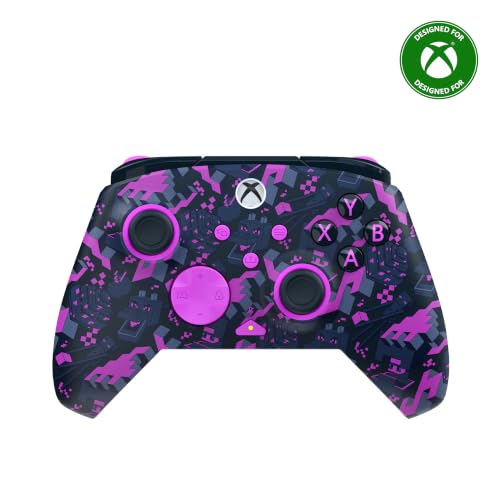
3. Turtle Beach Rematch Wireless RGB Gaming Controller
A Minecraft-styled pad that hides tournament-grade parts under the colour.
The parts list on this one reads like a competitive build. Ultra-sensitive TMR thumbsticks — the magnetic-sensor type that resists the drift that kills standard sticks — pair with Hall-Effect hair triggers that have 3-way trigger stops. Add two mappable quick-action back buttons, dual rumble motors with impulse triggers, and a 3.5mm audio jack with on-board audio controls, and you have a pad that is built to be tuned, not just held.
Connectivity is genuinely broad: Xbox Wireless through a USB transmitter for console and Windows 10/11 PCs, plus Bluetooth (BLE) for compatible Android mobile and streaming devices. The RGB lighting illuminates the Minecraft design, and it is officially licensed by Xbox and Mojang, so there is no compatibility gamble. A built-in rechargeable battery charges over the included 10ft USB-C play-and-charge cable.
Here is the honest part: this is a newer special edition with a small review footprint, and the flashy finish is a taste call. If you want a plain black pad instead of Minecraft RGB, the Xbox Wireless Controller – Black above is the pick. If you want Hall-Effect triggers and back buttons without stepping into the top price tier, this is a serious contender. It is the sharpest-feeling controller in this comparison for the money.
What Stands Out
- TMR thumbsticks and Hall-Effect hair triggers with 3-way stops
- Two mappable quick-action back buttons
- Xbox Wireless transmitter plus Bluetooth (BLE) for Android devices
- Officially licensed by Xbox and Mojang
What To Weigh
- The Minecraft RGB theme is not for everyone
- An add-on premium over the standard official pad
Best fit: Players who want Hall-Effect triggers and back paddles without paying the top-tier price.
Not for you: Anyone who wants a stealth-black pad or dislikes Minecraft-style styling on their shelf.
4. Xbox Core Wireless Controller 2-Pack

Two official Carbon Black pads in one box, so a second player never sits out.
Split this bundle across two players and the per-pad cost lands close to the budget tier — while you still get genuine Microsoft hardware. You get two Xbox Core Wireless Controllers in Carbon Black, each with a hybrid D-pad, textured grips on the triggers, bumpers, and back-case, and a USB-C port. Both work with Xbox Series X, Series S, Xbox One, Windows 10, Android, and iOS.
The practical bits matter here. The Share button captures and shares screenshots and recordings without a menu detour, and button mapping through the Xbox app lets each player set their own layout. Xbox Wireless handles the console, Bluetooth handles phones, tablets, and PC. If someone in the house plays on a Series S and someone else still uses an Xbox One, both pads are covered.
Two controllers in one box means you are trusting both units to be good. Customers note the occasional dead-on-arrival unit or a Series S pairing quirk — the kind of thing a replacement sorts out, not a design flaw. For a shared living room, the maths is simple: one box, two players, official controllers both times.
What you are buying: Two Microsoft Xbox Core Wireless Controllers in Carbon Black, each with a hybrid D-pad, textured triggers and bumpers, USB-C, and a Share button — covering Xbox Series X|S, Xbox One, Windows, Android, and iOS.
Plan for: The usual small-batch risk of a faulty unit in a multi-pack, so check both pads straight from the start.
Perfect for: Households with two players, or anyone who wants an official spare already charged and ready.
Overkill if: You play solo and would rather put the money into one higher-spec controller with back buttons.
5. Turtle Beach Victrix Pro BFG Reloaded

The controller you rebuild to suit your game, then adjust again for the next one.
Three customizable modules with built-in Hall-Effect technology let you physically swap the stick and button layout — standard, fightpad, or something in between. The 6-button fightpad module uses Kailh microswitches, the 5-stop Hall-Effect clutch triggers have a hair-trigger mode, and there are 4 mappable quick-action buttons. Add 11 interchangeable components, a module tool, and a carrying case, and this is a controller for people who treat their pad as hardware, not a consumable.
Under the hood you get wired and wireless connectivity with up to a 20-hour rechargeable battery, a built-in 3.5mm audio jack, and a lifetime subscription to Dolby Atmos. The Victrix Control Hub companion app runs on Xbox and PC for deeper tuning. It is officially licensed by Xbox, so the console side is clean.
Here is the honest trade-off. This is the most complex controller in this lineup, and complexity means a learning curve. The fightpad module’s extra buttons sit where a standard six-button layout does, and some players find that gets in the way of regular play. It is also a premium-tier purchase, so it only makes sense if you actually use the modularity. If you will never swap a module, the Rematch above gets you Hall-Effect triggers and back buttons for less. Buy it for the swappable modules and 5-stop clutch triggers, not because it tops the price list.
The Modular Advantage
- 3 customizable modules with built-in Hall-Effect technology
- 5-stop Hall-Effect clutch triggers with hair-trigger mode
- 4 mappable quick-action buttons and 11 interchangeable components
- Up to 20-hour rechargeable battery and lifetime Dolby Atmos
The Real Cost
- The fightpad module’s extra buttons can get in the way for some players
- Premium-tier spend that only pays off if you use the modularity
Buy this when: You play competitive games and want Hall-Effect sticks plus swappable layouts under your own hands.
Leave it when: You want a simple pad that feels right from the start and never needs a module tool.
6. Microsoft XBOX One Wireless Controller, Blue (Renewed)

An official Microsoft pad at a budget-friendly tier, in a solid blue finish.
Certified Refurbished means this unit was tested and certified to look and work like new, then repackaged with all relevant accessories and a minimum 90-day warranty. The 90-day window is the thing to note: it covers you against a dead-on-arrival unit, but it is shorter than a new-pad warranty. The blue finish and textured grip look genuinely good, and the controller pairs with Xbox One X, Xbox One S, Xbox One, and Windows 10 over Bluetooth.
The wireless range is quoted at up to twice that of previous Xbox One controllers (tested using the Xbox One S console), which matters more than you would think if your console sits across the room. The 16-button layout keeps the standard Xbox arrangement. It weighs 9.6 ounces, making it the lightest official pad in this lineup — a small but real comfort factor over a three-hour session.
Two things to check before you commit: the refurb inspector’s ears and nose. A small number of refurb units arrive with sticky or squeaky buttons, and occasionally some dust in the seams. That is the nature of a refurbished market, not a knock on the model. Buy it as a budget official pad for a second setup or a spare, and it rewards you. Expect a brand-new finish and you may be disappointed.
The value maths: Genuine Microsoft hardware with textured grip, Bluetooth, and double the wireless range of older pads, at a budget-friendly tier because it is Certified Refurbished.
Read the fine print: A minimum 90-day warranty covers defects, and a small number of units arrive with sticky buttons or dust in the seams — inspect it in the first week.
Worth choosing: You want official Microsoft build quality on a tight budget and do not mind a refurbished unit or a 90-day warranty.
Step up instead: You need a full new-product warranty or guaranteed clean buttons from day one.
7. SZDILONG Wireless 2.4GHz Controller

RGB lights, turbo fire, and back buttons for a budget-tier price.
The battery is the headline: a built-in 1000mAh lithium cell that charges over Type-C in 2 to 3 hours and runs 10 to 14 hours. Compare that to the ADHJIE pad’s 800mAh and you can see where the extra capacity goes. You also get 4 RGB lighting modes across 7 colours, a circle-running marquee effect, and a breathing pattern on the joysticks — this is a pad that wants to be seen.
On the play side, the ML and MR buttons on the back can map the basic A/B/X/Y/LB/RB/L3/R3/D-pad functions, giving you up to 1-16 combination keys. Turbo can be set to auto on any of the face and shoulder buttons, and cleared again by pressing the same combination a third time. The 360° omnidirectional joystick with rapid rebound is paired with Hall-Effect sticks, and there is a 3.5mm stereo jack for headphones and a mic. It reaches about 33 feet wirelessly over its 2.4GHz adapter.
The important caveat: this controller needs its 2.4GHz receiver plugged in — there is no Bluetooth, and it does not work with TVs or phones. If your console’s USB port is already busy or you play on a smart TV, that kills it. Several owners also report the pad stops working correctly over time, so treat it as a budget companion rather than your only controller. For a second setup or a backup in a bedroom, it punches above its tier.
Cheap Thrills That Deliver
- 1000mAh battery — 2-3 hours charge for 10-14 hours of play
- RGB lighting with 4 modes and 7 colours
- Turbo, programmable ML/MR back buttons, and Hall-Effect sticks
- 3.5mm stereo jack for headset audio
Read Before You Buy
- No Bluetooth — needs the 2.4GHz receiver, and will not work with TVs or phones
- Some units stop working correctly over time
Suits you if: You want RGB, turbo, and back buttons on a budget and always play on a console with a free USB port.
Not your pad: You play on a TV or phone, or need one controller you can depend on for years.
8. NINIFEI For Xbox One Controller

A red starter pad for a spare seat, sold on a budget-friendly tier.
The 2.4G wireless adapter pairs quickly and switches between Xbox One X|S, Xbox Series X|S, Xbox One, and PC Windows. With the 16-button layout, a 3.5mm audio headset jack, and USB-C plug-and-play to console or PC, the feature list looks complete on paper. Tactile feedback and rumble are part of the pitch, and the red shell makes it easy to spot in a crowded living room.
Setup needs a small ritual. You put batteries in (not included), press the reset button on the back of the controller, then re-pair with the charger and console. If it still does not respond, the fallback is to plug the receiver into the console, press the receiver button and the HOME button together, and wait for the light to flash. This is the sort of pad you keep a printed note for, not a pad you hand to a guest and walk away from.
Connection stability is the recurring concern. Some units will not connect to the device at all, and others disconnect mid-session — which is the hardest kind of fault to defend because it interrupts the game. If you want a reliable daily driver, the official pads at the top of this list are the safer buy. If you need a second pad for a friend who visits occasionally and you can live with the pairing steps, it is a budget-friendly option worth considering.
The appeal: A 16-button wireless pad with a 3.5mm headset jack, USB-C, and a 2.4G adapter that reaches Xbox One, Series X|S, and PC.
The reality check: Batteries are not included, pairing takes a specific sequence, and connection dropouts are the most common complaint — hard to forgive in a main controller.
Consider it for: A cheap second controller for the occasional guest player, where a quick re-pair is no big deal.
Skip it for: Your only controller — you want plug-and-play reliability every single session.
9. ADHJIE Xbox One Controller, 2.4GHz Wireless Xbox Controller

The lowest-cost way into a wireless Xbox pad, with a headset jack built in.
An 800mAh built-in rechargeable battery means 2 hours of charging gives you roughly 8 to 10 hours of play — and no more hunting for AA batteries. The 2.4GHz receiver connects within 30 feet once you plug it into the console and wait about 3 seconds for the light to stay on. Double motor shock provides the rumble, and the ergonomic shape is built for palm comfort over long sessions.
Compatibility is decent for the tier: Xbox One, Xbox One X/S, Xbox One Series X/S, and PC on Windows 10. The 3.5mm headphone jack lets you chat with friends mid-game. At 10 buttons and 0.28kg, it is the simplest and lightest pad here — but that also means fewer inputs than the 19-button official model above.
One detail to catch before you order: the included cable is USB-B, not USB-C, so keep track of it. The bigger caution is reliability. Connection dropouts are the most frequent complaint, especially when a headset is plugged into the 3.5mm jack, and some units stop working right away. The battery life lands well below the official pad’s 40-hour rating. Buy it as a budget-friendly backup that hits the essentials, not as the controller you rely on every night.
What You Get
- 800mAh rechargeable battery — 2 hours of charging for 8-10 hours of play
- 2.4GHz wireless up to 30ft after a roughly 3-second pairing
- 3.5mm headphone jack for in-game chat
- Double motor shock and an ergonomic palm shape
The Friction Points
- Drops connection most often when a headset is plugged in
- Included cable is USB-B, not USB-C
- 8-10 hour battery is the shortest runtime of the official-free pads here
Good match: You need a headset jack, wireless play, and the lowest entry cost, and you accept the risk of a dropped link now and then.
Better off spending more: You play ranked or long sessions where a disconnect costs you a match.
Know the Specs
Hall-Effect vs Standard Sticks
Standard analog sticks use physical contact inside the stick module, and over months of use that contact wears down until the pad drifts — the cursor creeps on its own. Hall-Effect sticks use magnetic sensing with no physical contact point to wear out, so they resist drift for longer. That is why the two Turtle Beach controllers and the SZDILONG pad carry Hall-Effect sticks, and it is the main reason they cost more than a basic pad. If you play hundreds of hours a year, this is the spec worth paying for.
Battery Capacity and Runtime
Capacity is measured in mAh (milliamp-hours) — a bigger number means a bigger tank, but runtime also depends on how efficiently the pad uses it. Two built-in pads here show the difference clearly: an 800mAh cell runs 8 to 10 hours per charge, while a 1000mAh cell runs 10 to 14 hours. A pad without an internal battery, like the official Xbox Wireless Controller, runs on AA cells you swap yourself. Consider the charging cable: USB-C is the standard, and a 10ft play-and-charge cable lets you keep playing during a top-up.
2.4GHz Receivers vs Bluetooth
A 2.4GHz receiver is a small USB dongle that plugs into the console and creates a dedicated wireless link — reliable, but it occupies a port and the controller will not work without it. Bluetooth is the built-in radio standard that lets a pad pair with a PC, tablet, or phone, and Xbox Wireless is the console’s own version of a direct link. A pad that covers all three is the most flexible choice if you switch between devices.
Button Count and Mapping
Button count tells you how much input flexibility the pad packs — a 10-button controller is a basic layout, while 19 or 21 buttons include shoulder buttons, sticks, and D-pad directionals counted individually. Beyond the count, check whether the pad supports mappable buttons, so you can reprogram inputs per game. The top-tier Victrix adds 4 mappable quick-action buttons and interchangeable modules on top of the standard layout.
Common Questions
Will a wireless Xbox One controller work on an Xbox Series S or Series X?
Do these controllers come with built-in batteries or need AA batteries?
What is stick drift and how do I avoid it?
Can I use these controllers on PC as well as the console?
Is a refurbished Xbox controller worth buying over a cheap new one?
How long does a wireless Xbox controller battery last per charge?
Do I need to use the little USB dongle that comes with some controllers?
Can I plug headphones into these controllers for game chat?
Are the cheaper third-party pads as reliable as the official Xbox controllers?
What is the difference between the Turtle Beach Rematch and the Victrix Pro BFG?
The Bottom Line
For most players, the winner is the XBOX Wireless Gaming Controller | Ice Breaker Special Edition. One official pad covers console, PC, and cloud gaming, with up to 40 hours of battery life, 19 buttons, and Xbox Wireless plus Bluetooth plus USB-C. If you want a Hall-Effect build (magnetic sticks that resist drift) with back buttons without the top-tier spend, the Turtle Beach Rematch leads on triggers. And if reliability across two players is the goal, the 2-Pack bundle covers a shared living room in one box. Whichever you choose, confirm it uses Xbox Wireless or a 2.4GHz receiver your console accepts — a Bluetooth-only pad will not pair with an Xbox One.
How we choose
We do not accept paid placement. Every pick is matched to a real buyer and a real use-case; we do not hands-on test units.
Sources
Specifications: manufacturer listings and product documentation. Review insights: verified customer reviews, as of November 2026. Pricing: not shown on this page (it changes often); check the current price via the retailer link.
As an Amazon Associate, Tactical Gear Guy earns from qualifying purchases. This does not affect which products we feature.