Specs are compiled from manufacturer listings and verified buyer reviews and can change over time — please confirm the key details on the product page before buying.
If your Xbox One S is running loud, dropping WiFi, or your controller’s bumpers have gone soft, you probably do not need a new console. You need one small part and a screwdriver. The tricky bit is that “Xbox One S” parts are not interchangeable with Xbox One, One X, or Series S parts — buy the wrong board or power brick and it simply will not fit or work. This guide sorts the reliable Xbox One S repair parts from the near-misses, so you buy the piece that matches your fault and your skill level.
This guide is built by comparing the manufacturers’ published specifications and the patterns across verified customer reviews, so you get each pick’s real strengths and trade-offs instead of marketing spin.
Some fixes are a five-minute screwdriver job; others need a soldering iron and a steady hand. Each pick below is labelled by how much work it demands, so you can match the part to your own comfort level before you order. Here are the Xbox One S Parts worth your money, grouped by what actually breaks first.
Top Picks

How To Choose The Best Xbox One S Parts
The most common mistake is assuming “Xbox One” means one machine. In practice, Microsoft shipped several models with different internal layouts, and a part built for one will not seat in another. Before you order anything, look at the model number — the Xbox One S is model 1681, and many listings name it explicitly. If a listing says “Slim,” that is the same console, so don’t let the wording throw you.
Match the part to the failure, not the console
Different faults need different parts, and mixing them up wastes money. A loud, hot console points to the internal cooling fan. A console that will not power on or shuts down on its own points to the internal power supply. Dropping WiFi or Bluetooth points to the wireless card. On the controller side, a bumper that only registers when you press hard is a tactile switch; a stick that drifts is a thumbstick or joystick module. Name the symptom first, then buy the part that fixes exactly that.
Know your skill level before you buy
Some of these repairs are screwdriver-only: swapping a fan, a power supply, or a WiFi board means opening the shell and unplugging a connector. Controller bumper switches are a different job entirely — those contacts are soldered to the board, so a basic soldering iron and some practice are required. Be honest with yourself about that. If you have never soldered, a pro tech is the safer route for the switch and joystick kits, while the fan and power supply jobs stay within reach of a careful first-timer.
Side-by-Side Comparison
| Model | Best For | Part Type | Fits | Skill Level | Amazon |
|---|---|---|---|---|---|
| SOSS GAMING Tactile Switch Kit★ Best Overall | Soft or dead RB/LB bumpers | Bumper switches (10 pack) | Base, S, X, Elite 1 & 2 | Soldering required | Amazon |
| iParto 10 Pack Switch KitBest Value | Full toolkit in one box | Bumper switches (10 pack) | One/One X/One S, Elite, Series X/S | Soldering required | Amazon |
| SOSS GAMING Analog JoysticksTop Performer | Stick drift and dead zones | Joystick modules (6 pack) | All Xbox One controllers except Elite 2 | Soldering required | Amazon |
| LeHang WiFi Board 1683 | Dead WiFi or Bluetooth | Wireless card module | Xbox One S (Slim) only | Screwdriver swap | Amazon |
| Benseager Controller Kit (1708) | Worn sticks, buttons, jack | Mixed button & thumbstick kit | Controller model 1708 | Screwdriver swap | Amazon |
| Gorliskl Cooling Fan | Loud or overheating console | Internal cooling fan | Xbox One S console | Screwdriver swap | Amazon |
| YWLRONG Internal Power Supply | No power or sudden shutdowns | Internal PSU | Xbox One S (PA-1131-13MX) | Tools included | Amazon |
| chenlan Internal Power Supply | Quiet PSU replacement | Internal PSU (reclaimed) | Xbox One S Slim 1681 | Screwdriver swap | Amazon |
| elxjar 220W Power Supply | International voltage flexibility | Internal PSU | Xbox One S 1681 | Screwdriver swap | Amazon |
Detailed Reviews
1. SOSS GAMING Tactile Switch Repair Kit (10 Pack)
Our pick — 4.5+★ from 550+ verified ratings; the strongest balance of quality and price.
It earns the top spot by targeting the RB/LB tactile switch that fails first on Xbox pads.
Bumper buttons are the most-abused part of an Xbox controller. RB and LB take the brunt of quick triggers, so they are the first to go soft, register only on a hard press, or quit entirely. This kit’s job is precise and honest: ten replacement tactile switches, which is enough to fix up to five controllers if you are doing multiple repairs. That 10-switch count matters because each controller needs two switches — one for RB, one for LB — so you are not ordering one fix at a time.
What actually arrives in the box is the reason it earns the top spot. You get the switches plus a T8 security Torx screwdriver, a T6 Torx screwdriver, and a prying tool — the three tools you need to open a controller shell and pry the bumper free. It fits any Xbox Original controller generation, including the Base, S, X, Elite Series 1, and Elite Series 2, so you are not locked to one model. That Base-to-Elite-2 fit is why multi-controller owners reach for this kit.
Here is the honest trade-off: this is a soldering job, not a plug-in swap. The switches are soldered to the board, so you will need basic soldering skills, a soldering iron, and a little patience to remove the old switch and seat the new one. If the word “solder” makes you nervous, price a local repair shop against the cost of a whole new controller before you commit. For anyone comfortable with a hot iron, ten switches and three tools for one price is the draw.
Where this kit lands its punch
- Ten switches means up to five controllers fixed per pack.
- Ships with T8, T6, and prying tools, so no extra hardware shopping.
- Covers Base, S, X, Elite Series 1, and Elite Series 2 — the widest compatibility of any bumper kit here.
- Purpose-built for the exact failure (weak or dead RB/LB) that buyers hit most.
Before you grab the iron
- Soldering skills and tools required — not a simple snap-in part.
- No controller shell or extra tools beyond the three included.
Made for: Anyone with a soft or dead bumper on an Xbox One S pad who can solder, or is willing to learn before a single repair.
Think hard if: You have never held a soldering iron — this repair goes beyond a screwdriver swap, so a pro is the safer call.
2. iParto 10 Pack Tactile Switch Repair Kit
The budget bumper kit that throws in the precision tools and a cleaning cloth.
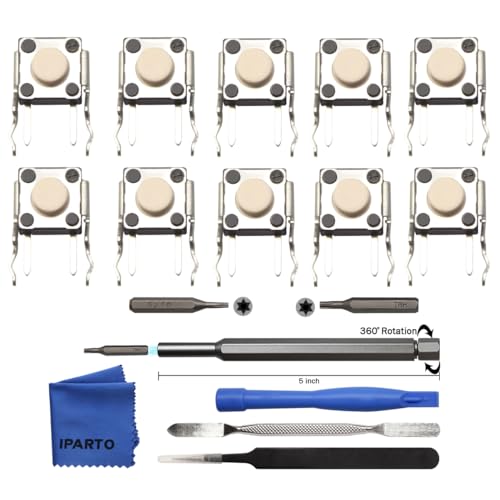
If you already own a soldering iron but need every other gadget to open a controller, this is the smarter buy. The iParto box carries ten tactile switches plus a metal 5-inch bit driver, two precision bits (T8 and T6), metal tweezers, a spudger, a double-ended metal spudger, and a microfiber cleaning cloth. The tweezers and spudgers are the parts people forget — they are what stop you chewing up the plastic seams when you pry a shell apart.
Compatibility runs wide: Xbox One, One X, One S, Elite Series 1 and 2, and even Series X and Series S controllers. The switches are inspected before packaging, and the whole kit ships in a strong outer casing so the small bits arrive intact. There is also a two-year manufacturer warranty backing it, which is unusual for a repair part at this level. The trade-off is that a soldering iron is still required, and the installation manual is not included — you are pointed to video guides instead.
Compared with the SOSS kit above, this one trades the same 10-switch count for a fuller tool set — you get tweezers and a cloth the other leaves out. Where it falls short is track record: with a smaller pool of buyer feedback, it is the newer, less-proven option. The switches themselves do the same job. If you want maximum tooling for the money, this is the value play.
The tooling angle: You get a driver, T8 and T6 bits, two spudgers, tweezers, and a cleaning cloth — a more complete opener kit than the SOSS pack, which stops at three tools.
The catch: No printed instructions and less buyer history than the top pick, so lean on video guides and confirm your controller model before soldering.
Great fit for: The tinkerer who owns a soldering iron and wants one box with every opener and bit inside.
Look elsewhere if: You want a long review record before trusting a part — the top pick has more history behind it.
3. SOSS GAMING Genuine Analog Joysticks Repair Kit (6 Pack)
Stick drift is the slow killer of controllers — this kit swaps the module, not the pad.
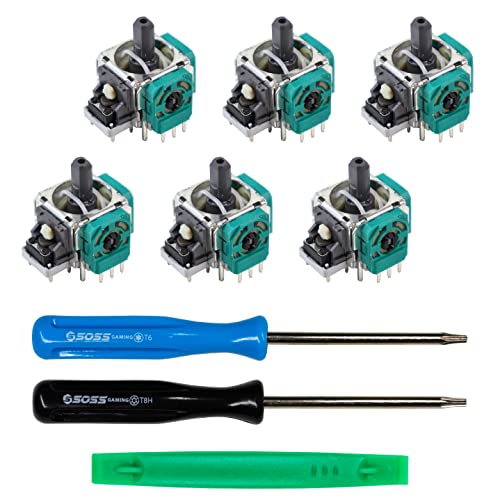
Few controller faults are more maddening than drift: your character creeps when you are not touching the stick, or the aim snaps sideways in a blind spot. This SOSS kit is the specific answer to that, and it does more than fix drift. The listing names creeping, stuttering, blind spots, dead zones, no click, non-centered sticks, and broken or loose joysticks among the faults it addresses. You get six joystick modules — enough to redo three controllers, since each pad carries two sticks.
It fits all Xbox One controllers but stops short of the Elite Series 2, so check your pad before ordering. Quality earns the most praise from buyers, who consistently report the modules feel like the right part rather than a cheap imitation, and functionality runs a close second in what they talk about. The kit also links to a full tutorial video, which is genuinely useful because, like the bumper switches, these modules are soldered in place.
Now the honest caveat, and it is the one to weigh: drift comes back for some buyers after time, which is a common reality with aftermarket sticks. Value draws split opinions too — some feel it pays for itself against a new controller, others expect more longevity. Neither turns this into a bad part; it is the nature of getting stick modules replaced without buying a whole new pad. Plan the soldering job carefully and it does the work.
What earns its keep
- Six joystick modules — enough for three controllers.
- Targets drift, creeping, dead zones, and loose sticks in one kit.
- Comes with a link to a full repair tutorial video.
The fair warnings
- Soldering required to swap the modules.
- Not compatible with the Elite Series 2 controller.
- Drift can reappear over time on some aftermarket sticks.
Reach for this if: Your Xbox One S pad drifts or has a dead zone and you can handle a soldered module swap.
Not the pick for: Elite Series 2 owners, since this kit leaves that controller out.
4. LeHang Bluetooth WiFi Board Wireless Card 1683 Module

When your console drops WiFi or Bluetooth, this tiny board brings it back.
Losing your wireless connection mid-game usually means one board inside the console has died, and replacing that board is far cheaper than a new machine. This LeHang module is the WiFi and Bluetooth card specifically for the Xbox One S Slim, part 1683. It handles Bluetooth data at 3 megabits per second and weighs 0.02 kg — a tiny card that slots into the console’s wireless connector. That 0.02 kg heft is a hint of how delicate it is: this part is fragile and should be handled with care.
The compatibility warning matters more than anything else here. This board fits the Xbox One S Slim only — it will not fit an Xbox Series S, so confirm your model before you buy. Compared with the cooling fan above, it is dramatically lighter (0.02 kg against the fan’s 0.1 kg), because it is a small circuit board rather than a fan assembly. No instructions come in the box, and the manufacturer suggests a professional technician handle the install if you are not confident opening a console.
For a careful DIYer, though, this is a straightforward board swap — no soldering, just careful connector work once the shell is open. It is the fix that turns “cannot connect” back into a normal wireless console. Confirm it is the One S Slim and handle the fragile board gently, and it restores wireless for far less than a new console.
What it solves: A dead WiFi or Bluetooth card in the Xbox One S Slim, restored with a single board swap instead of a new console.
The catch: Fragile and Slim-only — it will not fit a Series S, and no printed instructions are included, so verify your model and handle it gently.
Best for: Xbox One S Slim owners whose console has dropped its wireless connection and who are comfortable opening the shell.
Skip if: You have a Series S or a non-Slim model — this board is built for the Slim only.
5. Benseager Controller Repair Kit (Model 1708)

One box that redoes the whole controller face — bumpers, sticks, D-pad, buttons, jack.
Not every controller failure is a single switch. Sometimes the sticks have worn smooth, the D-pad has gone mushy, and the buttons feel tired all at once. That is the situation this Benseager kit is built for: a full cosmetic and functional rebuild of the Xbox One controller (model 1708). Inside are 2 LB/RB bumpers, 2 D-pads, 4 thumbsticks, 4 three-dimensional analog joysticks, 4 ABXY buttons, and 2 headphone jacks — plus a T8, a T6, and a prying tool for the job.
The material is where buyers notice an upgrade. The thumbsticks have a rubberized finish on the top and side, so your fingers stop sliding off the stick during fast play — a small change that adds grip and a touch more precision. Everything is made of premium ABS plastic, wear-resistant and shaped to fit the 1708 controller without modification. The parts earn steady praise for quality and reliability, the two things you most want from a rebuild kit.
Spend a moment on the honest side: value draws mixed reactions, with some feeling it is a bargain and others expecting more for the number of parts. It is also locked to the model 1708 controller, so it will not dress up every pad in the house. As the most complete face-level kit here, though, it saves you buying bumpers, sticks, and buttons separately — the one-box rebuild.
The value read: Buying bumpers, D-pads, sticks, buttons, and jacks in one kit spares you four or five separate orders — the draw for anyone with a pad that has worn across the board.
Who it is not for: Elite or non-1708 controllers, since these parts are shaped for the model 1708 shell.
Pick it when: Your controller has aged across several parts and you want to refresh the whole face in one go.
Pass if: You own a controller that is not the model 1708 — these pieces will not fit.
6. Gorliskl Replacement Internal Cooling Fan for Xbox One S

The fan that quiets a groaning console — and runs noticeably cooler than the original.
A fan that roars or fails to keep the console cool is a common Xbox One S complaint, and this replacement is the direct answer. The headline number is the noise rating: 50 dB, which keeps it quiet in a living room rather than whining through a headset. It is built for the Xbox One S console, swapping out a faulty, cracked, or broken internal fan. A 4-pin power connector and air cooling method round out the spec sheet.
The install kit is what makes this an approachable job. It ships with professional T8 and T10 screwdrivers plus a heatsink paste, so you have the opening tools and the thermal paste in one box. Buyers consistently say it is easy to fit and that it runs quietly — the noise level and easy installation are two of the most-praised aspects. Cooling performance gets solid marks too, with the console staying cool under load. Compared with the tiny WiFi card above, this fan carries real heft at 0.1 kg, because it is a full motorized assembly.
One point to weigh: fit draws some split opinions, so double-check you have the Xbox One S console and not a Series S or One X before ordering. For the right machine, this is a screwdriver-level swap that solves both the noise and the heat. For a loud or overheating One S, a fresh fan plus new heatsink paste addresses both noise and heat in one swap.
Why it cools the room down
- 50 dB rating keeps noise low through the fan’s own motor.
- Ships with T8 and T10 screwdrivers and heatsink paste.
- Buyers find it easy to fit and cool-running under load.
Check before you order
- Fit draws mixed feedback — confirm your console is the Xbox One S.
- It is a fan swap, so the shell has to come open.
Suits you if: Your Xbox One S runs loud or hot and you want the tools and paste bundled in.
Double-check first: Your model — this is built for the One S console specifically, so non-S consoles are out.
7. YWLRONG Internal Power Supply for Xbox One S (PA-1131-13MX)

For the console that will not turn on or shuts down on its own — the power brick inside.
When an Xbox One S refuses to power up, shuts itself off, flashes an odd power light, or stops providing power, the internal power supply is the usual suspect. This YWLRONG replacement targets exactly those faults. It is a 10 A internal unit rated for 100 to 240 volts of alternating current input, so it works across regions. The form factor is built specifically for the Xbox One S, seating where the original supply sat.
What sets this one apart is the included kit. It arrives with a fresh power cord and a set of repair tools, so you can replace the old cable at the same time and open the console without hunting for a screwdriver. The housing is made of ABS plastic, chosen for durability against wear. Note that the unit is air-cooled and designed as an internal part — this is a job for the console, not a desk accessory.
The honest word from the listing itself: if you have no installation experience, a professional is the recommended route for swapping an internal power supply. This is a mains-powered component, so a careful hand and real confidence matter. It does not carry a long review history yet, which is the main thing holding it back against the established options below — but the bundled tools and cable make it a value-forward pick for the confident DIYer.
What is included: A replacement power supply, a new power cord, and repair tools in one box — a fuller package than a bare PSU.
The honest caveat: A mains-powered internal swap with a short track record; if you are new to console work, a professional is the safer choice.
Good match for: A handy owner whose Xbox One S will not power on and who wants the tools and cable included.
Think again if: You have never opened a console — an internal mains supply is not the first repair to learn on.
8. chenlan Replacement Internal Power Supply for Xbox One S Slim 1681

A low-noise internal supply built for every Slim 1681 made across its run.
The chenlan supply is for the Xbox One S Slim model 1681, and it fits all Slim versions from the console’s original run. It replaces the PA-1131-13MX, N15-120P1A, and the X943284-004 and X943285-series part numbers, so you can match it to the number printed on your dead unit. The card carries one fan tuned to cut the noise issue, and it reads as a quieter, durable replacement rather than a loud aftermarket brick. Input spans 100 to 240 volts, and the whole unit weighs 0.26 kg.
The thing to understand before you buy: this is a disassembly part pulled from an original device, which the listing openly states. That means it may arrive with a few light scratches, and if cosmetic condition matters to you, it is not the finish you would get on a new-mold supply. Fit is praised as perfect, and installation is described as easy — so it slots in cleanly once the shell is open. Reliability, though, draws mixed reports: some units run faithfully, while others see the console switch off again over time.
Weigh that against the price and the honest disclosure and it makes sense for the buyer who prioritizes a quiet, genuine part over a spotless one. It is a refurb-style route, not a brand-new build. If you want the console quiet and working and don’t mind a scuff or two, this delivers; if reliability is your chief worry, the elxjar below carries a longer warranty.
Where it earns the sale
- Fits all Slim 1681 versions across the console’s run.
- Matches several OEM part numbers for easy verification.
- Low-noise fan design to tame a loud supply.
Honest limits
- A reclaimed part — may arrive with light scratches.
- Reliability draws mixed reports; some consoles power off again over time.
Reach for this if: You want a quiet, genuine-fit supply for a Slim 1681 and don’t mind minor cosmetic wear.
Look elsewhere if: Spotless condition and steady reliability are top of your list — the new-mold option below is the safer bet.
9. elxjar 220W Power Supply for Xbox One S Model 1681

The 220W internal supply that travels — automatic voltage for U.S. and abroad.
For anyone moving consoles between regions, the elxjar’s headline spec is the one to note: it delivers 220 watts and accepts 100 to 240 volts of input at 50/60 Hz, adjusting automatically. That makes it the right fit for the U.S., Canada, and most international regions without a step-down converter. It is built for the Xbox One S Slim, model 1681, and matches the common part numbers N15-120P1A, PA-1131-13MX, X943284-004, X943285-004, and X943285-005.
Inside, a high-quality fan reduces noise and improves airflow, so the supply stays quiet during play. The design is direct internal replacement — plug-and-play once you have the shell open, with no modification needed. Installation is the most-praised aspect here, with buyers describing the swap as quick. It also carries a 24-month warranty, which is long protection for a repair part. The 1.8 A current rating and single port round out a tidy, travel-ready supply.
The fair warning is functionality, which draws mixed reports — some units work great, while a few arrive dead, a pattern common to electronics shipped in bulk. Against the chenlan above, the elxjar is the new-build with the warranty, versus the reclaimed part with cosmetic wear. If guaranteed voltage coverage and long warranty matter most, this is the one; buy with the confidence to return a dud if one slips through.
The travel angle: 220W output with 100 to 240V automatic input makes it the pick for consoles moving between the U.S. and overseas — the one spec the other supplies do not spotlight.
Weigh this honestly: Functionality is a mixed bag, with an occasional dead unit showing up; the 24-month warranty is your cushion against that.
Choose this when: You need a 220W supply that handles different countries’ voltage and want the long warranty behind it.
Consider twice if: You want the widest reliability record — the supply with more buyer history may suit you better.
Know the Specs
Cooling Fan Noise (dB)
Fan noise is measured in decibels, written dB — a lower number means a quieter fan. A replacement rated at 50 dB runs at a polite hum in a living room rather than a whistle through your headset. When a fan fails, the console often runs hotter and louder before it starts shutting down, so a fresh quiet fan fixes two problems at once. Match the fan to the console model, because a One S fan will not seat in a Series S.
Power Supply Voltage and Wattage
An internal power supply’s input voltage, in volts, tells you which wall voltages it will accept, and its wattage tells you how much power it delivers to the console. A supply rated 100 to 240 volts auto-adjusts across the U.S., Canada, and most overseas regions. The nameplate part numbers (like PA-1131-13MX or N15-120P1A) are the fastest way to confirm a replacement matches your dead unit — check them against your console before ordering.
Wireless Board Data Rate
The WiFi and Bluetooth card is a tiny internal board, and its data-transfer rate — measured here at 3 megabits per second — describes the pipe it provides for wireless traffic. More important is the model it fits: the 1683 module is for the Xbox One S Slim, and it will not fit a Series S. A dead card usually shows up as dropped WiFi or Bluetooth, which a single board swap solves without a new console.
Bumper Switch Repair and Soldering
A tactile switch is the small button mechanism under your RB and LB bumpers, and it is soldered to the controller’s circuit board. That means a bumper repair needs a soldering iron, not just a screwdriver, to remove the old switch and seat the new one. These kits usually ship in multi-packs because each controller needs two switches, and the kit’s included tools (a T8 and T6 Torx driver and a prying tool) are what let you open the shell. Stick modules are soldered too, so the same skill applies.
Common Questions
Will an Xbox One S part fit my Xbox One or Series S console?
Do I need to solder to replace an Xbox One controller bumper?
How do I know if my Xbox One S needs a new power supply or a new fan?
Does the WiFi board replacement work for Series S consoles?
Which part numbers does an Xbox One S power supply replacement match?
Will replacing the joysticks fix stick drift permanently on my controller?
Can a controller repair kit work on an Elite Series 2?
Is a reclaimed power supply reliable compared to a new one?
What tools come with these Xbox One S repair parts?
Does the 220W power supply work overseas?
The Bottom Line
Start with the part that matches your actual symptom. For most people that is the SOSS GAMING Tactile Switch Kit, because bumper failures are the most common controller fault. Its ten switches and three included tools cover up to five controllers, and it holds 4.5+ stars across 500+ owners. If you want every opener gadget in the box, the iParto kit adds tweezers and a cloth for the tinkerer. And for a console that runs loud or hot, the Gorliskl cooling fan ships with the screwdrivers and paste to turn a groan back into a hum. Check your model number and your soldering comfort before ordering — those two checks decide whether the part fits and whether you can install it.
How we choose
We do not accept paid placement. Every pick is matched to a real buyer and a real use-case; we do not hands-on test units.
Sources
Specifications: manufacturer listings and product documentation. Review insights: verified customer reviews, as of November 2026. Pricing: not shown on this page (it changes often); check the current price via the retailer link.
As an Amazon Associate, Tactical Gear Guy earns from qualifying purchases. This does not affect which products we feature.