Specs are compiled from manufacturer listings and verified buyer reviews and can change over time — please confirm the key details on the product page before buying.
If your Xbox One has stopped reading discs, you almost certainly do not need a new console. You need one small part: a replacement optical drive deck that swaps into the existing shell. The drive is the laser-and-spindle assembly that spins a game disc and reads it. When that laser weakens, the console sits on “reading” forever or rejects the disc outright. The tricky part is that Xbox One drives are not plug-and-play across every model, and the tiny circuit board from your old drive usually has to move to the new one before games will load. This guide covers the drives that actually fit, what each one includes in the box, and the exact model numbers to check before you order.
This guide is built by comparing the manufacturers’ published specifications and the patterns across verified customer reviews, so you get each pick’s real strengths and trade-offs instead of marketing spin.
Replacing a dead deck is far cheaper than a new machine, and the six replacement drives below are the ones worth checking first. This breakdown of every xbox one optical drive tells you which deck matches your exact console model and what tools come in the box.
Top Picks


How To Choose The Best Xbox One Optical Drive
The part name is where most buyers go wrong first. A “disc drive deck” is the whole tray-and-laser assembly. A “laser lens module” is just the optical pickup inside it. If your console still pulls the disc in and spins it but will not read it, the laser is usually the failing piece. If the tray will not accept a disc at all or the motor grinds, you want the full deck.
Match the model number, not the brand name
Your console’s model decides which drive fits, because the Xbox One, One S, One X, and the Series consoles each use a physically different drive shell (the metal housing that holds the disc drive). The part numbers you will see most are DG-6M1S-01B, DG-6M1S-02B, DG-6M2S-01B, and DG-6M1S. Some listings cover the original Xbox One only. One listing in this guide is explicitly built for the One S, One X, Series X, and Series S instead. Check your console’s model before ordering — the wrong shell will not seat properly.
The circuit board swap is the step that trips people up
On the original Xbox One, the drive pairs with a small board that is married to your specific console. The usual advice is to pull that board from the old drive and move it into the new one, so the console still recognizes the drive for game discs. If your new drive reads CDs but not games, a board that was not swapped is the first thing to check.
Side-by-Side Comparison
| Model | Best For | Console Fit | Interface | What’s in the Box | Amazon |
|---|---|---|---|---|---|
| DG-6M1S Deck w/ HOP-B150 Laser★ Best Overall | Best overall original Xbox One fix | Microsoft Xbox One | SATA 3.0 Gb/s | 1x drive deck with laser module | Amazon |
| Liteon DG-6M1S-01B ModuleLaser Module Fix | Laser-lens-only replacement | Microsoft Xbox One | SATA 3.0 Gb/s | 1x Liteon module part | Amazon |
| AQIDAP Lite-On Replacement | Original Xbox One with two screwdrivers included | Xbox One (not S/X) | SATA 3.0 Gb/s | Drive + T10 and T8 screwdrivers | Amazon |
| ASHATA DG-6M1S-01B Drive | Metal-enclosed deck with screwdriver | One console | SATA 3.0 Gb/s | Disk driver + screwdriver | Amazon |
| LeHang Multi-Console Deck | One S, One X, Series X, Series S owners | Xbox One / One S / One X / Series X / Series S | — | Drive deck with laser module | Amazon |
Detailed Reviews
1. DG-6M1S Blu-Ray DVD Disc Drive
Our pick — 4.0+★ from 70+ verified ratings; the strongest balance of quality and price.
One box holds both the deck and the laser, so the whole read path is replaced in one shot.
What you get here is a complete DG-6M1S drive deck with the HOP-B150 laser lens module already part of the assembly. That matters because it removes the guesswork about whether your laser or your deck failed — you are replacing both. The assembly connects over SATA 3.0 Gb/s, the standard internal connector the console uses to talk to the drive, so it drops into the same slot your old deck came out of.
Owners single out reliability on this deck more than anything else. Across a spread of original Xbox One owners, the drive puts a machine back to reading discs instead of sitting on the loading screen. It is also straightforward to fit, with no soldering step in the swap. The listing itself is blunt about the limits: there are no instructions in the box, and it asks you to have a professional technician install it. Treat that as the real caveat rather than a piece of fine print.
Worth knowing before you order: it is built for the original Microsoft Xbox One, not the slimmer One S or the One X, so confirm your chassis first. The deck also ships as a fragile component, and the maker flags that it can take shipping damage — if something arrives wrong, contact the seller before you try to force it into place. For the most common case, a first-gen Xbox One with a tired laser, this is the most complete single purchase on the list.
Where it earns its keep
- Complete deck plus HOP-B150 laser module in one part, so both failure points get replaced together
- Reliability is what owners talk about most, and it is the positive kind — machines come back to reading discs
- No soldering needed for the swap, which keeps the job within reach of a careful beginner
- SATA 3.0 Gb/s interface matches the console’s own drive connector
What to plan around
- No instructions included, and the maker recommends a professional technician for install
- Built for the original Xbox One only — not the One S or One X
- The deck is fragile and can be damaged in transit; inspect it before fitting
Made for: original Xbox One owners who want the laser and the deck handled in one purchase and are comfortable with a no-instructions install.
Think twice if: your console is a One S or One X — this deck does not fit those shells.
2. Liteon DG-6M1S-01B Blu Ray DVD Disc Drive
A laser-first fix for a console that still spins discs but refuses to read them.
This is a Liteon DG-6M1S-01B module part, sized for the laser-lens side of the repair rather than a whole new tray. It reads Blu-ray at 6X, the speed figure printed on the listing, and works over the SATA 3.0 Gb/s connector. If your disc still gets pulled in and spun but the console cannot make sense of it, that points at the laser, and this is the part aimed at exactly that.
The listing is upfront about the step most buyers miss. You have to take the little motherboard out of your old drive and swap it into the new one, because that board is paired to your specific console for game discs. If the new module reads basic CDs but not DVDs or Blu-rays, that is the symptom the maker ties to a board that was not carried over. Budget the time for that swap before you start.
What you should know going in is that the reliability picture on this specific module is genuinely split. Some consoles come back fully working, and others still will not read the discs the owner cares about. Value lands in the same mixed territory — described as a nice inexpensive fix by some and as money not worth spending by others. That does not make it a bad part; it means this is the pick for someone diagnosing a laser fault, not a blanket first choice for every dead drive. Check the model on your console against the DG-6M1S-01B name before you commit.
Suits you if: your Xbox One still accepts and spins discs but will not read them, and you are ready to carry the old board across.
skip it if: your drive will not take a disc at all, or you want a proven uniform result — the reliability reports here are genuinely split.
3. AQIDAP Lite-On DG-6M1S-01B Blu-Ray Disk Drive

The most-discussed drive on the list, and it ships with both screwdrivers you need.
This AQIDAP drive replaces the Lite-On DG-6M1S unit in an original Xbox One, and it also covers the DG-6M1S-01B and DG-6M1S-02B model variants. The HOP-B150 laser sits inside a metal-enclosed deck that runs on SATA 3.0 Gb/s. In the box you get the drive plus a T10 and a T8 screwdriver — the two bits that open the console shell, so you are not hunting for tools mid-repair.
Buyers rate the install as straightforward and the price as fair for a repair part. Owners come away feeling the deck does exactly what a replacement drive should. Where it gets honest is reliability: some consoles come back working like new, and others find their game discs still will not read after the swap. That split is the real story here. The most likely cause, based on the maker’s own instructions, is the circuit board — you are told to lift your old board out of the old drive and install it in the new one. Skip that step and games often refuse to load.
Two things to check before ordering. First, this is original Xbox One only — it does not fit the One S, One X, or any of the Xbox 360 family. Second, the listing points you to a video for the install, which is worth watching before you open anything. If you want the part with the greatest weight of owner experience behind it and you have your board-swap plan ready, this is the one to beat on sheer feedback volume.
Value per repair: a metal-enclosed deck with a HOP-B150 laser plus T10 and T8 screwdrivers, so a single order covers the part and the opening tools.
The split reliability note: results range from working like new to discs still not reading — the board swap from your old drive is the step to get right.
Pick it when: you have an original Xbox One, you want the most-reviewed option here, and you are ready to move your old circuit board across.
Pass if: your console is a One S, One X, or 360 — this drive is not built for those shells.
4. ASHATA DG-6M1S-01B Disk Drive
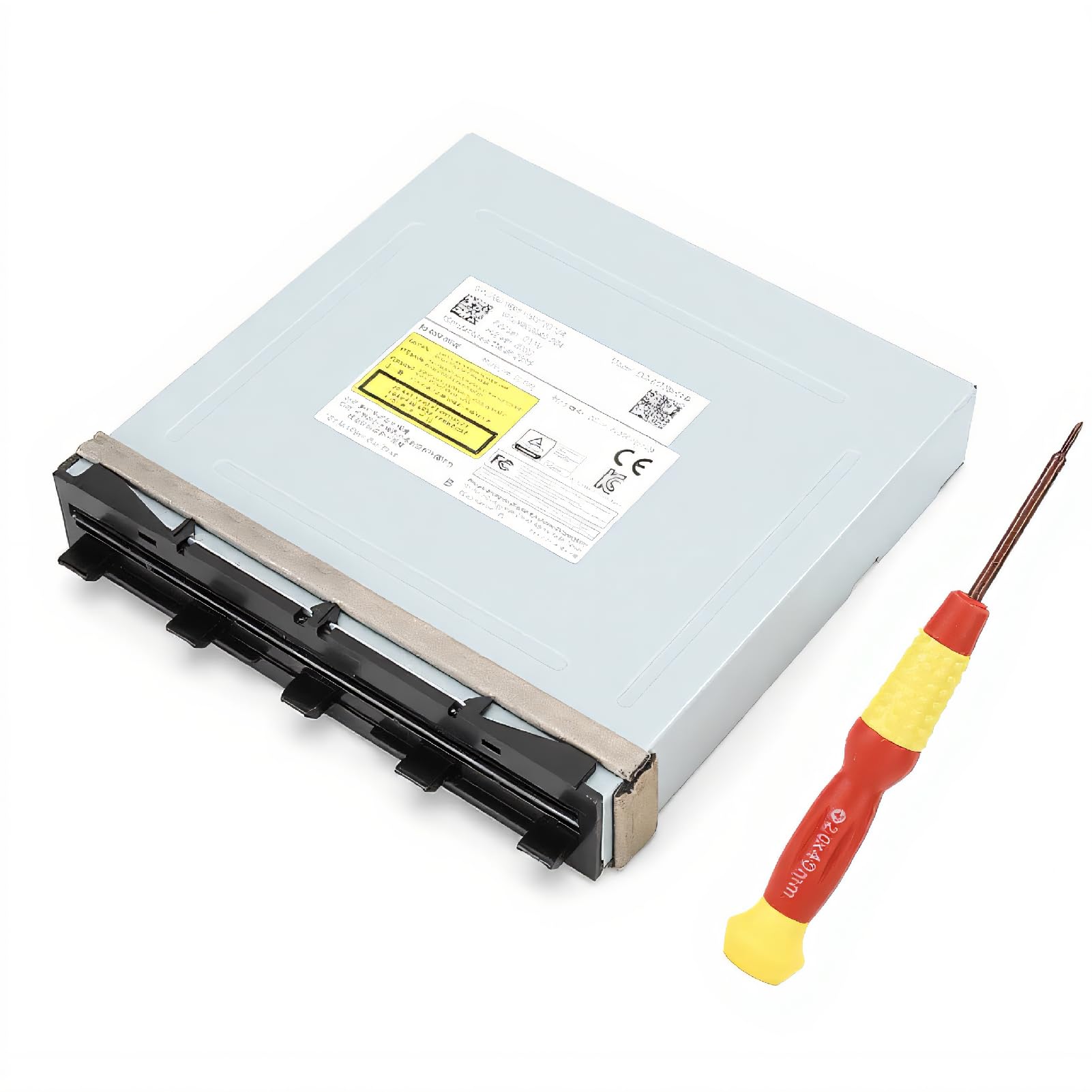
A metal-cased deck with a screwdriver tucked in, for the disc that will not load.
ASHATA’s replacement is a DG-6M1S-01B deck that comes in a metal enclosure, which gives the assembly a sturdier feel than an open frame. It runs on SATA 3.0 Gb/s and ships with a screwdriver so you can start the swap without tracking down tools. The symptoms it targets are the slow, frustrating ones — a console that will not read the disc, takes ages to load one, or does not accept the disc at all.
The listing claims stable performance and high reliability from professional manufacturing, but those are the maker’s words, not measured figures. Those are the maker’s words rather than measured figures, so weigh them the way you would any listing claim. What is concrete is the fit: it is built for the original One console, and the model string matches the DG-6M1S-01B and DG-6M2S-01B families. It is not a One S or One X part.
Here is the trade-off to weigh. The reputation on this one is the least settled of the drives that carry the original Xbox One label, and it is not the cheapest way into the repair either. If you specifically want a metal-enclosed deck and a screwdriver in the same box, it earns its place. If you want the most proven name in the category, the deck at the top of this list has the stronger record.
Choose this for: a metal-enclosed DG-6M1S-01B deck with a screwdriver included, for an original Xbox One that will not load discs.
Weigh the record: of the original-format drives in this guide, this one has the least settled reliability reputation, so read the listing carefully against your model.
5. LeHang Blu-Ray DVD Disc Drive

One deck that faces the whole Xbox line, not just the first-gen shell.
Most drives here are locked to the original Xbox One. This LeHang deck is the exception, listed as compatible with the Xbox One, One S, One X, Series X, and Series S. That coverage is the reason it earns a spot even though it lists fewer pieces in the box than the others. It pairs the drive deck with a laser lens module and weighs in at 4.2 ounces, so it is a light, compact assembly to handle.
This deck is known for getting a dead console reading discs again. Feedback centers on functionality and build quality, and the overall read is positive — an Xbox that had given up on discs plays them fine afterward. Install feedback is thinner but also favorable. As with every deck of this type, the maker ships it without instructions and recommends a professional technician for the install.
The catch here cuts the other way from the rest of the list. Everything else is tuned to the original Xbox One first; this one spreads its compatibility across five consoles, which means the fit details matter more, not less. Check the exact model of your machine against the listing before you order, because a Series S and an original One do not share the same shell. If you own a One S, One X, or a Series console — the models the other drives here cannot help — this is the deck built to reach them.
Why it stands out
- Covers Xbox One, One S, One X, Series X, and Series S — the broadest fit in this guide
- Pairs the deck with a laser lens module so the full read assembly is replaced
- Functionality and quality are what owners focus on, and the sentiment is positive
- Light 4.2-ounce assembly that is easy to handle during the swap
Where to be careful
- No instructions in the box, and the maker recommends a professional technician
- Because it spans five consoles, you must confirm your exact model before ordering
- Shipped as a fragile part that can be damaged in transit
Best for: One S, One X, Series X, and Series S owners that the first-gen drives on this list cannot serve.
Match first: confirm your exact console model against the five listed, since fit is the whole point of this deck.
Know the Specs
SATA 3.0 Gb/s and what it means
SATA is the internal cable standard that connects a disc drive to the console’s main board. The 3.0 Gb/s figure is the data rate that connector is rated for, and it is the speed the drive talks to your console at. Every deck on this list uses a SATA interface, which is why they all drop into the same connector your old drive came out of. You do not wire this yourself as a buyer — you are matching the part to the slot — but seeing SATA on a listing tells you it is the internal-drive type, not an external USB reader.
Drive deck versus laser lens module
These two names get used loosely, and the difference decides which part you buy. The deck is the full assembly: the tray, the spindle motor that spins the disc, and the laser pickup inside. The laser lens module is just the optical pickup that reads the disc surface. If the console refuses to accept a disc or grinds, you are looking at the deck. If it accepts and spins but will not read, the laser is the likely failure. Some listings here bundle both together, which is the safest way to cover either failure.
Common Questions
Will a replacement drive work in my Xbox One S or One X?
Why does my new drive read CDs but not game discs?
Do I need a professional to install an Xbox One disc drive?
How do I know if I need the full deck or just the laser?
Which drive model numbers fit the original Xbox One?
Are these drives fragile in shipping?
Do these drives come with a warranty?
Can I replace just the laser lens instead of the whole drive?
Will a Series X or Series S drive fix an original Xbox One?
The Bottom Line
If you own an original Xbox One, the drive to reach for is the DG-6M1S deck with the HOP-B150 laser, because it replaces the whole read assembly (the part that reads the disc) in one part, and reliability is the quality it is known for. If you want the screwdrivers and a warranty in the same box, the YWLRONG drive with repair tools is the more forgiving starting point. And if your console is a One S, One X, or a Series machine, the LeHang multi-console deck is the one built to fit. Check your model number first — that single step decides whether any of these will work.
How we choose
We do not accept paid placement. Every pick is matched to a real buyer and a real use-case; we do not hands-on test units.
Sources
Specifications: manufacturer listings and product documentation. Review insights: verified customer reviews. Pricing: not shown on this page (it changes often); check the current price via the retailer link.
As an Amazon Associate, Tactical Gear Guy earns from qualifying purchases. This does not affect which products we feature.