Specs are compiled from manufacturer listings and verified buyer reviews and can change over time — please confirm the key details on the product page before buying.
You already know how to aim with a mouse. The problem is that your Xbox One only listens to a controller, so your wrists sit idle while your thumbs do all the work. A mouse and keyboard adapter (a small box that sits between your keyboard, your mouse and the console) translates those inputs into controller signals the console accepts. The catch is that these boxes vary wildly in how well they translate, and the wrong one turns every match into a fight with your own gear. Below are seven that actually connect to an Xbox One, sorted by who they genuinely suit — including the ones worth owning and the ones that need patience.
This guide is built by comparing the manufacturers’ published specifications and the patterns across verified customer reviews, so you get each pick’s real strengths and trade-offs instead of marketing spin.
Some boxes need an original controller plugged in, some refuse wireless mice, and some want a phone app before they’ll cooperate. That one detail decides whether a pick feels instant or eats your first evening. Here is what actually matters when you shop for the best Xbox One mouse and keyboard adapter today.
Top Picks


How To Choose The Best Xbox One Mouse and Keyboard Adapter
The single biggest mistake first-time buyers make is assuming these adapters are universal plug-and-play gadgets. They are not. Almost every box on this list wants your original Xbox controller plugged into it, because the controller is what proves to the console that a legitimate input device is attached. Buy an adapter expecting to leave the pad in the drawer and you’ll spend the first hour confused by why the mouse cursor never appears.
Start with the controller requirement
An adapter works by spoofing a controller. Your mouse movement gets translated into right-stick input and your keyboard keys map onto buttons. If the adapter can’t see a real controller, it often has nothing to translate from. That’s why the original first-party pad is the safest choice — several makers warn outright that third-party controllers may not map properly.
Check wired versus wireless before you buy
This is the detail that quietly kills setups. Some adapters only accept single-function wired keyboards and mice, which means your wireless Logitech or Corsair gear simply won’t register. If you already own a wireless mouse you love, verify support before ordering — or budget for a cheap wired pair to go with the box.
Look at how many ports you actually need
Count what you’ll plug in: keyboard, mouse, controller, maybe a headset. A box with one port and a headset passthrough handles a bare-bones setup. A box with six ports gives you room to leave everything connected. Port count is one of the few specs you can compare cleanly across brands, and it reveals how the maker expected the box to be used.
Decide if you want app tuning
Some adapters let you remap keys and tune sensitivity through a phone app. That flexibility helps if you play several different shooters, since a saved profile per game means no re-mapping between sessions. If you only play one title, a simple hotkey switch or default layout is perfectly enough.
Side-by-Side Comparison
| Model | Best For | Ports | Weight | Current Rating | Amazon |
|---|---|---|---|---|---|
| Mayflash Max Shooter ONE★ Best Overall | Simple plug-and-play setups | 1 | 6.4 ounces | — | Amazon |
| Keyboard and Mouse Adapter for Xbox Series X/S, One & X360Most Ports | Multiple game profiles | 6 | 5.92 ounces | — | Amazon |
| Nintendo Switch Keyboard & Mouse Adapter (ECHZOVE) | Light travel setups | 3 | 1.58 ounces | 2 A | Amazon |
| HYCARUS HC-30050 | Headset users | 5 | 0.12 kg | — | Amazon |
| leadjoy VX2 AimBox | App-based tuning | 5 | 5.92 ounces | 0.5 A | Amazon |
| IOGEAR KeyMander 2 3Play | Sharing across three systems | 4 | 8.8 ounces | — | Amazon |
| XIM Matrix | Competitive multi-console play | — | 100 g | 1 A | Amazon |
Detailed Reviews
1. Mayflash Max Shooter ONE
One box, four consoles, and a vibration feature you can actually feel through a wrist strap.
If you want the shortest path from unboxing to playing, start here. Mayflash ships it with an tune default setting so it works the moment you plug it in — no firmware dance, no app download, no PC in the middle. It covers PS3, PS4, Xbox 360 and Xbox One in a single unit, which matters if your console collection is a mix-and-match affair.
The vibration function is the detail that surprises people. It ships with a sole customized wrist strap, and the point of that strap is to let you feel the rumble the console is sending — a small physical cue that helps in shooters where audio alone gets buried. There’s also a 3.5mm headphone passthrough for background music and online chat, but that specific function is listed for PS4, so treat headset audio as a PS4-side bonus rather than an Xbox guarantee.
The honest limitation is tuning depth. With a single port, this is a lean box: one device connects, and you build the rest of your setup around that. If you want saved profiles per game or per-key remapping, the six-port adapter further down offers far more room. Setup also isn’t instant for everyone — the layout takes a session or two to feel natural if you’re used to a controller. As owners put it, the appeal here is “a good alternative to pricier options,” and it holds up best as a first adapter rather than a final one.
What earns this the top spot
- Works across PS3, PS4, Xbox 360 and Xbox One with no extra software
- tune default setting means plug-and-play from the first connection
- Wrist strap and vibration support add a physical cue in shooters
- Compatible with Xbox One S controller and game system and Xbox One Elite controller, with a firmware update
Where it will frustrate you
- One port total — no room for a headset and both peripherals without planning
- Headset audio is listed for PS4, not Xbox One
- Elite and One S controller support requires a firmware update first
Reach for this if: you want the least fussy first adapter and you mostly play one game on one console.
Think twice if: you run multiple shooters with different key layouts, because there’s nowhere to save them.
2. Keyboard and Mouse Adapter for Xbox Series X/S, One & X360
Six ports, ten saved profiles, and a hotkey that swaps layouts mid-match.
Port count is where this box buries the Mayflash above. Six ports against the Mayflash’s single one means keyboard, mouse, controller and headset can all stay connected at once instead of you unplugging something every session. If your desk setup stays put rather than coming out of a drawer, six ports change your daily routine.
The AX360P also stores up to 10 preset game profiles, switched through either the mobile app or customizable hotkeys. That’s a real difference from a one-layout box: jumping from a tactical shooter to an action title without re-mapping anything is a hotkey press away. Setup runs over plug-and-play with the app as an optional extra for key mapping, so you can skip the phone entirely if you’re happy with defaults. A Type-C data cable, Android data cable and OTG adapter all come in the box.
Read the controller note carefully before ordering. This adapter requires the original controller to be connected — the mouse simply acts as the right joystick, and you won’t see a mouse pointer on screen. That last part is normal for this whole category, but it catches people who expect a desktop-style cursor. Also note the PS5 exclusion; if you plan to move to Sony’s newer console later, this isn’t the box that follows you.
Best fit: a fixed desk setup where everything stays plugged in, and a player who wants different key layouts per game without buying again.
The catch: it insists on a first-party controller being wired in, and there’s no PS5 support in the compatibility list.
Pick it for: the port count and the 10 saved profiles — the widest flexibility per box here after the XIM.
Leave it be if: you’re building toward a PS5 or you want your pad fully out of the picture.
3. Nintendo Switch Keyboard & Mouse Adapter
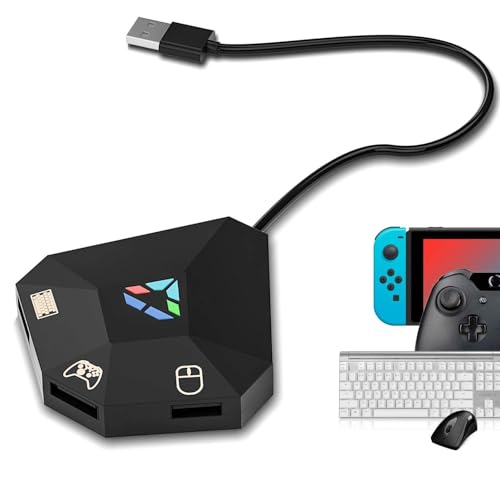
At 1.58 ounces it vanishes in a bag, and it still remaps your keys.
Weight is the whole story here. At 1.58 ounces this is the lightest adapter on the list, sitting far below the IOGEAR KeyMander 2 at 8.8 ounces. Toss it in a jacket pocket or a laptop bag and you’ll forget it’s there, which makes it the practical pick if you move between a bedroom setup and a friend’s living room.
It connects to Nintendo Switch, PS4 or Xbox One and remaps keyboard and mouse buttons to your own taste, with multiple saved profiles for switching between games. Setup is plug-and-play with no driver, following the manual: adapter in, keyboard and mouse in, original controller in.
The compatibility warning is the part that deserves attention. An official original controller is recommended for setup and key mapping, and third-party controllers may not support mapping or connection at all. That’s not a defect — it’s how the box authenticates input — but it means buying a knock-off pad to save money often backfires. If your only controller is an off-brand one, this is the point to stop and check the manual.
Why it travels well: a 1.58-ounce body with USB Type-C connection, custom key mapping and multiple saved profiles, plus plug-and-play setup with no drivers to install.
What holds it back: mapping depends on having an official original controller, and third-party pads may simply refuse to connect.
Your pick when: the adapter lives in a bag and comes out in different rooms, and you own a first-party pad.
Not for you if: your controller is a third-party model — the mapping may not work at all.
4. HYCARUS HC-30050

Five ports and a 3.5mm jack, so your headset stays in the chain.
Most cheap adapters make you choose between voice chat and your keyboard. This one takes a 3.5mm headset on Xbox One, PS4 or Nintendo Switch, so you keep game audio and teammate chat running while your mouse does the aiming. For anyone who plays squad shooters, that’s the feature that decides it.
The HC-30050 also maps one key to many actions without any software download, and supports side-button mapping on your mouse — useful when you want reload or crouch under your thumb. Multiple keybind sets can be saved for different games, switched with one click mid-session. It runs across PS4, Xbox One, Xbox Series X/S, Nintendo Switch and PS3 with no drivers, and covers common titles like Rainbow 6 Siege and Overwatch.
It’s a compact box at roughly 2.4 by 2.5 by 0.8 inches, small enough to sit behind the console unnoticed. Its low-latency, low-power chip keeps mouse tracking tight frame to frame, so aiming feels sharper than on a bargain box. Do budget a little reading time — the keybind setup expects you to hunt down the maker’s video tutorials for multi-game layouts, and going in blind makes the first hour longer than it needs to be.
Standout feature: a 3.5mm headset port on Xbox One alongside one-to-many key mapping and mouse side-key support, all with no software install.
Worth knowing: setting up multiple keybind sets sends you to online video tutorials, which slows down the first session.
Suits you if: voice chat and game audio need to stay live while you play on mouse and keyboard.
Skip the hassle if: you want zero setup homework — the multi-game keybind path needs the tutorials.
5. leadjoy VX2 AimBox

No firmware marathons — everything tunes through one app instead.
The pitch here is the setup, not the hardware. Rather than memorizing key combinations or spending evenings on firmware updates and forum threads, you connect the box and adjust mouse, camera, joystick, keybinds and lighting inside the Vlead app. If your patience for configuration is low, that’s the win.
Its VX agility translator targets 1:1 accuracy: your mouse movement reaches the game without the smoothing lag that blurs tracking. A built-in 3.5mm headset keeps voice chat and stereo audio in play. It’s also the most widely owned box on this list by a wide margin, rating 4.0+ stars across 1,500+ ratings, which tells you plenty of people got it working and kept it.
Two hard limits need saying plainly. Only single-function wired keyboards and mice are supported — wireless gear from brands like Logitech or Corsair won’t register, so check your mouse cable before ordering. And it does not work with PlayStation 5, full stop. The connection itself also asks you to read the manual first; skip that step and the box may appear dead rather than broken.
Why players keep this one
- All tuning lives in the Vlead app — no firmware hunting
- 1:1 agility translation for accurate, timely mouse movement
- Built-in 3.5mm headset for chat and stereo audio
- Four buttons short of nothing: mouse, camera, joystick and keybind settings all adjustable
What rules it out for some
- Wireless keyboards and mice are incompatible — wired only
- No PlayStation 5 support
- Reading the manual first is mandatory, not optional
Go here for: the easiest tuning experience on the list, backed by the largest owner base of any pick.
Look elsewhere if: your keyboard or mouse is wireless, or a PS5 is in your future.
6. IOGEAR KeyMander 2 3Play GES1337

One keyboard, three systems, and a hotkey to jump between them.
This is the only box here built around sharing rather than single-console use. It lets one keyboard and mouse serve up to three PCs and game consoles, with hotkey switching between them — so your desk stays clean and your Xbox One, PS4 and Switch all reach the same peripherals. At 8.8 ounces it’s the heaviest adapter on the list, a full 7.2 ounces above the 1.58-ounce ECHZOVE, which fits its role as a stay-put hub rather than a pocket accessory.
There’s a crossover function that swaps controllers between PS4, Xbox One and Nintendo Switch, which is handy if you and a friend play across different systems in the same room. Custom key mapping, mouse sensitivity and macro functions are all handled through Android or iOS apps, so the fine-tuning happens on your phone rather than on the box.
The trade-off is that this is a bigger, more deliberate piece of gear, and it rewards someone who wants a permanent multi-system desk. If you only own an Xbox One and just want your mouse to work in one shooter, the extra complexity is wasted on you. For a household with several consoles sharing one monitor, though, nothing else on this list does the same job.
The case for it: keyboard and mouse sharing across up to three systems, controller crossover between consoles, and full macro and sensitivity control via app.
The trade-off: at 8.8 ounces it’s a desk fixture, and the multi-system depth is overkill for a single-console setup.
Right choice for: a shared desk where three consoles fight over one keyboard and mouse.
Wrong choice for: a solo Xbox One player who wants a small, simple box.
7. XIM Matrix Multi-Input Adapter

The deepest toolkit in the category, and the one that asks the most of you.
XIM Matrix is aimed squarely at the player who treats aim as a craft. Its Smart Translator precision aim system and Smart Actions macro engine are the internal features that separate it from the cheaper boxes — this is where competitive players go when the default translation in a budget adapter stops being good enough. It covers Xbox Series X and S, PlayStation 5, Xbox One, PlayStation 4 and PC in one unit.
Input flexibility is where it pulls ahead. Ports on the left and right sides accept wired mice and keyboards, Xbox Elite, Series and One controllers, PS DualSense, DualShock 4 and 3, Move Navigation controllers, Switch Pro controllers and XIM NEXUS controllers. Bluetooth controllers are supported too, including Xbox pads with Bluetooth, and PS DualSense, DualShock 4, Switch Pro and JoyCon controllers work with gyro aim. That’s a spread no other adapter here approaches.
Be honest about what you’re signing up for. This is explicitly not plug-and-play. You’ll download the XIM Manager app, keep both firmware and app updated, register on the XIM forum for firmware downloads, and follow the setup steps carefully to avoid latency issues. It also operates strictly at 5V, and exceeding that risks damaging it. Reliability is the most-discussed topic around this unit and it splits both ways — plenty of players run it happily, while others hit connection trouble, particularly with phones. Community support exists, but it’s community-driven, so the warranty terms and game compatibility list are yours to verify before you commit.
What you’re paying for: proprietary Smart Translator aiming, a macro engine, and the broadest controller and input support in the category, including Bluetooth and gyro aim.
What it demands back: app setup, regular firmware updates, forum registration, exact 5V power, and a willingness to troubleshoot — this is not a plug-in-and-play box.
Built for: the competitive player who wants the deepest tuning toolkit and doesn’t mind setup homework.
Hard pass if: you want to plug in and play tonight — the non-plug-and-play setup and update routine will wear you down.
Know the Specs
Port Count
The number of USB slots on the adapter decides what stays plugged in at once. A one-port box handles a single device and forces you to swap cables. A six-port unit like the AX360P leaves keyboard, mouse, controller and headset connected together. Count your gear before you buy.
Current Rating
Measured in amps, this tells you how much current the box pulls. The leadjoy VX2 AimBox lists 0.5 A while the ECHZOVE lists 2 A. A higher figure means more current headroom for a keyboard, mouse and controller running at once.
Key Mapping and Profiles
Mapping lets you assign any keyboard key or mouse button to a controller function. Saved profiles store several of those layouts so you can switch games without redoing the work. Ten profiles, as on the AX360P, covers a whole library of shooters.
Controller Requirement
These adapters need a real controller attached to authenticate with the console. The mouse then acts as the right stick, with no on-screen cursor. Official first-party pads are the safe bet — third-party controllers may not map at all.
Common Questions
Do I need to keep my Xbox One controller plugged in for the adapter to work?
Will my wireless mouse and keyboard work with these adapters?
Do these adapters work on the PlayStation 5?
Why is there no mouse cursor on screen after I connect everything?
How many USB ports do I actually need on the adapter?
Can I give different games different key layouts?
Is the XIM Matrix worth the extra setup effort?
Will a headset still work while the adapter is connected?
What voltage do these adapters need?
Does a heavier adapter mean better build quality?
The Bottom Line
The winner for most Xbox One players is the Mayflash Max Shooter ONE, because it skips the firmware hunt entirely — tune defaults mean it works on the first connection, and the four-console coverage keeps it useful if your setup changes. If you want saved layouts and room for everything to stay plugged in, the AX360P adapter gives you six ports and 10 profiles. And for a desk shared across three systems, the IOGEAR KeyMander 2 3Play is the one to reach for.
One practical nudge: check your peripherals before you buy anything. Wireless mice and keyboards are the single most common reason a new adapter appears broken on arrival, and a wired pair solves it for less than the cost of a second adapter.
How we choose
We do not accept paid placement. Every pick is matched to a real buyer and a real use-case; we do not hands-on test units.
Sources
Specifications: manufacturer listings and product documentation. Review insights: verified customer reviews, as of November 2026. Pricing: not shown on this page (it changes often); check the current price via the retailer link.
As an Amazon Associate, Tactical Gear Guy earns from qualifying purchases. This does not affect which products we feature.