Specs are compiled from manufacturer listings and verified buyer reviews and can change over time — please confirm the key details on the product page before buying.
You aim better with a mouse. That is the whole reason you are here. The catch is that an Xbox One does not accept a keyboard and mouse on its own, so you need a small translator box that sits between your devices and the console and pretends your mouse is a controller. Some of these boxes do that in minutes. Others take an afternoon, a PC, and a firmware download before they behave, and knowing which one you are buying is the entire decision. This guide walks through real adapters that work on Xbox One, explains the setup burden of each one in plain terms, and tells you which is worth your time for your style of play.
This guide is built by comparing the manufacturers’ published specifications and the patterns across verified customer reviews, so you get each pick’s real strengths and trade-offs instead of marketing spin.
Below you will find the adapters ranked for Xbox One play, with the exact ports, wired-device rules and app controls that decide whether your mouse actually feels right in a match. Scroll on for the full breakdown of the wired and wireless compatibility rules that decide every Xbox One Keyboard and Mouse Adapter purchase.
Top Picks


How To Choose The Best Xbox One Keyboard and Mouse Adapter
The most common mistake is buying on the promise of “keyboard and mouse” and then discovering the box will not accept your wireless mouse. Most of these converters want a plain wired keyboard and a plain wired mouse, because the adapter has to read every keystroke and split-second mouse movement and translate it into stick input. A wireless dongle adds a layer the adapter cannot always read. Check that rule before anything else — it decides whether the thing works at all.
Does your console actually get supported, and which version
Read the compatibility line word for word. Several strong picks in this category cover Xbox One and Xbox Series X/S but exclude PlayStation 5, and a few older units only handle Xbox One after a firmware update. If you game on an original Xbox One or an Xbox One S, confirm those names appear. Do not assume a “next-gen” label automatically covers the older Xbox One — some units are built around the newer consoles first.
How much setup you are signing up for
Setup splits into two camps. Plug-and-play adapters connect, use a default profile, and put your mouse in the right stick almost immediately, with an optional phone app for tweaking. The other camp needs a PC, a firmware update and forum registration before it works properly, then a manager app for sensitivity, macros and key binds. If you want to play tonight, buy plug-and-play. If you want deep tuning and own a Windows PC, the firmware route pays off.
Key mapping depth and multiple game profiles
Every adapter maps your mouse to controller movement, but the difference lives in how many keys you can remap and how fast you can switch loadouts. Some support one-to-many key binds and mouse side-button mapping without any software. Others hold up to ten preset game profiles that switch through an app or a hotkey. If you jump between a shooter and a strategy title in the same evening, profile switching saves you re-mapping everything from scratch.
Audio, voice chat and the small ports
A headset jack on the adapter lets game audio and team chat flow through the box, which matters in shooters where footsteps and callouts decide rounds. Several units here include a 3.5mm headset connection. Skipping it means wiring your headset to the controller instead, which is fine until you want one tidy cable run from the adapter to your ears.
Side-by-Side Comparison
| Model | Best For | Ports | Input Type | Core Feature | Amazon |
|---|---|---|---|---|---|
| Mayflash Max Shooter ONE★ Best Overall | Budget-first plug and play | 1 | Wired keyboard and mouse | Vibration feedback with wrist strap | Amazon |
| CHEERKONTEK AX360PPort Hub Pick | Multi-console families | 6 | Wired keyboard and mouse | 10 preset profiles, app or hotkey | Amazon |
| HYCARUS HC-30050 | Shooter players who remap keys | 5 | Wired keyboard and mouse | One-to-many key binds, 3.5mm headset | Amazon |
| IOGEAR KeyMander 2 3Play | Sharing one keyboard across PCs and consoles | 4 | Wired keyboard and mouse | Hot-key switch across up to 3 PCs and consoles | Amazon |
| leadjoy VX2 AimBox | Fast setup with deep app tuning | 5 | Wired keyboard and mouse only | Vlead app setup, 3.5mm headset | Amazon |
| XIM Matrix | Competitive tuning and macro control | — | Wired and Bluetooth controllers | Smart Translator aim with Smart Actions macro engine | Amazon |
| Cronus Zen | Cross-console script and macro users | — | USB and Bluetooth devices | GamePacks and script support across platforms | Amazon |
Detailed Reviews
1. Mayflash Max Shooter ONE
The one-port box that lets your mouse mimic a pad on the original Xbox One without a PC detour.
If you want to try console mouse aim without committing to a tuning project, this is the simplest entry. It runs on a single port and relies on an “tune default setting” so you plug in, connect, and play. The whole point is that you are not hunting through menus in the first ten minutes — the adapter arrives with sensible aim mapping already loaded. For a buyer who mostly wants their mouse to mean something on an Xbox One, that default-first approach is the reason it takes the top slot.
Two things give it more personality than a basic dongle. First, it supports the vibration function through a customized wrist strap, so the rumble your controller would deliver is still there in your hand rather than vanishing. Second, it carries a headphone output for background music and online chat on PS4, which matters if you like your audio routed through the adapter rather than the pad. Xbox One S and Xbox One Elite controllers are supported now, but that support requires a firmware update — plan for that step if you use an Elite pad.
Where it gets less comfortable is the fine tuning. Owner experiences split on setup and ergonomics: some find it relatively easy to configure and comfortable in use, others say it takes real time to get used to the feel. Value is debated just as much. So think of this as the adapter you buy when default mapping is close enough and you are willing to learn its quirks — not the one for a player who wants to dial in sensitivity curve by curve. It wins on simplicity, not on fine control.
What earns it first place
- Default mapping means you can play almost straight after connecting, no PC required
- Wrist-strap vibration keeps controller rumble in your hand
- Headphone output for music and online chat
- Covers Xbox One, Xbox One S, Xbox 360, PS3 and PS4 in one unit
Where it asks for patience
- One port only — no room for extras on the box
- Elite controller support needs a firmware update first
- Aim feel takes some getting used to for players used to a pad
Go for this if: you want the cheapest path to mouse aim on an Xbox One and you are happy with default mapping.
Look past it if: you need multiple devices connected or deep sensitivity control on day one.
2. Keyboard and Mouse Adapter for Xbox Series X/S, One & X360
Six ports on a single converter, so your keyboard, mouse and cables all land in one place.
Port count is what separates this AX360P from almost everything else on the shelf. Six connection points sit on one small box, against the single port on the Mayflash unit above. In practice that means you can leave a keyboard and mouse wired in permanently and still have room for the supplied OTG adapter and data cables without constantly swapping plugs behind the console. For a desk with a lot of wired gear, those spare ports are the reason to buy it.
The software side is built for the player who swaps games often. You get up to 10 preset game profiles and can move between them through the mobile app or a hotkey, so a shooter loadout and a slower strategy mapping live on the same box. Setup stays plug-and-play with no PC needed, and the app is optional for key mapping and basic configuration. A one-year manufacturer warranty covers it, which is rare in this price band.
Two limits are worth knowing before you buy. It requires the original controller for a proper connection, so the pad stays in the chain. The mouse also behaves as the right joystick with no pointer icon on screen — normal for this category, but startling if you expect a desktop cursor. It is also not for PS5 owners, so check your console generation first.
Port-rich value: six ports plus ten switchable profiles and a one-year warranty make this the most practical hub-like converter here.
One cable always in play: the original controller must stay connected for the adapter to work, so budget a spot for it.
Reach for it when: your setup already has multiple wired devices and you want one box to hold them all.
Pass if: you are on a PS5 or you refuse to keep the stock controller tethered.
3. Keyboard and Mouse Adapter

Built for shooters: one-to-many key binds and mouse side buttons without a software install.
The HC-30050 leans hard into key mapping, and that is exactly what a shooter player wants. It supports one-to-many key binds with no software download at all, so a single key press can trigger a combination you would otherwise fumble on a pad. Mouse side-key mapping is supported too, which puts crouch, prone or weapon swap under your thumb instead of on a keyboard stretch. Five ports give you room to wire keyboard, mouse and headset together.
Multiple key bind sets are stored per game, and you switch between them with one click mid-match. The maker publishes video tutorials you can look up by the model name, which shortens the learning curve over deciphering a thin manual. Audio is handled through a 3.5mm headset port on Xbox One, PS4 and Nintendo Switch, so enemy footsteps and team chat come through the same box. A low-latency, low-power chip translates each mouse movement into stick input in real time.
The compatibility read is broad — PS4, Xbox One, Xbox Series X/S, Nintendo Switch and PS3, with no drivers and plug-and-play startup. On the honest side, this is a bigger footprint than the smallest converters here at 2.4 x 2.5 x 0.8 inches, and five ports means five cables to manage behind the console. It is a desk-friendly adapter rather than a throw-it-in-a-bag one. If your gear stays on one desk, neither point matters.
Shooter-first design: side-button mapping plus one-to-many binds give you real input control without touching software.
Best match: FPS and TPS players who want mouse-side keys doing real work in a match.
Not the pick if: you want the absolute smallest single-box footprint on your shelf.
4. IOGEAR KeyMander 2 3Play

One keyboard, one mouse, up to three machines — switch by hot key instead of unplugging.
Most adapters are single-machine translators. The KeyMander 2 3Play is a sharing switch first. It lets one keyboard and mouse pair drive up to three PCs and game consoles, with hot-key switching between them, so your desk does not have to hold three keyboards. If you alternate between a gaming PC and an Xbox One at the same workstation, that is a genuinely different product from the single-console boxes here.
A crossover function adds a second trick — you can swap controllers between PS4, Xbox One and Nintendo Switch. The companion Android/iOS app covers custom key mapping, mouse sensitivity and macro functions, so tuning happens on your phone rather than a PC. The maker pitches it at PUBG and Call of Duty players chasing faster, more accurate aim. It also carries lifetime US-based technical support from IOGEAR.
The hardware is the beefiest in this group — 4.3 x 2.6 x 0.91 inches and 8.8 ounces, which buys it a solidity the pocket-sized units lack but makes it a fixture on your desk rather than a travel item. It connects over USB Type C and holds four ports. If your goal is simply to mouse-aim on one Xbox One with the least money spent, you are paying for sharing features you may never use.
Shared-desk payoff: three-way switching and controller crossover make this the pick for a multi-machine setup.
Weight to consider: at 8.8 ounces it stays put, but it is not something you toss into a bag.
Made for you if: you drive a PC and a console from one keyboard and mouse.
Overkill if: one Xbox One is your only gaming machine.
5. leadjoy VX2 AimBox

Set it up in minutes through a phone app, then tune mouse, camera and key binds from the same screen.
The pitch here is the removal of homework. There is no firmware marathon and no forum tutorial to memorize — you connect through the Vlead app and adjust settings there. Mouse, camera, joystick, key binds and even lighting settings all live in one phone interface. For a player who wants their mouse working tonight and their sensitivity curve adjustable tomorrow, that app-first design is the reason it sits near the top of the premium group.
Inside, the VX agility translator technology is pitched as 1:1 gaming accuracy, so your physical mouse movement maps to the same movement on screen. A built-in 3.5mm headset connection handles voice chat and game audio. Compatible consoles are Xbox One, Xbox Series X/S and PlayStation 4, and it explicitly is not compatible with PlayStation 5. Five ports take the keyboard, mouse and headset, and two connector types — Micro USB and USB Type C — cover the cable side.
The rule that catches people is device support. Only single-function wired keyboards and mice work. Wireless gear from big-name brands is incompatible, so a wireless mouse you love may simply do nothing. The adapter also requires you to read the manual before connecting or it can fail to work. Owner experiences with functionality are genuinely mixed, with some units working great and others showing nothing at all — the wired-device rule is the first thing to check if it misbehaves.
Why the app control wins
- Full setup through the Vlead app instead of firmware flash tutorials
- Mouse, camera, key binds and lighting all adjustable in one place
- Built-in 3.5mm headset for chat and game audio
- Works across Xbox One, Xbox Series X/S and PS4
The rules you must follow
- Wired single-function keyboards and mice only — no wireless gear
- Not compatible with PlayStation 5
- Manual must be read before connecting or it can fail
Ideal for: players with a wired keyboard and mouse who want app tuning without PC firmware work.
Wrong for: anyone hoping to use a wireless Logitech or Corsair mouse.
6. XIM Matrix Multi-Input Adapter

The deep-tuning box: Smart Translator aim, a macro engine, and support for both wired and Bluetooth controllers.
XIM Matrix is for the player who treats aim as a project. Its two headline systems are Smart Translator, a proprietary precision aim system, and Smart Actions, an advanced macro engine. Where most adapters in this list just make your mouse act like a stick, this one gives you tools to shape how that translation behaves. It runs across Xbox Series X and S, Xbox One, PlayStation 5, PlayStation 4 and PC, so one unit covers nearly every setup you own.
Input flexibility is unusually wide. USB ports on the left and right sides take wired mice and keyboards, wired Xbox Elite, Series and One controllers, wired third-party licensed Xbox controllers, PS DualSense and DualShock controllers, Switch Pro controllers and XIM NEXUS controllers. On the wireless side, Bluetooth-enabled Xbox controllers, PS DualSense and DualShock, Switch Pro and JoyCon controllers are supported, and the PS and Switch pads get gyro aim. The XIM Manager app runs on iOS 13+, Android 6+ or Windows 10 x64 and later.
None of that comes free of effort. This is explicitly not plug-and-play. You download the manager app, keep firmware and app updated, and since a November 2023 firmware change you must register on the official XIM forum and log in to download firmware. It operates strictly at 5V, so a stronger power source can damage it. Reliability splits owners — some units run well, others hit connection problems, and setup divides people the same way. Budget an evening for it, not five minutes.
Where it shines: the widest device support here, from wired Elite pads to Bluetooth controllers with gyro aim.
The real cost: forum registration, app management and firmware upkeep before it behaves, plus strict 5V-only power.
Choose this if: you enjoy tuning aim systems and want one adapter covering Xbox, PlayStation and PC.
Walk away if: you expect to plug in and play within ten minutes of unboxing.
7. Cronus Zen Controller Emulator
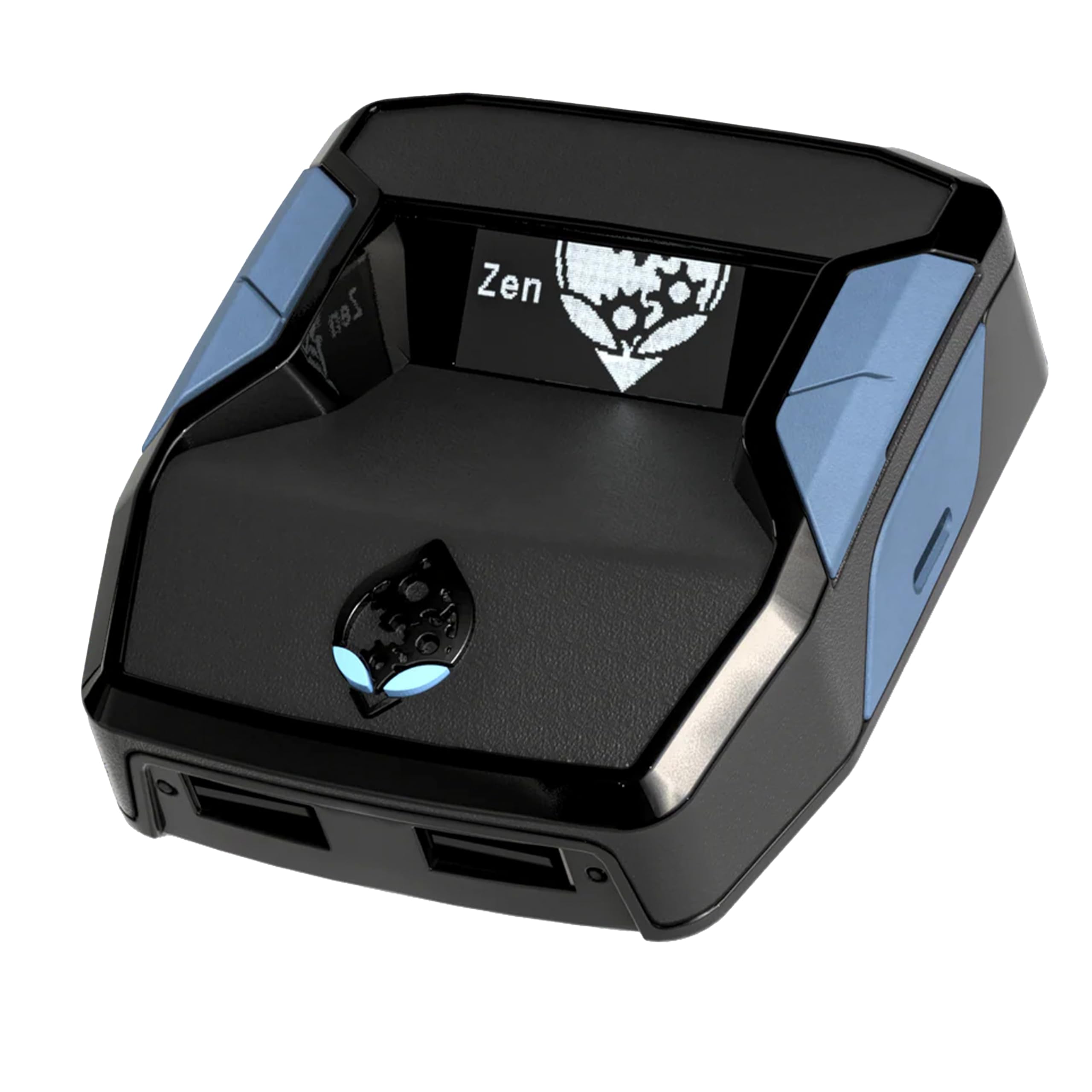
A script and macro hub that reaches Xbox, PlayStation, Switch and Windows from one glossy black box.
Cronus Zen is less a keyboard-and-mouse converter and more a platform. It supports all models of Xbox Series X/S, Xbox One and Xbox 360, most licensed Xbox controllers including Elite Series 2, Scuf Prestige and Razer Wolverine Tournament, every PlayStation generation through PS5 and PS4 Pro, and the Nintendo Switch with its TV Dock. It handles USB, Bluetooth and Dual Bluetooth. On Windows it accepts wired and wireless controllers plus mouse and keyboard, giving you access to compatible scripts, macros and GamePacks, tune for Windows 11.
The reason buyers seek it out is the ecosystem. GamePacks and scripts let you load ready-made configurations rather than building mapping from zero, and the controller compatibility list is the broadest of anything here — DualSense, Astro C40 TR, Nacon Revolution Pro 3, Scuf Vantage 2, Joy-Cons and the Switch Pro controller all appear on it. It is light at 3.5 ounces and small enough to sit under a monitor without drawing attention.
Setup is where it asks the most, and that is the honest trade. Owner consensus is split on whether it functions well at all, with a real share of buyers finding it does not work, and setup is the hardest task in the whole list — often taking the better part of half a day for a given game. Value gets argued over just as fiercely. If you enjoy tinkering with scripts, that depth is the appeal. If you wanted a quick mouse converter, this will frustrate you.
Ecosystem depth: GamePacks, scripts and the widest controller list of any pick here, across four platforms.
Time investment: expect a long setup session, and set your expectations around functionality being hit or miss.
Your pick when: you want script and GamePack support across Xbox, PlayStation, Switch and Windows.
Think twice if: a fast, simple Xbox One mouse setup is all you actually need.
Know the Specs
Wired-only input support
Most adapters in this category only read single-function wired keyboards and mice, because the box must interpret every keystroke and mouse movement in real time. A wireless dongle adds a translation layer that many converters cannot handle. Before buying, confirm the adapter accepts your exact mouse — a wireless Logitech or Corsair may simply not register. This single rule decides whether your purchase works at all.
Key mapping and profiles
Key mapping is how the adapter turns keyboard presses and mouse buttons into controller actions. Basic units map one key to one button. Better ones support one-to-many binds, so a single press triggers a combination, plus mouse side-key mapping for quick actions like crouch. Profile storage lets you hold several mapping sets and switch between them — through a hotkey or a phone app — when you move from a shooter to a different genre without remapping.
Latency and the translation chip
Latency is the delay between your mouse moving and your character turning on screen. A low-latency, low-power chip inside the adapter is what keeps that delay small enough to feel direct. You will not see a latency number printed on most of these boxes, so judge by the maker’s stated translation technology and by how owners describe the aim feel. A converter that reports sluggish turns is usually fighting its own internal processing.
Ports, audio and power rules
Port count tells you how many devices stay plugged in at once — keyboard, mouse, headset and cables. Fewer ports means swapping plugs; more ports means a tidy permanent setup. A 3.5mm headset jack routes game audio and voice chat through the adapter instead of the controller. Power matters too: several units operate strictly at 5 volts, and feeding them more can damage the device, so use the supplied cable and a standard USB source.
Common Questions
Will my wireless mouse work with an Xbox One keyboard and mouse adapter?
Does the adapter work on the original Xbox One or only the newer consoles?
Do I still need to connect a controller to the adapter?
Will a keyboard and mouse adapter work on PS5 as well as Xbox One?
Why does my mouse cursor not appear on screen in the game?
How long does setup take on an adapter like the Cronus Zen or XIM Matrix?
Can I use a headset with these adapters for voice chat?
What power source should I use with these adapters?
Can I switch key mappings between different games without remapping each time?
Is the IOGEAR KeyMander 2 3Play different from a single-console converter?
The Bottom Line
For most Xbox One players, the Mayflash Max Shooter ONE is the sensible starting point because its default mapping gets a mouse working without a PC, a firmware project or a forum account — and it holds 3.5+ stars across 500+ ratings. If you need room for several wired devices, the six-port CHEERKONTEK AX360P and its ten switchable profiles covers that far better. Shooter players who want mouse side buttons doing work should look at the HYCARUS HC-30050, while anyone driving a PC and a console from one desk gets the most from the sharing switch on the IOGEAR KeyMander 2 3Play.
And if you are ready to invest real setup time in exchange for deep tuning, the XIM Matrix and the Cronus Zen reward that patience — just go in knowing the effort is part of the deal, not a surprise.
How we choose
We do not accept paid placement. Every pick is matched to a real buyer and a real use-case; we do not hands-on test units.
Sources
Specifications: manufacturer listings and product documentation. Review insights: verified customer reviews, as of November 2026. Pricing: not shown on this page (it changes often); check the current price via the retailer link.
As an Amazon Associate, Tactical Gear Guy earns from qualifying purchases. This does not affect which products we feature.