Specs are compiled from manufacturer listings and verified buyer reviews and can change over time — please confirm the key details on the product page before buying.
Your Xbox One X runs hot enough after a long session that you start to hear it — and that is the moment most people go looking for a clip-on cooler. The short answer: a vertical stand that holds the console with a fan built in does the most good, and the FastSnail three-fan stand is the one to beat. Most of the confusing stuff here is just labels — some fans bolt to the side, some below, and only a few hold three USB 2.0 ports for your controllers and headset.
This guide is built by comparing the manufacturers’ published specifications and the patterns across verified customer reviews, so you get each pick’s real strengths and trade-offs instead of marketing spin.
You will see the difference between a fan that simply blows air anywhere and one that mounts cleanly with a secure fit. The quick table lines up every option so you can pick your xbox one fan in minutes instead of reading nine separate spec sheets.
Top Picks


How To Choose The Best Xbox One Fan
The first thing to check is not the fan count — it is whether the stand is built for your exact console. Plenty of these coolers are stamped “Xbox One X only” or “One S only”, and a stand meant for one model will not sit flush on the other.
Match the fan to your console model
Xbox One X has its own vent layout, and the side-mounted and vertical stands in this category are molded to it. The Mcbazel vertical stand states plainly it fits the Xbox One X console only. An OSTENT intercooler, by contrast, is listed for the older Xbox One console. Check your console’s model before you buy anything — a plug-in fan that vents the wrong way just adds noise.
Understand the two mounting styles
You have two ways to cool your Xbox One. A vertical stand holds the console on its end in a tower, so the fans push air up through the vents. A side-mounted cooler clips onto the side and blows air across the casing instead. Vertical stands usually add a light bar and a set of USB 2.0 ports (the older, slower USB plug type) for controllers and headsets. Side-mounted coolers are smaller and easier to pack away. Neither is strictly better: pick the stand for extra ports, the clip-on for a compact fit.
Know what the fan speeds can be set to
Some units give you a low/high/off switch so you can ramp the fans down when the room is quiet. The Mcbazel stand offers exactly that with two modes plus off. Others, like the FYOUNG unit, use an AUTO setting that turns the fans on when the console passes a set temperature and off when it drops back. Simple on/off is the easiest. AUTO sounds clever but the extra relay cycles can be noticeable.
Watch the noise claim, not just the cooling claim
A cooler is only useful if you still want to use the room. The Sanpyl side-mounted kit lists a noise level of 50 db — that is roughly the sound of a quiet conversation, which you will hear in the quiet parts of a game. Vertical stands tend to hide the fans behind the console, so the fan noise blends into the room. Play with headphones mostly and noise matters less; game at night in a shared room and it matters a lot.
Check for the extra USB ports
Many of these stands double as a small USB hub, and that is a real convenience for controller chargers and a USB headset. The catch printed on every one of them: do not plug an external hard drive into the stand ports. These ports run at USB 2.0, which is slow for a drive and can drop the connection. Use them for controllers and phones and they do their job fine.
Side-by-Side Comparison
| Model | Best For | Mount Style | Fan Count | Extra USB Ports | Amazon |
|---|---|---|---|---|---|
| FASTSNAIL Vertical Stand★ Best Overall | All-round pick | Vertical tower | 3 | 3 (USB 2.0) | Amazon |
| Mcbazel Vertical Cooling StandSmartest Control | Quiet-speed control | Vertical tower | 3 | 3 (USB 2.0) | Amazon |
| XBERSTAR One X Cooling FanCompact Clip-On | Compact clip-on | Side clip-on | 3 | 2 | Amazon |
| OSTENT Intercooler | Older Xbox One owners | Clip-on device | — | — | Amazon |
| FYOUNG USB Cooling Fan | AUTO mode | Side-mount fan | 3 | 1 (USB 2.0) | Amazon |
| Sanpyl Portable USB Cooling Fan | Travel | Side mount | 3 | None | Amazon |
| Mcbazel DOBE 3-Fan | Tight budgets | External USB fan | 3 | 1 | Amazon |
| V BESTLIFE Portable Fan | Plug and play | Side mount | 3 | None | Amazon |
| Zerone Cooling Fan Docking Station | Holder plus fan | Docking stand | 3 | None | Amazon |
Detailed Reviews
1. FASTSNAIL Vertical Stand with Cooling Fan
Our pick — 4.0+★ from 2,500+ verified ratings; the strongest balance of quality and price.
A three-fan tower stand that cools the console and tidies your controllers in one go
This one sits at the top because it does three jobs at once: it holds your Xbox One X upright on a tower stand, fires three cooling fans up into the console, and still gives you three USB 2.0 ports (the older, slower USB plug type) on the side. Most stands in this category give you either a fan or a hub; the FASTSNAIL gives you both. It also carries the highest rating on this list, 4.0+ stars across 2,500+ ratings.
Setup is genuinely plug and play. You drop the console into the stand, connect the built-in cable, and everything — fans and ports — powers off that one USB feed. No extra adapter to find, no second wall plug to fight for. The green light bar adds a glow under the console that owners clearly enjoy; it is the kind of small touch that makes the whole rig look less like a pile of wires.
The honest catch is stability and noise. Owners say the stand holds the console well but can wobble a little if you bump the shelf, and the fans are audible enough in a silent room. Both are the trade-offs of a tall tower with three fans sitting behind the console. Set it on a flat, solid surface and mostly file noise as background.
What earns its keep
- Three cooling fans built into the stand
- Three USB 2.0 ports for controllers, keyboard, phone or tablet
- Single cable powers fans and ports from the console
- Green light bar under the console
Where it asks you to compromise
- Can wobble slightly if the shelf gets bumped
- Fans are audible in a silent room
- Do not plug an external hard drive into the stand ports
Pick it when: you want one stand that holds the console, cools it, and adds three controller-charging ports without extra adapters.
Look past it if: you need a rock-solid base — this one can shift on a busy shelf.
2. Mcbazel Vertical Cooling Stand
The stand that lets you dial the fans down to low when the room goes quiet
Here is the difference that matters on this Mcbazel: a three-speed switch that runs high, low or off. The FASTSNAIL above gives you three fans and three ports but no fan-speed control. This one gives you the same three fans and three USB 2.0 ports, plus the ability to drop to low mode during quiet cutscenes. For a shared living room that is a genuinely useful dial.
What wins people over is fit — the stand is molded to the Xbox One X, and the non-slip pad and lock hold the console in place. Mcbazel also made it simple to power: USB 5V straight off the console, no extra adapter. The light bar gives the whole setup a lit look the same way the FASTSNAIL does, and the fit-and-finish is clean.
The one thing buyers raise is stability. It tends to be a touch wobbly if the surface is not dead flat, so set it on something solid. Otherwise, the Mcbazel vertical stand is the better pick of the two tower stands if fan-speed control is worth it to you.
Where it edges ahead: the high/low/off fan modes let you keep the cooling but drop the noise when the room gets quiet — something the FASTSNAIL does not offer.
The small print worth knowing: the stand wobbles a little on uneven surfaces; a flat, firm shelf fixes it. The USB ports are for controllers and phones, not an external drive.
For quiet rooms: buy this if you want to turn the fans down at night but still keep them running.
Forget the dial if: you are happy with a fixed three-fan stand and would rather save a few bucks.
3. XBERSTAR One X Cooling Fan-External Intelligent Control
A clip-on fan with a button you press to ramp the cooling up or down
XBERSTAR takes a different route from the tower stands: this is a side clip-on, not a vertical base. Three cooling fans pull heat out of the console casing while you game, and a button on the clip lets you control the fan speed without reaching for a dial on a stand. If you prefer to keep the console flat and just add a compact fan, this is the shape you want.
The clip-on design is easy to fit and comes off just as fast, so it is fine to leave on or pull off for a trip. The design lines match the console, and the low profile means it does not dominate your shelf the way a tower stand does. Weighing in at 1.5 pounds it has enough body to sit put with a clean clip.
If you keep your console flat and just want a clean clip-on fan, it fits the bill.
What it does well: easy clip-on install and a manual fan-speed button, so you are not stuck with one fan speed.
The trade-off to size up: only two ports and no vertical base — you give up the extra charging slots the tower stands provide.
Best fit for flat setups: keep your console horizontal and clip this on the side for extra airflow.
Not the one for: a full charging station — you will want a tower stand with three ports instead.
4. OSTENT Intercooler Device

An intercooler built for the original Xbox One, not the One X or One S
The OSTENT is the odd one out in this group in a useful way: it is listed for the older Xbox One console. If your console is the original brick rather than the smaller One S or the One X, none of the One X stands here will mount cleanly — this one is aimed at your model. It draws DC5V and runs under 800mA on start and under 500mA while working, all from the USB cable with no AC adapter.
It is listed as an auto-sensing unit that dissipates heat without disruptive fan noise. That is the promise on the box. The honest note is that this is the thinnest-reviewed pick on the list, and the model-to-console matching really matters here — buyers with the wrong model will find it does not clip on the way they expect.
If you own the original Xbox One and want a straightforward USB intercooler, this is the one in the group designed for it. For a One X owner, skip past and take a One X stand from higher up.
Who it is built for: original Xbox One owners — the model the One X stands here cannot serve.
Bare-spec note: the item weight is 14.1 ounces and it runs from the console USB cable at DC5V.
Choose it if: your console is the original Xbox One and you need a fan that was made for that body.
Steer clear if: you own a One X or One S, since this is not molded for those housings.
5. FYOUNG USB Cooling Fan Compatible with Xbox One X Console

Set it to AUTO, walk away, and let the temperature decide when the fans run
The FYOUNG is the one to look at if you like the idea of a cooler that switches itself on. It has three settings — ON keeps the fans running, OFF shuts them down, and AUTO uses the console’s own temperature as the trigger. Its three fans spin at up to 5000 rpm, which is a concrete measure of how fast the cooling pushes air.
There is one quirk in AUTO you should expect before you buy. When the fans cut out, leftover heat rises, the probe catches the higher temperature, and the fans kick back on — so you may see them cycle on and off a few times as the console settles. The maker calls this normal, and it is worth knowing so it does not surprise you the first night.
Cooling and functionality get split reactions in the reviews, with some saying it keeps the Xbox cool and others saying the opposite. Noise is the louder complaint. That makes the FYOUNG a solid choice if you want the AUTO feature, not so much if you want the quietest fan on the list.
Why the AUTO button appeals
- AUTO setting runs the fans based on console temperature
- Three fans spinning up to 5000 rpm
- Plugs into the console USB with no adapter
What to brace for
- Fans can cycle on and off in AUTO as temperature shifts
- Noise comes up as the main complaint
- Cooling results are split between owners
Reach for it if: you want the fan to manage itself by temperature and do not mind it cycling.
Pass on it if: you want a set-and-hold fan speed and the quietest possible unit.
6. Sanpyl Portable USB External Cooling Fan

A small three-fan side mount that packs neatly away, with a set noise figure to check first
Sanpyl’s focus is portability. Three mini cooling fans side-mount onto the One X casing and push air across it, and the whole kit runs off the console’s DC 5V USB port with no extra power supply and no tools. That makes it the pick if you pack your console into a bag and want a fan that travels without a stand to carry.
It lists a noise level of 50 db, which is the number to look at honestly. That is roughly the volume of a quiet conversation, so you will hear the fans in a hushed room. It is not a problem in a room with game audio going, but it is a figure the tower stands here do not publish and it tells you this is not the quietest option.
The compact design saves space and the material is ABS plastic. There are no extra USB ports on this one, so it is purely a fan. If you want controller charging, look at the FASTSNAIL above.
Where it shines: compact, tool-free, DC 5V USB power, so it travels in the bag without a stand or adapter.
Read the noise figure: at 50 db it is audible in a quiet room, and there are no extra ports for charging.
Pack it if: you move your console between rooms or take it on trips and want a light fan that comes along.
Leave it if: quiet matters most or you need ports for controllers.
7. Mcbazel DOBE Intelligent External USB 3-Fan Cooling Fan

The entry-level three-fan cooler that covers the basics for a tight budget
If you want the lowest-cost way into this category, the Mcbazel DOBE is the one. It is a three-fan external USB cooler built for the Xbox One X, with one extra USB port for charging. It weighs 3.17 ounces, so it is a light clip-on that will not drag on the console. For a lot of players that is the full ask: keep it cool, add a charging port, done.
There is a real note on reliability here. Some buyers report the fans work fine; others say the unit failed right from the start or only worked now and then. That split shows up in the cooler’s own reviews, so treat this as the pick where you accept the entry-level risk for the lower cost. If reliability is the priority, the FASTSNAIL and Mcbazel vertical stands higher up are the safer bet.
This is the number-limited pick of the group — if you can push the budget up a little, the tower stands buy you a sturdier base and three ports instead of one.
What you get for the money
- Three-fan external USB cooler for the One X
- One extra USB port for charging
- Light 3.17-ounce body
The budget caveat
- Reliability is split — some units fail from the start
- Only one extra port
- Plastic body is basic
Take the low-cost route: this fits if you want three fans and a charging port and will accept entry-level build.
Spend the bit extra if: you want a stand that has proven steadier — the vertical towers above are sturdier.
8. V BESTLIFE Portable Heat Reducing USB External Cooling Fan
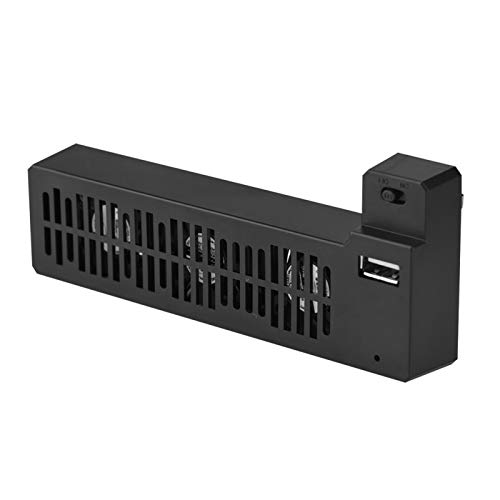
A simple side-mount fan that plugs in and gets to work with nothing to set up
The V BESTLIFE unit is the most straightforward cooler here. It is a side-mounted external fan with three mini cooling fans, powered from the console’s USB at 5 volts and 5 watts. Plug it in and the forced-air cooling starts. There is no dial, no mode switch, no light bar — just an ABS plastic housing that sits on the console and blows air.
The compact design saves space, and the box states it fits the One X console properly. This is the pick for someone who does not want to think about fan speed and just needs a cool-air source attached to the console. Because it is small and light, it is easy to install and remove when you need to.
The limit is nothing extra. No USB hub, no light, no control — so if you want ports or modes, spend up to a tower stand. There are also no meaningful published customer notes for this one, which is worth being upfront about.
Simple and direct: 5V, 5W USB power on three mini fans, and a plug-and-play install with a simple ABS housing.
No extras: no ports, no modes, no light bar, and no published buyer feedback to lean on.
Go simple: pick this if you want a no-fuss fan and never want to touch a setting.
Want more features: choose a stand above if ports or mode control matter.
9. Zerone Cooling Fan Docking Station External Cooler Stand

A docking stand that cools the console and doubles as a steady holder for console and controller
Zerone’s docking station does two jobs: it holds your One X and controller steadily on a stand, and it runs three mini cooling fans to pull heat away while you game. It powers off the console’s USB, needs no extra supply, and the ABS plastic case keeps it light. That double-duty design is its real pitch — one piece handles the fan and the storage.
Build quality is the honest caveat. Reactions split, with some finding it works great and others describing it as cheaply made. Noise is a mixed note too, though one buyer felt the fans were not too loud set against game audio playing. Set those against the practicality of a stand that holds everything in one spot.
If you want a single piece of gear that tidies the console and adds cooling, the Zerone does that. If you are chasing premium build, look at the FASTSNAIL at the top of the list.
The appeal: it doubles as a holder for the console and controller while three fans keep air moving, all on 5-watt USB power.
Build caveat: quality divides owners, so treat it as a value stand rather than a premium piece.
One-piece storage: the stand holds console and controller together and cools at the same time.
Build is the risk: if you want a sturdier stand, the FASTSNAIL or Mcbazel verticals above are the safer call.
Know the Specs
Fan count and airflow
Most coolers here run three mini fans, marked as “high speed” or “cooling fans”. More fans generally move more air across the console casing, which is the whole point — heat leaves faster. The FYOUNG also lists its top fan speed as 5000 rpm, a concrete measure of how quickly the blades turn. Match the fan count to how hard you push the console; a lighter player gets by with a compact side fan, a marathon-session player benefits from a full three-fan stand.
Mount style: stand vs side clip
A vertical stand takes the console upright in a tower and fans up into the base. A side-mounted cooler clips to the side and blows across the casing. The stand keeps your shelf tidy and can add USB ports; the clip-on is smaller and easier to carry. Choose by your desk: a tower stand for a fixed setup, a clip-on for a console you move around.
USB power and extra ports
Every cooler here runs off the console’s USB port — 5 volts DC in most cases — so you never need a separate adapter. Several also serve as a small hub: the FASTSNAIL and Mcbazel vertical stands each add three USB 2.0 ports. Use them to charge controllers, a keyboard, or a phone. Do not connect an external hard drive, since these ports are slow for a drive and can drop the link.
Noise and stability
Noise is the figure buyers underrate. The Sanpyl sits at 50 db, roughly a quiet conversation, so you will hear it in a silent room. Tower stands hide the fans behind the console, so the sound blends in more. Stability matters too: a tall stand can wobble if the shelf gets bumped, while a clip-on is more planted. Decide which matters more to your setup before you pick.
Common Questions
Will this fan fit my Xbox One S, or only the One X?
Do these cooling fans need their own power adapter?
Can I plug an external hard drive into the USB ports on the stand?
Is a vertical stand better than a side-mounted fan?
How loud will the fans be while I play?
What does the AUTO mode on the FYOUNG fan actually do?
Will a cooling fan stop my console from overheating during long sessions?
Can I stand the console upright with these towers?
Do these fans work while the console is turned off?
Which pick is best if I mostly want extra controller-charging ports?
The Bottom Line
For most people, the best xbox one fan is the FASTSNAIL Vertical Stand, because it genuinely does three jobs at once. It holds the console upright, cools it with three fans, and adds three USB 2.0 ports (the older, slower USB plug type) for controllers and a headset, all off a single cable. It is also the most-reviewed stand here, which is a fair vote of confidence.
If fan-speed control matters to you, the Mcbazel Vertical Cooling Stand adds a high/low/off switch the FASTSNAIL does not, so you can turn the fans down at night. For a flat-setup player who just wants a clean clip-on, the XBERSTAR is the compact one to reach for. And if your console is the original Xbox One, the OSTENT Intercooler is the model built for that body.
One nudge before you click buy: match the stand to your exact console — One X, One S, or original One — because a wrong-fit cooler is the most common miss-agreement in this category. Get the model right, set the stand on a flat surface, and keep an external drive off those USB 2.0 ports. Then the fan just does its job, blending into your game audio while you play.
How we choose
We do not accept paid placement. Every pick is matched to a real buyer and a real use-case; we do not hands-on test units.
Sources
Specifications: manufacturer listings and product documentation. Review insights: verified customer reviews, as of November 2026. Pricing: not shown on this page (it changes often); check the current price via the retailer link.
As an Amazon Associate, Tactical Gear Guy earns from qualifying purchases. This does not affect which products we feature.