Specs are compiled from manufacturer listings and verified buyer reviews and can change over time — please confirm the key details on the product page before buying.
If your Xbox One controller has a stick that drifts on its own or a bumper that only fires when you mash it, you do not need to buy a whole new pad. You need the right small part and the patience for a screwdriver. This guide covers the parts that actually fix those two problems — thumbstick modules, tactile bumper switches, faceplates, bottom shells and full swap kits — with the compatibility limits spelled out in plain English.
This guide is built by comparing the manufacturers’ published specifications and the patterns across verified customer reviews, so you get each pick’s real strengths and trade-offs instead of marketing spin.
The hard part is never the part itself — it is matching the model number printed inside your battery bay to the right kit. Below, every pick names the exact controllers it fits, so you can skip the guesswork and grab the one that belongs on your bench with a set of xbox one controller parts.
Top Picks

How To Choose The Best Xbox One Controller Parts
Every repair on this list starts with one question you can answer in ten seconds: what model number is molded into the plastic inside your battery compartment? That number is the single gate that decides whether a part drops straight in or arrives useless. A kit built for the Elite Series 2 will not seat on a standard Xbox One S, and the reverse is just as true.
Read your model number before you buy anything
The standard Xbox One S and Xbox One X pads carry model 1708. The original Xbox One pad is model 1698, and the Elite Series 2 and Elite Series 2 Core use model 1797. Newer Xbox Series X and S controllers are model 1914. Write that number down, then check it against the compatibility line in every listing — most of the wrong-part complaints in this category come from skipping this step, not from bad manufacturing.
Decide whether you are willing to solder
Thumbstick modules and tactile bumper switches are soldered to the board, so those two repairs need an iron, some flux, and a steady hand. Faceplates, bottom shells and swap-in thumbstick caps are screwdriver-only jobs. Be honest with yourself about which camp you are in before you order, because a soldered part you cannot install is money on the bench.
Know which tool bits the job needs
The controller shell uses Torx screws, and the sizes you will meet are T6, T8 and T8H — the H means a security Torx with a pin in the middle, which a plain bit will not turn. Several kits here bundle the drivers so you are not hunting for a T8H at the last minute. Buy a kit without the bits and you will stall halfway through the teardown.
Side-by-Side Comparison
| Model | Best For | Fits | Part Type | Soldering | Amazon |
|---|---|---|---|---|---|
| eXtremeRate ABXY Buttons (Three-Tone)★ Best Overall | Instant visual upgrade | 1708, 1698, 1797, 1914 | Face buttons | No | Amazon |
| 4PCS Replacement Joystick KitBudget Fix | Budget drift repair | Xbox One S / X | Thumbstick module | Yes | Amazon |
| iParto 10 Pack Tactile SwitchesSpare Stock | Spare bumpers on hand | 1708, 1698, 1797, 1914 | Bumper switch | Yes | Amazon |
| SOSS GAMING Analog Joysticks (6 Pack) | Multi-pad households | All Xbox One, except Elite Series 2 | Thumbstick module | Yes | Amazon |
| eXtremeRate NES Faceplate | Retro look on the Elite 2 | 1797 only | Front shell | No | Amazon |
| SOSS GAMING Tactile Switch Kit (10 Pack) | Dead RB / LB buttons | 1708, 1698, 1797, 1914 | Bumper switch | Yes | Amazon |
| VANPARK Elite 2 Metal Kit | Full Elite 2 refresh | 1797 only | Sticks, paddles, D-pads | No | Amazon |
| BSUZUN Full Shell Kit | Complete shell rebuild | 1797 only | Front + back shell | No | Amazon |
Detailed Reviews
1. eXtremeRate ABXY Buttons Xbox Series X & S
Our pick — 4.5+★ from 400+ verified ratings; the strongest balance of quality and price.
Four controller families, one tiny bag of buttons, and the cheapest way to make a tired pad look new.
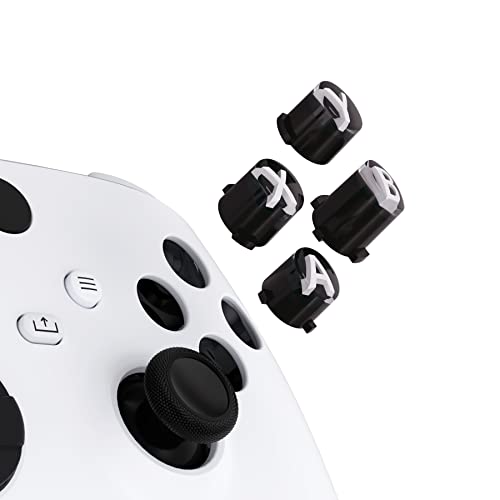
Start with the compatibility line, because it is unusually generous for this category. These four buttons drop into the Xbox Series X and S pad (model 1914), the Xbox One S and X (model 1708), the original Xbox One Elite (model 1698) and the Elite Series 2 (model 1797). One kit, four pads — which is why it holds 4.5+ stars across 400+ owners and takes the top spot here.
What you are buying is a set of symbolic action keys cut from ABS plastic, a tough moulded material that shrugs off thumb sweat and repeated presses. Each one is precision cut to behave like the stock button, so the travel and the click feel familiar in your hand. The three-tone finish — black bodies with clear edges and white classic lettering — is the reason most people order. It changes the whole face of the pad without touching a single wire.
The honest catch is the teardown. You have to open the controller to reach the button wells, and that means removing more of the shell than a nervous first-timer expects. The kit bundles a T8H security driver, a T6 driver, an open-shell tool and spare screws, so the tools are not the obstacle — the depth of disassembly is. Watch the maker’s own video before you start and this is a calm twenty minutes; skip it and you will be guessing at clips.
Where this kit earns its place
- Fits four pad families — 1708, 1698, 1797 and 1914 — instead of just one
- Includes T8H and T6 drivers plus an open-shell tool and spare screws
- ABS bodies are cut to match the original button dimensions
- Weighs 15 g for the set, so nothing changes in the hand
What it asks of you
- Requires a real teardown to reach the button wells — not a clip-on swap
- The controller, D-pad and thumbsticks are not in the box
- Installation depth is the one thing that splits opinion on these
Worth grabbing if: your pad works fine but the buttons have gone shiny and you want a visual reset for very little outlay.
Not your job: if opening a controller to its board sounds like a bad evening, pass on this one.
2. 4PCS Replacement Joystick Xbox One S/X
The drift kit that hands you four sticks and three screwdrivers in one small box.
If your left stick wanders while your thumbs are off it, you are looking at the exact problem this kit targets. It is built for the Xbox One S and Xbox One X pads, and it goes after stick drift, stuttering, blind spots, dead zones, non-centered sticks and broken or loose joysticks. Four replacement modules come in the box, so you can fix two controllers or keep spares for the inevitable second failure.
The tool bundle is where this one pulls ahead of most budget options: four 3D analog joysticks, four thumbstick caps, T6, T8 and T10 screwdrivers, a tweezer, a pry tool, a pry bar and a brush. The three drivers cover the screws you meet on a 1708 shell without a separate trip to the toolbox. Buyers report the replacement sticks track normally months after a repair, and the T6, T8 and T10 drivers hold their edges through repeated teardowns.
Now the part that decides it for you: the stick modules have to be soldered to the board. The listing says it plainly, and it is the one complaint that surfaces — some buyers found the job less easy than the photos suggest. That is not a defect in the part; it is the nature of a thumbstick repair. If you have never held an iron, budget for a practice run on a dead board or ask a friend who has. A few owners did find it straightforward, so your comfort with soldering is the real variable here.
The value read: Four stick modules plus a T6, T8 and T10 driver and a full accessory set puts this near the top of the budget tier for what lands in the box. Reviewers rate the four stick modules on fit and function, the two things that decide a drift repair.
Before you order: confirm you own an S or X with model 1708 and that you can solder, or this box will sit unopened.
Reach for this if: you can solder and want maximum spares per order for a two-controller household.
Look elsewhere if: you are on an Elite Series 2 — this kit is not built for model 1797.
3. iParto 10 Pack Tactile Switch Button Xbox One
Ten bumper switches in a hard case, backed by a two-year manufacturer warranty.
Ten tactile switches is a lot of spares for one controller, and that is the point. The bumper — the RB or LB paddle at the top of the pad — is the first thing to die on a heavily played controller, usually as a mushy press or no press at all. This pack covers the Xbox One, One X and One S, the Elite Series 1 and 2, and the Xbox Series X and S. One box, essentially every pad you or your household owns.
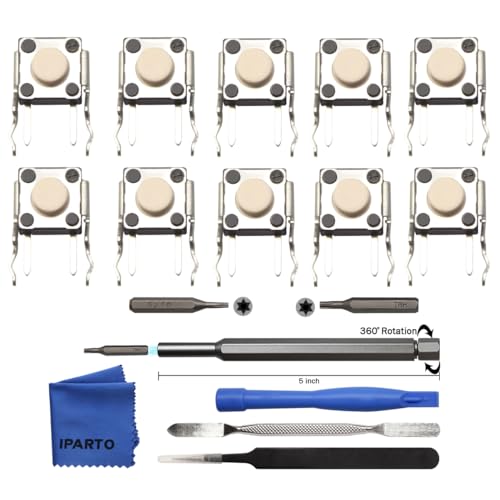
The tool bundle is genuinely complete for the job: a metal 5-inch bit driver, a Torx T8 bit, a Torx T6 bit, metal tweezers, a spudger, a double-ended metal spudger and a microfibre cleaning cloth. The switches ship inside a strong outer casing so they arrive intact rather than crushed in transit. iParto backs the pack with a two-year manufacturer warranty, unusually long for a ten-switch bumper kit.
Two things to plan around. Soldering is required to fit the switch, and the package does not include an installation manual — you are expected to follow a video on YouTube step by step. Neither is a fault in the product, but both mean this is not a first-time job without research. Ten switches for one repair also leaves you with nine spares, which is either the best value in the article or overkill, depending on how hard you play.
What lands in the box: Ten switches, a metal bit driver, T8 and T6 bits, tweezers, two spudgers and a cleaning cloth — a bench-ready set rather than a bag of loose parts.
The one thing to know: No manual inside, and no soldering tools beyond the bits. Bring the iron and watch the maker’s video first.
Best for: the player whose bumper has died twice already and wants a decade of spares in one order.
Second thought if: you only need one switch and have never soldered — start with a guided kit instead.
4. SOSS GAMING Analog Joysticks Repair Kit Xbox One
Six sticks that cover every Xbox One pad except the Elite Series 2 — and the widest feedback base here.
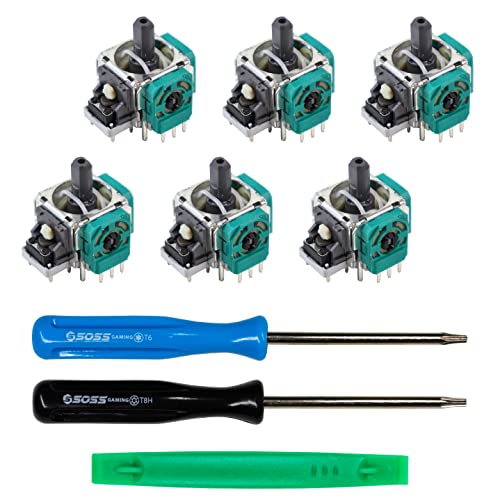
This kit fixes drift on more controllers than any other pick here: it fits every Xbox One pad except the Elite Series 2. Standard, S, X and Elite Series 1 all take these joysticks (the thumb-controlled sticks that wear out and drift). You get six modules per pack, so one order can revive several pads in a house or a rotating LAN setup.
It targets a specific list of failures — stick drift, creeping, stuttering, blind spots, dead zones, no click, non-centered, broken and loose joysticks. Reviewers rate the joystick modules on fit and function, and the packaging includes a link to a full soldering tutorial video.
The fair warning is drift itself. Some owners mention the new sticks stay perfect, and others see the drift creep back after a while — that split is real and worth knowing before you buy. For a part at this level, a repaired stick going soft again after months is a normal risk rather than a broken promise. Soldering is required, as with every stick module on this list, so bring the iron and the tutorial.
Why people keep buying it
- Fits every Xbox One controller except the Elite Series 2
- Six joystick modules per pack for multi-pad households
- Package includes a link to a full installation tutorial video
- Module quality is the most praised trait in the feedback
Where the limits sit
- Drift returning after some months is a real split in the feedback
- Soldering and basic tools are on you — none included
- Won’t fit an Elite Series 2, so check your model first
Pick it if: you have two or three standard Xbox One pads and want one order to cover them all.
Keep looking if: you want a drift fix with no soldering at all — no thumbstick module here works that way.
5. eXtremeRate Classic NES Style Faceplate Xbox Elite Series 2
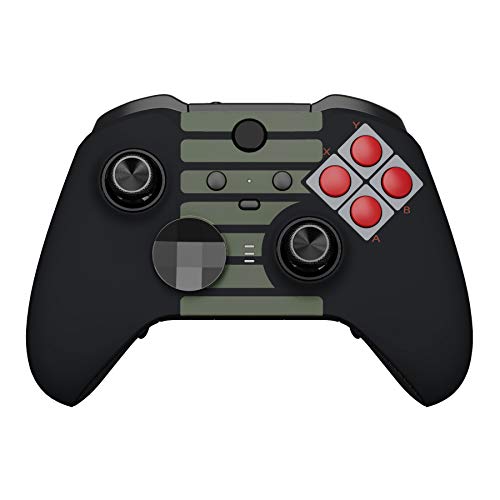
A grey-and-red eighties faceplate that turns a modern Elite 2 into something from a living room in 1988.
This one is a straight visual swap and it is narrower in fit than most of this list: it works on the Xbox One Elite Series 2 and Elite Series 2 Core, model 1797, and nothing else. Not the standard Xbox One, not the Elite Series 1, not the One X or One S. If your pad is not a 1797, this part will not seat — check the number before you get attached to the look.
What you get is a single front faceplate shell, an open-shell tool and two accent rings. The shell is moulded from ABS plastic with a glossy finish and a soft-touch feel — the grip is smooth rather than tacky, which keeps the retro panels clean to the eye. At 50 g for the shell, it is a noticeable chunk of the controller’s feel in the hand, and the textured surface holds up over long sessions rather than turning slick.
Installation is the friendly part: pop the original faceplate off the controller, clip this one on, and refit the accent rings. No soldering, no board access, no wire routing. The one honest note is that button feel is where feedback splits — a few owners find the 8-way D-pad behaves differently once the new top goes on. Treat it as a cosmetic part that happens to fit well, and it does exactly what it promises.
The finish in plain terms: Glossy ABS with a soft-touch top surface, so it looks sharp and feels smooth under your palms instead of squeaking like bare plastic.
The trade-off to accept: It is a 1797-only part, and D-pad responsiveness is the one thing a small handful of buyers flag after the swap.
Matches your bench if: you own an Elite Series 2 and want the retro look without opening the electronics at all.
Won’t help if: your pad is a standard Xbox One or Elite Series 1 — the shell simply won’t fit.
6. SOSS GAMING 2023 Tactile Switch Repair Kit Xbox One

The bumper fix for the button that only fires when you press it hard — ten switches and the drivers to reach them.
A dead or mushy RB or LB is the classic sign of a worn tactile switch, and this kit is aimed straight at that. It fixes bumpers with no function at all, bumpers that work intermittently, and bumpers that need a hard press to register. Ten switches in the pack is enough to revive up to five controllers, which is why it sits comfortably ahead of the single-repair kits on value for a household.
Compatibility covers the whole Xbox Original family — Base, S, X, Elite Series 1 and Elite Series 2. That is a wide net for one box. The package adds a T8 security Torx screwdriver, a T6 Torx screwdriver and a prying tool, so the teardown is covered without a tool run. The bundled drivers are the real difference here: the T8 security bit turns the pinned screws that a plain driver will not budge.
The honest note is the same one that applies to every switch on this list: the switches are soldered, so you need an iron, flux and basic skill. The listing says so plainly, and it is worth believing rather than hoping. Get past that and the feedback on fit and included parts is warm — the 10-switch count means you can afford to ruin one on a bad joint and try again.
Why it wins on bumpers: Ten switches, a T8 security driver, a T6 driver and a prying tool together mean one order covers the repair and the teardown tools. With up to five controllers per pack, the spares-to-cost ratio is the best of any bumper kit here.
The catch: Soldering is required and there is no iron in the box — plan for that before the package arrives.
Go for it when: RB or LB has gone soft and you already own an iron or know someone who does.
Think twice if: your bumper issue is a cracked shell rather than a dead switch — this kit won’t fix that.
7. VANPARK Metal Thumbsticks Paddles Joysticks Xbox Elite Series 2

Six metal thumbsticks, four gold paddles and two D-pads — the biggest single refresh in this guide, and the fastest way to make a worn Elite 2 feel new again.
This is the one for an Elite Series 2 whose sticks have gone bald and whose paddles feel tired. Six black metal Mod Swap thumbsticks, four gold paddles split into two medium and two mini, two gold D-pads and a silver thumbstick adjustment tool land in the box. The sticks are metal with silicone caps, and the paddles and D-pads are metal too, so the wear items are chosen for hardness rather than moulded softness.
The smart bit is how the sticks swap. You pull the old head off and press the new one on — no tearing the controller back down, no screws, no risk to the board. The heads seat firmly and stay put until you deliberately pull them, which is the behaviour you want from a swappable cap. The adjustment tool lets you fine-tune stick height and tension to taste, and the textured grip surfaces give your thumbs something to bite on.
The finish is the weak spot. The metal parts are hard-wearing, but the rubberised caps on the sticks draw mixed feedback — some owners see the rubber peel away over heavy use, and a few call the overall build cheaper than expected. Treat those caps as consumables and the rest of the kit will outlast the pad. It fits the Elite Series 2 only, so a standard Xbox One owner is out of luck.
What it changes: Six sticks, four paddles and two D-pads is enough to rebuild the whole top of an Elite 2 in one sitting, and the swap is tool-free at the stick.
The honest limit: Rubber peeling on the caps is the recurring complaint, and durability is a mixed call in the feedback — the metal paddles and D-pads are the parts that hold up.
Reach for this if: your Elite 2 sticks are worn smooth and you want a fresh set of paddles at the same time.
Skip if: you need a fix for a standard Xbox One pad — this kit is Elite Series 2 only.
8. BSUZUN Front and Back Housing Shell Xbox Elite Series 2

Both halves of an Elite 2 shell in one box, with every screwdriver you need to swap them.
The most complete shell kit here, and the one for a controller whose whole body has been through a war. You get a front shell, a back shell, a T2 screwdriver, a T6 screwdriver, a T8 screwdriver, tweezers and a prying tool. That is the full teardown in one order. Fit is strictly Elite Series 2, model 1797 — not any other Xbox pad.
This part is built to restore, not upgrade: it is designed to bring back the touch feel of a fresh Elite 2 — durable, wear-resistant and hard to damage in normal play. The glossy plastic and the shape match the original closely enough that the pad looks like it just came from the start. Buyers consistently praise the mould quality of the front and back shells.
Here is the caveat worth weighing. The kit is a genuine shell rebuild, and reassembly is where the mixed feedback sits: some owners found the plastic strips or the fit goes fussy as you tighten down. Slow, careful assembly following the video in the product details reduces that risk. If you rush it, this is the one part here where a mistake can cost you the shell rather than just time.
What makes it the full package
- Front and back shell in one box for a complete body rebuild
- T2, T6 and T8 drivers plus tweezers and prying tool included
- Faithfully restores the touch feel of the original Elite 2
- Mould quality is the most praised trait in the feedback
Where to slow down
- Reassembly is where stripping and fit complaints show up — go slowly
- 1797 only, no standard Xbox One fit
- Warranty is three months, shorter than the bumper kits
Best for: a heavily worn Elite 2 that needs a whole-body refresh rather than one panel.
Be realistic if: you are impatient with small screws — this is the most involved install in the guide.
Know the Specs
Model numbers (1708, 1797, 1914)
Check the model number first: every Xbox controller has one moulded inside the battery bay. The standard Xbox One S and One X use model 1708, the original Xbox One pad is 1698, the Elite Series 2 and Elite Series 2 Core are 1797, and the newer Series X and S pads are 1914. A part listed for 1797 will not fit a 1708 — the screw posts and clip positions differ. Check the number, then check the part.
Torx bit sizes (T6, T8, T8H, T3, T2)
Torx is the star-shaped screw head used across the controller shell. The sizes you meet are T6, T8 and T8H — the H means a security Torx with a pin in the centre that a plain bit cannot turn — plus the smaller T2 and T3 on the Elite Series 2. A kit with the right bits saves a mid-repair stall. Look for a kit that names the bits it includes rather than saying “screwdrivers included”.
Tactile switch vs thumbstick module
The tactile switch is the small button under the RB or LB bumper that clicks when you press it; a worn one gives a mushy or dead press. The thumbstick module is the whole analog stick assembly that senses direction; a worn one drifts on its own. Both are soldered to the board, so both fixes need an iron. Faceplates and bottom shells are the parts that swap with a screwdriver only.
ABS plastic shells
ABS is the tough moulded plastic the bodies and buttons are made from. It holds its shape under thumb pressure, takes a matte or gloss finish, and resists the sweat and oil that build up on a pad after months of play. A soft-touch ABS faceplate feels smoother in the hand than bare plastic, which is the difference between a shell that looks new and one that looks like a cheap copy.
Common Questions
How do I find out which model my Xbox One controller is?
Do I need a soldering iron to replace an Xbox One thumbstick?
Will an Elite Series 2 faceplate fit a standard Xbox One controller?
What is the difference between a T8 and a T8H screwdriver bit?
How do I fix stick drift without replacing the whole controller?
Can I replace an RB or LB bumper without soldering?
How many controllers can a 10-pack of tactile switches repair?
Is a shell swap worth it compared with buying a new controller?
Will a replacement faceplate change how the D-pad feels?
Do the metal thumbsticks on the VANPARK kit wear out the same way as plastic ones?
The Bottom Line
For most people hunting the xbox one controller parts to revive a tired pad, the eXtremeRate ABXY Buttons are the smartest first buy: one small bag fits four controller families and changes the look without a single wire. If the problem is drift rather than appearance, the SOSS GAMING 6-pack joysticks cover every Xbox One pad except the Elite Series 2 and give you spares for the next failure. And for a dead bumper on a heavily played pad, the SOSS GAMING tactile switch kit is the one that turns five controllers back to life out of a single box — provided you own an iron.
How we choose
We do not accept paid placement. Every pick is matched to a real buyer and a real use-case; we do not hands-on test units.
Sources
Specifications: manufacturer listings and product documentation. Review insights: verified customer reviews, as of November 2026. Pricing: not shown on this page (it changes often); check the current price via the retailer link.
As an Amazon Associate, Tactical Gear Guy earns from qualifying purchases. This does not affect which products we feature.