Specs are compiled from manufacturer listings and verified buyer reviews and can change over time — please confirm the key details on the product page before buying.
You do not need a full desktop board to type on an Xbox. What you need is a keyboard that actually talks to your console, clips on or plugs in without a driver hunt, and lets you fire off a message without putting the controller down. That is the whole job — and only some of the boards sold as “Xbox compatible” do it cleanly. This guide separates the ones that genuinely work on Xbox One and Series X|S from the ones that only claim to.
This guide is built by comparing the manufacturers’ published specifications and the patterns across verified customer reviews, so you get each pick’s real strengths and trade-offs instead of marketing spin.
These picks split into two families: clip-on chatpads that mount under your controller, and compact wired boards that sit on your desk. Choosing between them is most of the decision, and the picks below cover both.
Top Picks


How To Choose The Best Xbox Keyboard
The first fork in the road is shape, not brand. A chatpad bolts under your controller and lets your thumbs do the typing mid-match. A compact wired keyboard sits on a desk or lap tray and gives you a real typing surface. Pick the wrong shape and the backlight will not save you.
Clip-on chatpad or desk keyboard
A chatpad wins when you want to redeem a code, reply in party chat, or search the store without setting the controller down. It draws power straight from the controller, so there is no battery to think about. A desk keyboard wins when you are typing longer messages, emails, or store searches and want real keys under your fingers. Many compact boards are wired USB, so they plug straight into the console.
Button count tells you how much you can type
Button count is the honest measure of how usable a keypad really is. A 16-key chatpad handles short replies and codes. A 47-key pad gives you a fuller alphabet layout. A 61-key or 104-key board gives you a proper typing surface with modifiers and a number pad on the larger models. Match the key count to how much text you actually send.
Power and connection
Controller-powered chatpads pull their juice through the 3.5mm audio jack, so there is no separate charge — but they only work while the controller is on. Wired USB boards need a free port on the console. Wireless chatpads use a 2.4G receiver (a small USB dongle that carries the signal) and typically reach couch distance. Check which connection your console setup supports before you buy.
Side-by-Side Comparison
| Model | Best For | Buttons | Connection | Backlight | Amazon |
|---|---|---|---|---|---|
| Gaming Keyboard and Mouse 104 Keys★ Best Overall | Full desk setup | 104 | USB wired | RGB | Amazon |
| CHONCHOW 60% ComboSpace Saver | Small desks | 68 | USB wired | RGB | Amazon |
| FASTSNAIL Wireless Controller KeyboardController Companion | Controller typing | 16 | 2.4G wireless | — | Amazon |
| TiMOVO Green Backlight Keyboard | Dark-room chat | 47 | 2.4G wireless | Green | Amazon |
| TNP Xbox One Chatpad | Series X|S owners | 19 | 2.4GHz RF | — | Amazon |
| MoKo Green Backlight Keyboard | Quick install | 10 | 2.4G wireless | Green | Amazon |
| Womier 60% Mechanical | Feel and sound | 61 | USB-C | RGB | Amazon |
| RedThunder 60% Combo | Mouse-included setup | 61 | USB-A cord | RGB | Amazon |
Detailed Reviews
1. Gaming Keyboard and Mouse 104 Keys
Our pick — 4.5+★ from 300+ verified ratings; the strongest balance of quality and price.
The full-size desk board that throws in a mouse and still talks to your Xbox
If you want to sit down and type like you mean it, this is the one to beat. A full 104-key layout gives you the alphabet, a number pad, and 12 multimedia function keys — the same spread you would expect on a real computer keyboard. You get the mouse in the box too, so the whole desk setup lands in one purchase.
That button spread is the widest in this lineup, and it is not close. This board runs 104 buttons against the 16 on the FASTSNAIL chatpad — a 6.5x gap in what your fingers can reach. Both key caps and their printed characters are built to hold up, and the keystrokes stay readable when the LED backlight kicks in. What wins people over most is the build — 31 buyers single out quality, with functionality right behind at 21.
The honest catch sits in the compatibility column. Amazon tags compatibility as mixed, and that fits a board marketed at consoles but wired for a desktop. Plug-and-play means no drivers, and it lists Windows, MAC, Linux, Xbox, and PS4 support. If Xbox input is your only use, verify your setup before you rely on it. The crowd favorite sits at 4.5+ stars across 300+ owners, and that rating is why it takes the top slot.
Where it pulls ahead
- 104 keys including a number pad and 12 multimedia function keys
- Mouse included, so the whole setup arrives at once
- 19 anti-ghosting keys keep fast presses from cancelling each other
- 10 colour settings with adjustable speed, brightness, and direction
Read before you buy
- Xbox compatibility is the flagged weak spot — confirm your console setup
- At 0.91 kg it is desktop furniture, not something you move around
Built for: players who want one full keyboard-and-mouse kit for desk play and do not mind checking Xbox hook-up first.
Worth knowing: this carries the widest key count in the group but ranks below the MoKo and TiMOVO pads on total owner reviews.
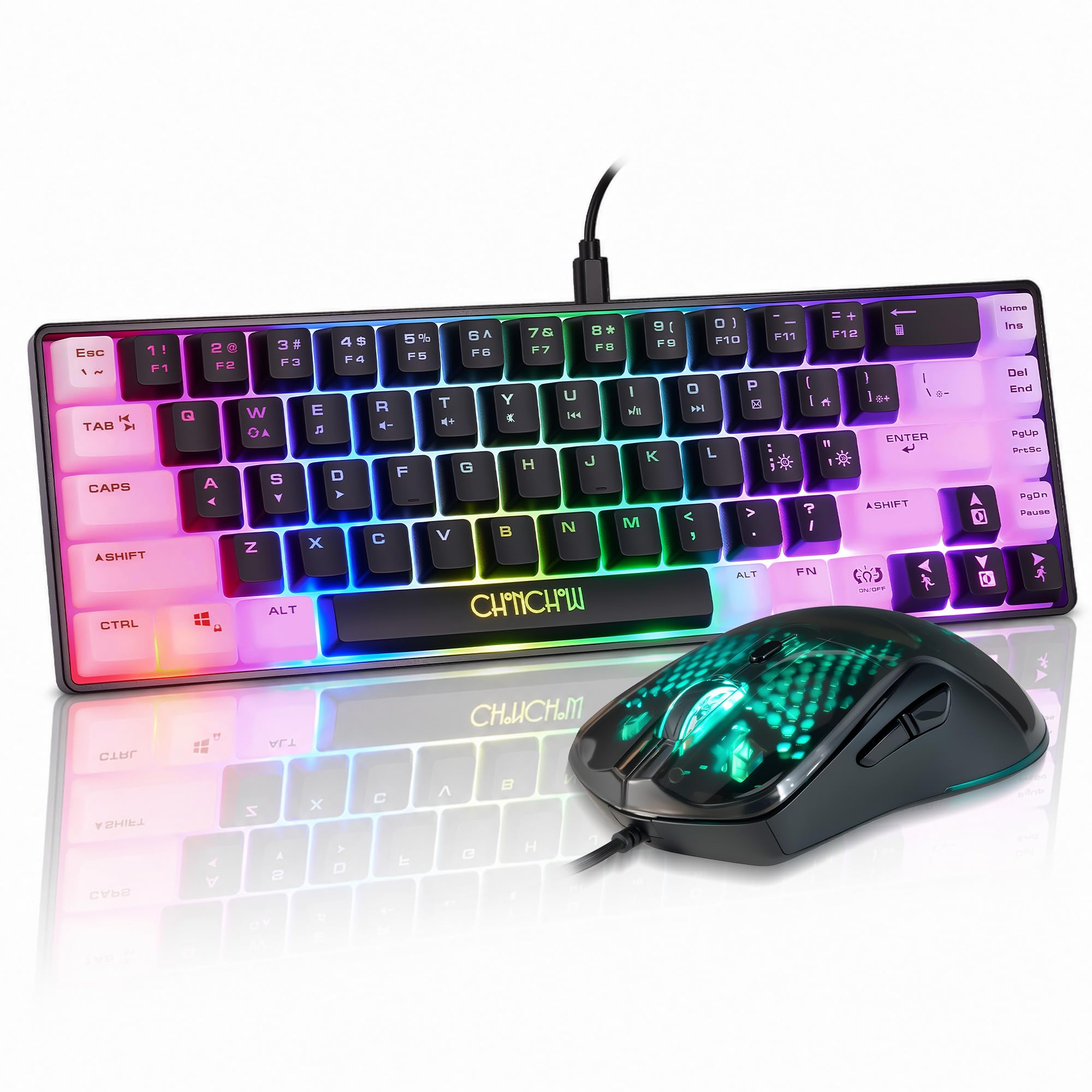
2. CHONCHOW 60% Gaming Keyboard and Mouse Combo
A trimmed-down 68-key board that hands your desk back to the mouse
Sixty-eight keys instead of a full 104 is a deliberate cut, and it buys you elbow room. The board frees up desktop space so your mouse hand is not fighting the keyboard for real estate — the exact reason small-form boards get picked for tight setups. At 0.65 kg it is 0.26 kg lighter than the full-size Gaming Keyboard and Mouse combo, so it shifts around easily if you move between desk and couch.
The lighting is the fun part: 9 lighting modes, 3 brightness levels, and 3 speed levels, plus 7 colours you can split into 6 blocks. The cable detaches, which makes packing it away simpler, and the USB Type-C interface keeps the data link steady. Quality is the recurring praise here — 60+ buyers rate it — with value for money next at 31. Value is genuinely part of the pitch.
Where it asks patience: functionality and durability both read mixed in the owner feedback, and noise level is mixed too, so expect a bit of clatter. It is also a membrane board rather than mechanical, which is a feel choice as much as anything. No number pad means entering long codes by hand. If you mainly type short messages, the missing number pad and membrane feel rarely matter.
What you gain: a compact 12.2 by 3.94 inch footprint, a bundled mouse, and 9 lighting modes for a very small outlay — the lowest-rated-of-the-winners trade is space over keys.
The RGB mouse pairs with a 1200/1800/2400/3600 DPI sensor inside a honeycomb shell that resists dust. Text entry on Xbox works, but you give up the numeric pad, so keep that in mind if you redeem a lot of long codes.
Reach for this if: your desk is cramped and you want keyboard plus mouse without spending much.
Look elsewhere if: you need a number pad or a mechanical feel under your fingers.
3. Wireless Controller Keyboards for Xbox Series X/S
The keypad that rides your controller and keeps a full QWERTY under your thumbs
This is the clip-on route done properly. It uses a QWERTY layout with a number pad, so your phone-typing muscle memory transfers straight over. The wireless link holds up to 10m — about 33 ft — so you can type from the couch without a cable dragging across the room. Setup is a USB dongle into the console, a pairing code, and you are in.
Party chat is where it earns its keep. Headphones plug into the 3.5mm audio jack for online group chat while you type, so voice and text run through the same accessory. Power comes from the controller through that jack, which means no charging and no battery swaps — it only runs while the pad is on. The silica-gel keys over a metal dome switch give the pad a soft-then-clicky response, and the size is small enough that palms still sit naturally around the controller.
Functionality is the split here, and it is the honest headline. Owners split between it working well and it not working at all, which usually points to pairing or fit rather than the concept. Confirm your exact controller model before ordering — the fit is the make-or-break.
Comfort-first build: lightweight, palm-supported, and it draws its power through the 3.5mm jack, so a full session of party chat adds zero battery worry.
Best fit: Series X|S players who want thumb-typed messages without adding a desk or a dongle.
Worth a check: the 16-key layout means fewer letters per row than the wider pads, so expect slower typing on long text.
4. TiMOVO Green Backlight Keyboard

Forty-seven green-lit keys that let you type in a dark room without squinting
Most chatpads make you hunt for letters in the dark. This one leans into that problem: press the Xbox key and the green backlight comes on, then drops into a power-saving state after 10 idle seconds so it is not draining the controller for nothing. That combination of a real 47-key layout and a lit face is the reason it holds its own here.
It is a controller attachment, not a desk board, and it behaves like one. Power and data come through the connected controller over a 2.4G wireless link, with the small receiver tucked on the top right side and removable. A 3.5mm audio port takes any headset so you can hear chat while you type. Installation is a matter of lining it up with the ports and pushing it on.
You get easier typing with it, but the letter-skip issue is real enough to mention — some keys do not always register, so slow down when you enter codes. Connectivity splits between smooth and flaky, and that usually traces back to how the receiver (the small USB dongle that carries the signal) sits in its port or to the controller’s own battery health. It is not a heavy-duty keyboard; treat it as a convenience add-on and it delivers.
Why it earns a spot
- 47 keys give a proper alphabet layout, not a 16-key compromise
- Green backlight kicks on with the Xbox key and sleeps after 10 seconds
- 3.5mm jack takes any headset for chat audio while you type
- Powered by the controller, so no separate charging routine
What to weigh up
- Some keystrokes skip, so slow down for redemption codes
- Connectivity feedback splits between smooth and unreliable
Made for: night-owl players who type short messages and want a lit keypad on the controller.
Skip if: you plan to type long emails and need every keystroke to land.
5. TNP Xbox One Chatpad Controller Keyboard Attachment
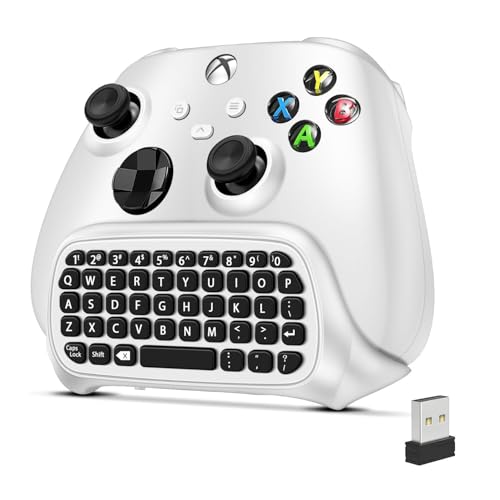
A white chatpad built for the controller you already own on Series X|S
This one is aimed squarely at the newer controllers. It lists compatibility across Xbox One, One X/S, Elite 1 and 2, and Series X/S — a wider fit list than most pads here. Setup takes seconds: the 2.4GHz receiver and 3.5mm audio jack connect with no drivers and no extra cables. You type and chat straight away.
The layout uses low-profile, well-spaced keys so both thumbs can reach them without leaving the sticks. It snaps under the gamepad without blocking the buttons or analog sticks, and it is lightweight enough that grip stays natural. Power comes directly from the controller, so there is no separate battery to feed.
Now the part you need to hear. Functionality and quality both read mixed in the owner feedback, and value for money is the negative note on the record. That is a lot of caveat for a pad at this end of the lineup, so go in expecting to verify your setup works before you lean on it. If the pairing clicks, you have typing on your controller; if it does not, the return window is your friend.
Model coverage: the broadest controller fit list in this group, including both Elite pads and Series X/S.
With 19 buttons it sits between the 16-key FASTSNAIL and the 47-key TiMOVO. That is enough for short replies and chat, not for long-form typing.
Consider it when: you run a Series X|S or Elite controller and want a white pad that matches.
Different choice if: you want a pad with a track record of steady owner satisfaction rather than a fresh fit list.
6. MoKo Green Backlight Keyboard for Xbox One Controller, Black

The pad owners are most familiar with — push it on, press Xbox, start typing
Familiarity counts for something, and this pad has it in spades. Push it into the Xbox One controller, press the Xbox key, and the green backlight comes up. It draws its power directly from the controller, and the light drops into power-saving mode after 10 idle seconds. Setup is the least fussy of the clip-on group — 50+ buyers rate it, and ease-of-setup feedback lines up with that.
The backlight is the star. 55 buyers point to it, and typing messages in a dark room stops being a fumble. A 3.5mm audio jack takes any 3.5mm headset so chat audio runs through the pad while you type, and the 2.4G receiver handles the data link. Ultra-compact is the right description: it sits on the controller without fighting your hands.
But look at the numbers honestly. It lists 10 buttons, which is the sparsest layout in this lineup, so long typing is not its game. Build quality is a genuine sore spot, and reliability feedback splits. It is a convenience accessory, not a daily driver — treat it as one and it earns its spot for quick chat and codes.
In the room: the widest review base of any clip-on pad here, which tells you a lot of people have lived with it and most keep using it.
Against the TiMOVO, the trade is clear: this one is easier to set up, the TiMOVO gives you 47 keys to this pad’s 10. Pick on button count if typing is the job.
Suits you if: you want the simplest clip-on pad for quick messages and headset chat.
One real limit: a 10-key layout means typing is slow — this is a convenience pad, not a keyboard replacement.
7. Womier 60% Percent Keyboard Gaming

The one that makes typing feel good enough to be the reason you buy it
A mechanical board in a 60% shell, themed on Kanagawa anime art with the pattern front and back. It runs a 61-key layout that lists PC, PS4, Xbox Series X|S, and Xbox One compatibility, so one board can sit between your desk and your console. PBT pudding keycaps and north-facing LEDs spread the RGB light evenly across the face.
Where it really separates from the wired clip-on crowd is the feel. POM linear red switches glide with a soft travel and a light click, rated to 50 million keypresses. Multi-layer sound-dampening filling — plastic and silicone inside — cuts the hollow ring metal cases usually have. Build quality is what buyers rate most here, and the sound gets its own mention. It also hot-swaps, so you can change switches down the road without replacing the board.
The catch is the key count and the layout. At 61 keys there is no number pad, and some keys move or merge, so expect a learning curve. Reliability feedback splits too, so test it early. It is not the pad to leave on a couch, and it wires in via USB-C rather than riding a controller.
The typing feel: linear POM switches with dampened fillings make this the most satisfying keypress in the group.
What you give up: 61 keys means no number pad and a slightly shifted layout — fine for gaming, slower for data entry.
Pick this when: the sound and feel of a real mechanical board matter as much as typing on Xbox.
Not for you if: you want a number pad or plug-and-chat simplicity on the controller.
8. RedThunder 60% Gaming Keyboard and Mouse Combo

A compact board and a light honeycomb mouse sold as one matched pair
Buy both halves from the same maker and you get the sizes worked out for you. The keyboard is a 61-key ultra-compact layout with no number pad — the shape FPS players pick because it leaves more space for mouse swings. Both pieces are RGB and both go without the numpad clutter. On the mouse side, a 7200 DPI optical sensor handles fast turns, and the perforated honeycomb shell brings the weight down for quicker flicks.
Durability gets practical treatment here. The board lists water-resistant protection against spills, and the cable is a braided USB with a gold-plated interface and an anti-interference magnet ring for steady data. That braid is built to outlast plain PVC cabling. Quality is what buyers rate most, with functionality next — the kind of feedback you want on a kit that has to survive desk life.
Where it asks a little: 61 keys means you type without a number pad, and the compact layout repositions keys, so give yourself a session to adjust. It is a membrane board, not mechanical, so the click and feel differ from the Womier. If you already own a good mouse, you are paying for one you may not need.
Why the pair works
- 61-key board plus a 7200 DPI mouse, sized to match
- Water-resistant board handles the odd spill
- Braided USB cable with gold-plated interface and magnet ring
- Honeycomb-shell mouse is light enough for quick flicks
The trade-offs
- No number pad, so long codes are slower to enter
- Membrane keys, not the mechanical feel of the Womier
Best for: a new desk setup that needs both keyboard and mouse from the same compact family.
Think twice if: you already own a mouse you love, or you need a number pad for data entry.
Know the Specs
Button count and layout
The number of keys decides how much you can type. A 10-key or 16-key chatpad handles short replies and redemption codes. A 47-key pad gives a fuller alphabet. A 61-key board or 104-key board gives you a real typing surface, with modifiers and, on the larger sizes, a number pad. QWERTY layout matters too, since your thumbs already know where the letters live from your phone.
Connection and power
Clip-on pads usually take power from the controller through the 3.5mm audio jack, so there is no separate battery to charge. Wired boards run a USB cable into the console and need no pairing. Wireless pads use a 2.4G or 2.4GHz receiver — a small USB dongle that carries the signal — which typically covers couch distance and adds a little pairing setup.
Common Questions
Will a chatpad work on an Xbox Series X controller as well as an Xbox One controller?
Do these keyboards need charging or batteries?
Is a 60% keyboard worse for typing than a full-size one?
What does the 3.5mm audio jack on a chatpad actually do?
How many keys do I need to type comfortably on Xbox?
Will a wired USB keyboard plug straight into the Xbox console?
What is the difference between a chatpad and a compact keyboard?
Can I change the switch type on a hot-swappable board?
Do the backlit keyboard and mouse drain the controller battery?
The Bottom Line
For the majority of shoppers, the xbox keyboard winner is the Gaming Keyboard and Mouse 104 Keys because its 104-key layout gives you the widest typing surface in the group, and it arrives with a mouse in the box. If you want a compact board that hands your desk back to your mouse, grab the CHONCHOW 60% Combo. And for quick chat on the controller itself, the TiMOVO Green Backlight Keyboard is the one to reach for. Pick on button count first — 16 keys handles a quick reply, 104 keys handles real typing.
How we choose
We do not accept paid placement. Every pick is matched to a real buyer and a real use-case; we do not hands-on test units.
Sources
Specifications: manufacturer listings and product documentation. Review insights: verified customer reviews, as of November 2026. Pricing: not shown on this page (it changes often); check the current price via the retailer link.
As an Amazon Associate, Tactical Gear Guy earns from qualifying purchases. This does not affect which products we feature.