Specs are compiled from manufacturer listings and verified buyer reviews and can change over time — please confirm the key details on the product page before buying.
The short answer: a keyboard only counts as an Xbox gaming keyboard if it actually talks to your console, and most cheap “console-compatible” boards quietly only work on PC. The safest starting point is any board whose listing names Xbox Series X|S and Xbox One in its own compatibility line — like the HyperX Alloy Origins 60, rated 4.5+ stars across 3,600+ ratings. Below you’ll find seven boards and combos, each checked against exactly that test.
This guide is built by comparing the manufacturers’ published specifications and the patterns across verified customer reviews, so you get each pick’s real strengths and trade-offs instead of marketing spin.
The tricky part isn’t finding a mechanical keyboard — it’s finding one your console will actually accept. Some boards plug straight into the USB port and just work; others need a converter dongle, and some of those dongles still won’t pass a mouse through in every game. That single detail decides whether your inputs register instantly or lag.
What follows separates the boards that truly connect from the ones that only claim to, so you can spot a real xbox gaming keyboard before you buy one.
Top Picks


How To Choose The Best Xbox Gaming Keyboard
The first thing to settle is not switches or lighting — it’s whether the board connects to your console at all. A keyboard can list “Xbox” in its marketing and still need a converter, and some converters only pass keyboard input, not mouse input. Check the compatibility line in the technical specs before anything else.
Confirm the Xbox handshake first
Wired USB is the least fussy route: the board plugs into the console’s USB port and the console reads it as a keyboard. The HyperX Alloy Origins 60 names Xbox Series X|S and Xbox One directly in its compatibility list, which is the clearest signal you’ll get from a listing. Wireless boards are a different story — they need their USB adapter plugged in, and a few games won’t accept keyboard input at all no matter what you connect.
Match the form factor to your desk and your games
A 60% board drops the number pad and the function row to free up mouse room, which matters in shooters where your arm swings wide. A 75% board keeps the arrow keys and function row in a tighter layout. A full-size board gives you a number pad and dedicated media controls, but eats more desk space. The right layout depends on if you need a number pad or want more mouse room.
Understand switch feel before you commit
Linear switches press straight down with no bump, so rapid taps feel smooth. Tactile switches give a small bump you can feel at the actuation point. Clicky switches add an audible click on top of that bump, which is satisfying in a headset but audible to anyone in the room. None of these is “better” — they’re different feels, and the reviews below note which one buyers preferred.
Side-by-Side Comparison
| Model | Best For | Key Count | Connection | Switch / Feel | Amazon |
|---|---|---|---|---|---|
| HyperX Alloy Origins 60★ Best Overall | Desk-space-first console play | 60% layout | USB-C to USB-A (detachable) | Linear HyperX Red | Amazon |
| 8Bitdo Retro 87 Xbox EditionXbox Edition | Xbox-flavored desk centerpiece | 87 | 2.4G, Bluetooth, USB-C | Mechanical, hot-swappable | Amazon |
| SteelSeries Apex 7 | Full-size board with an OLED display | 104 | USB | Tactile & clicky (Blue) | Amazon |
| WK75 75% Wireless | Quiet, gasket-mounted typing | 75% layout | Bluetooth 5.0, 2.4GHz, USB-C | Linear, hot-swappable | Amazon |
| BlueFinger 60% Tri-Mode | Swapping between console and laptop | 68 | 2.4G, Bluetooth, USB-C | Linear white, hot-swappable | Amazon |
| CHONCHOW Wireless Combo | Keyboard and mouse in one box | 87 | 2.4G Wireless | Membrane-style gaming keys | Amazon |
| FELICON T1 Combo | Budget FPS mini-keyboard kit | 39 | Wired USB | Mechanical-feeling membrane | Amazon |
Detailed Reviews
1. HyperX Alloy Origins 60 Mechanical Gaming Keyboard
Our pick — 4.5+★ from 3,500+ verified ratings; the strongest balance of quality and price.
A tiny aluminum slab that hands your mouse the desk back.
If your mouse keeps bumping the side of a full-size keyboard mid-match, the Alloy Origins 60’s 60% form factor is the fix — it drops the number pad and function row to free up desk room for your mouse. The case is aircraft-grade aluminum, which keeps it planted when you press hard. It names PC, PS5, PS4, Xbox Series X|S, and Xbox One directly in its compatibility list, so you’re not gambling on a converter.
The switches are HyperX Reds — linear, meaning they press straight down with no bump, which suits quick taps in shooters. HyperX rates the Reds for 80 million keypresses. The keycaps are double-shot PBT (a dense plastic that resists wear and shine), and the secondary functions are printed on the sides of the caps so you can find them at a glance. A detachable USB-C cable plus two-step feet for three tilt angles make it easy to pack and angle.
What wins people over is the build — the aluminum body is the aspect buyers single out most by a wide margin. The honest catch is reliability: most boards run fine, but a share of buyers report keys giving out early, so buy from a seller with a return window. One more thing worth knowing — at 60% you lose the number pad and dedicated arrow cluster, so if you type a lot of spreadsheets on the same desk, this isn’t the board for that job.
What earns the top spot
- Aluminum case keeps it stable during hard presses
- Linear Reds rated for 80 million keypresses
- Names Xbox Series X|S and Xbox One in the compatibility line
- Double-shot PBT caps resist wear and shine
- Detachable USB-C cable packs flat
Where it asks something of you
- 60% layout drops the number pad and arrow cluster
- A share of units report keys failing early — buy with a return window
- Wired only, so no couch play from across the room
Reach for this if: you want console keyboard support with maximum mouse room and a metal body that stays put.
Pass if: you need a number pad or dedicated arrow keys on the same board.
2. 8Bitdo Retro 87 Mechanical Keyboard, Xbox Edition
The board that makes your desk look like it shipped with the console.
This one earns its place on looks and heft. The 87-key layout matches a classic console keyboard you’d recognize, and the translucent green shell is the design detail buyers point to first. Around that sits a body that reviewers consistently call solid. If your setup doubles as a living-room showpiece, this is the board that carries the room.
It’s hot-swappable, so you can pull a switch and drop a different one in without soldering. Connection is triple: 2.4G wireless, Bluetooth, and USB-C, so you can pair it to a console dongle and a tablet at the same time and switch between them. RGB backlighting and programmable keys round it out.
Two honest notes before you buy. First, this is an Xbox Edition in aesthetics — the spec sheet lists it for Windows and Android, so confirm your console connection path before committing. Second, those 87 keys and the retro shell add up to a desk footprint that’s fuller than a compact board — measure before you buy if your desk is tight.
Build as the headline: the shell and case quality are the aspect buyers mention most, and it shows in how planted the board feels when you press hard.
The connectivity caveat: its triple connection is genuinely flexible for a laptop-and-console desk, but the pairing path on console deserves a check before you buy.
Best fit: Xbox loyalists who want a desk piece that matches their console and don’t mind a fuller footprint.
Think twice if: you need a guaranteed plug-and-play handshake with zero setup step.
3. SteelSeries Apex 7 Mechanical Gaming Keyboard

A full-size board with a tiny screen bolted to the top edge.
The feature that sets this one apart is the OLED smart display — a small screen built into the keyboard that shows settings and on-the-fly info from your game, Spotify, or Discord. That’s unusual on any board, and it’s the thing you’d notice first if it were on your desk. The rest is a 104-key full-size layout with a number pad, dedicated media controls, and USB passthrough.
It’s built on aircraft-grade aluminum alloy, and the switches here are Blue — tactile and clicky, meaning you feel a bump and hear a click at the actuation point. That’s satisfying for typing and loud enough for anyone sharing the room to notice. A premium magnetic wrist rest is included for full palm support. RGB lighting is per-key across 16.8 million colors.
The honest trade-off — and this is the most discussed point — is size and noise together. A 104-key board plus a wrist rest takes real desk space, and clicky Blue switches are not the quiet-night pick. It also runs wired USB only, so there’s no cable-free couch play here. For a desk setup that stays put, neither is a problem.
Why it’s a top pick: the click and feel of the Blue switches is the aspect buyers praise most — satisfying for both gaming and typing sessions.
The size question: measure your desk before you commit, because a full-size board with a wrist rest takes more room than the compact options above.
Pick it for: a permanent desk build where the OLED display and media keys earn their place.
Not for you if: your console lives across the room or the house shares your late-night sessions.
4. WK75 75% Wireless Gaming Mechanical Keyboard

A quiet, thocky 75% board for the desk you share with a headset.
The reason to look at the WK75 is its gasket structure with at least five layers of sound-damping padding. That’s a mounting method that sits the plate on soft cushions instead of screwing it hard to the case, so keystrokes land softer and the sound gets richer. The 75% layout keeps arrow keys and the function row while cutting overall desk width. It’s a purple board with RGB across 16.8 million colors.
Connection is a three-way spread: Bluetooth 5.0, 2.4GHz wireless, and Type-C wired, with a side button to swap between devices. It’s hot-swappable, so you can pull and swap switches without soldering, and COSTOM includes a free 2-in-1 keycap puller plus 3 replacement switches. NKRO means it can register many keys at once, which matters when your fingers land on a cluster.
What buyers appreciate here is the sound — the damped, ASMR-ish click is the detail that keeps coming up. It also feels premium for the price, with crisp RGB colors you can change to match your mood. One thing to check: its console compatibility is listed in the Item Highlight as PC/laptop/Xbox/PS4/PS5, but the main spec table lists Windows as the OS family — so confirm your Xbox path before you buy.
Sound as the selling point: the damped gasket mount gives this board a satisfying thock that’s a clear step up from a hollow plastic case.
The customization angle: hot-swap sockets, a keycap puller, and three spare switches mean you can change the feel later without buying a new board.
Made for: compact-desk players who value a muted, rounded typing feel over a loud clicky one.
A question mark on: its console handshake — verify your Xbox connection path before ordering.
5. BlueFinger 60% Wireless Mechanical Gaming Keyboard
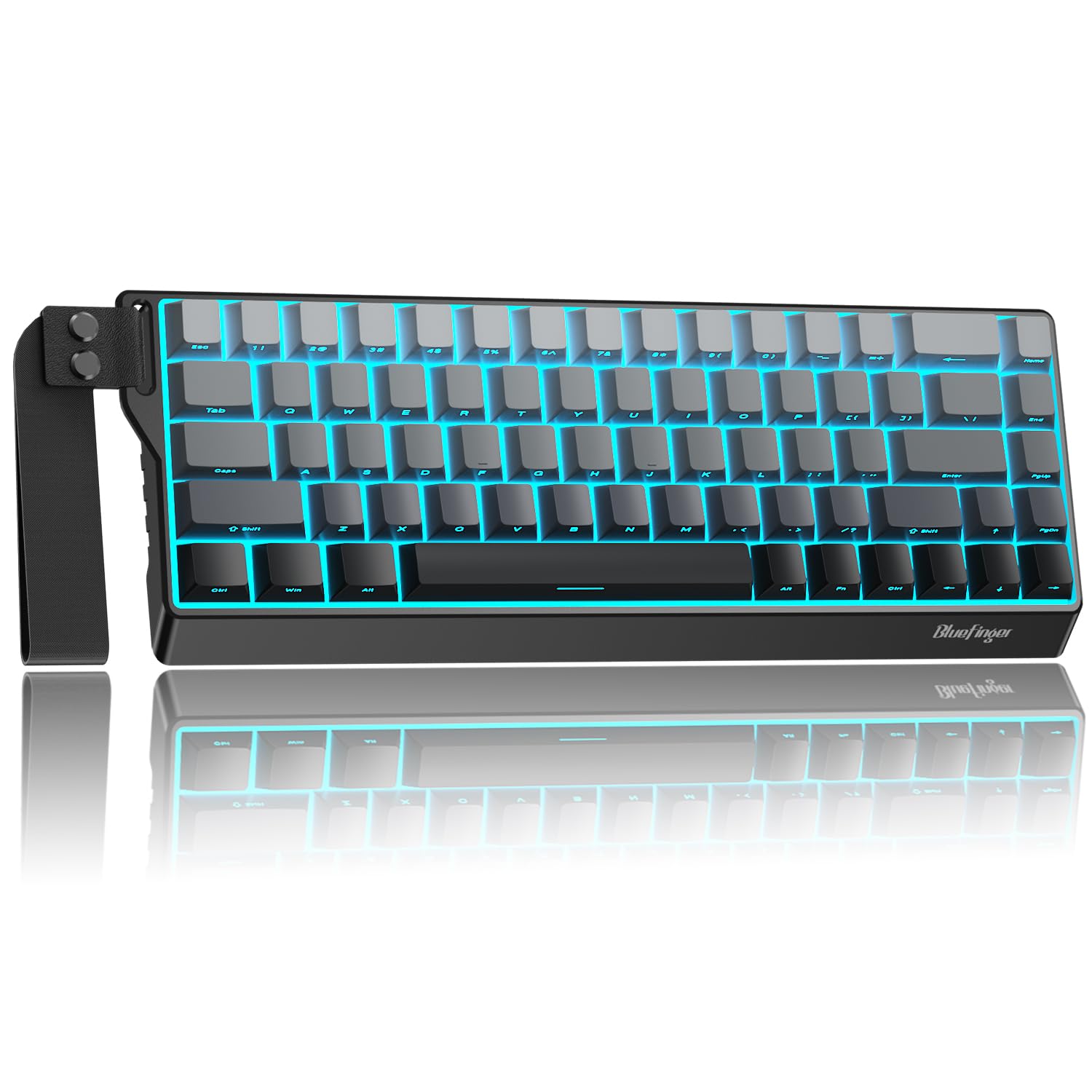
A 68-key board with a built-in strap and a 4000mAh tank.
The headline spec here is the 4000mAh battery — a large power reserve for a compact wireless board, and the kind of figure that means you charge it less often. You can also hold FN + Spacebar to check the remaining level instantly. It’s a 68-key layout, so you keep arrows and the function row while freeing desk room. A built-in strap makes it genuinely packable.
It runs three ways: 2.4G wireless, Bluetooth, and wired USB-C, with a switch on top for toggling and FN + Q/W/E for switching between Bluetooth 1, 2, and 3. The white linear switches are rated for up to 50 million keystrokes and press smoothly with a creamy, thocky sound. Hot-swap sockets mean you can change them without soldering. RGB backlighting offers multiple modes, colors, and speeds.
This is a young listing with a smaller customer base than the others here, so the track record is still building. The bigger thing to verify is console connection — the listing names MAC, Xbox, PC, and PS5, but the tech spec table lists laptop and PC only, so ask the seller for the Xbox path before you commit.
The battery is the reason: 4000mAh with an on-demand level check is a serious reserve for a compact board, which means fewer charge nights.
Check before buying: its tri-mode connection is flexible, but the console handshake isn’t spelled out beyond the marketing line.
Worth a look if: you want a packable compact board with a big battery and hot-swap flexibility.
Look elsewhere if: you want a long, deep review history behind your purchase.
6. CHONCHOW Wireless Gaming Keyboard and Mouse Combo

Two pieces, one dongle, and no batteries to buy.
This combo is one of the few here that gives you both halves — an 87-key board and a mouse — on a shared 2.4G adapter, so a single wireless link covers your whole desktop. Both are rechargeable: 2000mAh in the keyboard and 500mAh in the mouse, with a charging cable in the box. The keyboard sleeps after 60 seconds idle and the mouse after 10 minutes, and any key wakes them up. That’s a useful detail if your setup lives in a living room where the couch won’t launch itself.
It’s an 87-key compact board with rainbow LED across 3 brightness and breathing speeds, and the keycap characters are designed not to fade. The mouse is symmetrically shaped for ambidextrous use. It connects over 2.4G wireless across an effective distance of 10 meters. A word on the powered spec: use a 5V2A charger when you top it up.
The honest note is connectivity mixed bag — the set works on PS5 and PS4 for some buyers but not others, and console games can depend on the game’s own settings. The keyboard and mouse also can be used separately, which softens the frustration if one half loses its link. Verify console compatibility before buying, since that’s where the honest friction sits.
One dongle, two devices: the shared 2.4G adapter is the cleanest version of a wireless console desk without a nest of cables.
Auto-sleep in plain terms: the board dims after a minute idle and the mouse after ten, which stretches charges on a set you leave on all evening.
The right call for: a couch-and-console setup that wants a keyboard and a mouse on one wireless link.
The reason to hesitate: console support varies by buyer report and by game, so confirm before you rely on it.
7. FELICON T1 Wired 39-Key Keyboard and Mouse Combo

A 39-key one-hander built for shooters, converter included.
This kit puts a 39-key keyboard, a mouse, and a converter in one box, and the converter is the whole reason it’s here. It’s built for console FPS play — the listing names Fortnite, PUBG, Apex Legends, DOOM, Call of Duty, Rainbow Six Siege, and CS. The 39-key design is one-handed keyboard scaling, which frees desk space, and an integrated palm rest sits under your wrist.
The keyboard is wired for no-latency stability. All 39 keys have anti-ghosting, meaning they can all register at once, which matters when your hand is holding movement plus a couple of action keys. Key binding and mouse sensitivity adjustment happen through the included adapter without a downloaded program. Buttons are backlit for night play.
Compare the 39 keys to the 87 on the CHONCHOW combo and the trade-off is obvious: a much smaller key field for more desk space and a one-handed layout. The honest catch, and the most-discussed point by far, is console compatibility — owners mention the Switch setup failing and the instructions giving vague guidance. The converter isn’t tuned to specific games, so it’s a check-the-numbers purchase. Read the return policy before ordering and set it up carefully.
Why the layout works: the one-handed 39-key spread keeps your mouse arm free and your movement hand close, which is the point of a dedicated console board.
The setup step you can’t skip: driverless key binding is a plus, but the vague setup instructions and mixed compatibility reports mean your first session is part of the buy-in.
Buy it for: a tight-desk console shooter setup where the whole kit comes in one box.
Go another route if: you want a smooth out-of-box console handshake and setup guidance that holds your hand.
Know the Specs
Key count and form factor
Key count tells you how much desk space the board takes and what’s gone. A 60% board drops the number pad and function row to free mouse room. An 87-key board keeps the function row but not the number pad. A 104-key full-size board keeps everything. Pick by what you actually press in a game, not by what a spec sheet calls “pro.”
Switch type and actuation feel
Linear switches press straight down for smooth, quick taps. Tactile switches add a bump you feel at the actuation point. Clicky switches add an audible click on top of that bump. A rating like 80 million keypresses describes how long a switch is expected to last, not how it feels — that’s a separate spec. Match the feel to your noise situation and your game.
Connection type on console
Wired USB is the simplest path to a console, since the console accepts the board directly. Wireless boards need their USB adapter plugged in, and 2.4G is a short-range radio link that carries keyboard and mouse input. Bluetooth boards pair with a console through the console’s Bluetooth settings. Whatever the route, some games simply don’t accept keyboard input — that’s game-side, not a keyboard fault.
Battery capacity in mAh
mAh (milliamp-hours) is a battery’s size — a bigger number means more runtime between charges. A 4000mAh keyboard lasts longer per charge than a 2000mAh one, all else being equal. Auto-sleep and backlight brightness both eat into that. A battery-level check shortcut like FN + Spacebar saves you the guesswork on charge day.
Common Questions
Will any USB keyboard work on an Xbox Series X or Xbox One?
Do I need a converter dongle to use my keyboard and mouse on Xbox?
Does a mechanical keyboard work on Xbox or only PC?
How long will a mechanical keyboard switch last before it wears out?
What’s the difference between linear, tactile, and clicky switches?
Can I use a wireless keyboard and mouse on Xbox without extra hardware?
Is a 60% keyboard worse for gaming than a full-size one?
Why would I want a hot-swappable keyboard?
Do I need software installed to use these keyboards on console?
What does a keyboard battery capacity in mAh actually tell me?
The Bottom Line
The board that makes the most sense as a starting point is still the HyperX Alloy Origins 60, because it’s the one that names Xbox Series X|S and Xbox One in its own compatibility line, wraps that in an aluminum body, and keeps the desk clear for your mouse. If you’d rather have the desk centerpiece that matches your console, the 8Bitdo Retro 87 Xbox Edition is the aesthetic pick with three connection modes. And if a compact board with a big battery and hot-swap flexibility appeals to you, the BlueFinger 60% Tri-Mode is a genuinely interesting value.
One honest nudge: whichever board you pick, verify the compatibility line in the technical specs before you buy, because the console handshake is the only thing that can’t be fixed later with a setting or a driver. Get the connection right and even a budget board responds instantly.
How we choose
We do not accept paid placement. Every pick is matched to a real buyer and a real use-case; we do not hands-on test units.
Sources
Specifications: manufacturer listings and product documentation. Review insights: verified customer reviews, as of November 2026. Pricing: not shown on this page (it changes often); check the current price via the retailer link.
As an Amazon Associate, Tactical Gear Guy earns from qualifying purchases. This does not affect which products we feature.