Specs are compiled from manufacturer listings and verified buyer reviews and can change over time — please confirm the key details on the product page before buying.
Most Xbox setups don’t get better because someone bought the fanciest gear — they get better because the weak link got fixed. A controller that drifts, a battery that dies mid-match, a headset that mumbles: those are the three things that actually wreck a session. This guide sorts the real upgrades from the shelf filler so you spend once and stop thinking about it.
This guide is built by comparing the manufacturers’ published specifications and the patterns across verified customer reviews, so you get each pick’s real strengths and trade-offs instead of marketing spin.
Hall Effect sticks, a swappable battery pack, and a wired headset with a clean mic are the three upgrades that change how a session feels day to day. Here is the straight answer on the best Xbox Gaming Accessories for your setup.
Top Picks
How To Choose The Best Xbox Gaming Accessories
Start with the part of your setup that annoys you most. If your aim wanders when you aren’t touching the stick, that’s stick drift and no cable or grip will cure it. If the controller dies at the wrong moment, the fix is capacity, not a longer cable. Sort your problem first, then buy one accessory that solves it.
Match the connection type to where you sit
A wired controller sends input straight down a cable, so there’s no pairing to lose mid-match. That suits a fixed desk or a setup where the controller never leaves the room. Wireless runs on Xbox Wireless radio or Bluetooth and lets you sit back on a couch. Console-first players lean wireless for convenience; anyone chasing zero lag tends to stay wired.
Understand what battery capacity actually buys you
Rechargeable packs list capacity in mWh (milliwatt-hours — the stored energy in the cell). Plain AA cells list voltage and nothing else, so the honest comparison is runtime, not chemistry. Look at how long the pack claims per charge and whether you can swap cells without pulling the battery cover off — that last detail saves real fiddling at a friend’s house.
Check console compatibility before you click
Xbox accessories split between Xbox One, Series S, and Series X support, and a few skip one of those on purpose. A chatpad sized for a Series X controller won’t seat on some other models, and a grip kit built for one generation can misalign on the next. Read the compatibility line on the listing, not the product name.
Side-by-Side Comparison
| Model | Best For | Type | Key Spec | Connectivity | Amazon |
|---|---|---|---|---|---|
| UPERGO Walnut Headphone Stand★ Best Overall | Tidy desk setup | Desk stand | Dual headphone + controller holder | — | Amazon |
| SCUF Pro Triggers Grip KitTrigger Tuning | Shorter trigger pull | Controller grip kit | Trigger stop switch | — | Amazon |
| Turtle Beach Recon 50Chat on a Budget | Budget chat headset | Wired headset | 40mm speakers | Wired | Amazon |
| MoKo RGB Backlight Keyboard | Typing on console | Controller chatpad | 47 keys | 2.4G wireless | Amazon |
| DINOSTRIKE 4X 6200mWh Battery Pack | Long sessions | Battery + charging dock | 4x 6200mWh batteries | USB-C cable | Amazon |
| GameSir G7 SE | Zero stick drift | Wired controller | Hall Effect sticks and triggers | USB wired | Amazon |
| Xbox Wireless Controller Ice Breaker | Style plus battery life | Wireless controller | Up to 40 hours battery life | Xbox Wireless, Bluetooth, USB-C | Amazon |
| Xbox Wireless Controller Gears of War: E-Day | Collector shelf piece | Wireless controller | 3D molded laser-etched design | Xbox Wireless, Bluetooth, USB-C | Amazon |
| Xbox Core Wireless Controller 2-Pack | Two-player households | Wireless controller pair | 2 controllers included | Xbox Wireless, Bluetooth, USB-C | Amazon |
Detailed Reviews
1. UPERGO Walnut Headphone Stand
Our pick — 4.5+★ from 250+ verified ratings; the strongest balance of quality and price.
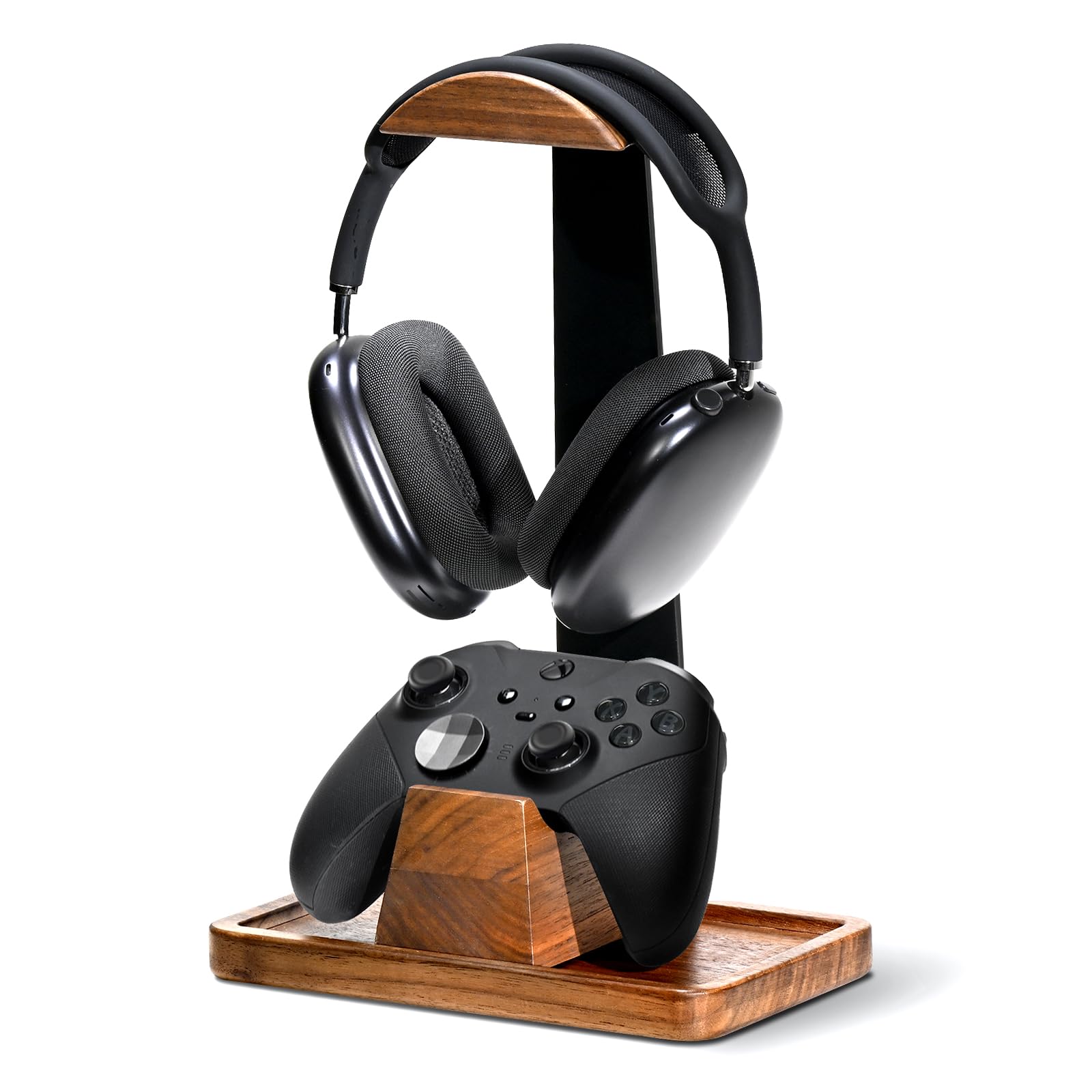
The only pick here that clears the desk instead of changing the gameplay — and it’s solid walnut, so it looks like furniture doing it.
Your headset and controller both need somewhere to land between rounds, and a bare desk isn’t it. This stand gives each one a dedicated spot: a curved cradle up top for over-ear cans, a solid wood dock below for the gamepad so it can’t slide off. That’s the whole point of a desk accessory — it removes a small daily annoyance you’d stopped noticing.
The frame is solid walnut wood with metal in the build, and the base is weighted with anti-slip silicone pads underneath. That combination means it holds a heavy headset without tipping, and it grips the desk instead of skating across it. Setup is a 3-part snap-together job that takes under 2 minutes with no tools.
What wins people over is the craftsmanship — the wood grain reads as real, and owners consistently treat it as a legitimate desktop piece rather than plastic scenery. Sturdiness and ease of assembly follow close behind, and it supports heavy headphones without tearing up the pads. The catch is scale: at 4.72 x 8.27 x 6.3 inches it claims real desk real estate, so a small side table won’t have room for it. It also holds one headset, not a collection.
What earns it first place
- Solid walnut construction with a weighted, silicone-padded base that stays planted
- Hidden storage tray in the hollow base for earpads, cables, or SD cards
- Snap-together assembly in under 2 minutes, no tools
- Wide arc and adjustable clearance fit most over-ear headsets
Where it stops short
- Needs a decent chunk of desk or shelf space to earn its keep
- Holds a single headset — no room for a second pair
Buy it if: your gear lives on a desk and you want one dedicated landing spot that looks like it belongs in the room.
Think twice if: your setup is a couch and a coffee table — this wants a flat surface to grip.
2. SCUF Pro Triggers Grip Kit with Share Button – Black
A 20 g pair of grips that shortens your trigger pull and stops your palms from sliding.
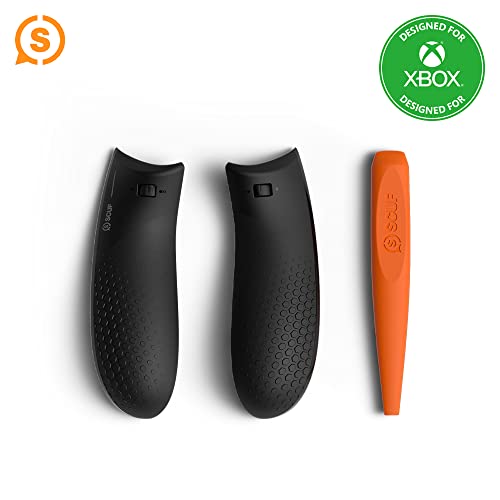
Shooters punish a long trigger pull. This kit adds a trigger stop switch that cuts the activation distance, so the shot registers sooner in the pull rather than at the bottom of it. The same set swaps the back grips for a grippier texture, which keeps the pad of your hand from creeping during a long session.
Fitting is a one-tool job — the removal tool ships in the box alongside a left grip, a right grip, and an installation guide. That’s a 20 g addition in total, light enough that you won’t feel the controller gain weight. Colour options run blue, red, black, and gray if you care about matching a shell.
Buyers report mixed feedback on two things: trigger control and reliability. A chunk of that depends on generation fit. It’s built for Xbox Series X and S controllers, and compatibility complaints cluster around the newer Series S shells. The grip texture and the overall build are the parts that land well. If your controller is an older One-era pad, confirm the model line before ordering — this is a Series X/S fit.
The one-tool appeal: you can fit and swap it in a few minutes, and the trigger stop is the single change that actually alters how a shot feels.
The catch: it’s a Series X/S part, and the trigger actuation results vary enough that you should test it on one trigger before committing to both.
Pairs best with: a Series X/S pad and a shooter where you want the shot to break earlier in the pull.
Skip the fit risk: if you’re on a One-era controller or a newer Series S shell, the seating is where this gets awkward.
3. Turtle Beach Recon 50 Gaming Headset
Wired, cheap, and it does the one job that matters most: it sounds good.
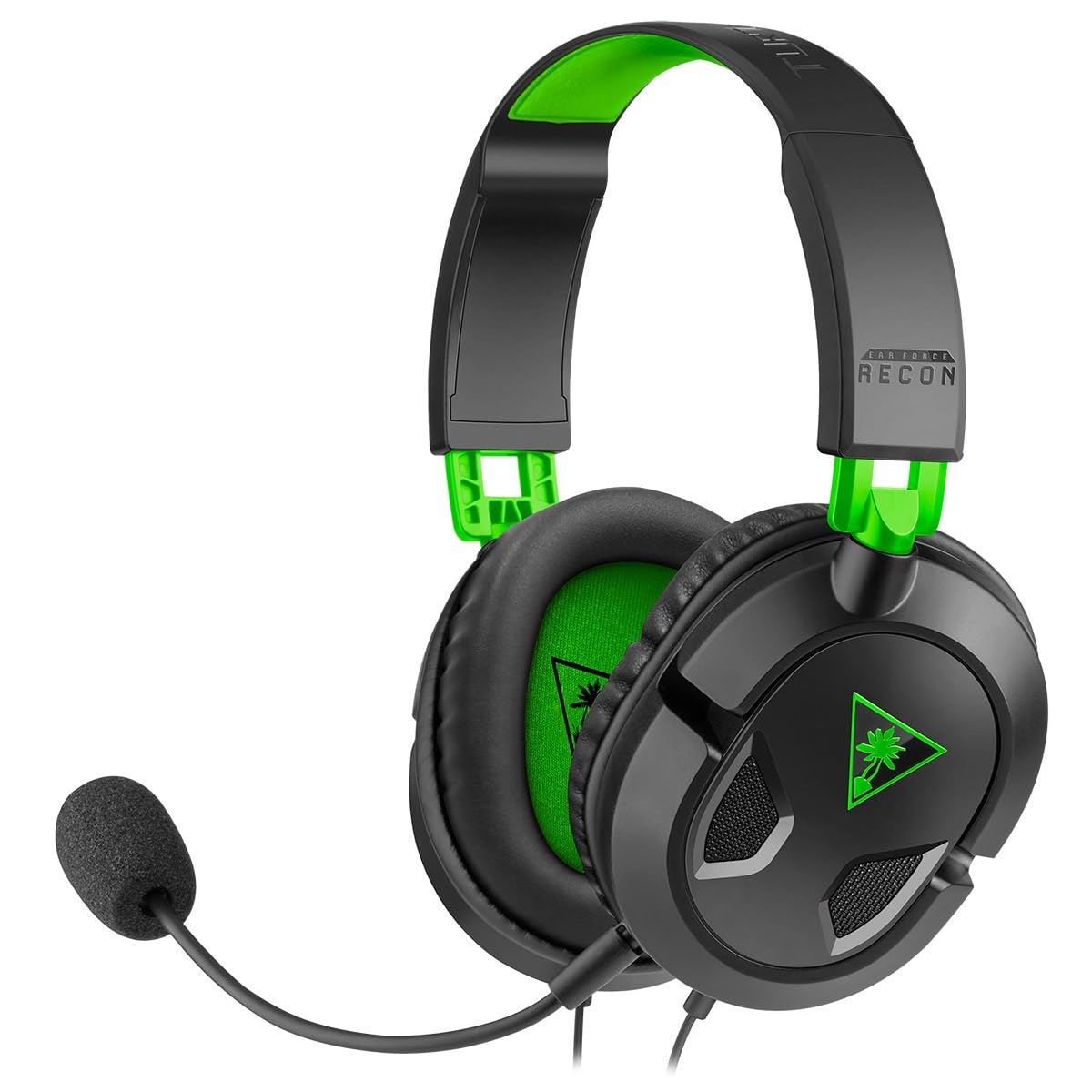
If you want chat and game audio from one 3.5mm plug without turning it into a purchase decision, this is the sensible floor. It’s a wired headset with 40mm speakers driving the audio and an adjustable high-sensitivity mic on a boom you can position. Surround sound ready for Xbox, and the in-line controls sit on the cable where your hand already is.
Compatibility is the quiet strength — Xbox One, PS4 Pro and PS4, PC, Mac, and mobile or tablet devices all take the same 3.5mm connection. One headset covers a console and a laptop and a phone, which is why it hangs around as a spare set in a lot of households. A single cable is all you manage; there’s no charging routine to forget.
Sound quality is what earns it the recommendation — it’s the aspect buyers talk about most, and it holds up for the money. The honest trade-off is build feel: the plastic and padding read as budget, so treat it as a headset you keep on a hook rather than one you toss in a bag. That’s a fair caveat, not a defect, and it’s why the price sits where it does.
Where it earns its keep: 40mm drivers and a high-sensitivity mic on a wired line, across Xbox, PlayStation, PC, Mac, and mobile from one 3.5mm plug.
What you accept: the shell feels entry-level in the hand, so it suits a desk hook better than a backpack.
The right call for: a first headset or a spare that has to work on whatever console is in the room.
Look past it if: you want a headset that feels dense and premium in the hand — the materials here are honest budget.
4. MoKo RGB Backlight Keyboard for Xbox One Controller

A chatpad that clips into the controller and lights its own keys, so messaging stops being a chore.
Typing a message with a thumbstick is slow, and this fixes it. The MoKo chatpad adds 47 keys that seat into the controller, so text, email, and party chat go in at keyboard speed. It fits Xbox One, One S, Series S, Series X, Elite, and Elite 2 controllers plus Windows 11 — but the listing is explicit that it doesn’t fit Xbox One X, so check your pad first.
The backlight is the part that makes it usable after dark. Three modes — rainbow breathing, trichrome, and monochrome — run behind silicone keys shaped so each letter stays readable. The light shuts off after 10 seconds of no input and comes back in the mode you left it in. Connection is 2.4G wireless (a dedicated radio link, not Bluetooth) with a stated range of 10 meters, and the receiver detaches from the top right of the keyboard.
Two practical notes worth knowing up front. It’s powered by the controller itself, so the listing asks for the pad to be above 20% charge to run normally. And responsiveness is where feedback splits — a share of buyers find it drops input, so it suits messaging and menu work better than fast in-game chat. Pairing is a sequence: connect the controller to the console, seat the keyboard, plug the receiver into the console, then press the pairing key within 15 seconds.
Why it earns a slot
- 47 silicone keys with RGB lighting that stays legible in a dark room
- 2.4G wireless link with a 10-meter stated range and a detachable receiver
- 3.5mm audio jack on the pad for wired headset audio
- Compact and light enough to carry — saves desk space too
What to plan around
- Doesn’t fit the Xbox One X controller
- Runs off the controller’s charge, so it needs the pad above 20%
- Input can drop, so it’s better for messages than fast play
Suits you if: you message, email, or browse from the couch and want real keys instead of a thumbstick.
Not for you if: you’re on an Xbox One X controller, or you need rock-solid input during competitive play.
5. DINOSTRIKE 4X 6200mWh Battery Pack with Charging Station
Four rechargeable cells and a dock, so a dead controller is a swap instead of a wait.
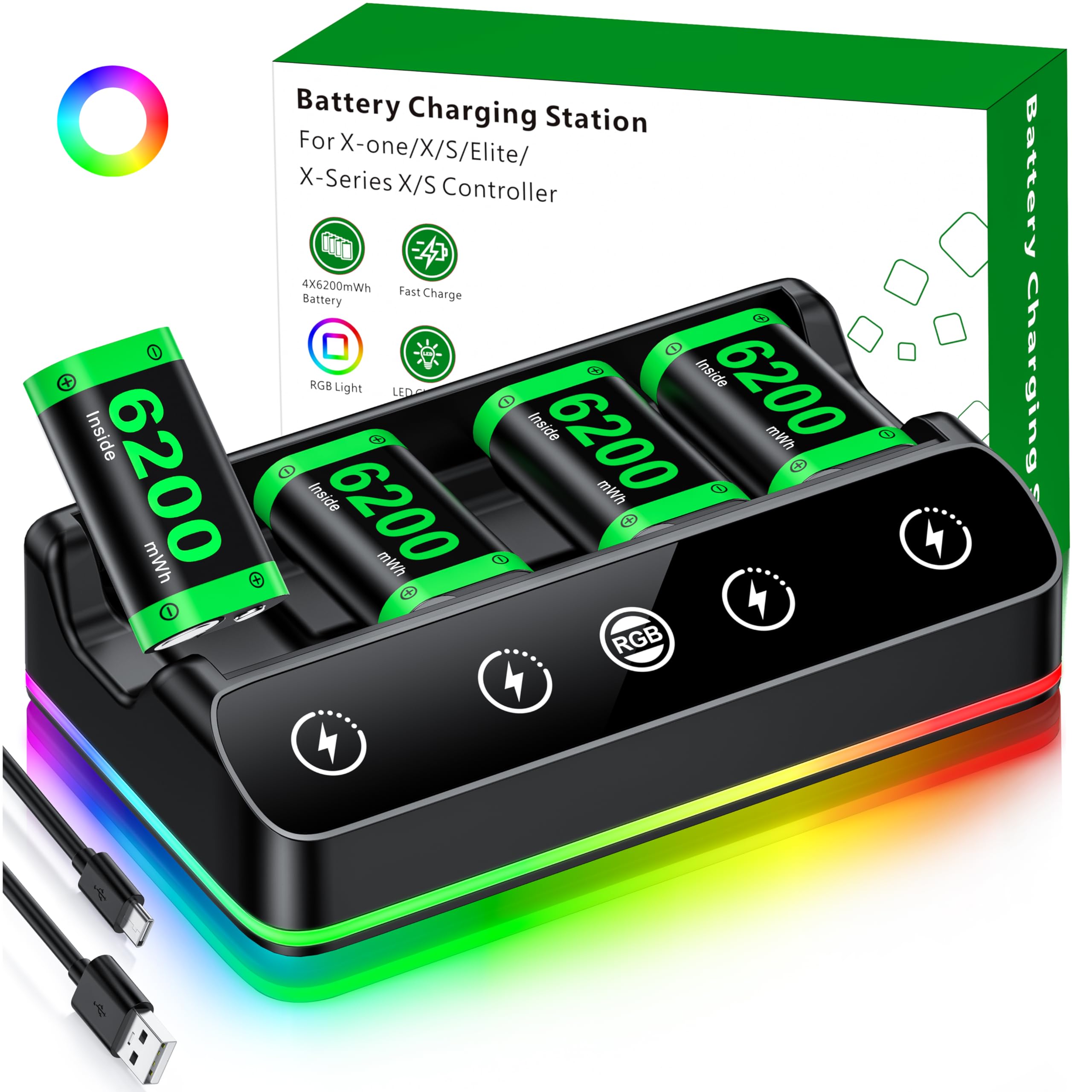
Running out of controller charge mid-match is a solved problem — you just need more cells than you can drain. This kit ships 4x 6200mWh rechargeable batteries with a charging stand, so one set charges on the dock while another sits in the pad. That’s four cells versus the single grip pair you’d get from a SCUF kit, and it’s the difference between a backup and a rotation.
The runtime numbers are the reason it wins people over. A full charge takes 4-5 hours, and each cell then delivers 15-20 hours of play. The dock carries dual-colour LED indicators — red while charging, green when done — so you can see status at a glance. A silicone pad underneath keeps it from sliding and damps the sound.
There’s a detail here that saves real annoyance: the batteries swap without pulling the controller’s battery cover off, which is the fiddly bit on most packs. The dock also throws in 7 adjustable LED lighting modes, changed with one button press and shut off with a 3-second hold, if you want some atmosphere on the shelf. Cells are NiMH and rechargeable, and a 1-year warranty covers the set.
What it solves: 4x 6200mWh cells at 15-20 hours each, charged in 4-5 hours, with a spare always ready in the stand.
Worth knowing: it’s a controller-side solution only — it doesn’t charge the pad itself, and the RGB lighting is a preference some will switch off permanently.
Worth it for: long sessions, shared controllers, and anyone tired of hunting for AA cells at the wrong moment.
Overkill if: you play in short bursts and already own a good set of rechargeable AAs.
6. GameSir G7 SE Wired Controller with Hall Effect Joysticks

Hall Effect sticks that don’t wear out are the whole argument — everything else is a bonus.
Standard analog sticks use physical contacts that grind down over time, which is exactly how drift starts. Hall Effect sticks read position with a magnetic field instead, so there’s nothing to wear through. That’s the headline here, and it’s why this pad shows up in conversations about controllers that outlive their sticks. It supports Xbox Series X/S, Xbox One X/S, and PC with Windows 10 and above, including Steam.
Around those sticks you get Hall Effect triggers, 2 custom back keys for mapping, and dual vibration — a pulse motor in the triggers plus an asymmetric grip motor. Audio runs through a 3.5mm jack for a headset, and the grip carries an ultra-fine laser-engraved texture that stays put in warm hands. The USB connection is detachable, which means you can replace the cable instead of the controller if it fails.
The catch is connectivity, and it’s the one thing to weigh seriously. A share of owners mention the pad refusing to stay connected, and that single issue is what keeps it from being an easy recommendation for everyone. On the positive side, the drift-free sticks and the ergonomics are what owners keep coming back to. It’s a 420 g unit — noticeably heavier than a stock wireless pad — so the heft is part of the feel.
The strongest case: Hall Effect sticks and triggers mean the wear part that usually kills a controller simply isn’t there.
The honest warning: connectivity complaints are common enough that you should buy it somewhere you can return it if your unit drops the link.
Pick it for: drift-free play on a fixed desk setup where a cable is no inconvenience at all.
Rethink it if: you need the connection to be invisible — wired reliability has been inconsistent for some buyers.
7. XBOX Wireless Gaming Controller Ice Breaker

Iced and frosted blues on a pad that claims up to 40 hours between charges.
Special editions are usually a paint job and a price bump. This one at least backs the finish with a real runtime claim: up to 40 hours of battery life, which is the number that matters if you’re tired of docking the controller every evening. Rubberized grips on the back cases keep it seated in your hands across a long session, and the textured triggers give your fingers something to index against.
Connectivity is the flexible part — Xbox Wireless for console, Bluetooth for PC and mobile, and USB-C for direct plug-and-play. You can pair with mobile, gaming handhelds, Smart TVs, and supported VR headsets through Xbox Cloud Gaming, and switch between devices. The dedicated Share button captures screenshots and recordings, and button mapping runs through the Xbox Accessories app.
The look is the reason most people land here, and the Ice Breaker blue mix does stand out on a shelf. Durability is the real caveat — reports of a pad lasting only a few months exist, and stick drift shows up as a negative thread in the feedback. Most owners are happy, but this is a controller to buy with a little care about where it’s stored and how hard it’s handled.
Reasons it makes the list
- Up to 40 hours of battery life per charge
- Xbox Wireless, Bluetooth, and USB-C on one pad
- Rubberized rear grips and textured triggers
- Dedicated Share button plus app-based button mapping
The fine print
- Durability feedback is mixed, with some reporting a short lifespan
- Stick drift appears as a recurring negative in the reviews
Made for: players who want a controller that looks distinct and runs for days between charges.
Pass if: you want the longest possible service life and drift-free sticks — the GameSir above targets that job directly.
8. Xbox Wireless Controller Gears of War: E-Day
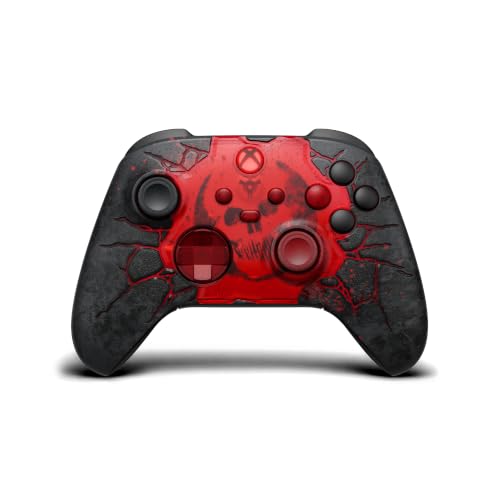
A Gears of War showpiece on the outside and a standard Xbox wireless pad underneath — and it nails both.
The detail work is the entire story. The top case is 3D molded and laser-etched with red glowing cracks modelled on an erupting E-hole, and the Crimson Omen sits front and centre. The ABXY buttons are blacked out with the X in transparent red, the triggers and D-pad are transparent red, and the COG tags are printed on the battery door. If you know the game, you’ll spot every reference without reading a word of copy.
Under the finish it’s a standard Xbox wireless pad — Xbox Wireless and Bluetooth, a 3.5mm headset jack, textured triggers and bumpers, and a hybrid D-pad. It works on console, PC, and cloud, and the rubberized black leather-like grips on the back and sides give it a different feel in hand than the smooth-shell versions. It weighs 13.6 ounces.
Owners treat the etched Omen-through-the-wall look as the standout, and the leather-like grip texture runs a close second — this is a shelf piece people actually play with. Value reads positively here rather than as a complaint, which is unusual for a limited edition. The honest limit is that it’s a cosmetic edition of a familiar pad: if you already own a Series controller, you’re paying for the art.
What makes it land: 3D molded laser-etched cracks, transparent red triggers and D-pad, and COG tags on the battery door — the theming runs all the way through.
The trade-off: mechanically it’s the same Xbox wireless architecture as the Ice Breaker, so the premium buys design, not new hardware.
Reach for it if: you’re a Gears fan and want the limited edition on the shelf and in your hands.
Look elsewhere if: you need a functional upgrade — this is a design edition of a familiar controller.
9. Xbox Core Wireless Controller 2-Pack

Two matching Carbon Black pads in one box — couch co-op without a second order.
If two people share the TV, one controller is a scheduling problem. This bundle puts 2x Microsoft Xbox Core Wireless Controllers in Carbon Black in a single box, so couch co-op stops requiring a second order. Each one carries textured grip on the triggers, bumpers, and back case, plus the hybrid D-pad for directional inputs that need to land cleanly.
Connection options cover the household: Xbox Wireless to the console, Bluetooth to Windows 10 PCs, tablets, iOS and Android, and a USB Type-C port for wired play. A 3.5mm stereo jack takes any compatible headset, and the Share button captures screenshots and clips. Button mapping is customisable per profile, so each player can set their own layout.
Quality is what owners talk about most, and value-for-money ranks right behind it — two pads in one purchase reads as sensible rather than indulgent. Functionality and connectivity are the mixed notes, with an occasional report of a pad failing early or a link dropping on Series S. That’s the sort of thing a warranty covers, and it’s worth registering both pads the day they arrive.
The practical win: 2x controllers in one box, both Carbon Black and both with the same textured grip and hybrid D-pad.
What to do on arrival: test both pads immediately and confirm each pairs cleanly — early failure is rare but real enough to check while returns are easy.
Best for: a two-player household or anyone who keeps a spare pad charged for guests.
Not needed if: you play solo and already have a working controller — one pad covers that.
Know the Specs
Hall Effect Sticks vs Standard Analog Sticks
Standard analog sticks track movement with physical contact parts that wear as you play, and worn contacts are what cause drift — the stick registering motion you didn’t make. Hall Effect sticks read position with a magnetic field instead, so there’s no contact surface to grind down. If drift is the reason you’re shopping, this is the spec to look for by name.
mWh Capacity and What It Means Per Charge
More play per charge depends on one number: mWh (milliwatt-hours, a measure of stored energy). A bigger number means more play per charge, all else equal. A 6200mWh cell in this guide is rated for 15-20 hours of play after a 4-5 hour charge — enough for several long sessions between top-ups. Plain AA cells don’t quote mWh at all, so compare the stated runtime instead of the chemistry label.
2.4G Wireless vs Bluetooth on a Console
A 2.4G connection uses its own dedicated radio link through a small USB receiver, which is why the MoKo chatpad quotes a 10-meter range and pairs through a receiver rather than a Bluetooth menu. Bluetooth is the more universal standard and pairs without a dongle, but it can be fussier to keep connected. On a console, a receiver-based link is often the simpler setup.
Trigger Stops and Pull Distance
A trigger stop shortens how far the trigger travels before it registers, so the input fires earlier in the squeeze. That matters most in shooters where a fraction of travel changes the feel of a shot. It’s a physical part swap, not software, which is why kits like the SCUF set include a removal tool and fit to specific controller generations.
Common Questions
Will the MoKo chatpad fit my Xbox controller?
Do Hall Effect sticks really stop stick drift?
How long does a 6200mWh battery pack last per charge?
Is a wired controller better than wireless for Xbox?
What does the SCUF Pro Grip Kit actually change?
Can I use these Xbox controllers on a PC?
Does the MoKo keyboard work with a headset plugged in?
Is a special edition controller worth it over a standard one?
How much desk space does the UPERGO stand need?
Do I need to change the battery cover to swap these battery packs?
The Bottom Line
For most setups the single best fix on this list is the UPERGO Walnut Headphone Stand. It solves the daily annoyance you actually stare at: your headset and controller get a real home, on solid walnut with a weighted base. If your problem is the controller itself, reach for the GameSir G7 SE. Its Hall Effect sticks and triggers (magnetic sensors that don’t physically rub together) take the wear-prone parts out of the equation. And if you keep losing matches to a dead pad, the DINOSTRIKE 4X 6200mWh pack turns a dead controller into a ten-second swap.
Buy the accessory that solves your worst moment — drift, dead battery, or a mumbling mic — not the one with the longest feature list. One upgrade that works quietly in the background beats three you keep fiddling with mid-match.
How we choose
We do not accept paid placement. Every pick is matched to a real buyer and a real use-case; we do not hands-on test units.
Sources
Specifications: manufacturer listings and product documentation. Review insights: verified customer reviews, as of November 2026. Pricing: not shown on this page (it changes often); check the current price via the retailer link.
As an Amazon Associate, Tactical Gear Guy earns from qualifying purchases. This does not affect which products we feature.