Specs are compiled from manufacturer listings and verified buyer reviews and can change over time — please confirm the key details on the product page before buying.
You want a pad that talks to your PC without fuss, feels right in your hands, and does not develop a wandering thumbstick three months in. That is the whole decision. Everything below is an Xbox-style controller that works on Windows, sorted by what each one genuinely does better than the rest.
This guide is built by comparing the manufacturers’ published specifications and the patterns across verified customer reviews, so you get each pick’s real strengths and trade-offs instead of marketing spin.
Stick drift, polling rate and trigger travel shape how a pad feels in play more than paddle count does, and the right Xbox Gamepad for PC keeps your aim steady and your hands relaxed. That is the filter used throughout this list.
Top Picks


How To Choose The Best Xbox Gamepad for PC
Two pads on this page can look identical in a photo and behave completely differently after a year of play. The gap usually depends on three things: how the thumbsticks sense movement (the sensor type inside), how fast the pad reports your inputs (its polling rate), and whether the trigger pull is long and analog (smooth and gradual) or short and clicky. Get those three right and the rest is grip shape and finish.
Stick technology is the longevity question
Most cheap sticks use potentiometers — physical contact points that wear a groove over time, which is what drift feels like. Hall Effect and TMR sticks sense movement magnetically with no physical contact, so the wear path that causes drift is removed. On a PC that matters more than on a console, because you are aiming with a mouse or a stick and small drift shows up as a wandering crosshair.
Polling rate tells your PC how often to listen
Polling rate is measured in Hz and describes how many times per second the pad reports its position. A pad running at 8000 Hz reports far more often than a standard one, which is the number competitive players chase. On a normal 60 Hz monitor you will not feel most of that headroom; on a high-refresh display it can tighten the feel of fast flicks.
Wired, wireless, or both
Wired means no charging and no interference, which is why esports pads still ship with a cable. Wireless via a 2.4GHz dongle gives you couch distance without Bluetooth latency. Bluetooth is the easiest for pairing to a laptop, but it is also the connection most likely to hiccup mid-match, so check which modes your shortlist offers before you commit.
Side-by-Side Comparison
| Model | Best For | Connection | Stick Type | Buttons | Amazon |
|---|---|---|---|---|---|
| Xbox Wireless Controller DOOM: The Dark Ages Limited Edition★ Best Overall | Collectors who want official Xbox feel | Bluetooth, USB-C | Standard | 9 | Amazon |
| PowerA Advantage Wired – Red FlameBudget Champion | Budget-friendly drift protection | USB-C wired | Hall Effect | 16 | Amazon |
| Hyperkin DuchesS – GreenhavenRetro Pick | Nostalgic shape, modern sticks | USB-C wired | Hall Effect | 18 | Amazon |
| Dinosoo RGB Wireless Controller | Cheap wireless with RGB | 2.4GHz wireless, wired | Hall Trigger | — | Amazon |
| Xbox Core Wireless – Carbon Black | The default choice for most PCs | Bluetooth, USB-C | Standard | 19 | Amazon |
| GameSir G7 Pro 8K – Nioh 3 | Competitive FPS on PC | 2.4GHz, USB-C wired | TMR | 16 | Amazon |
| GameSir G7 Pro – Wuchang Edition | Xbox and PC in one pad | 2.4GHz, USB-C, Bluetooth 5.3 | TMR | 12 | Amazon |
| Razer Wolverine V3 Pro 8K | PC-only esports setup | 2.4GHz, USB-C wired | TMR | — | Amazon |
| Nacon Revolution X Unlimited | Tinkerers who want options | RF, Bluetooth, wired | Hall Effect | 14 | Amazon |
Detailed Reviews
1. Xbox Wireless Controller DOOM: The Dark Ages Limited Edition
Our pick — 4.5+★ from 600+ verified ratings; the strongest balance of quality and price.
Official Microsoft internals wrapped in matte green Slayer armour, spikes and all.
This is the pad for the PC player who wants Microsoft’s own wireless controller, does not want to think about drivers, and would rather their desk gear look like it came out of a demon-infested fortress. It pairs over Bluetooth or a USB-C cable and works across Windows, Android, iOS, Xbox One and Series X|S — the broadest device list in this group of nine.
The shell is the pitch. Matte green armour plating with 3D silver helmet spikes runs across the top case, and the grips carry a leather-like rubberized texture instead of smooth plastic. The right thumbstick is finished in a sinister red to echo the Slayer’s chest port, the ABXY buttons are styled in the Sentinel alphabet, and the left trigger sits in orange.
What wins people over is the finish, and the leather-feel grip texture is the detail that keeps coming up in owner feedback. The shell is cosmetic, so you are paying extra for the DOOM finish rather than for better sticks or buttons.
Where the DOOM edition delivers
- Works on Windows, Android, iOS, Xbox One and Series X|S from one pad
- Leather-like rubberized grips with a texture owners single out
- Bluetooth plus USB-C, so no dongle to lose
- Official Microsoft build and layout, zero setup on PC
Where it asks you to compromise
- Nine buttons means no back paddles or macro keys
- Premium cosmetic finish costs more than the base Carbon Black model
- Hardening is visual only, not a performance change
Pick it if: you want Microsoft’s own wireless controller with a shelf-worthy finish and no interest in paddles.
Think again if: you need extra mappable buttons — this one gives you nine and stops there.
2. PowerA Advantage Wired Controller – Red Flame
Magnetic sticks, two mappable back buttons and a cable — for the price of a takeaway dinner.
If drift is the thing that has already cost you a controller, start here. The thumbsticks use Hall Effect modules — magnetic sensors with no physical contact between the sensing parts — so the wear that produces drift is designed out rather than delayed. That is the same anti-drift approach as pads costing several times more, and it is the single reason this sits near the top of the list.
You get 16 buttons, and two of them you can remap on the fly without opening a settings menu — handy mid-match. The triggers have 3-way locks (three stop points) so you can shorten the pull for shooters or use full travel for racing. There is also a 3.5 mm headset jack (the standard round audio plug) and a free Gamer HQ app for calibration. At 9.92 ounces it weighs a bit more than the 8.71-ounce Hyperkin DuchesS — about an ounce and a quarter more in your hands, which you will feel over a long session but not a short one.
Officially licensed for Xbox Series X|S and Windows 10/11, and backed by a 2-year limited warranty. The honest caveat is the cable: it is USB-C wired only, so there is no dongle and no Bluetooth. Long-term reliability is the other question mark — the Hall Effect sticks are the wear-free part, but the shell and the connections still live a normal life.
Why it earns the spot: drift-free magnetic sticks, on-the-fly button mapping and a 2-year warranty at entry-level money is a combination nothing else here matches.
The trade you make: wired only, and about an ounce heavier than the lightest wired pad on this page.
Reach for this if: you want permanent drift protection without spending mid-range money.
Look elsewhere if: a cable across the room is a deal you will not sign.
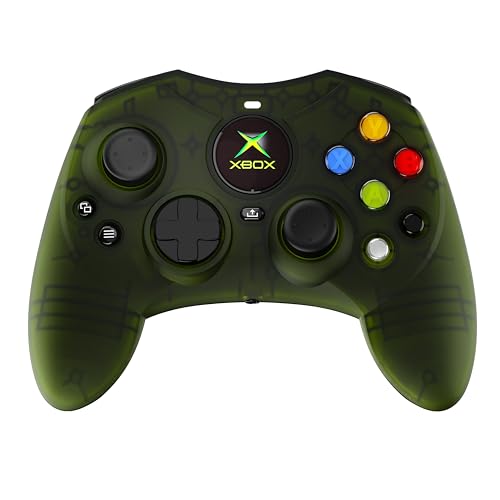
3. Hyperkin DuchesS Wired Controller – Greenhaven
The Controller S shape your hands remember, rebuilt with sticks that will not drift.
Eighteen buttons, Hall Effect sticks on both thumbsticks, and an officially licensed recreation of the Xbox Controller S form. Plug in the 10 ft USB-C cable and Windows 10 or 11 picks it up with no pairing dance. If you grew up on that older shell and modern pads feel wrong in your palms, this is the closest thing to a drop-in replacement.
It is also the most compact pad in the group at 6 x 3 x 2.5 inches, so it tucks into a bag easily. For scale, the DOOM edition measures 6.91 x 5.61 x 2.76 inches — noticeably more bulk to store. Weight lands at 8.71 ounces, which is lighter than the PowerA Advantage’s 9.92 ounces and makes longer sessions less tiring.
Impulse triggers give you the rumble in the trigger itself rather than only in the handles, and the Share button handles captures on Series X|S. Setup is the one area to know about: desktop tools and older titles tend to assume the modern button layout, so plan on a remap for the Start and Back positions. Worth knowing before you plug in. Design and nostalgia carry this pad, and comfort in the hand is what people talk about most.
What the DuchesS gets right
- Controller S shape with a familiar, compact feel
- Hall Effect sticks on both sides, no drift path
- 10 ft cable gives real couch distance
- Lightest wired pad here at 8.71 ounces
What to plan around
- Start and Back sit where muscle memory may not expect them
- Wired only, no wireless option
- Retro shell means some PC titles need a manual remap
Best fit: players who want the older Controller S grip with modern anti-drift sticks underneath.
Not the one for: a wireless setup or anyone unwilling to remap two buttons.
4. Dinosoo RGB Wireless Controller

Eight lighting modes and a 2.4GHz dongle, aimed squarely at the budget wireless buyer.
You get wireless play at an entry-level price, and the specs back it up: a 2.4GHz adapter (a small USB dongle for a direct wireless link) with a stated range beyond 30 feet, an internal battery, a 3.5 mm audio jack (the standard round headphone plug), and eight adjustable RGB light modes. It works with Xbox One, Series X, Series S, One S, One X, Android and Windows 11/10/8/7, so it will connect to almost anything on your desk.
Two extra tools separate it from a plain pad. A TURBO button toggles combo behaviour, and PL/PR buttons let you program mappings directly on the controller — hold Set for 3 seconds, then press PL/PR to clear them. If you like fiddling with macros without opening software, that is a real convenience.
Here is the part to weigh honestly: stick feel is the area owners are least settled on, and responsiveness is not this pad’s strength. The wireless link and the RGB are what it does well; precision aiming is not. It makes sense as a second pad for a co-op night or a younger player’s desk, not as your main competitive controller.
The value read: wireless, RGB, a headphone jack and on-pad macro programming is a lot of hardware for the entry tier.
Where it falls short: stick precision keeps it off any serious competitive shortlist.
Worth it for: casual PC and Xbox play where lighting and wireless freedom beat pixel-perfect aim.
Pass if: you play ranked shooters and need your stick to hold a line.
5. Xbox Core Wireless Gaming Controller – Carbon Black

The pad Windows already understands, with up to 40 hours between charges.
Every PC game with controller support is built around this layout, so compatibility is never the question. Nineteen buttons, a hybrid D-pad, textured grips on the triggers, bumpers and back case, a Share button for captures, and up to 40 hours of battery life on the manufacturer’s figure. Bluetooth covers Xbox Series X, Series S, Xbox One, Windows PC, Android and iOS, and USB-C handles wired play when the battery runs down.
The 19-button count is the highest here, and it is the sharp contrast with the DOOM edition’s nine — same core Microsoft layout, but this is the full modern set. Button mapping runs through the Xbox Accessories app, so you can rearrange the layout per game rather than per pad.
The catch worth naming is long-term reliability: the sticks are standard, not Hall Effect, so drift remains a possibility over years of heavy use. That is the same trade every standard-stick pad makes. For the widest device support with no driver setup, this is still the safest pick.
Why it stays the default
- Zero setup on Windows, and every game expects this layout
- Up to 40 hours per charge on Bluetooth
- 19 buttons with app-based remapping
- Bluetooth and USB-C both available
What you give up
- Standard potentiometer sticks, so drift is not engineered out
- No back paddles or macro buttons
- No trigger travel adjustment
The safe pick: anyone who wants one controller that works everywhere with no configuration.
The one to skip: heavy competitive players chasing drift-proof sticks and trigger stops.
6. GameSir G7 Pro 8K PC Wireless Controller – Nioh 3

An 8000 Hz polling rate on both wired and wireless, built for competitive PC play.
Eighty hertz would be a normal report rate; this pad runs at 8000 Hz over both USB and its 2.4GHz link, which is the highest polling figure in this lineup and the reason it exists. In plain terms, the pad tells your PC where its sticks are far more often, and the latency between your thumb and the screen shrinks with it. On a high-refresh monitor with a fast game, that is a real difference in how flicks feel.
Underneath are GameSir’s Mag-Res TMR sticks — magnetic sensors that, like Hall Effect, remove the physical contact that causes drift. The ABXY face buttons use optical micro switches and the D-pad uses mechanical micro switches, so both give a crisper click than membrane pads. Analog triggers are Hall Effect with a dual-mode switch, letting you pick a linear pull for throttle control or a clicky digital response for shooters.
Four remappable macro buttons — two lockable back paddles and two mini bumpers — each record up to a 32-step sequence, and a 6-axis gyroscope adds motion aiming if you want it. The honest limit is scope: it is built for Windows PC play, and the 272 g body is on the heavier side if you are used to lighter pads. This is the pad for the competitive PC player who counts frames and plays on a high-refresh monitor.
The defining spec: 8000 Hz polling on wired and 2.4GHz wireless is a class-leading figure for a PC gamepad, and it is the reason to buy this one over the standard Xbox pad.
What it costs you: 272 g of weight and a PC-first design that will not follow you to a console.
Built for: competitive PC players running a high-refresh setup who want every input logged as fast as possible.
Not needed by: casual players on a standard display — the polling headroom will go unused.
7. GameSir G7 Pro Wireless – Wuchang: Fallen Feathers Edition

GameSir’s first wireless pad for Xbox, and it docks into its own charging station.
Twelve buttons, TMR sticks, Hall Effect analog triggers with a hair-trigger mode, and a 1200mAh battery that recharges the moment you set the controller down on its bundled station. That station also hides a compartment for the wireless receiver, which is a small thing until you have lost a dongle. A one-press wake-up turns the console on from the pad.
Connectivity is where it earns its keep. A mode switch hops between a 2.4GHz dongle or USB-C for Xbox and PC, and Bluetooth 5.3 for Android, so one controller covers your desk, your console and your phone. The polling rate here runs at 1000 Hz rather than the 8000 Hz of the Nioh 3 G7 Pro above — still fast, but a clear step down for anyone counting frames.
The four programmable buttons and the drift-resistant TMR sticks are what people gravitate toward, and the grip texture holds the pad steady on your lap. Weighing 9.6 ounces, it is nearly an ounce into the Nacon’s 230 g territory — a difference you feel over a long session.
The case for the Wuchang edition
- One pad across Xbox, PC and Android over three connection types
- 1200mAh battery with a station that charges on contact
- TMR sticks and Hall Effect triggers with hair-trigger mode
- Receiver slot built into the charging base
The fine print
- 1000 Hz polling falls short of the 8000 Hz Nioh 3 model
- Twelve buttons is modest for a macro-heavy playstyle
- 9.6 ounces is heavier than a stripped wired pad
Choose it when: one controller has to serve your Xbox, your PC and a phone, and you want a dock that charges without plugging in.
Choose past it when: you are chasing the highest polling rate available.
8. Razer Wolverine V3 Pro 8K PC Wireless Gaming Controller

PC-only, mouse-click buttons, and the lightest wireless build Razer makes for esports.
Read the compatibility line before anything else on this one: it is built exclusively for Windows 11 PCs with USB-A, using a 2.4GHz dongle or a wired USB-C connection. No Xbox console, no PlayStation, no macOS, no mobile. That narrowness is the whole design brief, and it lets the rest of the spec sheet go after one job.
That job is speed. Razer’s HyperPolling runs at a true 8000 Hz in both wired and wireless mode, matching the GameSir G7 Pro 8K’s headline figure. The TMR thumbsticks use anti-drift magnetic sensing with swappable caps, so you can change the height and feel without buying a new pad. Four back buttons and two claw-grip bumpers sit inside the rubberized handles, and the Pro HyperTriggers switch between mouse-click speed and full analog travel with a flick of a switch.
The 8-way floating D-pad and doubleshot PBT action buttons are built for heavy use, and Razer includes a carrying case, two spare stick caps and a 2 m braided cable. Battery life is listed at 36 hours. What you are paying for here is those mouse-like back buttons — the responsiveness and the satisfying click are the reason this pad exists. Silent membrane buttons feel like mush by comparison. The trade is real: PC-only, and no consolation prize if you also game on a console.
Where it beats the field: four mouse-click back buttons plus two claw-grip bumpers gives you six programmable inputs, the most tactile of any pad on this page.
Where it boxes you in: Windows 11 on USB-A only, with no console or Mac support at all.
For the player who: treats a PC pad as competitive equipment and wants the lightest, most clickable build available.
Look away if: you ever want to use the same controller on an Xbox or a Steam Deck.
9. Nacon Revolution X Unlimited Precision Wireless Controller

Weights, stick heads, D-pads, rings and an LCD screen — this is a pad you tune like a race car.
Most controllers make you adapt to them. This one flips that: you get three sets of weights, three sets of joystick heads in concave (dished), convex (rounded) and high-dome (tall) shapes, two sets of joystick rings, and both a 4-way and a 6-way D-pad (the directional pad) in the box. The maker states this gives more than 60 customization combinations, all packed in a carrying case with a charging station.
Hall Effect magnetic sticks and triggers come standard, which addresses drift at the hardware level. PC mode is the other headline: latency listed at 1ms wired and 2ms wireless, gyroscope support for simulating a joystick or D-pad, and the ability to map PC keyboard keys straight onto controller buttons. Six shortcut buttons are mappable through the PC and Xbox app, and an LCD screen on the pad handles mapping and audio mixing without a second window.
Battery life is listed at up to 10 hours, which is modest next to the Razer’s 36 and the Carbon Black’s 40 — the station helps, but you will dock it often. At 230 g it is the lightest pad reviewed here, and it is officially licensed with Bluetooth for Android plus a 2.4GHz transmitter for everything else. Owners rave about the dead zones and the hand feel; connectivity is the variable, so plan on the wired cable for anything competitive.
What makes the Revolution X different
- Over 60 hardware combinations from weights, stick heads, rings and two D-pads
- Hall Effect sticks and triggers, so drift is a magnetic question not a wear one
- 1ms wired latency and keyboard-to-button mapping in PC mode
- LCD screen on the controller for mapping and audio mixing
- Charge dock included with a 3 m braided cable
Where it needs care
- Up to 10 hours of battery life means frequent docking
- Connectivity is the area to test with your own setup
- Three sets of weights and rings add fiddling to the setup
The tinkerer’s choice: anyone who wants to adjust stick height, trigger feel and D-pad shape without buying another controller.
The wrong pick for: a plug-in-and-go player who will never touch the weights.
Know the Specs
Hall Effect vs TMR Sticks
Both sense stick movement magnetically instead of by physical contact, which is why pads built this way resist the drift that plagues potentiometer sticks. TMR adds a signal-amplification step and is often described as lower power and more precise. For you, the practical upshot is the same: the thumbstick that slowly wanders off-centre after months of use is much less likely to happen.
Polling Rate in Hz
Polling rate counts how often the pad reports its position to your PC each second. A higher figure means fresher information, which tightens the feel of fast flicks. It only pays off if your display and game can use it, so a standard panel will not feel the difference between 1000 Hz and 8000 Hz. Buy for the refresh rate you actually own.
Trigger Locks and Hair-Trigger Modes
A trigger lock physically shortens the pull distance so the input registers sooner, which is what shooters want. Racing games want the opposite: long, smooth analog travel so throttle is progressive. Pads with switchable triggers or a hair-trigger mode let you choose per genre, which is a genuine advantage over fixed-trigger controllers.
Connection Type and Compatibility
Wired USB-C is the simplest and lowest-latency path, with no battery to think about. A 2.4GHz dongle adds wireless at low latency. Bluetooth is the easiest for pairing and the most likely to hiccup. Always check the supported device list: some pads are PC-only, and a few skip console support entirely, which matters if you want one controller to cover both.
Common Questions
Does an Xbox controller work on a Windows PC without extra software?
Will the Razer Wolverine V3 Pro work on an Xbox console?
Which sticks are less likely to drift over time?
Do I need an 8000 Hz polling rate for normal PC gaming?
What is a trigger lock and why would I want one?
Can I connect a Bluetooth controller to a PC without a dongle?
Does a heavier controller tire my hands out more quickly?
How do I remap the extra buttons on these controllers?
Is a wired or wireless controller better for competitive PC play?
Do these controllers have a headphone jack for chat audio?
The Bottom Line
The best all-rounder for most PC players is the Xbox Core Wireless Controller – Carbon Black, simply because Windows and every major title already expect its 19-button layout and the battery stretches to a manufacturer-claimed 40 hours. It is the pick that will never need troubleshooting.
If you want anti-drift sticks without paying premium money, the PowerA Advantage gives you Hall Effect modules, 3-way trigger locks and two on-the-fly mappable buttons for entry-level money. It is the best value on this page. For the highest polling rate and the most programmable buttons, the GameSir G7 Pro 8K is the one to beat at 8000 Hz across wired and 2.4GHz wireless. And the Razer Wolverine V3 Pro 8K is the answer if your desk is Windows-only and you want mouse-click back buttons and a carrying case in the same box.
Buy the Xbox Gamepad for PC that fixes the one problem you actually hit in play — drifting sticks, input lag, too few buttons, or no console support.
How we choose
We do not accept paid placement. Every pick is matched to a real buyer and a real use-case; we do not hands-on test units.
Sources
Specifications: manufacturer listings and product documentation. Review insights: verified customer reviews, as of November 2026. Pricing: not shown on this page (it changes often); check the current price via the retailer link.
As an Amazon Associate, Tactical Gear Guy earns from qualifying purchases. This does not affect which products we feature.