Specs are compiled from manufacturer listings and verified buyer reviews and can change over time — please confirm the key details on the product page before buying.
You bought a flight sim, loaded it up, and then tried to land an airliner with a thumbstick built for shooters. That is the exact moment most people go looking for a proper stick and throttle. The tricky part is Xbox support — plenty of flight sticks exist, but only some are officially licensed to plug straight into a Series X|S and just work. This guide separates the ones that do from the PC-only crowd.
This guide is built by comparing the manufacturers’ published specifications and the patterns across verified customer reviews, so you get each pick’s real strengths and trade-offs instead of marketing spin.
The picks below are grouped by what you actually fly: a first hotas, a full A320 replica, or a combat setup with vibration built in. Every one of them plugs into an Xbox console. The short version is simple: choose your xbox flight stick by your sim, not by the number of buttons printed on the box.
Top Picks


How To Choose The Best Xbox Flight Stick
The first thing to settle is licensing, not features. A stick that is officially licensed by Microsoft for Xbox Series X|S connects and maps its buttons without you hunting down workarounds. A PC stick with a USB plug may physically fit, but the console side can ignore it entirely. Start there, then sort by what you fly.
The sensor is what you are really paying for
Hall-Effect sensors (magnetic sensors with no physical contact inside the stick) read position without rubbing parts together, so the centering does not wear loose the way older designs can. A stick with Hall-Effect axes tends to hold its feel longer. A budget stick can still fly well, but expect the cheaper sensing to be the thing you eventually notice.
Desk setup or lap setup decides the throttle
A detachable throttle lets you pull the throttle unit off the joystick base and set it beside your keyboard, or rest it on your lap. If you sim from a couch with a controller in reach, this matters more than anything else on the spec sheet. If you have a proper desk rig, a fixed dual-unit system feels more solid under the hand.
Rudder: twist, rocker, or pedals
Yaw control (the left-right nose swing used for taxiing and coordinated turns) can come from three places. A Z-axis twist in the stick handle works from the start. A rocker lever on the throttle gives you a second option. Separate rudder pedals give you the finest control but are a bigger footprint and usually a separate purchase.
Count the axes before the buttons
Buttons are easy to advertise and easy to map. Axes are the analog channels that actually fly the plane — pitch, roll, yaw, and throttle. A stick with more axes gives you finer analog control over surfaces. A stick with a huge button count is great for combat sims that need dozens of commands. Match the number to the sim you fly most.
Side-by-Side Comparison
| Model | Best For | Buttons | Connector | Xbox Platforms | Amazon |
|---|---|---|---|---|---|
| Thrustmaster T-Flight Hotas One★ Best Overall | First HOTAS on a budget | 14 | USB | Xbox One, Series X, Series S | Amazon |
| HORI HOTAS Flight StickBest for Headsets | Headset jack on the stick | 16 | USB | Xbox Series X | Amazon |
| Turtle Beach VelocityOne Flightdeck | PC-only touch display rig | 139 | USB | — | Amazon |
Detailed Reviews
1. Thrustmaster T-Flight Hotas One Flight Stick & Throttle
Our pick — 4.5+★ from 5,500+ verified ratings; the strongest balance of quality and price.
The stick and throttle that gets a first-time Xbox pilot airborne without a manual.
Here is the one to buy if you want the whole HOTAS idea in one box and you want it to just plug into your Xbox. It carries 14 programmable buttons, a responsive trigger, a hat switch, and adjustable resistance on the stick, which means you can dial the stiffness to how heavy-handed you fly. Xbox One, Series X, and Series S are all listed as compatible, so you are not stuck guessing whether your console will see it.
What wins people over is the build. Owners praise the construction more than any other point by a wide margin, and the stick feels like a real peripheral rather than a plastic accessory. The detachable throttle is the part that changes your setup — use it locked to the stick on a desk, or pull it off and run it on your lap while the joystick sits beside you. That detachable throttle is what lets it work on a couch as well as a desk.
The honest catch is value. That is the one area where opinions split, and it is worth knowing before you commit. It also lives in the mid-tier price bracket, so it is not the cheapest way to start flying, and the pedals are sold separately through Thrustmaster’s S.M.A.R.T. sliding rail system. If your heart is set on a full pedal setup from day one, the Full Kit pick below saves you the extra purchase.
What pilots fly away with
- Detachable throttle works on a desk, on your lap, or apart from the stick
- Adjustable resistance lets you set how firm the stick feels in the hand
- USB connection and official Xbox support — no setup gymnastics on Series X|S or Xbox One
- TFRP rudder pedal compatible through the S.M.A.R.T. sliding rail system
Where it gives you pause
- Value is the most divided part of the picture, so weigh it against what you fly
- Rudder pedals are a separate purchase, not included
Reach for this if: you want a full hands-on stick and throttle setup on Xbox and want to be flying the same evening.
Look elsewhere if: you want pedals in the box — the Full Kit version is the one built for that.
2. HORI HOTAS Flight Stick for Xbox Series X|S, Xbox One and PC
A Microsoft-licensed split stick and throttle with a headset port built right in.
Plug your gaming headset straight into the stick and you keep the game audio and chat where your hands already are. That integrated headset jack is the detail that separates this HORI unit from the rest of the field — most sticks make you route sound through the console or a separate cable. It is officially licensed by Microsoft for Xbox Series X|S, Xbox One, and PC, so the console recognizes it as first-party hardware rather than a generic USB device.
The stick and throttle are separate units with full HOTAS control, and you get sensitive adjustment built into the settings for control customization. 16 buttons sit across the two halves. The footprint is compact too — 9.06 x 6.3 x 10.63 inches means it tucks into a desk corner, unlike the sprawling T-Flight Hotas One whose 20.47 x 11.42 x 22.24-inch dimensions eat far more surface. If desk space is tight, that size difference is real.
But this is a smaller-community stick with a modest fan base, and the numbers reflect that. Its aggregate score sits well below the flagship Thrustmaster and Turtle Beach picks in this list. That does not make it a bad unit — it makes it a specialist choice. If the headset jack is exactly the feature you have been missing, it earns its place; if you are chasing the most proven track record, look at the Thrustmaster T-Flight Hotas One instead.
The headset argument: a built-in audio jack on a licensed HOTAS is rare, and for anyone who flies with a headset on all session, it is a genuinely useful extra.
Read the track record first: a smaller review base and a lower overall score than the leaders mean this one rewards buyers who know exactly what they want from it.
Suits you when: headset audio routed through your flight stick matters more than the widest possible community of owners.
Worth skipping if: you would rather buy the most battle-tested stick in this group.
3. Thrustmaster T.Flight Hotas One
The officially badged Microsoft Flight Simulator stick, tuned with 5 axes and 10-bit precision.
If Microsoft Flight Simulator is the only thing you fly, this is the version with the official license stamped on it. It packs 10-bit the grip sits right whichever hand you fly with. It carries 38 programmable inputs and 8 axes — that is more than double the button tally of the Thrustmaster T-Flight Hotas One, which sits at 14. If you fly combat sims with dozens of mapped commands, that gap is the whole argument for this stick.
The sensors are 16-bit Hall-Effect, meaning contact-free magnetic sensing that reports fine position changes without wearing parts. Three adjustable tension settings let you set how firm the stick feels. There is a dual-lever setup, thumbstick, and multi-function wheel for analog control, plus a Flight Management Display that shows real-time telemetry on the stick itself. Twist rudder is included, with a lock option if you move to pedals later.
The build quality is what owners praise most, and by the numbers it is also the thing people argue about. Multiple buyers report the console has trouble recognizing the stick or that native support needs work — so plug-and-play confidence is not the strong suit here. It is not a unit to buy blind if your only requirement is “works the second I plug it in.”
Where the value sits: 38 inputs, 8 axes, 16-bit Hall-Effect sensing, and an ambidextrous grip — a lot of flight control in a small body, with a smaller physical footprint than the big desk setups.
The honest caveat: game recognition is the recurring note in ratings, so expect to spend some time in settings before your first flight.
Fits the pilot who: flies left-handed, or wants maximum inputs without the desk footprint of a full throttle unit.
Budget the setup time if: you expect every sim to recognize it the moment the USB-C cable goes in.
4. Thrustmaster T.FLIGHT HOTAS NEO
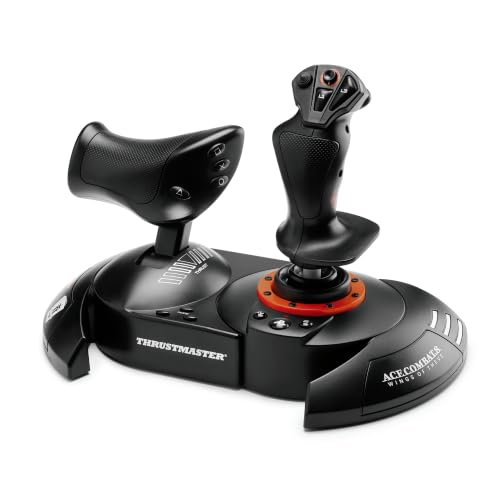
The all-in-one with real rudder pedals under your feet and Xbox buttons on the stick.
Two purchases folded into one box is the whole pitch. You get the HOTAS stick and throttle, plus the TFRP rudder pedals — the first flight sim pedals with Thrustmaster’s S.M.A.R.T. slide rail system, which moves on rails for smooth steering instead of jerking. If your landings have been sloppy because you were twisting a stick handle for yaw, having proper foot pedals changes the feel entirely. The pedals support your whole foot with removable heel rests, so long sessions are easier on your legs.
The Xbox integration is genuinely thoughtful. Dedicated Guide, View, and Menu buttons mean you can bring up the console dashboard or all your social features without reaching for a separate controller mid-flight. The layout includes a large detachable throttle quadrant, 5 axes, 14 programmable buttons, a rapid-fire trigger, and a multidirectional hat switch. You also get Hall-Effect joystick sensing, so the centering holds up over time.
Throttle is the point to check before you commit. Throttle sensitivity is the one split point in owner feedback — some pilots dial it in and fly fine, while others find it does not respond the way they expect. That is a real fit question rather than a universal problem, so if the throttle feel is critical to you, read the reviews closely and consider whether a dual-lever throttle system might suit you better. The pedals and the full kit, however, remain a genuinely complete setup.
What the full kit solves: pedals, stick, and throttle in one purchase, with Xbox dashboard buttons that keep you off the controller.
Try the throttle feel first: the one divided point in owner feedback, so if precise throttle response is your priority, verify it matches your style.
Built for the pilot who: wants pedals and a full HOTAS in one order, with no separate hardware shopping afterward.
Only look elsewhere if: you have strong opinions about throttle feel and want a dual-lever system instead.
5. Turtle Beach VelocityOne H.O.T.A.S. Flight Sim Controls
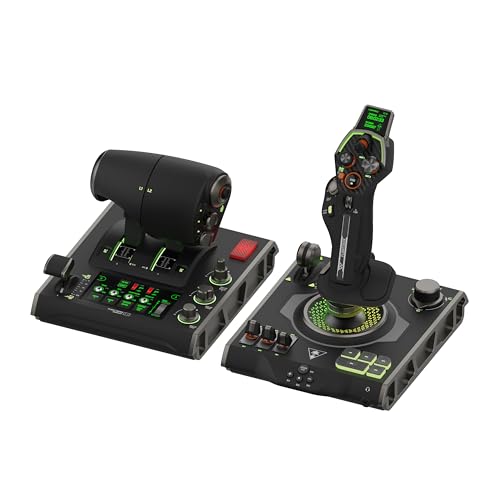
139 programmable buttons, a touch display, and a cockpit build for PC-only sim pilots.
This is the most feature-loaded system in the group, and it is the one you should read the fine print on. That fine print is the platform: it is listed for PC only, with Windows 10 and 11 support, not Xbox. If you are a console pilot, this is not your rig. If you fly on PC and want the deepest cockpit, the flight touch display is the standout — claimed as a world-first, and paired with a customizable OLED head-up display for live flight data.
The control depth is impressive on paper. 139 programmable buttons, contactless Hall-Effect controls for precision and durability, a stick module with gear lever and a 3-position rotary dial, and adjustable stick height to fit different hand sizes. The throttle has adjustable haptic detent response so you can feel the thrust positions, and there is adjustable multi-zone RGB lighting plus on-board audio enhancement for any 3.5mm headset. The Flight Hangar desktop app handles the deep customization.
Here is the honest part: owner feedback is the most divided in this list. Build quality and functionality both draw serious criticism, with multiple buyers reporting that it stopped working properly or failed under normal use, and button and throttle durability are recurring notes. That is a big caveat on a top-tier PC rig. If you buy it, buy it for the touch display and 139-input mapping, and go in expecting to watch for durability issues.
The feature ceiling: a flight touch display, 139 programmable buttons, Hall-Effect controls, adjustable stick height, and haptic throttle detents — a PC cockpit in one box.
The reliability question: durability and functionality are the most-discussed concerns in owner feedback, so a careful purchase is the wise one.
Right for the PC builder who: wants a touch display and the deepest button mapping available, and accepts the risk that comes with a divided track record.
Look to a proven alternative if: you are flying on Xbox or want the calmest reliability story.
Know the Specs
Hall-Effect Sensors
Hall-Effect sensors are contact-free magnetic position readers, so the stick’s axis tracks your hand without physical parts rubbing together. That is why a Hall-Effect stick tends to hold its centering feel longer than a mechanically worn one. If a stick lists Hall-Effect sensing, that is a signal the internals are built for years of movement, not just the first week.
Axes and Buttons
Axes are the analog channels that actually fly the aircraft — the ones that move smoothly from 0 to 100. Buttons are discrete press points, best for mapping commands like gear, flap, or weapon select. A combat sim needs lots of buttons; an airliner sim needs lots of axes. Count what your sim uses before choosing a stick with the biggest button tally.
Throttle Detachability
A detachable throttle separates from the joystick base, letting you use it on your lap, on a desk beside your keyboard, or in whatever layout fits your room. This matters most for couch and living-room pilots. It also means you can carry one half to a friend’s setup without lugging the whole rig.
Rudder Control
Rudder control handles yaw — steering the aircraft’s nose left or right for turns, taxiing, and landings. It can come from a Z-axis twist in the stick, a rocker lever on the throttle, or dedicated pedals under your feet. A twist option means you can fly without extra hardware; pedals mean finer control but more floor space and often a separate purchase.
Common Questions
Will any of these flight sticks work with my Xbox Series X?
Do I need rudder pedals, or can I twist the stick?
What is a HOTAS, and does it matter for my sim?
How much desk space will a flight stick take up?
Is the Turtle Beach VelocityOne better than the Thrustmaster T-Flight?
Will a flight stick work with Microsoft Flight Simulator on Xbox?
Can I swap the throttle to my left hand and the stick to my right?
Do these sticks work on PC as well as Xbox?
What does 10-bit or 16-bit accuracy mean on a flight stick?
Are the rudder pedals on the Full Kit worth the upgrade?
The Bottom Line
For most pilots, the xbox flight stick worth starting with is the Thrustmaster T-Flight Hotas One — it is Xbox-licensed across One, Series X, and Series S, carries a detachable throttle and adjustable resistance, and has the most proven owner base in this field. Owners praise the build more than any other point, and value is the one split in the feedback. If you want pedals in the box and Xbox dashboard buttons, grab the Thrustmaster T-Flight Full Kit with Rudder Pedals. And for Airbus immersion with a genuine thrust reverser, the Thrustmaster TCA Captain Pack X is the one to reach for — just plan for a setup session before your first departure.
How we choose
We do not accept paid placement. Every pick is matched to a real buyer and a real use-case; we do not hands-on test units.
Sources
Specifications: manufacturer listings and product documentation. Review insights: verified customer reviews, as of November 2026. Pricing: not shown on this page (it changes often); check the current price via the retailer link.
As an Amazon Associate, Tactical Gear Guy earns from qualifying purchases. This does not affect which products we feature.