Specs are compiled from manufacturer listings and verified buyer reviews and can change over time — please confirm the key details on the product page before buying.
Buying an Xbox flight sim controller is really one decision: yoke or stick. If you fly airliners in Microsoft Flight Simulator and want the most convincing cockpit feel, get a yoke. If you fly fighters, helicopters, or want one compact unit that sits on a desk or lap, get a HOTAS stick. Everything below is split along that line, so you can skip straight to the shape that matches the planes you actually fly.
This guide is built by comparing the manufacturers’ published specifications and the patterns across verified customer reviews, so you get each pick’s real strengths and trade-offs instead of marketing spin.
Each pick below is confirmed to work on Xbox consoles, with the axis counts, button layouts, and build notes that decide whether it feels right in your hands. This is a straight read on the xbox flight sim controller market, sorted by the way each unit actually behaves in the air.
Top Picks


How To Choose The Best Xbox Flight Sim Controller
The first thing that narrows the field is the shape of the control. A yoke is the steering-wheel-style column you see in airliners. A HOTAS (hands on throttle and stick) is a joystick plus a separate throttle lever, which is what fighter cockpits use.
Yoke Or Stick: Match The Shape To Your Aircraft
Fly Boeing and Airbus routes in Microsoft Flight Simulator and a yoke with a throttle quadrant will feel native — the 180° rotation and the trim wheel map to airliner habits. Fly combat jets or helicopters and a stick with a twist rudder is the better fit, because you need fast roll authority and a compact footprint. Pedals are the one upgrade both camps end up wanting, since they give your feet a job and free up your hands.
Axes And Buttons Decide How Much You Can Map
An axis is a control that moves through a range — pitch, roll, yaw, throttle — rather than just clicking on and off. More axes mean more of the aircraft you can drive without reaching for a gamepad. Button counts range widely in this category, from 14 on the entry-level Thrustmaster stick to 73 programmable inputs on the Turtle Beach VelocityOne H.O.T.A.S. More inputs are not automatically better, but they do mean fewer keyboard trips mid-flight.
Hall-Effect Sensors Keep Precision Over Time
Hall-Effect sensors use magnets to read the position of the stick or yoke, with no physical contact to wear down. That matters on flight sims because a drifting axis ruins a landing approach slowly and invisibly. Several picks here list Hall-Effect sensors, and the ones that do are the safest bet for years of smooth centering.
Side-by-Side Comparison
| Model | Best For | Control Type | Buttons | Axes | Amazon |
|---|---|---|---|---|---|
| Thrustmaster T.Flight Hotas One MSFS Edition★ Best Overall | Best all-round first HOTAS | HOTAS joystick + detachable throttle | 14 | 5 | Amazon |
| Turtle Beach VelocityOne Flightstick IICompact Pick | Desk-space savers | Compact stick with dual levers | 38 | 8 | Amazon |
| Turtle Beach VelocityOne Flight Universal Control System | Airliner realism on a desk | Yoke + throttle quadrant + trim wheel | 26 | 12 | Amazon |
Detailed Reviews
1. Thrustmaster T.Flight Hotas One
Our pick — 4.5+★ from 450+ verified ratings; the strongest balance of quality and price.
The plug-in-and-fly HOTAS that gets you off the gamepad without a learning curve.
If you want the safest first cockpit, this is it. Thrustmaster built this version under an official Microsoft Flight Simulator license for Xbox Series X|S and PC, so it shows up as a proper flight controller the moment you plug in the USB cable. You get 5 axes (the movable control ranges — pitch, roll, yaw and throttle among them, including a Z-axis for rudder), 14 buttons, 1 quick fire trigger and 1 multi-directional hat switch for swinging your view around the cockpit.
The detail that keeps it on the desk long-term is the detachable throttle. Play on a desk and you split the two halves into a normal HOTAS layout; play from the couch and you clip them together and rest the whole thing on your lap. Rudder works two ways — twist the stick around its Z-axis or use the rocker lever on the throttle — so you can steer on the ground without adding pedals. Joystick resistance is adjustable too, which means you can loosen it for lazy Cessna circuits or firm it up for something twitchier.
Where it lands honestly: 14 buttons is the low end of this list. The Turtle Beach VelocityOne Flightstick II carries 38 programmable inputs, 24 more, so heavy cockpit builders will run out of free bindings sooner here. For everyone else that trade is fine — fewer inputs, simpler setup, and an officially licensed layout that just works. At 4.5+ stars across 450+ ratings, it is the highest-rated pick here, and it earns that by being the least fussy way into the hobby.
What earns it the top spot
- Official Microsoft Flight Simulator license on Xbox Series X|S and PC, so it is recognised as a flight controller on plug-in
- Detachable throttle splits for desk flying or clips together for lap play
- Two rudder routes built in — Z-axis stick twist or the throttle’s rocker lever
- Adjustable joystick resistance suits gentle prop flying and sharper jets
- Compatible with Thrustmaster TFRP pedals if you want to add feet later
Where it asks you to compromise
- 14 buttons is the fewest in this lineup, so complex airliners will need keyboard backup
- Pedals are a separate purchase, not included
Start here if: you are moving off a gamepad and want a licensed HOTAS that behaves on day one.
Keep shopping if: you map dozens of cockpit switches and need more than 14 bindings.
2. Thrustmaster T-Flight Hotas One MSFS 2024 Collector Edition
Four extra buttons and a 2024 license badge over the standard Hotas One.
This is the same HOTAS shape as the pick above, reissued for Microsoft Flight Simulator 2024. It keeps the 10-bit precision, the 5 axes including feature you will not find on any other pick in this lineup is the integrated headset jack — plug your headset into the stick instead of the console and keep the audio lead off your lap.
Adjustable sensitivity and advanced settings let you dial in the response, which matters if you fly a twitchy fighter one session and a heavy airliner the next. The separate throttle means your left hand has a dedicated lever rather than a rocker bolted to the stick, which is the layout serious sim pilots tend to prefer for formation flying and carrier landings.
Be clear-eyed about this one: it sits at 3.0+ stars from 40+ ratings, the lowest score on the list, and it is not the pick for someone who wants zero setup. The 16-button layout is generous, but the value case leans on the headset jack and the split HOTAS form. If you fly with comms on and want the cleanest cable run, that feature alone justifies a look.
Its unique card: an integrated headset jack in the stick base — the only pick here with one — so your headset plugs in where your hands already are.
Read the score first: 3.0+ stars from a modest ratings pool signals a pick for a specific buyer, not a crowd favorite.
Reach for it if: a built-in headset jack and a fully separate throttle are the two things you care about most.
Look elsewhere if: you want the reassurance of a large, happy owner base behind the purchase.
3. Turtle Beach VelocityOne Flightstick II Sim Controller
A desktop stick that fits small spaces yet packs 38 programmable inputs.
Space is the real constraint for most sim setups, and this is the pick that respects it. The Flightstick II measures 7.48 x 8.19 x 9.92 inches and weighs 3.1 pounds — against 18.7 x 14.21 x 12.68 inches for the Thrustmaster T-Flight Full Kit, a footprint difference you will feel the moment you try to fit either one beside your monitor. Yet the input count is enormous: 38 programmable inputs across 8 axes, with high-resolution 16-bit Hall-Effect sensors doing the position reading so there is no rubbing contact to wear.
Versatility is the theme. Dual levers, a thumbstick and a multi-function wheel give you analog control without a separate throttle block. It is ambidextrous with adjustable wrist and thumb rests, so left-handed flyers are covered. Rudder twist can be enabled or locked out, which is exactly what you want once pedals arrive. Three adjustable tension settings let you pick a stick feel, and a Flight Management Display shows real-time telemetry so you can tune without alt-tabbing.
It is officially licensed for Xbox Series X|S, Xbox One and Windows 10/11 PCs, connects over USB-C, and expands later with pedals and mounting hardware. The VelocityOne Flight Hangar app handles RGB customization and personal performance settings. The catch is the track record: 3.5+ stars from a limited ratings pool makes this a newer entry still earning its reputation. Buy it because the footprint and input count fit your desk, not because the reviews are settled.
Why small-desk flyers like it
- 38 programmable inputs across 8 axes in a 7.48 x 8.19 x 9.92 inch body
- 16-bit Hall-Effect sensors for drift-free position reading
- Ambidextrous grip with adjustable wrist and thumb rests
- Lockable rudder twist so pedals can take over cleanly
- Three tension settings plus a Flight Management Display for in-flight tuning
The honest caveats
- A limited ratings pool so far, so long-term durability is still being written
- Dual levers are not the same as a full separate throttle quadrant
Best matched to: a single-monitor desk where a full HOTAS would not fit but you still want deep mapping.
Think twice if: you want a long, well-established ownership record before you commit.
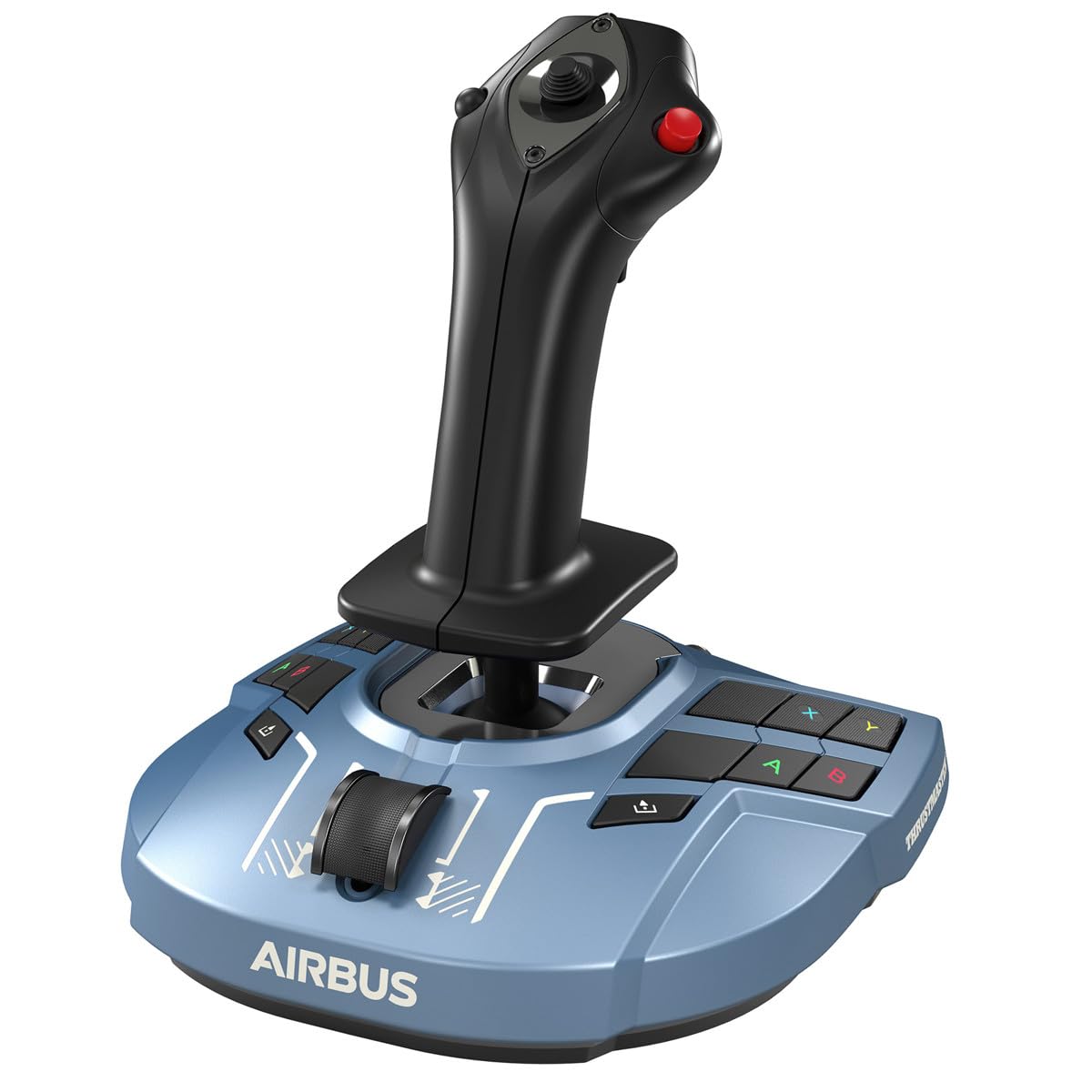
4. Thrustmaster TCA Sidestick Airbus X Edition
The only kit here that hands you pedals, throttle and stick in one box.
Most flight setups grow one purchase at a time — stick, then throttle, then pedals. This one skips the queue. You get a HOTAS stick with a large detachable throttle quadrant, 5 axes, 14 programmable buttons, a rapid fire trigger and a multi-directional hat switch. And underneath it, the TFRP rudder pedals, which use Thrustmaster’s S.M.A.R.T slide rail system for smooth travel instead of jerky inputs.
The pedals are the underrated part. They have a full-foot design with removable heel rests, so your whole foot rests on each surface through a long session rather than balancing on a toe. Dedicated Guide, View and Menu buttons mean you switch between the game and the Xbox dashboard without reaching for a gamepad. Bear in mind the footprint: 18.7 x 14.21 x 12.68 inches makes this the biggest desk occupant in the lineup by a wide margin, so measure before you buy.
Where it needs care: throttle feedback is mixed among owners, with some able to tune the sensitivity and others reporting it does not behave. That is the one thing to watch, and it is worth a quick test of the throttle sweep when yours arrives. The broader picture is that this is a huge-value bundle — pedals alone usually cost real money, and here they come in the box. At 4.0+ stars across 700+ ratings, it holds a strong record for a three-piece bundle.
The bundle win: stick, detachable throttle quadrant and TFRP rudder pedals together, so your feet join in without a second order.
What owners flag: throttle sensitivity is the recurring talking point — some find it adjustable, others hit issues, so test the throttle early.
Pick it when: you want a complete three-piece cockpit in one go, desk space permitting.
Skip if: you fly from a laptop tray or a small desk where that footprint will not land.
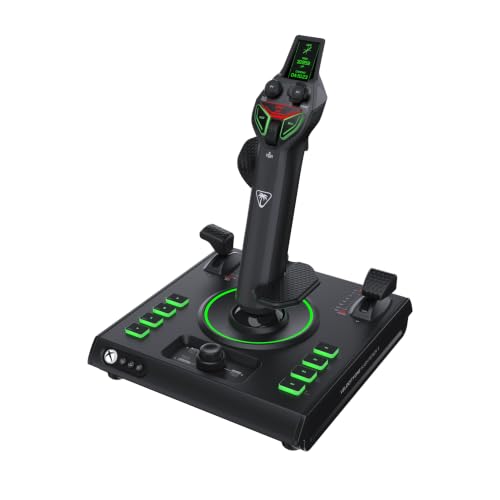
5. Turtle Beach VelocityOne H.O.T.A.S. Flight Sim Controls
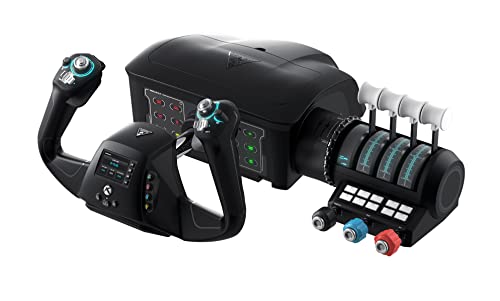
A full airliner desk cockpit: yoke, throttle quadrant and trim wheel in one system.
If you fly Boeing and Airbus routes rather than fighters, this is the yoke that turns a desk into a flight deck. The yoke handle rotates through a true-to-life 180°, read by a non-contact Hall-Effect sensor. Around it you get a modular throttle quadrant with swappable lever handles and buttons, a dedicated pitch trim wheel for fine control-surface adjustment, and integrated rudder and brake controls at your fingertips — so your feet can stay off the floor until pedals arrive.
It is built to teach you as you go. A full-color flight management display helps you learn and configure the system, and on PC you also get an authentic Status Indicator Panel. The spec sheet lists 12 analog axes, two POV switches and two 4-way HAT switches, plus 26 buttons. A secure clamping system fits a variety of home setups, and it is designed for Xbox and Windows titles including Microsoft Flight Simulator 2020 and 2024.
The trade-off is real and worth stating plainly: build quality and long-term reliability come back mixed in owner feedback — some find it well-built, others describe it as cheaply made, and a handful report it stops responding. At 4.0+ stars across 3,000+ owners, most are happy, but buy it from a seller with a clean return path. If a 180° yoke and an included trim wheel are what you have been missing from stick flying, there is no closer fit on Xbox.
What the yoke delivers
- True-to-life 180° yoke rotation on a non-contact Hall-Effect sensor
- Modular throttle quadrant plus a dedicated pitch trim wheel
- Integrated rudder and brake controls built into the yoke
- 12 analog axes, two POV switches and two 4-way HAT switches
- Secure clamping system for varied desk setups
What to plan around
- Build quality and reliability feedback run mixed, so buy where returns are easy
- A large desk footprint for a full yoke and quadrant system
Right choice for: airliner simmers who want a genuine 180° yoke and trim wheel rather than a stick.
Weigh the risk if: long-term reliability is your top priority — the owner record here is split.
Know the Specs
Axes: What They Actually Control
An axis is any control that sweeps through a range instead of clicking on and off. On a flight controller those are typically pitch, roll, yaw and throttle, and the count tells you how many aircraft functions you can drive smoothly by hand. The Thrustmaster T-Flight Hotas One gives you 5 axes including the Z-axis for rudder, while the Turtle Beach VelocityOne H.O.T.A.S. lists 15. More axes mean more of the cockpit lives under your fingers rather than on the keyboard.
Hall-Effect Sensors: Why They Matter
A Hall-Effect sensor reads position with magnets, with no physical contact between parts to wear down. That matters in flight sims because a worn sensor shows up as drift — the aircraft slowly pulls to one side even when your hand is off the stick. Several picks here list Hall-Effect sensors, and the ones that do are the safer bet for holding centre over years of use.
Rudder: Twist, Rocker Or Pedals
Yaw control on the ground and in the air can come three ways. A stick twist (the Z-axis) lets you steer with a wrist turn. A rocker lever on the throttle does the same job with a thumb. Separate pedals move the work to your feet and free your hands, which is why the Thrustmaster T-Flight Full Kit bundles TFRP pedals in the box. Pick the route that matches how much desk floor space you have.
Button Count And Programmability
Buttons are the switches you map to gear, flaps, autopilot and views. The count here runs from 14 on the Thrustmaster T.Flight Hotas One to 73 programmable inputs on the Turtle Beach VelocityOne H.O.T.A.S. More buttons mean fewer keyboard trips mid-flight, but they also mean more setup time. If you fly simple prop aircraft, a lower count is plenty.
Common Questions
Will a HOTAS stick work on an Xbox Series X without a PC?
Is a yoke better than a stick for Microsoft Flight Simulator?
Do I need rudder pedals, or does stick twist work?
Can I add pedals to the Thrustmaster TCA Yoke Boeing Edition?
What does 16-bit resolution actually mean on a flight stick?
How much desk space does a full yoke system need?
Can a left-handed flyer use these controllers?
Does the Turtle Beach VelocityOne H.O.T.A.S. need an app to work?
What is the pendular movement on the Boeing Edition yoke?
Do these controllers include a throttle?
The Bottom Line
For most people stepping up from a gamepad, the xbox flight sim controller to buy is the Thrustmaster T.Flight Hotas One Microsoft Flight Simulator Edition. It is the one unit that behaves on day one, gives you two ways to work the rudder, and splits the throttle for desk or lap without asking you to buy anything extra. If you fly airliners and want the feel of a real column, grab the Turtle Beach VelocityOne Flight Universal Control System — a 180° yoke with the throttle quadrant and trim wheel already in the box. And if a Boeing cockpit is the dream, the Thrustmaster TCA Yoke Boeing Edition offers the 8.3-inch pendular throw that no other yoke here matches.
How we choose
We do not accept paid placement. Every pick is matched to a real buyer and a real use-case; we do not hands-on test units.
Sources
Specifications: manufacturer listings and product documentation. Review insights: verified customer reviews, as of November 2026. Pricing: not shown on this page (it changes often); check the current price via the retailer link.
As an Amazon Associate, Tactical Gear Guy earns from qualifying purchases. This does not affect which products we feature.