Specs are compiled from manufacturer listings and verified buyer reviews and can change over time — please confirm the key details on the product page before buying.
If you are tired of waking an Xbox controller just to pause a movie, a media remote fixes that in one press. The short answer: the Nyko Media Remote for Xbox One is the one to buy for most people, because it covers One Guide, Netflix, Hulu Plus and Amazon Instant with dedicated Play, Pause and Fast Forward keys. The rest of this list sorts the alternatives by what each one does well.
This guide is built by comparing the manufacturers’ published specifications and the patterns across verified customer reviews, so you get each pick’s real strengths and trade-offs instead of marketing spin.
You will see which remotes use infrared line-of-sight control, which add motion-activated backlighting for a dark room, and which ones finally kill the battery habit. My full breakdown of every xbox dvd remote here covers range, button count, and the honest catch on each pick.
Top Picks


How To Choose The Best Xbox DVD Remote
A media remote is a small purchase with a big daily payoff: you stop reaching for a controller every time you want to pause a film. Pick one that talks to your console reliably and has the buttons you actually press.
Line of sight and range decide reliability
Most of these remotes use infrared, a light-based signal that must bounce off or point toward the console. That means a clear path matters more than raw distance. One model in this group lists a maximum range of 15 feet, so treat the numbers as best-case, not a promise through a cabinet door.
Dedicated media buttons versus a full keypad
Play, Pause, Fast Forward and volume keys are the ones you will touch most during a movie. A remote with a numeric keypad gives you more keys, but you rarely need digits for streaming playback. Count the keys you will actually press during a movie before you count the total.
Batteries or a rechargeable cell
Alkaline-powered remotes need two AAA batteries that are often not included, so budget for those on day one. A solar and USB-C charged model removes that chore entirely, but it adds a charging habit if the solar trickle runs low in a dark room.
Backlighting for night viewing
Motion-activated backlit buttons glow when you pick the remote up. That single feature ends the dark-scene guesswork over which key is Pause. It does not change playback, but it cuts how often you press the wrong key.
Side-by-Side Comparison
| Model | Best For | Max Range | Buttons | Power | Amazon |
|---|---|---|---|---|---|
| Nyko Media Remote – Xbox One★ Best Overall | Everyday disc and streaming control | 9 meters | — | Two AAA batteries | Amazon |
| Media Remote Control Compatible with Xbox One System (Blue)Best Value | Budget pick with a full keypad | 10 meters | 14 | Alkaline batteries | Amazon |
| SENBOMA Media Remote Control (Coal Black) | Compact navigation toggle | 15 feet | 10 | — | Amazon |
| PDP Solis Gaming Media Remote Control | Never buying batteries again | 10 feet | 15 | Solar and USB-C charging | Amazon |
| 8Bitdo Media Remote (Short Edition) | Deep button layout for app hoppers | 10 meters | 20 | Alkaline batteries | Amazon |
| Plauduct Media Remote (OG Green Glow) | Late-night sessions in a dark room | — | — | — | Amazon |
Detailed Reviews
1. Nyko Media Remote – Xbox One
Our pick — 4.0+★ from 450+ verified ratings; the strongest balance of quality and price.
The one that replaces your controller for movie night without asking for a setup ritual.
Put batteries in and it works — no pairing, no codes, no programming screen. The Nyko covers the whole Xbox One front end: One Guide, Netflix, Hulu Plus and Amazon Instant all respond to it. It also powers the console on and off, so the controller can stay on the shelf.
Two features earn it the top spot for most living rooms. The first is a row of dedicated Play, Pause and Fast Forward buttons, which means disc playback and streaming both get real transport control instead of stick-and-button workarounds. The second is TV control: it handles volume, channels and power on the television, so you can stop juggling a second clicker on the couch.
The honest catch is the signal. It uses infrared and lists a maximum range of 9 meters, which is where the 8Bitdo Short Edition’s 10 meters edges ahead. That is a small gap, but it matters if your console sits behind a glass door or in a corner of the room. The other thing to know is that the two AAA batteries are not included, so the first movie night needs a quick shop.
Where it earns its keep
- Dedicated Play, Pause and Fast Forward keys make disc and streaming playback one-press simple.
- Turns the Xbox One on and off without waking a controller.
- Also runs your TV’s volume, channels and power from the same handset.
- No programming step — insert batteries and it is ready.
What to plan around
- Infrared signal wants a clear line of sight to the console.
- Two AAA batteries are sold separately.
Go for this one if: you want one remote for Xbox media plus TV volume and power, with zero setup time.
Hold off if: your console hides inside a closed cabinet where an infrared beam struggles.
2. Media Remote Control Compatible with Xbox One System (Blue)
Fourteen backlit keys in blue, with A, B, X, Y and digits built in for menu work.
This UBay remote solves the dark-room problem across the entire pad rather than one strip of keys: motion-activated LED backlighting lights up all of its 14 buttons when it senses movement. Pick it up during a paused film and every label glows.
It covers full-function access to Xbox One, your television, Blu-ray and streaming media from one handset. The A, B, X, Y keys and numeric buttons are the part that separates it from simpler remotes — they let you move through app menus that expect controller face buttons. It runs on alkaline batteries, and neither the batteries nor a user manual come in the box, so plan for that on arrival.
Range is listed at 10 meters, which puts it ahead of the Nyko’s 9 meters on paper. The blue shell also makes it easier to spot on a dark coffee table. The trade-off is that it depends on seeing the console, and infrared does not like an obstructed shelf.
Backlight, fully lit: All 14 buttons glow together, so there is no fumbling for one highlighted strip while the credits roll.
Face buttons included: A, B, X and Y plus numeric keys give you controller-style menu movement without picking a controller up.
Reach for this if: you want every key lit and controller-style face buttons in the same handset.
Look elsewhere if: you need batteries in the box on day one — this one ships without them or a manual.
3. SENBOMA Media Remote Control (Coal Black)

A ten-button stick-style remote that treats your Xbox like a television.
You get a simple, compact remote with the SENBOMA instead of a wide spread of media keys. It carries 10 buttons and a navigation toggle, so you can move through Xbox One or Xbox Series X|S media apps, volume and power. The buttons glow in the dark, so you can find them in a dim room, and it needs no programming at all.
Reach is listed at 15 feet, which is real-world handy for a console across a small room. It also supports 2 devices, so one handset can serve a console and one more piece of gear. If you like a small clicker with a familiar layout, this is the shape you are used to.
The honest part: the owner feedback here is genuinely split on function, with responsiveness the recurring gripe. Some units behave like a normal remote; others come across as sluggish on button presses. That does not make it junk, but it does mean this is the pick for a secondary room or a spare TV rather than the main setup you rely on nightly. Buy it expecting a simple remote and you will judge it fairly; buy it expecting PDP-level extras and you will be disappointed.
Small and familiar: 10 buttons and a compact TV-style layout mean nothing to relearn if you already run a standard clicker.
Honest caveat: responsiveness is the weak spot in the feedback, so treat it as a light-duty remote.
Suits you if: you need a small, glow-in-the-dark clicker for a second Xbox or a bedroom TV.
Pass if: this is your only console and you want the most dependable press response every time.
4. PDP Solis Gaming Media Remote Control
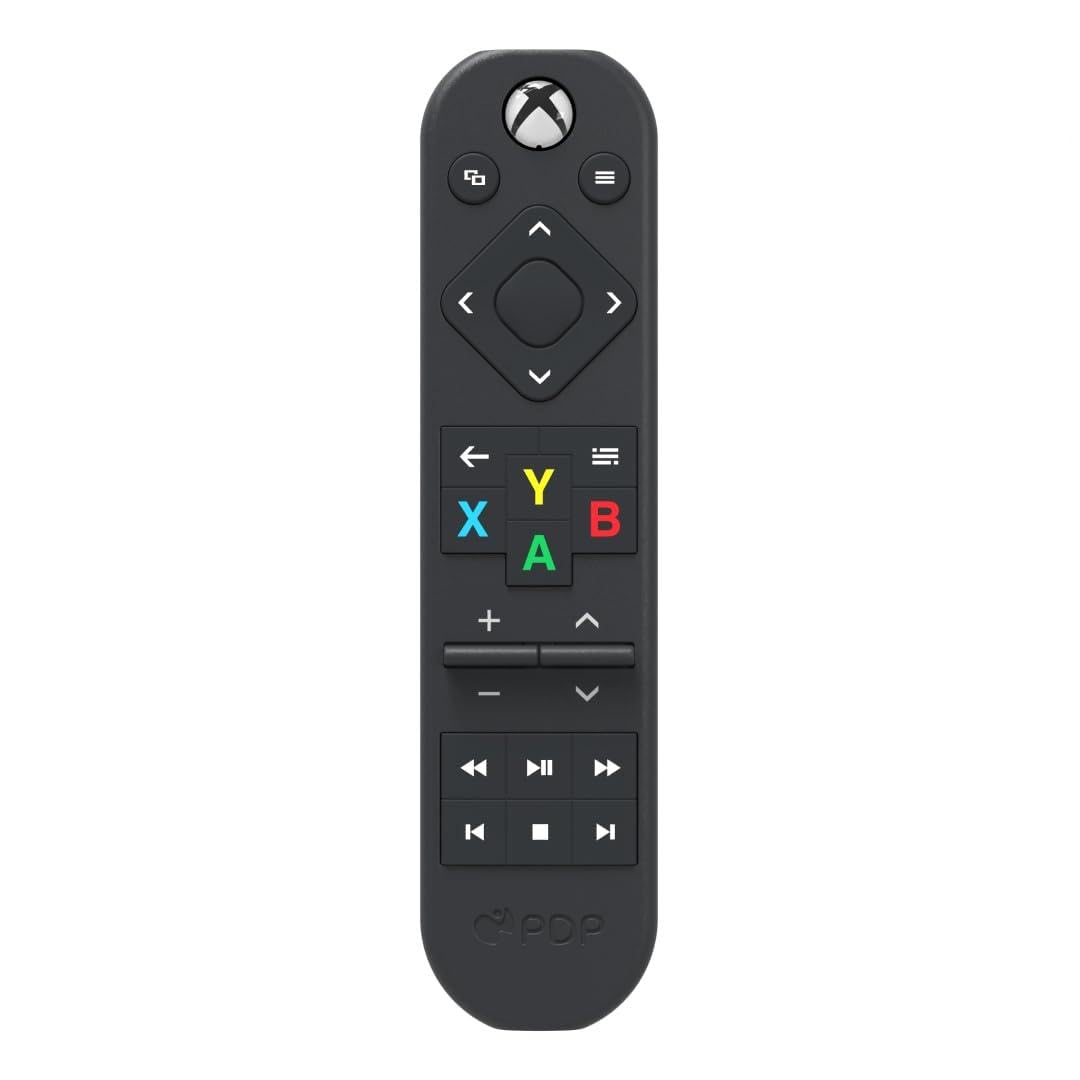
The battery-free option: solar on the window sill, USB-C when the sun is out.
Here is the spec that sells it — solar and USB-C charging in one remote, so the AAA routine is gone. That alone is worth real money over a few years of replacements. It is officially licensed by Xbox, made from 50% recycled plastics, and carries 15 buttons with motion-activated backlighting so it lights up when you lift it.
It covers volume, power, pause and the common Xbox controls including A, B, X and Y. Weighing in at 3.52 ounces, it is noticeably heavier in the hand than the 1.6-ounce Nyko, which is the direct trade for a built-in rechargeable cell. It also beats the SENBOMA on device count: 3 supported devices versus 2.
The catch is the one that shows up in the review pages most: reliability. Xbox commands sometimes go unanswered, and the volume and channel keys take extra presses. The backlight itself is the bright spot — it stays on long enough to help in a dark room. Think of the Solis as an eco-friendly convenience pick, not the most bulletproof remote on this list.
Why the battery-free angle wins
- Solar plus USB-C charging means no AAA purchases ever.
- Officially licensed by Xbox, with 50% recycled plastics in the build.
- Motion-activated backlit buttons light up the keypad when you pick it up.
- 3 device support is more than the SENBOMA offers.
Where it loses ground
- Command reliability is the most-cited problem in the feedback.
- Volume and channel presses can need a second push.
- Heavier at 3.52 ounces than the 1.6-ounce Nyko.
Best fit for: a home that wants to stop buying batteries and does not mind charging now and then.
Think twice if: a missed command during a film would drive you up the wall.
5. 8Bitdo Media Remote (Short Edition)

Twenty buttons, one dedicated Home key, and a wake-up press that skips the controller.
Nothing else in this lineup packs as many keys. The 8Bitdo Short Edition carries 20 buttons, double the 10 on the SENBOMA, and includes a dedicated Home button that wakes the Xbox instantly with a single press. Menu and app navigation get their own Xbox-labeled keys, and the buttons light up when you reach for them.
Compatibility runs across Xbox Series X, Xbox Series S and Xbox One, so it survives a console upgrade. For an app hopper who jumps between streaming services, that extra pad of dedicated keys means fewer menu detours.
Now the honest limits. Battery life is the clear weak spot — the feedback says it chews through cells quickly, so keep spares nearby. Button response is mixed, with some presses needing a second push, and reliability overall is a split verdict rather than a clean win. The backlight is the bright side: it comes on the moment you lift the remote.
The button count case: 20 keys plus a Home wake button make this the deepest layout here, and the 10-meter range tops the Nyko.
The honest trade: you will be rotating batteries more often than with an alkaline remote that sips power.
Pick it when: you bounce between several streaming apps and want a dedicated key for each screen.
Not for you if: frequent battery swaps would annoy you — the Nyko is the calmer option there.
6. Plauduct Media Remote (OG Green Glow)

A translucent green shell that lights up whole, top to bottom, when you grab it.
This one is for the person who wants the Xbox in the dark to look like the Xbox in the dark. The OG Green translucent shell amplifies the built-in LED illumination so the entire remote and every button glow at once, a nod to the 25th anniversary look. Motion activation turns the light on when you pick it up.
Inside the glow it is a full media remote: A, B, X, Y, the D-Pad, playback keys and volume, working across Xbox Series X|S and Xbox One. It covers games, streaming apps, movies and music from one handset. At 1.6 ounces it is the same light carry as the Nyko, and a redesigned hook keeps the back cover clipped firmly in place rather than sliding loose. A bonus set of two logo stickers comes in the box for personalizing the setup.
The practical catch is the light itself. A glowing shell is a novelty that some households love and others find distracting during a film, and the full-body glow is the whole point of the product. If you want a plain black remote, this is the wrong pick. If your console sits in a dark den and you keep misplacing the clicker, it is the easiest one to find.
The visual hook: full-body green glow plus a secure hook-style battery cover, with the same 1.6-ounce weight as the Nyko.
Trade-off to weigh: the glow is the feature — if a lit remote bothers you in a dark room, choose a black one instead.
Made for: late-night players who want a remote they can spot and love the anniversary green look.
Wrong pick if: you want a discreet black handset that disappears on the shelf.
Know the Specs
Infrared Range In Meters And Feet
Infrared is a light-based signal, so the listed maximum range is a best-case number with a clear path to the console. Some listings quote meters, some quote feet — a 10-meter remote and a 10-foot remote are not the same reach at all. Read the unit before you compare two numbers, and remember that a cabinet door or a pile of gear in front of the console shortens the practical distance.
Button Count And Layout
A higher button count does not automatically mean easier control. A 20-button remote earns its keep if you jump between apps and want a dedicated key for each screen. A 10-button compact remote is faster to learn and easier to use in the dark. Look for the keys you press during a movie — Play, Pause, volume and a Home or wake button — before you count the rest.
Power Source And Battery Chore
Alkaline remotes need two AAA cells (standard disposable batteries), and several listings state the batteries are not included, so budget for them. A solar and USB-C charged remote (USB-C is the small oval charging port) removes that purchase but adds a charging habit. Neither is wrong; the choice depends on whether you would rather buy batteries once a year or plug a cable in occasionally.
Motion-Activated Backlighting
This feature lights the buttons when the remote senses movement, so a dark room stops being a guessing game. On some models one strip lights up; on others the whole shell glows. It does not change playback speed or signal strength, but it cuts how often you hit the wrong key mid-scene.
Common Questions
Will an Xbox media remote work with both Xbox One and Xbox Series X|S?
Do these remotes need programming or pairing to the console?
Are batteries included with an Xbox media remote?
Why does my media remote sometimes need two presses?
Can a media remote control my TV as well as the Xbox?
Does a backlit remote drain batteries faster?
What is the difference between the 8Bitdo Short Edition and the Nyko remote?
Will an infrared remote work if my console is inside a cabinet?
Do these remotes play DVDs and Blu-ray discs on the console?
How many devices can one of these remotes control at once?
The Bottom Line
For most people, the winning xbox dvd remote is the Nyko Media Remote, because it pairs dedicated Play and Pause keys with TV volume and power control and needs no setup at all. If you would rather never buy batteries again, the PDP Solis covers that with solar and USB-C charging. And for a dark-room setup where you want the whole remote to glow, the Plauduct OG Green is the one to reach for. Start with the remote that matches how you actually watch, and movie night runs without a controller in reach.
How we choose
We do not accept paid placement. Every pick is matched to a real buyer and a real use-case; we do not hands-on test units.
Sources
Specifications: manufacturer listings and product documentation. Review insights: verified customer reviews, as of November 2026. Pricing: not shown on this page (it changes often); check the current price via the retailer link.
As an Amazon Associate, Tactical Gear Guy earns from qualifying purchases. This does not affect which products we feature.