Specs are compiled from manufacturer listings and verified buyer reviews and can change over time — please confirm the key details on the product page before buying.
If your thumbs never leave the sticks, you already know why extra buttons matter. Back paddles and remappable shoulder buttons let you jump, crouch, and reload without ever lifting a finger off the aim stick — which is the difference between winning and respawning. The market splits into two camps: wired tournament pads with Hall Effect sticks at mid-range prices, and premium modular controllers with swappable parts. Below are nine pads whose extra buttons are actually worth programming.
This guide is built by comparing the manufacturers’ published specifications and the patterns across verified customer reviews, so you get each pick’s real strengths and trade-offs instead of marketing spin.
Every pick here adds programmable buttons beyond the standard Xbox layout, and each one below earns its place on build quality, not looks. If you want faster reactions without dropping serious cash, this breakdown of the best xbox controller with extra buttons covers it all.
Top Picks

How To Choose The Best Xbox Controller with Extra Buttons
“Extra buttons” is not one feature — it is three designs (back paddles, claw-grip bumpers, remappable face buttons), and each changes how you hold the pad. Pick the layout that matches your main genre — paddles and bumpers for shooters, face-button remaps for everything else — before comparing specs.
Back paddles versus claw-grip bumpers versus remappable face buttons
Back paddles sit under your middle fingers, so you can trigger them without moving your grip. Claw-grip bumpers sit higher on the shoulder edge, letting your index finger roll onto them mid-sweep. Face-button remapping, by contrast, just moves an existing command somewhere more reachable. If you play shooters, paddles and bumpers win because they let you jump and crouch while keeping both thumbs on the sticks.
Why Hall Effect sticks are the spec that ends stick drift
A standard analog stick reads position through physical contact, and that contact wears out — which is the drift you eventually feel as your aim pulling left with no input. Hall Effect sticks use magnetic sensors with no physical contact, so the reading stays accurate far longer. Since an extra-button pad is a long-term purchase, insist on Hall Effect sticks that will not drift out from under you.
Trigger stops and mouse-click triggers: fast, but not for every genre
Trigger stops shorten how far the trigger travels before it registers a press. Mouse-click triggers swap the pull for a crisp click. Both speed up your reaction in shooters, but a shortened trigger gives you less range for throttle control in racing games. Look for a controller that lets you switch between the two modes rather than locking you into one.
Wired versus wireless for competitive play
A wired connection removes battery anxiety and keeps the signal constant during a ranked match. Wireless frees you from the cable but adds charging to your routine. At a desk, wired removes battery anxiety; from a couch, wireless with a charging dock is worth the premium.
Side-by-Side Comparison
| Model | Best For | Extra Button Count | Stick Type | Connection | Amazon |
|---|---|---|---|---|---|
| FLYDIGI Vader 5S★ Best Overall | Adjustable-feel all-rounder | 6 remappable | Hall Effect | Wired | Amazon |
| Hyperkin The CompetitorFeatherweight Pick | Lightest feel | 2 programmable rear | Hall Effect | USB | Amazon |
| PowerA FUSION Pro 4Twist-To-Adjust Sticks | Adjustable thumbsticks | 4 mappable | Hall Effect | USB | Amazon |
| Razer Wolverine V3 TE | Tournament play on PC | 6 remappable | Hall Effect | USB | Amazon |
| 8BitDo Ultimate 3-mode | Cross-device play | 2 pro back | Hall Effect | 2.4G / USB / Bluetooth | Amazon |
| Turtle Beach Rematch | Minecraft fans | 2 quick-action back | TMR | USB / Bluetooth | Amazon |
| Nacon Revolution X Unlimited | Deep customization | 6 mappable | Hall Effect | 2.4G / Bluetooth / USB | Amazon |
| Turtle Beach Victrix Pro BFG | Swappable modules | 4 mappable | Hall Effect | Wired / Wireless | Amazon |
| Razer Wolverine V4 Pro | Premium wireless | 6 mappable | Capacitive anti-drift | 2.4G / Bluetooth / USB-C | Amazon |
Detailed Reviews
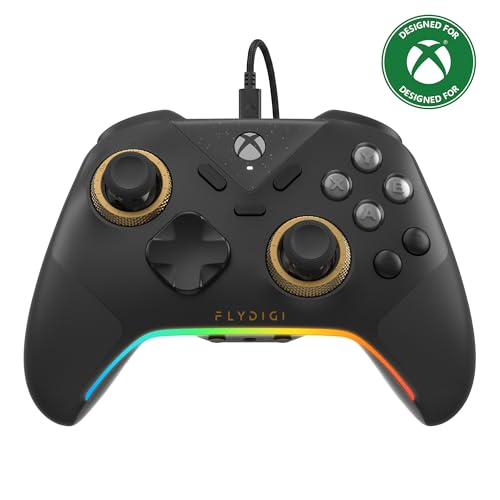
1. FLYDIGI Vader 5S Wired Controller
Our pick — 4.0+★ from 600+ verified ratings; the strongest balance of quality and price.
A wired pad with hand-adjustable stick tension you set per game before the match starts.
The Vader 5S wins this list because it puts the most control in your hands without asking you to swap parts. It carries six remappable buttons — rear and shoulder — so jump, crouch, and ping can all move off your thumbs and onto fingers that were doing nothing. That single spec is the reason it sits at the top: every extra button it gives you keeps your thumbs on the sticks where aim actually happens.
You can tighten or loosen the joystick by hand, so the stick feels how you want it. Tension adjusts from 40gf to 100gf on the fly — that is grams-force, a small measure of how hard the stick pushes back — so you can run a light, flickable stick for FPS aiming and a tighter one for racing or sports steering. No software, no parts swap, just a twist. Pair that with Hall Effect sticks (magnetic sensors with zero physical contact, so no drift over time) and you have a controller set up for years of use, not months.
The catch is weight and cable. At 450 g it is one of the heavier pads on this list, and the Hyperkin Competitor below is a full 200 g — so this is a substantial grip, not a featherweight. It is also wired only, which is exactly what competitive players want but not ideal for couch play. Buyers who value solid build quality above all else made it a favorite here; what wins people over is how refined the whole package feels for a wired, mid-range pad.
What Sells It
- Adjustable joystick tension from 40gf to 100gf — you set the feel per game
- Six remappable buttons across rear and shoulder
- Switchable micro-click and Hall Effect linear triggers for FPS or racing
- Hall Effect sticks with zero deadzone and strong recentering
Where It Gives Ground
- 450 g makes it a heavy, planted grip
- Wired-only design limits living-room play
Grab it if: you want the most tune-it-yourself control per dollar and play at a desk.
Think twice if: you want a wireless pad on the sofa — this one is tethered on purpose.
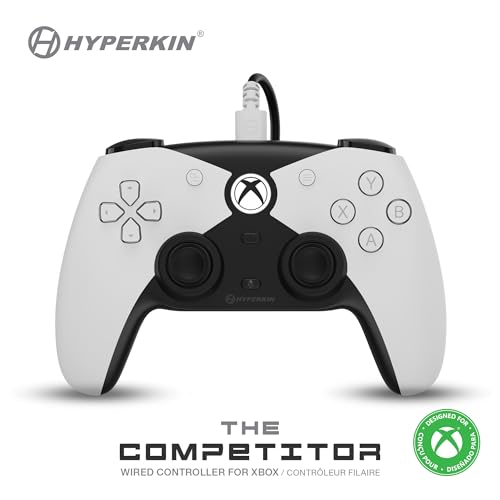
2. Hyperkin The Competitor
An officially licensed budget pad that stays feather-light in hand.
If the FLYDIGI above feels like holding a brick, this is the opposite end of the scale. At 200 g — versus the Vader 5S’s 450 g — the Competitor sits feather-light in hand, and its symmetrical stick layout keeps both thumbs at equal distance from center. That layout suits players raised on a classic pad who cannot stand offset sticks.
The extra-button story is simpler here: two programmable rear buttons, enough for the two actions that matter most (usually jump and reload). Hall Effect sticks keep drift out of the picture, and you get a translucent traditional D-pad plus four standard face buttons. Officially licensed by Xbox, so no compatibility guessing.
The trade-off is scope. With 15 total buttons and just two back paddles, it will not carry a full remap for a game with a dozen bindings — the Wolverine V3 Tournament Edition below offers 12 buttons with six remappable if you need that depth. This is the pad for someone who wants a clean, light grip with just the two extra triggers they actually use.
Light and dependable: the build is light but the official Xbox license means it just works, and the Hall Effect sticks hold their aim.
Reach for this if: you want a featherweight officially licensed pad with just two extra buttons.
Look elsewhere if: your game needs more than two extra bindings mapped.
3. PowerA FUSION Pro 4
Twist the sticks to three heights mid-match and never swap a cap again.
PowerA’s angle here is on-the-fly stick height. A quick twist raises or lowers each thumbstick through three settings — tall for precision aiming, short for quick sweeps — and you do it mid-game without pulling the pad apart. That is a real convenience for players who switch between a sniper and a run-and-gun style in the same session.
You get four mappable buttons you program on the fly, so you can remap without a PC. Hall Effect sticks resist drift, and 3-way trigger locks shorten trigger travel for faster response in FPS games or extend it for throttle control in racing. Seventeen total buttons gives you room to remap a lot without losing the standard layout. Dual rumble and impulse triggers add haptic detail, and a 3.5mm jack carries your headset.
Honesty requires a note on reliability: the pattern across buyers is genuinely mixed, with some reporting the pad working well long-term and others finding it stops working. If you need the very highest confidence in long-term durability, the FLYDIGI or the Razer pads are the safer emotional bet. The FUSION Pro 4 is best bought for its adjustable sticks, not as a buy-it-once-and-forget pad.
The standout spec: three stick heights per thumbstick, adjustable mid-game, is the reason to pick this over anything else here.
Weigh that against: long-term reliability reports split both ways, so treat it as a tuning tool first.
Pick this one if: variable stick height is exactly the customization you have been missing.
Consider the alternative if: proven long-run reliability is your top priority.
4. Razer Wolverine V3 Tournament Edition

Six remappable buttons and a 1000Hz polling rate built for the tournament stage.
This is the pad for the player who lives on a PC and treats latency as an enemy. A 1000Hz polling rate (how many times per second the controller reports its position — a thousand here) keeps every tiny stick movement registered quickly, which matters when a split-second flick decides the round. Four mouse-click back paddles and two claw-grip bumpers give you six remappable buttons, versus the PowerA’s four — enough to cover jump, crouch, reload, and more without your thumbs ever leaving the sticks.
Under the shell you get Hall Effect thumbsticks for anti-drift accuracy, Razer’s mecha-tactile action buttons for crisp fast actuations, an 8-way floating D-pad, and Pro HyperTriggers with that lightning-fast mouse-click response. Everything is tuned for competitive shooters on Xbox and PC.
The honest limit is the audience. Twelve total buttons and a wired USB connection mean this is a desk-and-monitor pad, not a living-room wireless. If you want a six-button competitive pad but play from the sofa, the wireless Wolverine V4 Pro further down is the closer match.
Reasons Competitive Players Bite
- 1000Hz polling rate for rapid, accurate stick reporting on PC
- Six remappable buttons: four back paddles plus two claw bumpers
- Hall Effect sticks with customizable sensitivity
- Mecha-tactile buttons and 8-way floating D-pad for crisp inputs
Trade-Offs To Know
- Wired USB only — no wireless freedom
- 12 total buttons is lean if you want a deep remap
Best fit for: ranked shooters on a PC with a monitor at eye level.
Less suited to: couch play or anyone who needs wireless freedom.
5. 8BitDo Ultimate 3-mode Wireless Controller

One controller that hops from Xbox to PC to phone without a cable or a re-pair.
This one earns its place by being the most adaptable pad here. It is 8BitDo’s first 2.4G wireless Xbox controller, officially licensed by Xbox — connect to Xbox or Windows PC over 2.4G wireless or wired USB, and to Apple or Android devices over Bluetooth. That triple-compatibility is the reason to pick it if you game across more than one screen.
The extra-button set is two pro back paddles, backed by Hall Effect joysticks and Hall Effect triggers so drift stays away. You also get a golden metal tactile D-pad, a 3.5mm audio jack, and three custom profiles. The integrated charging dock means it sits ready to grab — lift it off and it reconnects automatically, which removes the daily hunt for a cable.
The catch is in the body and the buttons. Its dimensions run larger than the PowerA FUSION Pro 4, and two back paddles is a lighter extra-button load than the six-button Razer pads. Buyers who need the most mappable inputs will find it modest; buyers who want one beautiful pad to rule every device will find it ideal.
what separates it: you get a triple-mode connection plus a dock that keeps it charged — a genuinely rare combination in an Xbox pad.
Choose it when: you bounce between Xbox, PC, and a phone or tablet.
Skip it when: two back buttons will not cover your remap needs.
6. Turtle Beach Rematch Wireless RGB Gaming Controller
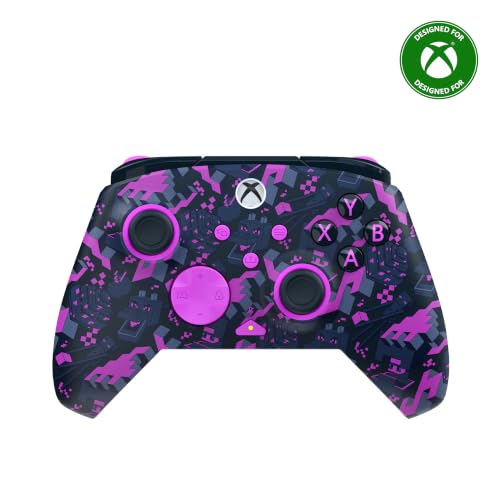
The officially licensed Minecraft pad that lights up your setup in RGB.
Some controllers are bought for feel, and this one is bought for feel and looks. Customizable RGB lighting glows through the officially licensed Minecraft design, so your pad becomes part of the setup rather than a black slab on the shelf. It is officially licensed by Xbox and Mojang, so the theme is the real deal.
The extra buttons are two mappable quick-action back buttons — modest, but enough for the jump-and-reload duo. What is less common is the stick tech: TMR thumbsticks (a sensor type built for sensitive, low-drift tracking) promise lightning-fast control, and Hall-Effect hair triggers with 3-way trigger stops give you the same fast-shot advantage as pricier pads. Dual rumble motors and impulse triggers round out the feedback.
Connectivity is flexible: wireless to Xbox and Windows 10/11 PCs through the included USB transmitter, plus Bluetooth (BLE) for compatible Android mobile and streaming devices. A built-in rechargeable battery pairs with a 10ft USB-C play-and-charge cable. The main thing to weigh is scope — two back buttons and a themed shell suit players who want a fun, capable everyday pad, not a hardcore tournament remap.
Where the value lives: Hall-Effect hair triggers with 3-way stops on a licensed themed pad is more competitive hardware than the look implies.
Made for you if: you want a themed pad that still brings fast triggers and TMR sticks.
Probably not your pick if: you need more than two extra buttons for a deep layout.
7. Nacon Revolution X Unlimited Precision Wireless Controller

Six mappable buttons and an LCD screen that turns the pad itself into a settings menu.
You can reshape how this controller feels, which suits tinkerers. Six mappable shortcut buttons, an LCD screen right on the pad for customization and audio mixing, and more than 60 physical combinations built from 3 sets of weights, 3 sets of joystick heads (concave, convex, high-dome), 2 sets of rings, and a 4-way or 6-way D-pad choice. Few pads on this list let you reshape the actual feel this much.
You get drift resistance from Hall Effect magnetic joysticks and triggers, plus four vibration motors (two in the handles, two in the triggers) for feedback. In PC mode latency drops to 1ms wired or 2ms wireless — fast enough that competitive players notice. A gyroscope can simulate a stick or the D-pad, and PC keyboard keys map to controller buttons. The included charging station keeps it topped up, with up to 10 hours of battery between charges.
Here is the balanced read: the customization is best-in-list, but connectivity and reliability reports are split, with some buyers finding a perfect connection and others hitting issues. The ergonomics draw strong praise — comfortable hands, near-perfect dead zones. Treat the Nacon as the pick for the player who enjoys dialing in hardware and can live with a wireless connection that may take a little patience.
The tinkerer’s case: over 60 physical combinations plus on-pad LCD customization is class-leading for the price tier.
The honest caveat: connection reliability splits both ways, so buy it for the tuning, not guaranteed plug-and-play.
Worth it for: hardware tinkerers who want to reshape the pad and remap six buttons.
Pass if: you want the simplest, most reliable wireless experience above all.
8. Turtle Beach Victrix Pro BFG Reloaded
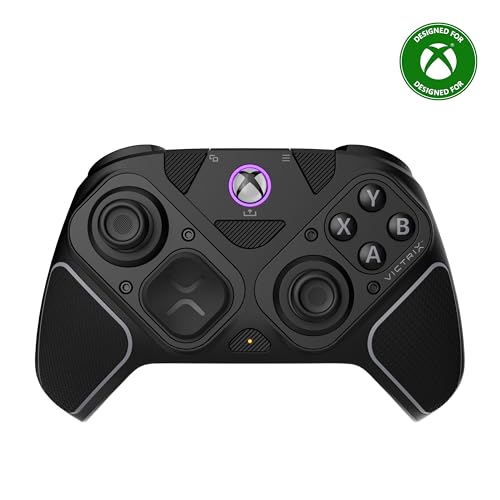
Swap the whole module — including a six-button fightpad — to change how the pad fights.
Most controllers let you remap buttons. This one lets you physically change the control surface. Three customizable modules with built-in Hall-Effect technology snap in, including a 6-button fightpad module with Kailh microswitches for fighting-game players who want arcade-style inputs. Eleven interchangeable components and a free Control Hub app give you room to rebuild the pad around a genre.
For general play, four mappable quick-action buttons handle your extra inputs, and 5-stop Hall-Effect clutch triggers with a hair-trigger mode let you shorten the pull for shooters. A 3.5mm audio jack comes with a lifetime subscription to Dolby Atmos, and the rechargeable battery runs up to 20 hours between charges — the longest runtime on this list. Officially licensed by Xbox, and it ships with a carrying case and module tool.
Your tolerance for modular hardware decides this one. Buyers report mixed feedback on button and trigger responsiveness — some love the trigger locks, others find extra buttons occasionally get in the way during regular use. The customization is what people praise most. If you love the idea of a pad that morphs from shooter to fighter, this is the one; if you want a dialed-in standard layout with nothing to fiddle with, the Wolverine V4 Pro or Vader 5S suit better.
What Buyers Come For
- Three swappable modules, including a 6-button Kailh-microswitch fightpad
- 4 mappable quick-action buttons plus 5-stop clutch triggers
- Up to 20-hour rechargeable battery — the longest here
- 11 interchangeable components and a carrying case included
The Fair Warning
- Modular layout means extra buttons can occasionally feel in the way
- Button and trigger feedback split between praise and gripes
Right for: players who switch between shooters and fighting games and want to rebuild the pad for each.
Wrong for: anyone who wants a fixed, fiddle-free standard layout.
9. Razer Wolverine V4 Pro Wireless Controller

The top-tier wireless upgrade: six mappable buttons with up to 8000 Hz HyperPolling on PC.
This is where the list tops out on both capability and cost. The headline is a polling rate that reaches up to 8000 Hz on PC (how many times per second the pad reports — eight thousand here), the fastest figure in this lineup, delivered over Razer HyperSpeed Wireless. That is the top of the ladder for competitive wireless play, versus the wired V3 Tournament Edition’s 1000Hz.
For extra buttons, you configure four removable mouse-click back buttons and two claw-grip bumpers — six mappable actions total, matching the V3 but now wirelessly. Capacitive anti-drift thumbsticks use contactless sensors for consistent aim, and adjustable Razer Pro HyperTriggers switch between instant mouse-click activation and full-range analog so you can move from FPS to racing without a new pad. Interchangeable thumbstick caps, a magnetic faceplate, and four onboard profiles let you tune the feel and carry your setups with you.
The honest note is that this is a premium-priced pad and a premium-tier commitment — you are paying for the wireless, the 8000 Hz ceiling, and the polish. If you mostly play cabled on a desk, the V3 Tournament Edition covers the core skill set for far less; the V4 Pro is for the player who wants the wireless version of that ceiling.
The mic-drop spec: up to 8000 Hz polling on PC plus six mappable buttons makes this the complete competitive package — if budget is a non-issue.
This is your controller if: you want the fastest wireless polling here and do not mind paying for the top tier.
The smarter spend for cabled play: the V3 Tournament Edition delivers the core six-button edge for less.
Know the Specs
Hall Effect versus standard analog sticks
A standard analog stick reads your movement through physical contact inside the module, and that contact wears over time — which is the drift that makes your aim pull with no input. Hall Effect sticks read position magnetically with no contact, so accuracy holds up far longer. On a controller with extra buttons, you want Hall Effect because you are buying a long-term pad.
Polling rate and what it means for reaction
Polling rate is how many times per second the controller reports its position to the console or PC. A 1000Hz rate means a thousand reports a second; a rate up to 8000 Hz means eight thousand. Higher rates translate to finer tracking of tiny stick movements, which matters most in fast FPS aiming on PC.
Trigger stops, hair triggers, and travel
Trigger stops shorten how far you must pull before a press registers. A hair-trigger mode goes shorter still — a light touch fires. Great for shooters where reaction speed wins, but less range means less throttle control in racing games. Controllers with a switchable mode let you cover both.
Back paddles versus claw-grip bumpers
Back paddles sit under your middle fingers; claw-grip bumpers sit on the upper shoulder so an index finger can roll onto them. Both keep your thumbs on the sticks, but paddles suit one grip style and bumpers another. Count the total mappable buttons — four to six gives real breadth.
Common Questions
Will an extra-button controller work on both Xbox Series X|S and PC?
Do extra buttons give an unfair advantage in online shooters?
What is stick drift and do Hall Effect sticks really prevent it?
Can I use a wired extra-button controller on a couch far from the console?
Is a higher polling rate worth it if I play on a TV?
How many extra buttons do I actually need for shooters?
Will trigger stops hurt my racing games?
Can I remap the back buttons without using a PC app?
Do these controllers have a headphone jack for my headset?
Is a modular controller harder to keep working than a fixed one?
The Bottom Line
You get the most control to dial in from the xbox controller with extra buttons options with the FLYDIGI Vader 5S — six remappable buttons, joystick tension you can adjust from 40gf to 100gf, and switchable triggers. If you want the top-speed wireless ceiling, the Razer Wolverine V4 Pro reaches up to 8000 Hz polling with six mappable buttons. And if couch play with a themed shell is your scene, the Turtle Beach Rematch brings TMR sticks and fast triggers in a licensed Minecraft design. Any of them will keep your thumbs on the sticks where they belong.
How we choose
We do not accept paid placement. Every pick is matched to a real buyer and a real use-case; we do not hands-on test units.
Sources
Specifications: manufacturer listings and product documentation. Review insights: verified customer reviews, as of November 2026. Pricing: not shown on this page (it changes often); check the current price via the retailer link.
As an Amazon Associate, Tactical Gear Guy earns from qualifying purchases. This does not affect which products we feature.