Specs are compiled from manufacturer listings and verified buyer reviews and can change over time — please confirm the key details on the product page before buying.
A good dongle pad wakes your Xbox on the first button press instead of forcing a manual re-pair every session. That is the point of a 2.4GHz dongle: the USB receiver stays in your console or PC and holds the link for you. This guide separates pads with a stable 2.4GHz link from ones that drop mid-match, and flags which extras are worth paying for.
This guide is built by comparing the manufacturers’ published specifications and the patterns across verified customer reviews, so you get each pick’s real strengths and trade-offs instead of marketing spin.
Some pads here use Hall Effect sticks (contact-free magnetic sensors that resist drift) and others use standard sticks, which changes how they hold up over years of play. Below are the specs that decide whether a dongle pad stays connected: receiver design, stick type, and trigger hardware.
Top Picks

How To Choose The Best Xbox Controller with Dongle
Most controller disappointments trace back to one of three things: the wireless link, the sticks, or the triggers. Get the wireless link, sticks, and triggers right and the rest depends on preference. Here is how to weigh each one before you buy.
The dongle decides how your sessions start
A 2.4GHz USB receiver (a small plug-in wireless adapter) holds a private link between the pad and your console or PC. That means no pairing menu and no hunting through Bluetooth settings. Several pads here add a one-press wake from the pad itself, which turns the console on and connects in the same motion. If you share a living room and swap between console and PC, a dongle that lives in a dock or a storage bay saves you from losing it behind the TV.
Hall Effect sticks versus standard sticks
Hall Effect joysticks use magnets instead of physical contact, so the sensor never wears against a track. In plain terms: the contact wiper that normally wears out and causes drift is gone. TMR sticks (tunnel magnetoresistance) go a step further by combining low power draw with that same contact-free design. Standard potentiometer sticks still work fine, but they are the component most likely to drift after heavy use.
Trigger stops, trigger locks and back buttons
A trigger stop shortens how far the trigger travels before it registers a press. In a shooter that means your shot fires sooner; in a racing game you want the full pull. A two-way trigger lock lets you switch between the two without opening anything. Mappable back buttons let you move a face-button action under your fingers so your thumbs stay on the sticks. These are competitive-play features, and they are the main thing separating mid-range pads from premium ones.
Side-by-Side Comparison
| Model | Best For | Stick Tech | Wireless | Extra Buttons | Amazon |
|---|---|---|---|---|---|
| GameSir G7 Pro Wuchang Edition★ Best Overall | All-round best | Mag-Res TMR | 2.4G dongle / Bluetooth 5.3 / USB-C | 4 programmable | Amazon |
| PowerA FUSION Pro WirelessRGB Showpiece | RGB showpiece | Hall Effect modules | 2.4G USB adapter | 4 mappable | Amazon |
| PowerA Advantage Regen SlateBattery Leader | Battery and trigger locks | Hall Effect | 2.4G USB adapter | 4 mappable | Amazon |
| 8Bitdo Ultimate 3E | Customization | TMR joysticks | 2.4G via dock / Bluetooth | 2 back + 2 bumpers | Amazon |
| Akalyptra RGB Wireless | Turbo speed levels | Hall Effect | 2.4G adapter | 22 total buttons | Amazon |
| Dinosoo RGB Wireless | RGB lighting | Hall triggers | 2.4G adapter / wired | PL/PR mappable | Amazon |
| Moonag Wireless | Budget pickup | Hall Effect | 2.4G USB receiver | Custom mapping | Amazon |
| Xbox One 2.4GHz Purple | Simple spare pad | Standard | 2.4G adapter (32 ft) | 16 total buttons | Amazon |
Detailed Reviews
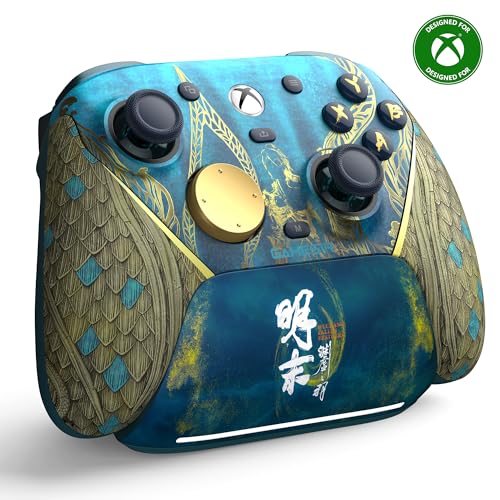
1. GameSir G7 Pro Wireless Gaming Controller
Our pick — 4.0+★ from 750+ verified ratings; the strongest balance of quality and price.
A 1200mAh pad that charges itself the instant you set it down
If you want one pad that handles console, PC and Android without changing anything but a switch, this is the one. The G7 Pro pairs over a 2.4G wireless link for Xbox and PC, then flips to Bluetooth 5.3 for Android — an easy-access mode switch does the work in seconds. For your living room that means the same controller you finished a Series X session with can pair to a phone on the couch.
The sticks are the headline. GameSir fits its Mag-Res TMR sticks here, which combine the precision and low power draw of traditional potentiometer sticks with the durability of Hall Effect (contact-free magnetic sensing). Practically: the drift-prone sensor has no physical contact surface to wear down. Underneath, the Hall Effect analog triggers use a mechanical micro-switch for a tactile actuation, and a Hair Trigger Mode kicks in when you hold the M+LT/RT buttons — short pull for shooters, long pull for racing.
You never have to hunt for the dongle, because the dock has a built-in compartment for the wireless receiver. The 1200mAh battery starts topping up the moment the pad sits in its dock, so you spend less time hunting for a cable. The one honest catch: this is a chunky pad at 9.6 ounces, so players used to a featherweight pad will notice the mass in long sessions. It also costs real money for a mid-tier feature set, so weigh if you need the dock and tri-mode switching.
Where it wins
- Mag-Res TMR sticks designed to resist drift over long-term play
- Three ways to connect: 2.4G dongle, Bluetooth 5.3, USB-C cable
- Smart dock charges on contact and stores the wireless receiver
- Hair Trigger Mode gives you a short-pull option for shooters
- Four programmable buttons for remapping mid-game
Where it asks more
- 9.6 ounces is heavy if you prefer a light pad
- Premium-tier spend for a pad with 12 buttons
- Dock takes up shelf space next to the console
Reach for this if: you switch between Xbox, PC and Android and want the dongle to live somewhere safe.
Think twice if: a light controller matters more to you than a charging dock.
2. PowerA FUSION Pro Wireless Controller with Lumectra
Three thumbstick heights you can twist mid-match without hunting for parts
PowerA builds this pad around adjustment rather than decoration, even though the lighting is what you notice first. The Quick-Twist thumbsticks let you change height while a game is running — three height settings on each stick, changed with a twist instead of a parts swap. If you switch between a twitchy shooter and a slow racing title in one evening, that saves you a bench session between games.
The hidden-design RGB runs 6 lighting modes across 4 customizable zones, and it stays dark until you switch it on. Under the shell, Hall Effect modules (contact-free magnetic sensors in the thumbsticks) give it a fluid feel and a longer life without the drift that contact-based sticks develop. Four mappable buttons program on the fly, mid-game, with no system menu involved.
Here’s the trade-off you need to know before buying: reliability is the recurring theme in owner feedback, with random shutdowns and dropped connections showing up alongside short battery life that falls under 5 hours. At 1.4 pounds it is also the heaviest pad on this list by a wide margin, so wrist fatigue over a marathon session is real. Treat the connection issues as a fit note — if your setup has a lot of wireless traffic nearby, a pad with a stronger link history may suit you better.
What wins people over: the twist-to-adjust sticks and the 6-mode lighting, both of which you can’t get on cheaper pads.
The honest catch: sub-5-hour battery life and reported connection dropouts mean this is a pad for shorter, visually-driven sessions rather than all-night grinds.
Matches best with: players who tweak their stick height game to game and want a pad that looks as customized as it plays.
Less suited to: marathon players who need every hour of battery they can get.
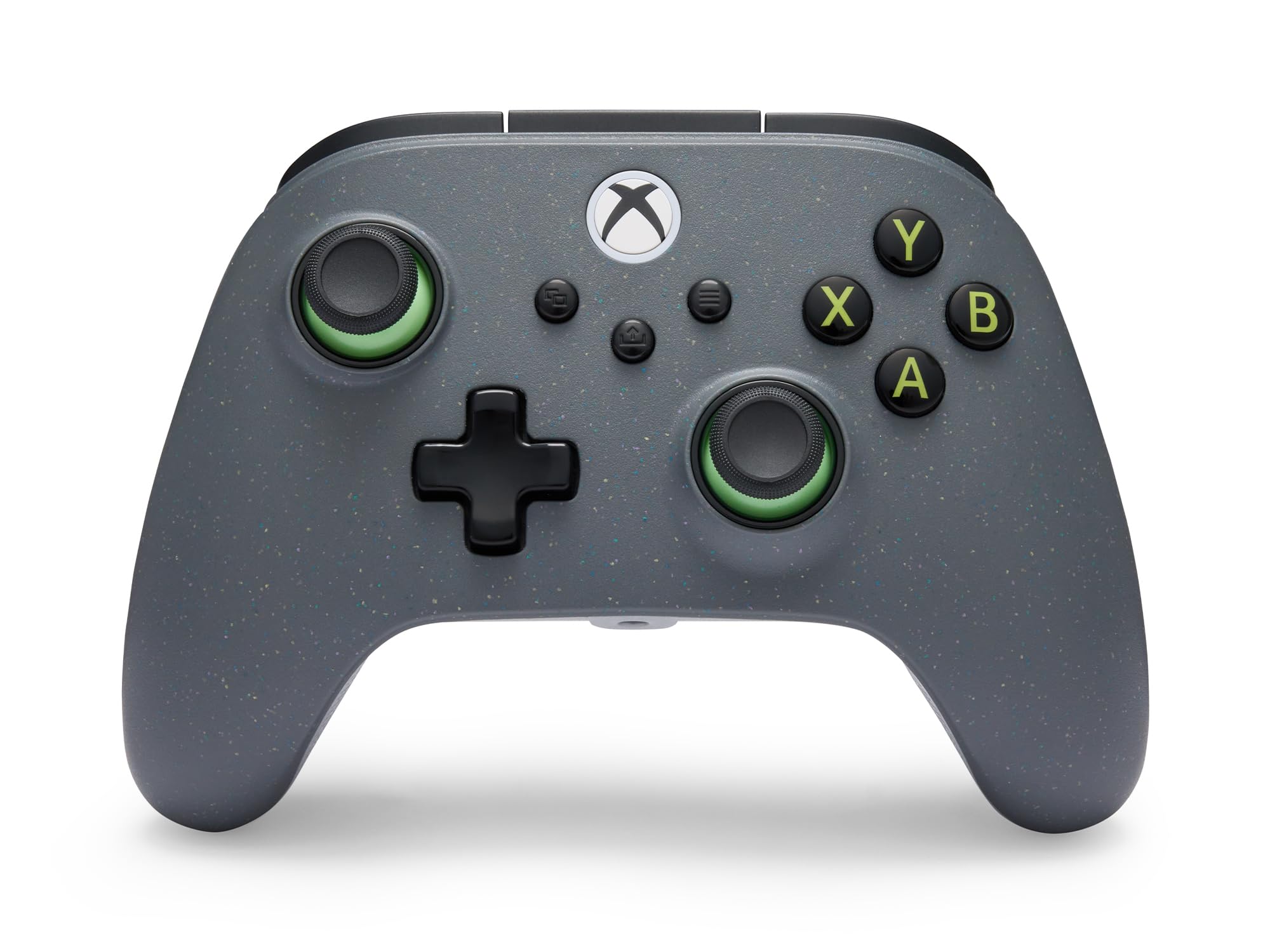
3. PowerA Advantage Wireless Controller
The pad that trades RGB for a 30-hour charge and a reclaimed shell
Two numbers define this controller. The rechargeable battery runs up to 30 hours per charge, and the shell is partially made from 65% reclaimed materials using recovered plastics. If you charge on Sunday and play through the week, that lifespan means you’re not scrambling for a cable mid-session. The included 10 ft USB-C charging cable is long enough to reach from a low shelf without stretching.
For competitive play, the Hall Effect thumbsticks and triggers remove the physical contact that leads to drift. Trigger locks are two-way adjustable — a short pull for instant response in shooters, a long pull for full throttle in racing games. The 1000Hz polling rate (the pad reports its position 1000 times per second) applies in wired PC mode, so the low-latency figure is a PC perk rather than a console one. Four mappable buttons program mid-game, and the free PowerA Gamer HQ app handles audio, triggers, rumble and dead zones.
The counterweight: owner feedback on quality and connectivity is split, so this is a pad to buy as a daily driver rather than a collector’s piece. It is officially licensed for Xbox Series X|S, which keeps the button layout and vibration behavior in line with what the console expects. If programmable buttons are your main draw, this delivers — it’s the one thing consistently singled out as a strength.
The number that matters: up to 30 hours per charge puts it well ahead of the FUSION Pro’s sub-5-hour figure, which is the biggest single gap between the two PowerA pads.
Sizing the caveat: mixed reports on long-term quality mean it’s a smart daily pick, not a pad to treat as indestructible.
My read: the practical choice if battery anxiety is what pushed you toward a docked pad in the first place.
Worth knowing: the 1000Hz figure only applies in wired PC mode, so console players gain no speed from it.
4. 8Bitdo Ultimate 3E Wireless Controller

A charging dock with zero contact points and swappable everything
This is the pad for the tinkerer. Swappable ABXY modules, standard or circular D-pad options, and multiple joystick styles let you rebuild the feel rather than adapt to it. The dock charges wirelessly with no contact points at all — magnetic alignment snaps the pad into place, and lifting it auto-reconnects so you’re back in the game without a button press. Keep the 2.4G adapter stored inside the dock and it extends the wireless signal from your console or PC, which is a neat answer to the dongle-in-the-back-of-the-TV problem.
The internals hold up their end. TMR joysticks pair with a 12-bit ADC sampling chip for precision and stability, which is a step beyond the standard-build pads on this list. Hall-effect impulse triggers with two trigger stops switch between levels in a second, so a shooter and a racing game can share the same pad without a settings dive. Two back buttons, two fast bumpers, three custom profiles, a 3.5mm audio jack and up to 1000Hz polling rate on PC round out a genuinely pro-grade feature set.
What holds it back is consistency. Controller quality draws the strongest praise here — many compare it directly to the Xbox Elite — but ergonomics, connectivity and reliability all land in mixed territory. Owner feedback describes complaints across those areas rather than a single isolated gripe, so if a perfect out-of-box experience is your priority, the premium price makes that gamble harder to accept. On PC, use the USB-C 2.4G adapter directly or through the dock; Bluetooth is for mobile devices only.
The customization story: swappable sticks, modules, and D-pad options make this the most adjustable pad on this list — an Elite-style build without the same name.
The reality check: mixed ergonomics and connectivity reports mean you’re paying a premium for a pad that asks you to accept some variance.
Best for: the player who wants to rebuild their controller, not settle for one layout.
Not for: anyone who wants plug-in-and-forget simplicity from day one.
5. Akalyptra RGB Wireless Controller
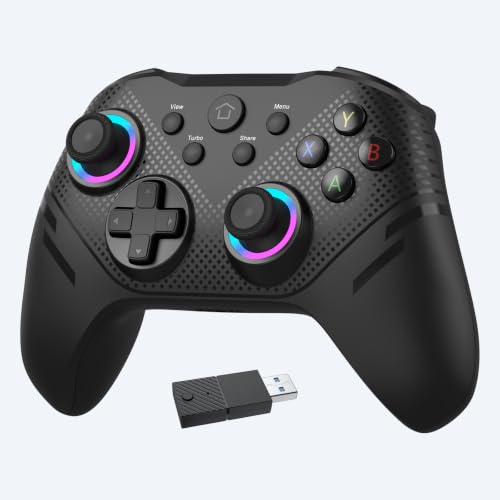
Twenty-two buttons and three selectable rapid-fire speeds in one shell
A controller with 22 buttons is not for everyone, but if you remap heavily, this is a lot of surface area to work with. The auto turbo function runs at 3 adjustable speeds — 8Hz, 15Hz and 25Hz — so you can set the fire rate to match the game rather than mashing. Once activated it keeps firing continuously without you holding the button, which is the sort of feature that changes how a shooter feels.
The core spec sheet is solid for the tier. Hall Effect joysticks and triggers use contactless magnetic sensing to prevent drift, and the 2.4G adapter brings a stable signal with strong anti-interference and low latency. It’s plug-and-play, no drivers required, which is exactly what you want from a dongle-based pad — plug in the receiver, power on, play. Dual vibration motors and a 3.5mm audio jack round out the tactile and chat side.
The honest follow-up: there isn’t much owner history to go on with this one, and what exists is split on reliability. Button and stick quality are the standout positives, so the parts that matter most are sound; the question mark sits over long-term dependability. If you want a feature-dense pad and accept that it may not be the last controller you ever buy, this is a reasonable pick. If you need proven durability, look at the GameSir or the PowerA Advantage instead.
What it brings to the fight
- Auto turbo at 8Hz, 15Hz and 25Hz selectable speeds
- Hall Effect joysticks and triggers for drift resistance
- 22 buttons for heavy remapping
- Plug-and-play 2.4G adapter with no drivers needed
The follow-up question
- Reliability is described as mixed
- Little long-term feedback to judge durability
- 22 buttons takes real getting used to
Pick it when: rapid-fire speed control and a big button arsenal are what you want from a pad.
Leave it when: long-term durability is your top worry.
6. Dinosoo RGB Wireless Controller

Eight light modes and a wireless range that clears the room
Buy this one if a bit of personality on your desk matters. The RGB version runs 8 light modes you can change freely, and the shell is described by owners as feeling like an original controller. Set it on a shelf next to a console and it earns its place visually. The 2.4GHz wireless adapter gives you more than 30 feet of range, which covers a couch across a large room without a cable running along the floor.
On features, the TURBO button cycles through combos while the PL/PR mappable buttons let you program on the fly — hold Set for 3 seconds, then press PL/PR to clear the mapping. The pad works wired or wireless and covers Xbox One, Series X, Series S, One S, One X, Android and Windows 11/10/8/7, with an internal battery and the USB adapter in the box. That compatibility spread is the most-praised trait, and versatility comes second.
The honest part: stick movement and responsiveness are the most-discussed points, and not all of it is positive — bad stick drift and input lag come up, alongside mixed durability feedback. That’s the trade-off at this tier. It is still a genuinely well-liked pad for build and versatility; just set your expectations around the sticks and treat it as a solid everyday controller rather than a competitive one.
What it gets right: build quality that reads like the original and connection options that span almost every Xbox and Windows generation.
What to keep in mind: drift and input-lag reports mean stick feel is the variable you’re accepting here.
Suits you if: you want an RGB pad that plugs into nearly any Xbox or PC setup without fuss.
Look past it if: you need pinpoint stick accuracy for competitive play.
7. Moonag Wireless Controller for Xbox with 2.4GHz Adapter

The entry-point pad that still gives you Hall Effect sticks
Spending a little on a controller doesn’t have to mean giving up drift-resistant sticks. The Moonag runs Hall Effect joysticks designed to minimize drift and keep input response accurate across long sessions. In practical terms, you get the contact-free sensing that’s usually reserved for pricier pads, which is the single best reason to consider this one.
You get two silicone joystick caps in the box to improve grip and reduce finger fatigue. A 3.5mm headphone jack (a standard round audio port) handles private audio and chat, so you can hear game sound without disturbing others. Dual vibration motors sit in the side grips with pulse trigger buttons for tactile feedback, so you feel bumps and trigger pulls in your hands. The 2.4GHz USB receiver (a small plug-in dongle that uses the 2.4GHz radio band) delivers the low-latency wireless link the dongle is there to provide, so your inputs register without noticeable delay. It’s plug-and-play across Xbox Series X|S, Xbox One and Windows PC, so you can move it between devices without setup.
Where this budget pad shows its price is in the connection. Owner feedback is split on connectivity, with frequent disconnections reported alongside plenty of happy players. That’s the classic entry-tier variable. Buy it as a second pad, a travel pad, or a spare for a second player and it does the job well; buy it as your only competitive pad and you may hit a stutter. Custom button mapping is here too, which is a nice touch at this tier.
The value read: Hall Effect joysticks at a budget tier is the headline, and the included silicone caps mean you’re not buying extras.
One caution: connection consistency is the lottery here, so keep the receiver in a clear line of sight.
Built for: spares, second players, and anyone who wants drift-resistant sticks without the premium spend.
Skip if: a rock-solid link is non-negotiable for ranked play.
8. Xbox One Controller, 2.4GHz Wireless Controller (Purple)

A straightforward purple pad with a 3.5mm jack and a 32 ft wireless reach
This is the simplest pick on the list, and sometimes that’s the point. The 2.4GHz adapter holds a signal within 32 feet, so you can sit back on the couch with room to spare. The 3.5mm stereo headphone jack means private audio and chat without tying up the TV speakers, and the ergonomic grip structure is designed to keep your hands from fatiguing during long sessions.
How it compares in size is note if your hands know exactly what they like. At 5.2 inches wide and 3.1 inches high it’s a considerably more compact shell than the GameSir G7 Pro, which measures 5.98 inches deep and 4 inches high — a sizeable difference in how it fills your palms. It carries 16 buttons against the GameSir’s 12, so there’s no shortage of inputs for the layout. Dual feedback motors give you the rumble side of the experience.
Be realistic about what it is. Stock joystick drift is a known watch point — the manufacturer’s own guidance suggests cleaning and recalibrating if camera drift appears, which tells you the sticks are the component to watch. Pairing with the Series S is also a reported trouble spot, even though it works with Series X and PC. Get it as a purple backup pad or a second-player controller and it’s a fine choice; count on it as your main pad and the connectivity quirks may frustrate.
Credentials worth noting
- 2.4GHz adapter holds a signal within 32 feet
- 3.5mm headphone jack for private audio and chat
- Compact shell next to the GameSir G7 Pro
- 16 buttons and dual feedback motors
Set your expectations
- Joystick drift is a documented watch point
- Series S pairing is reported as unreliable
- Colors and look are its main differentiator
Buy it as: a colorful second controller or an easy replacement for a single-player setup.
Pass on it if: it must pair with a Series S every time without fuss.
Know the Specs
Polling Rate
Polling rate is how often the controller reports its position to your system. A 1000Hz rate means 1000 reports per second, which is roughly once per millisecond — the lower the gap between input and on-screen action, the tighter the feel. On PC it matters most in fast shooters; on console you generally won’t get the full benefit because the console sets its own refresh timing. Note that several pads here list 1000Hz in PC wired mode only, so don’t buy purely for that number if you play wirelessly.
Hall Effect vs TMR Sticks
Hall Effect sticks measure magnetic fields with no physical contact, so the sensor doesn’t wear a track over time — that’s why they resist drift. TMR sticks (tunnel magnetoresistance) use a similar magnetic approach but add low power consumption and a higher, more stable polling rate. Both are more durable than standard potentiometer sticks, which rely on contact wipers that eventually wear. If a pad here says Hall Effect, it’s the drift-resistant route; if it says TMR, it’s that plus efficiency.
Trigger Stops and Locks
Trigger travel is the distance a trigger moves before the input registers. A trigger stop shortens that distance so your shot registers sooner. A two-way lock lets you pick a short pull for shooters and a long pull for driving games. This is one of the few specs that changes your actual reaction time, which is why competitive pads charge more for it than for cosmetics.
Dongle vs Bluetooth
A 2.4GHz dongle creates a dedicated link between pad and system, which typically gives you lower latency and more stable connections than Bluetooth. Bluetooth 5.3 in a controller is best used for phones, tablets, and handhelds where the dongle has nowhere to plug in. If your pad offers both, use the dongle for Xbox and PC and reserve Bluetooth for mobile.
Common Questions
Does the GameSir G7 Pro dongle stay in the controller or the dock?
Will a 2.4GHz dongle controller work on Xbox Series S without Bluetooth?
How long does a rechargeable controller battery actually last?
What is the difference between Hall Effect sticks and TMR sticks?
Do I need the dongle if I only play on PC?
Can a trigger lock help in racing games as well as shooters?
How many mappable buttons do I actually need?
What does the 65% reclaimed materials figure on the PowerA Advantage mean?
My controller’s sticks are drifting — can it be fixed rather than replaced?
Will a wireless controller work through a wall or from another room?
The Bottom Line
You get the most flexibility from the GameSir G7 Pro Wuchang Edition, the xbox controller with dongle that earns the top spot. It covers all the bases: Mag-Res TMR sticks (magnetic joysticks that resist drift), tri-mode switching between 2.4G, Bluetooth 5.3 and USB-C, and a dock that charges the 1200mAh battery while keeping the receiver safe. If battery life is your deciding factor, grab the PowerA Advantage Regen Slate with its up to 30 hours per charge and two-way trigger locks. And if you want the most customizable pad here, the 8Bitdo Ultimate 3E and its swappable modules are the one to reach for.
How we choose
We do not accept paid placement. Every pick is matched to a real buyer and a real use-case; we do not hands-on test units.
Sources
Specifications: manufacturer listings and product documentation. Review insights: verified customer reviews, as of November 2026. Pricing: not shown on this page (it changes often); check the current price via the retailer link.
As an Amazon Associate, Tactical Gear Guy earns from qualifying purchases. This does not affect which products we feature.