Specs are compiled from manufacturer listings and verified buyer reviews and can change over time — please confirm the key details on the product page before buying.
If your Xbox controller walks your character across the map on its own, a single replacement part can fix it. Stick drift, a mushy bumper, and a thumbstick worn down to bare plastic are all fixable with a replacement kit that costs a fraction of a fresh pad. This guide covers the nine kits worth your time, sorted by what actually breaks and who each one is built for.
This guide is built by comparing the manufacturers’ published specifications and the patterns across verified customer reviews, so you get each pick’s real strengths and trade-offs instead of marketing spin.
You will see which kits swap on without tools, which ones demand a soldering iron, and which ones cover the exact model number printed inside your battery bay. Before you buy any Xbox controller part, check the model number printed inside your battery bay.
Top Picks


How To Choose The Best Xbox Controller Parts
The first thing to do is flip your controller over and read the model number. It sits in the battery compartment, and it is the single number that decides whether a part clicks in or not at all. A thumbstick, paddle or shell kit built for the Elite Series 2 (model 1797) will not fit the older Elite Series 1 (model 1698), even though both look similar from across the room.
Match the part to what actually broke
A drifting stick is a different repair from a dead bumper. Drift is a worn-out sensor inside the joystick module, and the fix is a replacement module. A bumper that will not register is usually a failed switch under the plastic. Buying a full cosmetic kit when your problem is a sensor is the most common way people waste a repair budget.
Know whether you can solder
Some kits simply click into place with magnets. Others are drop-in modules that need the old part desoldered and the new one soldered to the board. A few are bare switches that demand solid soldering skill. Be honest with yourself about which group you belong to before you buy — a solder-required part in unskilled hands is a ruined controller.
Decide between repairing and replacing
A thumbstick kit fixes the wear that causes drift without touching the electronics. A bumper switch kit restores a button that has gone soft or dead. If the shell itself is cracked or the rubber grips have peeled, a housing kit brings the whole thing back to looking new — no electronics work involved, just tools and patience.
Side-by-Side Comparison
| Model | Best For | Fits | What You Get | Skill Level | Amazon |
|---|---|---|---|---|---|
| TOMSIN Magnetic Buttons Kit★ Best Overall | Elite Series 2 owners who want a quick cosmetic and grip refresh | Elite Series 2 (1797) only | 6 joysticks, 4 paddles, 2 D-pads, tool | No disassembly | Amazon |
| eXtremeRate ABXY ButtonsPersonalize Pick | Players who want their controller to look unlike anyone else’s | Series X/S, One S/X, Elite 1 & 2 | ABXY set, T8H and T6 drivers, pry tool | Full disassembly | Amazon |
| RGEEK Joystick ReplacementBest Starter Kit | Fixing a worn or drifting stick with tools included | Xbox One, 360 | 4 joysticks, 4 caps, T6/T8/T10 drivers | Driver only, no solder | Amazon |
| Flybxiya RB LB Bumper Set | Spare bumper buttons in bulk for a repair bench | Xbox Series X/S | 10 sets of bumper buttons | Disassembly required | Amazon |
| TOMSIN Thumbsticks for Elite 1 | Elite Series 1 owners who want to change stick height | Elite Series 1 (1698) only | 6 thumbsticks in 3 heights and shapes | No tools | Amazon |
| GuliKit TMR Joystick | Ending stick drift permanently on a Series X/S or Elite 2 | Series X/S, Elite Series 2 | 2 TMR stick modules, 2 KK Ring caps | Soldering required | Amazon |
| SOSS GAMING Tactile Switch Kit | Reviving a dead or mushy RB/LB button | Xbox One base, S, Elite 1 & 2 | 10 switches, T8 and T6 drivers, pry tool | Soldering required | Amazon |
| VANPARK Metal Parts Kit (Purple) | A full metal-feel upgrade set for the Elite Series 2 | Elite Series 2 (1797) | Metal sticks, paddles, D-pads, tool | No disassembly | Amazon |
| BSUZUN Housing Shell Kit | Refurbishing a scuffed or cracked Elite Series 2 shell | Elite Series 2 (1797) only | Front and back shell, grips, full driver set | Full teardown | Amazon |
Detailed Reviews
1. TOMSIN Magnetic Buttons Kit Xbox Elite Series 2
Our pick — 4.5+★ from 500+ verified ratings; the strongest balance of quality and price.
A no-teardown button refresh for Elite Series 2 owners who are tired of worn grey sticks.
This is the pick for Elite Series 2 players who have not lost any function but dislike the look and feel of the stock buttons. The kit gives you six metal-plated joysticks, four paddles and two D-pads, all magnetically attached so you pull the old part off and push the new one on. No screws. No shell removal. You can swap the whole look in a minute at your desk.
Fit is what buyers mention most. Seventeen reviewers mention fit and seventeen mention color, so the magnetic hold and the metal finish are what buyers judge this kit on. The brand also backs the set with a one-year warranty, which is meaningful on a part this small and this easy to lose.
Here is the honest limit. The kit is built for the Elite Series 2 model 1797 and its white Core sibling, and it will not fit the older Elite Series 1 model 1698. The value side is also the most-often-discussed point and reviewers land on both sides of it — some feel the finish justifies the ask, others do not. Know that going in and you will not be disappointed. Compatibility is listed for the Elite Series 2 family only, not for the standard Series X/S controller.
What earns it the top spot
- Six metal-plated joysticks, four paddles and two D-pads in one set
- Swaps on without taking the controller apart
- Strong magnetic hold — stays on until you pull
- One-year manufacturer warranty
What to weigh first
- Fits the Elite Series 2 only, not the Series 1
- Sticks are rubber-coated over metal, so they wear like stock over time
- Value is the most-debated point — price-sensitive buyers may hesitate
Reach for this if: you own an Elite Series 2 and want a fresh look and fresh grips without touching a screwdriver.
Look elsewhere if: you are on the older Elite Series 1, which needs its own fit-specific set.
2. eXtremeRate ABXY Buttons Xbox Series X & S
A three-tone keycap set that turns a stock ABXY row into something nobody else owns.
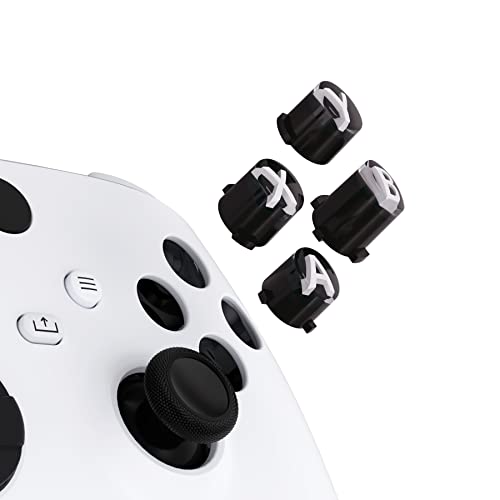
Look is the entire point here. Thirty-three reviewers mention appearance, the loudest cosmetic reaction of any part in this roundup. The three-tone black-and-clear set with white classic symbols is the look, and you can pair it with eXtremeRate’s own shells to make the whole controller your own.
The package does not leave you hunting for tools. You get the ABXY keys plus a T8H driver, a T6 driver, a pry tool and spare screws — enough to open the shell and swap the keys without a separate trip. One set is one set of keys, so there is no bulk benefit here. What you are buying is the design, not the volume.
Now the catch a buyer needs to hear: this is a full disassembly job, and the install experience divides people cleanly. Some find it quick, others find they have to take the controller apart further than expected. It fits the whole Xbox family — Series X/S (model 1914), One S/X (model 1708), and both Elite generations — but not other models. If you want the look and can handle a teardown, it delivers; if not, pick a magnetic kit instead.
The design upside: a genuinely distinct three-tone finish with white classic symbols, backed by a full driver set in the box.
Who should pause: anyone who would rather not open the controller. The install is a real disassembly project, and the reviews split right down the middle on how smooth it goes.
The one to grab if: you want a one-of-a-kind ABXY look and already own the drivers to get inside the shell.
Pass on this if: a teardown is more than you want to sign up for — the magnetic Elite kits do the makeup without ever opening the case.
3. RGEEK Xbox One Joystick Replacement with Screwdriver Kit
Four replacement sticks and the three Torx drivers you need, all in one bag.
For a first repair, having the tools in the box matters as much as the part. This set hands you a T6, a T8 and a T10 driver — all with magnetic tips so screws stay on the bit — plus two double-ended prying tools, a triangle paddle, four 3D analog joystick modules and four thumbstick caps. That is enough to fix up to two controllers without buying anything extra.
Quality is what owners talk about most, and it is the reason this one lands where it does. The sticks are soft rubber over PP plastic, so the thumb surface feels right without being slick. The screwdrivers are the sleeper win — magnetic tips save you from losing a tiny screw into the carpet mid-repair.
The thing to understand is that drift fix is not guaranteed here. Some players report the sticks work fine and fix the drift; others report they stop working over time. The set is a value repair, not a permanent one. If your priority is ending drift once and for all, a magnetic-sensor module is the stronger path. If you want a cheap, complete starter kit to learn the repair on, this is the place to start.
Reasons it lands on the shortlist
- Four joysticks and caps, enough for more than one controller
- T6, T8 and T10 magnetic-tip drivers included
- Two prying tools and a triangle paddle in the bag
The fair caveats
- Rubber-over-plastic sticks wear over time like stock
- Drift fix varies — some players see it, others don’t
Worth it for: a player who wants one complete box and a low-cost way to learn the stick swap.
Not the one if: you need a drift fix that holds for years — put the money into a magnetic module instead.
4. Flybxiya RB LB Bumper Button Xbox Series S X
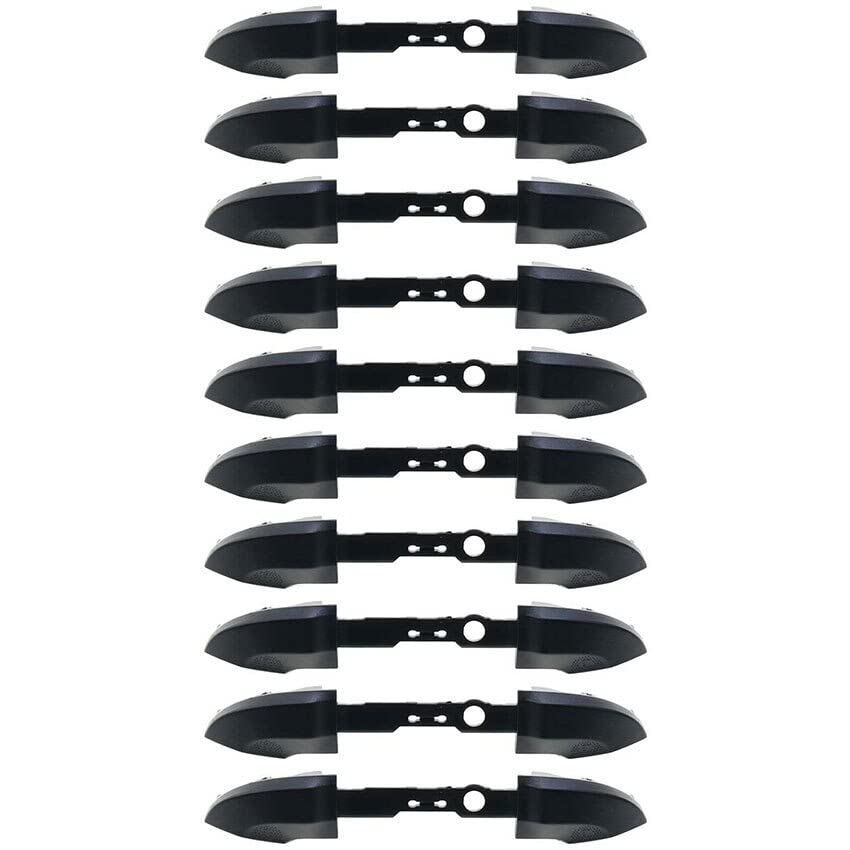
Ten sets of bumper buttons in one bag — built for volume, not for a single repair.
Ten sets. That is the whole pitch, and it is a big one — ten bumper sets here versus the single set of eXtremeRate ABXY keys. If you fix consoles for friends, run a small repair bench, or keep a drawer of spares, this is a constant-restock buy rather than a one-controller fix. Each set is the black LB and RB bumper button with its middle bar holder.
The fit is the story here, and it is an honest one. The bumper buttons are explicitly built for the Xbox Series X and Series S, and the reviews split right down the middle on how well they seat — some report a perfect fit, others report they do not seat at all, particularly on the Core X/S model. Treat it as a bulk-parts gamble and you will not be surprised. Measure the shape against the old bumper before you commit to a full set.
The build is plain plastic, so no metal or coating to speak of — that keeps the set light and cheap-to-replace, and it keeps the price per set firmly in the budget tier. This is the one part in the roundup I would call a spare-parts buy rather than a primary fix. If you need a single bumper fixed right the first time, a switch kit is the more reliable route.
The bulk case: ten full LB/RB bumper sets in a single bag, which is real value for a repair bench or a family with several controllers.
The honest risk: fit is the most-discussed point and it is mixed, with several buyers saying the bumper does not seat on the Core X/S controller. Order one set’s worth of patience with the rest.
Buy it when: you want a drawer of spare Series X/S bumpers and can handle a fit that might not land first time.
Skip it when: you have one broken controller and need the fix to work on the first attempt.
5. TOMSIN Thumbsticks Xbox Elite Series 1

Six sticks in three heights and shapes, so you can dial in your thumb feel without tools.
If you own the original Elite (model 1698) and never liked the stock stick height, this is the one variation kit made for that exact controller. You get six interchangeable thumbsticks across three heights and shapes, each steel-bodied with a rubberized top and sides. Swap them on and off with your fingers. No driver, no shell, no fuss.
Quality is the top note owners strike, and replacement feel runs right behind it. The steel shafts give the sticks a firm, consistent push rather than the plastic flex of the stock set. The rubberized caps do their job on longer sessions, and the magnetized base seats the stick in the right spot when you push it down.
The magnetic hold is where it gets tricky. Some players report the sticks feel too loose and the magnets are not strong enough, and the stick can come off during hard play. That is a real fit note worth hearing before you buy, not a reason to write off the set — the same review page shows plenty of players who find it solid. It fits only the Elite Series 1 (1698), not the Elite Series 2 or its white Core sibling.
What it does well: six sticks in three heights and shapes, steel bodies with rubberized caps, and a tool-free swap that takes seconds.
Where it can wobble: the magnet hold is the point some buyers flag — a few report the sticks feel loose and slip during hard play. If you grip hard, keep the tighter-fitting stock stick for competitive sessions.
The right buy if: you have an Elite Series 1 and want to change stick height and grip without tearing anything down.
Think twice if: your play is aggressive enough that a slightly loose stick would bother you — grab a fit-specific set instead.
6. GuliKit TMR Joystick Xbox Series X|S / Elite 2

A magnetic-sensor stick module that targets the actual cause of drift, not the symptom.
Every other part in this list changes how your controller looks or feels. This one changes how it works. The GuliKit TMR (Tunnel Magnetoresistance) joystick uses a contact-less magnetic field to read stick position, so there is no physical wiper to wear down and no drift to develop. Two modules and two KK Ring anti-friction caps come in the box for the Series X|S or the Elite Series 2.
The install is the gate. No circuit changes are needed, but soldering is — you desolder the old module and solder in the TMR one. If that sentence made you wince, plan to pay a repair shop. For anyone comfortable with an iron, the payoff is a stick that should not drift again because there is nothing left to wear out in the sensing path.
One Elite 2 specific note before you buy: after the TMR install, only the thumbstick caps included in the kit work. The original Elite caps are screw-on and will not fit the new module. You also need to recalibrate through the Xbox Accessories app before the first play session. It is the most involved repair in the roundup, and for players who want drift gone at the source, it is also the most permanent.
Why players chase this one
- Magnetic field sensing removes the wear that causes drift
- Two modules and two anti-friction KK Ring caps included
- Anti-interference design shields against magnetic triggers
- Works on Series X|S and Elite Series 2
Before you commit
- Soldering is required — no plug-and-play option
- Elite 2 must use the included caps, not the originals
- Recalibration through the Xbox Accessories app is mandatory
For the player who: is done replacing rubber sticks every year and wants the drift to stop at the sensor.
Not for the player who: does not own a soldering iron and does not want to pay someone who does.
7. SOSS GAMING Tactile Switch Repair Kit Xbox One

The fix for a bumper that has gone dead, not just flat — ten switches, two drivers, one kit.
A bumper that will not register at all is not a bumper problem, it is a switch problem. This kit replaces the switch itself. You get ten tactile switches, a T8 security Torx driver, a T6 driver, and a prying tool — everything to open the case and swap the failed switch. The kit covers the whole Xbox family: base, S, X, and both Elite generations.
What it actually fixes: a bumper with no function, one that works intermittently, one that needs a hard press to register. If that matches your problem, this is the part. The switch swap restores the click and the function, not just the appearance of the bumper.
The honest catch is the soldering. This is a bare switch, not a drop-in module — you desolder the failed one and solder the new one in place, so basic soldering skill and an iron are required. If that fits your bench, ten switches means you can keep fixing controllers instead of buying new ones. If it does not, the Elite magnetic kits are the no-solder route.
The straightforward win: ten switches and the two drivers you need, all in a single pack, for a problem that would otherwise mean buying a whole new controller.
The barrier: soldering is mandatory. Basic skill with an iron and the ability to keep a joint clean are the whole job.
Pick this if: your RB or LB has gone dead or intermittent and you can solder a switch in place.
Leave it for someone else if: you have never touched a soldering iron — this is not a starter repair.
8. VANPARK Metal Thumbsticks Paddles Joysticks Kit Elite Series 2

A metal-bodied upgrade set for the Elite Series 2 that swaps on without a teardown.
Metal where the stock set is plastic, that is the whole difference here. The paddle and D-pad parts are metal, the joysticks combine silicone and metal, and the set seats magnetically so you change the whole look and feel without opening the controller. The purple finish is the visual hook — it is a statement piece for the Elite Series 2 model 1797.
Owners lean on build quality first, and the metal paddles back that up — they hold their click and do not wear soft the way plastic paddles can after months of use. The textured grips on the joysticks give your thumb a consistent landing spot, which matters most when you play long sessions with sweaty hands.
The trade-off worth flagging is the metal-and-silicone mix. The same review pages that praise the quality also note the rubber peeling away on some units over time and describe the build as cheaper-feeling in places. That is a fit note, not a deal-breaker — the set still holds together, but if you expect undying metal everywhere, temper the expectation. Fit and compatibility are tight to the Elite Series 2 model 1797, so check your model number before ordering.
Where the upgrade shows
- Metal paddles and D-pads that hold their click
- Silicone-and-metal joysticks with textured grips
- Magnetic swap-on install with no disassembly
- Adjustable tool included for fine-tuning
Where it falls short
- Some buyers report the rubber caps peeling over time
- Fits the Elite Series 2 model 1797 only
Right for you if: you want metal paddles and a bolder color scheme on an Elite Series 2 without a teardown.
The reason to pause: the rubber caps take wear. If you grip hard and play daily, expect to swap caps eventually.
9. BSUZUN Housing Shell Replacement Kit Xbox Elite Series 2

A full front and back shell swap for an Elite Series 2 that has taken cosmetic damage.
This is the part you buy when the controller works fine but has cracked, scuffed, or shiny-worn plastic. You get a front shell, a back shell with grip cover, and the tools to do the job — a T2, a T6, a T8, tweezers and a prying tool. No soldering, no electronics swap, just a careful teardown and rebuild with fresh plastic in the original shape.
Build quality is what owners praise most. Owners say the replacement looks and feels like the original, and the touch feel is restored rather than dated. The glossy finish gives it that factory look. The install tutorial on the product page is the safety rail here — follow it slowly on the first try and it goes together without a fight.
The fit is the point to know. The shell is built only for the Elite Series 2 model 1797 — no other models. Fit and durability both get mixed reactions: some players find it snug and holding well, others report stripping at the screws during reassembly. Tighten gently, especially on the small T2 screws, and it holds. This is a cosmetic refurbishment, not a functional fix, so if the controller works and only looks beat up, it is the right call.
What it restores: the front shell, back shell and grip cover, in a finish that matches the original touch feel — with every driver needed in the box.
What to watch: mixed fit reports. Take reassembly slowly and do not over-tighten the small screws, or the plastic threads will strip and you will be reaching for a second shell.
The one to buy if: your Elite Series 2 works perfectly but looks like it lost a fight with a concrete floor.
The single caveat: fit is mixed and reassembly needs a careful hand — one rushed screw can undo an hour of work.
Know the Specs
Model Number Compatibility
The model number is printed in the battery bay and it is the first spec to check. 1698 is the original Elite Series 1, 1797 is the Elite Series 2, 1914 is the Series X|S Core, and 1708 is the One S/X. An Elite Series 2-specific thumbstick or paddle set will not fit the 1698 Elite, even though the two controllers are almost twins. Always read the number on your own controller before ordering.
Hall Effect vs TMR
A Hall Effect joystick reads stick position with magnets, so there is no wiper to wear down. TMR (Tunnel Magnetoresistance) is the newer step on from Hall Effect — the same contact-less magnetic approach, aimed at lower power draw and even smoother tracking. Both remove the mechanical wear that causes stick drift. The trade-off is soldering: a magnetic-sensor module is a board-level repair, not a swap-on accessory.
Soldering vs Swap-On
Some parts are cosmetic. Magnetic thumbsticks, paddles, D-pads and shells click or screw into place with the drivers in the box. Others are functional and sit on the board: replacement joystick modules and bumper switches both need desoldering and soldering. Match the repair to your skill level, not to the price. A soldering job in unskilled hands can turn a small repair into a scrapped controller.
Material Matters
ABS plastic is the budget material — light and cheap, but it wears smooth over time. Steel and metal plating hold their shape and feel firmer under the thumb. Rubberized and silicone surfaces grip better on long sessions but take wear and can peel. A metal body with a rubber cap is the middle ground most players settle on.
Common Questions
How do I know which Xbox controller model I have?
Will a thumbstick kit actually fix stick drift?
Do I need to know how to solder to use these parts?
Can I use an Elite Series 1 thumbstick on an Elite Series 2?
What tools do I need to open an Xbox controller?
Why does my bumper need a switch instead of a new bumper cap?
How many controllers can one repair kit fix?
What is the difference between a Hall Effect and a TMR joystick?
Does a replacement shell affect how the controller feels in hand?
The Bottom Line
For most people looking for xbox controller parts, the winner is the TOMSIN Magnetic Buttons Kit because it swaps a full fresh set on the Elite Series 2 — six joysticks, four paddles and two D-pads — without taking the controller apart. If your drift is a sensor problem, go straight to the GuliKit TMR Joystick and accept the soldering. And if the bumper has gone dead, the SOSS GAMING Tactile Switch Kit is the part that restores function.
How we choose
We do not accept paid placement. Every pick is matched to a real buyer and a real use-case; we do not hands-on test units.
Sources
Specifications: manufacturer listings and product documentation. Review insights: verified customer reviews, as of November 2026. Pricing: not shown on this page (it changes often); check the current price via the retailer link.
As an Amazon Associate, Tactical Gear Guy earns from qualifying purchases. This does not affect which products we feature.