Specs are compiled from manufacturer listings and verified buyer reviews and can change over time — please confirm the key details on the product page before buying.
Pairing a controller to a PC sounds simple, and then you hit the wall. Some pads only speak Xbox Wireless, some only wake up over a dongle, and a few drop the Bluetooth link mid-match. The short answer: the Xbox Wireless Controller | Gears of War: E-Day Limited Edition is the safest pick here, because it pairs over Bluetooth to a Windows PC and still gives you textured triggers, a hybrid D-pad and USB-C on top of the shelf-piece design. Below are nine pads that genuinely connect to a PC over Bluetooth, sorted by what each one is actually best at.
This guide is built by comparing the manufacturers’ published specifications and the patterns across verified customer reviews, so you get each pick’s real strengths and trade-offs instead of marketing spin.
Some pads here are built for grip and long sessions, others for macro buttons and trigger stops, and a few for pure looks on a desk. Expect plain talk about which ones hold a Bluetooth link and which ones want a dongle, so you can settle on the Best Xbox Controller for PC Bluetooth without guessing.
Top Picks

How To Choose The Best Xbox Controller for PC Bluetooth
The first thing to settle is how the pad talks to your PC. Bluetooth is the tidy option — no dongle in a USB port, no cable across the desk — but not every pad that says “wireless” on the box will pair that way. Read the connectivity line before anything else, and treat “Xbox Wireless” as a separate thing from Bluetooth, because they are different radios.
Check that Bluetooth is a listed connection, not a guess
A pad that lists Bluetooth in its specs will pair to a Windows laptop or desktop without extra hardware. A pad that only lists a USB transmitter wants its own dongle plugged in, and that dongle takes a port. Both work; they just behave differently when you move between a desk and a couch.
Decide how much stick precision you actually need
Standard thumbsticks are fine for most games but wear into drift over long use. Hall Effect sticks (magnetic sensors that read position without physical contact) and TMR sticks (a related magnetic design) are the names to look for if you want to avoid that slow creep. Neither improves your aim, but both cut down on the stick drift that shows up months in.
Match the extra buttons to your games
Rear buttons and paddles let you keep your thumbs on the sticks, which is why shooter players like them. Trigger stops shorten the pull so a tap registers faster. If you mostly play racing or platform games, those same features can feel fussy — a full-length trigger is better for throttle control.
Think about what powers it
Some pads have a built-in rechargeable battery and charge over USB-C. Others ship without a battery and expect AA cells or a separate Xbox rechargeable pack. That single detail decides whether you plug in overnight or keep a pack of batteries in a drawer.
Side-by-Side Comparison
| Model | Best For | Connectivity | Sticks | Weight | Amazon |
|---|---|---|---|---|---|
| Xbox Wireless Controller Gears of War: E-Day Limited Edition★ Best Overall | Collectors who game on PC | Bluetooth, Xbox Wireless, USB-C | Standard | 13.6 oz | Amazon |
| LENISUOLE Wireless ControllerMost Feature-Packed | Macro and turbo tinkerers | Wi-Fi, Bluetooth, wired | Standard with six-axis gyro | — | Amazon |
| XBOX Wireless Gaming Controller | Carbon BlackThe Everyday Standard | The everyday all-rounder | Bluetooth, USB-C | Standard | 13.12 oz | Amazon |
| Gamrombo Wireless Controller | Showy RGB on a desk | Wireless (dongle not included) | Hall Effect | — | Amazon |
| Turtle Beach Rematch Wireless RGB Gaming Controller | Competitive PC shooters | USB transmitter, Bluetooth (BLE) | TMR | 8.48 oz | Amazon |
| SCUF VALOR PRO | Paddle-first players | Low-latency wireless, Bluetooth, wired | TMR | 12.8 oz | Amazon |
| ASUS ROG Raikiri II | High polling rate on PC | 2.4GHz RF, Bluetooth, USB-C | TMR anti-drift | 9.6 oz | Amazon |
| Crazy Controllerz Customz Series | Custom Elite 2 looks | Bluetooth | Elite Series 2 | — | Amazon |
Detailed Reviews
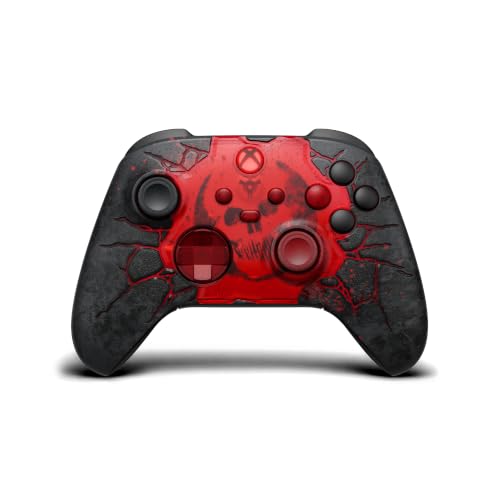
1. Xbox Wireless Controller Gears of War: E-Day Limited Edition
Our pick — 4.5+★ from 300+ verified ratings; the strongest balance of quality and price.
A themed pad that earns its place on the shelf and still pairs to your PC.
Start with the part that matters for a desk setup: this is a standard Xbox pad underneath the artwork, so it pairs over Bluetooth to Windows and also takes a USB-C cable for plug-and-play. You get the hybrid D-pad and textured triggers and bumpers that make the modern Xbox layout feel planted in shooters.
The build is where this one separates itself. The laser-etched cracks and the 3D molded detail are physical parts of the shell, not a printed skin, and the rubberized grip is the piece people talk about most when they describe holding it. Buyers praise the build quality first and the looks second — this is a controller you leave out on the desk rather than tuck in a drawer.
Cap it with the Crimson Omen front and center, blacked-out ABXY letters with a transparent red X button, and COG tags printed on the battery door, and you have a pad aimed squarely at Gears fans. If you want the plainest, lightest standard Xbox pad, the Carbon Black model below is the more sensible buy. But if the look is half the reason you are shopping, nothing else in this list does it this way.
What makes it worth owning
- Pairs over Bluetooth to a PC and also runs wired over USB-C
- Laser-etched shell details are molded into the plastic, not a decal
- Rubberized leather-like grips on the back and sides
- Hybrid D-pad plus textured triggers and bumpers for aiming
The honest trade-offs
- At 13.6 ounces it is the heavier side of a standard Xbox pad
- A special edition commands more than the plain Carbon Black version
Made for: Gears players and collectors who want a Bluetooth PC pad with real shelf presence.
Think twice if: you only care about weight and want the plainest standard pad available.
2. LENISUOLE Wireless Controller Four Vibration Motors
Four rumble motors, a gyro, and sixteen-key macros in a white shell.
For tinkerers who like to map things, this is the most programmable pad in the group. It runs four vibration motors split across the grips and triggers, so an explosion kicks through your palms while the trigger that fired it still buzzes. There is also a six-axis gyroscope for motion input inside supported games, and a pair of programmable PL/PR back buttons for inputs you want without leaving the sticks.
The macro side is unusual at this level. Turbo fires at 8 presses per second in semi-automatic mode, and it supports up to 16-key macro combinations, so a fighting-game combo or a crafting sequence can sit behind one press. Clearing a mapping is quick too — hold the Set key for three seconds, then press PL or PR. That is a lot of control for an entry-level pad, and it is the reason to look here over the plain Xbox models.
Two details decide whether it suits you. First, it lists three connection modes — Wi-Fi, Bluetooth and wired — with a 10-meter effective control distance, so Bluetooth to a PC is one option among several. Second, it ships with no built-in battery, so you supply AA cells or an Xbox rechargeable pack, and the listed USB-C fast charge time is 1.5 hours. A 15-minute auto sleep and low-battery protection help stretch whatever cells you put in.
Where it shines: programmable back buttons, 16-key macro support and 8-press-per-second turbo turn it into a custom-input pad rather than a plain gamepad.
The catch to plan around: no battery in the box means you are buying cells or a rechargeable pack on day one, and the Xbox One and Series X|S support means it is built for the console family first.
Reach for this if: macros and remapped buttons are the reason you are shopping.
Look elsewhere if: you want a pad that charges itself from the start.
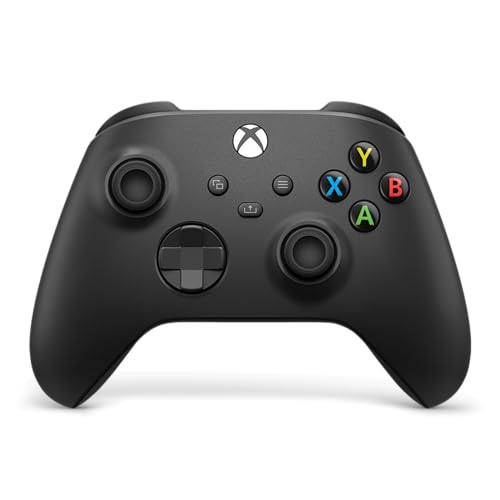
3. XBOX Wireless Gaming Controller | Carbon Black
The plain black baseline every other pad here is judged against.
If you want zero decisions, this is the pad. It pairs over Bluetooth or drops into USB-C for plug-and-play on a PC, and it carries 19 buttons including the Share button for screenshots and clips without leaving the game. Sculpted surfaces and updated geometry keep it comfortable through a long session, and the textured grips on the triggers, bumpers and back case are there so your hands do not wander mid-firefight.
Where it beats the special editions is weight. At 13.12 ounces it undercuts the Gears of War pad at 13.6 ounces, and that difference is exactly what you want in a pad you hold for three hours. The hybrid D-pad is the same layout, the 3.5mm jack takes a compatible headset for voice chat, and the Xbox Accessories app lets you remap buttons and set up controller profiles per game.
Owners say it just works across console, PC and cloud without fuss. The one honest caveat is the fit-and-finish verdict: some love the feel of it and some find it less special than older builds, so treat this as the workhorse, not the showpiece.
The safe buy: anyone who wants a Bluetooth PC pad that just works and never thinks about it again.
Not for you if: you want premium materials or a collector shell — the fit and finish draws split opinions.
4. Gamrombo Wireless Controller

Hydro-dipped art and colour-shifting RGB, plus drift-resistant sticks underneath.
The Jade Dragon shell is the pitch here, and it is done properly. The pattern is applied with hydro-dip printing rather than a stick-on skin, so it will not peel at the corners or bubble up over time. On top of that sits adjustable RGB lighting you can colour to match the rest of your desk, which is the sort of thing that makes a PC setup look intentional rather than assembled.
Underneath the paint the interesting part is the sticks. Four Hall Effect sensors read position magnetically rather than through physical contact, which is the design aimed at avoiding the slow drift that plagues standard sticks after months of use. The dual-motor rumble and precision 3D joystick do the main feedback work, and a 3.5mm jack takes a compatible headset.
Read the fine print before you commit. The listing notes that the dongle and 2xAA batteries are not included, and the media is dongle-based, so budget for both. There is also a real split in long-term feedback — some report it connects easily and works well, while others describe it quitting after about two months or refusing to connect. Worth it for the look, but buy it knowing you may need the one-year warranty.
Why the design earns a look
- Hydro-dip print will not peel or wrinkle like a vinyl skin
- Adjustable RGB lighting to match your setup
- Hall Effect sticks resist the drift that builds up over time
- 3.5mm headset jack for voice chat
What to budget for
- Dongle and AA batteries are sold separately
- Long-term reliability is the honest question mark here
Buy it for: a desk showpiece with genuinely drift-resistant sticks.
Skip the look-first bet if: you need a pad you never think about again — reliability is the division here.
5. Turtle Beach Rematch Wireless RGB Gaming Controller

The lightest pad here, with TMR sticks and hair triggers built for shooters.
At 8.48 ounces, this is the featherweight of the group — the Gears of War pad sits at 13.6 ounces by comparison, so the gap in hand is obvious over a long match. Underneath that light shell are ultra-sensitive TMR thumbsticks, and TMR is a magnetic sensor design aimed at keeping the stick accurate without the contact wear that leads to drift. Add Hall Effect hair triggers with three trigger stops and you have a pad tuned for fast, short inputs.
For PC players the connection detail deserves attention. It plays wirelessly on Xbox and Windows 10/11 PCs through a USB transmitter, so the transmitter takes a port on your desk. Bluetooth (BLE) is also there, listed for compatible Android mobile and streaming devices. If you specifically want a Bluetooth link to your PC, check your setup — the transmitter is the path for Windows.
Two mappable back buttons sit where your fingers rest, and the built-in rechargeable battery pairs with a 10ft USB-C play-and-charge cable, so you can run it wired while it tops up. Dual rumble motors with impulse triggers give the feedback, and the 3.5mm jack includes on-board audio controls. It also carries official licensing from Xbox and Mojang, which explains the Minecraft lighting design.
Take this one if: you want the lightest competitive-feeling pad with magnetic sticks and trigger stops.
Check your ports first if: the Windows link runs through the included USB transmitter rather than Bluetooth.
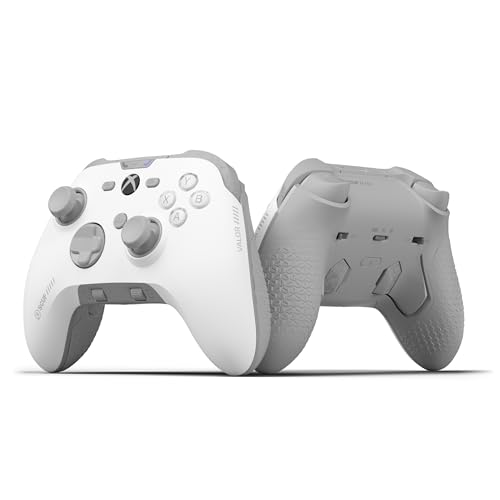
6. SCUF VALOR PRO Wireless Performance Xbox Controller
Four rear paddles and instant triggers, aimed squarely at ranked play.
The number to start with is four — four rear paddles, so both hands can reach extra inputs without leaving the sticks. The instant triggers eliminate trigger pull entirely, which shortens the time between your finger pressing and the shot firing. And on PC you can switch on the 1k Hz polling rate for faster input reporting to the machine. That combination is a competitive toolkit rather than a casual one.
Connections are handled three ways: low-latency wireless, Bluetooth, or ultra-fast wired, so the Bluetooth PC path is one of the options rather than the only one. The TMR thumbsticks can have their deadzones adjusted directly from your Xbox or PC through the SCUF app, so you can tune the amount of movement before the game registers it. The 24-button layout and swappable faceplates and thumbsticks let you change the look and layout over time.
Here is the honest part. The shape wins people over — smooth and responsive, and easy to forget in your hands over a long session. But connectivity is the recurring frustration, with random disconnections and trouble connecting to iOS devices both mentioned. At 3.5+ out of 5 across 400+ ratings, this pad has a real split between how it feels and how reliably it links, so plan for the wired option as a backup.
The competitive case: four paddles, instant triggers and adjustable TMR deadzones put custom inputs in reach without pausing.
What you should know: the Bluetooth link draws the most complaints in this group, so keep the wired or low-latency wireless option ready.
Built for: players who map as many inputs as possible to paddles and tune their own deadzones.
Be ready for: a connection that can hiccup — wired mode is the dependable fallback.
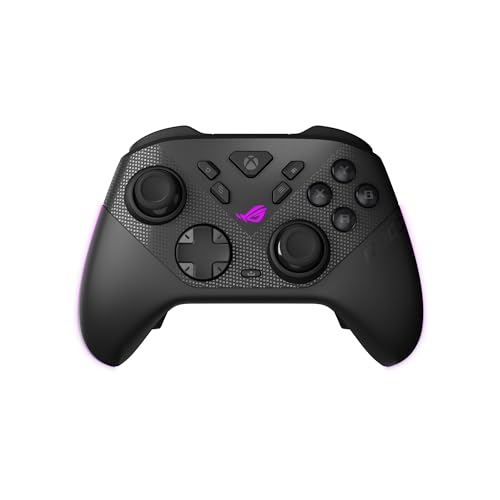
7. ASUS ROG Raikiri II Xbox Wireless Gaming Controller
Three ways to connect, and a 1000Hz polling rate on PC.
This is the most flexible link in the group. It runs low-latency 2.4GHz RF, Bluetooth, or wired USB-C, so a desktop, a laptop and a handheld each get a path. The 1000Hz polling rate is the PC performance headline — it reports your input to the machine at a faster rate, which is why competitive players care about it, and the 2.4GHz mode is boosted by ROG SpeedNova Wireless technology to keep that signal steady.
Sticks are anti-drift TMR joysticks, described as more accurate than Hall Effect sticks while drawing less power. Battery is quoted at least 30 hours of 2.4GHz wireless play on a single charge, with RGB lighting, audio and vibration turned off — that last clause matters, because those three features are exactly what drains a pad fastest in normal use.
The accessories are a real part of the value: a portable protective case that can charge the controller while it is inside, a charging stand, and two detachable joystick caps. There are also four programmable rear buttons and dual-mode triggers with a micro-switch short-travel setting and a TMR full-travel setting. The catch is that build and connection quality draw split feedback, with some reporting constant disconnects. At 9.6 ounces it stays light in hand either way.
What stands out
- 1000Hz polling rate for low latency over wired and 2.4GHz
- Charging case and stand included, plus two stick caps
- Dual-mode triggers let you pick short or full travel
- 9.6 ounces keeps long sessions comfortable
The fit note
- Wireless reliability draws divided feedback, with disconnects mentioned
- The quoted 30-hour runtime assumes RGB, audio and vibration are off
Worth it for: PC players who want the fastest input path and a charging case for travel.
Wait on it if: a rock-solid wireless link is non-negotiable — the wired USB-C mode is the safer bet.
8. Crazy Controllerz Customz Series Custom Wireless Controller

A genuine Elite Series 2, stripped down and rebuilt in clear violet.
The important thing to know is that this is not a third-party clone. It starts as a brand new official Microsoft Xbox Elite Series 2 controller, taken from its original packaging and customized with a variety of Crazy Controllerz parts — a clear violet front shell, purple chameleon buttons and a blue D-Pad set. Then it goes through a testing process and back into the original packaging. It keeps every feature and function of the stock Elite Series 2.
That base gives you 19 buttons and the Xbox Elite Series 2 layout, with a soft-touch plastic feel that is the reason the ergonomics notes skew positive. It connects over Bluetooth, and it is listed for PC/Mac as well as Xbox One and Xbox Series X consoles, so the PC pairing path is the same one you would use with a stock Elite pad. There is also the option of a fully custom look you will not find on a shelf.
The split is in the durability story. Buyers praise the build quality and the colour most, and the soft-touch grip backs up the looks. But trigger reliability and stick performance are the recurring downbeat notes, and the value question is loud for a custom pad at this level. If you want the look and the Elite 2 layout, this delivers. If you want maximum long-term certainty, a stock pad is the calmer choice.
Why it stands out: a fully custom Clear Violet shell on a genuine Elite Series 2 base, with 19 buttons and soft-touch plastic.
What to weigh: trigger and stick reliability get flagged alongside the price, so treat it as a look-first purchase.
For the collector: a unique clear violet Elite Series 2 that pairs over Bluetooth to your PC.
For the pragmatist: spend elsewhere — a stock pad gives you the same layout without the custom markup.
Know the Specs
Bluetooth versus Xbox Wireless versus a dongle
Bluetooth is a short-range radio that lets a controller talk to your PC without any extra hardware plugged in. Xbox Wireless is a separate Microsoft radio used mainly for consoles. A dongle or USB transmitter is a small stick that plugs into a USB port and creates its own link. Many pads list more than one of these, so read the connectivity line carefully — a pad with only a transmitter still works on a PC, it just uses a port.
Polling rate in Hz
Polling rate is how often the controller tells the PC where its sticks and buttons are, measured in hertz (reports per second). A 1000Hz rate means it reports far more often than a standard rate, which can shorten the lag between your thumbs moving and the game reacting. It matters most in fast shooters, and the pad has to support it in the mode you are using.
TMR and Hall Effect sticks
Both are magnetic sensor designs that read stick position without the physical contact that wears down over time on standard sticks. Standard sticks rely on contact parts that can drift as they age. Buying a pad with TMR or Hall Effect sticks is a way to keep the aim feel consistent over months of use, rather than watching the cursor creep.
Battery life and charging
Some pads have a built-in rechargeable battery and charge over USB-C. Some ship with no battery and expect AA cells or a separate Xbox rechargeable pack. Runtime figures are usually quoted with extras like lighting and vibration turned off, because those features drain a battery fast. Match the power setup to how you play — a nightly session needs less runtime than a marathon weekend.
Common Questions
Will an Xbox controller pair to a Windows PC over Bluetooth without a dongle?
Do I need an Xbox console to use one of these on a PC?
What is the difference between Hall Effect and TMR thumbsticks?
Which of these controllers has the longest battery life?
Are rear buttons and paddles worth having for a PC gamer?
What does a 1000Hz polling rate actually change in a game?
Do these controllers include a rechargeable battery in the box?
Can I use a headset with these pads for voice chat on PC?
Are trigger stops a help or a hindrance outside of shooters?
Is a special edition pad built any differently from the standard one?
The Bottom Line
For most PC players, the xbox controller for pc bluetooth decision lands on the Xbox Wireless Controller | Gears of War: E-Day Limited Edition, because it pairs over Bluetooth, keeps the full standard Xbox layout with textured triggers and a hybrid D-pad, and gives you a molded shell you will not see on every desk. It is the pick with real character that still behaves like a proper PC pad.
If you want the plainest, lightest standard option, the Carbon Black is the workhorse — 19 buttons, a Share button and USB-C plug-and-play without the special-edition premium. For fast competitive play, the Turtle Beach Rematch pairs TMR sticks and trigger stops with the lightest frame in the group at 8.48 ounces, and the ASUS ROG Raikiri II is the one to reach for when a 1000Hz polling rate and three connection modes matter more than anything else.
One last nudge: the Carbon Black pad carries a 4.5+ star rating across thousands of owners, so it is the low-risk default if the special editions do not grab you. Whichever you pick, confirm Bluetooth or your preferred link is listed for the exact model — that single line is the difference between a two-minute setup and a frustrating evening.
How we choose
We do not accept paid placement. Every pick is matched to a real buyer and a real use-case; we do not hands-on test units.
Sources
Specifications: manufacturer listings and product documentation. Review insights: verified customer reviews, as of November 2026. Pricing: not shown on this page (it changes often); check the current price via the retailer link.
As an Amazon Associate, Tactical Gear Guy earns from qualifying purchases. This does not affect which products we feature.