Specs are compiled from manufacturer listings and verified buyer reviews and can change over time — please confirm the key details on the product page before buying.
You want to play on your iPhone with a real controller in your hands, not glass under your thumbs. The one thing that matters most is Bluetooth pairing: the controller has to talk to iOS directly, with no dongle and no adapter. Every pick below does that. The differences show up in battery life, grip feel, and whether the extras are worth paying for.
This guide is built by comparing the manufacturers’ published specifications and the patterns across verified customer reviews, so you get each pick’s real strengths and trade-offs instead of marketing spin.
You’ll see which pads hold a charge through a long session, which ones add back buttons and trigger stops, and which are mostly about looks. Here is the honest shortlist of the best Xbox controller for iPhone.
Top Picks


How To Choose The Best Xbox Controller for iPhone
An iPhone will only work with a controller that pairs over Bluetooth, so that is the first box to tick. After that, you are choosing between battery life, grip comfort, and how many extra controls you actually want.
Confirm the Bluetooth connection first
Apple’s iOS talks to gamepads over Bluetooth, so a controller that only connects through a USB dongle or a proprietary wireless receiver will not pair with your phone. Look for Bluetooth listed in the connectivity specs before anything else. A pad that also offers USB-C is a bonus, because you can plug it into a PC or console too.
Battery life in hours, not guesswork
A controller’s runtime is quoted in hours, and that number tells you how many gaming sessions you get between charges. A pad rated for up to 40 hours will typically carry you through weeks of short phone sessions. Some third-party pads run on AA batteries you supply yourself, which means no charging cable but a steady supply of batteries to buy.
The extras that change how you play
Back buttons, trigger stops, and Hall-Effect thumbsticks are the features that separate a basic pad from a competitive one. Back buttons let you map a face button to the rear so your thumbs stay on the sticks. Hall-Effect sticks use a magnetic sensor instead of physical contact, which is a design meant to resist the stick drift that wears pads down over time.
Side-by-Side Comparison
| Model | Best For | Weight | Connectivity | Battery | Amazon |
|---|---|---|---|---|---|
| XBOX Ice Breaker Special Edition★ Best Overall | Style plus rubberized grip | 14.08 oz | Bluetooth, USB-C | Up to 40 hours | Amazon |
| Xexvyrin Wireless ControllerBest Value | Budget macro buttons and turbo | 5.6 oz | Bluetooth, Wi-Fi, USB | 2 x AA (not included) | Amazon |
| Xbox Core Pulse RedEveryday Pick | Most proven track record | 400 g | Bluetooth, USB-C | Up to 40 hours | Amazon |
| Turtle Beach Rematch | Competitive play with trigger stops | 8.48 oz | Bluetooth, USB-C | Built-in rechargeable | Amazon |
| Stealth Controllers Custom Series | Two-year warranty coverage | — | USB | Battery powered | Amazon |
| DreamController Deaddpool Headshot | Display-piece custom art | — | Bluetooth | — | Amazon |
Detailed Reviews
1. XBOX Wireless Gaming Controller
Our pick — 4.5+★ from 750+ verified ratings; the strongest balance of quality and price.
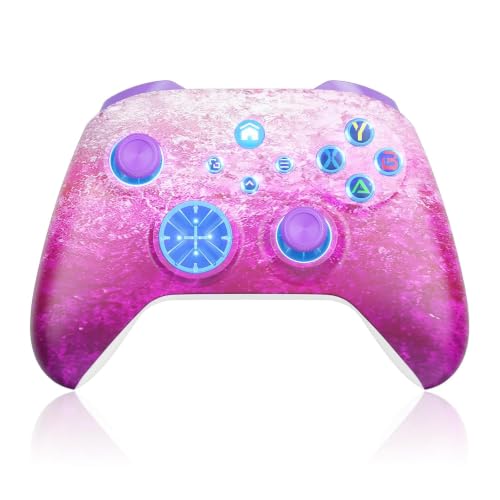
A frosted-blue special edition that keeps its grip long after the looks stop being new
If you want one pad that pairs to your iPhone and still feels good in hour three, the Ice Breaker earns the top spot. Its rubberized grips sit on the back cases, the part your palms actually rest against. That matters more on a phone than a console, because you are often holding a small screen closer to your face and squeezing a bit harder. The textured triggers and bumpers underneath your fingers add to the sense that this is a controller built to perform, not just to look bold.
Battery is where it pulls ahead of the fancier-looking customs. Up to 40 hours of play means a charge lasts through weeks of short phone sessions. You also get XBOX Wireless and Bluetooth for pairing to iOS, plus USB-C for plug-and-play when you switch to PC. The 3.5mm jack takes a headset, and the dedicated Share button grabs screenshots and clips without breaking your game. Custom button mapping through the XBOX Accessories app lets you save profiles per game.
The honest catch is durability. Design and quality dominate the feedback, but durability is mixed, with the occasional pad giving out around the five-month mark. Value is split too: some buyers feel the special-edition finish justifies itself, others do not. If you play hard and daily, treat it as a great-feeling pad rather than an indestructible one.
What it gets right in your hands
- Rubberized grips on the back cases keep your palms planted through long sessions.
- Up to 40 hours of battery means fewer mid-session charging breaks.
- Bluetooth, XBOX Wireless, and USB-C in one pad, so console, PC, and iPhone all work.
- Textured triggers, bumpers, and a 19-button layout with custom mapping.
Worth knowing before you commit
- An unlucky few report a pad failing around five months.
- Special-edition styling splits opinion on whether the finish is worth it.
Best for: players who want the best-looking official pad with real grip and 40-hour battery for iPhone play.
Look elsewhere if: you treat a controller roughly and want the most battle-hardened shell rather than the prettiest one.
2. Xexvyrin Wireless Controller
The featherweight third-party pad that hands you macro buttons for a budget price
Drop the Ice Breaker into a bag and you notice it; the Xexvyrin barely registers. It weighs 5.6 ounces versus the Ice Breaker’s 14.4 ounces, so it is a fraction of the heft in your hands. For iPhone play that lightness is a real benefit — your wrists do not tire holding a small screen and a light controller through a long session. The pink shell stands apart from the usual black and grey, too.
What it packs in is surprising. Two back buttons map up to 16 buttons to the PR/PL keys, which turns a one-button combo into a single press. Turbo and 6-Axis Gyro tilt control round out the feature list, alongside dual vibration and a 3.5mm jack. Connectivity spans Bluetooth, Wi-Fi, and wired, with a stated wireless range of over 30 feet. It works across Xbox, Android, iOS, and Windows.
Do budget for batteries. The Xexvyrin runs on 2 x AA batteries, which are not included, so you will add those on day one. There is no customer-review feedback recorded for this one yet, so you are buying on specs rather than a track record. It is the smartest entry point if you want extra controls without a bigger spend.
The macro payoff: Back buttons that map up to 16 inputs mean your thumbs never leave the sticks mid-firefight, and that is the feature competitors charge far more for.
Battery reality check: AA power saves you a charging cable but means keeping spares on hand; plan for that before your first session.
Grab this if: you want programmable back buttons and a light feel without spending official-brand money.
Think twice if: you would rather never buy AA batteries again.
3. XBOX Wireless Gaming Controller | Carbon Black
The red pad backed by the biggest pool of owners in this lineup
This is the crowd favorite — 4.5+ stars across 27,000+ owners. Pulse Red carries the full XBOX CORE build: up to 40 hours of battery, the hybrid D-pad, and textured grip on the triggers, bumpers, and back case. It pairs to iOS and Android over Bluetooth and takes a headset through the 3.5mm jack. Custom button mapping runs through the XBOX Accessories app.
Compared with the Carbon Black above, this one drops a button — 18 versus 19 — and that is the whole mechanical difference. What you gain is a bold red shell that people consistently single out as the reason they picked it. The red shell is the reason many buyers pick it.
The durability picture is the one to weigh. With tens of thousands of owners, most are clearly happy — but if you want the single most battle-tested pad here, this is it, blemishes and all.
Choose it when: you want a proven red pad with 40-hour battery and every standard XBOX control on your iPhone.
Pick something else if: long-term durability is your number-one worry and you would trade a little color for a beefier shell.
4. Turtle Beach Rematch Wireless RGB Gaming Controller
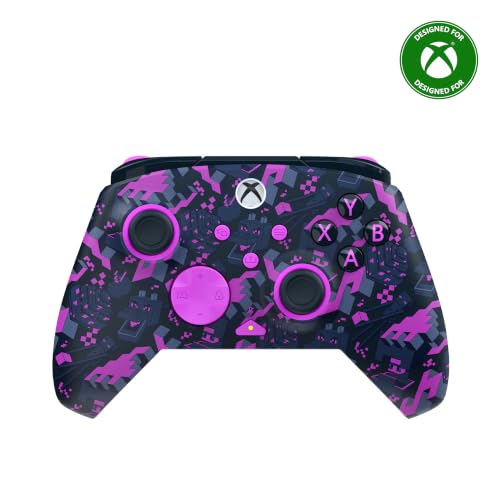
The competitive pad with trigger stops and sticks built to resist drift
If you have ever lost a fight to stick drift, this is the controller to look at. The Turtle Beach Rematch uses Hall-Effect hair triggers with 3-way trigger stops, which means you can shorten the pull for a faster response. Its TMR thumbsticks are ultra-sensitive, built for quick, precise movement rather than sluggish sweeps. For iPhone play that precision is the difference between a clean flick and a missed shot.
Coming in at 8.48 ounces, it sits between the featherweight Xexvyrin and the hefty official pads — enough weight to feel planted without wrist strain. It connects over Bluetooth to compatible Android and streaming devices and via USB for Xbox and Windows PCs. Two mappable quick-action back buttons, dual rumble motors, and impulse triggers are all onboard, along with a 3.5mm jack and patented on-board audio controls.
The built-in rechargeable battery is the practical win: no AA runaround, just a 10ft USB-C play-and-charge cable so you can keep gaming while it tops up. It is officially licensed by XBOX and Mojang, and the customizable RGB lighting lights up the Minecraft design. You pay premium money for the trigger stops and the drift-resistant sticks — but if competitive play is the reason you are here, that is the right trade.
Where it earns its keep: Trigger stops and Hall-Effect triggers give you a shorter, snappier pull — the sort of thing you feel immediately in a shooter.
The premium question: It is the priciest way to get Bluetooth play here, so make sure you will use the back buttons and stops before you commit.
Point it at: competitive iPhone players who want trigger stops, back buttons, and drift-resistant sticks.
Step back if: you mostly play casual mobile games and will not touch the extra hardware.
5. Stealth Controllers Wireless Controller
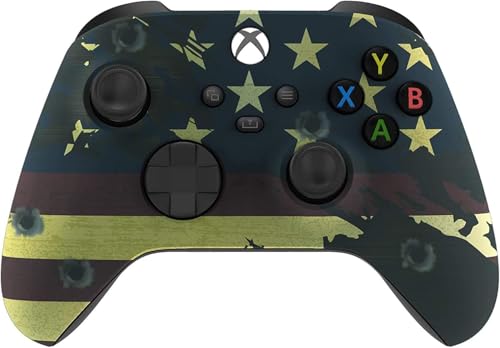
A customized flag-finish pad backed by a two-year warranty
A custom shell usually means worry, because you are buying someone else’s handiwork. Stealth softens that by standing behind every controller with a 2-year warranty and U.S.-based support. For the money it asks, the coverage is the real headline: a custom finish with a safety net. The American Flag design is professionally customized for a premium look and feel without compromising function or comfort.
The control side is familiar — a redesigned hybrid D-pad for accurate inputs, textured grips on the triggers, bumpers, and back case, and custom button mapping through the accessories app. The 3.5mm headset jack is there for voice chat. The soft-touch finish is the tactile selling point you notice the moment you pick it up.
One word of caution for iPhone buyers. Its listed connectivity is USB, and the compatible devices list Xbox One and Series S/X rather than iOS, so confirm it pairs over Bluetooth to your phone before you commit.
Reach for this if: you want a custom-designed pad with a two-year warranty behind it.
Confirm first if: iPhone pairing is your main goal — check the Bluetooth support before buying.
6. Deaddpool Headshot Superhero Custom X-box Controller

A genuine hydro-dipped showpiece that keeps the original controller feel underneath
Make no mistake about what this is: a real Microsoft XBOX wireless controller customized by DreamController with a hydro-dipped print, not a vinyl skin stuck on top. That distinction matters. Water transfer printing means nothing peels, wrinkles, or bubbles up, and the wear-resistant finish holds its color through long sessions. The art is on the front shell only, and the back keeps its original finish.
Underneath, it is a standard XBOX pad — same buttons, triggers, rumble, and wireless range. It connects over Bluetooth and works across Xbox One, One S/X, Series S/X, and Windows 10. Every controller is checked and tested in-house in the USA before it ships, and it arrives with all original accessories. As a gift for a comic-book fan or streamer, it is a real standout on a shelf or a desk.
The price of the art is the story here. Buyers love the appearance — the artwork is the star — and the enjoyment is clear. But reliability is mixed, with the occasional unit reported to stop working after a month, and value is the sore point, since the custom print carries a big premium over a stock pad. Buy it as a display-grade piece you happen to game on, not the ruggedest daily driver.
The art side delivers
- Real hydro-dipped print that will not peel, wrinkle, or bubble like a skin.
- Original Microsoft controller underneath with all original accessories.
- Checked and tested in the USA before shipping — a strong gift for a fan.
The premium you accept
- A rare unit is reported to fail within a month.
- Value is the sore point — the custom art carries real added cost.
The buy for: collectors and streamers who want a head-turning custom shell they can still play on.
Pass it up if: you want maximum ruggedness and value over looks.
Know the Specs
Connectivity: Bluetooth, USB-C, and Wi-Fi
For an iPhone, Bluetooth is the connection that matters — it is how iOS talks to a controller without any dongle. USB-C is the wired fallback you use on a PC or console for zero-latency play, and it doubles as a charging path on pads that support it. Wi-Fi shows up on a few third-party pads as an extra wireless option alongside Bluetooth. Check that Bluetooth is listed before you buy, because a pad that only uses USB or a proprietary receiver will not pair with your phone.
Battery Life and Power Source
A battery figure quoted in hours tells you how long you play before a recharge. A pad rated for up to 40 hours runs through several weeks of short phone sessions on one charge. Some controllers use a built-in rechargeable battery with a USB-C play-and-charge cable, so you can keep playing while it tops up. Others run on AA batteries you supply, which means no charging wait but a steady supply of batteries to buy. Match the power source to how you like to play.
Sticks and Triggers: Hall-Effect and Trigger Stops
Standard thumbsticks use physical contact that can wear into drift over time. Hall-Effect sticks use a magnetic sensor instead, a design meant to resist that wear. Trigger stops let you shorten how far a trigger travels, so a shot fires sooner. A 3-way trigger stop gives you three pull lengths to choose from. These features are what separate a competitive pad from a casual one, and they are worth the premium only if you play games where split-second timing counts.
Button Count and Mapping
Button quantity on paper runs from 14 up to 19 depending on the pad, and the extras are usually back buttons plus a Share button. Programmable back buttons are the ones that change how you play — mapping a face button to the rear lets your thumbs stay on the sticks. Custom mapping through an app lets you save profiles per title. More buttons is not automatically better; it matters only if you will actually map them.
Common Questions
Will an Xbox controller connect to my iPhone over Bluetooth?
How long does the battery last on an Xbox controller for iPhone?
Do I need the Xbox Accessories app to use these controllers on iPhone?
What is the difference between Hall-Effect sticks and regular thumbsticks?
Are trigger stops worth it for mobile gaming?
Can I use a wired USB controller with my iPhone instead of Bluetooth?
What does hydro dip mean on a custom Xbox controller?
Do these controllers work on both iPhone and PC?
Are back buttons and macro functions hard to set up?
The Bottom Line
For most people, the xbox controller for iphone winner is the XBOX Ice Breaker Special Edition, because it pairs to iOS over Bluetooth, holds a charge for up to 40 hours, and gives you rubberized grips for long sessions. If competitive play is why you are here, grab the Turtle Beach Rematch for its trigger stops and drift-resistant sticks. And if you want the most battle-tested pad with the biggest owner base behind it, the Pulse Red is the proven red default.
One last nudge: the Ice Breaker pulls the top spot because it nails the balance — official XBOX quality, Bluetooth for your phone, and grip that lasts. Give it a look first.
How we choose
We do not accept paid placement. Every pick is matched to a real buyer and a real use-case; we do not hands-on test units.
Sources
Specifications: manufacturer listings and product documentation. Review insights: verified customer reviews, as of November 2026. Pricing: not shown on this page (it changes often); check the current price via the retailer link.
As an Amazon Associate, Tactical Gear Guy earns from qualifying purchases. This does not affect which products we feature.