Specs are compiled from manufacturer listings and verified buyer reviews and can change over time — please confirm the key details on the product page before buying.
A dead controller mid-match ends the session, and a dock plus a spare battery prevents it. You want a charger that refills your Xbox pad while you sleep and hands it back full, plus a spare battery so you are never hunting for AAs again. This guide separates the docks worth owning from the ones that quit after a few weeks, and it tells you exactly which battery capacity and charge time to look for before you buy.
This guide is built by comparing the manufacturers’ published specifications and the patterns across verified customer reviews, so you get each pick’s real strengths and trade-offs instead of marketing spin.
Every option below has been checked for real Xbox compatibility, honest charge times, and battery capacity you can actually use. Read on for the strongest chargers, ranked so you can pick the right one for your setup and skip the guesswork on the best Xbox Controller Charger.
Top Picks


How To Choose The Right Xbox Controller Charger
What you are really buying is a battery plus a way to refill it — the dock is just the delivery system. Get the battery capacity and the charger style right and the rest falls into place. Get them wrong and you end up with a stand that looks good but leaves you reaching for AAs anyway.
Match the battery to your playtime
Battery capacity is the single number that decides how long you can play before the charger matters. It shows up two ways: in mWh (milliwatt-hours, the total energy stored) and in mAh (milliamp-hours, the charge stored). A bigger mWh number means more playtime per charge, so compare the battery figures first and the dock design second.
Playtime claims range widely across these picks. Some kits promise around 8-12 hours per charge, others 18-25 hours, and a couple list up to 30 hours. Where a manufacturer lists both a charge time and a playtime, both matter — a big battery that takes all day to fill is a nuisance if you game in short bursts.
Pick a dock or a plug-in pack
A charging station holds your controller upright and refills it through metal contacts while it sits there. A plug-in battery pack lets you charge through a USB-C cable while you keep playing. Docks are tidier and store your controller; plug-in kits are better if you never sit still and want to top up mid-session.
Check the battery doors fit your controllers
Xbox One pads and Xbox Series X|S pads use different battery doors, so check the kit includes covers for every controller you own. Multi-controller households need a kit with both door types. Some batteries are built as a single unit with the door attached, which means there is no separate cover to lose.
Compatibility is not universal
Officially licensed gear is built to Microsoft’s spec and fits first-party controllers cleanly. Most third-party battery packs state plainly that they do not fit third-party Xbox controllers or the older Xbox 360. If you use a custom or third-party pad, verify the fit before you buy a dock for it.
Side-by-Side Comparison
| Model | Best For | Battery Capacity | Charge Time | Compatibility | Amazon |
|---|---|---|---|---|---|
| 8BitDo Charging Dock★ Best Overall | Overall dock with storage | 1100 mAh | — | Series X|S, Xbox One | Amazon |
| DINOSTRIKE Battery Pack KitBest Spare-Battery Kit | Spare batteries for two pads | 2x 4800mWh | 4 hours | Xbox One, Series X|S | Amazon |
| PowerA Solo Charging StandFastest Top-Up | Fast single-controller top-ups | 1100 mAh | About 30 minutes (customer-reported) | Series X|S, Xbox One | Amazon |
| YUANHOT LED Pack (5-Cover) | Long playtime with a level display | 2x 1400 mAh | 2.5-3 hours | Series X|S, One, Elite | Amazon |
| YUANHOT Series X|S Pack | Series X|S owners who hate loose doors | 2x 1400 mAh | 3-4 hours | Series X|S only | Amazon |
| RJAD Charging Station Kit | Three-way charging flexibility | 2x 4800mWh | 3 hours | Xbox One, Series X|S | Amazon |
| Fosmon DUAL 2 MAX Dock | Two controllers on one dock | 2x 5280mWh (2200mAh) | — | Series X|S, One, Elite | Amazon |
| Controller Gear Pro Stand | Colour-matched display stand | 1100 mAh | — | Series X|S, One, Elite | Amazon |
| DINOSTRIKE Dual Dock | Dual dock with spare-battery storage | 2x 5520mWh | 4 hours | One, One S/X, Elite, Series X|S | Amazon |
Detailed Reviews
1. 8BitDo Charging Dock for Xbox Wireless Controllers (Black)
Our pick — 4.5+★ from 800+ verified ratings; the strongest balance of quality and price.
A licensed dock that turns your controller into a desk ornament and squeezes a spare battery drawer into the base.
You set your controller down and it starts charging right away, standing upright. That is the draw here. It is officially licensed by Xbox, so it fits Series X|S and Xbox One wireless controllers properly. Drop the pad on and the magnetic contacts pull it into line, so you are not fiddling to find the balance on the charging pins.
The rechargeable battery pack inside is rated 1100 mAh (milliamp-hours, the stored charge figure that decides playtime), and it ships with 2 battery doors so both controller generations are covered. There is also a storage compartment tucked into the body — a genuinely useful detail, because battery doors and dongles vanish in desk drawers. The LED indicator glows amber while charging and flips to white when full, so you know at a glance without checking the console.
Owners keep coming back to how it looks and how neatly it fits. The finish is designed to sit beside first-party controllers without clashing, and it reportedly pairs especially well with the Ghost Cipher pad. What you gain in polish you trade a little in charging muscle — the 1100 mAh battery is modest next to the 2200 mAh cells in the Fosmon dock. But if the goal is a clean, licensed home base you never think about, this is the one to get.
What earns it the top spot
- Officially licensed fit for Series X|S and Xbox One controllers
- Magnetic contact seats the controller without hunting for pins
- Built-in storage compartment keeps battery doors and small parts together
- Amber-to-white LED tells you instantly when the pad is charged
Worth knowing before you commit
- The 1100 mAh battery is smaller than the high-capacity cells on other docks here
- Dock-and-battery kit means you are locked into its own pack for spares
- One controller slot, so a two-pad household needs a second unit
Settle on this one if: you want a licensed, tidy dock that stores your controller and never needs a cable fished out.
Move on if: you game for marathon stretches and want the biggest possible battery in the pad.
2. DINOSTRIKE Xbox Battery Pack
Two batteries, four covers, and a cable — a full swap kit for the household with more than one Xbox pad.
If you own both an Xbox One pad and a Series X|S pad, this kit is built for exactly that mess. You get 2 x 4800mWh batteries and 4 covers — two for Xbox One and two for Series X|S — so you are not ordering the wrong door later. That mWh figure is total stored energy, and this pack claims 8-12 hours of playtime per charge, which sits at the shorter end against the 30-hour packs here.
Charging takes 4 hours per battery, which is longer than the 2.5-3 hours on the YUANHOT kits. The trade-off is the swappable setup: one battery charges while the other plays, and the included 4.92-foot USB-C cable lets you top up the controller in hand. There is an LED next to the charging port — red while charging, off when done — plus protection against overcharge, overvoltage and overheating, and the pack is rated for 2000+ recharge cycles.
What wins people over is the sheer value of getting two batteries and every cover shape in one white kit. Buyers rate the fit and performance highly, and the play-and-charge option means a low battery no longer ends a session. The honest catch is the 3-ounce battery weight — heavier than the 1.6-ounce LED-display packs, so it adds a little heft to the pad. For a multi-controller household, though, the flexibility is what you notice.
Where it stands out: 4 covers covering both Xbox One and Series X|S means no guessing which door fits which controller.
The one annoyance: a 4-hour charge per battery means you should keep the spare topped up rather than run both flat.
Best for: families with two controller generations under one roof who want every cover included.
Look elsewhere if: you want the lightest possible battery or the fastest recharge.
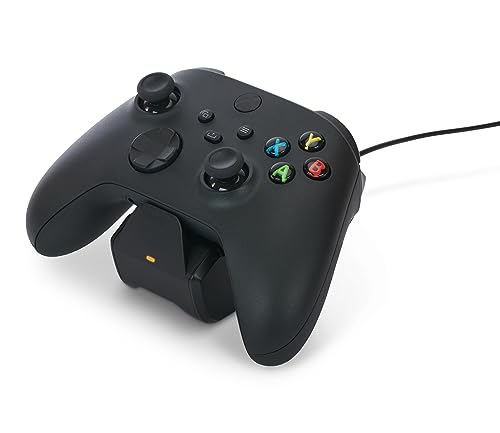
3. PowerA Solo Charging Stand for Xbox Series X|S – Black
Customers report about thirty minutes on this stand to bring the controller back to full.
Customers report around thirty minutes on the PowerA base, and that is the reason this stand suits players who squeeze in a match after work and cannot wait around. You drop the controller on the vertical stand and, by those reports, it charges the 1100 mAh battery to full in about half an hour. Owners consistently flag how quickly it gets a pad back to max — and setup takes under a minute from the start.
It is officially licensed for Series X|S and works with Xbox One wireless controllers too, shipping with 1100 mAh battery, two doors and a 3.3-foot USB cable. That cable is short at 3.3 feet next to the 5-foot lead on the YUANHOT packs, so plan on sitting the stand close to the console or a wall adapter. The two-year limited warranty is a genuine comfort on an accessory that lives on your shelf.
Functionality is what most people come away talking about, with charging performance right behind — the thing does what it says without fuss. The honest catch: a few owners hit battery-fit problems, where the pack does not seat cleanly in their particular controller. If you strike that, PowerA’s two-year warranty is the route to a fix. For a fast, licensed single-controller stand, the speed here is hard to argue with.
Why players gravitate to it
- Customer reports of a controller charging to full in about 30 minutes
- Officially licensed for Series X|S, works with Xbox One pads
- Two-year limited warranty backs the purchase
- Setup takes under a minute
The honest trade-offs
- Battery fit has caused problems for a few owners on certain pads
- 3.3-foot cable is short — keep the stand near a power source
- Single slot means one controller charges at a time
Reach for it if: speed matters most and you want a licensed pad back at full before your next session starts.
Pass if: you need to charge two controllers at once or want a longer cable for flexible placement.
4. YUANHOT LED Display Battery Pack

A battery that tells you its exact percentage instead of dying on you mid-match with no warning.
Running out of power is not the problem — running out with no warning is. This YUANHOT pack puts a smart LED display on the battery that reads the level as a percentage, so you always know what you have left. That percentage readout is why players burned by a sudden dead controller keep this kit around.
Inside are 2 x 1400 mAh batteries, each claiming up to 30 hours of playtime — longer than the 8-12 hours on the DINOSTRIKE kit, though the recharge takes 2.5-3 hours compared to its 4. The bundle covers Series X|S, Xbox One and Elite, with two doors for each controller family, plus a 5-foot USB-C cable for play-and-charge or direct battery charging. Fully charged in about 2.5-3 hours means a spare is always ready if you rotate them.
The battery quality and battery life are what people rave about most, and the percentage display turns out to be the quiet favourite — no more guesswork between “medium” and dead. Be straight with yourself about the charging side: there are reports of cells that would not charge at all, so test both batteries in the first week while a return or replacement is easy. Get a good pair and the playtime and the level readout make this a strong home for your controller.
The standout: a percentage readout on the battery itself — real numbers, not a blinking low-battery icon.
Test them early: a small number of packs have arrived not charging, so run both batteries through a full cycle within the return window.
Worth your money if: you hate surprise dead-battery losses and want to see your charge as a percentage.
Think twice if: you need guaranteed out-of-box reliability and would rather not risk a dud cell.
5. YUANHOT Controller Battery Pack

One piece, no separate door — a battery that clicks into a Series X|S pad and never loses its cover.
This is the cleaner idea of the two YUANHOT packs: the battery and its cover are a single unit, so there is no separate door to misplace. It fits only the Series X|S controllers — not Xbox One, not the 360 — which keeps the design simple. Drop it in, the LED display shows your percentage, and you are set.
You get 2 x 1400 mAh cells that each claim up to 30 hours of play, a full charge in 3-4 hours and a 5-foot USB-C cable for topping up in hand. That 3-4 hour charge is slower than the 2.5-3 hours on the other YUANHOT, so plan to rotate the spare rather than charge both on the same evening. The percentage display makes rotating easy, since you can see exactly which cell needs the cable next.
Battery life is what buyers rave about, with a full charge reportedly lasting days rather than hours. The thing to weigh is fit: while many say it snaps in cleanly, some buyers report the controller not staying in place with this style of battery. If your pad has any looseness in the compartment, that is the risk — otherwise the one-piece build and long playtime make it an easy daily driver. Just confirm you are on a Series X|S controller before you order.
What makes it worth it
- Battery and cover built as one piece — nothing to lose
- Up to 30 hours claimed playtime per 1400 mAh cell
- LED percentage display on every battery
- Two cells means one recharges while the other plays
The honest caveats
- Series X|S only — no Xbox One or 360 support
- Some owners found the fit less secure than a separate-door battery
- 3–4 hour charge is slower than the quickest rivals
Go this direction if: you run a Series X|S pad and are tired of losing the little battery door.
Look elsewhere if: you also own Xbox One controllers and want one battery that covers both.
6. RJAD Battery Pack with Charging Station

A dock with three ways to charge, so a low battery never stops you — dock it, cable it, or swap the cell.
Most kits give you one charging route; this one gives you three. Drop the controller on the station and charge through the battery contacts, plug the USB-C cable in while you play, or pull the cell and charge it separately. That last option matters if you own two controllers, because you can be playing on one while the battery from the other refills.
The kit comes with 2 x 4800mWh Ni-MH batteries, four covers covering both Series X|S and Xbox One/One X/One S/Elite pads, plus the USB-C cable. The station fully charges both cells in about 3 hours and each battery claims 28-30 hours of play. LED indicators on both the station and the batteries run grey on standby, red while charging, green when full — and there are four anti-slip pads on the base to stop the whole thing sliding off your shelf.
Charging performance is the strength owners point to, and the flexibility is why it lands in the conversation for anyone juggling multiple controllers. The honest read on battery life is more mixed than the charging, so treat the 28-30 hour claim as an upper limit on light loads rather than a guarantee. With 2000+ recharge cycles to its name, it works out as a long-term replacement for AAs — not a one-weekend fix.
The flexibility wins: three charging routes — dock, cable in hand, or separate cell — beats single-method kits.
Manage expectations: battery life is more mixed than the charging performance, so rotate the spare rather than relying on one cell lasting all week.
Built for: two-controller households that want a dock and the option to charge a spare battery off the pad.
Not the one if: you only ever own a single controller and would rather keep things to one simple method.
7. Fosmon Xbox Controller Charger Station

Two cradles, two beefy batteries, one dock — the pick for households where two pads are always in play.
The reason to look at this option is simple: two slots and two high-capacity batteries mean two controllers can be topped up at once. Each 5280mWh (2200mAh) NiMH cell is bigger than the 1100 mAh batteries on the licensed single-controller stands, and the claimed playtime per charge sits in the 40-45 hour range.
Place-and-charge is the whole ritual here — the pad lines up with the metal conductor and starts topping up, and the dock doubles as a holder so both controllers have a home. Two LED indicators show each slot separately, and the charging board cuts power automatically once a battery is full, with overheating and short-circuit protection in the mix. It is certified by SGS (an independent third-party safety test house), and the limited lifetime warranty is generous for the price tier.
Quality and functionality are the two things people talk about most, and the everyday verdict is that it does the job quietly. The honest catch is battery longevity over the very long run: most packs hold, but a minority stop accepting a charge after a couple of months, and a slow recharge is part of the design. Treat the batteries as the consumable and the dock as the keeper — the warranty has you covered if a cell goes early.
The duo payoff: two 2200mAh batteries and two cradles let you keep both pads ready without swapping.
Set the lifespan expectation: a slow recharge is normal here, and a minority of cells weakened early — the limited lifetime warranty is why that is a small risk, not a big one.
Take it home if: two controllers need to live on one dock and you want big batteries with a lifetime warranty behind them.
Weigh other options if: you want fast recharge times or a single tidy controller slot.
8. Controller Gear Pulse Red Universal Xbox Pro Charging Stand

The stand built to match your Pulse Red controller exactly, down to the material and finish.
Colour match is the point here. This stand is manufactured with the same material and colour as the Pulse Red Series X controller, so your pad and its charging base look like a matched set on the shelf. If you paid attention to your controller’s finish, this is the accessory that continues that theme rather than clashing with it.
Under the shell it is a magnetic stand: metal contacts pull the pad into place and hold a secure charge, which stops the annoying half-seated charging you get from loose cradles. The rechargeable battery is rated 1100 mAh, and it works across Series X|S, Xbox One X, Xbox One S, Xbox One and Elite Series 1 controllers. There is one genuinely clever touch — the stand lets you navigate your Xbox dashboard one-handed while the controller sits on it, so nothing gets unplugged to change settings.
Owners who are in it for the look are delighted that the colour matches their first-party controller so precisely. What you should go in understanding is the charging reliability: it works as advertised for most, but a minority find it does not charge at all. That is the trade-off of a display-first stand with a specific finish — if that happens to you, official licensing and the Microsoft-backed build mean a return is straightforward. If your priority is a clean looking, colour-matched dock for a single pad, this is exactly the fit.
Why the look pays off
- Same material and Pulse Red colour as the first-party controller
- Magnetic contact system holds a secure charge
- Officially licensed by Microsoft Xbox
- One-hand dashboard navigation while docked
What to keep in mind
- Charging reliability is mixed — a minority report it not charging at all
- 1100 mAh battery is modest next to the high-capacity docks
- Colour match is specific to Pulse Red pads
The pick when: your Pulse Red controller deserves a stand that continues the look and holds a magnetic charge.
Not the pick when: you want maximum battery capacity or the fastest possible recharge.
9. DINOSTRIKE Charger Station
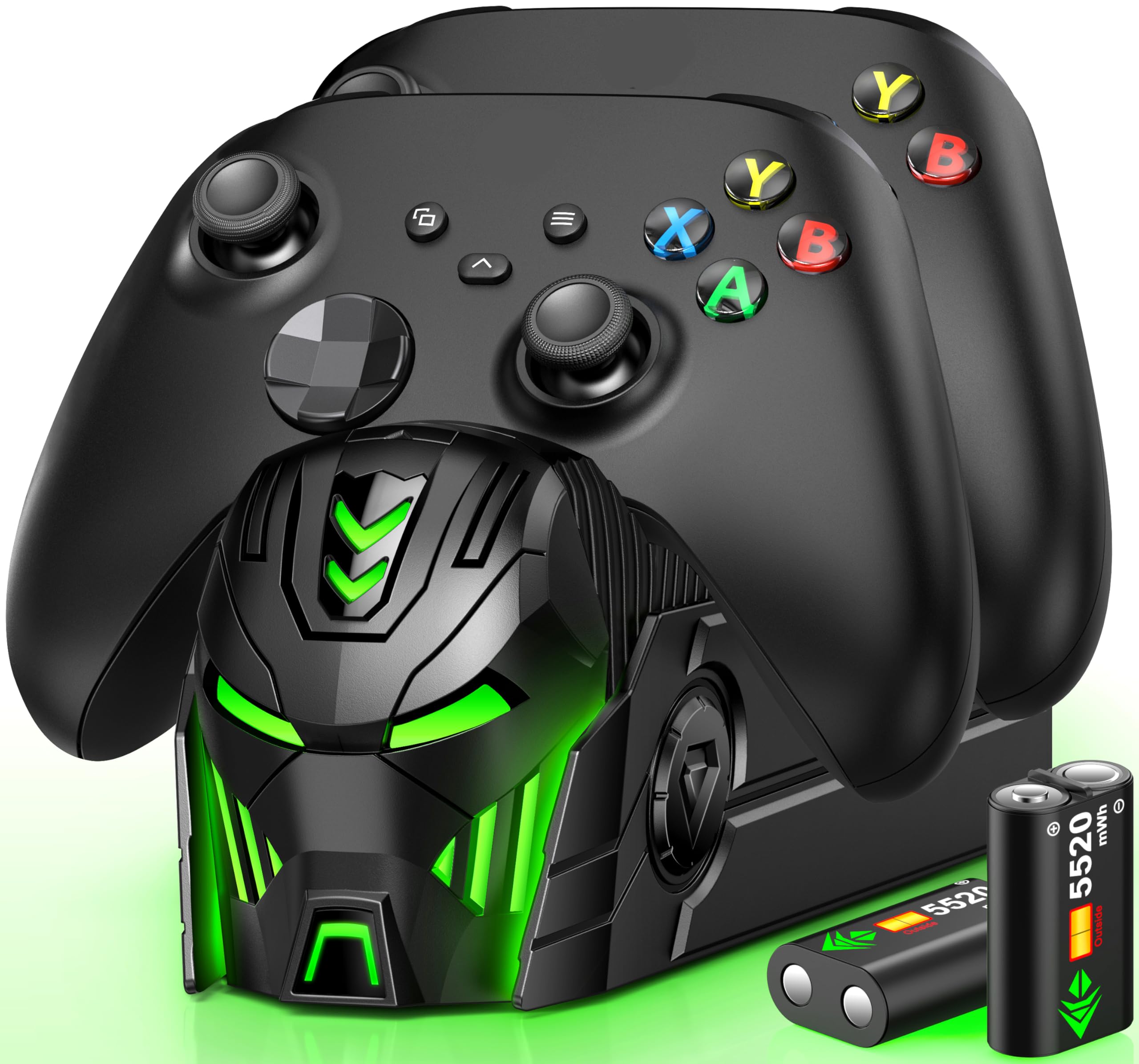
The dock with the largest battery cells here and a hide-away compartment so spares never go missing.
This is the kit for the two-controller household that wants the biggest cells it can get in a dock. Each battery is rated 5520mWh — bigger than the 4800mWh in the DINOSTRIKE pack kit and the 5280mWh in the Fosmon — and each claims 18-25 hours of play per full charge. The station holds two controllers at once and comes with four battery covers, two for Xbox One/One S/One X and two for Series X|S.
A full charge takes about 4 hours, and the dock adds overcharge, overcurrent, overheating and short-circuit protection on the USB-C line. There are LED indicators on the front — red while charging, green when full — plus a button that turns the lights off without interrupting the charge. The real standout detail is the storage compartment in the base: it holds the spare batteries, so the one thing that kills every rechargeable kit (losing a battery) is designed out.
Reliability is what owners mention about most, and the quick charge and glowing red/green lights make it painless to read at a glance. Note that the controllers are not included, so this is a dock-and-battery kit rather than a pad. Compatibility is on the more mixed side — a few owners found their particular pad did not sit perfectly — so double-check your controller generation before ordering. Bring your own pads and the big cells and hidden storage make this a tidy home base for two controllers.
The best single feature: a battery compartment in the base — the spare cells live with the dock, not in a drawer.
Pin down before you buy: controllers are not included, and fit is mixed for a few, so match it to your exact pads.
Choose it if: you already own two Xbox pads and want the largest batteries with on-board storage.
skip it if: you expect controllers in the box or need a guaranteed universal fit.
Know the Specs
mAh and mWh: what the numbers mean
More playtime per charge depends on two battery ratings. mAh (milliamp-hours) is the charge a battery stores; mWh (milliwatt-hours) is the total energy it holds. Both tell you how much gaming you get before you need the dock. A bigger figure means more playtime, which is why the 2200mAh Fosmon cells and the 4800mWh packs sit higher than the 1100 mAh stands.
More capacity usually means more weight in the pad. Compare the 1.6-ounce LED-pack battery to the 3-ounce DINOSTRIKE cell and you can feel the difference in hand. Pick a bigger battery for long sessions and a lighter one if you prefer the feel of a light controller.
Charge time versus playtime
Charge time is how long the battery takes to refill; playtime is how long it lasts on that charge. The two do not line up neatly. Some kits refill in 2.5-3 hours, others take 4 hours, and a couple of the licensed stands are reported to hit full in about 30 minutes.
Think about your rhythm: short, frequent sessions reward a fast refill, while long weekend marathons reward a big battery. A two-battery kit lets you do both — one cell refills while the other plays. A spare battery means you never have to race a slow charger before your friends get online.
Common Questions
Will these chargers work with both Xbox One and Xbox Series X|S controllers?
What is the difference between a charging dock and a battery pack?
How long does a full charge last in playtime?
Do these batteries fit third-party or custom Xbox controllers?
Can I charge my controller while I keep playing?
Why does my kit need different battery covers for Xbox One and Series X|S?
What does the LED indicator on these docks actually tell me?
Will a 2000-plus recharge battery last longer than AA batteries over time?
Is a dual dock worth it if I only own one controller?
The Bottom Line
For most players the strongest home base is the 8BitDo Charging Dock — officially licensed, magnetic, with a storage drawer for battery doors, and a finish built to sit beside a first-party controller. If quick refills matter more, the PowerA Solo Charging Stand is reported by customers to get a pad to full in about 30 minutes. And for the two-controller household that wants the biggest cells and spare storage in the base, the DINOSTRIKE Dual Dock is the one to reach for.
Whichever you pick, test both batteries in the first week and rotate them — that one habit keeps you playing instead of swapping AAs.
How we choose
We do not accept paid placement. Every pick is matched to a real buyer and a real use-case; we do not hands-on test units.
Sources
Specifications: manufacturer listings and product documentation. Review insights: verified customer reviews, as of November 2026. Pricing: not shown on this page (it changes often); check the current price via the retailer link.
As an Amazon Associate, Tactical Gear Guy earns from qualifying purchases. This does not affect which products we feature.