Specs are compiled from manufacturer listings and verified buyer reviews and can change over time — please confirm the key details on the product page before buying.
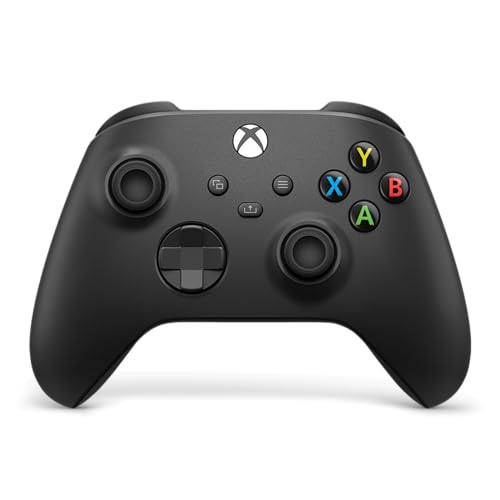
Buying a black Xbox controller sounds simple until you realize one thing decides whether you love it or curse it: the sticks. Standard analogue sticks wear out and start drifting — the on-screen cursor creeps even when your thumb is off the stick. The controllers below are all black, all Xbox-ready, and several use Hall Effect sticks (magnetic sensors that resist drift because nothing physically rubs together). The Xbox Wireless Gaming Controller | Carbon Black is the crowd favorite at 4.5+ stars across 3,600+ owners.
This guide is built by comparing the manufacturers’ published specifications and the patterns across verified customer reviews, so you get each pick’s real strengths and trade-offs instead of marketing spin.
You will see exactly which pads survive sweaty ranked grinds, which layouts fight your hands, and which ones are wired for a reason. By the end you can match a controller to how you actually play, and this breakdown of the xbox controller black options makes that call a whole lot easier to get right.
Top Picks


How To Choose The Best Xbox Controller Black
The sticks usually fail before anything else on a controller, so start there. Next, pick a cable or a battery, and count how many extra buttons your games actually reward. Color, grip texture, and button count are details you can compare in the table below.
Stick type: Hall Effect versus standard analogue
A standard analogue stick uses a physical carbon-track sensor that wears as you push it, and that wear shows up as drift. Hall Effect sticks swap that for magnetic sensing, so the stick body never touches a sensor surface. If you play several hours a week, Hall Effect sticks are the cheaper long game because you are not replacing the pad when the aim wanders.
Wired or wireless, and what it costs you
A wired pad like the Hyperkin DuchesS or PowerA Advantage Plus never needs charging and plugs straight into USB — one less thing to think about mid-match. Wireless pads free you from the cable but you trade that for battery management and, on some units, pairing quirks. Neither is “better”; it depends on how far you sit from the screen.
Extra buttons and trigger stops
Mappable back buttons let you keep your thumbs on the sticks while you jump, crouch, or reload. Trigger locks shorten how far the trigger travels, which speeds up firing in shooters. If you mostly play racing or sports games, those features matter less than a comfortable grip and a reliable connection.
Fit and hand fatigue
Weight matters more than most buyers expect. A heavier controller, like the 450 g Flydigi Vader 5S, feels planted but tires your hands faster over long sessions. Lighter pads are easier to hold for hours but can feel less substantial. Match the weight to how long you actually play.
Side-by-Side Comparison
| Model | Best For | Connection | Buttons | Stick Type | Amazon |
|---|---|---|---|---|---|
| Xbox Wireless Gaming Controller | Carbon Black★ Best Overall | All-round everyday play | Bluetooth / USB-C | 19 | Standard analogue | Amazon |
| Hyperkin DuchesS Wired ControllerBest Value | Drift-free budget play | USB | 18 | Hall Effect | Amazon |
| PowerA Advantage Plus Wired ControllerMost Adjustable | Adjustable sticks on a budget | USB-C | 18 | Hall Effect | Amazon |
| FLYDIGI VADER 5S Wired Controller | Tunable tension for FPS | Wired | 17 | Hall Effect | Amazon |
| PowerA FUSION Pro 4 Wired Controller | Pro features on console | USB | 17 | Hall Effect | Amazon |
| Xbox Elite Series 2 Core | White | Premium wireless flexibility | Bluetooth / USB-C | 15 | Adjustable tension analogue | Amazon |
| Microsoft Xbox Core 2-Pack Bundle | Two-player households | Bluetooth | — | Standard analogue | Amazon |
| Nacon Revolution X Unlimited | Deep customization fans | Bluetooth / RF / USB | 14 | Hall Effect | Amazon |
Detailed Reviews
1. XBOX Wireless Gaming Controller | Carbon Black
Our pick — 4.5+★ from 3,500+ verified ratings; the strongest balance of quality and price.
The pad that just works everywhere — console, PC, phone — without a setup headache.
The thing that earns this the top spot is how little it asks of you. Plug in USB-C or pair over Bluetooth and it runs on Xbox Series X|S, Xbox One, Windows, Android, and iOS with the same 19 buttons and the same feel. It ships with textured triggers and bumpers plus a hybrid D-pad, which means the edges give you a bit of grip under your fingertips and the direction pad holds its click instead of mushing.
Sculpted surfaces and updated geometry are the two phrases behind the comfort claim, and they matter for the long Tuesday-night session where your hands start to cramp. The Share button is small but useful — one press grabs a screenshot or a clip without digging through menus. Remapping through the Xbox Accessories app lets you reassign buttons and save profiles per game, so your shooter layout does not bleed into your racing one.
What wins people over is dependability, and the note of caution sits on build quality. That is not a defect story so much as a “how you treat it” story: this is a plastic-shell pad, not a tank. It weighs 13.12 ounces, so it feels planted rather than featherlight. If you want a pad that survives being thrown around, look further down the list at the metal and rubberized options; if you want one controller that does everything, this is it.
Where it shines
- Pair-and-switch across console, PC, and cloud devices with one pad
- Textured triggers, bumpers, and back case keep your grip secure
- Hybrid D-pad and Share button cover modern play without extra gear
Honest limits
- Standard analogue sticks, not Hall Effect — drift is a long-term risk
- Plastic shell rewards careful handling
Reach for this if: you want a single black controller that plays console, PC, and cloud without switching anything.
Look elsewhere if: you need magnetic sticks for years of drift-free aiming.
2. Hyperkin – DuchesS Wired Controller
Hall Effect sticks and a familiar shape for players who hate cable-to-battery swaps.
Your aim stays where you point it, because this pad uses magnetic Hall Effect sticks (magnet-based sticks that don’t rub a sensor surface, so drift is less likely). That is the feature worth paying for if stick drift has burned you before. At 243 g it is light enough to hold for a full session. It measures 6 x 3 x 2.5 inches — noticeably more compact than the 6.91 x 5.61 x 2.76 inches of the Xbox Wireless Carbon Black pad above. If desk space or a small hand size matters, the smaller shell helps.
The controlled quality of the sticks is what owners keep praising, with the modernized Controller S form factor adding a nostalgic feel for anyone who grew up on the older shape. The audio jack and impulse triggers round out a package that feels like more than its tier should allow. It is officially licensed for Xbox Series X|S, Xbox One, and Windows 10|11.
The honest catch is the Back and Start buttons — their placement feels odd to some hands. It is a fit issue, not a fault: try to picture where your thumb naturally rests. And since this is a USB-only pad, expect a cable at all times. That is a small trade for magnetic sticks at this level.
What buyers love: The compact shell and zero-drift sticks make this feel like a serious step up over a stock pad.
Worth knowing: Awkwardly placed Back and Start buttons are the most common friction point.
Who it beats: Standard analogue pads that will drift within a year or two of heavy play.
The trade-off: You give up wireless freedom for magnetic precision at an entry-level price.
3. PowerA Advantage Plus Wired Controller
Twist the sticks mid-match and never swap a component again.
Having drift-free sticks with a twist adjustment on top is a rare combo at this level. The Quick-Twist system gives you three height settings — Standard, Medium, and Tall — and you change them without swapping parts. Taller sticks give you a longer throw for fine aim; shorter ones let you snap faster. Combined with the contact-free magnetic Hall Effect modules, the stick body avoids the physical wear that causes drift.
Two mappable buttons you program on the fly and dual rumble motors round out the feature set. The 3.5 mm jack takes a headset for chat, and the free PowerA Gamer HQ app lets you tune audio, triggers, rumble, and dead zones. It also works across Xbox Series X|S, Xbox One, and Windows 10/11, and it ships with a 2-year limited warranty, which is longer coverage than several pads here.
At 10.24 ounces it is lighter than the 13.12-ounce Xbox Wireless Carbon Black controller by a noticeable margin — easier to hold through long sessions. The recurring gripe is durability: buttons can degrade over time, and some units give out sooner than you would hope. If you play in a long marathon every night, expect to replace it eventually. For everyone else, the adjustability and magnetic sticks outweigh that risk.
The case for it: Twist-to-adjust stick height plus Hall Effect sensors is a lot of tuning for a pad at this level.
The catch: Long-term button durability is the most-discussed downside, and some units fail earlier than expected.
Suits tinkerers: anyone who wants to change stick height between games without buying new parts.
Think twice if: you want one pad to run for years without replacement.
4. FLYDIGI VADER 5S Wired Controller
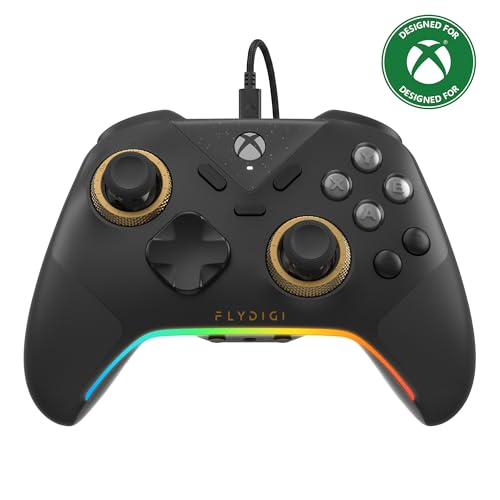
Lighter tension for flick shots, tighter tension for racing lines — all from the stick itself.
What sets this apart is being able to dial the physical stick tension from 40gf to 100gf on the fly — a force measured in grams, where lighter tension favors fast flick shots and tighter tension smooths steering. No software needed. That plus updated Hall Effect sticks — zero deadzone and precise recentering — means the aim holds accurate even after long sessions. The trigger switch lets you jump between micro-click for rapid fire and linear Hall Effect for smooth throttle and braking.
It is a hefty one at 450 g, the heaviest on this list and much weightier than the 243 g Hyperkin DuchesS. That heft feels planted and sure, but it will tire your hands sooner than a light pad. Four motors across both triggers and grips bring stronger recoil and road feedback. Six remappable buttons, quick in-game profile switching, and full FLYDIGI software add deep control for players who want it.
Owners describe this as a pro-feature pad at a fraction of pro pricing, and the adjustable tension is the feature most called out for improving precision. It runs on Xbox Series X|S, Xbox One, and Windows 10/11. The only real friction: at 450 g, marathon handheld play asks more of your wrists. If comfort across all-day sessions is priority one, the lighter PowerA Advantage Plus above may suit better.
Why FPS players want it
- 40gf to 100gf stick tension adjustment without software or parts swaps
- Switchable micro-click and linear trigger modes for shooters or racers
- Four vibration motors across triggers and grips add tactile feedback
- Six remappable buttons and on-the-fly profile changes
Trade-offs to weigh
- 450 g is the heaviest pad here — more planted but more tiring
- Wired only, so the cable is always part of the setup
The smart pick: competitive players who want to tune stick feel by game genre.
Skip if: a 450 g controller in hand for hours sounds like a chore.
5. PowerA FUSION Pro 4 Wired Controller

Four remappable buttons and trigger stops squeezed into a wired pro-grade shell.
This sits above the Advantage Plus in the lineup, and the upgrade is real for shooter fans: 4 mappable buttons you program mid-game, versus 2 on the smaller pad. Set them to jump, crouch, ping — whatever keeps your thumbs on the sticks. The three-position trigger locks let you shorten trigger travel for faster firing in FPS titles, then release them for full throttle in racing games. Hall Effect modules in the sticks keep precision intact over time.
Quick-Twist gives you three height settings per thumbstick without part swaps. Dual rumble motors, impulse triggers, and the 3.5 mm stereo jack round out the play features, and it is officially licensed for Xbox Series X|S and Xbox One as well as Windows 10/11. It weighs 12.96 ounces, putting it close to the Xbox Wireless Carbon Black in hand.
This is the pick where the caveat is biggest on this list: buyers are split on whether it justifies its tier, and some report units that stop working. It is still a feature-rich pad for the price, but if you want maximum confidence in reliability, the magnetic-stick Hyperkin or the PowerA Advantage Plus above are safer bets. Buy this for the four back buttons and trigger locks, not for longevity guarantees.
Feature outlook: Four mappable buttons plus three-way trigger locks is serious customization on a wired pad.
Reliability read: Reliability is the most mixed signal here — some long-term users report failures.
Best if: you need four back buttons and trigger stops without going full premium.
Rethink if: dependability matters more to you than cockpit-level customization.
6. XBOX Wireless Gaming Controller | Elite Series 2 Core

A pro-tier wireless pad with adjustable tension and a 40-hour battery.
Up to 40 hours on a charge means days of sessions before you reach for the USB-C cable. Adjustable-tension thumbsticks let you set how stiff the stick feels, and a wrap-around rubberized grip keeps the pad secure in your hands. Shorter hair trigger locks let you fire faster without full trigger travel. It pairs to Xbox Series X|S, Xbox One, and Windows over Xbox Wireless, Bluetooth, or the included USB-C cable.
Save up to three custom profiles on the controller and switch between them on the fly, and the Xbox Accessories app lets you remap buttons and even pick the color of the guide button. This core version includes just the essentials — swap out extra paddles or components separately if you want more. That keeps the package leaner and simpler than the full kit.
Now the honest part: this is a white controller, not black, so if you are strict about matching a black setup it will stand out. It is also polarizing on durability — some owners swear by it, others report issues. If you treat it as a premium piece of kit and handle it carefully, it gives you the most configuration options in this lineup. For an all-black build, the plain Carbon Black or a third-party black pad above is the safer match.
What justifies the premium
- Up to 40 hours of battery life before a recharge
- Adjustable-tension sticks and short hair trigger locks
- Three on-board custom profiles switched mid-game
- Rubberized wrap-around grip for long sessions
What nags
- White finish breaks an all-black setup
- Reliability varies — treat it with care
- Core edition leaves extra components out
The premium choice: players who want wire-free play plus the most tuning on the official side.
Not a match if: strict black coloring is non-negotiable for your rig.
7. Xbox Core Wireless Controller 2-Pack

Two Carbon Black pads in one box for a living-room that hosts a second player.
If your setup is couch co-op or two people on the same TV, the second pad is the whole point, and that is what the actual product is: a bundle with two Carbon Black Xbox Core controllers. Both carry the textured grip on triggers, bumpers, and back case plus the hybrid D-pad, a USB Type-C port, the Share button, and Xbox Wireless plus Bluetooth. They pair easily and switch between Xbox Series X|S, Xbox One, Windows 10, Android, and iOS.
Since two controllers carry twice the risk of a dud, this is the one place a bundle can double your exposure. Functionality and connectivity are the most mixed signals here — the majority work great, but a few units report a controller that stops functioning quickly, and a few run into pairing trouble on Xbox Series S. The flip side is convenience: one order, two matching controllers, and a setup ready for a guest.
If a single pad is all you need, spend the flexibility elsewhere. If your household regularly runs a second player, these pair cleanly and share the same familiar grip across both units.
The practical win: One order lands two matching Carbon Black controllers ready for a second player.
The caution: The mix of verified signals shows some units arrive with pairing trouble or early failure.
Designed for: households that regularly run two players on the same console.
Skip if: you only ever play solo.
8. Nacon Revolution X Unlimited Precision Wireless Controller

A wireless pad with an on-controller screen, weights, and swappable joystick heads.
You can set this pad up your own way: magnetic Hall Effect sticks and triggers resist drift, and the box holds a 4-way and 6-way D-pad, 3 sets of weights, 3 joystick heads, and 2 ring sets — over 60 combinations, plus a storage case. An LCD screen (a small display on the pad) handles mapping and audio mixing without a PC. A bundled charging station tops up its up-to-10-hour battery. It runs wireless over 2.4 GHz RF (a dedicated wireless link) or Bluetooth, or wired over a 3-meter braided cable.
Its performance mode drops latency to 1ms wired and 2ms wireless, and the gyroscope can simulate a joystick or D-pad. Six shortcuts are mappable through the PC and Xbox app, and it is officially licensed for Xbox. It weighs 230 g, making it one of the lighter pads here. Ergonomics is what owners lean on most — comfortable in hand with precise dead zones.
The wrinkle: reliability and connectivity both carry mixed signals, so some users hit pairing trouble. It also costs the most of anything here, and a month of Game Pass Ultimate is included. Buy this for the physical tinkering and the screen-driven setup, not as the simplest first pad. It is a specialist tool.
What stands out: Over 60 hardware customization combinations plus an LCD for on-controller tuning.
The honest caveat: Connectivity draws mixed reports, so patience with pairing helps.
The tinkerer’s pick: anyone who wants to physically rebuild the pad around their grip.
Steer clear if: you want plug-and-play simplicity at the lowest cost.
Know the Specs
Hall Effect sticks
Hall Effect sticks use magnets to sense movement instead of a physical sensor that rubs. That rubbing part is what wears out and causes drift — the cursor creeping when your thumb is lifted. Magnetic sticks have no contact surface to wear, so aim stays accurate far longer. Hall Effect is the single biggest durability decision in the category.
Analogue stick tension
Tension is how stiff the stick feels when you push it. Higher tension needs more force for the same movement, which slows fine adjustments — good for racing and precision. Lower tension snaps back faster for flick shots in shooters. Pads with on-the-fly tension give you the choice; standard pads lock one feel.
Mappable buttons
Mappable buttons let you reassign an extra back or shoulder button to any action. The benefit is keeping your thumbs on the sticks while you jump or reload. Mid-game programming means you change it on the controller itself, without booting system settings. Two buttons cover most shooters; four give you a fuller pro layout.
Wired vs wireless latency
Wired connections cut out interference and never die mid-match, and one controller here drops to 1ms latency wired. Wireless frees you from the cable and adds battery management — one pad runs up to 40 hours on a charge. If you sit close to the screen, wired saves hassle. If you sit across the room, wireless wins.
Common Questions
Will a black Xbox controller work with both Xbox Series X and PC?
Is Hall Effect stick drift really a problem solvable by hardware?
Can I use a wired Xbox controller on a console that also has wireless?
What do trigger locks actually do for shooting games?
How many mappable buttons do I really need?
Can the Flydigi Vader 5S adjust stick tension without software?
Do wired controllers work on Xbox One as well as Series X|S?
How long does the battery last on wireless Xbox controllers?
Can a wired PC controller also connect to an Android or iOS device?
Is a lighter controller better for long gaming sessions?
The Bottom Line
Most players should buy the Xbox Wireless Gaming Controller | Carbon Black. It pairs over Bluetooth or USB-C (the small oval charging and data plug) across console, PC, and cloud, with the same familiar grip and a -level feature set. On a budget and want drift resistance? The Hyperkin DuchesS brings magnetic Hall Effect sticks. For shooters, reach for the Flydigi Vader 5S, with its on-the-fly 40gf to 100gf tension dial (a stick-stiffness dial you turn mid-game) and four-motor feedback. The Xbox Wireless Gaming Controller | Carbon Black still holds the highest score here at 4.5+ stars across 3,600+ owners. For most mixed-console households, that confidence is what you are actually buying.
How we choose
We do not accept paid placement. Every pick is matched to a real buyer and a real use-case; we do not hands-on test units.
Sources
Specifications: manufacturer listings and product documentation. Review insights: verified customer reviews, as of November 2026. Pricing: not shown on this page (it changes often); check the current price via the retailer link.
As an Amazon Associate, Tactical Gear Guy earns from qualifying purchases. This does not affect which products we feature.