Specs are compiled from manufacturer listings and verified buyer reviews and can change over time — please confirm the key details on the product page before buying.
A 3D printer that fits on a nightstand, a dorm shelf or a classroom desk should come from the start ready to run. For filament (FDM) printers, buy a fully assembled mini machine with auto bed leveling (the printer sets its own nozzle height, so you don’t adjust it by hand) and a magnetic build plate (it lifts off so you can peel prints free). Skip anything that needs an afternoon of bolt-tightening. (Resin printers, such as the Anycubic Photon Mono 4 below, work differently: the build plate is leveled manually and there is no magnetic sheet to peel, in exchange for far finer detail.) The small printers below all trade big build volume for a tiny footprint, and that trade is what makes them usable at home. A mini printer that stays plugged in on the same desk gets used; one that lives in a cupboard does not.
This guide is built by comparing the manufacturers’ published specifications and the patterns across verified customer reviews, so you get each pick’s real strengths and trade-offs instead of marketing spin.
A mini printer finishes prints faster and uses less filament than a full-size machine, because its build plate (the surface a print grows on) is small. The frame also matters: an enclosed frame (walls around the print area) keeps fingers and dust out, while an open frame needs a spot away from drafts. Below you’ll find nine compact machines compared on build volume, weight and the features that decide whether a beginner gets a good first print or a tangle of spaghetti — a clear read on the world smallest 3d printer for your desk.
Top Picks


How To Choose The Best World Smallest 3D Printer
Small printers are not just shrunken versions of big ones. The plate is smaller, so every print finishes sooner, but the machine’s frame, its leveling system and the way it handles filament decide whether you get a clean model or a failed blob. Start with what you want to print, then work backwards to the specs that support it.
Match the build volume to your actual projects
Build volume is the box of space the nozzle can reach, written as three numbers in millimeters or inches. A 100 x 105 x 100 mm plate handles chess pieces, keychains, small figures and phone stands easily. Anything bigger, like a full helmet or a large vase, will need to be split into parts. Decide honestly what you want to make before you fall for a tiny footprint.
Auto leveling is the beginner’s safety net
The bed is the flat plate the first layer sticks to, and it has to sit a hair below the nozzle for filament to bond. Manual leveling means turning screws by hand and testing with a sheet of paper — fiddly and easy to get wrong. An auto-leveling printer measures the gap itself, often using a sensor that reads the metal plate, which is why these machines suit kids and first-timers so well.
FDM or resin: pick the right technology
FDM printers melt a plastic filament strand and lay it down in lines. Resin printers cure liquid resin layer by layer under an LCD screen, which produces far finer detail but needs gloves, ventilation and post-print washing. For a child’s desk or a family room, FDM is the simpler and safer route. For jewelry prototypes and tabletop miniatures, a resin machine’s resolution wins.
Footprint, weight and noise decide where it lives
A printer you have to carry to the kitchen table for every job ends up stored in a cupboard within a month. Check the machine’s footprint against the shelf or desk you have in mind, and check the weight if you plan to move it. Noise matters more than most buyers expect, because a printer can run for hours while the family watches TV.
What comes in the box saves you a second order
Some kits ship with filament, a microSD card loaded with test models and the slicing software already installed. Others give you the printer and nothing else, so your first print waits on a filament delivery. A starter kit costs a little more up front but gets you printing the same day.
Side-by-Side Comparison
| Model | Best For | Build Volume | Machine Weight | Leveling | Amazon |
|---|---|---|---|---|---|
| TINA2S Mini 3D Printer★ Best Overall | Beginners and kids | — | 6.4 pounds | Auto | Amazon |
| Entina Tina2 BasicFastest Start | Fast first print | 100 x 105 x 100 mm | 6 pounds | Auto | Amazon |
| Entina Tina2CApp-Powered Pick | App-driven families | 3.9 x 3.9 x 3.9 in | 5.5 pounds | Auto | Amazon |
| ANYCUBIC Photon Mono 4 | Fine detail miniatures | 6.04 x 3.42 x 6.49 in | 7.7 pounds | 4-point manual | Amazon |
| MALYAN M320 | Metal-frame stability | 150 x 150 x 150 mm | 11.66 pounds | Factory calibrated | Amazon |
| Geeetech 3D Printer (M1) | Fast budget printing | 3.94 x 4.33 x 3.94 in | 8.81 pounds | 16-point auto | Amazon |
| Geeetech M1S | Wi-Fi app control | 3.94 x 4.33 x 3.94 in | 9.88 pounds | 16-point auto | Amazon |
| AOSEED AI 3D Printer | Safe kid-side printing | — | 8.82 pounds | Leveling-free | Amazon |
| Bambu Lab A1 Mini Combo | Multi-color prints | — | 22 pounds | Full-auto | Amazon |
Detailed Reviews
1. TINA2S Mini 3D Printer
Our pick — 4.5+★ from 400+ verified ratings; the strongest balance of quality and price.
The starter kit that gets a total beginner from unboxing to a finished print on day one.
What makes this the pick for most people is the box itself. You get the printer, 10M of PLA filament, a microSD card already loaded with model designs and slicing software, plus the accessories you would otherwise buy separately. The machine arrives fully assembled, so there is no bolt-tightening ritual and no chance of a wobble you caused yourself. Owners consistently describe printing within a quarter of an hour of opening the carton.
Under the hood, the setup is aimed squarely at first-timers. Auto leveling pairs with a dual z-axis rail (two threaded rods that keep the print head square as it rises) for straighter walls, and a 2.4” LCD screen handles the menus. The flexible magnetic build plate bends so finished models pop off without a scraper. One-touch filament loading means you press a button to feed and retract the strand instead of feeding it by hand.
The printer works with 1.75mm PLA, PLA pro and TPU filament — the standard thickness that most spools use — and runs on MAC, Windows or Linux with WiiBuilder, Cura, Simplify3D or Slic3r. It connects over Wi-Fi and Bluetooth. At 6.4 pounds and 8.3 x 8.3 x 11.4 inches, it earns its place on a dorm desk or classroom shelf. It is also one of the quietest machines here, which is why it can run next to a bed.
Where it wins
- Everything for a first print ships in the box — 10M of PLA, a loaded microSD card and slicing software.
- Auto leveling plus a dual z-axis rail removes the two most common beginner failure points.
- One-touch filament loading and a flexible magnetic plate keep cleanup simple.
- Quiet operation and a 6.4-pound body make it genuinely livable on a desk.
What to plan around
- It only works with a metal plate that can attach magnetically — a non-metal plate stops the proximity sensor from reading correctly.
- The 2.4” screen is small, so menu navigation takes a little getting used to.
Buy this one if: you want a printer that a child or a complete novice can be running within the first hour, with nothing else to order.
Just know: stick to the included metal platform plate or a comparable magnetic one, or the sensor will misbehave.
2. Entina Mini 3D Printers Tina2 Basic, Fully Assembled and Auto Leveling
Five minutes from unboxing to a running first layer, printing straight from the included TF card with no computer attached.
If the goal is speed to a first print, the Tina2 Basic is the machine to beat. It ships fully assembled with test models and slicing software already on the TF card, and the manufacturer states you can start your first print in 5 minutes. Offline printing from that card means you do not need to connect a laptop at all. That is a big deal in a classroom where the printer and the computers are in different rooms.
The compact frame measures 11.4 x 8.6 x 8.6 inches and weighs 6 pounds, so it slots onto a school desk without dominating it. Build volume is 100 x 105 x 100 millimeters — enough for figures, keychains and small practical parts. Auto leveling takes care of the uneven bed for you, and the flexible magnetic plate lifts off so you can flex models free.
Two practical touches stand out. It resumes printing after an unexpected power cut, so a brownout does not waste a half-finished model — and it is fully open-source, so you are not locked into one slicer. Knob operation and a one-button filament feed keep the interface familiar for kids. Note that the Tina2 Basic is slightly larger on the desk than the Tina2C, which measures 6.5 x 8 x 10 inches — worth measuring your shelf before you commit.
The honest read: this is the no-fuss starter for someone who wants a printer working before they finish their coffee, and the offline card workflow means fewer moving parts to troubleshoot.
The trade-off: spending is matched here by a simpler control scheme — a knob and a 2.4” LCD rather than a touchscreen — so tech-hungry kids may find the interface plain.
Reach for this if: you want zero computer setup and the shortest possible path to a first print.
Look elsewhere if: you want app control and a touchscreen — the Tina2C covers that instead.
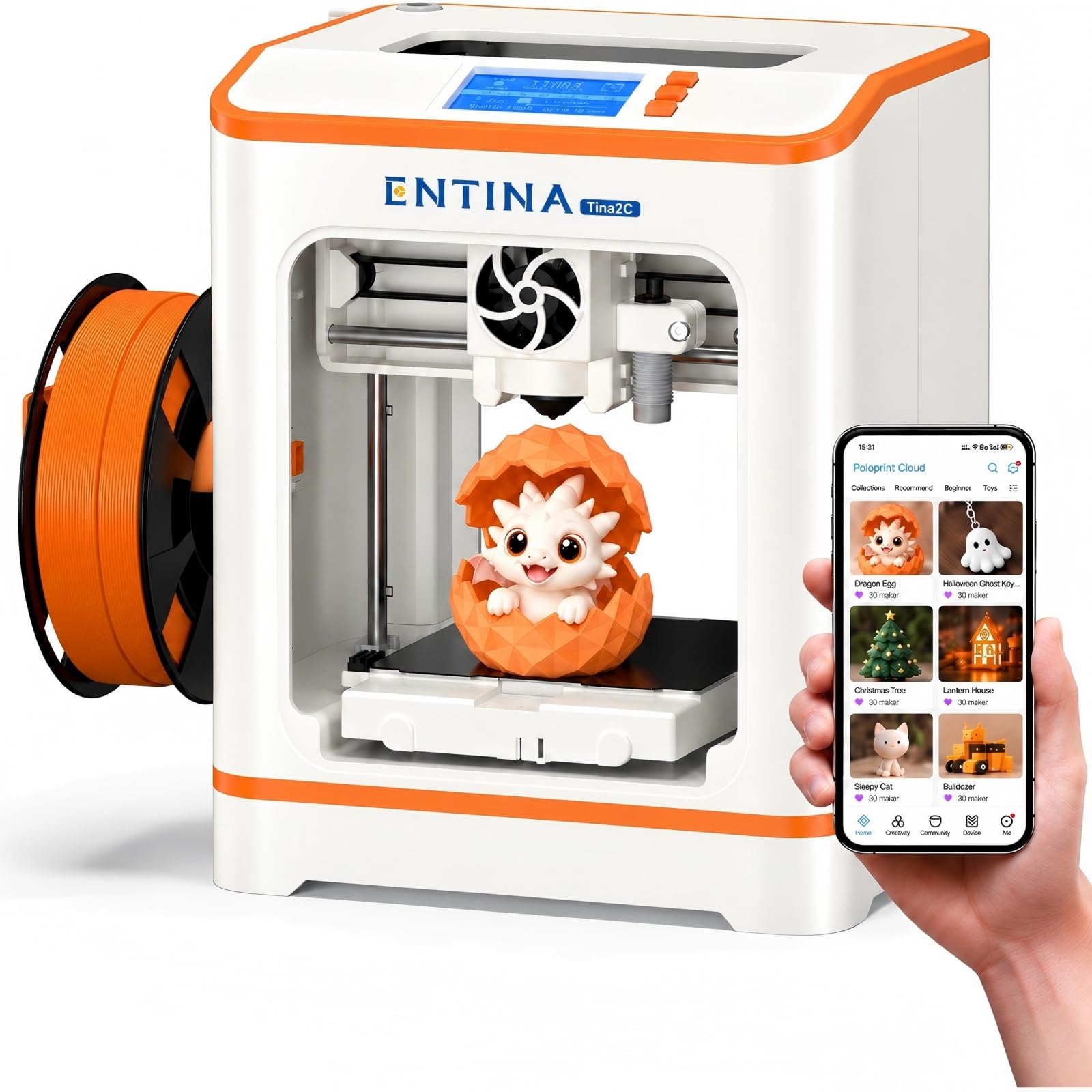
3. Entina Tina2C 3D Printer for Beginners & Kids
A 3500+ model app library means a kid can pick a design and print without modeling anything first.
The Tina2C’s real talent is removing the blank-page problem. The Poloprint Cloud app opens onto 3500+ ready-to-print models and 25+ DIY projects, with new designs added daily, so a kid can pick a toy and tap print without ever opening a design program. AI-powered text-to-3D and photo-to-3D tools let you turn a written idea or a picture into a model with no modeling experience.
Connectivity is the other headline: 2.4GHz WiFi for app control, or a TF card for offline jobs. Setup follows the same guided path through the app, with factory presets and auto leveling doing the calibration work for you — a first print in as little as 5 minutes is the claim. Power-loss recovery resumes an interrupted job, which matters when a child unplugs the wrong cable.
On the hardware side, it comes in at 5.5 pounds and 6.5 x 8 x 10 inches, making it the smallest-body machine of the Entina trio. The build volume is 3.9 x 3.9 x 3.9 inches, so plan small. A flexible magnetic plate lets you bend prints loose, and a quick-swap nozzle simplifies cleaning. There is built-in LED lighting over the build area and the machine runs quietly enough for a bedroom desk.
Why families gravitate to it
- 3500+ app models and 25+ DIY projects mean instant ideas for kids.
- Photo-to-3D and text-to-3D tools handle the modeling for you.
- WiFi plus TF card covers both app-driven and offline printing.
- At 5.5 pounds it is the lightest of the Entina machines here.
Where it asks for patience
- The 3.9-inch build cube is genuinely small — large toys must be printed in parts.
- The app experience matters as much as the hardware, so a stable WiFi connection is worth sorting first.
My pick for: households where the kids will browse a model library instead of designing from scratch.
Think twice if: your projects run bigger than a 3.9-inch cube.
4. ANYCUBIC Photon Mono 4 Resin 3D Printer

A 10K resin printer that resolves eyelashes and filigree on figures the size of your thumb.
This one is a different animal entirely. It is a resin printer, meaning it cures liquid resin under an LCD screen rather than laying down melted filament. The 7-inch mono screen resolves 9024 x 5120 pixels, and each pixel measures 17 x 17μm on the X and Y axes — a micron being a thousandth of a millimeter, so those pixels are microscopic. The result is miniature detail that FDM printers simply cannot reach.
Anycubic’s LighTurbo matrix light source spreads the exposure evenly to reduce layer lines and rasterization, which shows up as smoother surfaces on finished models. Build volume is 6.04 x 3.42 x 6.49 inches — a tall, narrow working space that suits standing figures. The laser-engraved platform improves grip on the first layer to cut lifting and warping, while still letting you pop prints free.
Setup is friendlier than resin printing’s reputation suggests. The 4-point leveling method means you level once and tighten four screws, with no repeat ritual — and power-loss recovery saves material and time on an interrupted job. Weighing 7.7 pounds, it is heavier than the Tina2C’s 5.5 pounds, reflecting the glass screen and light engine inside. One catch: the Anycubic app does not support this model, so plan on the on-machine interface.
What it does brilliantly: fine-detail work — tabletop miniatures, jewelry prototypes, small mechanical parts where surface finish counts.
The catch is the process: resin needs gloves, ventilation and a wash-and-cure step after printing, so this is not a bedroom toy for a child to run alone.
Built for: makers who prize detail over convenience and are ready for the resin workflow.
Wrong tool for: a family room where a child prints unsupervised.
5. MALYAN M320 Mini 3D Printer for Kids and Beginners

A 150 x 150 x 150 mm build cube inside a full metal frame heavy enough to stay put through long prints.
Most machines in this class squeeze you into a 100mm plate. The M320 gives you 150 x 150 x 150 mm, which is the roomiest build cube among the FDM printers here — enough for a full-sized mug or a two-part figurine without splitting the model. It also runs a heated bed and a wide extruder temperature range, so it handles 1.75mm PLA and PETG.
The frame is the second reason to look at it. A full metal chassis keeps the machine steady through long prints, and it arrives fully assembled and factory-calibrated, ready to print from the box. Touchscreen control makes menu navigation pleasant, and the detachable magnetic platform grips during printing then bends to release the model.
Stability has a cost, though. At 11.66 pounds it is the heaviest FDM option on this list, so it is a leave-it-in-place machine rather than one you carry between rooms. The footprint of 8.66 x 12.6 x 13.98 inches also asks for a real desk rather than a narrow shelf. This is a good fit for a classroom or workshop that wants one solid printer rather than a portable one.
Reasons it earns a place
- 150 x 150 x 150 mm build volume is the largest cube among the FDM printers here.
- Heated bed and wide temperature range support PLA and PETG.
- Full metal frame keeps the machine stable through long jobs.
- Touchscreen control and a magnetic removable plate simplify everyday use.
Counting the cost
- 11.66 pounds is not a carry-around weight.
- It needs more desk depth than the compact Entina machines.
Settled-in choice: for a workshop or classroom that wants maximum print size from a compact body.
Skip the cart: if portability is why you are shopping small in the first place.
6. Geeetech Mini 3D Printer
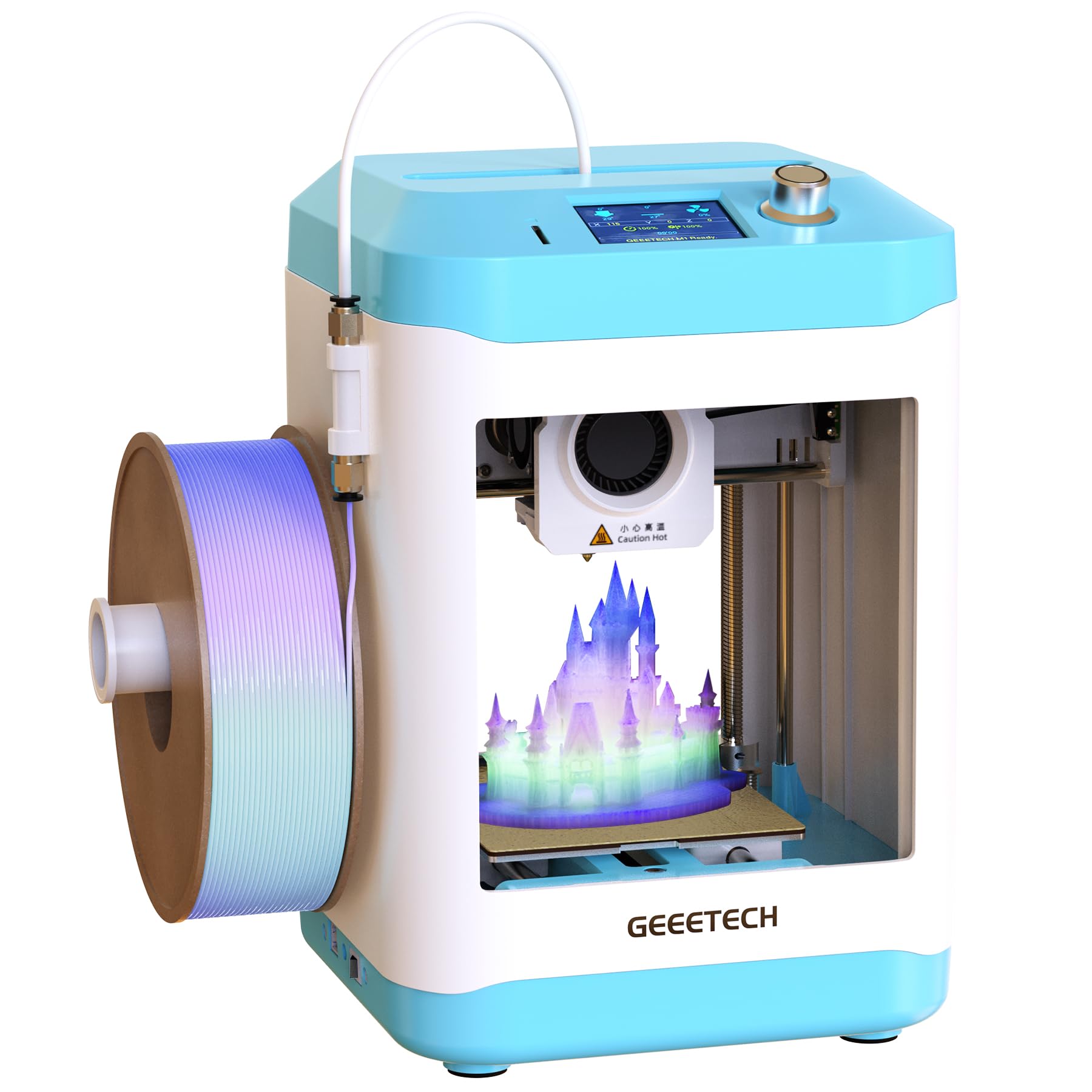
250mm/s print speeds from a 50W hot end at an entry-level price.
The Geeetech M1’s pitch is tempo. A 50W heating rod melts filament quickly, and print speeds reach 250mm/s, so small projects finish in a fraction of the sitting time. The direct-drive extruder uses a dual-drive metal gear system with a 1:5 gear ratio, which translates to strong, consistent grip on 1.75mm PLA and TPU. If your kids lose interest during long prints, this machine keeps the loop short.
Leveling is handled by a 16-point full-auto system across a heated, flexible magnetic plate — more measurement points than a basic sensor, which helps the first layer sit flat. The 2.4” LCD color screen and high-brightness lighting make the machine easy to read, and knob operation plus one-button filament loading keep it approachable for a young user.
It arrives fully assembled. The build area is 3.94 x 4.33 x 3.94 inches, so treat it as a small-parts machine. At 8.81 pounds it is heavier than the Entina models, because of the metal gear extrusion hardware. A practical note: it accepts both 500g and 1000g spools, but the maker recommends a filament holder for the larger 1kg spool, and the model file for that holder can be printed on the machine itself.
What stands out: speed and a heated magnetic bed at an entry-level tier — the 250mm/s figure is the draw here.
One thing to know: the operating menus and controls are not especially child-friendly, so plan on an adult handling the setup.
Right for: budget-conscious buyers who value fast, short print jobs.
Not the smoothest for: a child expected to operate it unaided.
7. Geeetech M1S 3D Printer for Kids and Beginners

Wi-Fi app printing and one-click jobs, added to the M1’s fast printing core.
This is the connected sibling of the Geeetech M1. Pair it with the Geeetech app over WiFi and you can browse models and send a job with one tap, which spares beginners a USB shuffle. The rest of the formula is the same quick-moving hardware: a 50W heating rod for fast melting, speeds up to 250mm/s, a TF card slot for offline jobs, and knob plus one-button filament loading.
The extruder earns separate mention. A high-performance dual-drive metal gear system with a 1:5 gear ratio gives strong extrusion force, so 0.5kg TPU and PLA materials feed reliably. Print area is 3.94 x 4.33 x 3.94 inches, and the machine accepts 1kg filaments with a holder. A 16-point full-auto leveling routine across the heated, flexible magnetic bed does the bed-setting work for you.
Setup is start-to-print straightforward, which is exactly what the buyer profile here needs. The 2.4” LCD color screen keeps the controls readable, and the backlight over the build area helps you check the first layer. Support runs to 12 months of free repair and lifetime technical assistance. At 9.88 pounds, though, it is the heavier of the two Geeetech machines, so budget a fixed spot rather than a carry-around role.
What buyers get
- Geeetech app and WiFi put one-click printing in reach of a novice.
- 16-point auto leveling across a heated magnetic bed.
- Direct-drive dual-gear extruder handles PLA and TPU at 0.5kg sizes.
- 12 months of free repair plus lifetime technical support.
What to factor in
- At 9.88 pounds it wants a permanent spot on the desk.
- Consistent reliability is the theme that needs watching — some units behave, some get flaky.
Pick this to: send prints from a phone and skip the memory card entirely.
Weigh first: you are paying a step up for the app link over the M1’s card-based workflow.
8. AOSEED AI 3D Printer

A toy factory behind a closed door — enclosed, leveling-free, and built around child safety.
The AOSEED wins on the safety story first. It has an enclosed, pinch-resistant body, so the moving parts sit behind a barrier rather than out in the open — a meaningful difference for a family room printer. It also uses leveling-free platform calibration and TÜV Rheinland ISO 16000-tested PLA. Noise is kept low by design. If you have a child who wants to be hands-on, this is the machine built around that wish.
The model library stays young. You get 20,000+ human-reviewed, print-tested models with 1,000+ added weekly, plus 16 mini and 2 premium design modules aimed at age-appropriate projects. AI Doodle turns voice, text or image prompts into a model, and AI MiniMe converts a photo into a cartoon-style figure. Single-color printing is the limit — multi-color items require printing separate parts and assembling.
Speed is genuinely brisk: 220–250 mm/s in everyday use, with peaks up to 400 mm/s, and precision down to 0.05 mm. Small toy projects can finish in as little as 20 minutes, which keeps a child’s attention through the whole build. A built-in camera streams progress to a phone and can auto-create time-lapse videos. The quick-release nozzle speeds up filament swaps, and runout detection pauses the job rather than wasting a print. The kit ships with a roll of PLA, tools, a magnetic plate and DIY stickers.
The strong suit: a child can run this without touching exposed hardware, and the camera feed (a live view of the print from your phone) lets parents check on a job without standing over it.
The honest gap: the maker notes the enclosed body has been described as stopping after a couple of weeks for some buyers — a mixed reliability record to weigh against the safety design.
Family-first pick: for the household that wants a printer behind a safe door rather than out in the open.
The caution: reliability is the mixed signal to weigh against that safety story.
9. Bambu Lab A1 Mini Combo, A1 Mini 3D Printer & AMS lite

Multi-color parts arrive as standard, and first setup takes about 20 minutes.
The A1 Mini Combo’s calling card is color. The AMS lite feed system lets you print in multiple colors in one job, so a toy figure ships with painted-looking details rather than a single plastic tone. The base machine is the A1 Mini; the Combo adds the AMS lite, which is required for multi-color work. Acceleration is rated 10,000 mm/s², which is the number behind its fast, crisp corners and fine detail.
Calibration is handled automatically — full-auto routines take care of Z-offset (the height gap between nozzle and plate) and bed leveling, so the machine sets itself up for each print. Active flow rate compensation reads conditions and adjusts extrusion on the fly, which reduces blobs and gaps. First print takes around 20 minutes to be ready, thanks to the pre-assembled build.
It also runs quietly. Active motor noise cancellation keeps the sound at or below 48 dB — roughly the level of a quiet conversation — which matters if the printer shares a room with a TV. The 1-Clip quick-swap nozzle makes maintenance easy, and the simplified touchscreen keeps the controls clear for beginners. At 22 pounds and 16.77 x 14.82 x 19.5 inches it is the largest and heaviest machine here, so it wants a proper table rather than a shelf.
The case for spending up
- AMS lite opens multi-color printing in a single job.
- 10,000 mm/s² acceleration and active flow compensation keep prints crisp.
- 48 dB or lower noise level suits a shared family room.
- Full-auto calibration and a 1-Clip nozzle simplify daily running.
Reality check
- At 22 pounds it is far heavier than the Entina machines — plan a fixed spot.
- Multi-color adds cleaning waste and longer jobs; the AMS lite is required for color work.
For the color-obsessed: makers who want multi-color models without painting them by hand.
Pass on this if: desk space is tight and a 22-pound body has nowhere to live.
Know the Specs
Build Volume
Build volume is the largest object the machine can print, written as three numbers — width, depth and height. It is the single spec that decides whether your project fits. Small machines in this class range from a 3.9-inch cube on the Tina2C to a 150mm cube on the MALYAN M320. Always check the largest dimension of your model against the largest of the three numbers.
Auto Leveling
The bed must sit just below the nozzle for the first layer to stick. Auto leveling uses a sensor to measure the gap and adjust for you. A 16-point system checks more spots than a single-point sensor, which helps on uneven desks. A non-metal plate can confuse a sensor that relies on metal detection, so match the plate to the machine.
Print Speed
Speed is quoted in mm/s, or as acceleration in mm/s². Higher numbers mean the nozzle travels faster across each layer. Speed is quoted as a peak figure, not a guarantee for every model, so treat it as a ceiling. Detail-heavy models need slower passes for clean walls.
Noise Level
Noise is measured in decibels (dB). Lower is better if the printer lives near a bed or a TV. Motor noise cancellation drops the operating sound toward the conversational range. Quiet running matters because a single print can take a large part of an evening.
FDM and Resin Explained
FDM melts a 1.75mm plastic strand and lays it in lines. Resin cures liquid under an LCD, giving finer detail but needing gloves and ventilation. For family and classroom use, FDM is the straightforward choice. For miniature detail, resin delivers more resolution per pixel.
Filament Compatibility
Filament is sold by material and thickness. PLA is the beginner standard, while TPU is flexible and PETG is tougher. Most machines here accept 1.75mm filament. Some support 0.5kg and 1kg spools, though a holder is recommended for the larger sizes.
Common Questions
Can a mini 3D printer truly fit on a dorm room desk?
What is the smallest build volume worth accepting?
Is a resin 3D printer safe for a child’s bedroom?
What does a 400mm/s print speed actually mean in practice?
Do I need Wi-Fi to run a mini 3D printer?
How much filament should I plan to buy separately?
Does auto leveling mean I never have to adjust the bed?
Can a mini printer make multi-colored models?
How long do small 3D prints take from start to finish?
Which mini printer is best for a complete beginner?
The Bottom Line
For most people shopping for the world smallest 3d printer, the winner is the TINA2S Starter Kit. It ships with filament, a loaded card and slicing software (the program that turns a model file into printer instructions), so you can print the same day. Auto leveling means a beginner never sets nozzle height by hand. If you want the shortest path to a first print, the Tina2 Basic promises a 5-minute start, according to the maker. For kids who want a model library to browse, the Tina2C pairs 3500+ app models with 5.5 pounds of portable weight. And if multi-color parts matter more than desk space, the Bambu Lab A1 Mini Combo brings the AMS lite feed system (a unit that swaps between four filament spools) into a compact frame. The TINA2S is the crowd favorite for good reason: it has 4.5+ stars and the largest review base among the FDM picks here (FDM means fused deposition modeling, the layer-by-layer plastic printing most home machines use). That mix of a complete first-print kit and genuine quiet running is what makes it the one to start with.
How we choose
We do not accept paid placement. Every pick is matched to a real buyer and a real use-case; we do not hands-on test units.
Sources
Specifications: manufacturer listings and product documentation. Review insights: verified customer reviews, as of November 2026. Pricing: not shown on this page (it changes often); check the current price via the retailer link.
As an Amazon Associate, Tactical Gear Guy earns from qualifying purchases. This does not affect which products we feature.