Specs are compiled from manufacturer listings and verified buyer reviews and can change over time — please confirm the key details on the product page before buying.
Your render or AI job either fits in the card’s memory or it crawls. That memory is VRAM (the dedicated memory the GPU keeps its working data in). When your rendering scene, AI model, or simulation dataset overflows it, the driver spills the extra to your system RAM and speed collapses. So VRAM is the number to check first, followed by the driver and certification the card ships with. Those two things separate a card that works from one you regret. Below, every price tier from entry-level to flagship is matched to the job it suits.
This guide is built by comparing the manufacturers’ published specifications and the patterns across verified customer reviews, so you get each pick’s real strengths and trade-offs instead of marketing spin.
You will see the cards that hold up under sustained renders, the compact ones that fit a small chassis, and the big-memory models built for AI. The crowd favorite is the PNY Quadro RTX 4000 at 4.0+ stars from a small but real base of buyers. Read on for the full best workstation graphics cards breakdown.
Top Picks


How To Choose The Best Workstation Graphics Cards
A workstation card is not a gaming card with a different sticker. It ships with drivers tested against the software you actually use — the CAD, 3D, and AI packages that crash or render wrong on a consumer card. The trick is to match memory and cores to your workload instead of buying the biggest number on the box.
Start with VRAM, not clock speed
VRAM is the hard ceiling on your project size. A 4 GB card fills up on a moderate 3D scene, while a 32 GB card swallows large models and high-resolution datasets whole. If a project exceeds that memory, the card offloads to slower system RAM and your render times stretch out. Pick capacity by your biggest realistic project, then worry about speed.
Understand what the cores do
CUDA cores (NVIDIA’s general-purpose compute units) handle the everyday math of rendering and simulation. Tensor cores speed up AI and machine-learning work, and RT cores do the heavy lifting for ray-traced lighting that looks physically real. A card heavy on Tensor and RT cores suits AI and photoreal rendering; a card with a huge CUDA count suits broad compute.
Check the fit before you buy
Workstation cards can be long, thick, and power-hungry. Check three things: the slot width (a dual-slot card blocks the slot beside it), the card’s length against your chassis clearance, and the power connector it needs against your PSU. A great card that will not physically seat in your case is money wasted.
Side-by-Side Comparison
| Model | Best For | VRAM | Memory Type | Interface | Amazon |
|---|---|---|---|---|---|
| PNY NVIDIA Quadro RTX 4000★ Best Overall | All-around value | 8 GB | GDDR6 | PCIe x16 | Amazon |
| AMD Radeon Pro W7500Top Performer | Efficient mid-range | 8 GB | GDDR6 | PCIe x8 | Amazon |
| PNY Quadro P5000 16GBHigh Memory Value | Big memory, older platform | 16 GB | GDDR5X | PCIe 3.0 x16 | Amazon |
| AMD Radeon Pro WX 9100 | HBM2 bandwidth | 16 GB | HBM2 | PCIe x16 | Amazon |
| Nvidia RTX 2000 ADA 16GB | Small chassis builds | 16 GB | GDDR6 ECC | PCI Express | Amazon |
| ASRock Intel Arc Pro B60 Creator 24GB | 24 GB on a budget | 24 GB | GDDR6 | PCIe 5.0 x16 | Amazon |
| PNY NVIDIA RTX A4500 | Compute and NVLink | 20 GB | GDDR6 | PCIe x16 | Amazon |
| ASRock Intel Arc Pro B70 Creator 32GB | Creator and AI work | 32 GB | GDDR6 | PCIe 5.0 x16 | Amazon |
| ASUS Turbo Radeon AI PRO R9700 32GB | Large-model AI | 32 GB | GDDR6 | PCIe x16 | Amazon |
| NVD RTX PRO 6000 Blackwell 96GB | Flagship AI and simulation | 96 GB | GDDR7 ECC | PCIe Gen 5 | Amazon |
Detailed Reviews
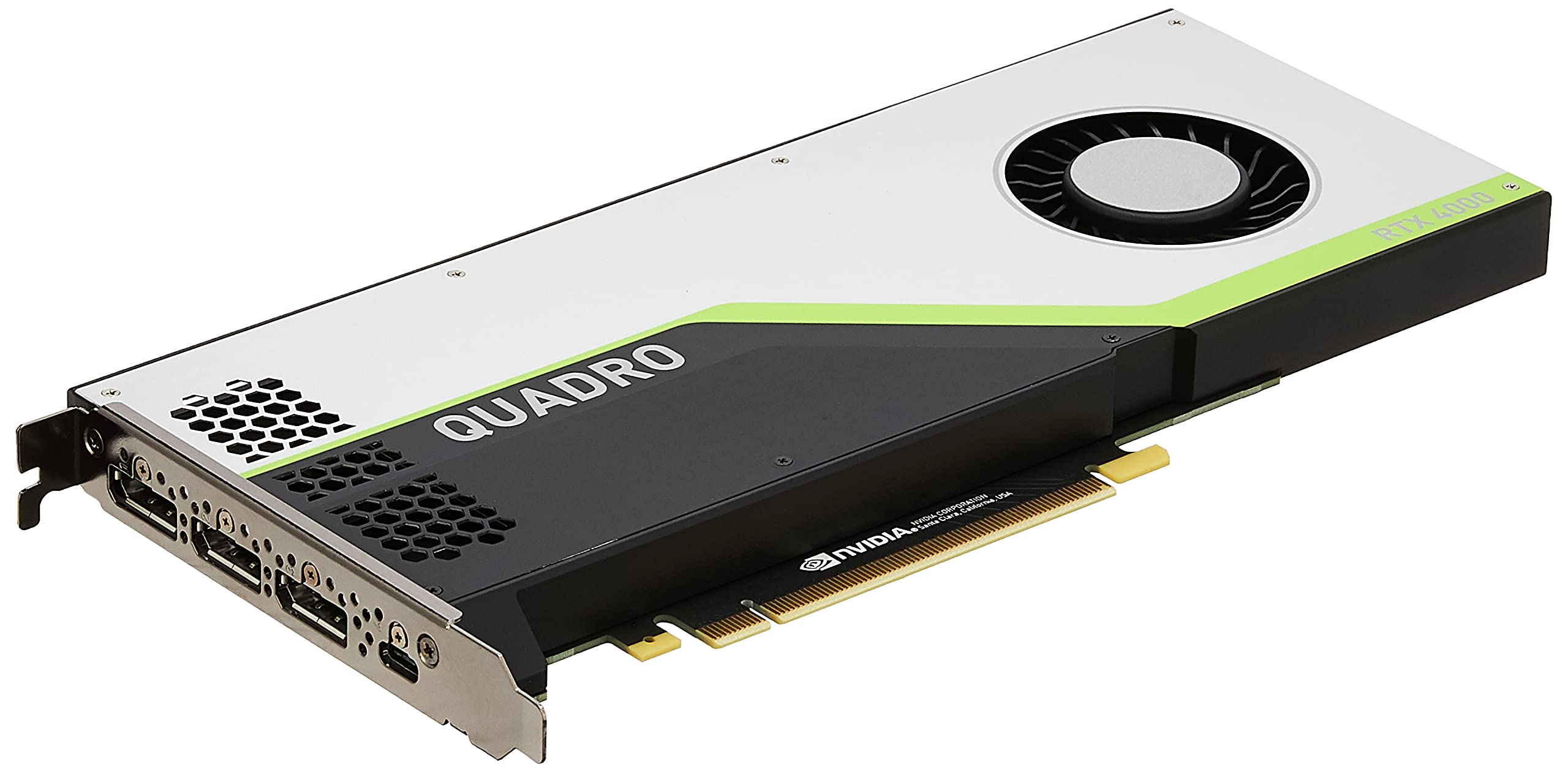
1. PNY NVIDIA Quadro RTX 4000
Our pick — 4.0+★ from 200+ verified ratings; the strongest balance of quality and price.
The card that makes ray-traced rendering feel routine instead of a coffee break.
This is the pick for a working professional who wants real ray-traced rendering without paying flagship money. It holds 8 GB of GDDR6 memory (the fast type that keeps working data close to the GPU) on a PCIe x16 slot, giving you a comfortable ceiling for mid-sized CAD models and 3D scenes. NVIDIA’s Turing architecture sits underneath, with 2304 CUDA cores doing the everyday compute and 36 RT cores handling the ray-traced lighting.
The numbers behind the render speed are serious for a card its size: 288 Tensor cores feed AI and denoising work, and peak throughput reaches 7.1 TFLOPS in FP32. That FP32 figure is the general compute rate, and the FP16 and INT8 ratings climb well above it for AI and inference tasks. It can drive four displays at once at up to 7680×4320 resolution, which is the kind of multi-monitor reach a video editor or trading-desk workstation actually uses.
What earns it the top spot is its steady application performance in daily professional use, which buyers consistently praise. The honest catch is the value question: some find it good and others find it pricey for an older Turing-generation card, so weigh it against newer mid-range options. At 8″ long and a 4″ width, it also fits most standard cases without a fight, unlike the far longer creator cards further down. It is the sensible all-arounder when you want certified drivers, ray tracing, and a proven design.
What it gets right
- 36 RT cores bring photoreal ray-traced rendering to a mid-tier card
- Drives 4 displays at 7680×4320 resolution simultaneously
- Compact 8″ length fits standard chassis
- NVIDIA Turing drivers tested against professional applications
Where it asks you to compromise
- Older Turing generation, so buyers split on whether it earns its cost
- 8 GB caps you out on large AI models and dense scenes
Reach for this if: you render mid-sized scenes, edit video, or run CAD and want certified drivers plus ray tracing in one proven card.
Look elsewhere if: your AI models or datasets demand more than 8 GB of headroom.
2. AMD Radeon Pro W7500
An efficient 8 GB professional card for CAD and design desks that value power draw.
If your workload is professional design and CAD rather than AI, this card keeps things lean. It carries 8 GB of GDDR6 memory and drives output up to 7680×4320, so high-resolution multi-monitor setups are within reach. It weighs 1.550 lbs and slots into a desktop on a PCIe x8 interface — the shorter-lane connection that still clears plenty of bandwidth for design work.
Slot lanes are where this card splits from the PNY RTX 4000. The W7500 runs on PCIe x8 (eight data lanes) versus the x16 (sixteen lanes) on the PNY, so pick the W7500 only if your build has lanes to spare. It is also a full-height desktop card in classic black, so it mounts like a standard workstation GPU rather than a compact or low-profile part.
The Radeon Pro line is aimed at professional use, so treat this as the practical pick for a designer who wants a modern AMD card with a modest memory footprint. It does not chase the biggest VRAM numbers, and that is the trade: you get an efficient professional card, but AI and heavy rendering will want more memory than 8 GB gives you.
The read in one line: a full-height AMD professional card with 8 GB GDDR6 and 7680×4320 output on a PCIe x8 connection, suited to design and CAD desks.
Ask before you buy: confirm your AI or rendering projects fit inside 8 GB, because that is the ceiling here.
Good match for: CAD, drafting, and multi-monitor design work on a standard desktop build.
Think twice if: you need a big VRAM pool for models or dense scenes.
3. PNY Quadro P5000 16GB
Sixteen gigabytes of memory on an older platform — capacity over generation.
When 8 GB is not enough but flagship money is out of the question, this card offers a big memory pool. It carries 16 GB of GDDR5X on a 256-bit bus, which is the older, wider memory interface that still delivers solid capacity for large scenes. It runs on a PCI Express 3.0 x16 connection — an older bus than the PCIe 5.0 cards here, so it is best matched to a matching older workstation board.
The clock story is where this card shows its age. Its GPU clock speed of 1328 megahertz reads slow next to the ASRock Intel Arc Pro B60’s 2400 megahertz — that is a difference of 1072 megahertz on the engine clock. So the P5000 is not the card you pick for the fastest clock; you pick it for the memory. The full-height, x16 form factor and the included DisplayPort and DVI-D cables round out a ready-to-install package.
This is the pragmatic move for a legacy workstation that needs a large frame buffer without a multi-thousand-dollar leap. Accept the older architecture and the lower clock, and 16 GB of GDDR5X gets dense CAD assemblies and large datasets moving. If you are building fresh on a modern platform, lighter and newer cards will serve you better.
Why it earns a slot
- 16 GB of VRAM handles larger scenes than most 8 GB cards
- 256-bit GDDR5X memory interface
- Ships with DisplayPort and DVI-D cables
The honest trade
- Older PCIe 3.0 bus and slower engine clock suit legacy builds best
Best for: legacy workstations that need a big memory pool on an older board.
Not for: fresh builds chasing the fastest clock or the newest bus.
4. AMD Radeon Pro WX 9100

HBM2 memory and a box full of adapters for the multi-display professional.
This card uses HBM2 memory — a stacked, high-bandwidth type of VRAM that sits close to the GPU — at 16 GB and 945 MHz memory clock. Output reaches 7680×4320, so high-resolution multi-monitor walls are in play.
You get a bigger accessory bundle than most workstation cards ship with. The box holds four Mini-DisplayPort to DisplayPort adapters, a Mini-DisplayPort to HDMI 1.4 passive adapter, a Mini-DisplayPort to DVI passive adapter, both flat and bent board retention brackets for OEM chassis, and a 3D stereo sync cable. So you can wire up a broad set of displays and fit an OEM chassis without a second shopping trip.
At 350 g it does not strain the slot, and it runs on a PCI Express x16 interface. This is a specialist choice aimed at display-heavy workflows and stereo 3D. The trade is that it is an older-generation AMD card, so you are buying the HBM2 memory and the adapter bundle, not the newest architecture.
Standout detail: the included adapter set — four DisplayPort adapters plus HDMI and DVI options — turns one Mini-DisplayPort card into a multi-display hub.
Weigh this: the older generation means newer cards will outpace it on fresh builds.
For the multi-display pro: stereo 3D and broad monitor arrays where the adapter bundle saves real setup hassle.
Skip if: you are starting a brand-new build and want the newest architecture.
5. Nvidia RTX 2000 ADA 16GB

Sixteen gigs of error-correcting memory squeezed into a half-height card.
This is the answer for a compact workstation that still needs serious memory. It packs 16 GB of GDDR6 with ECC — error-correcting memory that catches and fixes stray data errors, a real benefit for long simulations and rendering that must not corrupt. The half-height, dual-slot form factor with a blower active fan is built to slide into tight professional chassis.
Its physical size is the contrast point in this list. The length runs 6.61″ against the far longer ASRock Intel Arc Pro B60 Creator at 10.67″ — a difference you will feel when your case has little clearance. That compact footprint is exactly what makes it a good match for small and half-height workstation builds where the big creator cards simply will not fit.
Output tops out at 3840×2160 resolution on a PCI Express interface, so it is aimed at professional visual work rather than driving several 8K monitors at once. The trade is real: you get ECC memory and a small footprint, but you do not get the multi-8K output of the flagship cards. For a compact render or simulation node, that is a sensible exchange.
The case for it
- 16 GB GDDR6 with ECC catches data errors during long jobs
- Half-height, dual-slot design fits compact workstations
- Blower active fan suits tight chassis airflow
What it does not do
- 3840×2160 output ceiling is below the 8K-capable cards here
Made for: small-form-factor workstations that need ECC memory for dependable long renders.
Not your card if: you need to drive multiple 8K displays.
6. ASRock Intel Arc Pro B60 Creator 24GB

Twenty-four gigabytes of VRAM for people who thought 24 GB meant flagship money.
This is the value story of the list for anyone who needs a big memory pool. It carries 24 GB of GDDR6 on a 192-bit bus with 456 GB/s of bandwidth — enough to hold sizable AI models, 3D scenes, and generative design data in memory instead of spilling to system RAM. The engine clock runs at 2400 megahertz, which reads briskly next to the PNY Quadro P5000’s 1328 megahertz.
The platform is genuinely current. It uses PCIe 5.0 x16 for maximum bandwidth on the newest workstation boards, and Intel’s Xe2-HPG architecture provides 20 Xe cores and 160 XMX engines rated at 197 INT8 TOPS for AI acceleration. Twin media transcoders handle AV1, H.264, and HEVC, so high-resolution video exports move quickly. It ships with ISV certification and professional drivers tested against AI, design, engineering, and manufacturing software.
What wins people over is the memory per dollar: 24 GB of GDDR6 that undercuts the big-name flagships. Reliability reports are more mixed, so pair it with a clean PSU and good airflow. Mind the fit too: it is a 2-slot card with a single 8-pin power connector and a 200W TDP, and ASRock asks you to verify chassis clearance and power supply before purchase. Four DisplayPort 2.1 outputs and scalable Linux multi-GPU support make it a strong fit for AI and rendering workstations.
The defining number: 24 GB of GDDR6 with 456 GB/s bandwidth on a PCIe 5.0 card, paired with 197 INT8 TOPS of AI throughput.
Do this first: check your chassis clearance and PSU against the 200W TDP and single 8-pin connector before ordering.
A smart fit for: AI inference, 3D rendering, and generative design where 24 GB of memory matters more than brand cachet.
Keep in mind: mixed reliability reports mean a solid PSU and airflow are worth the setup effort.
7. PNY NVIDIA RTX A4500

A compute-focused card with enough cores to flatten a render queue.
This is the pick for heavy compute work. It carries 7168 tune CUDA cores rated at 23.7 TFLOPS, which is roughly triple the CUDA core count of the PNY Quadro RTX 4000’s 2304 — a big jump in raw parallel throughput. If your work leans on GPU compute for rendering, simulation, or data processing, that core count is the number that does the work.
The AI and ray-tracing side is equally serious: 224 third-generation Tensor cores rated at 182.2 TFLOPS feed machine-learning work, and 56 second-generation RT cores rated at 46.2 TFLOPS handle ray-traced rendering. The card pairs that with 20 GB of GDDR6 memory and a 2 gigahertz GPU clock. NVLink support lets you pool the memory of two cards, which is the professional way to scale past a single card’s VRAM ceiling.
It is a dual-slot, full-length board on a PCIe x16 interface, 10.5″ long and 4.4″ wide, so plan your case clearance. What you get for that footprint is a professional board with memory pooling and a mountain of Tensor throughput. The trade is that it is not cheap, and if you do not need NVLink or Tensor volume, a lighter card covers you.
The highlights
- 7168 CUDA cores at 23.7 TFLOPS for heavy compute
- 224 Tensor cores and 56 RT cores for AI and ray tracing
- NVLink pools memory across two cards
- 20 GB GDDR6 with a 2 GHz engine clock
The compromise
- Full-length dual-slot board needs chassis clearance
- Premium positioning means it is a serious spend
Right for: compute-heavy rendering, simulation, and AI work where core volume and NVLink memory pooling pay off.
Overkill if: your work fits comfortably on a mid-tier card without memory pooling.
8. ASRock Intel Arc Pro B70 Creator 32GB
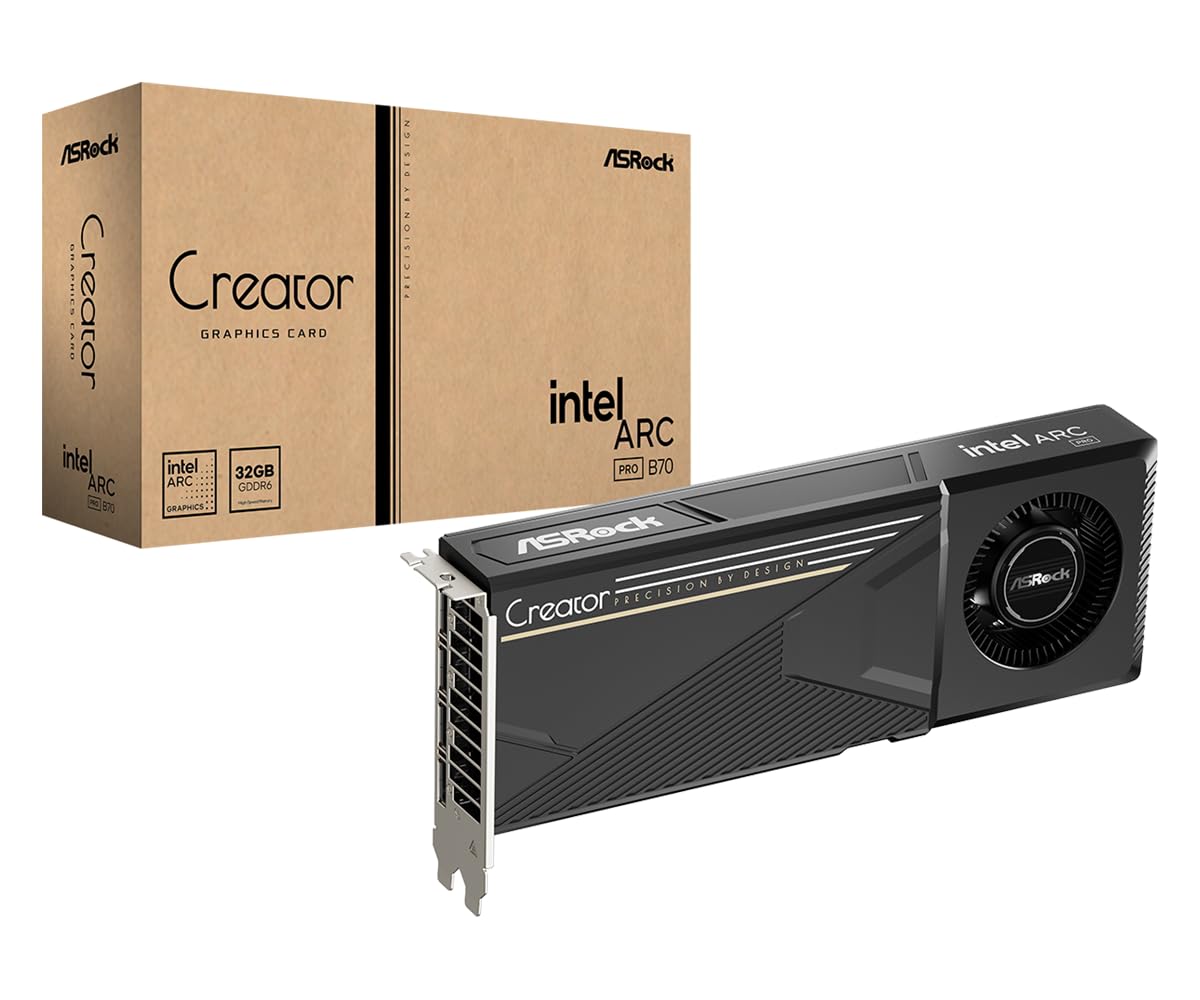
Thirty-two gigabytes built for creators who render, generate, and train on one card.
If your day is a mix of rendering, AI generation, and complex visualization, this card aims straight at it. It holds 32 GB of GDDR6 on a 256-bit bus running at 19 Gbps, which gives you room for large AI models and big datasets held locally. The engine clock reaches 2540 megahertz, the highest clock in this list, and the PCIe 5.0 x16 interface keeps data moving at full bandwidth.
The memory capacity is the contrast point on this list. Intel’s Xe2-HPG architecture supplies 32 Xe cores and 256 XMX engines, and the card supports multi-GPU scaling under Linux for LLM deployments.
What keeps the sustained performance honest is the cooling: a blower system with a vapor chamber and Honeywell PTM7950 phase-change material moves heat away during long jobs. Four DisplayPort 2.1 outputs feed high-resolution multi-monitor rigs, and the die-cast shroud and metal backplate give it a durable build. Noise stays acceptable under sustained creator and AI workloads. A single 12V-2×6-pin power connector and a 271 x 112 x 39 mm size mean you should verify chassis and PSU fit first.
Where it shines: 32 GB of GDDR6, a 2540 MHz engine clock, and PCIe 5.0 make it a fast, large-memory card for local AI and rendering.
Set up with care: the 12V-2×6-pin connector and an approximately 271 mm length warrant a PSU and clearance check before you buy.
Pick it when: you run AI generation, rendering, and visualization on one workstation and want 32 GB of headroom.
Double-check first: your power supply has the right connector and your case fits the card’s length.
9. ASUS Turbo Radeon AI PRO R9700 32GB

A 32 GB AMD card tuned for AI workloads, with cooling built to last.
This is an AMD side of the aisle pick for large-model AI. It carries 32 GB of GDDR6 VRAM on a 256-bit bus, so local models and heavy datasets fit in memory rather than spilling out. It runs on AMD’s RDNA 4 architecture and connects over PCIe 5.0, with output through one HDMI 2.1b and three DisplayPort 2.1a ports — the modern connector set for high-refresh professional monitors.
The build details show attention to sustained heat. A die-cast cover and backplate add structural stability and help dissipate heat, and a phase-change GPU heat pad improves heat transfer to lower temperatures under load. The fans use dual ball bearings, which the maker rates at up to twice the lifespan of plain bearings.
At 1.04 kg it is a substantial card, and its 2-slot design keeps it manageable in a workstation. For AI-controlled workflows and large models, 32 GB is the draw. The trade is that the 2 gigahertz clock and dual-slot build sit below the flashiest cards here, so it makes most sense when memory headroom for AI is your priority.
The reason to buy: 32 GB of GDDR6 and RDNA 4 architecture on PCIe 5.0, aimed squarely at local AI work.
Keep in view: the dual ball-bearing fans and phase-change pad help, but the maker’s lifespan claim is a stated spec, not a verified outcome.
Best for: AI workflows and large local models where 32 GB of VRAM decides whether the model fits.
Consider alternatives if: you want the highest clock speed rather than the most AI headroom.
10. NVD RTX PRO 6000 Blackwell 96GB

Ninety-six gigabytes of GDDR7 — the card that swallows whole AI datasets.
This is the top of the mountain. It carries 96 GB of GDDR7 ECC memory at 1.8 TB ps of bandwidth — enough to fine-tune large AI models locally, explore large-scale VR environments, and run bigger multi-app workflows than any other card here. The Blackwell streaming multiprocessor adds neural shaders that integrate neural networks inside programmable shaders, and DLSS 4 multi-frame generation keeps simulations smooth.
Ray tracing and AI accelerate together on this card. The 5th-gen Tensor cores support FP4 precision and are rated up to 3X the previous generation, while 4th-gen RT cores double the prior generation’s ray-triangle intersection rate. PCIe Gen 5 doubles the bandwidth of PCIe Gen 4 for data-intensive AI and 3D tasks, and a double-flow-through cooling design pushes airflow to sustain peak output under 600W power loads.
It also covers the workstation jobs buyers care about. DisplayPort 2.1 (the video output standard) drives up to 8K at 240 Hz and 16K at 60 Hz, so one cable can feed a very high-resolution panel. Universal MIG (Multi-Instance GPU, which splits one card into isolated slices) lets several workloads run side by side. Ubuntu and Comfyui setups run well on it. It ships in bulk OEM packaging with a 3-year manufacturer’s warranty. The catch is the buy itself: it is the most expensive card in this guide by a wide margin and pulls 600W, so your PSU and cooling plan matter. Note also the export-compliance screening the seller mentions before ordering.
Why it is the flagship
- 96 GB of GDDR7 ECC memory at 1.8 TB ps bandwidth
- 5th-gen Tensor cores with FP4 and 4th-gen RT cores
- PCIe Gen 5, DisplayPort 2.1, and Universal MIG
- 3-year manufacturer’s warranty
What it demands
- 600W power load and flagship cost make it a specialist buy
- Bulk OEM packaging — no retail box
The flagship choice: local AI fine-tuning, large-scale simulation, and multi-instance work where 96 GB decides what is possible.
Not for: everyday design, where a mid-tier card costs far less and does the job.
Know the Specs
VRAM and Bus Width
VRAM is the card’s own memory for working data, and bus width is how wide the road between the GPU and that memory is. More memory holds bigger scenes and AI models; a wider bus moves data faster. When your project exceeds VRAM, the driver offloads to slower system RAM and speed dips. Pick capacity by your biggest project, then check the bus width and memory type for throughput.
CUDA, Tensor, and RT Cores
These three core types split the work. CUDA cores handle general compute like rendering and simulation math. Tensor cores accelerate AI and machine-learning tasks. RT cores do the ray-traced lighting that looks physically real. A render-heavy job leans on CUDA and RT cores; an AI workload leans on Tensor cores. Match the core mix to your job, not just the total.
Common Questions
How much VRAM do I need for a workstation card?
Is a workstation card better than a gaming card for CAD and 3D software?
What does ISV certified actually mean for my software?
Can a workstation card run on my existing power supply?
Will a full-length card fit in my case?
Do I need NVLink or multi-GPU support for AI work?
Does GDDR7 ECC memory really matter for rendering and simulation?
What is the difference between GDDR6, GDDR7, and HBM2 memory?
How many monitors can a workstation card drive?
Can I mix two different workstation cards in one machine?
The Bottom Line
For most professional workstations, the best workstation graphics cards pick is the PNY NVIDIA Quadro RTX 4000. It fits most cases while giving you 8 GB of GDDR6 (the card’s video memory), 36 RT cores for ray tracing, and certified drivers. If a large memory pool for AI and rendering is your priority, reach for the ASRock Intel Arc Pro B70 Creator 32GB. And when the project truly needs the most memory money can buy, the NVD RTX PRO 6000 Blackwell 96GB is the flagship that ends the debate.
One last thing before you commit: the RTX 4000 holds the higher score at 4.0+ stars, while the RTX PRO 6000 Blackwell draws the strongest performance and value feedback of the flagship cards. If you want the safest starting point, the RTX 4000’s broad professional driver support makes it the low-risk pick for a first workstation build.
How we choose
We do not accept paid placement. Every pick is matched to a real buyer and a real use-case; we do not hands-on test units.
Sources
Specifications: manufacturer listings and product documentation. Review insights: verified customer reviews, as of November 2026. Pricing: not shown on this page (it changes often); check the current price via the retailer link.
As an Amazon Associate, Tactical Gear Guy earns from qualifying purchases. This does not affect which products we feature.