Specs are compiled from manufacturer listings and verified buyer reviews and can change over time — please confirm the key details on the product page before buying.
You want a computer that does not slow down when the work gets heavy — CAD assemblies, video timelines, virtual machines, or a local AI model chewing through a dataset. The picks below are the machines that hold their speed under a sustained load, sorted by what each one is genuinely built to do. If you want the shortest answer: the MINISFORUM MS-01 is the strongest all-round buy here, because it pairs a 14-core Intel i9 with a real PCIe 4.0 x16 slot and two 10-gigabit network ports.
This guide is built by comparing the manufacturers’ published specifications and the patterns across verified customer reviews, so you get each pick’s real strengths and trade-offs instead of marketing spin.
Below you will find towers, small-form-factor boxes, and mini workstations, each matched to the job it handles best. The right pick depends on if you need raw core count, room to add a graphics card later, or a box small enough to sit on a shelf — and each pick below is matched to one of those three needs.
Top Picks


How To Choose The Best Workstation for Computer
The first decision is form factor, and it drives everything else. A tower gives you room for full-size graphics cards, multiple drives, and a big power supply. A small-form-factor or mini workstation saves desk space but limits what you can physically add later. Decide how much room you have before you fall for a spec sheet.
Start with cores, not clock speed
Cores are the individual processing units inside the chip, and each core can work on a separate task at once. Threads are the parallel lanes each core can run. A chip with 20 cores and 28 threads finishes a video render or a code compile faster than a chip with 4 cores at a higher clock speed, because the work splits across more lanes. Clock speed — measured in gigahertz — tells you how fast one lane runs, not how many run at once.
Check the expansion slot before you buy
A PCIe x16 slot is the long connector on the motherboard where a graphics card or a network card sits. The “x16” means it has sixteen data lanes, and the generation number (PCIe 4.0, PCIe 5.0) sets how much data those lanes carry per second. If you plan to add a serious graphics card for rendering or model training, confirm the slot exists and confirm its generation. A workstation with no such slot is a closed box.
Decide if you need ECC memory
ECC memory (error-correcting code) is a type of RAM that catches and fixes small data errors as they happen. On a long render or an overnight simulation, one flipped bit can corrupt the output. ECC costs more and is not offered on every model. If your work is repeatable and disposable, ordinary RAM is fine. If it is not, ECC is worth seeking out.
Budget for the parts that are missing
Many refurbished workstations ship with no hard drive and no operating system. Read the listing carefully: some say “No HDD” and some say “No Operating System.” Factor in the cost of a drive and a Windows licence before you compare two machines on headline specs. A cheaper tower that needs both is not actually cheaper.
Side-by-Side Comparison
| Model | Best For | CPU Cores | Memory | Graphics | Amazon |
|---|---|---|---|---|---|
| MINISFORUM MS-01★ Best Overall | All-round mini workstation | 14C / 20T | 32GB DDR5 | Intel Iris Xe | Amazon |
| Dell Precision T7810 (Chia Farming)Core Count King | Raw core count on a budget | 28C / 56T total | 128GB DDR4 | Quadro K620 2GB | Amazon |
| Lenovo ThinkStation P520Room to Grow | Certified tower with drive bays | 4C | 128GB DDR4 | Quadro M2000 4GB | Amazon |
| Dell Precision T7810 (E5-2670 v3) | Dual-socket value tower | 12C (dual) | 128GB DDR4 | Quadro NVS 315 1GB | Amazon |
| Dell Pro Tower Plus | Office productivity tower | 20C / 20T | 8GB DDR5 | Intel integrated | Amazon |
| MINISFORUM MS-02 Ultra | AI inference mini workstation | 24C / 24T | 4x DDR5 slots | Intel UHD + PCIe 5.0 x16 | Amazon |
| Dell Tower Desktop (RTX 5060) | GPU rendering and gaming | 20C | 32GB DDR5 | RTX 5060 8GB | Amazon |
| HP Z2 SFF G1i | ISV-certified SFF design | 14C / 14T | 64GB DDR5 | Intel integrated | Amazon |
| GEEKOM A9 Mega | Local AI model runs | Ryzen AI Max+ 395 | 128GB LPDDR5X | Radeon 8060S | Amazon |
| MINISFORUM MS-S1 MAX | AI clusters and rack work | 16C / 32T | 128GB LPDDR5x | RDNA 3.5 | Amazon |
Detailed Reviews
1. MINISFORUM MS-01 Mini Workstation Intel Core i9-13900H
Our pick — 4.5+★ from 150+ verified ratings; the strongest balance of quality and price.
A shoebox that carries a 14-core i9 and still leaves room for a graphics card.
The footprint is what wins people over: a full desktop-class processor in a box that fits on a shelf. This box manages to hold a full desktop-class processor without taking up a desk, and that is exactly why it rates top marks among the crowd — 4.5+ stars across 160+ owners. The processor is Intel’s Core i9-13900H, listed at 14 cores and 20 threads with up to 5.4GHz and 24MB of cache. Cores are the individual working units; threads are the parallel lanes each one runs. In plain terms, that headroom is what lets you keep a render, a browser full of tabs, and a virtual machine all moving at once. The integrated Intel Iris Xe graphics runs up to 1.5GHz, which is enough to drive your monitors but not a substitute for a dedicated card.
That is where the PCIe 4.0 x16 slot earns its place. It is the long connector where a real graphics card, a network card, or a storage controller goes, and PCIe 4.0 is the fourth generation of that data standard. Add a card there and this small box turns into a workstation that handles 3D rendering or video editing at a serious pace. Storage is equally generous: it holds up to three M.2 NVMe drives, with one interface rated to move data at up to 7000MB/s. NVMe is the fast flash-drive standard, so 7000MB/s means a large project file opens in seconds rather than minutes. It also supports RAID 0 for capacity and RAID 1 for data safety — RAID is a way of spreading or mirroring data across drives so you gain either speed or a backup copy — plus one U.2 drive and two 22110 M.2 drives.
Networking is the quiet headline. Two 10Gbps SFP+ ports and two 2.5G RJ45 ports mean this machine plugs straight into a fast office backbone or a lab switch — SFP+ is the slot used for fibre and high-speed network modules, and 10Gbps is ten gigabits per second. The port selection rounds out with three USB 3.0 Type-A, two USB 2.0 Type-A, one HDMI 2.0 output at 4K@60Hz, and two USB4 Type-C ports at 40Gbps. The catch is noise. It stays extremely quiet in everyday use, but under a sustained heavy load the fans make themselves heard — so if you sit close to it in a shared studio, plan where it lives.
What earns the top spot
- 14 cores and 20 threads with up to 5.4GHz turbo keep heavy multitasking smooth
- A PCIe 4.0 x16 slot lets you add a real graphics card later
- Two 10Gbps SFP+ and two 2.5G RJ45 ports suit lab and studio networks
- Room for three M.2 NVMe drives with RAID 0 and RAID 1 support
Where it asks for patience
- Fan noise climbs under sustained heavy load
- Intel Iris Xe integrated graphics is not a match for a dedicated card from the start
Reach for this if: you want one compact machine that runs your work now and accepts a graphics card later.
Look elsewhere if: your desk sits in a quiet shared room and you push it hard all day.
2. Dell T7810 Workstation
Twenty-eight cores and fifty-six threads for the price of a mid-range laptop.
If your job is to keep every core busy — encoding, batch processing, a home lab running a stack of virtual machines — this is the pick with the most raw lanes in the whole group. Two Intel Xeon E5-2690 v4 chips sit side by side, each 14-core, for 28 cores and 56 threads total, running at 3.1GHz with a 3.5GHz turbo. The cache figure here is the one that separates it from the ThinkStation below: 35MB against 8.25MB, roughly four times the on-chip working memory. Cache is the small, very fast memory built into the processor, so a bigger pool means fewer slow trips to main memory during a long calculation. Memory is 128GB of DDR4, and a Nvidia Quadro K620 with 2GB carries the display output.
Read the listing before you commit, because two things are missing on purpose. There is no hard drive and no operating system included — you supply both. The upside is that you choose exactly the drive and the Windows licence you want instead of paying for whatever shipped. The optical drive is also not included. It is sold renewed, which explains the lower score of 3.5+ stars across 70+ ratings: the machines that work run beautifully as a home lab server and arrive super clean, while the mixed feedback around reliability reflects the occasional unit that shows up refusing to boot. Buy renewed with that in mind and check the seller’s return window.
What it is really for: sustained parallel work where core count beats per-core speed — a virtual-machine host, a build server, a render farm node.
The honest catch: budget for a drive and an operating system on top, and understand that a renewed dual-Xeon tower carries more arrival risk than a new box.
Who it fits: tinkerers and lab builders who want maximum threads per machine and are happy finishing the build themselves.
Who should look away: anyone wanting a machine that boots the moment it lands.
3. Lenovo ThinkStation P520 Workstation
Four cores, a 900W power supply, and two empty drive bays waiting for drives.
This one wins on power delivery and breathing room rather than brute core count. The Intel Xeon W-2123 runs 4 cores at 3.6GHz with 8.25MB of cache — fewer lanes than the dual-Xeon tower above, so it is the wrong tool for a distributed render, but a steady one for a workstation that runs a handful of heavy applications. The graphics side is more interesting: a Quadro M2000 with 4GB drives up to four DisplayPort monitors, which is four times the graphics memory of the T7810 in this list. Spreading four screens across a CAD layout or a trading setup is exactly the job that card was made for. It arrives with Windows 11 Professional already installed, so it boots and works from the start.
The power supply is the part that future-proofs it. A 900W unit certified 80PLUS Platinum — that rating measures how efficiently it converts wall power into usable current — sits well above the 685W in the T7810, and it leaves headroom for a heavier graphics card later. Two 3.5-inch drive bays sit empty and ready for extra storage beyond the 512GB NVMe M.2 SSD. NVMe is the fast flash standard, so that boot drive gets you into Windows quickly. Ports cover four USB 3.1 up front, four more USB 3.1 plus two USB 2.0 at the back, two 1GB Ethernet ports, and audio in and out. No keyboard or mouse in the box.
Cold read on the trade-off: four cores will feel thin if you batch-render or compile large projects, and the 900W supply is only worth its headroom if you actually plan to add a card. For a multiprogram professional desktop with four monitors and a spare drive bay, it is the balanced choice.
Best for: designers and analysts running several screens and a few demanding apps who want an installed OS and a big power reserve.
Skip the core count: if your day is one giant parallel job, the 28-core tower above will finish it sooner.
4. Dell Precision T7810 Workstation 2X Intel Xeon E5-2670 V3
Two twelve-core Xeons, 128GB of RAM, and a drive already inside.
This is the version of the T7810 that arrives with storage and a working drive plan. Two Intel Xeon E5-2670 v3 processors, each 12-core at 2.3GHz with a 3.1GHz turbo, give you a dual-socket tower for parallel workloads. Sustained dual-socket throughput is what carries it, and the full 128GB of DDR4 is genuinely there rather than a listing promise. An integrated Intel AHCI controller runs SATA RAID at 6Gbps across levels 0, 1, 5, and 10, so you can mirror or stripe drives for speed or safety. The 480GB SSD gets you working immediately.
The memory gap against the Dell Pro Tower Plus is worth pausing on: 128GB here against 8GB there, sixteen times the working space. RAM is where open applications and files live while you work, so 128GB means you can keep a huge dataset plus several programs open without the machine paging to disk and stalling. Graphics is a Quadro NVS 315 with 1GB, and its DMS-59 connector is the one real snag — that is an older video output standard, so you will likely need an adapter or to add a modern card to drive current monitors. The 685W power supply feeds it all, and there is no operating system included.
For a refurbished tower, the practical picture is warm: it rates 4.0+ stars and the complaints that surface center on that connector rather than the machine itself. Treat it as a workhorse that needs one adapter before it meets your screen.
Why it holds its place
- Dual 12-core Xeons give real parallel throughput
- Full 128GB DDR4 is present and accounted for
- 480GB SSD and RAID 0/1/5/10 support out of the gate
The snag to plan around
- DMS-59 graphics connector needs an adapter or a card swap
- No operating system — you supply Windows
Worth grabbing if: you need maximum memory and dual sockets without paying new-tower prices.
Think twice if: you want to plug in a modern monitor with no adapter fuss.
5. Dell Pro Tower Plus Ultra 7 DVDRW 8GB DDR5 1TB SSD

A modern business tower with three DisplayPorts and an NPU for AI tasks.
For a desk job that means spreadsheets, dashboards, and video calls all at once, this is the sensible new-machine pick. The Intel Core Ultra 7 265 runs 20 cores across 8 performance cores and 12 efficiency cores, with 20 threads, up to 5.3GHz turbo, and 30MB of cache. That split is how modern chips save power — light work runs on the efficient cores, heavy work jumps to the performance ones. An integrated Intel AI Boost NPU rates up to 13 TOPS; that is a dedicated neural processing unit measured in trillions of operations per second, built for AI-assisted workloads. Three native DisplayPort 1.4a outputs drive up to three 4K monitors, which is the sort of setup that makes a data analyst’s day easier.
Storage and memory are the honest limitation. The 1TB PCIe SSD is roomy and quick, but RAM is only 8GB of DDR5 — against 128GB on the Precision T7810, a sixteen-times difference. Eight gigabytes is fine for office work but tight if you keep many browser tabs and large files open. Ports run the modern gamut: a 20Gbps USB-C and a 10Gbps USB-A up front alongside two USB 2.0, then three 5Gbps USB-A, two USB 2.0, a 10Gbps USB-C, three DisplayPorts, and Gigabit Ethernet at the back. There is no HDMI port and no built-in Wi-Fi — wired only. An 8x DVD writer handles discs, and Windows 11 Pro is preinstalled.
The practical verdict: buy this as a new office tower with three-screen output and an optical drive, not as a memory-hungry powerhouse. The combination of DisplayPort flexibility and a fresh machine with a fresh licence is what makes it worth the middle tier.
Mind the gap: 8GB of DDR5 is the one spec to check against your workload before committing.
Pick this one if: you want a brand-new tower, three 4K displays, and an optical drive without overspending.
Look past it if: your work runs on large datasets that want more than 8GB of RAM.
6. MINISFORUM MS-02 Ultra Mini Workstation PC
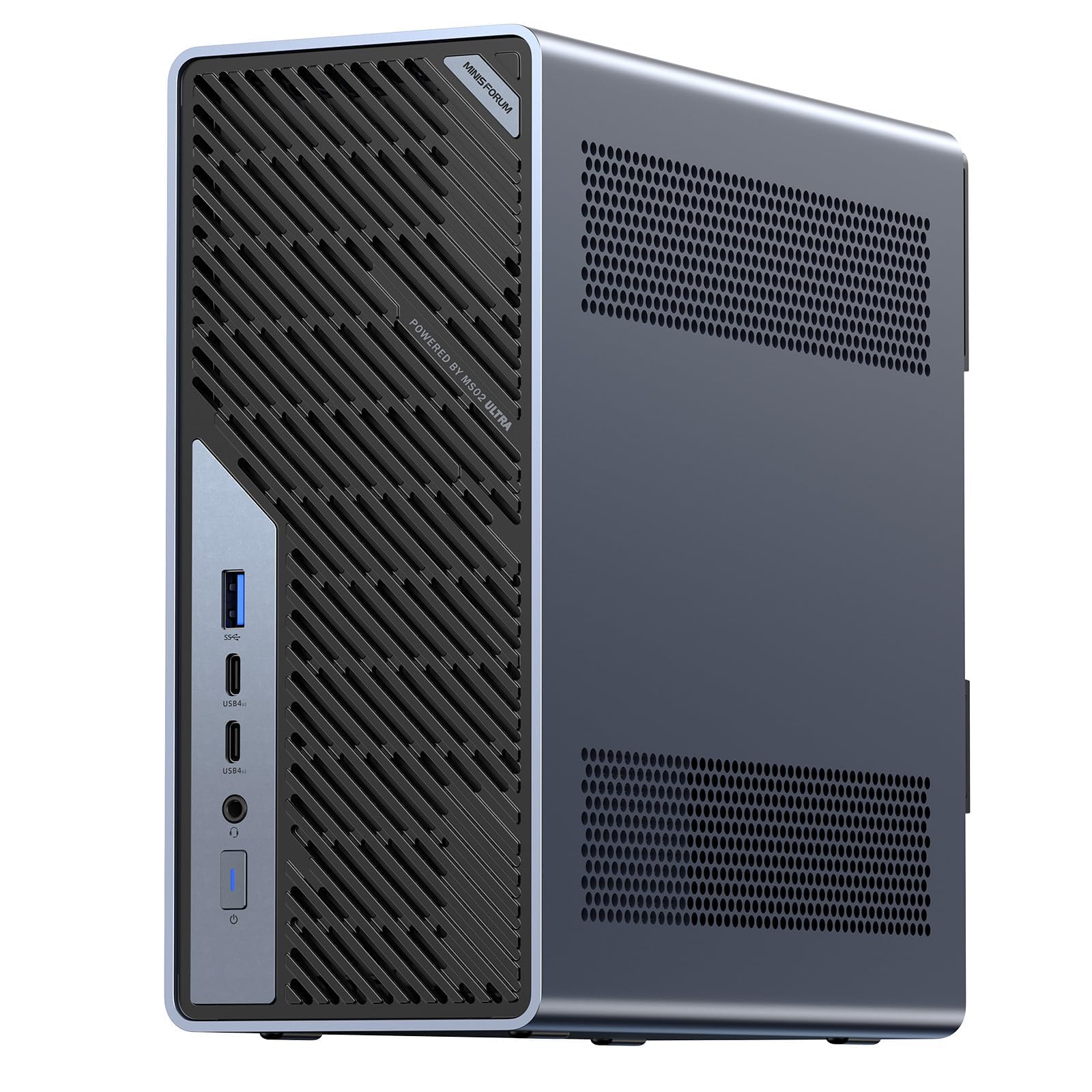
A mini workstation built around a PCIe 5.0 slot and ECC memory.
This is the pick for someone who expects to bolt in a graphics card and keep going. The Intel Core Ultra 9 285HX runs 24 cores and 24 threads up to 5.5GHz with a 13 TOPS NPU. Pair that with the PCIe 5.0 x16 slot — the fifth generation of the high-speed connector, ahead of the PCIe 4.0 slot in the MS-01 above — and you have room for a desktop-class GPU for model training. Four DDR5 SODIMM slots accept up to 256GB of memory, and ECC support keeps data integrity in mission-critical work. SODIMM is the compact memory format used in small machines. Four PCIe 4.0 M.2 slots hold up to 24TB of storage with RAID 0/1/5/10, so you can split scratch disks, media libraries, and project drives.
Thermals are the engineering story. A dedicated CPU/GPU airflow design with a 6-pipe dual-fan cooler holds stable performance under sustained load, delivering up to 140W turbo while keeping a 100W TDP — TDP is the thermal design power, a measure of how much heat the cooler must shed. It runs as quietly as 36 dB, which is a library-level hum. A built-in 350W power supply carries the load, though that is below the 900W supply in the ThinkStation. Networking is rich: dual 25GbE plus 10GbE and 2.5GbE ports, USB4 v2 at 80Gbps, and Wi-Fi 7. Builders should note the memory guidance — when half-inserting a module, seat it in the CPU-side slots first or the system may not boot.
Standout strengths
- PCIe 5.0 x16 slot opens the door to a desktop-class GPU upgrade
- Four DDR5 slots and ECC memory for data-critical work
- Quiet at 36 dB with a 350W built-in supply
- Dual 25GbE and Wi-Fi 7 for fast lab networks
What to keep in mind
- 350W supply is modest compared with a full tower
- Barebone memory compatibility needs checking before you buy RAM
Suits you if: your work runs local AI models or heavy media loads and you want room to add a GPU.
Not your fit if: you need a turnkey machine with memory already installed and matched.
7. Dell Precision 7910 / T7910 Tower, 2X Intel Xeon E5-2670 V3

The first machine in this list with a dedicated graphics card built in.
Rendering and 3D modeling are where this tower separates itself. An NVIDIA GeForce RTX 5060 with 8GB of GDDR7 memory sits inside — GDDR7 is the newest generation of graphics memory, and the dedicated 8GB is a different world from the shared-integrated setups on most picks here. The Intel Ultra 7 265F processor adds 20 cores with up to 5.3GHz turbo, and 32GB of DDR5 RAM lets you stack virtual machines and design programs side by side. A 2TB SSD handles boots and file transfers at speed. The tower rates 4.5+ stars, the highest score in the group, and the review feedback points to steady delivery under sustained load.
Sustained performance is the theme worth noting: the listing describes the architecture as built to hold speed without thermal throttling — throttling being the slowdown a chip applies when it gets too hot. For a developer or creator running long renders, that is the difference between a job that finishes tonight and one that drops in performance halfway through. Ports cover one HDMI 2.1, two USB 2.0, three USB 3.0 for five USB in total, plus integrated Wi-Fi and Bluetooth for wireless networking. Windows 11 Pro is preinstalled and a Dell Pro 5 keyboard and mouse ship in the box, so it is ready on arrival.
The honest limit: there is no fingerprint reader, and the dedicated GPU is a mid-tier card rather than the top of the line — plenty for 3D modeling and video work, but not the ceiling for the heaviest AI model training.
Why it stands out: it is the only pick with a dedicated graphics card already installed, so the render work starts on day one without an upgrade purchase.
Made for: creators and developers who want GPU rendering, a large SSD, and Windows 11 Pro shipped ready.
Not aimed at: anyone chasing the absolute top tier of AI training throughput.
8. HP Z2 SFF G1i Workstation Desktop, Intel Ultra 5 235

A small-form-factor workstation that carries the certifications CAD suites want.
Certification is the word that matters with the HP Z2 SFF G1i: ISV approvals cover AutoCAD, Creo, SOLIDWORKS, ANSYS, and MATLAB. ISV certifications — independent software vendor approvals — cover AutoCAD, Creo, SOLIDWORKS, ANSYS, and MATLAB, which means those design and simulation suites are tested against this hardware. If your day is spent inside one of those, a certified machine saves the guesswork of whether a driver will misbehave mid-project. The Intel Core Ultra 5 235 runs 14 cores and 14 threads up to 5.0GHz with 24MB of cache, paired with 64GB of DDR5 RAM and a 2TB PCIe NVMe M.2 SSD. The workstation chipset is the dedicated W880, sitting a tier above HP’s business SFF lines.
The small footprint does not cost much in connectivity. Two USB-C 3.2 Gen 2×2, four USB-A 3.2 Gen 2, two USB-A 3.2 Gen 1, three USB-A 2.0, two DisplayPort 1.4, Ethernet, and a headset combo jack cover a full desk. DisplayPort 1.4 supports a single display at up to 8K, enough for a high-resolution drafting monitor. MIL-STD 810H testing underpins the durability claims, and Windows 11 Pro with BitLocker and Remote Desktop is preinstalled. The disclosure is worth reading: the computer is brand new but resealed to upgrade the memory and SSD, with a three-year warranty on the upgraded parts and a one-year warranty from HP on the rest.
The certification advantage: if your software is on that ISV list, this is the lowest-friction new machine here for avoiding driver surprises.
The caveat to weigh: graphics are integrated Intel, so it is a CAD and modeling station rather than a GPU-render machine — and the resealed upgrade is worth confirming with the seller.
Right for: engineers and designers inside AutoCAD, Creo, SOLIDWORKS, ANSYS, or MATLAB who need certified compatibility and 64GB of RAM.
Wrong for: heavy GPU rendering, which wants a dedicated card.
9. GEEKOM A9 Mega AI Workstation PC, Ryzen AI Max+ 395

A desktop built to run large AI models entirely offline.
This is the machine for someone who wants 128-billion-parameter AI models to run locally, with no cloud API in the loop. The AMD Ryzen AI Max+ 395 sits at the center, backed by 128GB of LPDDR5X memory running at 8000 MT/s — MT/s is the memory transfer rate, a measure of how fast data moves between RAM and the processor. In supported settings up to 96GB of that shared memory can be handed to the Radeon 8060S graphics, which is what lets the machine run select 4-bit quantized models with up to 128 billion parameters. Quantized means the model is compressed to save space so it fits. A 2TB PCIe Gen4 NVMe SSD stores the models, and dual M.2 slots take up to 8TB total.
Offline operation is the real selling point. After setup and downloading your models, supported workflows run without a cloud API, so sensitive data never leaves the machine and there are no per-call fees. That matters for a studio handling client work under confidentiality. Cooling uses the IceBlast 5.0 system — a full-coverage vapor chamber plus dual turbo fans — supporting up to 120W sustained power with a 140W maximum dissipation figure. On connectivity you get dual 2.5GbE LAN, dual 40Gbps USB4, dual HDMI 2.1, four-display support up to 8K, and Wi-Fi 7. It carries a three-year limited warranty with brand-direct support and compliance with CE, FCC, CB, and RoHS.
Bear in mind the cost tier is the top of this list, and the memory is shared rather than modular — you cannot swap sticks later. It rates 4.0+ stars over a modest sample of ratings, and the reputation it carries is for performance and reliability.
Its reason to exist: private, offline AI inference with enough unified memory to run a 128-billion-parameter model — a workload most desktops simply cannot fit.
Built for: AI developers, creative studios, and researchers who need local model runs and cannot send data to a cloud.
Not the pickif: you want upgradeable parts or a machine you can swap memory into later.
10. MINISFORUM MS-S1 MAX Mini AI Workstation PC

The only pick here designed to link units together into a rack.
Scale-out design is what sets the MS-S1 MAX apart: two units form a dual-unit cluster, and multiple units cascade into a 2U rack deployment. Two of these can be configured as a dual-unit cluster to run a large 235B Q4 model locally at 10.87 tok/s, and multiple units can cascade into a distributed cluster for a 2U rack deployment. A cluster of four was used to run a DeepSeek-R1 671B Q4 model. There is even a reserved cluster power-on interface for unified start-up and shutdown. If your plan is to grow a small AI compute centre over time rather than buy one big box, this is the machine built for that path. The AMD Ryzen AI Max+ 395 APU inside pairs a Zen 5 CPU running 16 cores and 32 threads up to 5.1GHz with 64MB of L3 cache, an RDNA 3.5 GPU, and a 50 TOPS NPU, for 126 TOPS of total system output. APU means the processor and graphics are built on one chip.
Memory and cooling are the two spec sheets to read carefully. It carries 128GB of LPDDR5x, the same unified category as the GEEKOM above — shared with the GPU, and fixed rather than upgradable. The cooling uses an aerospace-grade aluminum alloy chassis with a copper base plate, six heat pipes, dual turbine fans, and PCM thermal material, holding 130W continuous and 160W peak power from a built-in 320W supply. Connectivity runs USB4 V2 at 80Gbps, dual 10GbE LAN, HDMI 2.1 at 8K60, a full-length PCIe x16 slot, dual M.2 slots with RAID 0/1 up to 16TB, and Wi-Fi 7. Four switchable modes — performance, balanced, silent, and rack — let the same box run on a desk or in a rack.
Builders should note the memory reservation: the 128GB is fixed, so this is a buy-once decision. It rates 4.5+ stars, level with the top pick, and the standout in its feedback is raw performance. The honest counterpoint is memory headroom — the unified pool fits large models, but the feedback on its limits for larger AI models is mixed, so match the model size to the memory you order.
Why it earns a premium slot
- Dual-unit and rack cluster support for scaling AI compute
- 126 TOPS total from CPU, RDNA 3.5 GPU, and 50 TOPS NPU
- USB4 V2 at 80Gbps and dual 10GbE built in
Points to weigh honestly
- 128GB LPDDR5x is soldered and cannot be upgraded
- Feedback on very large model fit is mixed — size your model to the memory
Hand this to: teams building a small AI cluster who want rack deployment and unified start-up across units.
Leave it for someone else if: you expect to add memory later or need only single-machine capacity.
Know the Specs
Core count and thread count
Cores are the individual processors inside a chip, and threads are the parallel lanes each one runs. A 20-core, 28-thread chip handles a compile or a render across many lanes at once, while a 4-core chip focuses on fewer tasks. For batch work — encoding, compiling, simulating — more threads finish sooner, which is why the 28-core tower leads here. For single-threaded tasks like opening a spreadsheet, clock speed in gigahertz matters more than raw core count.
PCIe generation and lanes
PCIe is the high-speed connector standard for graphics cards, network cards, and storage controllers. The generation number (PCIe 4.0, PCIe 5.0) sets how much data each lane carries per second, and the lane count (x16) sets how many lanes are attached. A PCIe 5.0 x16 slot accepts the fastest current cards and carries future ones, while a PCIe 4.0 x16 slot accepts the previous generation. If you plan to add a GPU for rendering or model training, confirm both the slot and its generation before buying.
Memory type and capacity
RAM is where your open programs and files live while you work. Capacity decides how many large files you can keep open; type (DDR4 versus DDR5) decides speed and compatibility. ECC and registered memory catch and correct small data errors, which matters on long jobs where a single flipped bit can corrupt a render. A machine with 8GB of RAM suits office work, while 64GB and 128GB configurations suit virtual machines, large datasets, and heavy multitasking.
Thermals and noise
A workstation runs a chip at full load for hours, so the cooling design matters as much as the spec sheet. A dedicated airflow path with multiple heat pipes and dual fans holds speed without throttling — throttling is the slowdown a chip applies when it overheats. Noise is measured in decibels, and designs that stay quiet under sustained load suit shared studios, while designs that ramp up need their own space. Match cooling capacity to how hard and how long you push the machine.
Common Questions
Do I need ECC memory for a workstation?
Why do some workstations ship without an operating system?
Can I add a graphics card to a mini workstation?
Is a dual-Xeon workstation better than a modern single-socket desktop?
What is the difference between RAID 0 and RAID 1?
How much RAM does a workstation really need for CAD and modeling?
Do these workstations include Wi-Fi?
What does the PCIe generation number change for storage speed?
Is a renewed workstation safe to buy?
Can a mini workstation run large local AI models?
The Bottom Line
The workstation for computer that suits the most people is the MINISFORUM MS-01 — a 14-core i9 with a PCIe 4.0 x16 slot, two 10Gbps SFP+ ports, and room for three M.2 drives, all in a footprint you can set on a shelf. If your work is heavy parallel batch processing and you want maximum cores for the outlay, the Dell T7810 with dual E5-2690 v4 chips wins on 28 cores and 35MB of cache, provided you are happy to add a drive and an OS. For GPU rendering on day one, the Dell Ultra 7 265F with the RTX 5060 ships with the card already installed and the highest score in this group. And if local AI models are the point, the GEEKOM A9 Mega keeps the work on your desk with 128GB of unified memory. The review pages point the same way: buyers reward real expansion slots and honest memory, which is why the MS-01 holds its place at the top.
How we choose
We do not accept paid placement. Every pick is matched to a real buyer and a real use-case; we do not hands-on test units.
Sources
Specifications: manufacturer listings and product documentation. Review insights: verified customer reviews, as of November 2026. Pricing: not shown on this page (it changes often); check the current price via the retailer link.
As an Amazon Associate, Tactical Gear Guy earns from qualifying purchases. This does not affect which products we feature.