Specs are compiled from manufacturer listings and verified buyer reviews and can change over time — please confirm the key details on the product page before buying.
Your desk has a problem you probably blame on yourself: you keep crawling under it. The charger you need is behind the monitor, the outlet is behind the cabinet, and the cable you want is a knot you did not create. The fix is rarely a better desk — it is a handful of clamp-on, stick-on, bolt-under accessories that put power, light, and height within reach of your hands. This guide covers the nine working from home accessories worth rearranging your setup for, and it tells you plainly which ones solve a real daily annoyance and which ones are just decoration.
This guide is built by comparing the manufacturers’ published specifications and the patterns across verified customer reviews, so you get each pick’s real strengths and trade-offs instead of marketing spin.
You need to stop unplugging the lamp to charge your phone. Below you will find the standouts, the honest trade-offs, and the desk-clamp power strip that quietly fixes most of it — a solid starting point when you are shopping for working from home accessories.
Top Picks

How To Choose The Best Working From Home Accessories
Most home office purchases fail for one boring reason: they were chosen for how they look in a listing photo, not for the fifteen small motions you repeat every day. Before you buy anything, walk through your own routine. Where do you reach for a charger? Where does the cable tangle? Where does your wrist rest on the edge of the desk? Every pick below maps to one of those moments.
Measure your desk edge before you buy anything that clamps
A clamp only works if it fits, and desk thickness varies more than people expect. One clamp here handles desktops up to 1.97 inches thick; another is recommended for edges between 0.5 and 1.96 inches. Grab a ruler and check the actual edge you plan to attach to, including any trim or lip. A clamp that is too narrow will not bite. A clamp that is too wide will wobble every time you type.
Match the USB port to the device you actually charge
Two USB ports can look the same and charge at very different speeds, so check the wattage (how much power a port pushes) and the standard. A port rated for 30W Power Delivery (a fast-charging standard that negotiates higher voltage) can charge a laptop or tablet at a useful rate, so your laptop is topped up by lunch. A plain 5V/3.0A port is fine for a phone. If you plan to run a laptop, monitor, and phone from one strip, check the combined output when several ports are in use. The total often gets shared out, so each port may not get full power at once.
Separate “organizing” from “hiding”
These are two different jobs. A tray with four tiers and a drawer keeps papers and pens sorted and visible. A fabric tray bolted under the desktop takes the cable spaghetti out of your eyeline entirely. Most setups want both, but if you can only fix one thing, fix the cables — they make a desk feel chaotic even when the surface is clear.
Side-by-Side Comparison
| Model | Best For | Power / Capacity | Mounting | Footprint or Weight | Amazon |
|---|---|---|---|---|---|
| TROND Desk Clamp Power Strip★ Best Overall | Taming a cable-heavy desk | 5 AC outlets + 3 USB, 1440J surge | Edge clamp, up to 1.97″ thick | 14.4 oz | Amazon |
| MEKASS Ergonomic Wrist Rest SetBest Comfort Add-On | Long typing sessions | — | Non-slip silicone base | 0.38 kg | Amazon |
| KIBAGA Concrete Organizer Set of 3Best Desk Aesthetic | Keeping pens and notes sorted | 24.38 cubic inches | Freestanding on desktop | 0.59 kg | Amazon |
| gianotter Wood Desk Organizer | Paper-heavy paperwork days | 4 trays, file sorter, drawer | Tabletop | 4.4 lb | Amazon |
| Mifaso PD30W Clamp Power Strip | Charging a laptop from the desk edge | 4 AC outlets + 4 USB, 30W PD, 1080J surge | Clamp, 0.5″–1.96″ edges | 5 ft cord | Amazon |
| LapGear Lap Desk | Working from the sofa or bed | Fits laptops up to 15.6″ | Rests on your lap | 2.14 lb | Amazon |
| Univivi Under Desk Cable Tray | Hiding cables and power bricks | 36″L x 5.5″W x 5.5″H | Clamp on or screw-in | 600D oxford fabric | Amazon |
| Quntis Monitor Light Bar | Lighting the desk without screen glare | 78 LED beads, 3000K–6500K | Weighted clip on monitor | 6.5 ft cable | Amazon |
| ComfiLife Gel Seat Cushion | Long days in a hard desk chair | 17.5″L x 13.7″W x 2.8″H | Non-slip rubber bottom | 1.5 lb | Amazon |
Detailed Reviews
1. TROND Desk Clamp Power Strip
Our pick — 4.5+★ from 800+ verified ratings; the strongest balance of quality and price.
The clamp that ends the under-the-desk crawl, with eight devices fed from one edge mount.
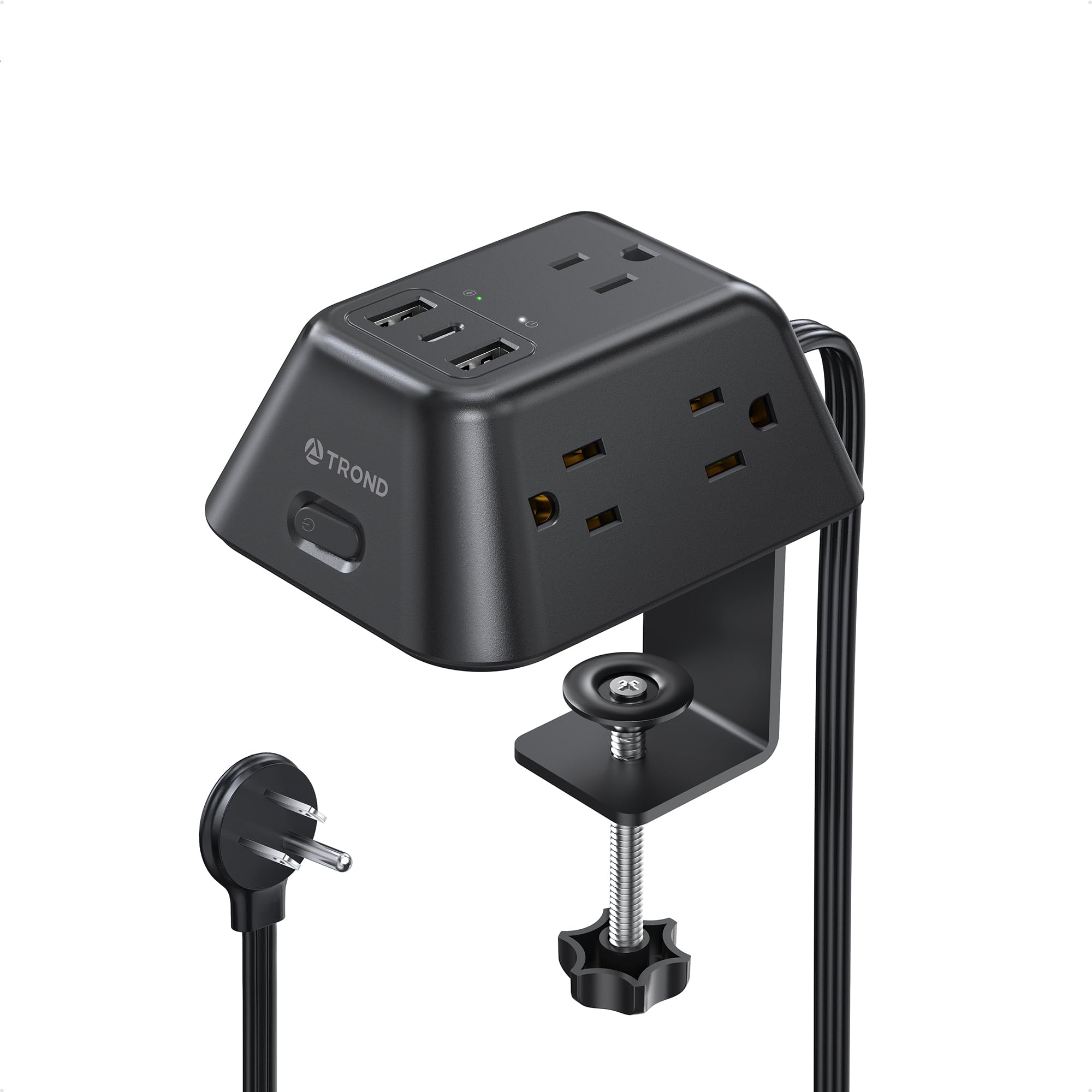
What wins people over here is stability. The clamp grips an edge up to 1.97″ thick and stays put, so plugging in a cable no longer yanks the strip onto the floor. You get 5 AC outlets plus 3 USB ports in a body measuring 4.1″ by 3.8″. That is small enough to crowd nothing and big enough to charge your laptop, monitor, phone, and headphones at once. That is eight devices from one wall socket, with no adapter chain.
Bulky power bricks sit properly instead of leaning on each other and popping loose. You also get 1440 joules of surge protection (a rating for how much energy spike it can absorb). Put your computer, printer, and router behind it: a lightning-storm spike or brownout gets absorbed before it reaches the hardware. The 6ft flat extension cord runs 0.15″ thin, and the 45-degree flat plug measures 0.33″, so it tucks behind a cabinet or under a rug without forcing the furniture out from the wall.
Set expectations on the charging speed, though. The USB-C port is rated 5V/3.0A and the two USB-A ports 5V/2.4A — perfectly good for a phone, earbuds, tablet, or camera, but not a fast-charge laptop port. This is a desk power hub, not a high-wattage charging brick. The other honest note is value: this is the pick most owners call good money for what it does, though the cost-per-outlet math gets less flattering if you only ever use two plugs.
Why It Holds The Top Slot
- Clamp mount keeps all eight ports at desk height and off the floor, rated for edges up to 1.97″ thick
- Three-sided, outward-facing outlet layout swallows bulky bricks that normally block a neighbouring socket
- 1440J surge protection covers a full home office worth of electronics
- Flat 45-degree plug and 6ft flat cord fit behind furniture without a gap
Where It Tops Out
- USB-C is 5V/3.0A rather than a Power Delivery laptop port, so big laptops charge slowly
- The cost-benefit only sings if you genuinely have several devices to feed
Reach for it if: your desk runs on six plugs and a tangle of bricks, and you want the whole mess lifted off the floor permanently.
Look elsewhere if: you need laptop fast-charging from a USB-C port — the Mifaso below carries a 30W PD charger instead.
2. MEKASS Ergonomic Wrist Rest for Keyboard and Mouse Set
Two pads, one job: keeping your wrists off the hard edge of a desk.
Softness is the headline with this set, and it is not a vague claim. The keyboard pad and mouse rest are filled with slow bounce-back memory foam (foam that springs back slowly) under a lycra cover. That slow rebound is the point: the foam gives under your wrist and then comes back, rather than flattening into a pancake by month three. The keyboard pad runs 17.32″ long by 3.15″ wide and 0.79″ thick, so it spans a full-size board. The mouse pad is 6.23″ by 3.54″ at the same thickness. Together they weigh 0.38 kg.
Where the MEKASS pulls ahead of a plain foam pad is the base. A non-slip silicone underside holds it against metal, wood, glass, or plastic desktop surfaces, so you are not chasing the rest back into position mid-sentence. The surface itself carries a raised massage pattern — small bumps that give your hand something to settle into during a long stretch of typing. That grip is what keeps the pad in place through a full typing session.
Firmness is the trade-off to think about before ordering. Memory foam that stays this soft is a fit question, not a defect — if you like a firmer brace under your wrist, a denser foam will suit you better. And the thickness of 0.79″ raises your hands slightly, so give yourself a session or two to adjust your typing angle rather than deciding in the first hour.
The fit that matters: both pads are sized for common keyboard and mouse footprints rather than a fixed desk layout, so they drop onto most setups without measuring.
What you give up: soft memory foam rewards gentle pressure; press hard and you sink rather than brace.
Best for: anyone whose wrists notice the desk edge by mid-afternoon and wants a soft landing rather than a rigid brace.
Think twice if: you prefer a firm, flat support or you use a compact keyboard smaller than the 17.32″ pad.
3. KIBAGA Aesthetic Desk Organizer Set of 3 – Sturdy Concrete
Three grey concrete blocks that make a cluttered desk look deliberate.
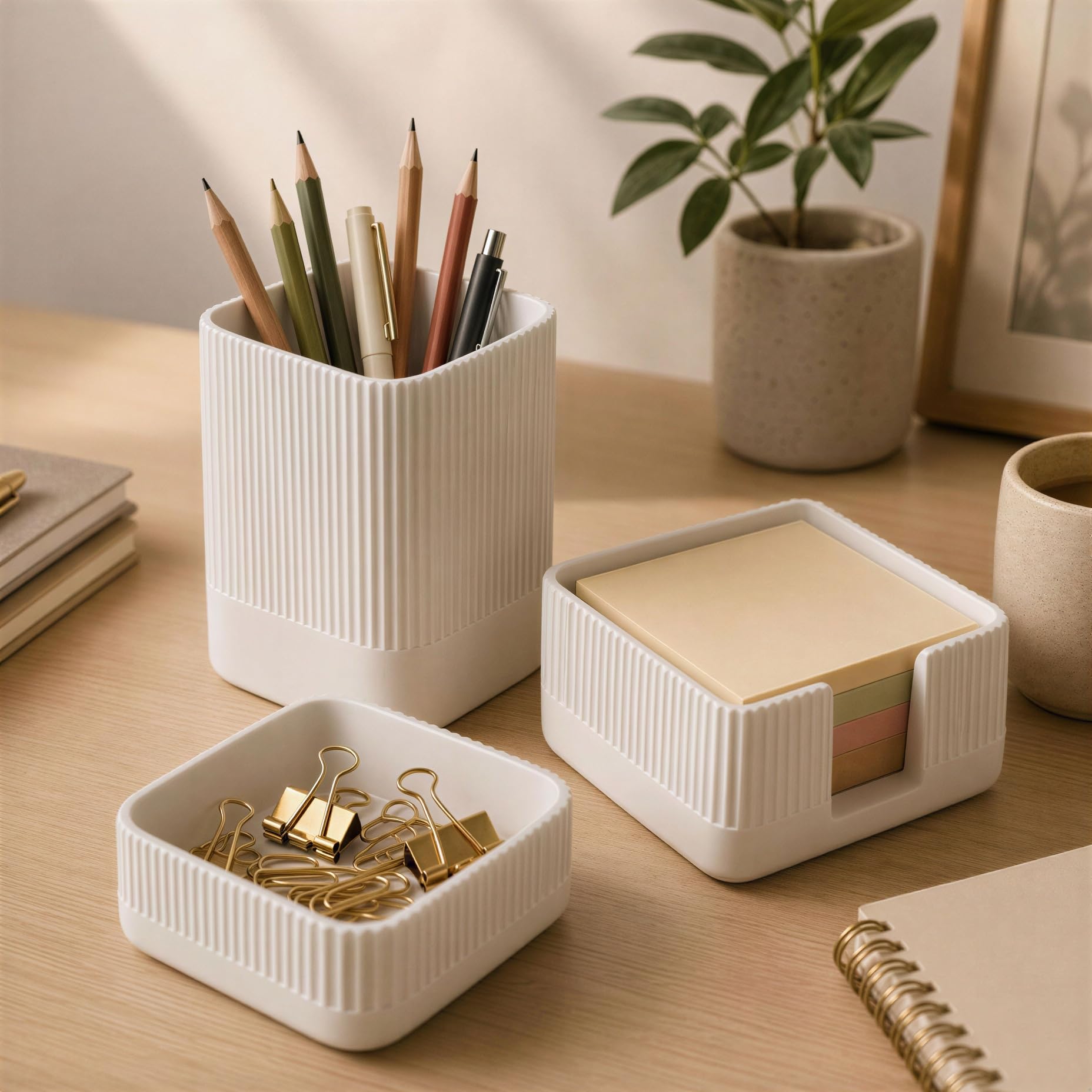
Quality is what this set trades on, and the material explains it. The three pieces are cast in concrete with a thick matte texture, which is why they hold their shape and sit heavily on the desk instead of skating across it. You get a pen holder, a paperclip holder, and a sticky note holder, together holding 24.38 cubic inches of small stuff. The whole set weighs 0.59 kg — heavier than the MEKASS wrist rest set above at 0.38 kg, and that extra heft is exactly what stops a pen pot from tipping when you drop a pen in.
Here is the one number to check against your own desk. This set is compact by design: the widest piece is 3.5″ across, and the full set is 3.5″ deep, 3.5″ wide, and 3.75″ tall. Compare that to the gianotter wood organizer below, which spans 13.2″ wide by 9.25″ deep by 9.4″ tall — a 3.8x gap in width and a 2.6x gap in depth. If you have a narrow desk or a shallow shelf, the concrete set is the one that fits. If you are drowning in A4 paper, it is the wrong tool entirely.
The caveat is size expectation, and it cuts honestly. Some buyers expect the sticky note holder to swallow a standard pad and find it smaller than they pictured, and the stack does not always line up exactly at the base. Measure your notes before you commit. Think of it as a desk-jewellery set that also holds pens, not a filing system.
Material honesty: concrete means real weight and a matte stone finish, so it stays put and hides fingerprints far better than glossy plastic.
The catch: the sticky note holder is sized for smaller pads — check your refill pack before ordering.
Suits you if: you want a tidy pen-and-clip zone on a compact desk and you like the look of raw concrete.
Skip the set if: your clutter is paper-based — the wood organizer handles documents, this one handles small pieces.
4. gianotter Wood Desk Organizer

A vertical filing stack that turns a paper avalanche into four labelled shelves.
Four trays, one magazine rack, one pen holder, and a sliding drawer — that is the full component list, and it is aimed squarely at anyone whose desk is really a document problem in disguise. The vertical layout is the clever part: it uses height instead of floor space, so 13.2″ of width and 9.25″ of depth buys you four separate paper levels plus a drawer. Every compartment is open to view, which is the difference between a file you can grab in two seconds and a pile you have to sort through.
Assembly is where this one pleasantly surprises people. The tray arrives with detailed instructions and matching tools, so the build is a sit-down job rather than an afternoon project — and owners consistently call the result sturdy once it is together. The body mixes wood with alloy steel and plastic, and the outer surface is powder-coated and rust resistant, which is why it survives coffee-desk humidity without peeling. It weighs 4.4 lb, so once it is loaded with paper it is not moving anywhere.
Be clear about the space claim, because it is the biggest of the organizers here. Opening this up is the opposite of the concrete set’s 3.5″ footprint — you are giving over a real corner of the desk. There is also a generous 100-day return window if the fit is wrong, which takes the risk out of measuring badly.
What It Gets Right
- Four paper tiers plus a magazine rack, pen holder and drawer in one vertical unit
- Powder-coated, rust-resistant finish holds up on a drinks-and-snacks desk
- Instructions and tools included, so assembly is quick for a flat-pack
What It Asks Of You
- 13.2″ wide by 9.25″ deep by 9.4″ tall — it claims a genuine chunk of desktop
- 4.4 lb empty, so plan a permanent home for it rather than moving it daily
Take this route if: invoices, notebooks, and printouts are what bury your desk, and you want them stacked and reachable.
Pass on it if: your desk is narrow — the concrete set fits a much tighter footprint.
5. Mifaso PD30W Desk Clamp Power Strip with Surge Protector

The clamp strip that can actually fast-charge your laptop, thanks to a 30W USB-C port.
This is the direct answer to the TROND’s weak spot. The TROND tops out at 5V/3.0A on USB-C, while the Mifaso carries a true 30W Power Delivery port. That standard lets the strip negotiate a higher voltage with a laptop or tablet, so it charges at a useful rate rather than trickling. It steps through 5V/3A, 9V/3A, 12V/2.5A, 15V/2A, and 20V/1.5A, so a MacBook, iPad, or phone each get the voltage they ask for. The maker notes the fastest charging comes from using the USB-C1 port alone. The maker also notes that running several USB ports together shares out a combined maximum of 18W.
Count the sockets: 4 AC outlets plus 4 USB (including 2 USB-C), which the maker totals as an 8-in-1 arrangement. The AC spacing is unusually generous at 1.9″ between sockets, so two chunky adapters can sit side by side without one blocking the other. That is worth checking against the TROND’s three-sided layout if you run power bricks. Surge protection sits at 1080 joules. The 5ft cord reaches a distant wall outlet, and the 45-degree right-angle plug leaves room for other plugs below it.
Two installation facts decide whether this fits your desk. The clamp is recommended for edge thickness between 0.5 and 1.96 inches, and the maker asks you to leave 0.4″ to 0.5″ of clearance from the wall. Mounting needs no drilling — the clamp screws on and foam pads protect the surface. One practical caution: the maker specifies a total connected load not to exceed 1875W/15A, so this is not the strip for a space heater alongside your workstation.
Pick it if: a laptop lives on your desk and you want it charged from the edge without a separate brick and cable run.
Check first if: your desk edge is thinner than 0.5″ or thicker than 1.96″ — the clamp will not seat properly outside that range.
6. LAPGEAR Home Office Lap Desk, Espresso Woodgrain
A 2.14 lb desk that travels from the sofa to the bed to the patio table.
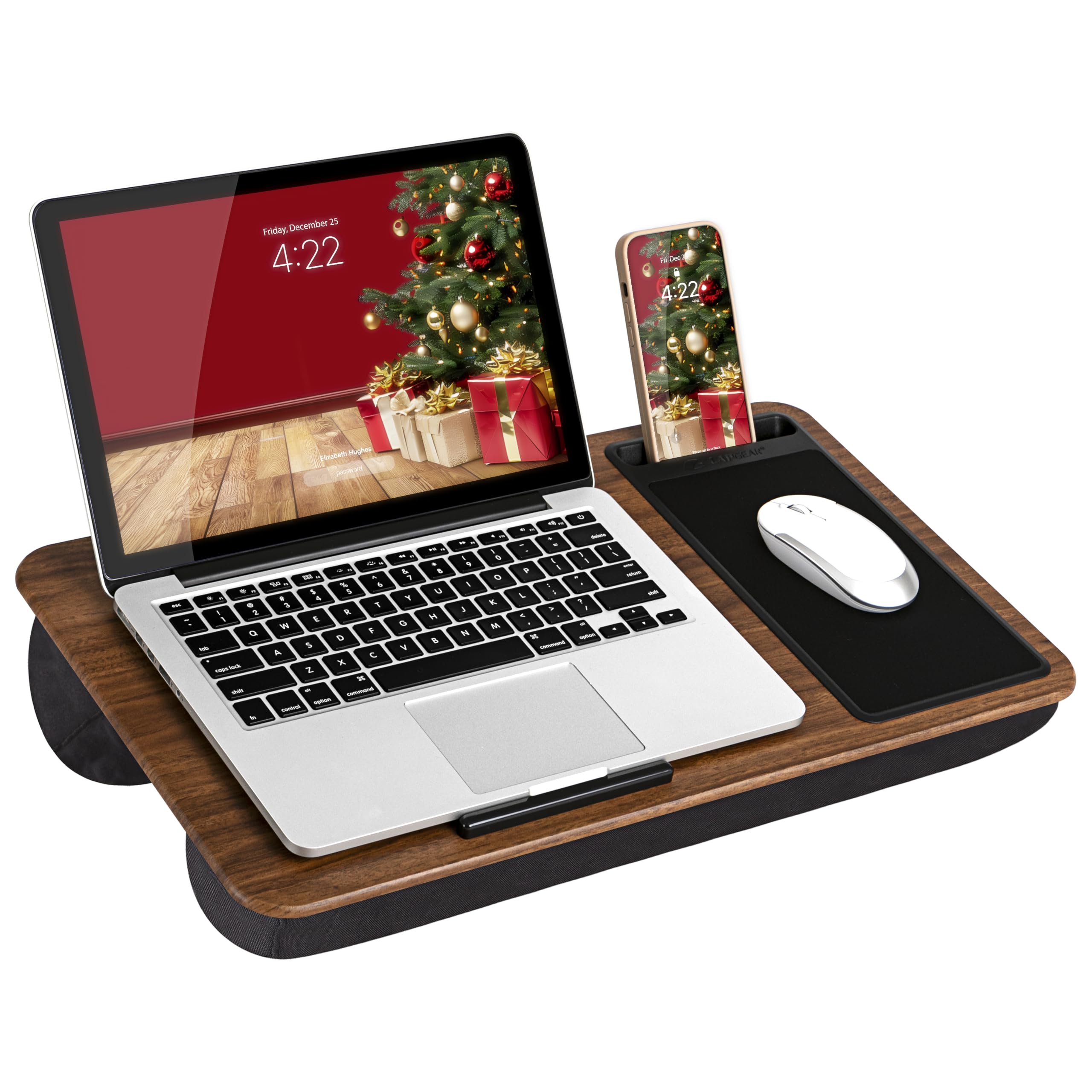
Comfort is the whole reason this one exists, and it comes from the underside rather than the top. The dual-bolster cushion presses against your legs, holds the platform steady, and leaves airflow through the middle so your lap does not turn into a hot plate during a long call. The top surface is a solid espresso woodgrain panel measuring 21.1″ wide by 12″ deep, sized for laptops up to 15.6″.
What makes it a workstation rather than a tray is the built-in layout. There is a 5×9″ precision tracking mouse pad on the right and a phone slot moulded in, plus an integrated device ledge that stops the laptop sliding forward when you shift position. Everything travels with the desk — nothing to set up, nothing to lose. At 2.14 lb with a built-in handle, you can carry it one-handed from the kitchen table to the living room when the afternoon needs a change of scenery.
The trade-off is genuinely about how you sit. A lap desk is a mobile surface, not a replacement for a proper chair-and-monitor setup. Stability on the cushion varies with leg position and cushion firmness, and buyers report it can shift as you move. Treat it as the second workplace in your house, the one for reading and email, and keep the desk for the heavy sessions.
Where it wins: the mouse pad and device ledge mean a real mouse-and-laptop session without a table in sight.
The honest limit: a cushioned platform on your lap will shift slightly when you cross your legs.
Made for you if: your best thinking happens on the sofa and you want the mouse to work there too.
Look at a desktop organizer instead if: you need a fixed, permanent workstation that never moves.
7. Univivi No-Drill Under Desk Cable Management Tray, 36 inch
Thirty-six inches of fabric tray that swallows every cable and brick under your desk.
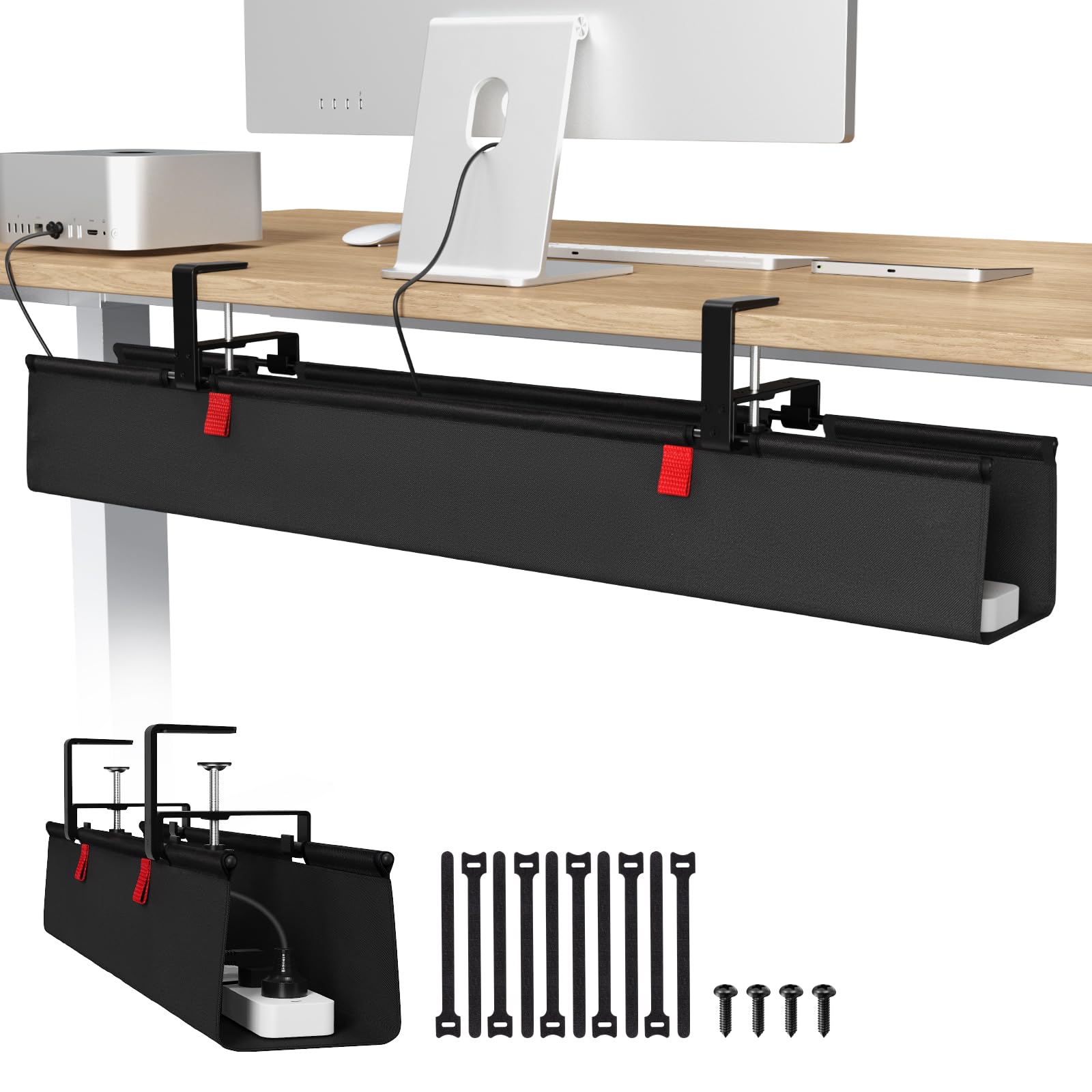
Quality is what the Univivi is built on, and the material choice explains why. The tray is thick 600D oxford fabric — a heavy woven cloth — rather than thin sheet metal, it carries a bottom support that holds its shape under load, and the fabric is flame retardant. At 36″ long, 5.5″ wide, and 5.5″ tall, it is sized for full-size adapters and power strips, not just loose cords. Built-in ties let you fix each item in place so nothing migrates to one end.
The installation gives you a genuine choice. You can clamp it on with the screw-free bracket, which the maker rates as heavy duty, or fasten it with screws — and it works on wood, glass, and metal table tops. The tray also unfolds, so you can drop a power brick in or pull one out without lying on the floor and reaching blind. That single detail is what turns cable management from a one-time chore into something you will actually maintain.
Measure before you buy, because this tray has real clearance rules. If your desk has built-in drawers or a back rod, you need at least 5.3 inches of clear space along the edges or the clamps cannot attach. It also fixes underneath with clips that need a lip of tabletop to grip, so a completely flush underside is a no-go. Being able to see the clips is part of the design — this hides cables, not the tray itself.
The Case For It
- 36″ x 5.5″ x 5.5″ capacity holds full power bricks and strip adapters, not just wires
- Clamp-on for renters, screw-in for permanence — works on wood, glass and metal tops
- Unfolds for easy access and uses built-in ties to keep everything fixed
- Thick 600D oxford fabric with a bottom support holds shape under weight
Measure Twice
- Needs at least 5.3 inches of clear space along edges if your desk has drawers or a back rod
- The mounting clips need visible tabletop lip to grip, so it is not fully hidden
Choose it when: the underside of your desk is a nest of bricks and you want the floor behind you clear in one afternoon.
Rethink it if: your desk is fully enclosed with drawers to the wall, leaving no room for the clamps.
8. Quntis Computer Monitor Lamp

A light bar that lights your keyboard without putting a glare stripe on your screen.
The asymmetrical optical design is the spec that earns this lamp its place. Instead of throwing light forward onto the panel, the beam is shaped to fall only on the desk area — so your screen stays readable and the keyboard, notebook, and coffee mug are lit. It mounts with a weighted clip on top of the monitor, which takes no desk space at all. If you have ever angled a desk lamp around a glare problem, this is the cleaner answer.
Then there is the light itself. The bar carries 78 LED beads and runs from 3000K to 6500K — warm through cool daylight — with stepless brightness and color temperature control by touch. A built-in ambient light sensor watches the room and adjusts the output toward 900 lux, keeping the desk lit without overdoing it. Colors come through accurately too, with a Ra98 color rendering index, which is why it suits anyone judging photos or design work on paper. The 6.5 ft USB cable gives you sensible reach to a port or brick.
Flicker and glare are the two things to test for yourself once it is mounted. The maker certifies the bar to the IEC/TR 62778 and IEC/EN 62471 standards for blue-light and flicker performance. Setup takes about five minutes. The one adjustment to plan for is clip depth — very curved or ultra-thin monitor backs may not grip as securely, so check the top edge of your panel before you commit.
Standout spec: 78 LED beads across 3000K–6500K with an ambient sensor that target 900 lux — a real range from dim to bright without a separate lamp on the desk.
Heads-up: the weighted clip depends on a reasonably flat monitor top; a curved panel can make the mount fussy.
Buy it for: late shifts when the room light is too dim but a full desk lamp throws glare at the screen.
Not the right lamp if: you need light for a whole room rather than the desk surface directly in front of you.
9. ComfiLife Gel & Memory Foam Seat Cushion, Gray

A 2.8-inch gel cushion that turns a hard kitchen chair into something you can sit through a meeting on.
A medium-firm gel and memory foam cushion is the simplest upgrade to any desk chair, and the size is the first thing to check. This one measures 17.5″ long, 13.7″ wide, and 2.8″ tall and weighs 1.5 pounds, so it sits on a standard seat without overhanging and lifts you slightly rather than turning the chair into a sofa. The U-shaped cutout at the back is designed to sit under your tailbone so pressure moves off that spot — place the cutout at the back, not the front.
The materials are what keep it usable day after day. A cool-gel layer sits on top of the memory foam to counter heat buildup, and the core is described as medical-grade memory foam engineered to hold its shape through long sitting. A non-slip rubber bottom keeps it from sliding on slick surfaces, there is a built-in handle for carrying it between rooms, and the zippered velour cover is removable and machine washable. It is recommended for office chairs, car seats, gaming chairs, wheelchairs, and airplane seats alike.
The honest part: this is a medium-firm lifting cushion, not a plush pad. It raises your hips slightly, so on soft seats or deep car buckets it can feel tall at first. The fix is simply to lower your chair height a notch. Treat the height as something you adjust around rather than a fault. It is the longest-running pick in this guide, and reviewers consistently report comfort through a full working day.
Worth it for: a hard desk chair, a long commute, or a kitchen table you sit at for hours — the gel layer keeps it from going flat.
Adjust around it if: your seat is very soft; the 2.8″ height can feel tall until you lower the chair.
Know the Specs
Surge Protection in Joules
A joule rating tells you how much energy a strip can absorb before the surge reaches your devices. Higher numbers mean more headroom, and both clamp strips here carry meaningful ratings — 1440 joules on the TROND, 1080 joules on the Mifaso. For a desk with a computer, monitor, and router behind it, that headroom matters during a storm or a brownout. It is protection, not a guarantee, so unplugging during a known lightning event is still the safest move.
USB Power Delivery Wattage
Power Delivery, usually written PD, is a charging standard that lets a device and a charger agree on voltage and current. Wattage is the useful number: 30W on the Mifaso’s USB-C port can top up a laptop or tablet at a workable rate, while a plain 5V/3.0A port on the TROND is best reserved for phones and small gadgets. Watch the combined output when several ports run at once — the total gets shared rather than delivered to each port at full strength.
Desk Clamp Thickness Range
A clamp power strip is only as good as its grip, and the grip depends on edge thickness. The TROND handles desktops up to 1.97″ thick; the Mifaso is recommended for edges between 0.5 and 1.96 inches. Measure the actual surface you plan to attach to, including any trim. A clamp outside its range will either refuse to close or wobble under the weight of a plugged-in brick, and neither ends well for your electronics.
Color Temperature and Lux
Color temperature, measured in kelvin, describes how warm or cool the light looks — 3000K reads warm and easy on the eyes at night, 6500K reads like midday. Lux measures how much light lands on a surface. The Quntis bar spans 3000K to 6500K and its sensor steers output toward 900 lux, keeping the desk readable without glare. For evening work, a warmer setting at lower brightness is generally the gentler choice.
Common Questions
Will a desk clamp power strip fit my standing desk?
How many devices can I charge from one clamp power strip?
Do I need a drill to install an under-desk cable tray?
Is a monitor light bar better than a normal desk lamp?
What does 1440 joules of surge protection actually mean?
Can the Quntis monitor lamp dim right down for evening work?
How do I stop a memory foam wrist rest from sliding on my desk?
Will a lap desk work as my only work surface?
How thick is the ComfiLife seat cushion and will it fit my chair?
Do I need an under-desk tray if I already have a clamp power strip?
The Bottom Line
If you change one thing about your home office, make it the power. The TROND Desk Clamp Power Strip fixes the most daily friction: 5 AC outlets and 3 USB ports clamped to the edge of your desk, so every charger is at hand and nothing lives on the floor. Most owners call it good value for the job, and it earns the top slot because it solves the annoyance you repeat dozens of times a day.
Then attack the other two problems in order of how much they bother you. If cables under the desk drive you mad, the Univivi Under Desk Cable Tray swallows 36 inches of bricks and wire and takes an afternoon to install. If your wrists or your seat are the issue, the MEKASS wrist rest setand the ComfiLife seat cushion address the parts of a long workday that a better desk cannot reach.
For the desk itself, the small stuff adds up. The KIBAGA concrete organizer set keeps pens and clips in one compact 3.5″ footprint and stays exactly where you put it. Add the Quntis monitor lamp once evening work starts, and the LapGear lap desk for the couch days when you want the mouse to work away from the desk. Pick the one that matches your worst daily annoyance and fix it this week — the rest can follow.
How we choose
We do not accept paid placement. Every pick is matched to a real buyer and a real use-case; we do not hands-on test units.
Sources
Specifications: manufacturer listings and product documentation. Review insights: verified customer reviews, as of November 2026. Pricing: not shown on this page (it changes often); check the current price via the retailer link.
As an Amazon Associate, Tactical Gear Guy earns from qualifying purchases. This does not affect which products we feature.