Specs are compiled from manufacturer listings and verified buyer reviews and can change over time — please confirm the key details on the product page before buying.
If your crew still writes hours on a paper sheet, you already know the pain: someone always rounds up, someone always forgets to sign out, and payday turns into an argument. A work time clock fixes that by stamping the real time on a card the moment an employee walks in — no estimating, no disputes. This guide compares eleven punch clocks and time-stamp machines on card capacity, calculating, and backup so you can match one to your crew size.
This guide is built by comparing the manufacturers’ published specifications and the patterns across verified customer reviews, so you get each pick’s real strengths and trade-offs instead of marketing spin.
Your first decision is simple: do you want a card-punch machine that keeps paper records, or a calculating unit that totals hours for you? The differences are spelled out below, so you know whether you’re buying a stamp-only punch or a calculating clock before you spend.
Top Picks


How To Choose The Best Work Time Clock
A ten-person crew needs a very different clock than a warehouse running three shifts. Before you compare models, answer three questions about your own operation: how many employees punch in, how complicated your pay periods are, and if you want paper cards or a number you can hand straight to a bookkeeper.
Auto-Aligning Card Feed vs Manual Loading
With a manual clock, the employee has to line the card up in the slot themselves. With an auto-aligning (also called auto-feed or Tru-Align) clock, the machine grabs the card and positions it for you. That single feature is what stops the crooked, half-printed punches that make a card unreadable at payroll time. If a lot of your staff are new, seasonal, or switching shifts constantly, auto-alignment is the feature to pay for.
Plain Time Stamp or Calculating Clock
A basic time stamp just prints the time and date on the card — you still subtract the numbers yourself or type them into a spreadsheet. A calculating clock does that subtraction for you and totals regular and overtime hours right on the card. For a small shop where the owner totals hours by hand on Sunday night, the calculating model usually saves the most hassle. For a larger operation that already uses payroll software, a clean printed card may be all you need.
Battery Backup and Time Format
Battery backup keeps the clock’s time and settings alive when the power drops, so you are not resetting everything after an outage. Look for a stated backup window. On the format side, check whether the machine prints 12-hour AM/PM, 24-hour military time, or hundredths of an hour (decimal hours). That last one matters because payroll systems often bill in decimal hours, so a clock that prints in hundredths skips the conversion step.
Side-by-Side Comparison
| Model | Best For | Type | Included Time Cards | Stated Weight | Amazon |
|---|---|---|---|---|---|
| uPunch CR1000★ Best Overall | Small business time + date stamping | Digital time clock + date stamp | 50 | 4.4 pounds | Amazon |
| Allied Time AT-2700Most Hygienic | Touch-free punch-ins | Touch-free time clock | — | 1.88 kg | Amazon |
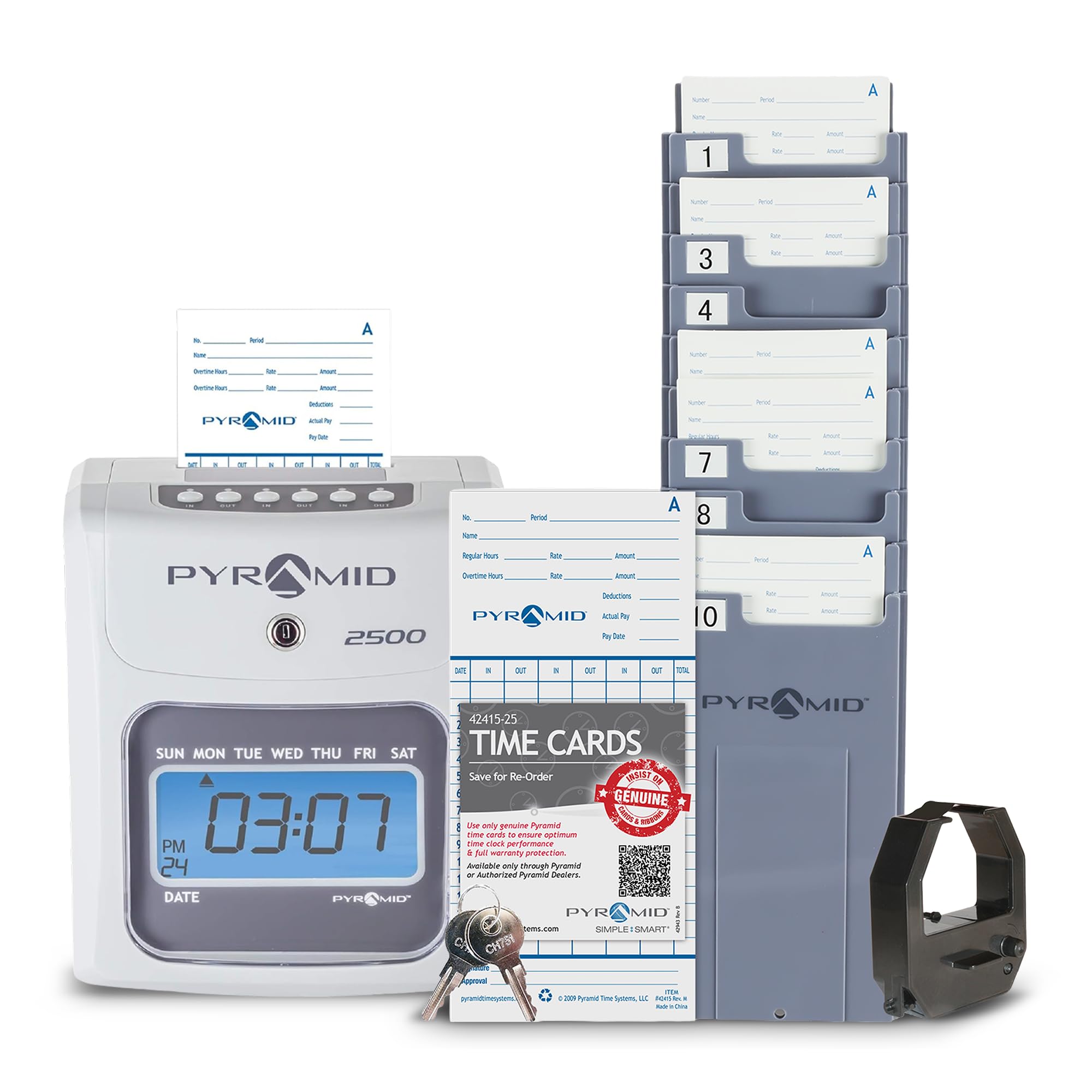
| Pyramid 2500Best Card Value | Unlimited employees, six-column cards | Auto-aligning card punch | 100 | 3.1 pounds | Amazon |
| uPunch HN4500 | Calculating for up to 50 employees | Calculating time clock | 200 | 8.8 pounds | Amazon |
| Allied Time AT-3000R | Time clock + document stamp in one | Time clock + date stamp | — | 4.94 pounds | Amazon |
| Acroprint ES900 | Small offices wanting preset messages | Time clock + date stamp + numbering | — | — | Amazon |
| Lathem 1600E | Project time tracking for invoicing | Electronic time clock + document stamp | 25 | — | Amazon |
| Allied Time AT-4500 | Calculating for 10 or fewer hourly staff | Calculating touch-free clock | — | 2.45 kg | Amazon |
| Amano TCX-35 | Document control and mail room tracking | Electronic punch clock + message stamp | — | 5 pounds | Amazon |
| Pyramid 5000 | Auto-totaling for up to 100 employees | Auto-totaling time clock | 25 | 5 pounds | Amazon |
Detailed Reviews
1. uPunch CR1000 Digital Time Clock
Our pick — 4.5+★ from 600+ verified ratings; the strongest balance of quality and price.
One box that punches cards and stamps paperwork, with 50 cards and a ribbon already inside.
If you run a front desk or a small office, you are usually doing two jobs at once: tracking when people arrive and logging when paperwork came in. The uPunch CR1000 handles both because it prints time and date on employee time cards, then switches to date-stamping documents with preset messages and 3-way printing. You get the machine, 50 time cards, one ribbon, and two keys in the same box, so there is no separate supply order on day one.
The cover has a window cut into it so you can see and load cards without pulling the whole lid off — a small thing that speeds up the morning rush. Timekeeping itself is digital and accurate, which is the whole point: it prints arrival, break, lunch, and departure times so you stop subtracting them by hand. At 4.4 pounds it sits on a counter without wandering, and the CR2 battery it needs is included.
Here is the honest catch, and it is the one thing to weigh before you buy. The build is plastic and the long-run durability story is not this machine’s strength — a small number of buyers report trouble within months, and reliability is genuinely mixed rather than universally praised. If your team punches four times a day, every day, and you want a machine that will run untouched for years, budget for that. For a modest office that wants clock and stamp duties covered by one countertop unit, it fits neatly.
What earns it the top spot
- Two jobs in one unit: employee punches plus document date-stamping with preset messages.
- 50 time cards, a ribbon, and two keys come in the box — nothing extra to buy to start.
- Loading window in the cover makes card swaps quick during a shift change.
- Digital printing removes the manual math from arrival, lunch, and departure times.
Where it asks for care
- Plastic housing and a mixed long-term durability picture; treat it as an office machine, not a job-site one.
- Occasional reports of early failure mean keeping the receipt and warranty paperwork handy.
Reach for this if: you want one countertop machine to punch employees in and stamp incoming paperwork without buying two devices.
Look elsewhere if: your clock lives on a dusty construction site where a plastic body will take a beating.
2. Touch Free Small Business Time Clock AT-2700
No buttons, no alignment, no shared surfaces — just drop the card and walk.
Some workplaces cannot afford a shared button panel that a dozen hands touch every shift change. The AT-2700 sidesteps that entirely: the card feed is fully automatic, the machine aligns the card itself, and there is nothing for the employee to press. You drop the card in and it prints. That design also removes the single most common source of bad punches — someone jamming a card in crooked because they were in a hurry.
Setup is genuinely quick, with a guided menu and a Quick Start Guide that the maker describes as a 2-minute job, plus lifetime phone and email support. You can print hours in AM/PM or 0-23 military format, and minutes in 60ths or 100ths, which means the card can match whatever your payroll process expects. Daily punch times are unlimited, and each card carries your pay-cycle date so a stack of cards stays sortable.
What deserves a fair warning is reliability. Some owners mention a unit that quit within days, while plenty of others run theirs without complaint — it is a mixed picture, not a uniform one. If you buy this, keep the support number close, because that lifetime support line is part of what you are paying for. For a clean, low-touch front office it makes real sense; for a dusty warehouse, a sturdier card machine is a better bet.
The case for it: Touch-free operation and a guided setup that gets you punching the same day. Hour formats (12 or 24, 60ths or 100ths) cover most payroll conventions without a conversion chart.
What to know: Reliability splits both ways — great units exist, and so do early failures. Budget for the possibility and lean on the included lifetime support.
Suits you when: hygiene and speed at shift change are the priorities and you want zero buttons for staff to fumble.
skip it if: you need a clock that shrugs off a rough shop-floor environment every single day.
3. Pyramid Time Systems 2500 Auto Aligning Time Clock
A hundred cards in the box and room for an unlimited crew — this is the workhorse buy.
Start with the supply math, because it is where the Pyramid 2500 quietly wins. This kit ships with 100 time cards; the Pyramid 2650 ships with 25. That is a difference of 75 cards before you place a single reorder. Add in an ink ribbon cartridge and two security keys and you are running the same afternoon you unbox it.
The card handling is the other reason it earns its place. Cards load from the top and align automatically, and the six-column format records three in-and-out punch cycles per day so arrivals, breaks, lunches, and departures all land on one card. Cards are two-sided, covering days 1 through 15 on side A and 16 through 31 on side B, which lines up with both weekly and biweekly pay periods. Employee count is unlimited, so growing your team does not mean replacing the clock.
The recurring gripe is arithmetic: several customers note the machine does not add up hours properly, so treat the printed times as your record and do the totals yourself or in payroll software. Quality and ease of use are what keep this clock in service, and the seven-day battery backup means a power cut does not wipe your settings. It also doubles as a document time stamp when you need proof of when something came in.
Why it holds up: 100 cards, a ribbon, and two keys upfront, unlimited employees, and top-loading auto-align so nobody jams a card. Military or 12-hour display and seven-day backup round out a dependable daily driver.
The arithmetic caveat: hour totals have drawn complaints, so plan to verify your own math rather than trusting the running sum.
Pick this one if: you want the best supplied-and-ready card machine for a growing crew and don’t mind confirming the hour totals.
Think twice if: you need the clock itself to do flawless payroll calculating — that is a different job for a different model.
4. uPunch HN4500 Advanced Calculating Time Clock Bundle

The card supply here is absurd in the best way — 200 cards, three ribbons, two racks.
If your payroll week ends with you squinting at a stack of cards doing subtraction, this is the model built for you. The HN4500 does the calculating itself, computing regular and overtime hours for up to 50 employees and printing the totals right on the card. That means the number you carry to payroll is already done — no spreadsheet, no rounding debate.
Then there is the bundle, and it is the headline for a reason. You get 200 time cards, two 10-slot racks to keep them organized by employee, three ribbons, and two keys. That is 175 more cards than the Pyramid 2650 includes. The dual racks matter more than they sound: 50 employees’ cards scattered on a counter become chaos fast, and slots keep each one findable.
Two things to weigh honestly. First, this is a big machine — 15 inches wide by 12 inches high and 8.8 pounds, so it needs real counter or wall space, unlike the compact Pyramid above. Second, the calculating is not universally loved: some owners find the configuration fiddly, and a few report totals that came out wrong. When it works, it saves real payroll time; when it doesn’t, you are back to checking the math. Set it up carefully and test a full pay cycle before trusting it.
What it takes off your plate
- Computes regular and overtime for up to 50 employees, printed on the card.
- 200 time cards, three ribbons, two racks, and two keys all in the box.
- Dual 10-slot racks keep a 50-person card stack organized.
- Two-year warranty with weekday customer support.
Where to slow down
- A full-size unit at 15 inches wide by 12 inches high and 8.8 pounds — it needs dedicated space.
- Configuration can be fiddly, and totals occasionally come out wrong, so verify a pay cycle first.
Go here when: you are done doing payroll math by hand and want a large team’s cards organized and totalized in one system.
Hold off if: you are short on counter or wall space — this is the biggest unit on the list.
5. AT-3000R Allied Time USA Digital Time Clock and Date Stamp

A punch clock that also stamps your mail with RCVD, FAXD, or PAID in one press.
Plenty of small businesses need two things from one machine: employee punches and proof that a document landed. The AT-3000R covers both, printing date and time on a time card for payroll, or stamping a document with one of 13 preset short messages like RCVD and FAXD. You can set the print to the left or right and adjust the depth margin so the mark always lands inside the box you meant.
It handles the payroll conventions most businesses argue about. Print hours in 12- or 24-hour format and minutes in 60ths or 100ths of an hour, so the card matches your payroll system. Menus are available in English, Spanish, French, and Portuguese. An optional password keeps employees from changing the date and time, which is exactly the protection you want when punches drive pay. The maker backs it with a 2-year warranty and lifetime support.
The honest downside centers on card alignment: lining up a time card by hand takes practice, and the print quality splits opinion — clean for some, hard to read for others. The machine is reliable and easy to set up, so the friction is in the card work, not the electronics. If your staff are patient and the card count is modest, this earns its keep; if you want zero alignment effort, go for an auto-align model instead.
Where it shines: dual duty as punch clock and document stamp, with 13 preset messages, adjustable print position, four menu languages, and password protection against tampering.
The hand-work caveat: card alignment needs a steady hand, and print legibility divides opinion — offset with the 2-year warranty and lifetime support.
Built for you if: your office needs both payroll punches and stamped proof-of-receipt on paperwork from a single unit.
Not the one if: your whole crew punches rapidly at shift change and you cannot afford alignment fumbles.
6. Acroprint ES900 Electronic Payroll Recorder

Sets its own time from the U.S. Atomic Clock and corrects for daylight saving on its own.
Most punch clocks make you set the time once and then trust it. The ES900 removes that trust question by syncing to the U.S. Atomic Clock, the official time signal, so its printed time stays correct without you adjusting it. It also auto-adjusts for daylight saving, which means no scramble twice a year and no payroll discrepancy from a clock running an hour off.
Beyond payroll punches, it does double duty as a date stamp and a numbering machine, which suits a small business that processes invoices or purchase orders and wants serial numbers on paper. The print flexibility is unusual: over 300 configurations with multilingual preset messages, so you can set it to stamp exactly the wording your documents need. A metal frame gives it a sturdier feel than the plastic-bodied models on this list, and a battery keeps settings intact during outages, though how long that battery lasts varies. Password protection locks in consistent tracking.
The thing to know is that its current owner base is smaller than the card-punch flagships, so long-run feedback is thinner — functionality is what people praise, and small-business fit is the recurring theme. It works best as a flexible stamping station for a modest office. If you want a dialed-in, high-volume crew punch clock with a huge card supply, the uPunch HN4500 is the more direct call.
The edge in practice: Atomic Clock sync and automatic daylight-saving correction keep printed times honest without maintenance, while 300+ print configurations and multilingual messages cover document stamping and numbering in the same machine.
Fair caveat: Backup battery life varies, and this model has fewer owners reporting long-term experience than the bigger names here.
Ideal for: an office that wants self-correcting time plus a flexible multi-format stamping station in one metal-bodied unit.
Consider the alternative if: you are punching a large crew many times a day and need a high-capacity card machine built for volume.
7. Lathem 1600E Time Clock Machine and Document Stamp

Tracks payroll hours and project time to the minute, so invoicing stops guessing.
If you bill clients by the hour, payroll time and billable time are not always the same number. The Lathem 1600E handles both: it records in and out times for payroll, and separately tracks project time down to the minute so job costs and invoices come out accurate. Contractors and small shops that bill by the job often need exactly that split.
The document side is just as useful. It prints date, time, and 13 preset messages like SENT, PAID, FILED, and VOID on business paperwork, giving you a paper trail of when something went out. Tru-Align time cards (25 included) are designed to feed cleanly for quick printing and aligned punches. Its internal calendar updates the year, month, and date on its own — the maker states it runs without resetting until Year 2099, so you will not be reprogramming dates.
Weigh two things before you commit. Time accuracy has drawn mixed feedback, with some owners reporting the clock does not keep time correctly, and a few describe trouble within the first couple of months. Quality and ease of mounting are the recurring positives, so the hardware is well regarded even where the clock keeping is not. If your invoices depend on minute-level accuracy, check its time against a reference regularly and you will get the most from it.
The billing advantage
- Separate project-time tracking to the minute supports accurate invoicing and job costing.
- Prints date, time, and 13 preset messages such as PAID, FILED, and VOID.
- Internal calendar updates on its own through Year 2099.
- 25 Tru-Align cards included for clean, aligned printing.
Watch the clock-keeping
- Mixed reports on time accuracy — some units drift, so spot-check against a reference.
- A handful describe early trouble; keep warranty details on file.
Made for: contractors and shops that bill by the job and need payroll punches plus minute-level project time in one machine.
Caveat to accept: timekeeping accuracy has wavered for some owners, so build in a periodic time check if invoices are on the line.
8. Calculating AT-4500 Allied Time USA Time Clock

Drop the card, walk away, and the regular and overtime totals are already added.
For a small crew where the owner handles payroll personally, this machine was built for exactly that job. The AT-4500 totals regular and overtime hours right on the employee’s card, daily and weekly, so the math is done before you sit down to run payroll. The maker positions it for teams of 10 or fewer hourly staff, which is where hands-on payroll math hurts the most.
Punching is completely hands-off: no buttons to press and no card to line up, because the auto-feed aligns it for you and the employee just drops it in. That also cuts down on shared surfaces between workers. Setup runs through a guided menu that takes a few minutes, and the automatic daylight-saving adjustment means one less seasonal chore. Allied backs it with US-based lifetime support and setup help if you get stuck.
This is a desk or wall unit — it can mount on a wall — with a tough polycarbonate body and a large display. Quality and ease of use carry its reputation, so the recurring notes are minor rather than structural. The one thing to plan around is capacity: it is aimed at 10 or fewer hourly employees, and if your team grows well past that, the uPunch HN4500 handles up to 50 with a bigger card supply. Until then, this delivers a lot for a small operation.
Why small teams like it: Regular and overtime totals printed on the card, hands-free auto-align punching, and automatic daylight-saving adjustment all in a guided-setup package.
The limit to plan for: Sized for 10 or fewer hourly employees — a growing headcount will eventually push you to a higher-capacity model.
The smart buy for: a small shop that wants calculating done on the card without adding a payroll service.
Look bigger if: you already run more than ten hourly staff or expect rapid growth.
9. AMANO TCX-35 Time Clock for Employees
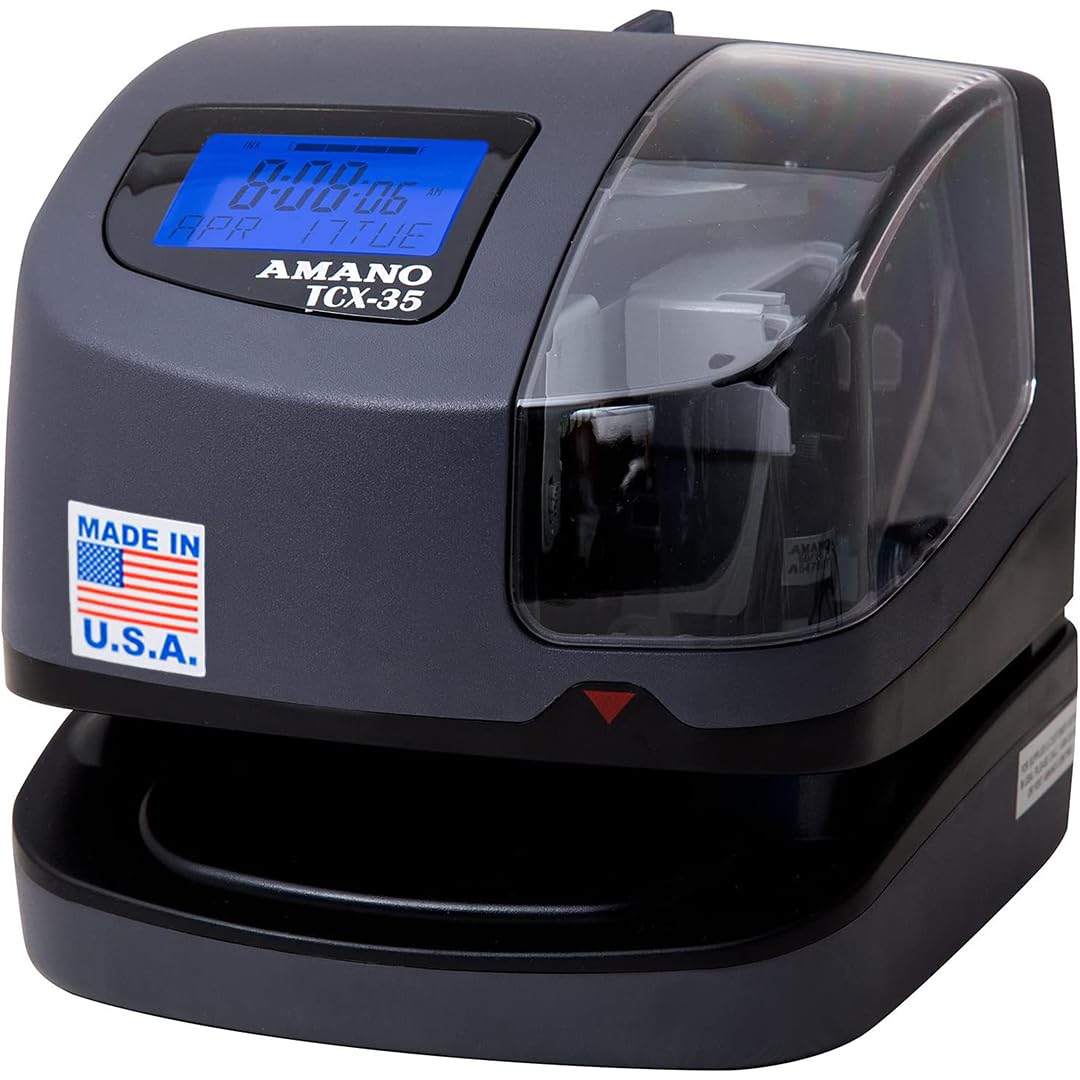
Built in the USA with a factory warranty, and it tells you when the ribbon runs low.
There is a simple, practical detail here that saves a lot of small hassles: a ribbon ink capacity indicator. Instead of discovering your punch clock has gone faint mid-payroll, the machine tells you the ribbon is running down so you can swap it before it matters. For a time clock, that is exactly the kind of boring-but-useful feature that keeps a payroll week smooth.
The core job is covered — tracking employee work time, plus document control and mail room duties where you need proof of when something was received. It automatically adjusts the year, month, date, and time, including leap year and daylight saving, so you are not resetting dates. You can print custom messages such as REC’D, PAID, and FILE, and it prints in multiple languages. It is made in the USA and carries a one-year factory warranty.
What the hardware gives you is steady competence — easy to set up, works well, and quality that owners put above previous models they have used. The trade-off is scale: this is a focused punch and stamp machine rather than a calculating one, so if you want the clock to total overtime for a fifty-person crew, the uPunch HN4500 goes further. For a shop that wants a dependable American-made punching station with a clear ribbon warning, this one holds up its end.
The reliable core: Automatic date, time, leap-year, and daylight-saving adjustment, custom message printing, and a ribbon ink indicator that flags low ink before a payroll week is affected.
Where it stops: It punches and stamps rather than calculating hours, so overtime totals stay manual unless you pair it with payroll software.
The steady choice when: you want an American-made punch-and-stamp machine with a clear ink warning and automatic date handling.
Move on if: you need built-in calculating for overtime across a big team.
10. Pyramid Time Systems 5000 Auto Totaling Time Clock
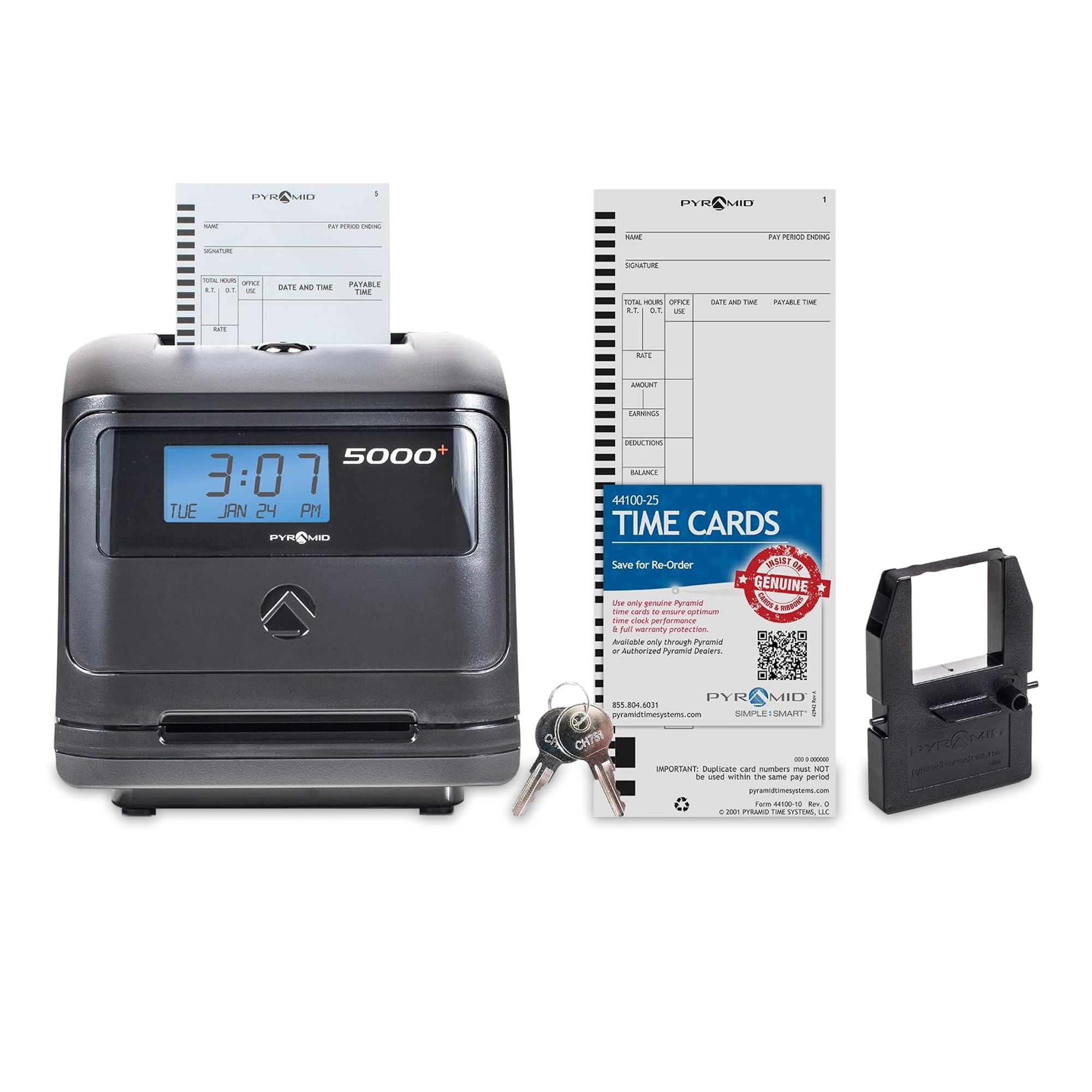
Totals a full staff on the clock, with rounding rules you set once and forget.
When your team crosses into the dozens, doing payroll math by hand stops being a nuisance and starts being a real time sink. The Pyramid 5000 totals worked hours automatically for each pay period and supports up to 100 employees, so the number sitting on the card is ready for payroll with no second step.
The flexibility is where it earns its keep. You choose actual time or rounded time in 0, 5, 10, or 15-minute increments, and the machine handles weekly, biweekly, semi-monthly, or monthly pay periods. Rounding rules set once mean every card is calculated the same way, which ends the “he rounds up, she rounds down” argument. The auto-feed mechanism aligns each card for a fast, precise punch without the employee lining anything up by hand, and a backlit LCD shows time, date, and day at a glance. A tamper-proof security lock fights time theft, and battery backup keeps settings for up to seven days without power.
Reliability is the solid footing here — the clock keeps accurate time and works as promised, and the maker’s reputation for durability shows through. Where feedback splits is on the overall finish, with some owners over the moon and others underwhelmed by quality. Set that against a 25-card starter supply and a one-year manufacturer warranty. For a mid-size operation that wants automatic totals and real rounding control, it does the heavy lifting — just add cards to your first order.
What it does for a mid-size team
- Automatically totals each employee’s hours per pay period for up to 100 employees.
- Rounding in 0, 5, 10, or 15-minute increments, across weekly to monthly pay periods.
- Auto-feed card alignment and a backlit LCD for quick, accurate punches.
- Tamper-proof lock and seven-day battery backup protect time and settings.
What to budget for
- Only 25 time cards included, so larger crews reorder soon.
- Overall finish draws split opinions, though the clock’s timekeeping and reliability are dependable.
Right when: you run a mid-size crew and want hours totalized with consistent rounding handled by the machine.
Pair it with: a bigger time-card order — 25 cards will not stretch far for a team near that ceiling.
Know the Specs
Auto-Aligning vs Manual Card Feed
An auto-aligning clock grabs the time card and positions it for a clean punch; a manual one relies on the employee to line it up. Auto-align saves seconds at every shift change and avoids the crooked, faint punches that make a card hard to read later. On a team with high turnover or constant shift swaps, it is the feature that keeps your records legible.
Calculating vs Time-Stamp Only
A calculating clock adds up regular and overtime hours and prints the totals on the card; a time-stamp-only machine just marks the in and out times. Calculating saves the manual math and reduces rounding disputes, while a stamp-only unit is simpler and often more affordable. Choose calculating if payroll math is on you; choose stamping if you already run payroll software.
Battery Backup and Continuous Calendar
Battery backup keeps the clock’s time and settings alive through a power cut — look for how many days it lasts. A continuous calendar keeps the date correct on its own, so leap years and short months don’t throw off your records. Together, these two features are what let a punch clock run through outages and date changes without a manual reset.
Time Format and Rounding
Clocks can print in 12-hour AM/PM, 24-hour military time, or hundredths of an hour. Hundredths matters because payroll systems often work in decimal hours, so a clock that prints that way skips a conversion step. Rounding options — actual time or 5, 10, 15-minute increments — decide how punches are tallied, so set them to match your payroll policy.
Common Questions
Do these time clocks work without an internet connection?
How many employees can a single punch clock handle?
What happens to my time records during a power outage?
Is a calculating time clock better than a plain punch machine?
Can employees change the time on the clock to fake their hours?
What is the difference between hundredths of an hour and regular minutes?
Is an auto-aligning clock worth it over a manual one?
How long do the time cards and ribbons last before I need to reorder?
Can these time clocks be mounted on a wall instead of a desk?
Do I need to reset the clock for daylight saving time and leap years?
The Bottom Line
For most small businesses, the winner is the uPunch CR1000 because it does two jobs in one machine — punching employee cards and stamping your documents — with 50 cards and a ribbon in the box. It is the crowd favorite on this list, and the clock-plus-stamp dual purpose is what makes it the safest starting point.
If payroll math is your bottleneck, the Allied Time AT-4500 totals regular and overtime on the card with no buttons to touch. The uPunch HN4500 takes the same job up to 50 employees with 200 cards in the box. For mid-size operations, the Pyramid 5000 totals automatically for up to 100 employees with rounding control — so if you want an auto-calculating clock that scales, that is the one to reach for.
How we choose
We do not accept paid placement. Every pick is matched to a real buyer and a real use-case; we do not hands-on test units.
Sources
Specifications: manufacturer listings and product documentation. Review insights: verified customer reviews, as of November 2026. Pricing: not shown on this page (it changes often); check the current price via the retailer link.
As an Amazon Associate, Tactical Gear Guy earns from qualifying purchases. This does not affect which products we feature.