Specs are compiled from manufacturer listings and verified buyer reviews and can change over time — please confirm the key details on the product page before buying.
Most people building a work-from-home setup get this backwards. They buy a fast computer and then sit on a hard kitchen chair with their laptop at chest height, which is why their neck aches by Thursday. The smarter order is a desk surface you actually own, a chair-height keyboard, and a screen that sits at eye level — then the horsepower. This guide covers the four bundles that put those pieces together, so you can pick the one that fits how you actually work rather than how a marketing page says you should.
This guide is built by comparing the manufacturers’ published specifications and the patterns across verified customer reviews, so you get each pick’s real strengths and trade-offs instead of marketing spin.
A folding pop-up desk, a leather organizer set, and two refurbished desktop bundles each solve a different piece of the same problem. This page breaks down what each one actually gives you in a Work From Home Kit.
Top Picks

How To Choose The Best Work From Home Kit
The trap with a home-office kit is assuming more is better. It is not. What makes a bundle worth owning is whether the pieces overlap in your day. A laptop stand that never leaves the kitchen table is a paperweight. A desktop that boots in seconds but arrives without a monitor leaves you hunting for a second box. Pick based on where you sit and what you already own.
Decide whether your bottleneck is posture or processing power
If your current setup is a laptop on a table, your neck is the problem, not the chip. Raising the screen to eye level is the single change you will feel fastest — the Logitech Casa does exactly that by unfolding a book-like case into a stand. If instead your machine stalls with twelve browser tabs open, no stand will help and you need memory and storage.
Check what ships in the box, not just the headline
A desktop bundle is only complete if the monitor, keyboard, and mouse are actually included. Both refurbished towers here ship as full sets, which saves you a second purchase and a second delivery. A desk accessory set is the other kind of bundle: it does not compute anything, it just removes the chaos of scattered pens and stray sticky notes.
Know what refurbished means for you
Both desktop computers here are listed as renewed, which means a previous owner had them first and a seller restored them. That is why a Core i7 tower and a 22-inch monitor can land in the same conversation as a starter budget. Read the seller’s condition notes and return window before you commit, because the setup experience varies from unit to unit.
Side-by-Side Comparison
| Model | Best For | Memory | Storage | Monitor Included | Amazon |
|---|---|---|---|---|---|
| Logitech Casa Pop Up Desk★ Best Overall | Laptop workers with no dedicated desk | — | — | — | Amazon |
| KINGFOM 5-Piece Desk Organizer Set | Decluttering a shared or small desk | — | — | — | Amazon |
| HP EliteDesk 800 G3 SFF Bundle | Budget full desktop with a screen | 8GB RAM | 256GB SSD | 21.5″ FHD | Amazon |
| Dell OptiPlex Core i7 Bundle | Heavy multitasking on a budget tower | 16GB RAM | 512GB SSD | 22″ FHD | Amazon |
Detailed Reviews
1. Logitech Casa Pop Up Desk
Our pick — 4.5+★ from 350+ verified ratings; the strongest balance of quality and price.
A book-shaped case that becomes your whole desk when you open it.
If your “office” is the kitchen table and it has to go back to being a kitchen table at six o’clock, this is the piece that changes your day most. The Casa Pop Up Desk packs a laptop riser, a wireless keyboard, and a wireless touchpad into one case that closes flat. Unfold it and the case angles into a stand that lifts your screen toward eye level, which is the posture fix most home workers never get around to buying separately. Set it down on a dining table, a high countertop, or a sunny corner floor — Logitech says the stand and each device connect over Bluetooth Low Energy to Windows, macOS, iPadOS, and ChromeOS.
The laptop riser itself accommodates most machines from 10 to 17 inches, so a 13-inch ultrabook and a chunky 15-inch work laptop both sit in it. The keyboard and touchpad are the quiet win: they feel like a laptop you already know, so there is no relearning curve on day one. Portability is the trait that wins people over most, and you can feel why — the whole kit is built around the idea that your desk is wherever you put the case down. There is also a recycled-plastic story here: the touchpad uses a minimum of 62% certified post-consumer recycled plastic, the keyboard 47%, and the book itself 44%.
The honest catch is stability. The plastic stand part is sturdy, but the ledge at the bottom is thin, and a laptop can slide forward off it if you bump the table or work at a steep angle. A few buyers also question the value relative to a simple stand plus a separate keyboard. Neither is a deal-breaker — it is a kit built for portability, not for a permanent desk that never moves. Set it up on a stable surface and it behaves.
What earns its place
- Three devices in one folding case: riser, keyboard, touchpad
- Fits laptops from 10 to 17 inches
- Bluetooth Low Energy pairing across Windows, macOS, iPadOS and ChromeOS
- Recycled plastic content of at least 62% on the touchpad and 47% on the keyboard
Where it asks for care
- The thin bottom ledge lets a laptop slide if the surface gets knocked
- Value questions surface when compared with buying a stand and keyboard separately
- The laptop itself is not included with the desk
Made for the table-sharer: renters, studio dwellers, and anyone whose workspace needs to disappear into a shelf by evening.
Weigh first: if your laptop never leaves one spot, a fixed riser and a full-size keyboard give you more for less fuss.
2. KINGFOM 5PCS Desk Organizer

Five matching pieces that turn a pile of pens into something you would photograph.
This is the pick for the person whose video calls keep catching a shoebox of cables in the background. The set arrives as five coordinated pieces in black PU leather with white hand-sewn thread: a mouse pad, a tissue box holder, a pen and card holder, a multifunction desktop organizer, and a sticky note dispenser. Everything matches, which is the part most people underestimate. A mismatched pile of plastic trays reads as clutter even when it is tidy, while five pieces in one leather finish read as a decision you made on purpose.
The measurements are useful rather than decorative. The mouse pad is 9.84 by 7.87 inches, sized so your cursor does not run off the edge mid-swipe. The pen and card holder has a square pen section measuring 2.87 by 2.87 by 3.93 inches that holds roughly 20 pens, and the note dispenser box takes 200 pages of 3.9-inch by 3.9-inch paper. The tissue cover measures about 5.3 inches on each side with a 5-inch inner depth. Buyers describe the stitching and finish as professional-grade, and the build quality is what the write-ups keep returning to.
One thing to plan around: the set only takes loose tissues that fit a 5-inch-deep box, so if your tissues come in a larger carton you will need to pull them out of the original package first. The PU leather interior is lined with soft flannel over a stable MDF frame, and it wipes clean with a damp cloth. It will not survive a soaking, so keep drinks a few inches away.
The matching argument: five pieces in one finish do more for how a desk reads than five separate trays ever will, and the seam work holds up to close inspection.
The thing nobody mentions: you are buying a look as much as storage, so measure your desk edge before ordering — a 9.84-inch mouse pad sets the width you need to clear.
Worth it for: anyone setting up a first home office on a shared desk who wants the visual clutter solved in one order.
Think twice if: your tissues come in oversized cartons, because the 5-inch inner depth is a real limit.
3. HP EliteDesk 800 G3 SFF Desktop

The full-desk bundle that lands without you buying a second box.
If you are starting from nothing — no tower, no screen, no keyboard — this is the least complicated way to get a working desk. HP ships the small-form-factor PC, a 21.5-inch FHD monitor, a keyboard and mouse, plus WiFi and Windows 11 Pro in one bundle. The screen resolution is 1920×1080 in a 16:9 panel, which is the everyday standard for spreadsheets, video calls, and documents.
The processor is an Intel Core i5-6500 quad-core running at a 3.2 GHz base clock and reaching up to 3.6 GHz. Paired with 8GB of RAM and a 256GB solid-state drive, that is enough for office work, a browser full of tabs, and streaming in the background. The SSD is the part you will feel most — boot times and file opens stay quick because there is no spinning disk to wait on. It is a small-form-factor chassis, so it sits under a monitor or on a shelf without eating the whole desk.
Here is the number that makes the decision for you. The Dell OptiPlex below ships with 16GB of RAM and a 512GB SSD against this bundle’s 8GB and 256GB — double on both counts. If your workday means twenty tabs plus a video call plus a large file open at once, that gap shows up. Buyers describe the setup process as mixed: some find it simple, others mention thin instructions. Expect to spend a few minutes matching cables to ports rather than following a clear illustrated guide.
Reasons it earns the budget slot
- Monitor, keyboard and mouse are all included, not sold separately
- 1920×1080 FHD on a 21.5-inch panel
- Windows 11 Pro preinstalled
- Small-form-factor body that fits under a shelf
The honest trade-offs
- 8GB RAM and 256GB SSD are half what the Dell bundle carries
- Setup instructions are hit or miss depending on the unit
- Renewed stock means condition varies, so check the seller notes
Reach for this if: you need a complete first desk delivered in one order and your workload is email, documents, and calls.
Look elsewhere if: you already own a monitor and keyboard — you would be paying for parts you will not use.
4. Dell OptiPlex PC
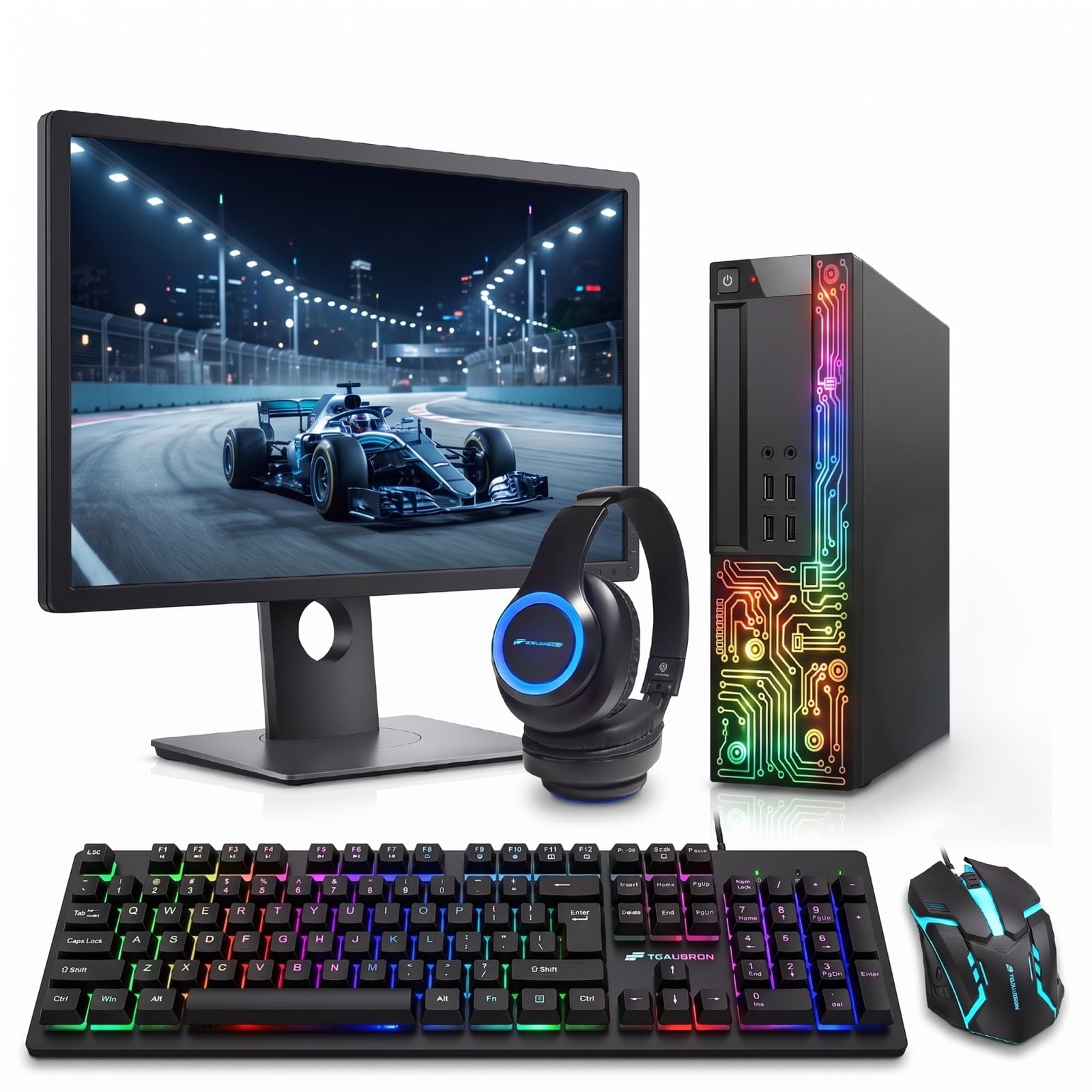
Sixteen gigabytes, a 512-gig drive, and more light strips than most offices allow.
Multitaskers who keep finding the ceiling on an 8GB machine should start here. The OptiPlex pairs an Intel Core i7 reaching up to 3.8 GHz with 16GB of RAM and a 512GB SSD — the largest memory and storage combination in this group. Against the HP bundle’s 8GB and 256GB, that is double on both counts. The processor’s 3.8 GHz ceiling also edges the HP’s 3.6 GHz, so heavier work finishes a little quicker. In practice you get a tower that boots fast, holds a browser, a call, and a document without swapping to disk.
The bundle does not stop at the tower. A 22-inch Full HD monitor is included at 1920×1080, along with an RGB keyboard, an RGB mouse, and an RGB headphone set. A sound bar is in there too, and a webcam, so virtual meetings work without a separate purchase. WiFi and Bluetooth 5.0 handle the wireless side, and Windows 11 Pro is preinstalled with multi-language support. If your home office doubles as a gaming corner after hours, the lighting is a feature rather than decoration.
Two things to know before you click. First, this is renewed stock, so open the box and check every component on arrival — the sound and microphone reports across the review pages are mixed rather than uniform. Second, a 3.5+ rating across 400+ reviews tells you this is a value play with real variance, not a polished retail product. If you want the safest possible setup experience, the HP’s simpler kit is the lower-risk pick, even with half the memory. What you trade for that risk is the biggest spec sheet in this article.
The spec-sheet winner: 16GB RAM, a 512GB SSD, and a 3.8 GHz Core i7 make this the most capable machine here, and the RGB peripherals, webcam, and sound bar arrive in the same box.
Untangle before you order: renewed condition and mixed audio reports mean you should test the webcam and microphone in your first hour, while the return window is still wide open.
Pick this one for: heavy tab counts, photo work, or evening gaming where the larger memory and drive actually get used.
Pass if: you want a plug-and-forget setup with no checking of parts — the renewed variance is the tax on the bigger specs.
Know the Specs
RAM, and why 8GB versus 16GB shows up in your day
RAM is short-term memory — the workspace your computer keeps open for the programs currently running. With 8GB you can comfortably hold a browser, a document, and a video call. Push past that and the machine starts shuffling data to the drive, which is what you feel as a stall when you switch windows. 16GB gives you roughly double that headroom, so a big spreadsheet, several tabs, and a call can all stay open at once without the pause.
SSD capacity, and how much 256GB really holds
A solid-state drive stores your files with no moving parts, which is why a machine with one starts up quickly and opens documents without the wait of an older spinning disk. Capacity is the practical question. 256GB covers a working set of documents, a few thousand photos, and the operating system, but a video project or a large game library fills it fast. 512GB gives you room to keep more on the machine instead of reaching for an external drive.
Processor speed, in plain terms
The clock speed in GHz describes how many cycles the chip completes per second. Higher numbers generally mean snappier handling of demanding programs, but the core count and generation matter just as much — a quad-core i5 and a Core i7 are different tools even when their numbers look close. For email, documents, and calls, either is more than enough. For photo editing or gaming, the higher ceiling pays off.
What “renewed” means for your return window
Renewed means a prior owner used the machine and a seller inspected, cleaned, and restored it before resale. That is how a Core i7 tower with a monitor reaches a lower tier than a new retail build. The trade is variance: condition and included accessories can differ between units. Inspect everything in the first day or two, photograph anything that looks off, and keep the packaging until you are sure.
Common Questions
Will the Logitech Casa keyboard pair with my work laptop if IT has locked down Bluetooth?
Does the Casa Pop Up Desk hold a 17-inch laptop securely?
Is 16GB of RAM overkill for a home office PC?
Can I upgrade the RAM or storage on a renewed OptiPlex or EliteDesk later?
What should I check first when a renewed desktop bundle arrives?
Will the 21.5-inch and 22-inch monitors fit a small desk?
Is a desk organizer set worth it if I already have drawers?
Does the KINGFOM tissue holder fit standard tissue boxes?
Can I use the Casa Pop Up Desk on a sofa or bed rather than a table?
Which bundle makes more sense if I mostly write and take calls?
The Bottom Line
For most people assembling a Work From Home Kit, the winner is the Logitech Casa Pop Up Desk because it fixes the thing you feel first — screen height and keyboard position — and packs away when the workday ends. If you want a complete desk with a monitor and Windows 11 Pro already in the box, grab the HP EliteDesk 800 G3 bundle. And for heavy multitasking where 16GB of RAM and a 512GB drive genuinely get used, the Dell OptiPlex bundle is the one to reach for. One nudge: the Casa is the highest-scoring pick here at 4.5+ stars across 300+ owners, and it is the piece most home workers wish they had bought before the desk.
How we choose
We do not accept paid placement. Every pick is matched to a real buyer and a real use-case; we do not hands-on test units.
Sources
Specifications: manufacturer listings and product documentation. Review insights: verified customer reviews, as of November 2026. Pricing: not shown on this page (it changes often); check the current price via the retailer link.
As an Amazon Associate, Tactical Gear Guy earns from qualifying purchases. This does not affect which products we feature.