Specs are compiled from manufacturer listings and verified buyer reviews and can change over time — please confirm the key details on the product page before buying.
Most “wooden” keyboards you see online are plastic shells printed with a grain pattern, and they sound exactly like the cheap boards they are. The ones worth your money use a genuine wood case — walnut or sapele — which changes both how the board feels under your wrists and how it sounds when you type. This guide covers eight boards built with genuine wood — full timber cases on most, wood sidings on the two Keychron boards — sorted by what each one does best. The YUNZII QL75 is the crowd favorite, holding 4.5+ stars across 400+ ratings, and it takes the top spot because its stepped key rows make all-day typing the most comfortable here.
This guide is built by comparing the manufacturers’ published specifications and the patterns across verified customer reviews, so you get each pick’s real strengths and trade-offs instead of marketing spin.
Real wood means real variation: two boards from the same run can have different grain, weight, and even sound. Below you get the honest read on each one, so you know which trade-offs fit your desk and your hands before you commit to the best wooden mechanical keyboard for your setup.
Top Picks

How To Choose The Best Wooden Mechanical Keyboard
A wood case changes how a keyboard feels under your hands and how it sounds compared with the aluminum or plastic shells most boards use. Your right pick depends on three things: how much desk room you have, whether you type for hours at a stretch, and if you want to swap switches later.
Start with layout size, because it controls your desk space
A 65% board keeps the letters, numbers, arrows, and a function row in a tight footprint — think the XVX MU68 at 12.6 inches long. A 75% adds a few more keys and usually a knob or extra column, like the 84-key YUNZII QL75. A TKL (tenkeyless, meaning no number pad) drops the numpad but keeps everything else, which is what the Keychron K8 HE does. The smaller the board, the more room your mouse gets. The trade-off is that you give up keys you may type every day.
Decide if you want a hot-swappable board
Hot-swappable means you can pull a switch out and push a new one in without a soldering iron. If the feel of a switch is a mystery to you, this matters: it lets you try a clicky switch, decide you hate it, and swap to a quiet linear one later. Most boards on this list use a 3-pin or 5-pin socket, so a huge range of aftermarket switches will fit. If you never plan to tinker, a fixed board is fine and you can ignore this.
Match the wireless mode to your devices
Tri-mode means the board connects three ways — Bluetooth, a 2.4GHz USB dongle, and a USB-C cable. Bluetooth is best for pairing a laptop and a tablet and hopping between them. The 2.4GHz dongle is the low-latency option for gaming. The cable is for when the battery runs down or you want zero lag. If you only ever use one desktop, you can save by skipping the wireless and going wired.
Side-by-Side Comparison
| Model | Best For | Layout / Keys | Connectivity | Case Material | Amazon |
|---|---|---|---|---|---|
| YUNZII QL75★ Best Overall | All-day typing with a retro look | 75% / 84 keys | BT / 2.4GHz / USB-C | Wood | Amazon |
| Womier WD75 V2Best Battery Life | Long battery life for desk setups | 75% / 82 keys | BT / 2.4GHz / USB-C | Wood and plastic | Amazon |
| Akko MU02Premium Pick | A polished, gift-worthy board | 75% | BT 5.0 / 2.4GHz / USB-C | Walnut and aluminum | Amazon |
| Keychron K8 HE (Black) | Competitive gaming with wood trim | TKL 80% / 87 keys | 2.4GHz / BT 5.2 / USB-C | Aluminum and wood | Amazon |
| Keychron K8 HE (White) | A lighter-looking take on the same board | TKL 80% / 87 keys | 2.4GHz / BT 5.2 / USB-C | Aluminum and wood | Amazon |
| XVX MU68 FujiWave | Small desks with a tiny footprint | 65% / 68 keys | 2.4G / BT / USB-C | Walnut | Amazon |
| GLENCREAG WK84 | Wired simplicity and QMK control | 75% / 84 keys | USB-C wired | Sapele wood | Amazon |
| YUNZII WOOD68 | Compact, portable, budget-friendly | 65% / 68 keys | BT / 2.4GHz / USB-C | Walnut | Amazon |
Detailed Reviews
1. YUNZII QL75 Keyboard
Our pick — 4.5+★ from 450+ verified ratings; the strongest balance of quality and price.
A typewriter-style aluminum-front board with a wood trim that types better than it looks.
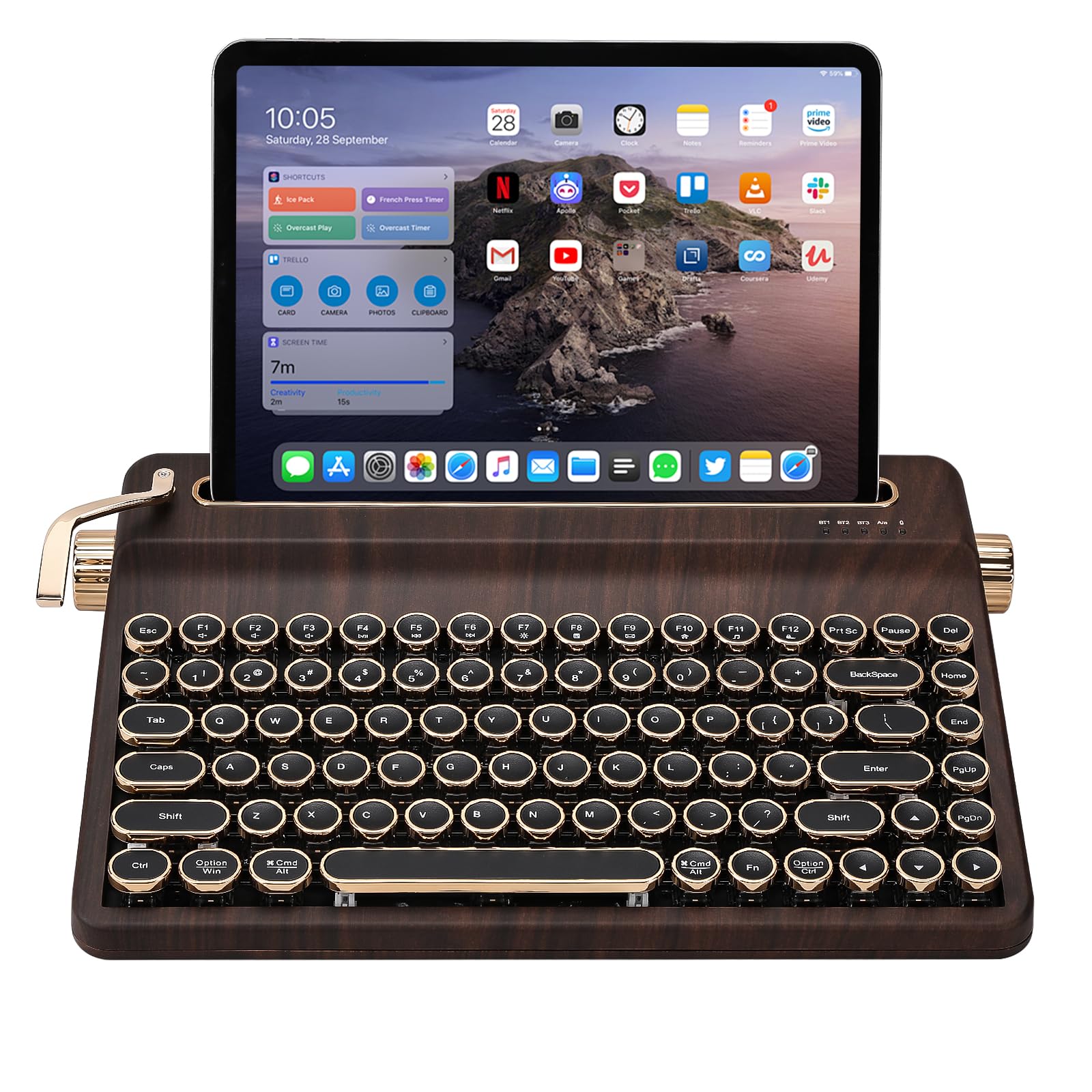
Comfort, not just the vintage styling, is what wins people over here. Each key row steps up in height as it moves back, so your fingers rest at a natural angle instead of stretching flat across a level deck. With 84 keys in a 75% layout, you keep the function row and arrow cluster without ceding your desk to a full-size board. Round keycaps and pre-lubed switches complete the typewriter look, and yes, that clicking sound is part of the deal.
It connects three ways — Bluetooth, 2.4GHz dongle, and USB-C — and it can hold five paired devices, so your PC, tablet, and TV are all one button away. There is a built-in stand on the board that holds a phone or tablet upright, which is a genuinely handy addition if you type on a tablet alongside a monitor. The footprint measures 12.9 by 8.4 inches, so measure your desk tray before you commit. QMK/VIA support means you can remap every key if the default layout does not suit you.
The stepped rows make this the most comfortable board in the group for long typing sessions, and that is what carries it into first place.
Where it earns its keep
- Stepped key rows angle your wrists naturally for long typing sessions
- Five-device memory makes switching between PC, tablet, and TV one press
- Built-in device stand means one less accessory on your desk
- Hot-swap sockets take both 3-pin and 5-pin switches for easy customizing
Worth knowing first
- The 12.9 by 8.4 inch footprint needs a roomy desk tray
- The typewriter click is loud, so shared offices may not love it
Go for this: if you want the vintage typewriter look without sacrificing all-day typing comfort.
2. Womier WD75 V2 Keyboard
An 8000mAh walnut board that trades charging cables for months of cordless typing.
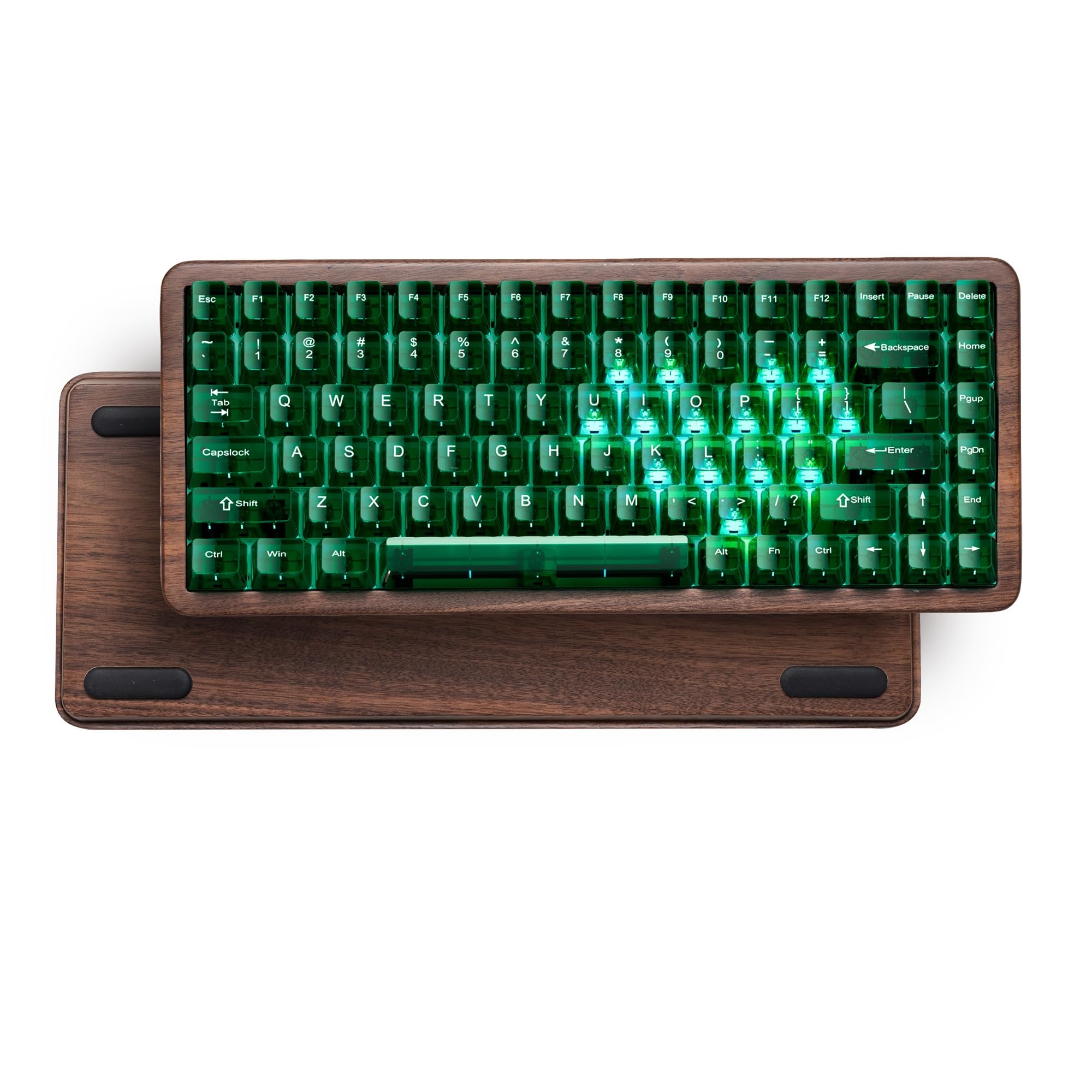
That 8000mAh battery is the headline. It is the largest in this group, and it means you can leave the cable in a drawer rather than tethering your desk. It connects three ways — USB-C wired, Bluetooth 3.0/5.0, and 2.4GHz — and holds up to three devices at once. The walnut shell is polished smooth, paired with green translucent keycaps that let the RGB glow through evenly thanks to the south-facing LEDs.
The switches are custom full POM linear units with a 55 gf spring weight and 2.0mm pre-travel. In plain terms: they are light enough to type fast and stiff enough to avoid accidental keystrokes. Five layers of sound-absorbing foam sit underneath, which is why the typing comes out soft and cushioned rather than hollow. Hot-swap sockets accept both 3-pin and 5-pin switches. QMK/VIA programming works, though you have to remap keys in wired mode first — once set, the keymap carries over to wireless.
The one real catch: complaints about ease of use and Bluetooth connectivity do show up, mostly around the initial pairing and getting used to the layout. Quality and sound are the strong suits — the wooden construction is what owners praise most — so if you want a long-lived desk centerpiece and can tolerate a bit of setup fiddling, this is a strong value.
What the battery buys you: months between charges at 8000mAh, so the board lives on your desk rather than at the end of a cable.
The setup trade: QMK/VIA remapping must be done in wired mode, and some buyers take a while to get Bluetooth pairing right.
Reach for this: if you want a genuine walnut board that stays cordless for a very long stretch.
Look elsewhere: if you want Bluetooth to pair without any fiddling on day one.
3. Akko MU02 Mechanical Keyboard
A polished walnut-and-aluminum board that feels like furniture and types like it too.
Of everything here, the MU02 is the one that reads as a built object rather than a keyboard. A warm-tone walnut bottom case meets an aluminum top case, and the MOA-profile PBT keycaps are dye-sublimated so the legends do not wear off. Akko even throws in wood wax to keep the timber conditioned. If you are buying a walnut-and-aluminum desk centerpiece that happens to type, this is the one.
The gasket mount is the part your fingers notice. Instead of the plate sitting hard against the case, it floats on a soft connection, which produces a cushioned bottom-out and a deeper thock than a stiff board. Five layers of noise reduction — including a PET layer and 3mm poron case foam — keep the sound locked in. It connects with Bluetooth 5.0, 2.4GHz, or USB-C, and the 4000mAh battery covers a multi-device desk setup. Per-key RGB profiles and over 12 media hotkeys are remappable through the Akko Cloud Driver.
The honest note is the price-versus-RGB balance. Some owners find the wood and sound worth every bit, while others thought the price felt high and found the RGB lighting underwhelming relative to the rest of the board. Neither is a flaw so much as a taste call. Build quality and the quality of the typing are what carry this board — the sound and the solid weight come through clearly.
The material story: real walnut, aluminum, dye-sub PBT keycaps, and included wood wax — the case is the reason to buy.
Honest watchpoint: value and RGB brightness split opinions, so buy this for the wood and the feel, not the light show.
This is your board: if a real walnut case and gasket-mounted softness matter more than fancy lighting.
Spend elsewhere: if RGB effects are high on your priority list, because the lighting divides opinion.
4. Keychron K8 HE TKL Black
Hall Effect switches that reset the instant you lift — with wood and aluminum holding it all down.
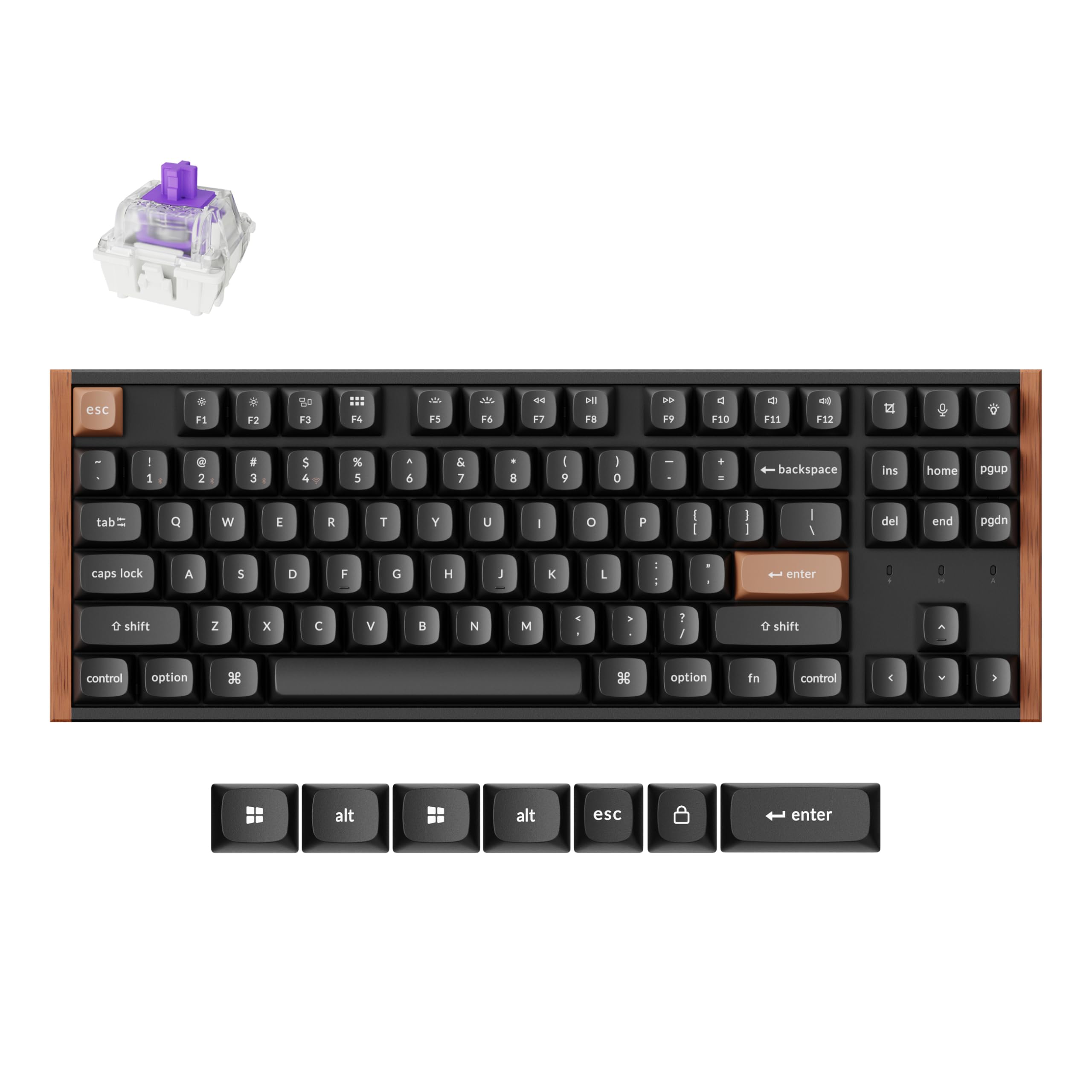
This board is built for people who want gaming speed and a desk that still looks grown-up. The Hall Effect switches use magnetic sensing instead of physical contact, so you can dial the actuation depth anywhere from 0.2mm to 3.8mm. In practice that means a shallow press fires a key, and Rapid Trigger resets each keystroke by how far your finger travels, so rapid strafing in an FPS is instant. It is a very different experience from a standard mechanical switch.
The 80% TKL layout keeps arrows and the function row while leaving space for your mouse. You get three connection options — 2.4GHz at a 1000Hz polling rate, Bluetooth 5.2, or USB-C — and can pair up to three devices. The double-shot PBT keycaps resist shine, and the frame pairs an aluminum chassis with natural wood sidings. Remapping and actuation depth are handled in the Keychron Launcher web app or through QMK. It works with Mac, Windows, Linux, and Bluetooth tablets, so one board covers coding, office typing, and gaming.
The split in owner feedback is wireless reliability and perceived value. Some find it an excellent value for a magnetic-switch board, while others felt the premium price was steep and hedged on the wireless. None of that touches the feel, which is where this board justifies itself — a quiet, thocky character from a metal-and-wood frame that feels planted.
Why it competes
- Adjustable actuation from 0.2mm to 3.8mm lets you set a hair-trigger or a deliberate press
- Rapid Trigger resets by travel distance for fast strafe response in shooters
- 1000Hz polling in 2.4GHz and wired keeps input latency low
- Aluminum plus wood frame adds weight and rigidity for a planted feel
Things to weigh
- Wireless performance gets mixed feedback, so heavy wireless use is a risk
- Premium pricing leaves some buyers feeling the value is a stretch
- Wood is limited to the sidings, not the whole case
Pick it for: competitive play and coding on one board, with real Hall Effect switches under your fingers.
Pass if: you need rock-solid wireless above all, since that is the weakest link in the feedback.
5. Keychron K8 HE TKL White

Same magnetic engine as the black K8 HE, dressed in a white-and-wood frame for light desk setups.
If the aluminum-and-black K8 HE above appeals to you but your desk leans pale and bright, this white-framed version is the same board in a different coat. The 87-key TKL layout and wood sidings are unchanged. So are the Hall Effect magnetic switches with 0.2mm to 3.8mm adjustable actuation and Rapid Trigger for instant resets. You are choosing a white frame, not a different switch spec.
The rest of the package carries over: 2.4GHz at 1000Hz polling, Bluetooth 5.2, and USB-C wired, with up to three paired devices. Double-shot PBT keycaps shrug off shine, and the aluminum-and-wood frame gives the board its planted weight. Customization runs through the Keychron Launcher web app or QMK, so remapping and actuation depth are a few clicks away. Mac, Windows, and Linux are all supported.
What comes through most clearly in the feedback here is build quality and the ergonomic feel — this is a board that simply feels good to use, which is a fair read on a magnetic-switch design. There is not much in the way of complaining. The trade-off is the one that follows the whole K8 HE line: wireless is the weaker link relative to the feel, so if you plan to live untethered, test it early.
Why bother over the black one: a white frame changes how the same board sits in a light-toned room, without changing any switch spec.
What stays the same: wireless remains the part to verify early, since that is where the design draws more caution.
Best match for: a white-desk setup that wants magnetic-switch speed without a dark frame.
Not your fit: if you want a fully solid wood body — this is wood siding on an aluminum frame.
6. XVX MU68 Wood Keyboard

A genuine walnut 65% board that disappears on a small desk and pairs with three devices.
This board gets one thing right that many do not: the case is actual cut walnut, and the matte oil finish keeps fingerprints off after a long session. No two boards look alike because the grain is different on each one. It measures 12.6 by 4.3 by 1.4 inches, so it frees up real space for a mouse or a notebook.
The 68-key 65% layout keeps your arrows and function row close to hand while trimming the size. Connectivity is tri-mode: 2.4GHz, Bluetooth, and USB-C, with up to three devices and a 4000mAh battery for weeks between charges. The mode switch is hidden under the CapsLock keycap, which keeps the top surface clean and looks deliberate rather than cluttered. A hot-swap PCB takes both 3-pin and 5-pin switches. The tray mount and foam damping cut noise and vibration for long typing sessions, and it is fully programmable via VIA and QMK.
With a smaller review base, the feedback is thinner, but the board itself is honest about what it is — a compact, real-wood board for small desks and multi-device users. It is sturdy and portable at 866.2g with keycaps, which is light enough to carry between home and office. Universal Mac and Windows compatibility means no fiddly setup if you switch systems.
The footprint win: real walnut and a 4.3-inch width make this the answer for cramped desks and small trays.
The trade you accept: a 65% layout drops keys a full board keeps; check you can live without a numpad and a few extras.
Snag it if: your desk is tight and you want genuine walnut grain on every board.
Skip the compact here: if you type on a numpad daily and cannot lose the extra keys.
7. GLENCREAG WK84 USB-C Wired Wooden Mechanical Keyboard, 75%

A wired sapele-wood board that skips the battery and puts your money into the case and control.
Sapele wood is the draw. It is denser and darker than the walnut of the compact picks, giving the WK84 a more grounded, furniture-like feel. The 84-key layout, against 68 keys on the YUNZII WOOD68, keeps your function row and arrows intact. And because it is wired over USB-C with no battery or wireless radio, you never think about charging. Plug it in and type.
The switches are green linear units, hot-swappable for swapping without a soldering iron. That PBT keycap set holds up against wear and oil, and the board carries a HiFi sound tuned to feel smooth and responsive on each press. Twenty dynamic RGB lighting effects let you set the mood. QMK/VIA support means full key remapping and macro building, which makes it a practical choice for coders and gamers alike.
Quality is the theme with this one — the well-made sapele case and the appearance earn the most praise, and the sound gives it a satisfying, instrument-like tone under the fingers. A smaller review base keeps the sample limited, but what there is describes a keyboard that punches well above its footprint. If you love a wired sapele board with QMK/VIA remapping and no battery to charge, this earns a place.
what separates it
- Sapele wood case is durable and darker than walnut picks here
- No battery means no charging routine — USB-C plugs straight in
- QMK/VIA gives full key remapping and macro control
- Twenty RGB effects and hot-swappable green switches
Facts to factor in
- Wired only — no Bluetooth or 2.4GHz if you want a cable-free desk
- Green linear switches are fixed in the package if you dislike the feel
- Pricier than the entry boards here despite the wired-only design
The right call for: anyone who wants a permanent corded fixture with real sapele and full remapping.
Move on if: you need wireless freedom, because there is no battery or radio in this one.
8. YUNZII WOOD68 Keyboard

A solid walnut 65% board with a big battery and a small footprint, at the friendliest price here.
Solid walnut, not a veneer. The WOOD68 is cut from polished timber, and the 68-key 65% layout keeps your essentials close without crowding your desk. Weight comes in at 0.7 kg, light enough to slip into a bag between home and office. It connects three ways — Bluetooth, 2.4GHz, and USB-C — and pairs across Windows and Mac, with an included 2.4G dongle and extra keycaps in the box.
The 4000mAh battery means you are not reaching for a cable often. Pre-lubed linear switches give a solid sound straight from the start, and the hot-swap PCB takes both 3-pin and 5-pin switches. A five-layer noise-reduction stack — silicone, switch pad, PET film, sound-absorbing cotton, and thick case foam — turns each press into a refined thocky signature with a cushioned feel. South-facing RGB with 16.8 million colors and 22 dynamic effects lights the keycaps evenly. Cherry-profile PBT double-shot keycaps resist wear and oil, so the legends stay crisp. Multimedia shortcuts come pre-programmed and can be remapped through the YUNZII software.
The honest frame: this is the entry-level pick of the bunch, and with a smaller review base you get less of a crowd read. But the walnut case, the 4000mAh battery, and the cushioned thock are all genuinely there. If you want solid walnut and hot-swap without spending the most, this delivers the core experience.
What you are buying: solid walnut, a 4000mAh battery, and a five-layer damped thock at the entry tier.
What you give up: a smaller review pool and fewer bonus keys than a 75% board — you live with the 65% layout.
Budget winner when: you want solid walnut and real hot-swap in a compact, wallet-friendly board.
Look up the list: if you need more keys, a gasket mount, or a bigger body of owner feedback.
Know the Specs
Wood case vs wood siding
There are two meanings of “wooden” on this list, and they are not the same. A full wood case means the enclosure itself is cut from timber — walnut on the YUNZII WOOD68 and XVX MU68, sapele on the GLENCREAG WK84. Wood siding means natural wood panels are wrapped onto an aluminum frame, which is what the Keychron K8 HE does. A full case is a heavier, more natural-feeling object. Sidings keep the board lighter and sturdier for gaming. Neither is wrong — decide how much the timber itself matters to you.
Hot-swap sockets and switch types
Hot-swap means the switches sit in sockets you can pull and replace by hand — no soldering iron required. A socket that takes 3-pin and 5-pin switches accepts a huge range of aftermarket units, so you can move from clicky to linear to tactile until the feel suits you. Linear switches are smooth top to bottom with no bump; tactile switches add a noticeable bump; clicky switches add an audible click. Hall Effect switches, like on the Keychron K8 HE, are a different family — they sense travel magnetically, which is what allows adjustable actuation depth.
Battery capacity in mAh
The wireless boards here range from 4000mAh (the YUNZII WOOD68, XVX MU68, and Akko MU02) up to 8000mAh on the Womier WD75 V2. A bigger battery number generally means more typing between charges. The exact runtime varies with RGB brightness and wireless mode, so treat the mAh figure as a relative guide — a 4000mAh board is fine for desk use, and an 8000mAh board is the better fit if you hate charging.
Layout size: 65%, 75%, and TKL
A 65% board keeps letters, numbers, arrows, and a function row — roughly 68 keys — and is the smallest option for a cramped desk. A 75% adds a few keys and typically lands around 82 to 84 keys, splitting the difference between compact and full. A TKL, or tenkeyless, drops only the number pad, keeping every other key — the Keychron K8 HE carries 87 keys. The more keys you keep, the more desk room you give up. Match the layout to what you actually type.
Common Questions
Does a real wood case actually change how a keyboard sounds?
Will a 65% keyboard still work for gaming and regular typing?
What does hot-swappable mean and do I need it?
Is a Hall Effect keyboard better than a standard mechanical one?
How do I care for a wooden keyboard case?
Can I connect a wireless wooden keyboard to a Mac and a PC at once?
Does the bigger battery on the Womier WD75 V2 mean I charge it less often?
Do I need QMK or VIA software to use a wooden mechanical keyboard?
The Bottom Line
For most people, the best wooden mechanical keyboard in this group is the YUNZII QL75, because the stepped key rows and five-device memory make it the most comfortable board here to actually type on all day. If you want a genuine solid wood case, the Akko MU02 gives you walnut, an aluminum top, and a gasket mount that softens every keystroke. And if you are gaming competitively, the Keychron K8 HE puts magnetic switches and Rapid Trigger under your fingers with wood sidings to keep it looking sharp.
The honest nudge: the QL75 wins on stepped-row comfort and 400+ ratings, so it is the low-risk start. But if timber is the whole point of the purchase, spend up to the Akko MU02 — it is the board that most clearly feels built rather than assembled, and that is why it earns the premium spot.
How we choose
We do not accept paid placement. Every pick is matched to a real buyer and a real use-case; we do not hands-on test units.
Sources
Specifications: manufacturer listings and product documentation. Review insights: verified customer reviews, as of November 2026. Pricing: not shown on this page (it changes often); check the current price via the retailer link.
As an Amazon Associate, Tactical Gear Guy earns from qualifying purchases. This does not affect which products we feature.