Specs are compiled from manufacturer listings and verified buyer reviews and can change over time — please confirm the key details on the product page before buying.
You want a case that looks like furniture and cools like a wind tunnel, and the truth is most wood cases make you pick one. The Fractal Design North is the safest answer for a full-size build, but there are legitimately better picks if your graphics card is enormous, if your desk is small, or if you want five fans in the box. Below you get the real differences — wood panel type, graphics card clearance, and how many fans actually show up pre-installed.
This guide is built by comparing the manufacturers’ published specifications and the patterns across verified customer reviews, so you get each pick’s real strengths and trade-offs instead of marketing spin.
Three spec-sheet numbers separate a wood case that feels like furniture from one that feels like a sticker kit. Below, each number is translated into what it means for your build.
Top Picks


How To Choose The Best Wood Panel PC Case
A wood panel case lives or dies on one thing you can’t fix later: the panel is the front door of your whole build. Genuine walnut ages with the desk. A printed wood-effect wrap looks right for about a month. Airflow, fan noise, and cable room you can work around. The panel you cannot.
Genuine wood versus a wood-effect finish
Look for the words “genuine walnut,” “solid walnut,” or “front panel cut from” in the listing. That phrasing means a real slab of timber with visible grain, not a vinyl print over steel. Genuine wood also means the front is a structural panel with its own thickness, so the case usually breathes through the sides and top instead of the front. A printed finish typically sits on a plastic or steel front, which is fine — just know that’s what you’re getting.
Graphics card length is the number that traps people
Every case here lists a maximum GPU length, and that figure is honest only when you mount the card horizontally with no radiator in front of it. Add a front-mounted liquid cooler and the usable space shrinks fast — the North drops from 355 mm to 300 mm once a 360 mm front radiator goes in. Measure your card first, then decide whether the radiator goes up top instead.
Count the pre-installed fans, then check the airflow path
A case that ships with five PWM fans (pulse-width modulation, meaning the motherboard can slow them down for quiet running) saves you a real purchase and an evening of installation. But fan count alone isn’t cooling. Reverse-blade fans and bottom-mounted intakes push air where your graphics card actually sits, which matters more than raw quantity. Three well-placed fans can beat six crammed into the wrong spots.
Motherboard size sets the shelf you’re shopping on
Full ATX boards need a mid-tower. Small-form-factor ITX boards open up compact cases that fit under a monitor, but they force hard choices on cooler height and power supply type. Decide the motherboard first — ATX, micro-ATX, or mini-ITX — because that choice eliminates half of this list immediately.
Side-by-Side Comparison
| Model | Best For | Max GPU Length | Pre-Installed Fans | Form Factor | Amazon |
|---|---|---|---|---|---|
| Fractal Design North★ Best Overall | Most full-size builds | 355 mm (300 mm with front radiator) | 2 × 140 mm PWM | ATX / mATX / ITX mid-tower | Amazon |
| Lian Li LANCOOL 217Most Airflow | Most airflow from the start | — | 5 PWM (2×170 mm, 2×120 mm, 1×140 mm) | ATX mid-tower | Amazon |
| Lian Li A3-mATXBest for Big GPUs | Big GPU, small footprint | 415 mm | None included | mATX / ITX mini-tower (26.3 L) | Amazon |
| Okinos Cypress 7 | Storage-heavy builds | 415 mm front / 390 mm rear | 4 × 120 mm PWM | ATX mid-tower | Amazon |
| Antec Flux Wood | Dual 360 mm radiators | — | 5 × PWM | E-ATX mid-tower | Amazon |
| ASUS ProArt PA401 Wood | Quiet creative workstations | 315 mm | 2 × 160 mm ring-blade | ATX mid-tower | Amazon |
| FOIFKIN F600 | Showcase glass builds | 400 mm | 7 no-LED fans | ATX mid-tower | Amazon |
| MONTECH XRWood | Value ARGB lighting | 410 mm | 4 ARGB PWM (3×140 mm, 1×120 mm) | ATX mid-tower | Amazon |
| Fractal Design Terra | Smallest possible footprint | 322 mm | None included | Mini-ITX (10.4 L) | Amazon |
Detailed Reviews
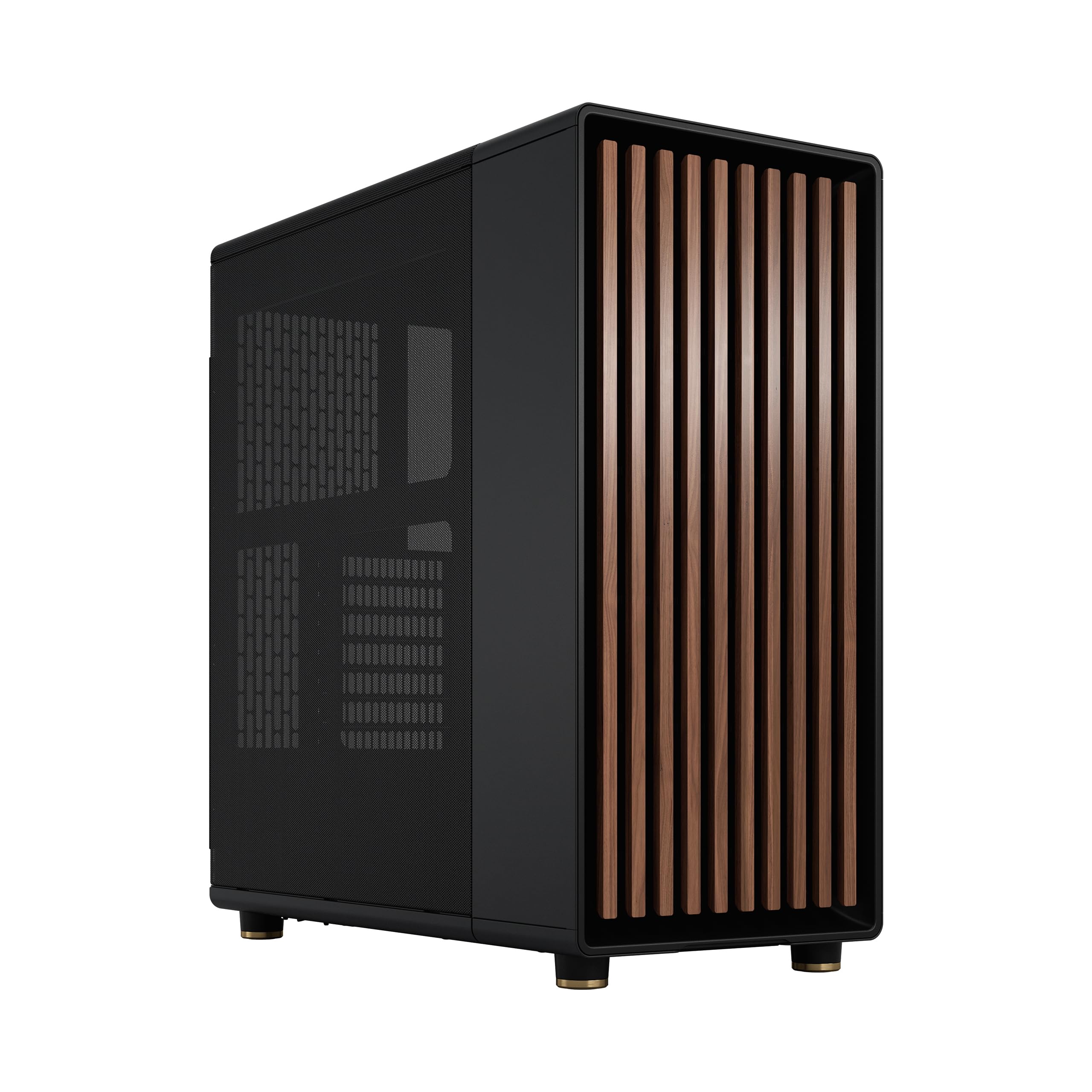
1. Fractal Design North Genuine Walnut Wood ATX Mid Tower
Our pick — 4.5+★ from 3,500+ verified ratings; the strongest balance of quality and price.
The one that made wood cases acceptable in a living room and not just a workshop.
This is the case most people picture when they hear walnut PC case, and it earns that spot. The front panel bars are cut from sustainably sourced walnut, and the rest of the chassis is charcoal black metal with fine-patterned mesh on the sides and top. It fits ATX, micro-ATX, and mini-ITX boards, so it survives a motherboard upgrade in three years.
Clearance is the number to write down: 355 mm for a graphics card, dropping to 300 mm if you bolt a 360 mm radiator on the front. That’s a real 55 mm you lose, and modern flagship cards run close to that ceiling. Seven bridgeless expansion slots give you room for a capture card, a sound card, or a second GPU without fighting the frame. Two 140 mm Aspect PWM fans come installed, and there are two combined 3.5-inch/2.5-inch drive mounts plus two dedicated 2.5-inch mounts from the factory.
What wins people over is the look — that front panel is the single most-discussed thing about this case, and case quality runs it a close second. Assembly is genuinely easy, helped by side panels that come off and a top panel with an integrated tab. Storage capacity and fan room land where buyers expect: six drives and up to three large fans. Neither is a flaw, just what airflow costs.
What earns the top slot
- Genuine walnut front bars instead of a printed wood-effect wrap
- 355 mm graphics card clearance with no radiator in front
- Two 140 mm Aspect PWM fans included, so the build runs quiet on day one
- Fits ATX, micro-ATX, and mini-ITX boards — no dead end on upgrades
What to weigh first
- Front radiator cuts GPU clearance to 300 mm — measure before you buy
- 9.5 kg empty is a genuinely heavy lift onto a high desk
- Mesh panels let more fan noise through than a solid side would
Reach for this if: you have a full-size ATX board, a graphics card under 355 mm, and you want the case to look intentional in a room.
Look elsewhere if: you plan a 360 mm front radiator and a card near 350 mm — that combination does not fit.
2. Lian Li LANCOOL 217 ATX Mid-Tower, Black Walnut Wood
Five fans in the box, including two 170 mm units that move serious air without shouting.
If you were going to buy five PWM fans anyway, this case hands them to you along with a walnut accent panel. The count is the story: two 170 × 30 mm front fans, two 120 mm reverse-blade fans, and a 140 mm rear fan, all pre-installed. Reverse-blade fans pull air in from the bottom and side where your graphics card sits, so the cooling isn’t just declared on the box — the airflow path is actually routed at the GPU.
Fans mount without tools, and the two front 170 mm units can be raised into what Lian Li calls CPU mode. That angles the airflow at the processor instead of spreading it across the whole case, which is the setting you want if your CPU cooler is doing the heavy lifting. Two power buttons mean the case works whether it sits on your desk or under it. Power supplies up to 220 mm fit, and the mounting bracket can face front or be rotated when you want cable routing to be easier.
Build quality and appearance are what buyers talk about, with the all-black components reading as deliberate rather than default. Cable management is the part people single out as easy — routing and tidying go fast thanks to the back-connect motherboard support that keeps the thick power cables hidden behind the tray. At 10.5 kg it is the heaviest case on this list by a clear margin, so plan a floor spot or a solid desk. Genuine wood accents come in dark walnut or light beech if the black isn’t your palette.
Where it wins: five PWM fans included at this level makes the case a straight value play — you’d otherwise spend the difference on cooling separately.
Where it asks something back: 10.5 kg is the heaviest pick here, and five fans mean five cables to route if you want them on separate headers.
Buy it when: airflow is your priority and you don’t want to shop for fans separately.
Think twice when: you move your case around often — this is a heavy box to carry.
3. Lian Li A3-mATX PC Case, 415mm GPU, 360 AIO, Wood Black Mesh
Small enough for a shelf, long enough inside for a 415 mm graphics card.
Here’s the head-to-head that matters: this case fits a 415 mm graphics card, while the Fractal North above stops at 355 mm — that’s 60 mm of extra card length in a box that takes up a fraction of the desk space. The trick is the 26.3 L volume (the total space inside the case). Lian Li built a micro-ATX and mini-ITX chassis around a modular internal frame, then added steel mesh panels on the sides and top so the small footprint doesn’t choke the air.
You can mount a 360 mm radiator and up to 10 × 120 mm fans, which is a remarkable amount of cooling surface for something this compact. The power supply is flexible too: ATX, SFX, and SFX-L units all fit, including Lian Li’s own EDGE supplies, and you choose front or side mounting depending on what clearance you need. The front panel is walnut over a black chassis, so the wood reads as a design choice rather than a bolt-on.
Design is the thing people rave about here — the modular frame earns more discussion than the looks, which tells you how much the build experience matters on a small case. Buyers routinely report fitting a 360 mm AIO with a thick radiator alongside a large graphics card, and temperatures staying manageable. The one recurring friction point is cable management, which is the honest tax on a 26.3 L case with this much inside. No fans are included, so budget for those — that’s the trade for keeping the price where it is.
The small-case argument
- 415 mm GPU clearance beats the North’s 355 mm in a far smaller box
- 360 mm radiator plus up to 10 × 120 mm fans of mounting
- ATX, SFX, and SFX-L power supplies all supported
- Walnut front panel keeps the wood look without the bulk
The small-case bill
- No fans included — add them to your total
- Cable management is the tightest part of the build
- Micro-ATX and mini-ITX boards only, so a full ATX board won’t fit
Right call for: a micro-ATX or mini-ITX build with a graphics card that won’t fit anywhere else this compact.
Wrong call for: you’re keeping a full-size ATX motherboard — it physically will not go in.
4. Okinos Cypress 7 Genuine Walnut Wood PC Case

Four PWM fans and a walnut front, with room for five drives tucked inside.
Storage is the angle most cases ignore, and this one leans into it. You can fit five SSDs in total, with two side-mounted drives that take priority over extra fan positions when you need the room. Four 120 mm PWM fans (pulse-width modulation fans that the motherboard can slow down for quiet running) come pre-installed, and Okinos rates the intake at 200 CFM (cubic feet per minute — the volume of air those fans push through in a minute), which is real airflow rather than a marketing figure on a spec sheet.
Graphics clearance is generous from the front: 415 mm with the front fan in place, or 390 mm with the rear fan configuration. Side-mounted AIO (all-in-one liquid cooler) support tops out at 280 mm. There’s one pairing to know before you commit — a 240 mm water cooler on the right side can interfere with graphics cards wider than 280 mm, so if your card is a thick three-slot design, put the radiator up top instead. At 6.45 kg this is the lightest mid-tower here by a wide margin against the North’s 9.5 kg.
Case quality is what people praise most, with the walnut grain running second. Build quality and buildability both come in strong, which tracks for a case with magnetic tempered glass that pops off for access. The Type-C 3.2 Gen 2 port runs at 10 Gbps, so a fast external drive isn’t bottlenecked by the front panel. One flat limitation: this case does not support vertical graphics card mounting, only horizontal — if a vertical showcase build is your plan, that rules it out. It’s one honest constraint on an otherwise excellent value.
The value read: genuine walnut, four PWM fans, and 200 CFM of intake at this tier is a hard combination to match.
The one hard limit: horizontal GPU mounting only — no vertical showcase option, so plan your look around that.
Fits your build if: you run multiple drives and want the wood front without a heavy chassis.
Skip if: a vertically mounted graphics card is part of your display plan.
5. Antec Flux Wood Mid-Tower E-ATX PC Case, 5 PWM Fans

Two 360 mm radiators at once, with five PWM fans already bolted in.
Count the fans and the radiator support together and this case separates itself from the pack. Five PWM fans ship installed: three P12 PWM at the front, one P12R PWM reverse fan in the power supply chamber, and a P14 PWM in the rear. Against the Fractal North’s two included fans, that’s five versus two — three extra fans you don’t buy or install. The reverse fan in the PSU chamber pushes air up at the graphics card, which is a placement most budget cases skip entirely.
Cooling headroom is the real headline. You can run a 360 mm front radiator and a 360 mm top radiator simultaneously, or swap to a 420 mm front radiator plus a 280 mm top radiator. Up to nine fans fit in total. The chassis accepts E-ATX boards alongside standard ATX, and it supports the newer back-connect motherboards that route cables behind the tray. Metal, glass, and genuine walnut come together on the exterior so the front panel reads as a furniture material rather than a finish.
Case quality leads the conversation, airflow comes next, and appearance follows close behind — that’s a sensible priority order for a case this focused on thermal headroom. Spaciousness and ease of assembly both get consistent appreciation, and cable management has its fans too. The one thing to weigh honestly is noise: the 120 mm front fans can develop a rattle, and it’s the most-discussed trade-off in the box. Plenty of builds run quiet, so it’s a unit-to-unit thing rather than a design flaw. At 9.27 kg it’s a solid mid-weight case to lift.
Why water-cooled builders pick it
- Front 360 mm plus top 360 mm radiators simultaneously, or 420 mm plus 280 mm
- Five PWM fans pre-installed versus the North’s two
- E-ATX board support with back-connect motherboard compatibility
- Dedicated Antec Flux airflow channel across multiple vent directions
What to keep an ear on
- Front 120 mm fans can rattle — the noisiest point of this build
- 9.27 kg puts it in the middle of the pack for portability
- Nine fan mounts means a lot of cables if you run every position
The pick for: a dual-radiator custom loop or a heavy air-cooled E-ATX build.
Not the pick for: you want guaranteed silence from the start — swap the front 120s if rattle bothers you.
6. ASUS ProArt PA401 Wood Edition ATX Mid-Tower

Two 160 mm ring fans moving 138 CFM, behind a Forest Stewardship Council certified wood front.
This one is aimed at editors and 3D artists, not gamers chasing frames. The twin 160 × 32 mm front ring fans push up to 138 CFM of airflow, and the extra 32 mm of fan depth is what lets a large slow-spinning fan move that much air quietly. The wood front panel carries Forest Stewardship Council certification, meaning the timber is sourced to that standard — a specific claim few cases on this list make.
The I/O is where the ProArt line earns its name: a USB Type-C 20Gbps port sits up front, which matters if you shuttle footage off a fast external drive between edits. Power and reset buttons can be locked, and there’s two-section PWM control so fan curves stay where you set them. Inside, the case takes 240 mm radiators and graphics cards up to 315 mm. That is the most restrictive card ceiling on this entire list, so check your card before anything else.
Appearance and case quality both draw consistent praise, and build quality gets mentioned too, with the tempered glass side panel showing off the interior. The tempered glass and detachable PSU bracket make assembly straightforward. Size is the recurring honest note — several buyers find it smaller inside than they expected, which lines up with that 315 mm card limit. If your card is short and your workload is creative, that constraint costs you nothing. If you have a long flagship GPU, it costs you the build.
The creative-station read: locked buttons, 20Gbps Type-C, and two-section PWM control are features aimed at people who leave a workstation running all day.
The measurement that rules it in or out: 315 mm is the tightest GPU ceiling here — a long card ends the conversation.
Best matched to: a shorter graphics card, a creative workload, and a desk that faces the glass panel.
Check first: your card’s length against 315 mm — this is not the case for a long flagship GPU.
7. FOIFKIN F600 PC Case, Walnut Wood, 7 Pre-Installed Fans
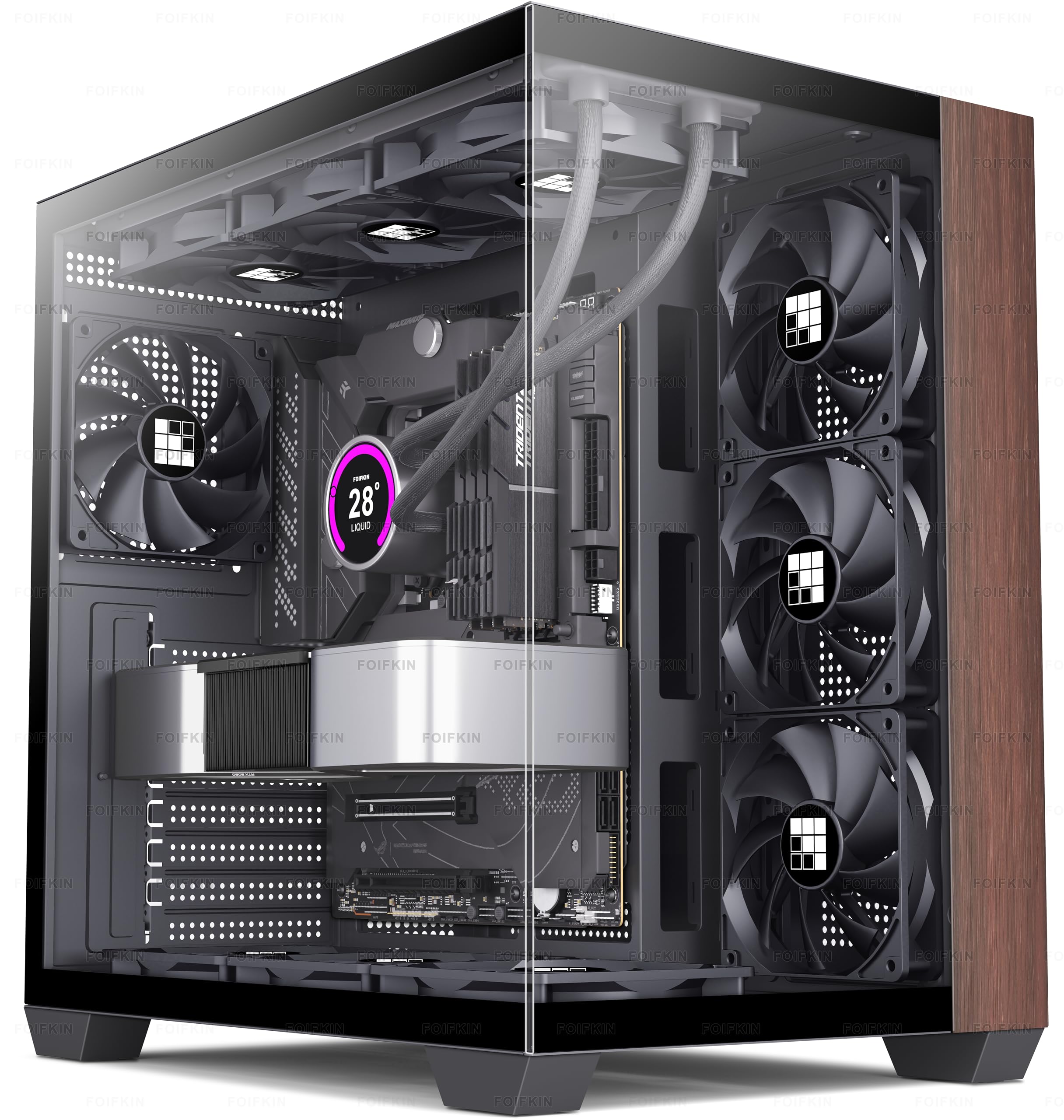
A 270-degree glass wrap around seven pre-installed fans and a walnut trim panel.
If you want to see every component, this is the one to shortlist. The 270° double-cabin glass curtain wall wraps two faces of the case, and the wood elements sit against metal for contrast rather than competing with it. Inside, the fit is fully specified: ATX, micro-ATX, or mini-ITX boards, a 360 mm cooler, CPU coolers up to 170 mm tall, graphics cards up to 400 mm, and ATX power supplies up to 220 mm. Seven expansion slots handle add-in cards.
Seven no-LED fans come pre-installed — the quiet approach, since no lighting means nothing flashing at you during a late session. Drive support covers either one HDD plus two SSDs, or two HDDs. The front I/O gives you Type-C 3.0, one USB 3.0, one USB 2.0, microphone and audio jacks, plus separate power, restart, and LED switch buttons. Appearance is the single most-praised thing about this case, and value for money is right behind it, which is a fair reflection of how much hardware comes in the box.
Space and airflow both come up as clear wins — long graphics cards fit without drama, and temperatures on a 5800X3D stay cool in owner builds. The honest friction is fit and cable management, which land as mixed rather than negative: the case reads as genuinely spacious to some and larger than expected to others, and cable routing takes some planning. Build quality is the metal-and-glass question worth asking before you commit to the glass look. Worth a look if the showcase is the point.
Why the glass crowd likes it
- 270° glass showing both sides of the build, not just one window
- Seven no-LED fans included — nothing flashing, all cooling
- 400 mm GPU clearance plus 170 mm CPU cooler height
- Type-C, USB 3.0, and USB 2.0 up front
What to plan around
- Two glass faces mean more surface to keep smudge-free
- Cable routing takes planning on the first build
- Some buyers find the footprint bigger than the photos suggest
This is your case if: the components are meant to be seen and you want the fans handled from the start.
Look past it if: you need a compact footprint — this one takes up real desk space.
8. MONTECH XRWood ATX PC Case, Genuine Walnut, 4 ARGB Fans

Genuine walnut, four addressable RGB fans, and 410 mm of graphics card room on a budget.
The XRWood makes its case with numbers. Three 140 mm front ARGB fans and one 120 mm rear ARGB fan come pre-installed, so the lighting and the cooling are both handled on arrival. ARGB means addressable RGB, where each LED can be set to a different color rather than the whole fan glowing one shade. Graphics cards up to 410 mm fit, which covers the latest RTX 50 Series cards and most of the oversized flagships people actually buy.
An adjustable GPU support stand is included — a small thing that stops a heavy card sagging over months. The PSU shroud is oversized and the routing space is expanded, so cable management doesn’t fight you the way it does on some budget frames. The front panel is deliberately styled with carbon-print accents in the frame to add contrast against the walnut. At 14.3 pounds this is roughly 30 percent heavier than the Lian Li A3-mATX at 11 pounds, a fair swap for a mid-tower that fits three 140 mm fans up front.
The enclosure uses steel, plastic, and wood together, and it’s a mid-tower that takes ATX, micro-ATX, and mini-ITX boards plus 360 mm AIO coolers. Four internal bays cover 3.5-inch and 2.5-inch drives. The honest note: the carbon print and the bold front styling are a taste call, and the ARGB lighting means more cables to manage behind the tray. If a clean, minimalist wood look is what you want, the North reads quieter. If value and visible lighting are the goal, this delivers more per dollar.
Where the value sits: four ARGB fans, a GPU support stand, and 410 mm of card clearance all included — the accessory shopping list is short.
Where taste decides: carbon-print accents and bold front styling are a strong look, not a neutral one.
Worth grabbing if: you want lighting and cooling sorted in one purchase and a card near 410 mm.
Pass if: you want the understated furniture look — the carbon accents push the other way.
9. Fractal Design Terra Jade, Walnut Front, Mini ITX Case

A 10.4 L box that takes a 322 mm graphics card and looks at home next to a bookshelf.
Ten-point-four liters is the whole argument. This case is small enough that where it goes stops being a question — it fits beside a monitor or under a TV where a mid-tower simply won’t. The front panel is cut from FSC-certified solid walnut, set into anodized aluminum, and the aluminum front is 8 mm thick. At 4 kg it’s the lightest case here by a wide margin against the North’s 9.5 kg, so you can pick it up with one hand.
The clever part is the stepless, slidable central wall. That gives you 30 mm of internal flexibility to shift between graphics card space and CPU cooler height, so you tune the layout to your parts rather than bending your parts to the case. A PCIe 4.0 riser cable is included, which is the little extra that small-form-factor builders usually have to buy separately. Graphics cards up to 322 mm fit, and the front I/O offers two USB ports including one USB Type-C 20Gbps.
Design earns the most praise, appearance follows, and buildability comes in strong — the case is genuinely easy to assemble for its size. Build quality holds up too, with one owner reporting it survived a fall to the floor. Cooling performance and internal space come in mixed, which is exactly what you’d expect from 10.4 L: it works, but it makes you plan. Value for money splits opinion as well, since small-form-factor hardware carries a premium. The honest trade: you’re paying for the footprint, not the component budget.
Why tiny wins here
- 10.4 L total volume — fits places a mid-tower cannot go
- 322 mm GPU clearance inside something this small
- 30 mm stepless central wall lets you tune clearance to your parts
- PCIe 4.0 riser cable included in the box
What the footprint costs
- Mini-ITX boards only — an ATX or micro-ATX board won’t fit
- Cooling relies on careful part choices, not volume
- Premium pricing for the small-form-factor format
Perfect for: a mini-ITX build where desk or shelf space is the binding constraint.
Not for: you already own an ATX or micro-ATX motherboard — this case takes mini-ITX only.
Know the Specs
Maximum GPU Length
This is the longest graphics card the case can hold, measured with the card sitting horizontally. It’s the first number to check because a card that doesn’t fit means shopping for a case again. Treat the figure as a ceiling, not a comfortable middle. The North lists 355 mm but drops to 300 mm once you add a 360 mm front radiator, and the ProArt PA401 caps out at 315 mm while the A3-mATX reaches 415 mm. Measure your card’s actual length from the bracket to the far edge, then compare. If you plan a front-mounted liquid cooler, use the reduced figure instead — that’s the number that will stop the build.
Pre-Installed Fan Count
Fans included in the box save you money and a build step, but the count alone doesn’t tell you how well the case cools. Position matters just as much: a reverse-blade fan under the power supply pushes air up at the graphics card, and front fans angled toward the CPU do more for your processor than a wide spread across the whole chassis. PWM fans can be slowed by the motherboard for quiet running, while a fixed-speed fan runs at one volume forever. Five fans on the Antec Flux Wood means you likely won’t shop for cooling separately, but the noise each fan makes is worth reading up on before you commit to a build that runs all of them.
Case Volume and Form Factor
Volume in liters tells you how much desk or shelf space the case claims. A 10.4 L case like the Terra fits where a mid-tower cannot, but it also limits how much air and how many components can live inside. Motherboard size is the gatekeeper — full ATX boards need a mid-tower, while mini-ITX boards open up compact cases. Deciding this first removes most of the list immediately, so pick your board before you fall for a case.
Genuine Wood vs Wood-Effect
Genuine walnut is a real slab of timber with visible grain and its own thickness, and the listing usually says so directly — “genuine walnut,” “solid walnut,” or “cut from.” Forest Stewardship Council certification is a sourcing standard you’ll see named on the ASUS ProArt and Fractal Terra panels. A wood-effect finish is a print over plastic or steel: it can look convincing in photos and will look like a print within a few months of daily handling. Neither is a defect, but only one ages alongside your desk.
Common Questions
Will my ATX motherboard fit in the Lian Li A3-mATX?
How do I know if my graphics card fits before I order?
Is genuine walnut front panel actually solid wood?
Do I need to buy extra fans for the Lian Li A3-mATX or Fractal Terra?
Can I run two large radiators in the Antec Flux Wood?
Does the Okinos Cypress 7 support a vertically mounted graphics card?
What is the practical difference between mesh side panels and solid ones?
Is a wood front panel bad for airflow compared to an open mesh front?
Which of these cases takes the longest graphics card?
How heavy are these wood cases to move around?
Can I fit a 360 mm AIO in the FOIFKIN F600 with a long graphics card?
The Bottom Line
The safest wood panel PC case for a standard full-size build is the Fractal Design North, because it pairs a genuine walnut front with ATX, micro-ATX, and mini-ITX support and two 140 mm PWM fans already installed. If your priority is airflow per dollar, the Lian Li LANCOOL 217 ships five PWM fans including two 170 mm front units, and that’s the easier build to cool without shopping for extras. For a graphics card that needs every millimeter, the Lian Li A3-mATX takes 415 mm of card inside a 26.3 L box, while the Okinos Cypress 7 matches that card length in a lighter mid-tower with storage for five SSDs.
One last nudge: the North has the deepest track record of any case here across thousands of owners, and that consensus outweighs any single spec. But if your build calls for dual radiators, the Antec Flux Wood handles a front 360 mm plus a top 360 mm at once with five fans included. And if the case needs to disappear beside a monitor, the Fractal Terra at 10.4 L is the one that stops being a footprint problem.
How we choose
We do not accept paid placement. Every pick is matched to a real buyer and a real use-case; we do not hands-on test units.
Sources
Specifications: manufacturer listings and product documentation. Review insights: verified customer reviews, as of November 2026. Pricing: not shown on this page (it changes often); check the current price via the retailer link.
As an Amazon Associate, Tactical Gear Guy earns from qualifying purchases. This does not affect which products we feature.