Specs are compiled from manufacturer listings and verified buyer reviews and can change over time — please confirm the key details on the product page before buying.
If your desktop is stuck on a weak Wi-Fi signal or an unstable connection, the fix is usually a better wireless adapter, not a new router. A PCIe card or USB dongle with a stable six-gigahertz band, proper antennas, and Bluetooth can turn a stuttering connection into something close to wired speed. This guide covers 9 options and which one fits your setup.
This guide is built by comparing the manufacturers’ published specifications and the patterns across verified customer reviews, so you get each pick’s real strengths and trade-offs instead of marketing spin.
You will learn which band, chipset, and interface actually matter for your machine, plus the one thing most buyers miss before clicking buy. Here is the honest breakdown of the best wireless Wi-Fi LAN adapter for your desktop.
Top Picks


How To Choose The Best Wireless Wi-Fi LAN Adapter
The single biggest decision is how the adapter connects to your PC. A PCIe card slots directly into your motherboard and typically gives you stronger, more stable reception. A USB dongle plugs into an external port and is far easier to move between machines. Neither is automatically better — they solve different problems.
PCIe Card or USB Dongle
A PCIe card is the right pick for a desktop that stays put and needs the strongest possible signal. It uses the motherboard’s own bus, and the large external antennas screw into the back of the case. The catch is that you need to open the case and have a free PCIe x1 slot. A USB adapter skips all of that. Plug it into a USB 3.0 port and you are online in minutes, which makes it the better call for a laptop or a machine you cannot easily open.
Which Wi-Fi Standard You Actually Need
Wi-Fi 6 handles most homes fine, but the newer 6E standard opens the six-gigahertz band. That band is wider and less crowded, so speeds stay steadier when neighbours’ networks pile up. The catch is that you need a 6E router and, for full six-gigahertz access, Windows 11. If your router is older, a 6E card still works but dials back to the band your router supports.
The Chipset Tells You A Lot
Most quality cards today run on the Intel AX210 chipset or the Mediatek MT7921AU. The chipset drives driver support, Bluetooth version, and how well the card holds a signal. Intel-based cards tend to install cleanly on Windows, while the Mediatek chip is the one to look for on Linux-friendly models. Match the chipset to the operating system you actually run.
Side-by-Side Comparison
| Model | Best For | Top Speed | Interface | Bluetooth | Amazon |
|---|---|---|---|---|---|
| WiFi 6E AX210 WiFi Card (OKN)★ Best Overall | All-round desktop upgrade | 2974 Mbps | PCIe x1 | 5.3 | Amazon |
| TP-Link Archer TX20EBest Value | Budget Wi-Fi 6 builds | 1800 Mbps | PCIe x1 | 5.2 | Amazon |
| BZIZU WiFi 6E PCIe CardCompact Pick | Tight cases and small builds | 5400 Mbps | PCIe x1 | 5.3 | Amazon |
| FENVI FV-AXE3000 | Performance per dollar | 5400 Mbps | PCIe x1 | 5.3 | Amazon |
| ASUS PCE-AX1800 | Brand-name reliability | 1800 Mbps | PCIe | 5.2 | Amazon |
| BrosTrend AXE3000 Linux | Linux desktops and Pi | 3000 Mbps | USB 3.0 | — | Amazon |
| WAVLINK BE6500 USB | Portable Wi-Fi 7 | 6452 Mbps | USB 3.0 | — | Amazon |
| BrosTrend BE6500 USB | Cutting congestion at range | 6500 Mbps | USB 3.0 | — | Amazon |
| TP-Link Archer TBE552E | Maximum Wi-Fi 7 bandwidth | 9300 Mbps | PCIe | 5.4 | Amazon |
Detailed Reviews
1. WiFi 6E AX210 WiFi Card (OKN)
Our pick — 4.5+★ from 850+ verified ratings; the strongest balance of quality and price.
The tri-band card that turns a congested desktop signal into a clean, stable line.
The OKN card packs the Intel AX210 chipset and pushes up to 2974 Mbps of real throughput — enough to keep a gaming session or 8K stream steady even on a busy network. Its real party piece is the wider 6GHz band, which gives you up to 7×160MHz channels to choose from so you can dodge the crowds your neighbours create on 2.4GHz and 5GHz. If your router supports 6E, this is the cleanest connection upgrade in its class.
What seals it is the Bluetooth 5.3 radio. Bluetooth 5.3 pairs your controller, headset, and keyboard faster and holds the link tighter than the older 4.2 standard. The card ships with two high-gain antennas, a low-profile bracket for smaller cases, and both the Bluetooth header cable and a quick install guide. It holds 4.5+ stars across 900+ ratings.
One honest thing to plan for: you will need a free PCIe x1 slot (or x4/x8/x16) and a physical connection to your motherboard’s USB header for Bluetooth to work. It is a two-minute job once the case is open, but it is more work than a USB dongle. The other requirement is a bit of patience — download the driver directly from Intel by searching “AX210” before you install the card, and everything runs flawlessly.
What makes it worth the slot
- Tri-band 6GHz connectivity at up to 2974 Mbps keeps dense networks smooth.
- Intel AX210 chipset is the gold standard for Windows driver stability.
- Bluetooth 5.3 delivers faster pairing and broader range for peripherals.
- Low-profile bracket covers both standard and small-form-factor builds.
What to plan for
- Requires a free PCIe slot and a USB header cable for Bluetooth.
- You must install the Intel driver manually before first use.
Reach for it if: you have a desktop tower, a Wi-Fi 6E router, and you want the strongest possible signal for gaming or streaming.
Pass if: you cannot open your case or your router tops out at standard Wi-Fi 6 — a USB or Wi-Fi 6 card makes more sense.
2. TP-Link WiFi 6 PCIe Card (Archer TX20E)
The trusted workhorse that gets a Wi-Fi 6 desktop online without drama.
TP-Link’s Archer TX20E delivers up to 1800 Mbps total — 1201 Mbps on 5GHz or 574 Mbps on 2.4GHz — which is plenty for most homes that are not running a 6E router yet. It uses OFDMA and MU-MIMO to keep lag low when several devices share the same network, so your gaming and calls stay responsive even when someone else is streaming. The two high-gain antennas are the practical feature here: they boost your desktop’s reach in rooms far from the router.
Around 94 buyers single out its performance as the reason they keep it. It also shows up working in warehouse environments, where signal bounces off metal racks and walls all day. Bluetooth 5.2 is on board for controllers, headphones, and keyboards, and both standard and low-profile brackets come in the box. The catch: to use Bluetooth, you must connect the included USB cable to an F_USB header on your motherboard, or the Bluetooth half never wakes up.
Where it earns its place: a dependable, familiar chipset with simplified setup, mid-range price positioning, and the kind of antenna range that fixes a bedroom desk far from the router.
The honest note: a few owners find connectivity mixed in tricky layouts, and the Bluetooth cable is non-negotiable if you want peripheral support. It is not the card for a 6GHz network, but for standard Wi-Fi 6 it holds up well.
The right fit: anyone with a Wi-Fi 6 router who wants a stable, low-lag upgrade for a desktop without going up in band.
Not the one: if you already run a 6E or Wi-Fi 7 router, you are leaving speed on the table here.
3. BZIZU WiFi 6E PCIe Card (Intel AX210)
A tiny 3.14″ card that slips into tight cases and still hits 5400Mbps.
If your case is short on room, this BZIZU card measures just 3.14″ long by 2.75″ wide by 0.78″ tall — noticeably more compact than the TP-Link card above, which runs 5″ long and 4.72″ wide. That smaller frame still carries the Intel AX210 chipset and the full 5400 Mbps tri-band ceiling, so you get 6GHz performance without a card that crowds your build. Two high-gain antennas screw in at the back for range.
Owners describe the setup as close to automatic — Windows finds the drivers during install in many cases, and the card connects cleanly with both Bluetooth and Wi-Fi 6 right away. Bluetooth 5.3 is on board for controllers and headsets, and WPA3 encryption keeps your network secured. The reported speeds come close to wired territory, which is the whole point of upgrading to 6E in the first place.
Why it punches above its size: the small footprint plus the Intel AX210 chipset mean that a mini tower with a single free PCIe slot can still ride the 6GHz band at full speed.
Worth knowing: like every 6E card, you only open up 6GHz if your router supports it and you are on Windows 11 — otherwise it works but settles onto 5GHz. It also needs the included USB cable connected for Bluetooth to function.
Fits best in: small-form-factor and mini-tower builds where a full-size card would press against the case wall.
Look elsewhere if: you have a full-size tower and simply want the widest antenna spread — the bulkier cards give more physical room for the aerials.
4. FENVI FV-AXE3000 WiFi 6E PCIe Card

FENVI brings 5400Mbps tri-band at a weight that lets you forget the card is there.
The gap between this card and the TP-Link below it is stark on paper: FENVI claims 5400 megabits per second total versus the TP-Link’s 1800, a straight threefold ceiling jump. FENVI also tips the scales at just 1.6 ounces — roughly half the TP-Link’s 3.52 ounces — so it adds next to nothing to your build weight. The Intel AX210 chipset handles the heavy lifting, delivering 2400 Mbps on 6GHz, 2400 Mbps on 5GHz, and 574 Mbps on 2.4GHz.
Owners consistently say the range and stability are the wins. It holds a connection in multi-wall rooms, and one download test clocked 955 Mbps down with 50 Mbps up on a solid line. Bluetooth 5.3 lets you run a headset, keyboard, and controller at once without drops. OFDMA and MU-MIMO trim latency during games or big transfers, and WPA3 secures the link.
The catch is fit and finish. It carries 900+ ratings at 4.0+ stars, and a small number of builds report a fussier-than-expected install — check slot clearance and bracket alignment before you button up the case. But if you want a bracket-optional, dual-antenna 6E card for dedicated throughput, this one earns its keep.
The verdict: a triple-band performance card that trades a bit of polish for raw speed, making it the value play for anyone who wants 6E without paying premium money.
Pick it when: you want the highest sustained throughput per dollar and have a case with room for a slightly fussier fit.
Better elsewhere: if you demand a perfect out-of-box install with zero bracket fiddling, the OKN or BZIZU options above are smoother.
5. ASUS PCE-AX1800 PCIe WiFi Adapter

ASUS brings brand-name polish to a Wi-Fi 6 card that just works on first boot.
The PCE-AX1800 delivers 1800 Mbps on the Wi-Fi 6 standard (802.11ax), with OFDMA and MU-MIMO to keep a busy home network efficient when several devices share bandwidth. Two external antennas handle range, and Bluetooth 5.2 gives you the same faster pairing and wider coverage you get from other 5.2 cards. WPA3 is on board for network security.
Around 29 buyers highlight that it works right from the start as the reason they kept it. Compatibility also gets a nod, with owners noting it connects well with both Bluetooth and Wi-Fi 6 in the same setup. If you are coming from an expensive USB adapter, this card matches the performance of your other devices for a lot less money.
The honest trade-off: this is a Wi-Fi 6 card, so it cannot touch the 6GHz band. If you have a 6E or Wi-Fi 7 router and want the extra headroom, you are better served by a tri-band card. But for a standard Wi-Fi 6 network that just needs a reliable desktop connection, this ASUS is a set-and-go pick with the weight of a major brand behind it.
Why it holds up: major-brand support and a clean install make it the safest choice for someone who does not want to troubleshoot a cheap card.
The limit to weigh: no 6GHz band. On a standard Wi-Fi 6 router that is fine; on a newer router it caps your ceiling.
Suits you if: you want a no-surprises Wi-Fi 6 card from a name you recognize and your router is not 6E.
skip it if: you already own a 6E or Wi-Fi 7 router and want to use the wider six-gigahertz band.
6. BrosTrend AXE3000 Linux WiFi Adapter
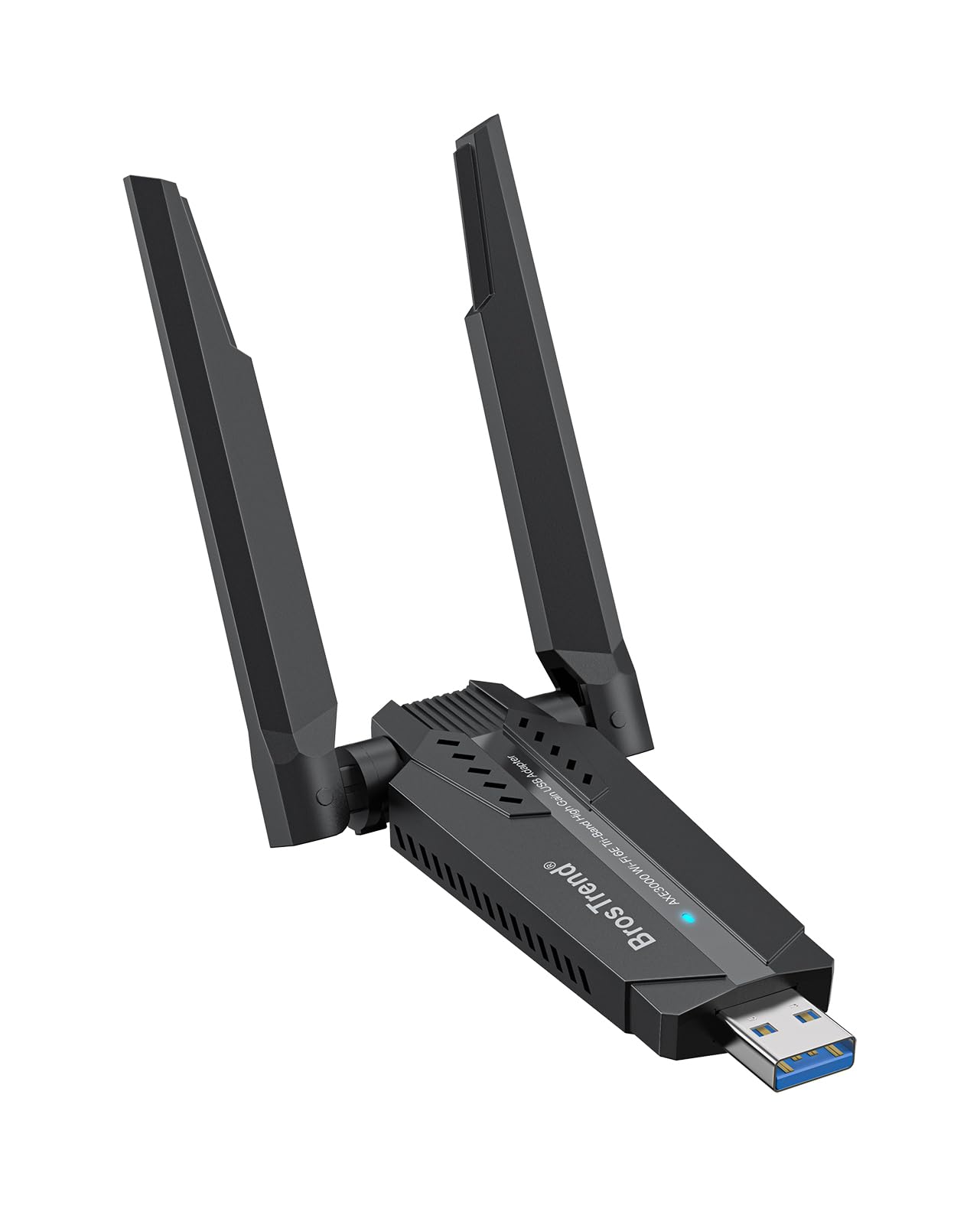
The USB dongle built for Linux machines, no driver hunting required.
Most wireless cards are Windows-first, which leaves Linux users hunting for drivers and forum posts. This BrosTrend adapter flips that: it works on every Linux distribution running kernel 5.18 or newer, with no setup. Ubuntu, Linux Mint, Debian, Raspberry Pi OS, Kali, Fedora, and Arch are all named as compatible. If you run a dual-boot, a VM, or a Pi, this is the one that treats Linux as the first-class citizen.
It uses the Mediatek MT7921AU chipset and USB 3.0 for up to 1201 Mbps on 6GHz, 1201 Mbps on 5GHz, or 574 Mbps on 2.4GHz. Dual adjustable antennas with beamforming sharpen the signal, which helps in a home office or a workshop far from the router. Functionality is what the room talks about most, with plug-and-play a close second — the device delivers a stable connection that does not drop out mid-task.
The core sell: genuine plug-and-play on Linux with a supported chipset, plus USB 3.0 headroom that keeps it from bottlenecking your speeds.
The caveat: 6GHz access depends on recent Linux distros or Windows 11, and older kernels are not supported at all. If you run an older Linux build, check your kernel before buying.
Made for: Linux desktop owners, Raspberry Pi tinkerers, and anyone running Arch or Fedora who wants Wi-Fi 6E without compiling drivers.
Not for you if: you run an older kernel, or you need a Windows-only setup that does not require version checking.
7. WAVLINK BE6500 USB WiFi 7 Adapter
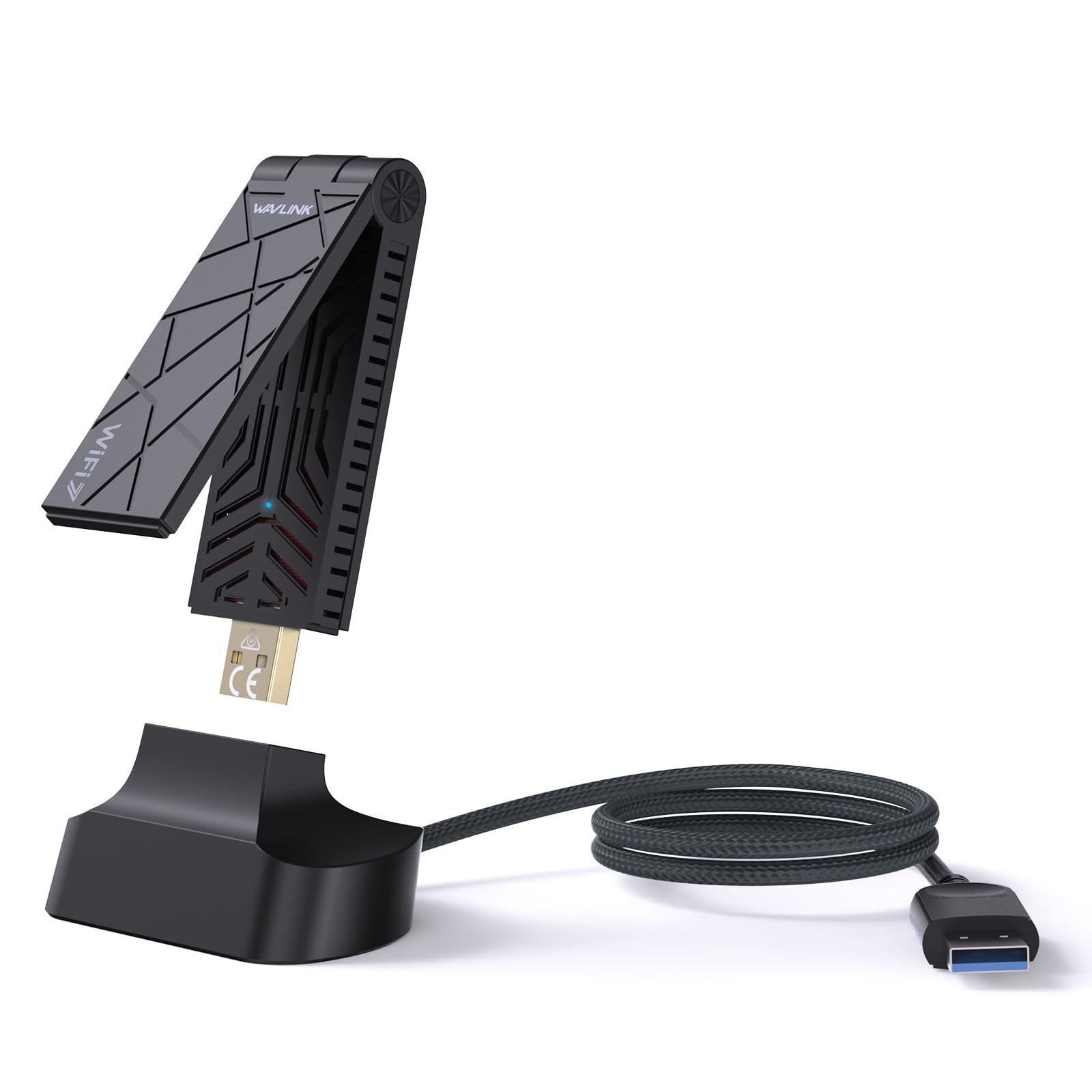
Wi-Fi 7 speed in a foldable dongle you can slip into a bag.
This is the only USB adapter here with a foldable design: it compacts down to fit a pocket and includes two 3dBi tri-band antennas for range on the move. It carries the full Wi-Fi 7 spec — up to 6452 Mbps, split as 2882 Mbps on both 6GHz and 5GHz plus 688 Mbps on 2.4GHz. For a laptop or a desktop you move between rooms, that combination of portability and next-gen speed is hard to match.
Daily function is where it earns confidence. Buyers report it performing better than built-in antennas, hitting full 600 Mbps internet speeds without a hiccup, and holding both 5GHz and 6GHz connections at once. It runs on Windows 10/11 with built-in driver support — plug it into USB 3.0 and you are done. WPA3 is on board, and MLO, 4K-QAM, Multi-RUs, OFDMA, and MU-MIMO are all supported to trim lag in a crowded home network.
Two things to be clear on before you buy. First, this is not a signal booster — it adds Wi-Fi to a computer that lacks it, and cannot strengthen a weak router signal. Second, the six-gigahertz band needs Windows 11 version 21H2 or later, so a Windows 10 machine stays on 5GHz and 2.4GHz.
Strengths worth noting
- Wi-Fi 7 tri-band at up to 6452 Mbps, the fastest USB option on this list.
- Foldable design fits a bag or pocket for travel between desks.
- Built-in driver support means plugging into USB 3.0 isn’t a hassle.
- 2x3dBi antennas and WPA3 security cover range and privacy.
Points to weigh
- 6GHz band requires Windows 11 version 21H2 or later.
- Not a booster or extender — it cannot improve your existing router signal.
The pick for: laptop and portable desktop owners who want Wi-Fi 7 without opening a case.
Think twice if: you are on Windows 10 and want the 6GHz band, or you want a card that stays put in a tower.
8. BrosTrend BE6500 USB WiFi 7 Adapter

BrosTrend’s USB Wi-Fi 7 packhorse aims signal through walls and keeps it there.
At 6.5 Gbps total — 2882 Mbps on 6GHz, 2882 Mbps on 5GHz, and 688 Mbps on 2.4GHz — this dongle is built to lean on the widest channels. Dual external antennas and beamforming do the real work: they point the radio at your router, which is why it holds a stable connection through walls that thinner dongles struggle with. 4K-QAM, 160MHz channels, Multi-RU, and Preamble Puncturing round out the congestion-cutting tools.
Stability and reception are where it shines. Owners mention it dramatically improving wireless reception and performing better than a network card in their setup. The pre-loaded driver means no CD or download — you plug into USB 3.0 on Windows 11/10 and it is recognized. One thing it does not do: MLO (Multi-Link Operation) is not supported on this model, so the band-combining trick stays on the router side.
The disconnect to be honest about is compatibility. It is not compatible with macOS, Linux, or Bluetooth, and a Windows 10 machine only gets 5GHz and 2.4GHz — the 6GHz band needs Windows 11. If you expect a Mac or a Linux box to use it, this is not your pick.
The real take: a long-range USB Wi-Fi 7 adapter that prioritizes reception strength over band-combining, best for a Windows 11 desktop in a room far from the router.
Where it stumbles: Windows-only, no Bluetooth, and the value conversation gets mixed — if you need 6GHz on Windows 10, look to the WAVLINK above.
Best matched to: Windows 11 users who need strong reception through walls and do not mind a USB form factor.
Wrong choice if: you run Linux or macOS, need Bluetooth from the same device, or are stuck on Windows 10 and want 6GHz.
9. TP-Link Archer TBE552E PCIe WiFi 7 Card

The bandwidth king: 9.3 Gbps tri-band for a desktop that demands the most.
This card is the ceiling of the group. The Archer TBE552E delivers up to 9300 Mbps total — 5764 Mbps on 6GHz, 2882 Mbps on 5GHz, and 688 Mbps on 2.4GHz — and when paired with a Wi-Fi 7 router it open up 320MHz channels on 6GHz, doubling the bandwidth of the previous generation. MLO, Multi-RUs, and 4K-QAM are all supported, and Bluetooth 5.4 is the newest version here for controllers, headsets, and keyboards.
Build quality and raw speed are why it has a following. Customers note download speeds hitting 400+ Mbps. Installation is easy, and two high-gain antennas extend coverage for a desktop further from the router. A low-profile bracket is included for mini towers.
What you cannot ignore is the operating system. This card is designed exclusively for Windows 11 and is not compatible with Windows 10, Linux, or anything older. Bluetooth also has a few rough reports in mixed use, so if dual-purpose is essential, test the Bluetooth link early. If you are on Windows 11 with a Wi-Fi 7 router, none of that matters — this is the widest pipe you can put in a PCIe slot.
Why it’s the ceiling
- 9300 Mbps total tri-band, the highest on this list.
- Bluetooth 5.4 is the most current wireless version here.
- 320MHz channels on 6GHz with a compatible router.
- Low-profile bracket covers small-form-factor builds.
Where it will bite
- Windows 11 only — no Windows 10, no Linux support.
- Bluetooth has some mixed feedback in daily use.
This is your card if: you are building or upgrading a Windows 11 tower with a Wi-Fi 7 router and want the absolute widest channel.
Step away if: you are on Windows 10, running Linux, or only have a Wi-Fi 6 router — the bandwidth you paid for simply won’t show up.
Know the Specs
Data Transfer Rate
This is the fastest the adapter claims to move data, measured in megabits per second (Mbps) — a higher number means more headroom for downloads, streaming, and big file transfers. Most cards listed here show 1800 Mbps on Wi-Fi 6, 5400 Mbps on Wi-Fi 6E, and up to 9300 Mbps on Wi-Fi 7. In practice, your router and internet plan cap the real speed, so a higher-rated card mainly buys you future-proofing.
Tri-Band and the 6GHz Band
Tri-band means the adapter can operate on 2.4GHz, 5GHz, and 6GHz. The six-gigahertz band is wider and less crowded, so connections stay steadier when neighbours’ networks pile up. You need a 6E or Wi-Fi 7 router to use it, and on some cards full access requires Windows 11. If your router is older, the card still works but settles onto the bands your router supports.
PCIe Versus USB 3.0
PCIe is the slot inside your motherboard; a card that uses it usually delivers stronger, more stable reception and stays permanently in place. USB 3.0 is the external port and gives you plug-and-play simplicity and portability — ideal for laptops or moving between rooms. Both can reach full speed; the choice is about installation effort versus flexibility.
Bluetooth and WPA3
Bluetooth versions from 5.2 to 5.4 handle controllers, headsets, and keyboards, with newer versions offering faster pairing and wider range than the older 4.2 standard. WPA3 is the current wireless security protocol — it strengthens the encryption on your connection and guards against brute-force attacks, so the password protecting your network is harder to crack.
Common Questions
Will a 6E card work with my Wi-Fi 6 router?
Do I need Windows 11 for the 6GHz band?
PCIe card or USB adapter for a desktop PC?
Why does my new card’s Bluetooth not work?
What chipset should I look for?
Is a Wi-Fi 7 adapter worth it if I have a Wi-Fi 6 router?
Will a wireless adapter improve my ping in games?
Can I use a Linux adapter on Windows?
Do I need an antenna-free card for a mini case?
What does WPA3 actually protect?
The Bottom Line
For most desktops, the wireless wi-fi lan adapter to start with is the OKN WiFi 6E AX210 Card, because its Intel chipset, 2974 Mbps throughput, and Bluetooth 5.3 cover gaming, streaming, and peripherals in one slot. If you are on a standard Wi-Fi 6 router and want the safest no-surprises pick, grab the ASUS PCE-AX1800. And if you run Linux or a Raspberry Pi, the BrosTrend AXE3000 Linux adapter is the one that actually works from the start.
One thing worth acting on: the OKN card holds the strongest combination of speed, chipset, and Bluetooth in this group, and that is why it takes the top slot. Match your adapter to your router’s band and your operating system, and the upgrade will show up the moment you connect.
How we choose
We do not accept paid placement. Every pick is matched to a real buyer and a real use-case; we do not hands-on test units.
Sources
Specifications: manufacturer listings and product documentation. Review insights: verified customer reviews, as of November 2026. Pricing: not shown on this page (it changes often); check the current price via the retailer link.
As an Amazon Associate, Tactical Gear Guy earns from qualifying purchases. This does not affect which products we feature.