Specs are compiled from manufacturer listings and verified buyer reviews and can change over time — please confirm the key details on the product page before buying.
You want a keyboard you can type on from the sofa, the hotel desk, or the coffee shop table — with a cursor you control without dragging a separate mouse along. That is exactly what a wireless touch keyboard does: it puts real keys and a touchpad on one slab you can pick up with one hand. The picks below are sorted by what they actually do well, not by marketing labels.
This guide is built by comparing the manufacturers’ published specifications and the patterns across verified customer reviews, so you get each pick’s real strengths and trade-offs instead of marketing spin.
Some fold to pocket size, some stay rigid like a laptop deck, and one trades the touchpad for a swipe strip. Every pick here connects wirelessly and gives you a real pointing surface, so you never have to guess whether the cursor comes with the keys. The short version: pick the deck whose folded size matches how flat you need it to pack.
Top Picks


How To Choose The Best Wireless Touch Keyboard
Start with the surface you will actually type on. A keyboard that folds gives you pocket portability, but a rigid, one-piece deck gives you steadier keystrokes. Neither is wrong — they just suit different tables.
Touchpad or touch-sensitive keys
A touchpad is the small rectangular pad under the keys that moves the cursor when you drag a finger across it. That is the surface that lets you click, scroll, and select without a mouse. Some keyboards instead use a touch strip at the top for volume and brightness. Both count as touch control, but only a touchpad replaces a mouse for everyday clicking and dragging.
How it connects
A 2.4GHz dongle is a tiny USB receiver you plug into the device, and it behaves like a wired connection without the cable. Bluetooth pairs directly with no receiver at all, which matters on tablets and phones that have no full-size USB port. Keyboards that support both give you a fallback when one route misbehaves.
Battery and standby
Battery capacity is measured in mAh (milliamp-hours) — a bigger number generally means more typing between charges. Auto-sleep is the feature that puts the keyboard to sleep after a set idle time, and any-key wake brings it back. Standby figures quoted in days describe how long it can sit idle, not how long it types.
Key size and layout
Keycap size is the width of a single key, and it drives how fast you type. Full-size keys feel familiar; smaller caps on a foldable force your fingers to adjust. A number pad on a compact deck is a genuine productivity add for spreadsheets and password entry, but it also means the deck is wider when open.
Side-by-Side Comparison
| Model | Best For | Connection | Keys | Weight / Battery | Amazon |
|---|---|---|---|---|---|
| Bnnwa Rechargeable Wireless Keyboard with Touchpad★ Best Overall | Everyday desk and sofa use | 2.4GHz + 2x Bluetooth 5.1 | QWERTY | 500mAh | Amazon |
| Arteck 2.4G Wireless Touch TV KeyboardBest for the Couch | Typing from the couch | 2.4GHz USB dongle | 78 | 16 ounces | Amazon |
| CZUR K5S Bluetooth Keyboard with TouchpadBest Travel Companion | Travel and business trips | Bluetooth + wired USB | — | 13.2″ x 4.3″ x 0.3″ | Amazon |
| TECKNET Foldable Bluetooth Keyboard | Working on the go | Bluetooth (3 devices) | 64 | 235 g | Amazon |
| Omikamo Foldable Bluetooth Keyboard | Spreadsheets on the move | 2.4GHz + 2x Bluetooth | 99 | 0.65 lb / 320mAh | Amazon |
| MEETION Foldable Keyboard with Touchpad | Lap and sofa typing | Bluetooth 5.3 (3 devices) | 96 | 0.87 lb / 280mAh | Amazon |
| Samsers Full-Size Foldable Bluetooth Keyboard | Full-size keys in a small bag | Bluetooth 5.1 (3 devices) | 78 | 9.2 ounces | Amazon |
| Nillkin Foldable Bluetooth Keyboard | Pocket-sized full layout | Bluetooth (3 devices) | 105 | 260 g | Amazon |
| NuPhy Node75 Wireless Mechanical Keyboard | Mechanical feel with touch gestures | Bluetooth / 2.4GHz / USB-C | QWERTY | 4000mAh | Amazon |
Detailed Reviews
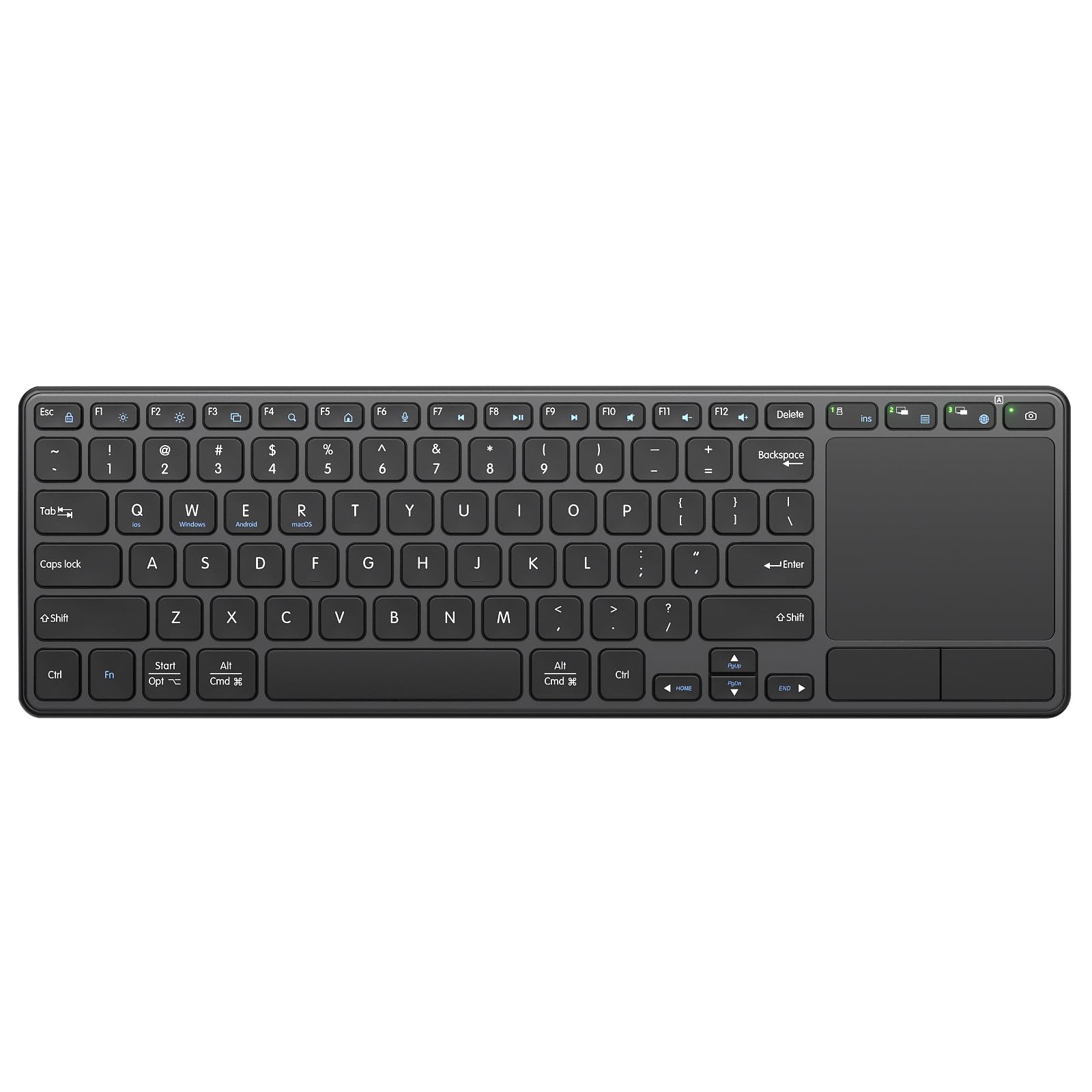
1. Bnnwa Rechargeable Wireless Keyboard with Touchpad
Our pick — 4.5+★ from 150+ verified ratings; the strongest balance of quality and price.
Three devices, one charging cable, and a trackpad with real left and right buttons.
The thing that separates this Bnnwa from most compact keyboards is the connection count. You get a 2.4GHz dongle plus two Bluetooth 5.1 channels, so three devices sit paired at the same time. Your laptop, your tablet, and your phone can all be logged in, and you hop between them without re-pairing anything. Three paired devices means no re-pairing when you switch from laptop to tablet mid-task.
Power comes from a built-in 500mAh battery that charges through a Type-C port — no drawer full of AAA cells to keep buying. A 10-minute automatic sleep with any-key wake is the kind of detail that matters on a keyboard you forget to switch off. The scissor-switch keys use an X-structure that the maker rates for up to 10 million keystrokes, and they are built to keep clicking quiet so you can type in the same room as other people.
You get a real touchpad with dedicated left and right mouse buttons, so you can click without tapping. It also supports gestures for pointing, zooming, and scrolling. It works with iOS, Windows, Android, and macOS, and Fn+Q/W/E/R swaps the layout. The build feels heavier and more solid than the price suggests. Fn+Q/W/E/R swaps the layout between macOS and Windows, so the same deck serves both machines.
Why it takes the top slot
- Three devices paired at once across 2.4GHz and two Bluetooth 5.1 channels.
- 500mAh Type-C battery with 10-minute auto-sleep and any-key wake.
- Trackpad with separate left and right mouse buttons plus gesture support.
- Scissor keys rated to 10 million keystrokes with noise-reducing click tech.
Where it asks a little patience
- The dongle lives inside the battery cover, so pairing a new device means opening the back.
- You need to charge it fully before the first use.
- Switching between three devices is the part with the most back-and-forth in owner feedback.
Reach for this if: you juggle a laptop, tablet, and phone and want one deck that stays paired to all three.
Think twice if: you want a keyboard that folds — this one stays full length.
2. Arteck 2.4G Wireless Touch TV Keyboard
A stainless deck built to live on the coffee table and reach across the room.
Arteck’s whole pitch is distance. You get a stated 10 meters — that is 33 feet — of wireless range from the nano receiver, which is roughly the span of a large living room. Plug the dongle into a TV-connected computer, smart TV, or HTPC and the keyboard and trackpad work right away with no software to install. Media hot keys sit on the deck so you can pause, skip, and adjust volume without hunting for the remote.
It is a chunky thing at 16 ounces, and the stainless finish is the reason. At 16 ounces it stays put on a cushion or blanket instead of sliding off your lap. The full-size layout measures 14.64″L x 5.04″W x 0.16″H, which makes it the widest deck in this group. For comparison, the TECKNET foldable measures 7.1″L x 4.2″W x 0.63″H folded — so this Arteck takes up roughly twice the footprint when both are sitting out.
Battery duty is handled by two AAA cells included in the box, so there is no charging routine to build. Two AAA cells mean no charging cable to route to the living room. Windows 10, 8, 7, and Chrome OS all work with it. The honest catch is that this is a Windows-family dongle keyboard — it is not a multi-device Bluetooth deck, so it will not hop between a tablet and a phone. Treat it as the dedicated remote for one screen.
What owners cite: the sturdy metal build and the looks are the recurring theme — plenty of buyers describe it as reading far more expensive than its tier. One common comparison in the feedback is to an Apple wireless keyboard that costs a good deal more.
Set your expectation: range can dip in a crowded wireless environment, so the 33 feet is best-case.
The clearest fit: a media PC or smart TV setup where the keyboard never leaves the living room.
Skip the idea of: multi-device switching — this one is a single-receiver tool.
3. CZUR K5S Bluetooth Keyboard with Touchpad
The only pick here that can go wired when wireless gets moody.
A fallback cable is a small feature with outsized value. The CZUR K5S runs on Bluetooth wireless or a wired USB connection, so if a hotel desk’s Bluetooth is fighting you, you plug in and keep typing. The deck itself is thin and compact enough to slide into a bag, and it measures 13.2″L x 4.3″W x 0.3″H. At 0.3 inches thick it slides into a laptop sleeve alongside your machine.
Switching systems is a three-shortcut job: Fn+A for Mac and iOS, Fn+S for Windows, Fn+D for Android. Fn+A and Fn+S switch between Mac/iOS and Windows with two keystrokes, no settings menus. The battery is rechargeable with a cable in the box, and the keyboard drops into sleep after 10 minutes idle. One quirk worth knowing: the touchpad cannot wake the keyboard, so you press a key to bring it back.
Quality is the single biggest theme in the owner feedback by a wide stretch, followed by the connection and the touchpad’s sensitivity. What people keep coming back to is how well the pad tracks — smooth and accurate rather than jumpy. The manufacturer is upfront that the keycaps sit slightly smaller than a standard full-size keyboard, so touch typists should expect a short adjustment period. There is no backlight, which is a deliberate trade to stretch battery.
Pick this when: you travel for work and want a wired lifeline plus a smooth pad in a thin body.
Know going in: the keycaps are smaller than full size, so heavy typists will feel the difference.
4. TECKNET Foldable Bluetooth Keyboard
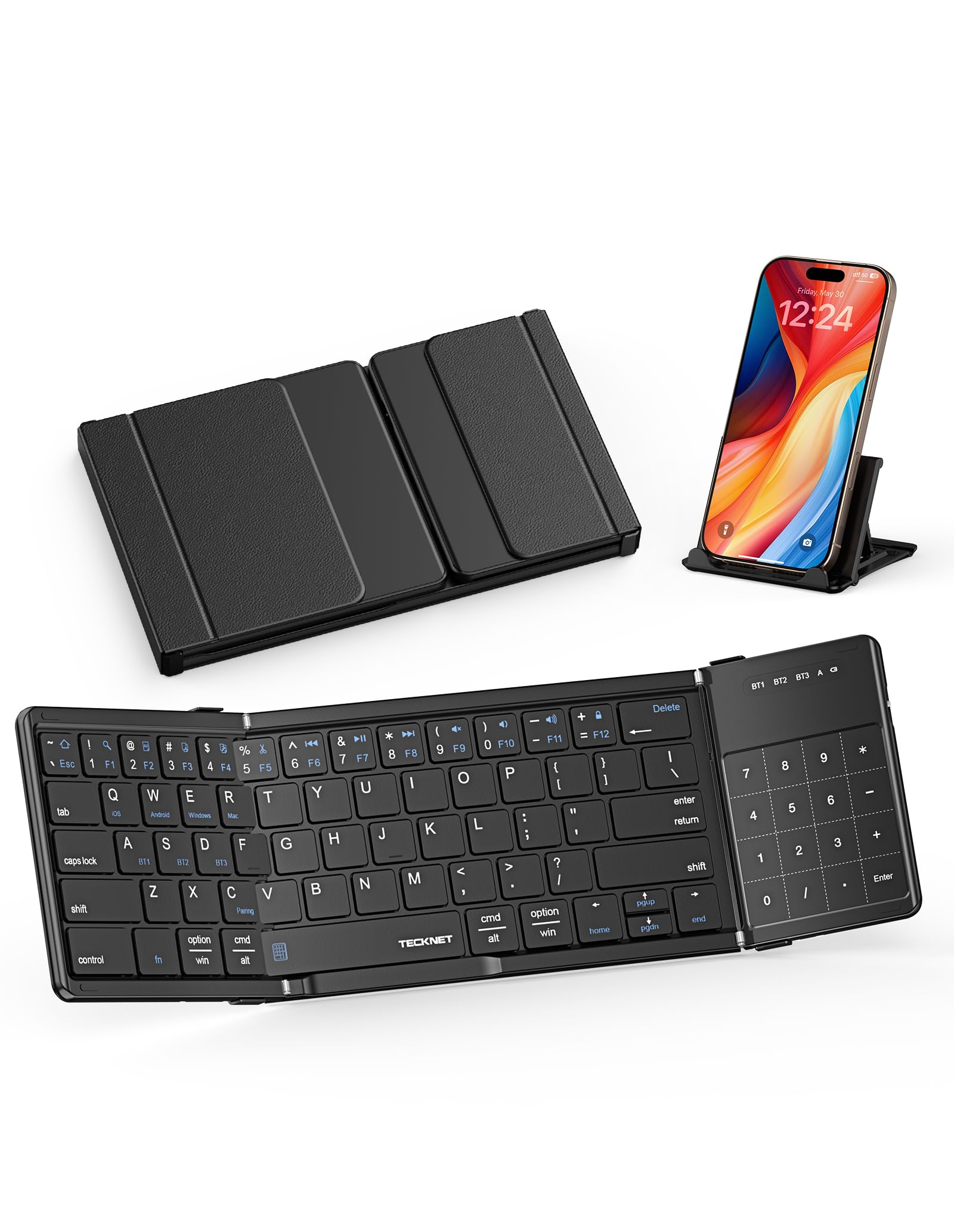
Folds to a third of its size, then flips into a number pad when you need one.
This one folds three ways into a 64-key layout that packs down to 7.15 × 4.22 × 0.63 inches. According to the maker, that cuts the footprint by over 50% against a full-size keyboard, and it slides into a backpack or handbag without a fight. For scale, the Arteck above spans 14.64 inches across — this is small enough to disappear into a side pocket.
The touchpad has a genuinely smart trick: it switches between Touchpad Mode, Numeric Keypad Mode, and Touch-Off Mode. The numeric setting turns that same pad area into a number pad for fast data entry. Touch-Off shuts the surface down so a stray palm does not send the cursor flying mid-sentence. It pairs with up to three devices over Bluetooth and swaps between them in under a second without re-pairing, plus 12 multimedia shortcut keys across Fn+F1 to Fn+F12.
USB-C fast charging pairs with an auto-sleep function the maker says extends standby to 300 days, and a red light in the top-right corner warns you when the battery falls below 20%. The package includes a foldable stand, a storage pouch, and a charging cable. What lands best with buyers is the overall quality and how genuinely compact it is in a bag. The functionality gets a split reaction — the mode switching is clever, but it is the part that takes the most getting used to.
Best trick in the box: the three-mode touchpad, which turns one pad into a cursor control, a number pad, or nothing at all.
Fair warning: a 64-key layout means some keys live on function layers rather than the top deck.
Built for: remote workers and hot-deskers who want a tiny kit that still handles numbers.
Not ideal if: you refuse to learn a compact layout — 64 keys is a real adjustment from full size.
5. Omikamo Foldable Bluetooth Keyboard
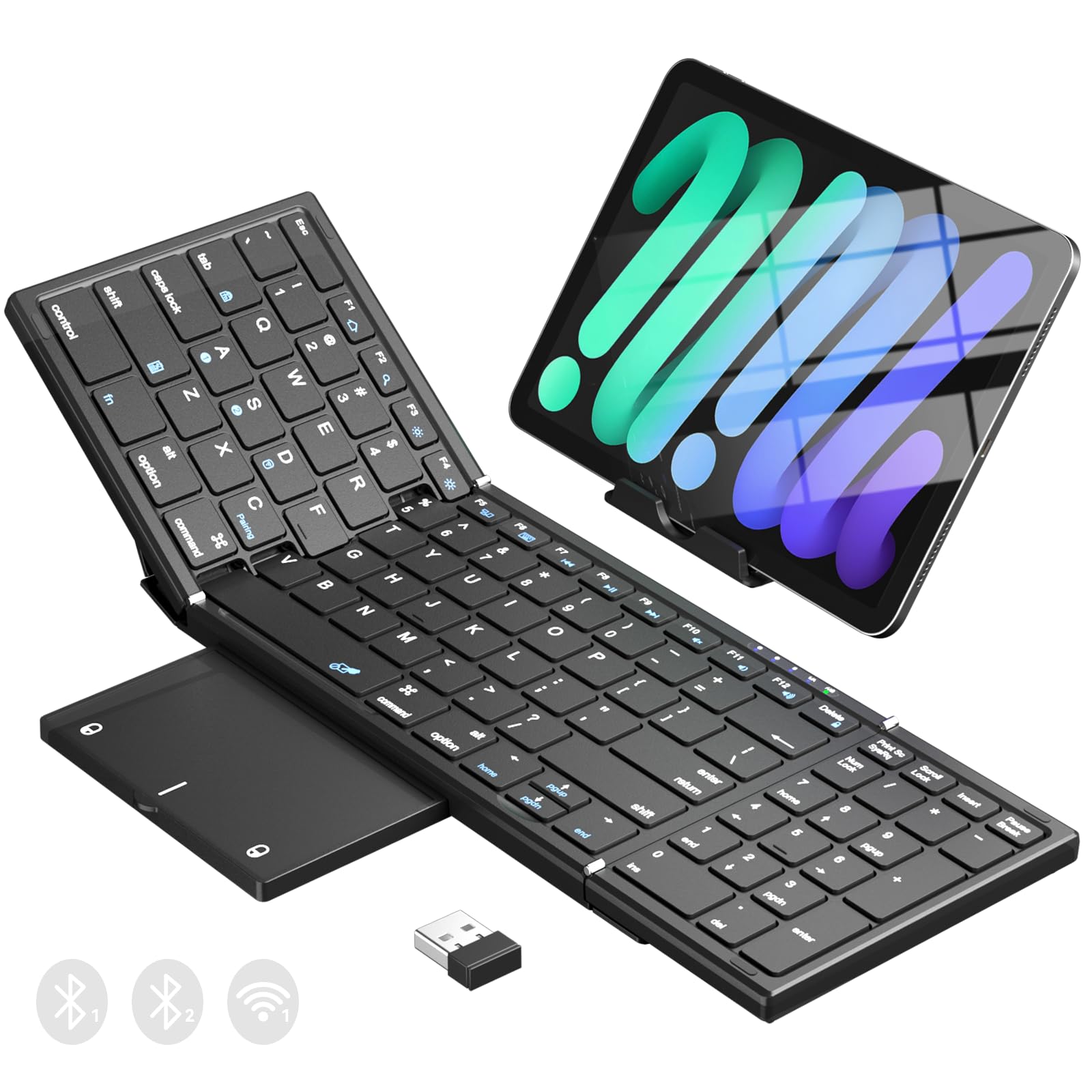
Ninety-nine keys and a folding touchpad, sized for real spreadsheet work on the road.
Most foldable keyboards shrink the key count to save space. This one goes the other way with a 99-key QWERTY layout and 15.5mm keycaps, which is close enough to a laptop deck that your fingers do not have to relearn much. Open it measures 13.5 × 4.5 × 0.4 inches; folded it is 7.3 × 4.5 × 0.9 inches at 0.65 lb. The number pad beside the pad is the reason to pick it — Excel sheets, passwords, and email replies all get faster with digits under your right hand.
Connections cover all the bases: one 2.4GHz USB receiver plus two Bluetooth channels, with one-click switching between an iPad, phone, tablet, or laptop. A 320mAh battery charges through Type-C, and you can check the level by pressing Fn+Shift — the red light flashes four, three, two, or one time to show 100% down to 25%. Ten minutes idle puts it to sleep, and any key wakes it.
The touchpad folds along with the deck, and the non-slip PU base keeps the whole thing from skating on a café table. X-shaped scissor switches give laptop-style rebound rather than a mushy press. Functionality is what buyers talk about most here, and the durability and portability follow right behind. The foldability and responsiveness get a split reaction — the hinge is the piece that needs the most care in daily use.
The practical case: a full number pad plus a folding touchpad in a package under a pound — that combination is rare.
Consider the trade: you pay for the extra keys with a wider open footprint than a 64-key folder.
Serious fit for: anyone who types numbers all day and still wants a bag-sized deck.
Second thoughts if: you only need letters — the number pad adds bulk you would not use.
6. MEETION Foldable Keyboard with Touchpad and Numeric Keypad
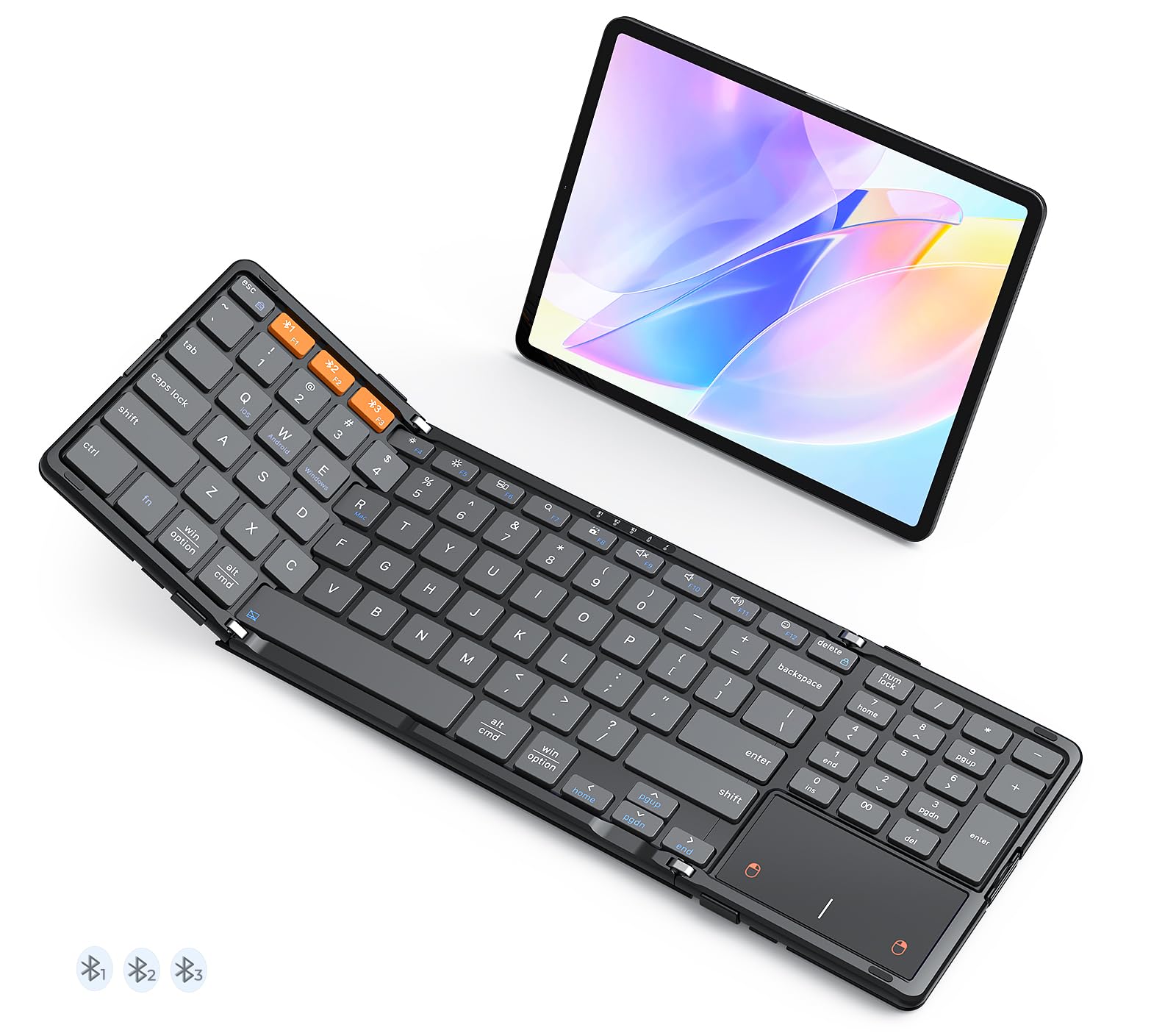
A folding keyboard that does not fold on you mid-sentence.
Folding decks have one common annoyance: they curl, wobble, or flop shut while you type on your lap. MEETION addresses it head-on with metal support bars on both sides. Once the latches fasten, the deck stays rigid and flat, whether it is on the sofa, your lap, or an uneven table. Most folding decks have no locking hinge; this one latches rigid before you type.
The layout is a standard 96-key QWERTY with an integrated touchpad, numeric keypad, and a full shortcut row. X-shaped scissor switches keep the press quiet and precise. It runs Bluetooth 5.3 and pairs with up to three devices from a distance up to 10 meters, with a dedicated button to swap between laptop, tablet, and smartphone. At 7.87 × 4.84 × 0.67 inches and 0.87 lb, it is the heaviest folder here — and that weight is the thing keeping it planted.
Inside sits a 280mAh battery with a stated standby of up to 90 days. Fast charging through USB-C takes 2–3 hours, and it sleeps after 20 minutes idle. The back is wrapped in leather for scratch and stain resistance, and the non-slip leather base holds grip on smooth surfaces. Appearance is the most-discussed quality in the feedback, and the locking fold comes up repeatedly as the reason it works on uneven ground. A velvet bag comes in the box.
Choose it for: lap typing where a floppy hinge would drive you up the wall.
Weigh this: at 0.87 lb it is the heaviest folding option here, so it is the one you notice in a bag.
7. Samsers Full-Size Foldable Bluetooth Keyboard

Standard-size keys and a 13.5-inch spread, folded into something you can palm.
Full-size keys are the whole argument here. Unfolded it measures 13.5 x 4.5 inches with 0.63 inch standard keys, so your fingers land where they already expect. A smooth metal hinge lets it open flat into a proper typing deck. Quiet scissor-switch keys (the low-profile mechanism under each cap) and a non-slip PU leather base keep it steady on a desk. Folded with magnets, the whole thing weighs 9.2 ounces and drops into a briefcase.
Three devices connect at once over Bluetooth 5.1, switching without delay across Windows, Mac OS, iOS, and Android. The larger multi-touch trackpad handles mouse functions including clicks, so you can leave the mouse in the bag. The rechargeable battery is rated to last up to 70 hours of use, or 120 days on standby, after a 2–3 hour charge. A Type-C cable, phone holder, and velvet storage bag come included.
Performance is the quality buyers bring up most, with the ease of connection close behind and portability right there too — it fits in a back pocket, which is not something you can say about most full-size decks. Reliability and value both draw a split view in the feedback, so this is a pick to choose for the key size and the hinge rather than as the cheapest route. The blue PU finish resists daily wear and scratches.
Why it stands out: standard 0.63 inch keys on a board that folds — most folders shrink the caps to save room.
What to weigh: reliability is the split topic in feedback, so buy it for the typing feel rather than as a rugged travel beater.
The match for: touch typists who want full-size keys and still need a folding deck.
Look past it if: you want the smallest possible pack size — this folds but does not shrink to pocket scale.
8. Nillkin Foldable Bluetooth Keyboard
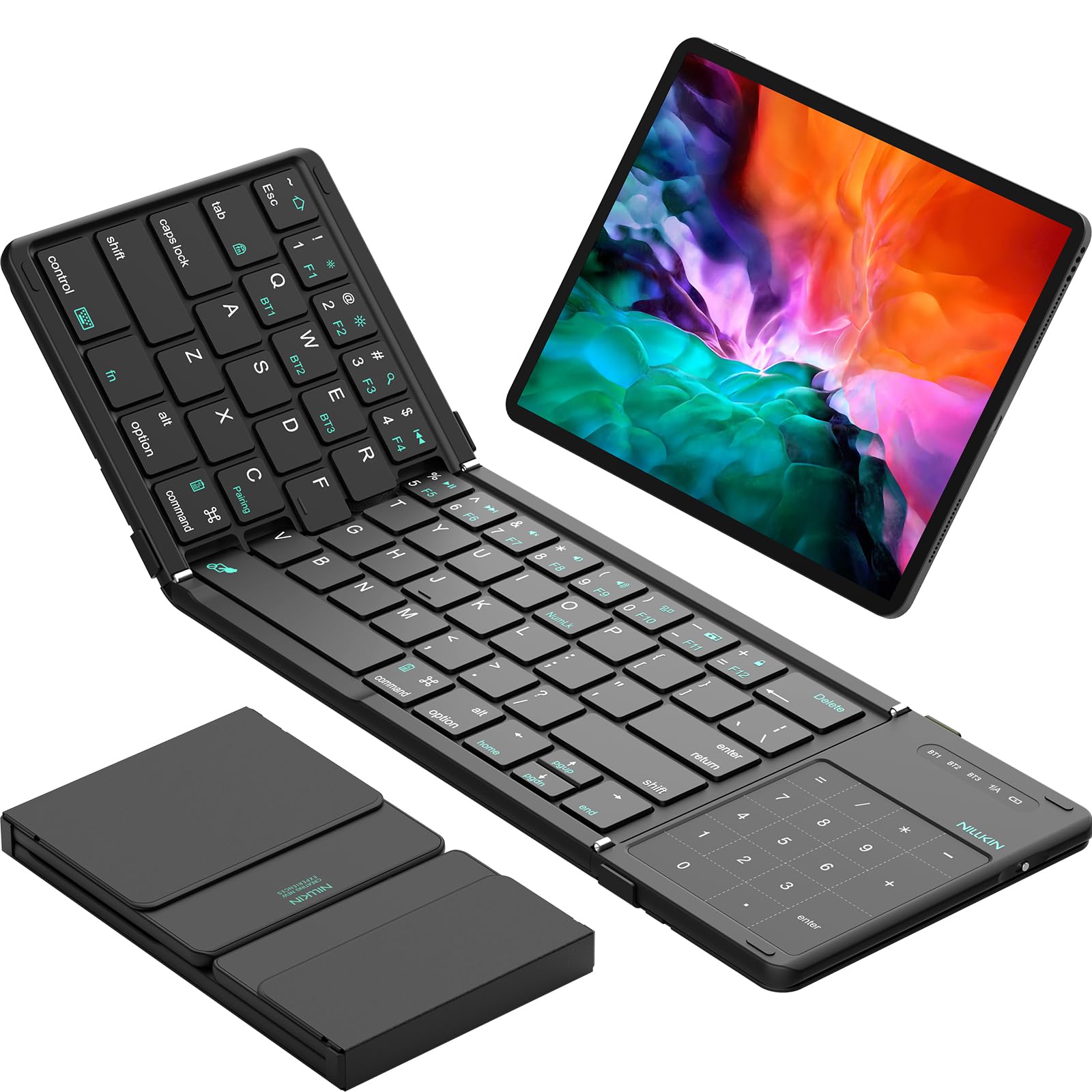
A full 105-key layout squeezed into a footprint that folds to a hand-sized square.
Nillkin packs the most keys per inch of anything here: 105 keys with 16mm keycaps, folding from 13.5″ x 4.2″ x 0.32″ down to just 7.2″ x 4.2″ x 0.63″. At 9.16oz it is easy to carry in a sling or briefcase, and a custom storage pouch comes with it. The aluminum alloy hinge is rated through 10,000+ fold tests, which is the durability claim that matters most on a keyboard with a moving joint.
The multi-touch trackpad handles clicking, scrolling, and navigation with gestures, so no mouse is needed. Three devices pair over Bluetooth and switch with Fn+BT1, BT2, or BT3, holding a lag-free link up to 33ft. Compatibility covers Windows, macOS, Chrome OS, iPadOS, and Android, though it does not support iOS 13.4 or older, or Android 3.0 or older. Charges by Type-C, and auto-sleep stretches standby to 140 days.
Two things to know before you commit. The flat no-tilt profile and unlatching fold mean you should use it on a flat surface — the hinge does not lock, so lap typing is not its strength. And iPad users need to turn on AssistiveTouch for the pad gestures to work, with some gestures depending on the app. What buyers respond to is the compact footprint that is still big enough to type on all day, and the way it collapses into a neat square.
The headline spec: 105 keys at 16mm in a deck that folds to 7.2 inches — the densest layout in this group.
The flat-surface rule: no locking hinge and a no-tilt profile mean it belongs on a table, not your knees.
Ideal for: travellers who want every key present and a deck that packs to palm size.
Not for: lap typing or iPad gesture work without enabling AssistiveTouch first.
9. NuPhy Node75 Wireless Mechanical Keyboard
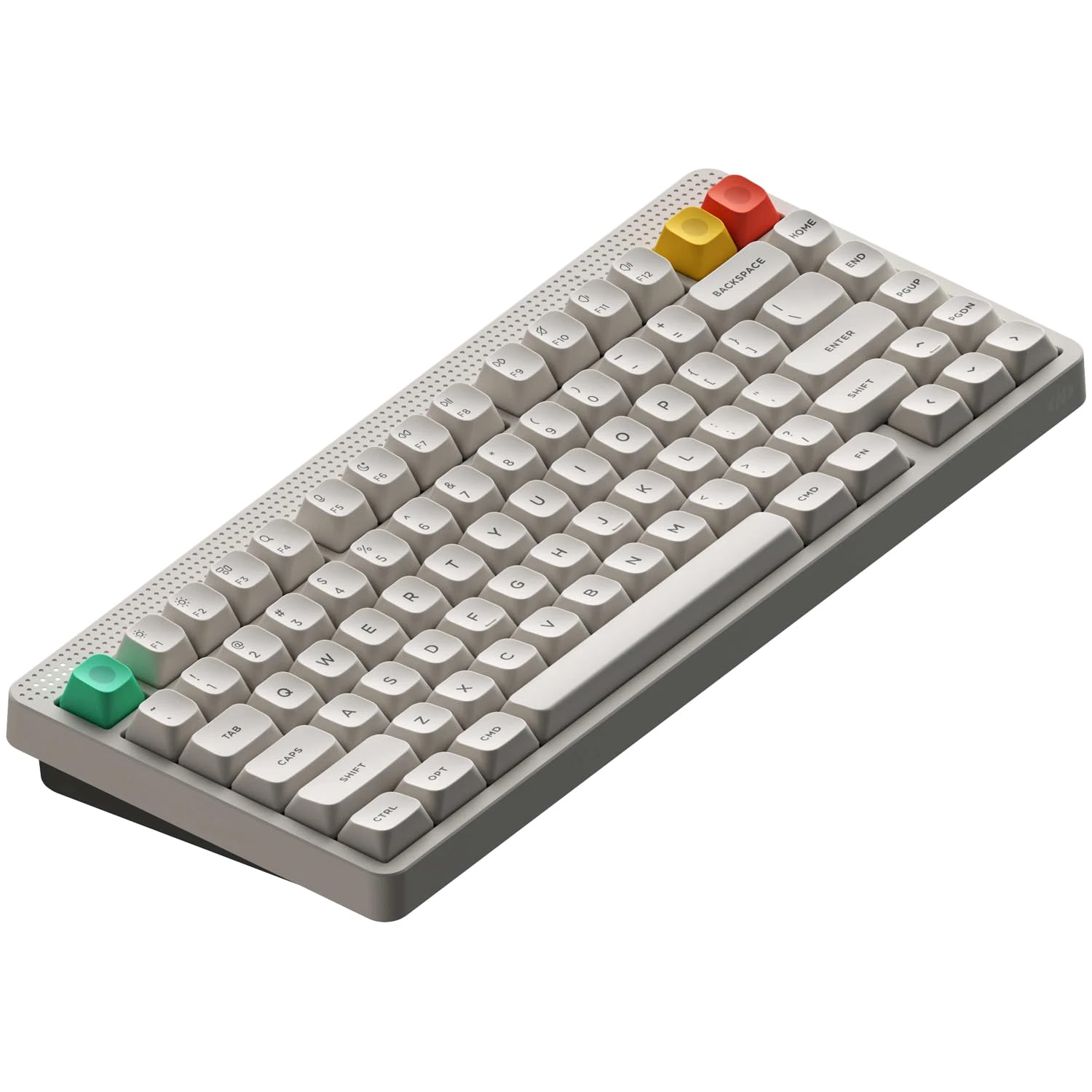
No touchpad here — instead a swipe strip that controls volume and brightness.
This is the one that reads differently. NuPhy swaps the usual volume knob for a touch area at the top of the deck, and you slide a finger across it to change volume or brightness. Those gestures can be configured through the NuPhyIO software. It is touch control, just not cursor control — there is no trackpad, so this is the pick for someone who wants a great typing board rather than a mouse replacement.
The internals are the real story. It is a gasket-mounted mechanical keyboard, meaning the plate floats on a soft mount so the press feels cushioned and the sound stays dampened. Internal damping materials cut vibration and hollow echo. The 4000mAh battery delivers up to 1000 hours of runtime per charge, and a 1000Hz polling rate in 2.4GHz and wired modes keeps the response fast. Hot-swappable switches let you pull and replace them without soldering.
Connection is tri-mode: Bluetooth, 2.4GHz wireless, or USB-C wired, with up to 5 devices paired and swapped via shortcut keys. RGB backlighting is configurable, and the double-shot PBT keycaps resist shine and fading. Nearly silent operation and a strong typing experience are what buyers highlight, and the value reads well against the mechanical tier. Tactile feel draws a split view, which makes sense — switch feel is personal, and hot-swap means you can change it.
The number to sit with: 4000mAh and up to 1000 hours per charge — the largest battery in this article by a wide margin.
Be clear on what it is: no touchpad, so you still need a mouse or trackpad for cursor work.
Right call when: you want mechanical feel, RGB, and five-device switching in one board.
Wrong call if: the touchpad is the reason you are shopping — this keyboard does not have one.
Know the Specs
mAh Battery Capacity
A battery rated in mAh (milliamp-hours) stores charge, so a higher number generally means more typing between recharges. The NuPhy’s 4000mAh sits at the top of this group, while the CZUR and MEETION rely on smaller cells and more frequent charging. Standby figures quoted in days describe idle time, not typing time, so treat them as separate numbers.
Bluetooth vs 2.4GHz Dongle
A 2.4GHz dongle is a tiny USB receiver and needs a full-size USB port. Bluetooth pairs directly with no receiver, which is how you connect a tablet or phone. Keyboards that carry both let you keep one device on the dongle and two on Bluetooth — that is the three-device setup several picks here use.
Scissor Switches and Keycaps
Scissor switches are the low-profile mechanism under the key that gives a short, stable press — the same idea as a laptop keyboard. Keycap size, measured in millimeters, decides how much finger room each key gives you. Full-size 15.5mm or 16mm caps feel familiar; smaller caps require adjustment but allow a smaller deck.
Polling Rate and Touch Gestures
Polling rate is how often the keyboard reports to the computer, measured in Hz — 1000Hz means it checks a thousand times a second, which matters for fast typing and gaming. A touchpad or touch strip lets you control the cursor or adjust settings with a finger drag, so you skip a separate mouse for simple tasks.
Common Questions
Will a wireless touch keyboard work with my iPad?
Do I need a USB port to use one of these keyboards?
How long does the battery actually last between charges?
Can a folding keyboard stay flat while I type on my lap?
Is a touchpad keyboard a real replacement for a mouse?
How many devices can I pair at once?
What does auto-sleep do and will it interrupt my typing?
Do these keyboards have backlighting for typing in the dark?
Can I swap the switches on a mechanical touch keyboard?
Will a small folding keyboard handle letters and numbers without extra steps?
The Bottom Line
For most people, the wireless touch keyboard worth buying is the Bnnwa Rechargeable Wireless Keyboard with Touchpad. Three devices stay paired at once, the 500mAh Type-C battery kills the battery-shopping habit, and the trackpad has real mouse buttons. If you want a keyboard that folds flat for a bag, grab the MEETION — its metal support bars keep it rigid on your lap. And for full-size keys that still fold, the Samsers is the one to reach for. Pick the Bnnwa first if you want a single deck to cover desk, sofa, and travel; it is the crowd favorite of the group at 4.5+ stars across 150+ ratings.
How we choose
We do not accept paid placement. Every pick is matched to a real buyer and a real use-case; we do not hands-on test units.
Sources
Specifications: manufacturer listings and product documentation. Review insights: verified customer reviews, as of November 2026. Pricing: not shown on this page (it changes often); check the current price via the retailer link.
As an Amazon Associate, Tactical Gear Guy earns from qualifying purchases. This does not affect which products we feature.