Specs are compiled from manufacturer listings and verified buyer reviews and can change over time — please confirm the key details on the product page before buying.
If your desktop is stuck on a little USB Wi-Fi stick that drops out mid-game, you already know the problem: the antenna is buried behind a metal case. A wireless NIC for desktop — meaning a network card that slots into a PCIe slot inside your PC — fixes that by putting a proper antenna outside the case, where it can actually hear your router. This guide covers the nine add-in cards that do it well, sorted by what each one is actually good at, so you can pick the right one for your board and your router.
This guide is built by comparing the manufacturers’ published specifications and the patterns across verified customer reviews, so you get each pick’s real strengths and trade-offs instead of marketing spin.
Some cards here use Wi-Fi 6E, some use Wi-Fi 7, and a few only work on Windows 11 — so the first thing to check is your motherboard slot and your router, not the box art. Below you’ll find every card broken down by real specs, plus wireless nic for desktop picks for gaming, streaming, and budget builds.
Top Picks


How To Choose The Best Wireless NIC for Desktop
The hard part is matching it to the hardware you already own, because a card your board can’t talk to is a card you’ll be returning. Three things decide that match: your free slot, your router’s Wi-Fi generation, and your Windows version.
Check your slot and your Windows version first
Every card here fits a PCIe x1 slot, the short little slot near the long graphics card slot on most motherboards. Several also list support for PCIe x4, x8 and x16, so you can drop them in a larger empty slot if the short one is covered. The second gate is the operating system. Cards built on Wi-Fi 7 often require Windows 11, while Wi-Fi 6E and Wi-Fi 6 cards tend to list Windows 10 and 11 both — check the listing before you buy, because this is the number one reason a card gets returned.
Match the card to your router, not the marketing
A Wi-Fi 6E card only reaches its fastest 6GHz band when your router also broadcasts 6GHz. A Wi-Fi 7 card only gets the MLO benefit — Multi-Link Operation, which uses two bands at once for a steadier link — when paired with a Wi-Fi 7 router. If your router is older, a cheaper Wi-Fi 6 card will run at the same real speed as a premium one. Spend on the newer card only if you plan to upgrade the router too.
Look at the antenna and the Bluetooth cable
Antennas that sit on a cable, on a magnetic base or a flexible mount, get the signal out from behind the metal case, which is the whole point of going internal. Bluetooth on these cards runs off a small USB header cable that plugs into your motherboard — so you need a free internal USB header and you should disable your board’s built-in Bluetooth to avoid a conflict. Cards that ship with a low-profile bracket fit slim cases; check the box contents if you have a small tower.
Side-by-Side Comparison
| Model | Best For | Top Speed | Wi-Fi Standard | Bluetooth | Amazon |
|---|---|---|---|---|---|
| GIGABYTE GC-WBAX210★ Best Overall | Most buyers | 2400 Mbps | Wi-Fi 6E | 5.2 | Amazon |
| BZIZU AX210 Wi-Fi 6E PCIe CardCompact Pick | Compact builds | 5400 Mbps | Wi-Fi 6E | 5.3 | Amazon |
| ASUS PCE-AX1800Best Value | Wi-Fi 6 on a budget | 1800 Mbps | Wi-Fi 6 | 5.2 | Amazon |
| UGREEN BE6500 PCIe Card | Future Wi-Fi 7 upgrade | 2882 Mbps (6GHz) | Wi-Fi 7 | 5.4 | Amazon |
| ASUS PCE-AXE5400 | Wide 6GHz reach | 5400 Mbps | Wi-Fi 6E | 5.2 | Amazon |
| GIGABYTE GC-WIFI7 | Fast two-band gaming | 5800 Mbps | Wi-Fi 7 | 5.3 | Amazon |
| Cudy WE4000 | Crowded networks | 5400 Mbps | Wi-Fi 6E | 5.3 | Amazon |
| TP-Link Archer TBE400E | Windows 11 Wi-Fi 7 | 6500 Mbps | Wi-Fi 7 | 5.4 | Amazon |
| TP-Link Archer TBE550E | Range and top speed | 9300 Mbps | Wi-Fi 7 | 5.4 | Amazon |
Detailed Reviews
1. GIGABYTE WiFi 6E GC-WBAX210
Our pick — 4.5+★ from 3,500+ verified ratings; the strongest balance of quality and price.
The card most people should stop shopping after — a drop-in upgrade that just works.
The headline number here is 2400 Mbps over the Intel Wi-Fi 6E AX210 module, a chipset that supports two streams (meaning two data lanes at once) across the 2.4GHz, 5GHz and 6GHz bands. In practice that means your downloads and game updates run over the clean 6GHz band while the rest of the house fights over 5GHz. It is a Wi-Fi and Bluetooth combo adapter, so one slot handles both your network and your headset or controller.
What wins people over is that it simply functions — the fit-and-forget reliability of the thing is what owners talk about first, followed by build quality. Installation is genuinely plug-and-play on Windows 10, and it hands you a Bluetooth radio on the same card. As one of the larger cards here at 8.27 by 5.83 by 2.16 inches, it takes up real room, so measure your case clearance before it arrives — the compact alternative below is 3.14 by 2.75 by 0.78 inches, a much smaller footprint for a tight build.
Speed is the other reason this sits on top: it beats the ASUS PCE-AX1800 outright on the raw rating — 2400 megabits per second against 1800. The trade-off is honest and worth knowing. The connectivity and compatibility categories carry mixed feedback, which usually points to a slot or driver mismatch rather than a bad radio. Check your free PCIe slot and your Windows build, and you land in the group that never thinks about it again.
Where it earns its spot
- Intel AX210 module with dedicated 6GHz spectrum for lower latency
- 2400 Mbps across 2.4GHz, 5GHz and 6GHz bands
- Straightforward plug-and-play install on Windows 10
- Wi-Fi and Bluetooth 5.2 handled by a single card
What to weigh first
- One of the larger boards here — check case clearance
- Connectivity feedback is mixed, usually a slot or driver mismatch
Reach for this if: you want one card to cover Wi-Fi and Bluetooth without babysitting drivers.
Check first: your case has room for an 8.27-inch board and a free PCIe x1 slot.
2. BZIZU WiFi 6E PCIe Card (Intel AX210, 5400Mbps)
A tiny board with a big number — 5400Mbps folded into a 101-gram package.
This is the one to look at if your case is cramped. Where the GIGABYTE up top measures 8.27 by 5.83 by 2.16 inches, this BZIZU card sits at 3.14 by 2.75 by 0.78 inches and weighs 101 grams, so it tucks into a mini-ITX build without crowding anything. The Intel AX210 chipset inside pushes tri-band speeds up to 5400Mbps across 6GHz, 5GHz and 2.4GHz, with Bluetooth 5.3 on the same card.
The AX210 is the same silicon family doing the heavy lifting in the top pick, so you get the same reliability story — reduced latency on the 6GHz band and a Bluetooth radio for controllers and headsets. It runs Windows 10 and 11, which means it does not lock you out of an older install the way several Wi-Fi 7 cards here do. Setup runs on Windows’ automatic driver install, so most people are online without downloading anything on another machine first.
The thing to plan for is the Bluetooth cable — it needs a free internal USB header on your motherboard, and you should switch off your board’s own Bluetooth so the two don’t fight. It also ships with a low-profile bracket alongside the standard one, which is the detail slim-case builders notice. If your tower is small and your router is 6GHz-capable, this is the more sensible shape of the same idea.
Small-case first: the compact footprint and included low-profile bracket make it the easier fit for tight builds.
Same brain, smaller body: the AX210 chipset ties it to the top pick’s reliability without the bulk.
Best for: mini-ITX and small towers that can’t spare the space.
Plan around: the Bluetooth header cable — you need a free internal USB header.
3. ASUS AX1800 PCIe WiFi Adapter (PCE-AX1800)
The budget card that doesn’t punish you for skipping the newer bands.
You get 1800 Mbps of Wi-Fi 6 (802.11ax) here, plus two external antennas and Bluetooth 5.2. It weighs 2.72 ounces and measures 4.74 by 3.46 by 0.85 inches, so it fits a standard tower with room to spare. The 1800 Mbps figure is the honest limit — it is lower than the 2400 Mbps on the GIGABYTE above and the 5400 Mbps on the BZIZU, but it is also the card that fits a plain, older router without you paying for bands it can’t use.
What makes it reliable for a budget pick is OFDMA and MU-MIMO, two Wi-Fi 6 features that let your router serve several devices at once instead of taking turns. In a household where someone is streaming and someone else is on a video call, that smooths out the stutter. WPA3 security comes on board, which is the current standard for keeping your network password from being cracked.
The fit question is your router. This card is Wi-Fi 6, not 6E, so it does not touch the 6GHz band — if you have a Wi-Fi 6E or 7 router and want the clean band, spend on the cards below. If your setup is a solid 5GHz router and a wired-backhaul mesh, this runs the same real speeds for a lot less outlay. It works from the box on Windows 10, and reports say it slots in as a sensible swap for a flaky USB adapter.
Why it holds up
- 1800 Mbps Wi-Fi 6 with OFDMA and MU-MIMO for busy households
- Two external antennas for a clean signal path
- WPA3 security included
- Runs on Windows 10 without driver hunting
The honest limit
- No 6GHz band — Wi-Fi 6 only
- Lower ceiling than the tri-band cards if you buy a 6E router later
Worth it when: your router is Wi-Fi 6 and the 6GHz band isn’t in your future.
skip it if: you already own a 6E or 7 router and want the clean band.
4. UGREEN WiFi 7 BE6500 PCIe WiFi Card
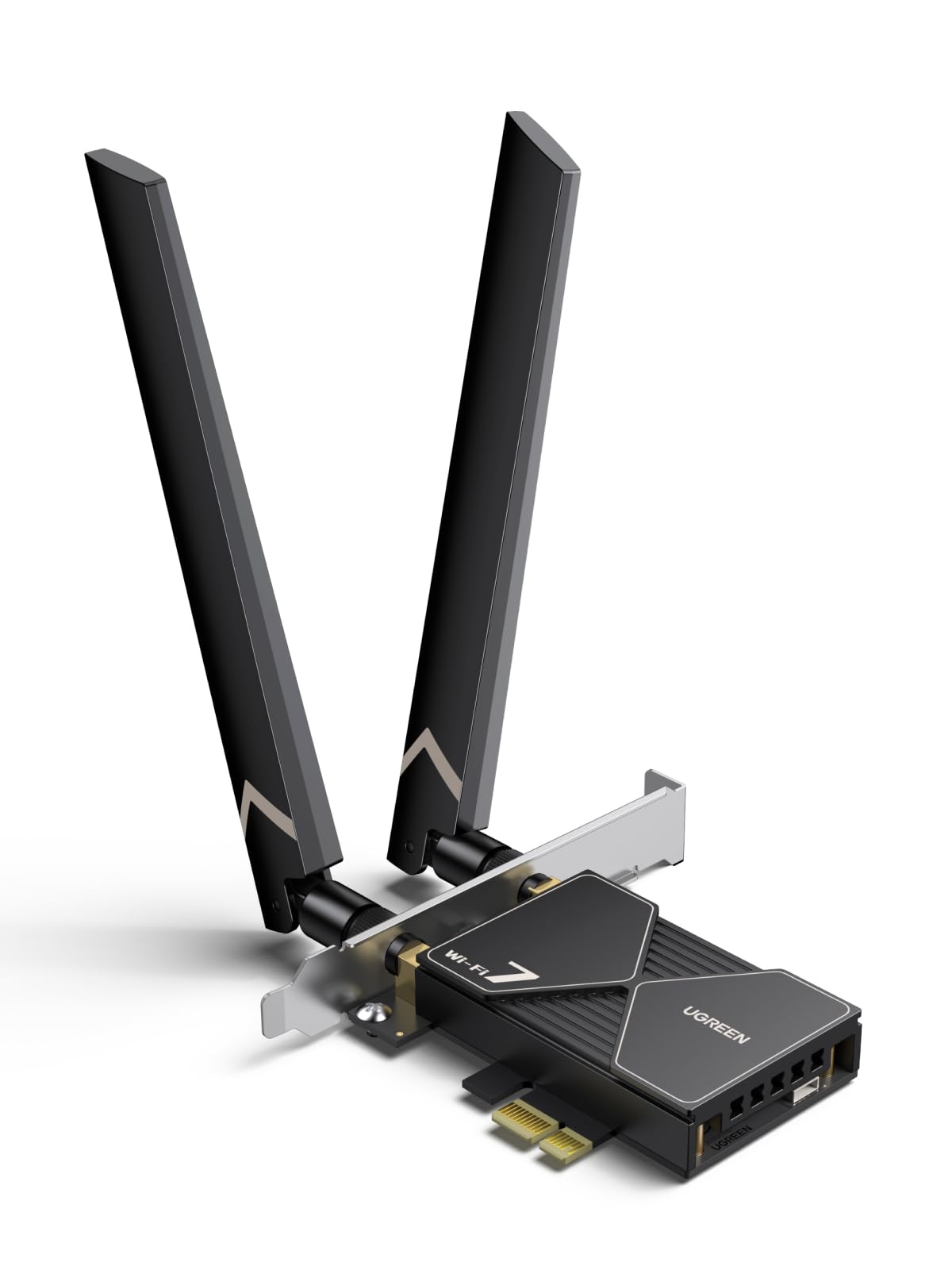
Wi-Fi 7 and Bluetooth 5.4 in one card — if your PC runs Windows 11, this is the future-proof route.
On the raw speed rating, this BE6500 card reaches 2882 Mbps in the 6GHz band, while the GIGABYTE GC-WIFI7 lists 5800 Mbps across its own bands. The 160MHz bandwidth on 6GHz means wider lanes for data, and MLO (Multi-Link Operation) lets the card use two bands at once so a dropped signal on one doesn’t kill your game.
The flexible dual 6dBi high-gain antennas are the detail that matters for range — you can angle them at your router instead of pointing them wherever the case allows. Bluetooth 5.4 handles a controller, headset and keyboard at once, which frees your desk from cable clutter. The driver comes on an included USB stick, so setup works even when your PC has no working network connection yet.
Two things to look at honestly. It only works on Windows 11 — not Windows 10, not older builds — so check your version before ordering. And reliability is the mixed note in the reviews: some owners are thrilled, others couldn’t get it working at all, which usually points to a router or driver mismatch on the Wi-Fi 7 side. You also have to disable your motherboard’s built-in Bluetooth first, or the two radios conflict. If you’re on Windows 11 with a Wi-Fi 7 router, none of that should slow you down.
Where it shines: Wi-Fi 7 MLO and 2882 Mbps on the 6GHz band point it at a destination router, not an old one.
Before you order: Windows 11 only, and disable your onboard Bluetooth plus plug in the supplied USB stick for the driver.
Pick it when: you’ll be on Windows 11 and want a card that grows with a Wi-Fi 7 router.
Look elsewhere if: you’re still on Windows 10 — this card won’t install at all.
5. ASUS PCE-AXE5400 Wi-Fi 6E Adapter

Tri-band 6E coverage that reaches across the room without a big price jump.
This is ASUS’s Wi-Fi 6E take at AXE5400, so it lines up on the same 5400 Mbps ballpark as the Cudy and BZIZU here, with Bluetooth 5.2 on the same card. It weighs just 0.05 kg, and the two external antennas are set well off the board, which is what gives it a long reach — signal you can point toward the router instead of leaving behind a metal case. OFDMA and MU-MIMO keep multiple devices served at once on a busy network.
The value story is the 6GHz band. You get a clean, less congested channel for gaming and 4K streaming, and the ASUS name is backed by a huge DIY builder base, so driver support is mature. It installs on Windows 10 and slots into a standard PCIe slot without a fuss. If you want tri-band speed without paying the Wi-Fi 7 premium, this is a calm, well-supported middle step.
The honest catch is that Bluetooth is 5.2 here, not the 5.3 or 5.4 you get on the newer cards below — fine for a headset or controller, but not the latest revision. And like every 6E card, the 6GHz band only wakes up if your router has it. This card rewards you for owning a mid-to-high-end mesh; on an older router it still works, just at the lower bands.
Good match for: a 6E router and a mid-range build that wants tri-band range.
Know this: Bluetooth 5.2 and no 6GHz band unless your router has 6GHz.
6. GIGABYTE WiFi 7 GC-WIFI7

Built for the gamer who hates a dropped frame — 5800Mbps with two-band MLO.
Start with the number: 5800 Mbps on this Wi-Fi 7 module, which is the faster of the two GIGABYTE cards here and earns its place for a gaming PC that wants headroom. It runs MLO (Multi-Link Operation) so it can hold two bands at the same time — meaning a hiccup on one band doesn’t end your match. 4K-QAM packs more data into the signal, and MRU (Multiple RU) helps the card cut through interference from neighbours’ routers.
The Bluetooth 5.3 on board covers your controller and headset, and it fits PCIe x1 slots on both AMD and Intel boards. Buyers report gigabit-class speeds when the router allows it, and the install goes smoothly on Windows 10 and 11. It weighs 0.24 kg, light enough that the board doesn’t sag in the slot.
The one thing to keep in perspective: Wi-Fi 7 features like 4K-QAM and MLO only fully engage with a Wi-Fi 7 router. On a Wi-Fi 6 or 6E router this runs like a very good 6E card, so the premium is partly a bet on your next router. If you’re planning to upgrade the router in the next year or two, it’s an easy call; if you’re staying put, the Wi-Fi 6E picks above give you the speed without the wait.
Frame-rate focus: MLO across two bands and 5800 Mbps make it the gaming-forward choice here.
Router pairing: the Wi-Fi 7 tricks need a Wi-Fi 7 router to show up.
Made for: gamers with a Wi-Fi 7 router and a PCIe x1 slot to spare.
Hold off if: your router stays on Wi-Fi 6 — the extra features go quiet.
7. Cudy WE4000 Wi-Fi 6E PCIe Adapter

The steady hand for a packed network — AX5400 speed with a heatsink to keep it cool.
One detail separates this from the other Wi-Fi 6E cards here: it comes with a heatsink, a metal finned body that sheds heat so the radio doesn’t throttle during a long download or a big game session. Underneath it runs Wi-Fi 6E up to 5400 Mbps with the Intel AX210 inside, Bluetooth 5.3, and it measures 100 grams — light enough to slot into a PCIe x1 without drama. The 6GHz band gives you the clean, fast lane for gaming and VR, and OFDMA and MU-MIMO keep latency low when the house is online at once.
What owners talk about most is that it just works from the start — the automatic Windows 10 driver install catches it, and the signal holds steady over long sessions. Owners typically report 400Mbps-plus with low ping, enough for smooth 1080p 60fps streaming. WPA3 keeps your network encrypted, which matters if you live somewhere with a lot of routers fighting for the same channels.
The one caveat is no surprise on a card this capable: a few owners have had connectivity hiccups, which in practice usually traces to a router or driver version. That’s a mismatch to fix rather than a reason to avoid — and the heatsink and stable AX210 radio make it a strong pick for anyone who’s been burned by a cheap USB adapter that overheats. If you do a lot of long gaming sessions, the cooling is a real reason to choose this over a bare card.
What buyers keep coming back to
- Heatsink keeps the Wi-Fi 6E radio cool through long sessions
- AX5400 speeds on the clean 6GHz band via Intel AX210
- Automatic Windows 10 driver install — no driver hunting
- WPA3 security and low-latency OFDMA/MU-MIMO
Worth knowing
- A few connectivity hiccups reported, usually driver or router side
- Needs a 6GHz router to open up the fast band
Right for: long gaming or streaming sessions where heat and stability matter.
Only if: your router has 6GHz — otherwise the clean band stays locked.
8. TP-Link Archer TBE400E Wi-Fi 7 PCIe Card

Tri-band Wi-Fi 7 up to 6500 Mbps — and it brings both brackets for a slim tower.
The three-band split is the useful bit here: 2882 Mbps on 6GHz, 2882 Mbps on 5GHz, and 688 Mbps on 2.4GHz, adding up to 6500 Mbps total. It pairs MLO, Multi-RU and 4K-QAM with a Wi-Fi 7 router for lower latency and steadier throughput than the older Wi-Fi 6 cards can manage. It weighs 2.08 ounces, and it ships with both a standard and a low-profile bracket, so it drops into a small case without a separate purchase.
What makes it stand out is the reliability feedback — owners rate this card’s steadiness as its top quality, with connectivity and Bluetooth coming up next. The two high-gain antennas push the signal further, and Bluetooth 5.4 connects your controller, headset and keyboard at once. On a properly configured Windows 11 PC it comes up and stays up.
Two hard requirements. It’s Windows 11 only — not compatible with Windows 10 and below — and it needs a free internal USB header for the Bluetooth cable. If your board is onboard-Bluetooth equipped, disable that first or the two fight. The mixed value feedback usually traces back to people pairing it with a Wi-Fi 6 router and not seeing the full 6500 Mbps — so if your router isn’t Wi-Fi 7, the cheaper Wi-Fi 6E cards above give you the same real speed. If you are on Windows 11 and Wi-Fi 7, this is the stable member of the group.
Stability-first: reliability is the quality owners point to most, backed by Bluetooth 5.4 and high-gain antennas.
Check the box: Windows 11 only, and you need a free internal USB header for Bluetooth.
Suits you if: you run Windows 11 with a Wi-Fi 7 router and value a steady signal over chasing the highest number.
Think twice if: your PC is on Windows 10 — there’s no install path here.
9. TP-Link Archer TBE550E Wi-Fi 7 PCIe Card
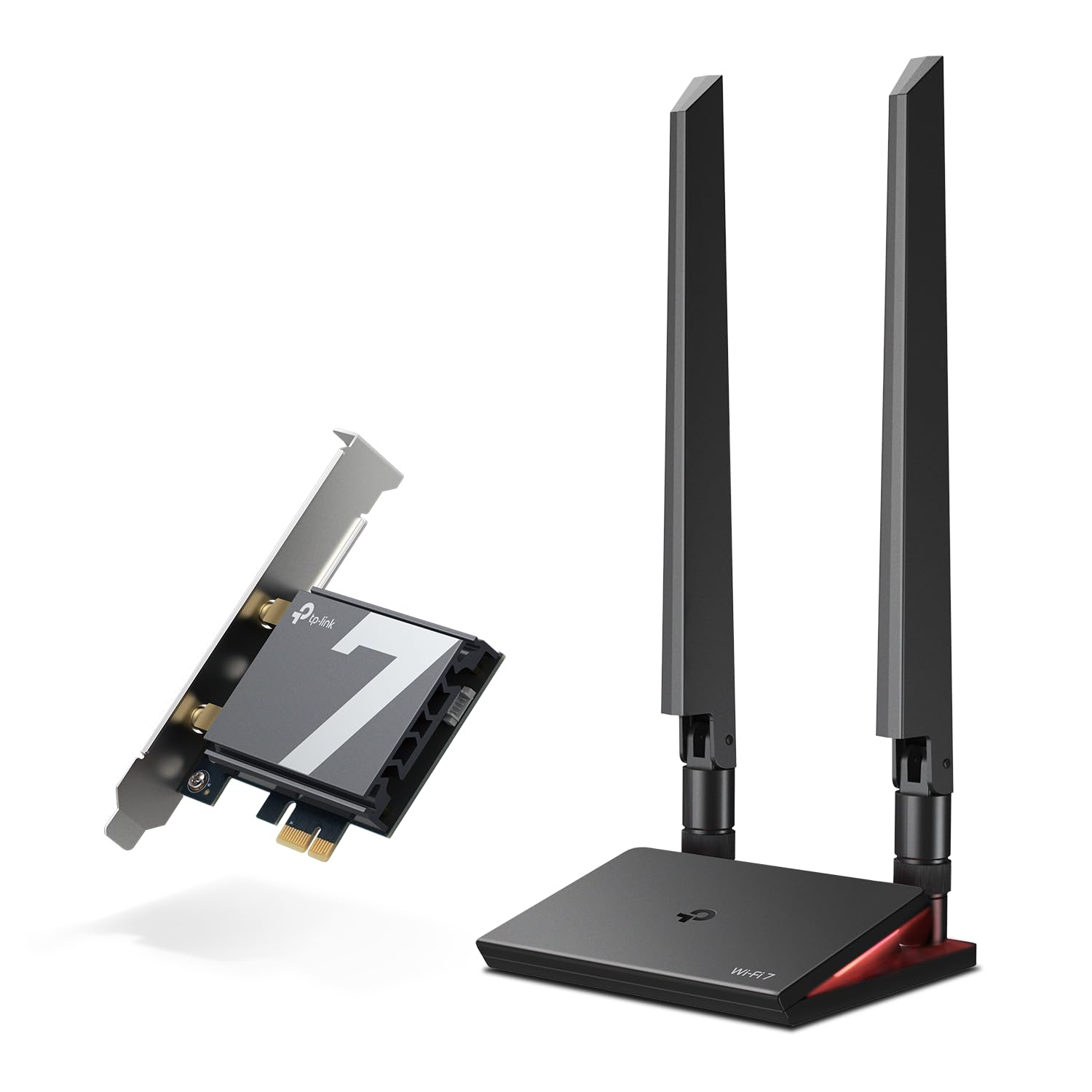
The top-speed card, with antennas on a cable you can park anywhere on the desk.
The numbers on the box are the biggest in this list: up to 5760 Mbps on 6GHz, 2880 Mbps on 5GHz and 688 Mbps on 2.4GHz, which adds up to 9300 Mbps. It weighs 10.56 ounces, and that heft includes the magnetized antenna base with a 1-metre braided RF cable — the antennas sit on a cable, so you can park them beside the router in the clear rather than behind the case, which is exactly what fixes a weak signal. A multicolor status LED on the base shows network state at a glance with a touch switch.
On the Wi-Fi 7 front it runs 4K-QAM and 320MHz for more data per signal, plus MLO to spread traffic across bands and cut lag on busy networks. The bundled USB drive makes driver setup quick, and WPA3 keeps the network protected. Paired with a Wi-Fi 7 router, owners mention 700–900 Mbps and call the install and router pairing easy.
The honest risk is reliability: most units work beautifully, but a minority stop working after about a month — the one note to weigh. That typically ties to firmware and router compatibility rather than the hardware design, so budget a little patience for setup and make sure your router is Wi-Fi 7 before you buy. If you want the longest reach and the highest 9300 Mbps ceiling in this list, this is the one — and the magnetic base lets you place the antenna where fixed-antenna cards can’t.
Top pick for distance: the magnetic base and cable let you aim the antennas where the signal actually is.
Be ready for: Windows 11 only, and a minority of owners hit reliability trouble — check firmware early.
Know the Specs
Wi-Fi 6 vs 6E vs 7
Wi-Fi 6 is the previous standard and runs on 2.4GHz and 5GHz only. Wi-Fi 6E adds the 6GHz band, a cleaner lane with less interference, which is what most of the cards here use for speed. Wi-Fi 7 builds on that with MLO (Multi-Link Operation — using two bands at once for a steadier link), 4K-QAM (packing more data into the signal) and, on some cards, 320MHz bandwidth. The catch: Wi-Fi 7 features only switch on with a Wi-Fi 7 router. On an older router, the newer card runs like a very good 6E card.
Mbps and the Bluetooth version
Mbps is the raw speed rating — how many megabits per second the card can theoretically move. Higher is better only if your router can feed it. Bluetooth 5.2, 5.3 and 5.4 are successive updates of the same wireless link your headset and controller use; each adds range and efficiency. On these cards Bluetooth runs off a USB header cable inside the case, so you need a free header and should disable your board’s built-in Bluetooth to avoid a conflict.
Common Questions
Will a PCIe Wi-Fi card work in a laptop?
Do I need a Wi-Fi 7 router to use a Wi-Fi 7 card?
Why is my built-in Bluetooth not working after installing a card?
Will a Wi-Fi 6E card make my Wi-Fi faster?
Can I use the Bluetooth header cable without plugging it in?
Is a PCIe card faster than a USB Wi-Fi adapter?
Does the card’s speed rating depend on my internet plan?
Do I need a low-profile bracket for a small case?
Will a Wi-Fi 7 card work on Windows 10?
How do I know which PCIe slot I have?
The Bottom Line
For most desktops, the wireless nic for desktop winner is the GIGABYTE GC-WBAX210 because it pairs the Intel AX210 module with 6GHz tri-band speed and a straightforward plug-and-play install — the card most people set up once and never touch again. If your build is tight, the BZIZU AX210 card folds the same chipset into a far smaller board at 3.14 by 2.75 by 0.78 inches, and if you’re staying on a plain Wi-Fi 6 router, the ASUS PCE-AX1800 gives you the speed without paying for bands you can’t reach. For a gaming PC on a Wi-Fi 7 router, the GIGABYTE GC-WIFI7 leads with 5800 Mbps and two-band MLO. Match the card to your PCIe slot, your Windows version and your router’s Wi-Fi generation, and you’ll get the connection you were hoping for.
How we choose
We do not accept paid placement. Every pick is matched to a real buyer and a real use-case; we do not hands-on test units.
Sources
Specifications: manufacturer listings and product documentation. Review insights: verified customer reviews, as of November 2026. Pricing: not shown on this page (it changes often); check the current price via the retailer link.
As an Amazon Associate, Tactical Gear Guy earns from qualifying purchases. This does not affect which products we feature.