Specs are compiled from manufacturer listings and verified buyer reviews and can change over time — please confirm the key details on the product page before buying.
You want a keyboard you plug in once a month, not one that dies mid-sentence because the AA cells gave out again. That is the whole point of this list: every board below has a built-in rechargeable battery, charges over a cable, and skips the battery drawer entirely. Which one is worth your desk space depends on one question — are you typing spreadsheets, gaming, or working quietly in a shared room? The picks are sorted around that answer.
This guide is built by comparing the manufacturers’ published specifications and the patterns across verified customer reviews, so you get each pick’s real strengths and trade-offs instead of marketing spin.
The best overall is the Redragon S101M-KS for tri-mode flexibility and a keyboard that runs up to 300 hours with the RGB off. Below you will find how each board charges, how long it lasts, and which one fits your desk.
Top Picks

How To Choose The Best Wireless Keyboard with Rechargeable Battery
Battery capacity alone will not tell you which board to buy. A board that lasts weeks on a charge and one you plug in every night can look identical on the shelf. The difference shows up three weeks into ownership. Here is what to weigh before you pick.
Battery capacity in mAh and real standby time
A milliampere-hour (mAh) is how much charge the battery holds — a bigger number generally means longer stretches between charges. The TECKNET KB014 packs 500mAh and claims up to 180 days on roughly a two-hour charge, based on two hours of daily typing. The SABLUTE packs 4000mAh and lasts weeks on a single top-up. Both use auto-sleep so the board shuts off when you walk away. Check what triggers wake-up and how fast it responds — a sluggish wake is the quiet annoyance that makes you reach for a wired board again.
Connection mode and how many devices you juggle
A 2.4GHz connection uses a small USB receiver for a stable, low-lag link. Bluetooth skips the dongle and lets you pair with a laptop, tablet or phone. Tri-mode boards offer both plus a wired fallback. If you alternate between a work PC and a personal tablet, look for a board that switches devices with a key combo — the TECKNET combo and the Bnnwa trackpad board both do this via FN keys. If you sit at one desk all day, 2.4GHz alone is simpler and one less thing to manage.
Side-by-Side Comparison
| Model | Best For | Battery / Charge | Connectivity | Key Type | Amazon |
|---|---|---|---|---|---|
| Redragon S101M-KS★ Best Overall | Gaming and tri-mode flexibility | Up to 300 hrs (RGB off) | 2.4G / Bluetooth / Wired | Gaming (QWERTY) | Amazon |
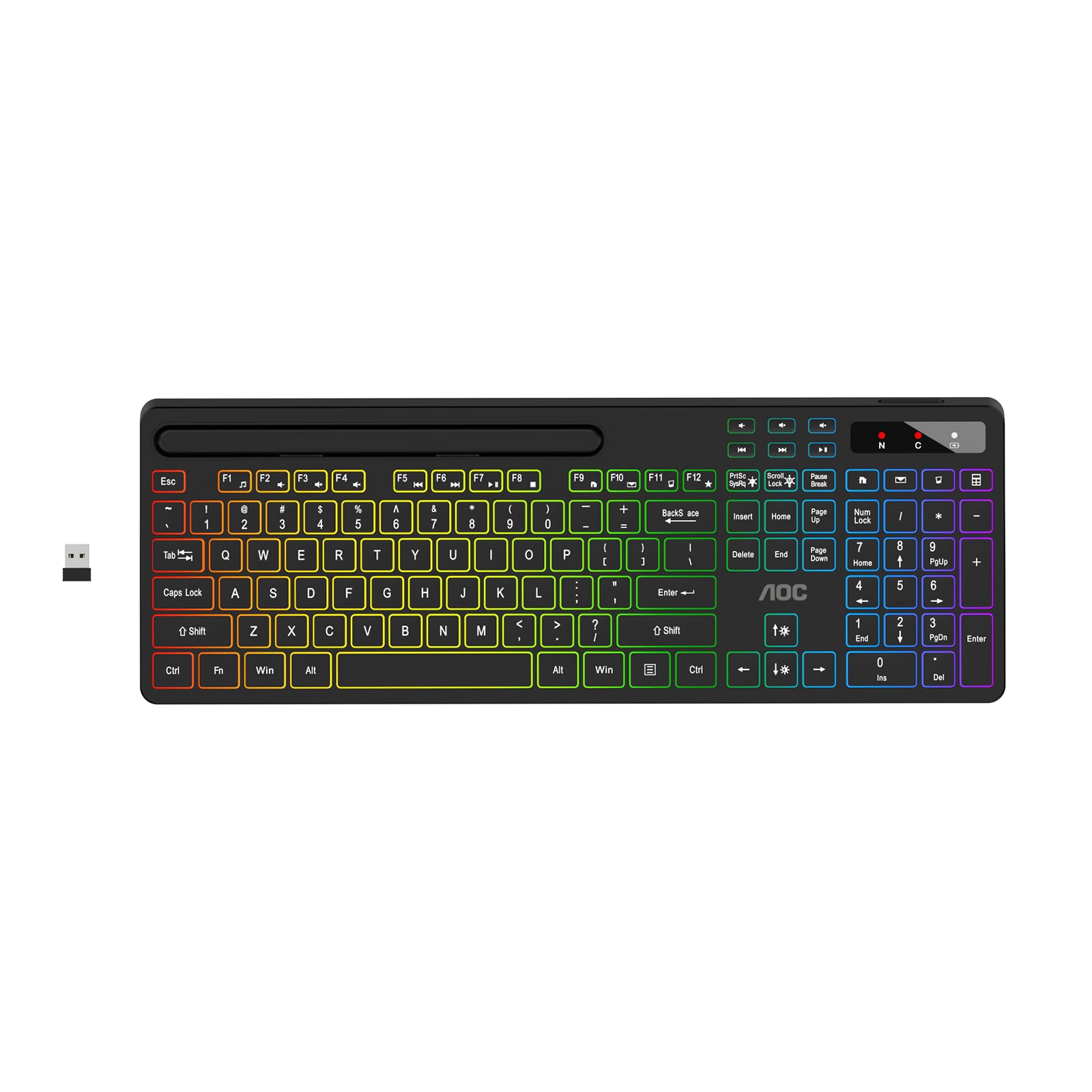
| AOC KB600Best Light-Up Budget Pick | Budget RGB desk with phone holder | 1500mAh rechargeable | 2.4GHz USB | Membrane | Amazon |
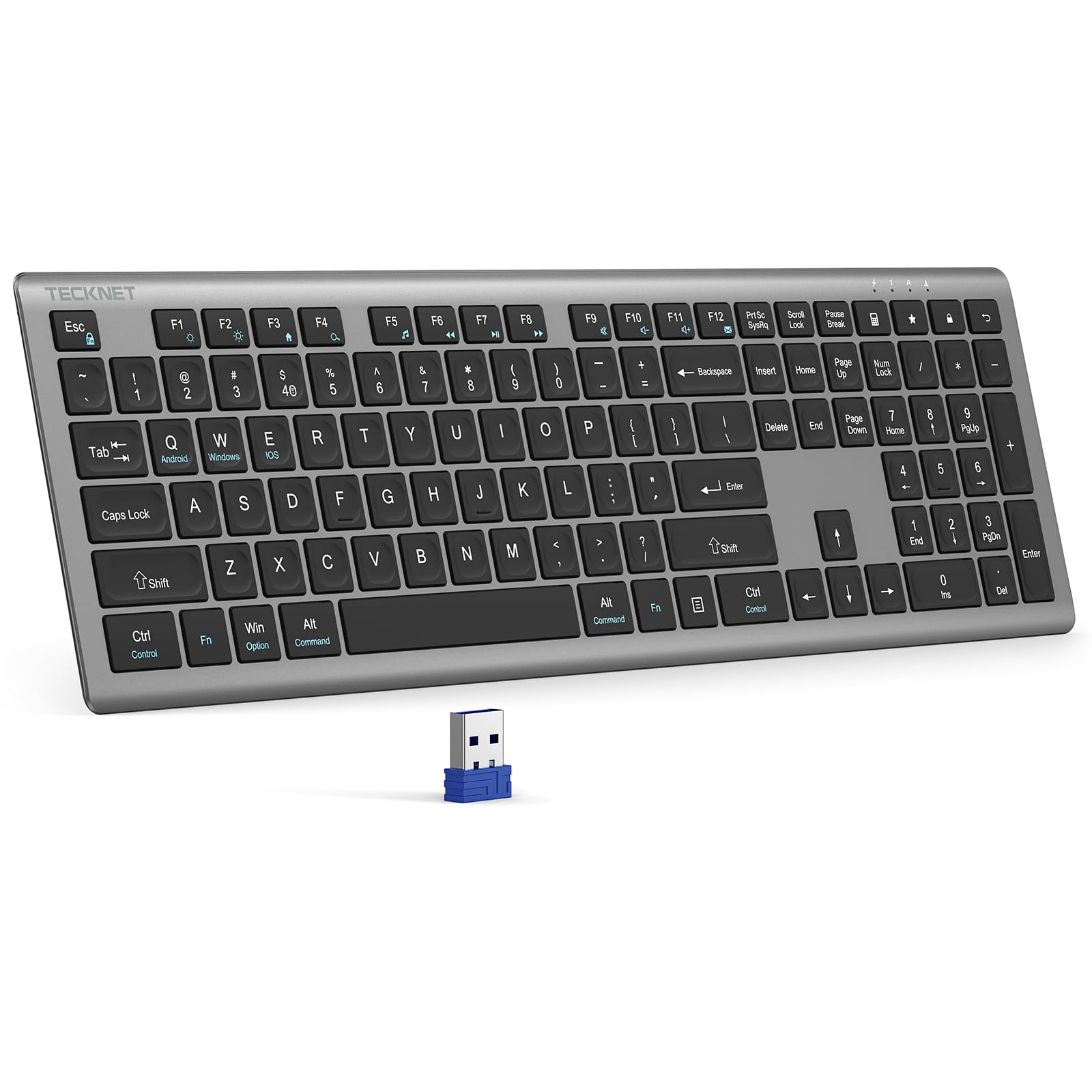
| TECKNET KB014Longest Per-Charge Run | All-day typing on one charge | 500mAh / up to 180 days | 2.4GHz USB | Scissor-switch, 110 keys | Amazon |
| XISOGUU 882 Combo | Custom look and RGB on a budget | 2000mAh keyboard / 600mAh mouse | 2.4G / Bluetooth / Wired | Membrane, 104 keys | Amazon |
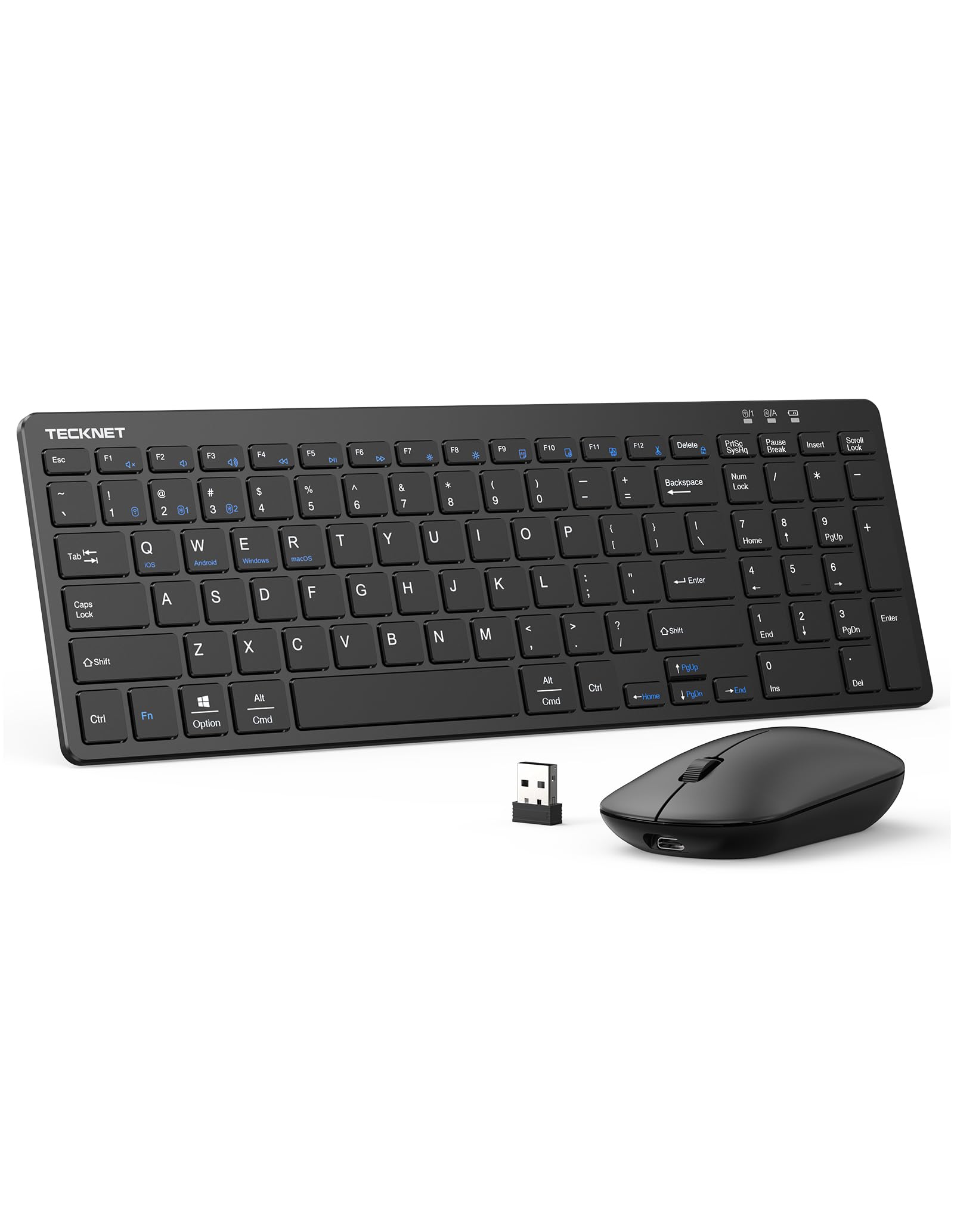
| TECKNET 3-Device Combo | Switching between three devices | USB-C, up to 5 months standby | 2.4G / Bluetooth 5.0 / 3.0 | Scissor-switch, low-profile | Amazon |
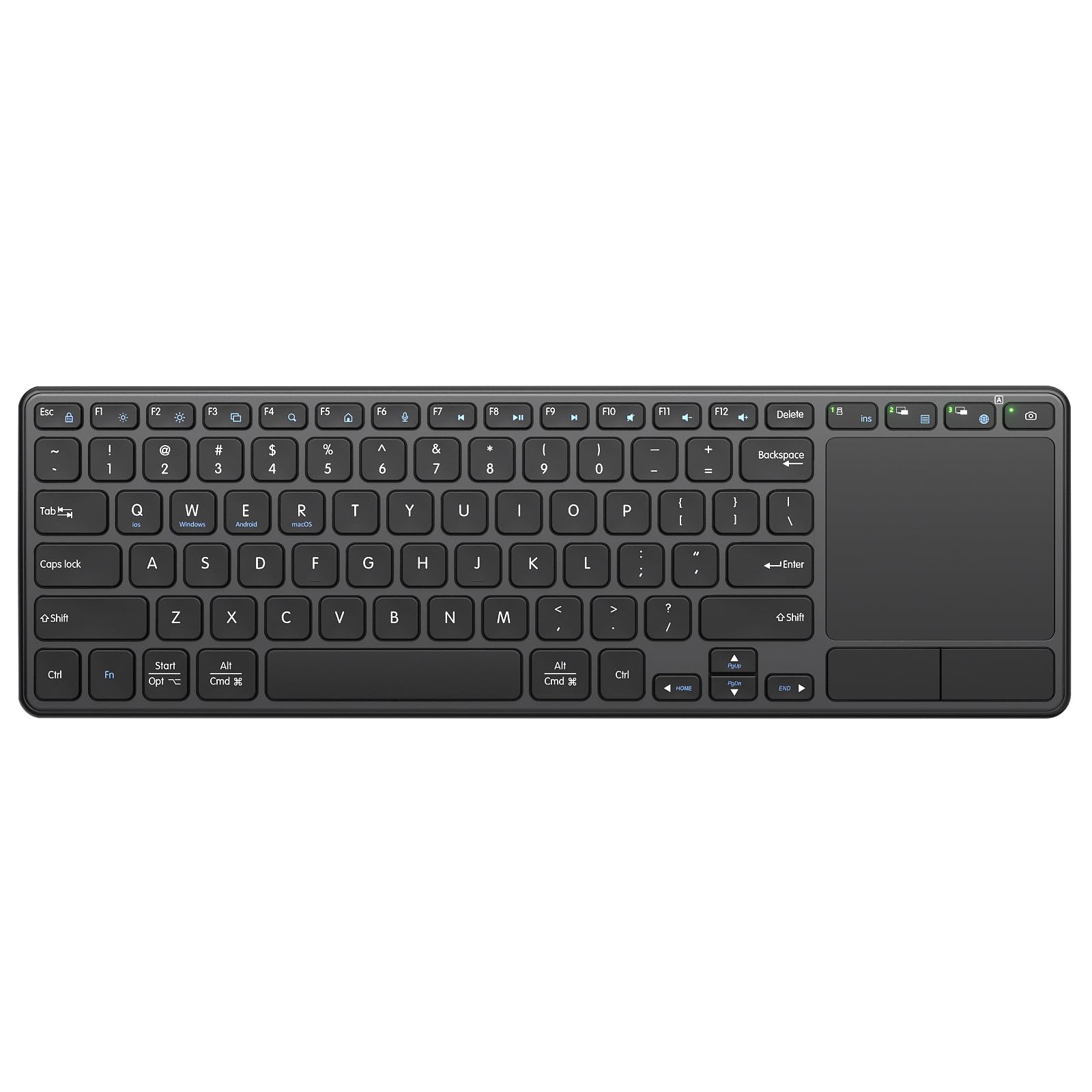
| Bnnwa Touchpad Keyboard | TV and tablet navigation without a mouse | 500mAh rechargeable | 2.4G / Bluetooth (3 devices) | Scissor-switch | Amazon |
| Arteck HW305-3 | Long-life combo for Windows desks | USB-C, 6 months keyboard / 4 months mouse | 2.4GHz USB | Scissor-switch low-profile | Amazon |
| SABLUTE MA31 Pro | Comfort typing with a palm rest | 4000mAh rechargeable | 2.4GHz USB | Wave keys, ergonomic | Amazon |
| seenda COE303 Pro | Style-forward RGB desk setup | 2-3 hr charge / up to 200 hrs | 2.4G / Dual Bluetooth | Jelly scissor-switch | Amazon |
Detailed Reviews
1. Redragon S101M-KS Gaming Keyboard and Mouse
Our pick — 4.5+★ from 51,500+ verified ratings; the strongest balance of quality and price.
Three ways to connect, 300 hours on one charge with the lights off.
The Redragon S101M-KS answers the question most gamers ask first: will this drop my inputs when the wireless link stutters? It gives you three paths — a 2.4G dongle, Bluetooth, or a wired USB-C connection — so if one link gets flaky mid-match you switch to another. It is that wired fallback that makes this a safer pick than a wireless-only board. You are never stuck without a working connection.
Battery is where it earns its spot at the top. The rechargeable cell runs up to 300 hours with the RGB lighting turned off, and a battery indicator on the keyboard tells you where you stand before it dies. Those 300 hours are the RGB-off figure, though. Leave the eight backlight patterns running at full brightness and you will charge far more often, so plan to toggle the lighting off when you are not actively gaming. The 2.4G receiver is a 2-in-1 version, meaning one dongle drives both the keyboard and the mouse.
The bundled mouse is not filler. It reaches 4800 DPI across five selectable levels (800/1200/1600/3200/4800), and DPI is simply how far the cursor travels per inch of mouse movement — high numbers suit fast, twitchy play. You can also remap the seven mouse buttons and adjust the polling rate from 125 to 1000Hz through software from Redragon. The catch is the software requirement: customizing keys and lighting means a download, so if you want a board that just works the moment you plug it in, the out-of-box defaults are fine but a little plain. There are 10 independent multimedia keys and 12 combination keys for quick controls, plus splash resistance and a WIN lock. It weighs 1.06 kg, which keeps it planted on a desk but is not something you toss in a bag.
Where This One Pulls Ahead
- Up to 300 hours of use with RGB off before you need the cable
- Tri-mode gives you a wired fallback the wireless-only boards lack
- 4800 DPI mouse included and controlled by the same 2.4G receiver
- 36-month warranty and splash resistance on the keyboard
What To Weigh First
- 300-hour figure drops sharply with RGB left on
- Full customization needs the Redragon software download
Built for: gamers who want one setup for PC, laptop and console and refuse to be stranded by a dropped connection.
Know before you buy: if you plan to leave the RGB blazing, budget for more frequent charging than the headline number suggests.
2. AOC KB600 Wireless Keyboard with 7-Color RGB Backlit
A backlit full-size board with a built-in tablet stand, for entry-level money.
The AOC KB600 makes the most sense for a student or home-office desk that has to do two jobs at once. An 8.7-inch stand is built right into the top edge, so your phone or tablet sits up while you type on the 116-key board below it. That single detail separates it from every other budget board here, none of which give you a place to park a screen.
Its 1500mAh battery charges over the included USB cable, so the disposable cell routine is gone for good. You get seven lighting colors across four modes with adjustable brightness — enough to see the keys in a dim room, and the black finish keeps it looking tidy on a shared desk. The 2.4GHz link runs through a compact USB receiver and the board is plug-and-play from the moment you slot it in. Hotkeys and media keys sit on the board for one-press volume and shortcut control.
There is one setup quirk worth knowing before you think something is broken. The backlight automatically turns off within a couple of seconds if the USB receiver is not plugged into a computer that is powered on. That is a built-in power-saving setting rather than a fault, so plug the receiver in first and the lighting behaves. Anyone expecting the lights to work on their own will read it as a defect when it is not.
Suits you if: you want a lit, full-size desk keyboard plus a screen holder without spending much.
Think it over if: you need multi-device switching — this one is a single 2.4GHz receiver, no Bluetooth pairing.
3. TECKNET Wireless Keyboard Rechargeable 2.4G Ultra-Slim
Charges twice a year, types all day, and barely makes a sound doing it.
This is the board for the person who cannot remember the last time they hunted for a charging cable. TECKNET puts the figure right out front: the 500mAh cell lasts up to 180 days on about a two-hour charge, measured on two hours of daily use. That means a plug-in roughly twice a year for a typical home office. Compare it to the XISOGUU combo’s 2000mAh pack, which holds a larger reserve but burns through it faster under RGB lighting — a 4.0x gap in raw capacity that does not translate directly to time between charges because a backlit board drains harder.
The typing itself is built for long sessions. It runs 110 scissor-switch keys — a scissor mechanism is two criss-crossed plastic supports under each keycap, the same idea a laptop uses to keep travel short and even. Key travel here is 2mm, which feels light and quick rather than deep and clicky. A finger-fit key shape follows the curve of your fingertip, and the non-slip pads underneath keep the board from sliding around. The full-size layout keeps a number pad for spreadsheet work. It also rates up to 10 million keystrokes on the keys and comes with a spill-resistant layer to shield the insides from a tipped coffee.
On the device-count side, note what you are getting: a single USB receiver, no Bluetooth. You cannot flip between a PC and a tablet the way the multi-device boards on this list do. The 2.4GHz link reaches across a 15-meter range, generous enough to work from across a room or from a couch with the computer connected to a TV. It also wakes instantly on any keypress and sleep-modes itself during idle stretches, so you are never waiting for it to catch up. The dimensions (17.12 inch length, 5.12 inch width) mean it wants a full-width desk slot, not a tight laptop sleeve.
Pick this one if: you type at a fixed desk for hours and want to forget the charger exists.
Look elsewhere if: you need to hop between two or more devices — the single 2.4GHz receiver keeps this a one-computer board.
4. XISOGUU Wireless Keyboard and Mouse Combo

A gradient-pink full-size combo that hits 16.8 million colours and 50 hours per charge.
The XISOGUU combo is the pick for a desk that is as much a look as a workstation. The black-and-pink gradient shell makes it far more distinctive than a plain black board, and the RGB system covers 16.8 million colours across nine preset lighting effects. A volume knob on the board handles audio without hunting for keys. If the desk is part of the photo for a stream or a study corner, this earns the spot.
Power comes from a Type-C rechargeable 2000mAh keyboard battery, paired with a 600mAh mouse battery. The pair runs up to 50 hours continuously with the lighting on — a real figure, not an RGB-off figure — and the board falls asleep after two minutes of no input, waking on any key. That 2000mAh pack is the larger capacity than the TECKNET KB014’s 500mAh, but it carries four more keys in a 104-key layout versus that board’s 110. Charge it for roughly three hours before the first use to get the full runtime.
One thing to sort out before buying. Despite the tri-mode connectivity on the box, this is a membrane keyboard through and through — the keys cannot be hot-swapped and the switches cannot be replaced. If you have ever enjoyed swapping mechanical switches, this is not that board. Typing stays quiet, matched by a foldable stand so you can set the tilt to suit your wrists, and 104 keys with function keys and a number pad cover standard layouts. The three connectivity paths (2.4G, Bluetooth, wired) let you run it off a laptop or a desktop without fuss.
What it nails: the colour and lighting package is far beyond most boards at this tier, and getting 2000mAh in the keyboard plus a 600mAh mouse gives you a combo that stays lit for a long session.
The honest trade: membrane keys are the ceiling here — no switch swapping, and the typing feel will not satisfy anyone who wants a mechanical click.
Your board if: aesthetics and RGB matter as much as function, and you want a full combo in one box.
Step past if: you want replaceable mechanical switches — membrane construction rules this one out.
5. TECKNET Wireless Bluetooth Keyboard and Mouse Combo
Three devices, one keyboard, no re-pairing — switch with a key tap.
If your workday runs across a desktop, a MacBook and an iPad, the equipment-change dance is the part that wears you down. This TECKNET combo kills it. It carries a 2.4GHz receiver plus Bluetooth 5.0 and 3.0, and you flip between paired devices by pressing FN+1, FN+2 or FN+3 — no re-pairing each time. A small indicator light tells you which mode you are in: Caps Lock signals Bluetooth pairing and Num Lock means the 2.4G receiver is active. One shared USB-A receiver hides inside the mouse and runs both pieces.
Charging is USB-C and takes about two hours to fill, with auto-sleep after ten minutes of inactivity. The claimed standby is five months, which shrinks the cable hunt from a weekly chore to an occasional one. At 14 inches long it still fits a full numeric keypad, and it weighs 12 oz, so it slides into a laptop bag without a second thought. That makes it the pick for the person who works from home Mondays, the office Tuesdays, and a café on Fridays.
Typing is the quiet kind. Scissor-switch keys sit under low-profile caps, which damps the clicking noise down to nearly silent without dulling the keypress. In a shared room, a library, or a bedroom where someone else is asleep, that matters. It is a single-colour backlight, not the full RGB you get on some boards here, so read it as practical visibility rather than a light show. The catch if you want a big travel board: the 14-inch footprint means a compact desk or a small bag can feel snug alongside it.
The pitch in one line: the three-way switching and five-month standby make it the most travel-friendly board on this list.
What to accept: the backlight is single-colour, and the full keypad makes it wider than the slimmest boards you might compare it to.
Reach for this if: you juggle three screens and want to type on all of them without five dongles.
Wait up if: you need vivid RGB lighting — this board keeps it simple with one colour.
6. Bnnwa Rechargeable Wireless Keyboard with Touchpad
Keyboard and mouse fused into one slab, for TVs and tablets where a mouse has nowhere to live.
Some setups have no room for a mouse, or no flat surface to work one on. That is the case this Bnnwa board exists for. Its trackpad sits on the keyboard itself, with left and right mouse buttons that speed up copy and paste and gesture support for pointing, zooming and scrolling. A couch-and-smart-TV setup, a tablet on a stand, or a living-room desktop with no desk at all all make sense with this one.
It pairs up to three devices over a 2.4G dongle and two 5.1 Bluetooth channels, swappable by holding FN plus one of four system keys. Charging runs through a Type-C port into a 500mAh cell, and a ten-minute auto-sleep with any-key wakeup stretches the standby considerably. Scissor-switch keys sit under the caps with an X-shaped support structure that keeps each press light, stable and quiet. Its 10 million-keystroke rating matches the TECKNET KB014’s, and both use quiet scissor mechanisms if noise is your deciding factor.
The upgraded trackpad is the reason to pick it — the company pitches it as more capable and comfortable than its earlier K316 version. The feel of the pad and the solid build carry the experience, and the board has real heft rather than feeling hollow. Connectivity is the one area to read closely: it pairs across multiple devices, but some owners find multi-device pairing less glitch-free than a single-link setup, so patience during initial pairing pays off. It is also worth knowing the mouse buttons take a little adjustment if you are used to a separate mouse under your hand.
Reasons It Stays In The Picture
- Trackpad with dedicated left and right buttons replaces a separate mouse
- Three-device pairing over 2.4G and dual Bluetooth 5.1
- Quiet scissor keys rated to 10 million keystrokes
Keep An Eye On
- Multi-device pairing can feel fussier than a single-link board
- Learning to use the on-board mouse buttons takes a little practice
Made for you if: your keyboard lives on a couch, a coffee table or a TV stand where no mouse can follow.
Give it a pass if: you already work at a proper desk with a mouse you like — the trackpad is redundant there.
7. Arteck 2.4G Wireless Keyboard and Mouse Combo
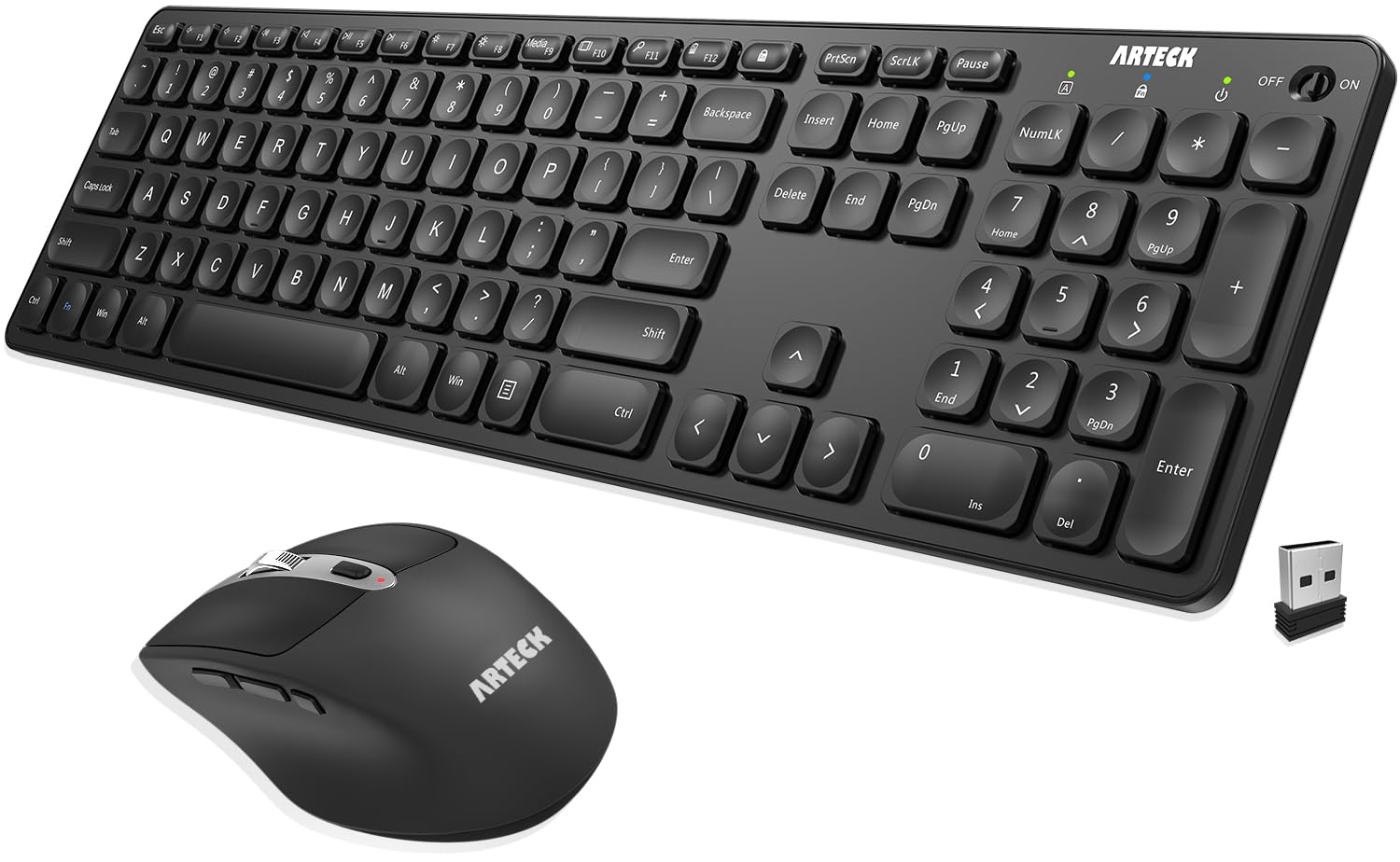
Six months on the keyboard, four on the mouse, one charge — and one dongle for both.
Owners of this Arteck combo tend to mention the same thing: the batteries just do not need topping up. That lines up with the spec sheet, which claims a rechargeable lithium battery lasting six months on the keyboard and four months on the mouse from a single charge, based on two hours of non-stop use per day. Set it up, charge it, and the next time you think about the cable is months away. It is the pick for someone who wants a combo that disappears into the background.
The keyboard is a full-size scissor-switch board with low-profile keys, arrow keys and a number pad — familiar territory for anyone leaving a laptop. The included mouse does more than basics: a DPI button cycles the cursor speed through five settings (800, 1200, 1600, 2000 and 2400), and two side buttons jump pages backward and forward while a third switches windows. Its contoured shape is angled to keep your wrist flatter through long sessions. Both devices share one nano USB receiver that stores inside the mouse, freeing up a USB port you would otherwise spend on a second dongle.
The setup is genuinely simple. Slot the receiver in and both pieces work — no pairing dance, no software. The trade is that this is a Windows-focused board with a single 2.4GHz receiver, so there is no Bluetooth to throw to a MacBook or an iPad, and the OS support starts at Windows 7. If your desk is Windows-only, that limitation will never touch you. If you use a Mac as well, the TECKNET three-device board above covers both systems more comfortably.
The reason to buy: the six-month keyboard battery and four-month mouse battery make it the longest-lasting combo on this list, and the shared receiver keeps your ports free.
Course correction: support starts at Windows 7 with no Bluetooth, so a mixed Mac-and-Windows desk will want a multi-device board instead.
Reach for this if: you are on Windows, want a keyboard and mouse that barely need charging, and would rather not own another dongle.
Look elsewhere if: you need Bluetooth for a Mac, iPad or tablet.
8. SABLUTE Ergonomic Wireless Keyboard and Mouse Combo
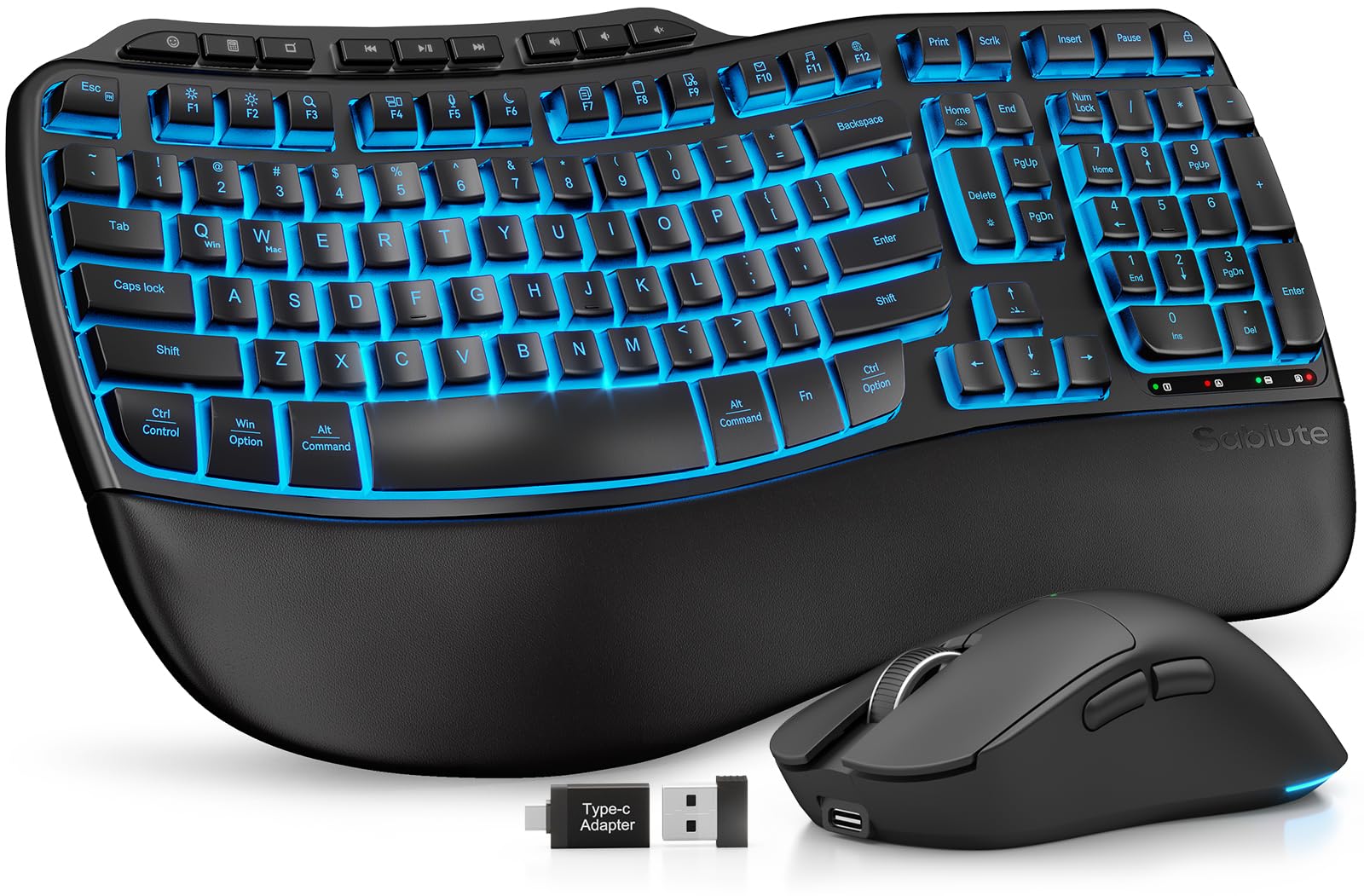
Weeks of typing between charges, with a cushioned rest under your palms.
Long typing sessions are where the SABLUTE makes its case. A faux lambskin leather palm rest runs along the front, and the matte finish is meant to stay dry and easy to wipe down rather than gathering sweat like fabric. Wave-shaped keys are cut for a smoother motion through each press, and adjustable front and back stands let you set the board to sit or stand as your wrists prefer. Paired with the matching mouse, it is the pick for someone who types for hours and feels their wrists at the end of the day.
The battery is the headline spec: a 4000mAh cell, described as twice the capacity of standard backlit keyboards. Combined with intelligent auto-sleep, that translates to weeks per charge. The keyboard is rated to 10 million keystrokes, double the 5 million the manufacturer calls typical. There are nine one-touch shortcut keys and backlighting in soft tones or bold colours, whichever suits your mood.
The mouse has a 700mAh cell of its own, six buttons and three DPI levels (800, 1200, 1600), with six fixed colours or five cycling modes. One 2.4GHz receiver covers both pieces across a 33ft range, and the USB-A-and-C combo in the box is meant to fit most devices. The honest caveat is reliability — functionality is what most people praise, yet some report the mouse cutting out unexpectedly, so if you rely on precise, uninterrupted mouse work, keep an eye on that. At about a kilogram it is heavier than a travel board, so treat it as a fixed-desk companion.
Why Wrists Like It
- 4000mAh battery keeps the board going for weeks per charge
- Faux lambskin palm rest and wave-shaped keys soften long typing sessions
- Keyboard rated for 10 million keystrokes
- One 2.4GHz receiver runs keyboard and mouse together
Worth Knowing
- Some units report the mouse dropping out unexpectedly
- Heavier than slim boards, so it stays at one desk
Best matched to: heavy typists who want a soft rest under their palms and a board that stays at one workstation.
Consider the alternative if: you need a mouse you can rely on without any dropouts.
9. seenda Wireless Bluetooth Keyboard Mouse Combo

Jelly keycaps, 14 backlight modes, and a glowing mouse that matches.
The seenda combo is built for a desk people actually enjoy looking at. Rounded, bubbly jelly keycaps in purple give it a soft, translucent look, and the translucent mouse mirrors it so the pair reads as one set. There are 14 keyboard backlight modes and nine mouse light modes, adjustable with an RGB control knob rather than menu-diving. A small display screen on the keyboard shows the power level at a glance, which is one of those details that quietly removes the guesswork from charging.
Under all that style, the typing is real. The typewriter-style round keys use a soft cushioned structure that reduces the harsh clack, so the board types quietly with a tactile bounce through low-profile scissor keys. A 2-3 hour charge supports up to 200 hours of use, so plugging it in is occasional rather than nightly. The full-size layout keeps a number pad at 15.4 by 5.4 inches, and a 7° adjustable stand lets you set the angle. Charging for both keyboard and mouse is Type-C.
Connectivity covers the daily juggle: a 2.4G USB link plus dual Bluetooth channels let you switch from a Windows laptop to a MacBook or an iPad without re-pairing. The mouse adds four DPI levels (800, 1200, 1600, 2400), enough for browsing and documents. At 1.35 kg, the pair is clearly a desk feature piece, not a travel kit. The catch is one of portability and layout — the rounded jelly keycaps are a different feel from flat scissor keys, so if you rely on precise, familiar key spacing for fast touch-typing, give yourself a session to adjust.
Made for: anyone who wants their keyboard to be the prettiest thing on the desk while still working for real spreadsheets and study.
Weigh the feel first: rounded keycaps are a love-it-or-adapt situation, so expect an adjustment period if you are a fast touch-typist.
Know the Specs
Battery capacity and how long it really lasts
The mAh number tells you how much charge the cell holds, but the hours figure is what you actually live with. A board with a modest pack and a big auto-sleep window can outlast a bigger pack that drives RGB all day. Check whether the stated runtime assumes the backlight is on or off — the Redragon’s 300 hours is an RGB-off figure, while the XISOGUU’s 50 hours is with the light on. Match the runtime to how you plan to use the board, then confirm the charging port matches your cable drawer.
Key mechanism: scissor, membrane and travel
A scissor mechanism uses two crossed supports under each key to keep travel short, even and quiet — the low-risk choice for shared rooms. Membrane boards sit flatter and feel softer, and they generally cannot swap switches. Key travel is simply how far the key drops when you press it; the TECKNET KB014’s 2mm is light and quick, while deeper travel suits people who like a more pronounced press. Durability ratings, given in millions of keystrokes, give you a long-term comparison point.
Common Questions
Will a rechargeable keyboard work with my Mac as well as my PC?
How often will I actually have to charge a rechargeable keyboard?
Can I use a rechargeable wireless keyboard while it is charging?
Does going wireless add a typing delay I will notice?
What is the difference between Bluetooth and a 2.4GHz receiver?
Are these keyboards quiet enough for a shared office?
Can I switch between devices without re-pairing every time?
Do I need software to change the backlighting or key functions?
Is a full-size keyboard with a number pad too big for a small desk?
Which keyboard here lasts the longest on a single charge?
The Bottom Line
The wireless keyboard with rechargeable battery that fits most people is the Redragon S101M-KS, because its tri-mode connection removes single-link risk and its 300-hour RGB-off battery covers true gaming marathons. If sheer time between charges is your priority, the Arteck combo delivers six months on the keyboard and four on the mouse. And if you work across a laptop, tablet and desktop, the TECKNET three-device combo flips between them with a key press. With a 4.5+ rating and 150+ reviews, the Bnnwa touchpad board is the pick if you need a keyboard and mouse in one slab.
How we choose
We do not accept paid placement. Every pick is matched to a real buyer and a real use-case; we do not hands-on test units.
Sources
Specifications: manufacturer listings and product documentation. Review insights: verified customer reviews, as of November 2026. Pricing: not shown on this page (it changes often); check the current price via the retailer link.
As an Amazon Associate, Tactical Gear Guy earns from qualifying purchases. This does not affect which products we feature.