Specs are compiled from manufacturer listings and verified buyer reviews and can change over time — please confirm the key details on the product page before buying.
If your gaming PC still runs on a Wi-Fi card that shipped with the motherboard, you already know the pain: good ping in the lobby, then a stutter the moment a fight starts. The fix is a dedicated Wi-Fi 6E or Wi-Fi 7 adapter that pulls a cleaner signal off the less-crowded 6GHz band. This guide breaks down nine of them — PCIe cards that screw into your board and USB dongles that plug in — so you can pick the one that matches your case, your router, and your Windows version.
This guide is built by comparing the manufacturers’ published specifications and the patterns across verified customer reviews, so you get each pick’s real strengths and trade-offs instead of marketing spin.
The short answer: go PCIe if you have a free slot and want the strongest link, and go USB if you want plug-and-play with no case surgery. Below you’ll find the crowded-air fix for every budget and build — the best wireless internet adapter for gaming PC setups that actually stays connected when the match matters.
Top Picks


How To Choose The Best Wireless Internet Adapter for Gaming PC
Start with the slot, not the speed number. A PCIe card slides into a free PCIe x1 slot on your motherboard and uses external antennas you can aim; a USB adapter plugs into a USB 3.0 port and hangs off a cable. Neither is automatically faster — what changes is how much freedom you get to place the antenna where the signal is strongest.
Check your Windows version before anything else
Most Wi-Fi 7 cards here only reach their full 6GHz speed on Windows 11. Several list Windows 10 support as partial, and a few are Windows 11 only. Match the adapter to the OS already on your machine, or you’ll be paying for bands you cannot touch.
Look at the antenna, not just the box speed
Two external antennas you can angle toward the router beat an internal stub every time in a room with walls between you and the access point. High-gain antennas — the ones rated in dBi — extend range and hold a steadier link. That steadiness is what your in-game ping actually rides on.
Know what MLO does and when it helps
Multi-Link Operation lets a Wi-Fi 7 adapter use two bands at once, which cuts the chance of a dropped packet during a firefight. It only kicks in when both the adapter and your router are Wi-Fi 7. On an older router, that feature stays dormant and you fall back to standard single-band speed.
Side-by-Side Comparison
| Model | Best For | Interface | Max Speed | Bands | Amazon |
|---|---|---|---|---|---|
| WiFi 6E AX210 PCIe Card★ Best Overall | Budget PCIe upgrade | PCIe x1 | 2974 Mbps | Tri-Band (2.0+/5/6GHz) | Amazon |
| FENVI FV-AXE3000Best Value | Big antennas, tighter budget | PCIe x1 | 5400 Mbps | Tri-Band (2.0+/5/6GHz) | Amazon |
| UGREEN BE6500 PCIeWindows 11 Pick | Wi-Fi 7 on Windows 11 | PCIe | 2882 Mbps (6GHz) | Tri-Band (2.0+/5/6GHz) | Amazon |
| BrosTrend BE6500 USB | Plug-and-play Wi-Fi 7 | USB 3.0 | 6500 Mbps | Tri-Band (2.0+/5/6GHz) | Amazon |
| WAVLINK BE6500 USB | Foldable travel dongle | USB 3.0 | 6452 Mbps | Tri-Band (2.0+/5/6GHz) | Amazon |
| GIGABYTE GC-WIFI7 | Brand-matched motherboard builds | PCIe x1 | 5800 Mbps | Tri-Band (2.0+/5/6GHz) | Amazon |
| TP-Link Archer TBE400E | Reliable everyday Wi-Fi 7 | PCIe | 6500 Mbps | Tri-Band (2.0+/5/6GHz) | Amazon |
| ALFA AWUS036AXML | Linux and long-range scanning | USB 3.0 | 3000 Mbps | Tri-Band (2.0+/5/6GHz) | Amazon |
| TP-Link Archer TBE550E | Top-tier 6GHz throughput | PCIe | 9300 Mbps | Tri-Band (2.0+/5/6GHz) | Amazon |
Detailed Reviews
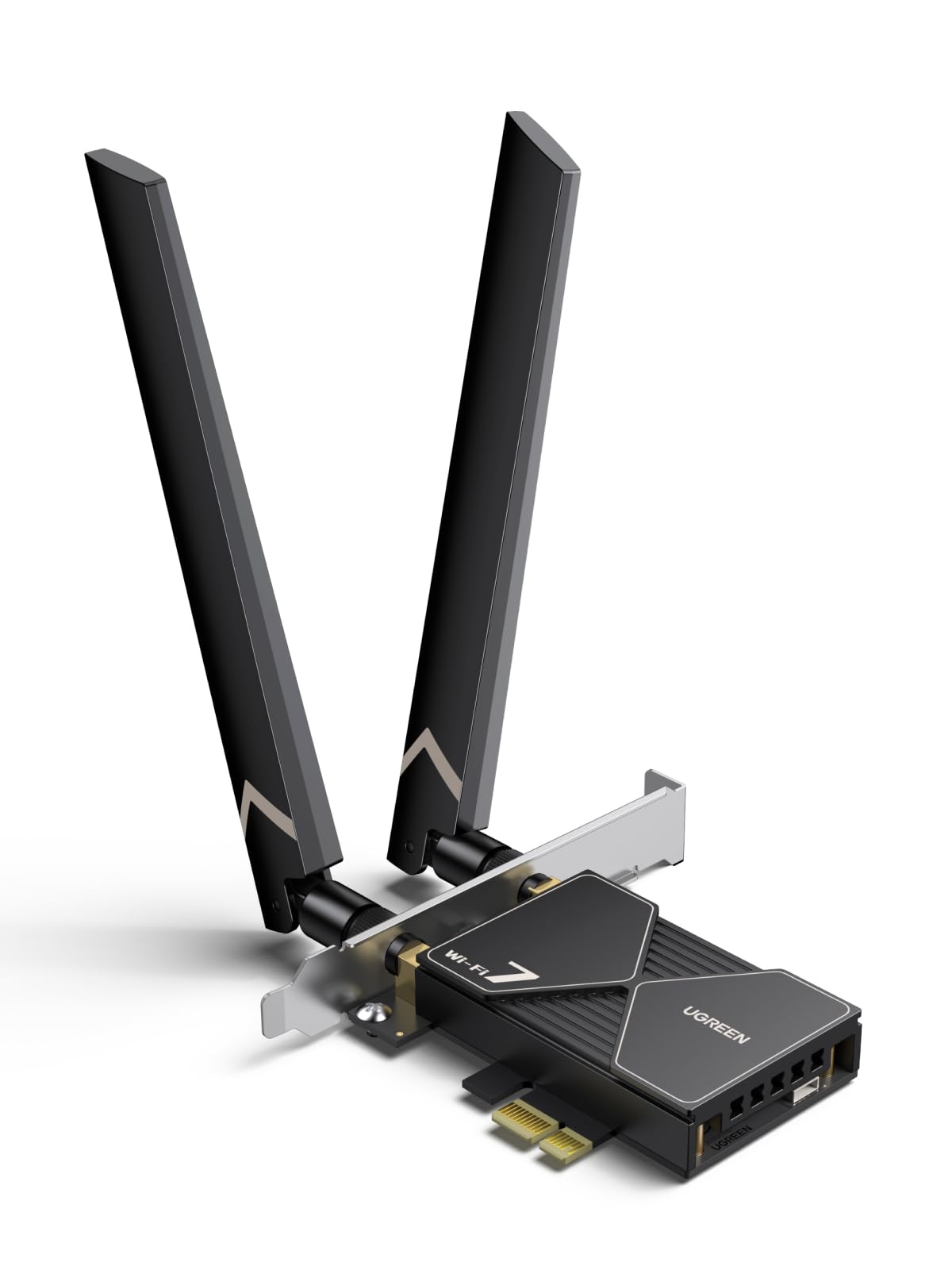
1. WiFi 6E AX210 PCIe WiFi Card with Bluetooth 5.3
Our pick — 4.5+★ from 850+ verified ratings; the strongest balance of quality and price.
The clean-slate PCIe card that finally lets your desktop breathe on the 6GHz band.
For a desktop that has to climb above a crowded 2.4GHz and 5GHz airspace, this AX210 card is the one I’d put in a friend’s build without hesitating. It is the crowd favorite here for good reason — 4.5+ stars from 800+ owners. The two external high-gain antennas are the practical win: you point them toward your router and the link firms up, which is exactly what low-latency gaming needs. And at 110 g the card is feather-light on the board, while still running the modern AX210 chipset most builders already trust.
The headline claim is the 6GHz expansion — the spec sheet lists 7×160MHz channels, 14×80MHz channels, 29×40MHz channels and 60×20MHz channels up there. In plain terms, the top end of that ladder is wider lanes for your game traffic so a busy household doesn’t shove you into a congested channel. It also brings Bluetooth 5.3 (a newer short-range radio standard than 4.2) for your controller and headset, plus WPA3 encryption so the home network is on the current security protocol.
Where this card asks you for a little patience is the driver. You download it from Intel’s site by searching “AX210” — not a big deal, but it is a step you cannot skip. And the board needs a free PCIe x1 slot plus a Bluetooth header cable run to the motherboard. Compared with a USB dongle it is more install work, and in return you get the strongest, most consistent link. For a gamer who wants one install and years of steady 6GHz play, this is the pick.
What makes it the top pick
- Tri-band 6GHz channels give your game traffic room to breathe.
- Dual high-gain antennas you can aim at the router.
- Ultra-low latency OFDMA and MU-MIMO handling.
- Bluetooth 5.3 for controllers and headsets.
- WPA3 encryption built in.
What to weigh first
- Driver download and Bluetooth header cable are required steps.
- Needs a free PCIe slot and a case you can open.
- Not the newest Wi-Fi 7 standard — Wi-Fi 6E only.
Made for: Desktop builders who want the steadiest 6GHz link and a Bluetooth upgrade in one card.
Think twice if: You’re on a laptop or can’t open the case — a USB adapter will save you the hassle.
2. FENVI FV-AXE3000 WiFi 6E PCIe Card
Same AX210 brain as the top pick, with two full-size antennas that reach across the house.
Buyers keep coming back to the signal here. They report it improves connection speed by 200Mbps and delivers satisfactory range, and the numbers back that up — the spec sheet promises 2400Mbps on 6GHz, 2400Mbps on 5GHz and 574Mbps on 2.4GHz for a 5400Mbps total. That is the concrete difference from the top pick: the FENVI leans on its two external high-gain antennas to hold a steady link in large rooms and through walls, rather than a single stubby pair.
The chipset is the same Intel AX210, so you get OFDMA and MU-MIMO — the two technologies that keep data packets moving without piling up when other devices share the network. Beamforming points the signal at your router, which is what keeps a 4K stream from stuttering while you game. Bluetooth 5.3 lets a headset, keyboard and mouse run off the card at once, and WPA3 keeps the network on current encryption. It fits PCIe x1, x4, x8 or x16 slots and ships with a low-profile bracket, so small-form-factor builds stay covered.
Nothing here is fiddly. The 4.72″ length is actually longer than the top pick’s 3.15″ card, which is the trade for bigger antennas. Pick it for the two high-gain antennas first, and accept the 4.72″ card length as the trade.
Where the extra length pays off: two high-gain antennas genuinely expand the usable range — buyers report it handles walls and distance from the router comfortably.
The follow-up question: yes, it’s Wi-Fi 6E, not Wi-Fi 7, so you’ll need a 6E-capable router to see the 2400Mbps band. On an older router it falls back.
Right call for: A room with distance or walls between you and the router, where a PCIe card’s antennas matter most.
Look elsewhere if: You already own a Wi-Fi 7 router and want the newest standard — this one tops out at Wi-Fi 6E.
3. UGREEN BE6500 PCIe WiFi 7 Card
The Wi-Fi 7 card with a driver USB stick already in the box — no hunting for downloads.
If you’re on Windows 11 and want the newest wireless standard without a software scavenger hunt, this UGREEN is the straight answer. It’s Wi-Fi 7, so the spec sheet lists 2882Mbps at 160MHz on 6GHz, 2882Mbps on 5GHz and 688Mbps on 2.4GHz, with MLO and flexible dual 6dBi high-gain antennas. The standout practical detail: the driver is preinstalled on a USB stick in the box, so you plug it in, follow the steps, and you’re done. What keeps the crowd happy is exactly that — straightforward installation.
MLO is the feature to care about for gaming. It lets the card pick the best path across bands so the picture and sound stay in sync and disconnections become rare — which is what you feel as a smoother, steadier match. Bluetooth 5.4 rounds it out for headphones, keyboard and mouse, and you can angle the 6dBi antennas toward the router for a cleaner signal.
The catch is Windows-only, and specifically Windows 11. On other systems it simply won’t run, so check your OS before you buy. A small share of owners also report the odd unit that never connected; treat that as a fit check, not a blanket verdict — it works well for the majority. Note too that you gain nothing unless your router is Wi-Fi 7 to open up the BE6500 speed.
Why it earns a spot
- Wi-Fi 7 with MLO, 4K-QAM and 160MHz support.
- 6dBi high-gain antennas you can orient.
- Bluetooth 5.4 for wireless peripherals.
- Driver USB stick included — no CD or downloads.
- WPA3 security.
What to know first
- Windows 11 only — no Windows 10 or Mac.
- Needs a Wi-Fi 7 router to hit full BE6500 speed.
- A handful of owners hit connectivity issues on their first unit.
Go with this if: You’re running Windows 11, want Wi-Fi 7, and value a plug-in driver stick over a download.
skip it if: You’re on Windows 10 — it doesn’t support that OS at all.
4. BrosTrend BE6500 USB WiFi 7 Adapter

A USB dongle that punches like a PCIe card — 6500Mbps without opening the case.
Here’s the number to sit with: 6500Mbps total across 2882Mbps on 6GHz, 2882Mbps on 5GHz and 688Mbps on 2.4GHz. That beats the AX210 PCIe card’s 2974Mbps on paper, and it does it from a USB 3.0 port. And it’s tiny — at 28.5 g against the PCIe card’s 110 g, it’s roughly a quarter the weight. For a gamer who rents, uses a prebuilt, or just doesn’t want to crack the case, this is the least-fuss way to get Wi-Fi 7 speed.
What owners value most is how it performs in the real world — it does the basic job of staying connected and fast without drama. The dual external antennas and beamforming focus the signal toward the router through walls, which is what keeps your ping steady. It handles 4K/8K streaming, big downloads and competitive play. The pre-loaded driver means no CD and no download before you’re online.
The important catch: MLO, the multi-band tech that makes the smoothest Wi-Fi 7 gaming happen, is not supported on this adapter. It’s also Windows only — no macOS or Linux — and Bluetooth isn’t part of the package. Windows 10 only sees the 5GHz and 2.4GHz bands; the 6GHz band needs Windows 11. For a plug-and-play USB upgrade to 6500Mbps, it’s a strong buy if you can live without MLO and Bluetooth.
The speed win: 6500Mbps over USB 3.0 with 4K-QAM and 160MHz channels — a genuine rival to a PCIe card for raw throughput.
The honest trade: no MLO, no Bluetooth, and Windows 11 required for that 6GHz band. If those matter, a PCIe Wi-Fi 7 card is the better fit.
Best for: Gamers who want Wi-Fi 7 speed from a USB port with no case surgery.
Not the one if: You want MLO or Bluetooth, or you’re running macOS or Linux.
5. WAVLINK BE6500 USB WiFi 7 Adapter
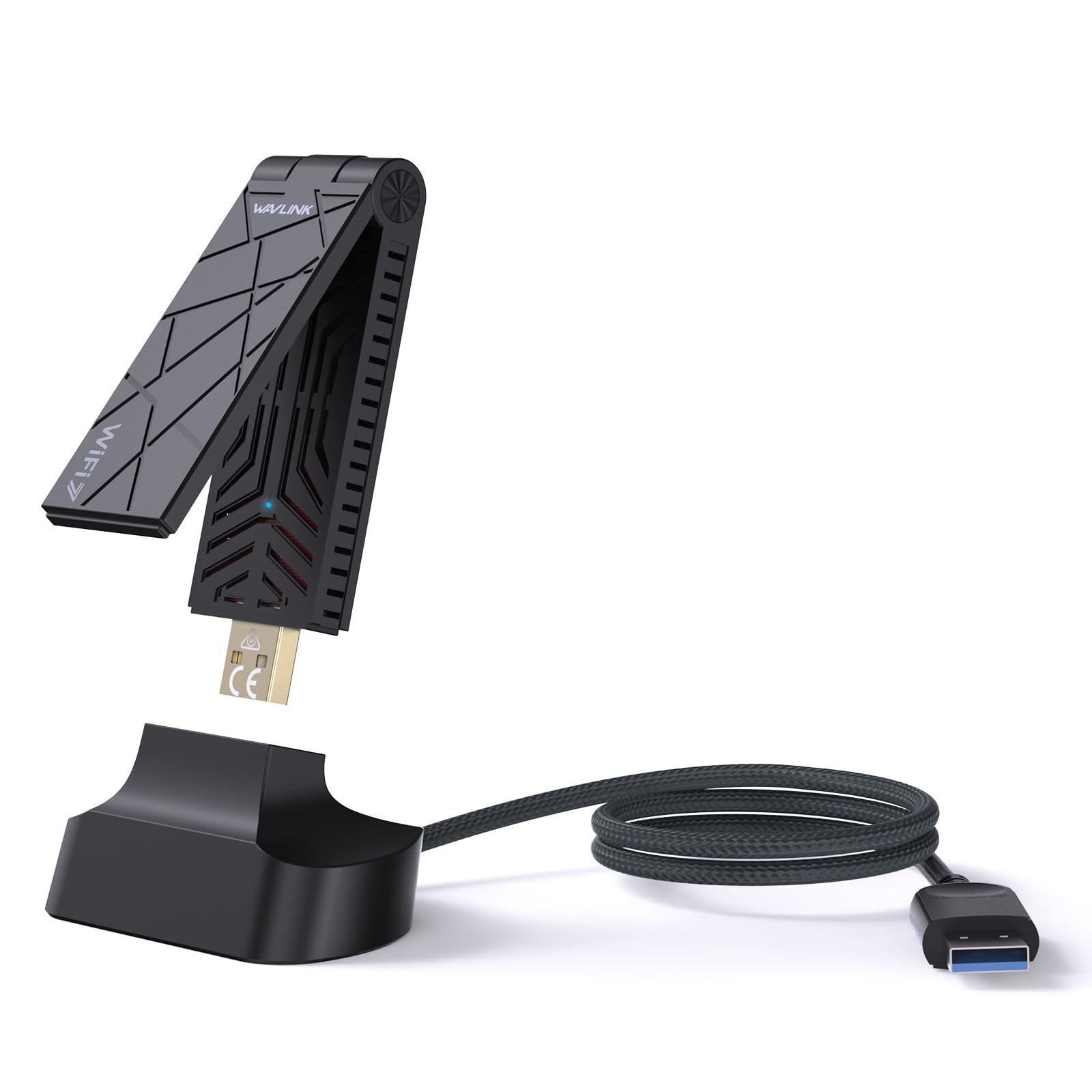
A pocket-sized Wi-Fi 7 dongle that doubles as a hotspot for the rest of your gear.
This is the pick for a laptop-and-desktop household or a gamer who moves between setups. The foldable body is the smallest of the group, and the spec sheet lists 6452Mbps total — 2882Mbps on 6GHz, 2882Mbps on 5GHz and 688Mbps on 2.4GHz — delivered through a USB 3.0 cable. Owners mention it holds full 600Mbps internet speed without a hiccup and connects on both 5GHz and 6GHz, which is the behavior you want from a dongle you relocate often.
There’s a bonus the others don’t have: Soft AP mode. Flip it and your PC’s wired connection becomes a Wi-Fi hotspot for phones and tablets — handy in a hotel room or a dorm. Two 3dBi tri-band antennas give it surprising range for its size, and WPA3 encryption keeps the shared network secure. It supports the full 802.11a/b/g/n/ac/ax/be standard chain, so older and newer routers both talk to it.
WAVLINK is upfront that this is not a repeater or booster — it will not stretch an existing weak signal, it only replaces or upgrades the wireless in your PC. And it wants a Wi-Fi 7 router to reach full speed; on a Wi-Fi 6 or 6E router it is limited to that standard. A couple of owners got a dud unit, so buy with the returns window open. Otherwise it’s compact, capable, and slips into a bag.
What sets this dongle apart
- Foldable design that travels easily.
- Soft AP mode turns your PC into a hotspot.
- Two 3dBi tri-band antennas for its size.
- WPA3 encryption.
- Works with older standards (a/b/g/n/ac/ax/be).
The fine print to check
- Not a repeater — won’t fix a weak signal at the source.
- Full speed needs a Wi-Fi 7 router.
- 6GHz needs Windows 11; Windows 10 is limited.
Reach for this if: You move your Wi-Fi between machines or want hotspot sharing in a pinch.
Not the fix if: You’re trying to extend or boost a weak signal — this replaces the wireless in your PC, it doesn’t repeat a signal.
6. GIGABYTE GC-WIFI7 PCIe Expansion Card

A Wi-Fi 7 card that fits the motherboard it was likely built to sit next to.
For a GIGABYTE-based build, this is the natural pairing, and it does the job: up to 5800Mbps, with 320MHz bandwidth support across the 2.4GHz, 5GHz and 6GHz bands. MLO lets it run on two bands at once, MRU improves interference handling, and 4K-QAM packs more data into each signal. Owners are happy with the speed — gigabit links and 300–320Mbps came up often — and the install goes in without a fuss.
The real draw is the slot standard: it runs on PCIe x1 and includes Bluetooth 5.3, so your controller and headset get a solid short-range radio alongside the Wi-Fi. It doesn’t chase the highest peak speed; it is designed to drop into a GIGABYTE board on PCIe x1 and run without driver hunting.
The honest limit follows from the number: 5800Mbps is the top speed here, below the BE6500 and BE9300 cards on this list. That’s less headroom for monster sustained transfers, though in-game latency — what you actually feel — depends more on the 6GHz link and MLO than the peak figure. On Windows 10 you get support, unlike some of the Windows 11-only cards, so an older machine still has a path.
The logical mate: PCIe x1 fit plus Bluetooth 5.3 makes it a tidy add-in for a GIGABYTE desktop that already has a 6GHz router in the room.
Where it trails: 5800Mbps is the slowest Wi-Fi 7 peak of the PCIe cards here — fine for gaming, less so if you plan huge local network file transfers.
Ideal when: You own a GIGABYTE build and want the card that matches your board’s spec sheet.
Consider another if: You want maximum peak throughput or the lowest possible price on a Wi-Fi 7 PCIe card.
7. TP-Link Archer TBE400E WiFi 7 PCIe Card

The Wi-Fi 7 card that wins on staying connected, not on a flashy spec sheet.
Ask what makes this TP-Link worth its slot and you get one clear answer: reliability. It is the quality buyers call out most, and here it is backed by 6500Mbps total — 2882Mbps on 6GHz, 2882Mbps on 5GHz and 688Mbps on 2.4GHz — with MLO and 4K-QAM doing the latency work. Owners say it holds 600Mbps consistently and works better than the onboard Wi-Fi module, which is the comparison that matters if you’re fed up with a motherboard’s built-in wireless.
Two high-performance antennas boost range, OFDMA and MU-MIMO keep multiple devices from choking the airwaves, and Bluetooth 5.4 handles controllers, headphones and keyboards. WPA3 guards the network, and you get both a standard and low-profile bracket, so a mini-tower case is covered. The setup is aimed at Windows 11 exclusively — it will not run on Windows 10.
The friction point is the OS. That Windows 11-only support is a hard line, not a preference, and if you’re still on Windows 10 this card is off the table. Money is also a talking point, though the reliability reputation is what makes owners forgive it. If your PC is on Windows 11 and you value a 600Mbps link that stays up mid-match, this is a quietly confident pick.
Why the reliability story lands
- Consistent 600Mbps reported by owners.
- MLO and 4K-QAM for steady gaming latency.
- Dual high-performance antennas.
- Bluetooth 5.4 for peripherals.
- Low-profile bracket included.
Before you commit
- Windows 11 only — no Windows 10 support.
- A slice of owners question the value.
- Full speed needs a Wi-Fi 7 router.
The reliable choice for: Windows 11 gamers who want a connection that doesn’t drop mid-match.
Hold off if: Your PC is on Windows 10 — this card won’t run there.
8. ALFA AWUS036AXML WiFi 6E USB 3.0 Adapter

Built for the crowd that runs a non-standard OS — and wants antennas you can swap.
Most cards on this list are Windows-first. The ALFA is the exception: it lists Linux among its compatible systems alongside Windows, which makes it the pick for a dual-boot rig, a dedicated Linux box, or a smart TV setup. It’s Wi-Fi 6E — 6GHz band included — with up to 3000Mbps combined over USB 3.0, driven by the MediaTek MT7921AU chipset. The two 5dBi high-gain detachable antennas are the physical standout: you can screw them off and reposition them, or swap in your own, to chase a stronger link.
Speed is what people talk about most with this adapter, and the 6GHz band delivers less congestion and lower latency than 2.4GHz or 5GHz. It’s a long-range workhorse for streaming, gaming and big file moves, and the detachable antenna design is genuinely useful when your desk sits in a bad spot.
The honest trade sits in software. Results split on Linux support — some get it running on Ubuntu, others don’t — so check your distro and kernel before you count on it. A few owners also hit setup friction that they rate poorly. It’s a strong choice for a range-focused or non-Windows build, but confirm compatibility with your specific machine first.
Why it has a niche
- Linux and Windows listed support.
- Two 5dBi detachable antennas you can reposition.
- 6GHz band for less congestion and lower latency.
- MediaTek MT7921AU chipset.
- Up to 3000Mbps over USB 3.0.
Where to be careful
- Linux results vary by distro and kernel.
- Setup can be finicky for some.
- Wi-Fi 6E, not 7 — no MLO.
Worth it for: Linux users and long-range tinkerers who want swappable, aimable antennas.
Best avoided if: You want zero-fuss setup — a Windows-first card is the smoother ride.
9. TP-Link Archer TBE550E BE9300 PCIe Card
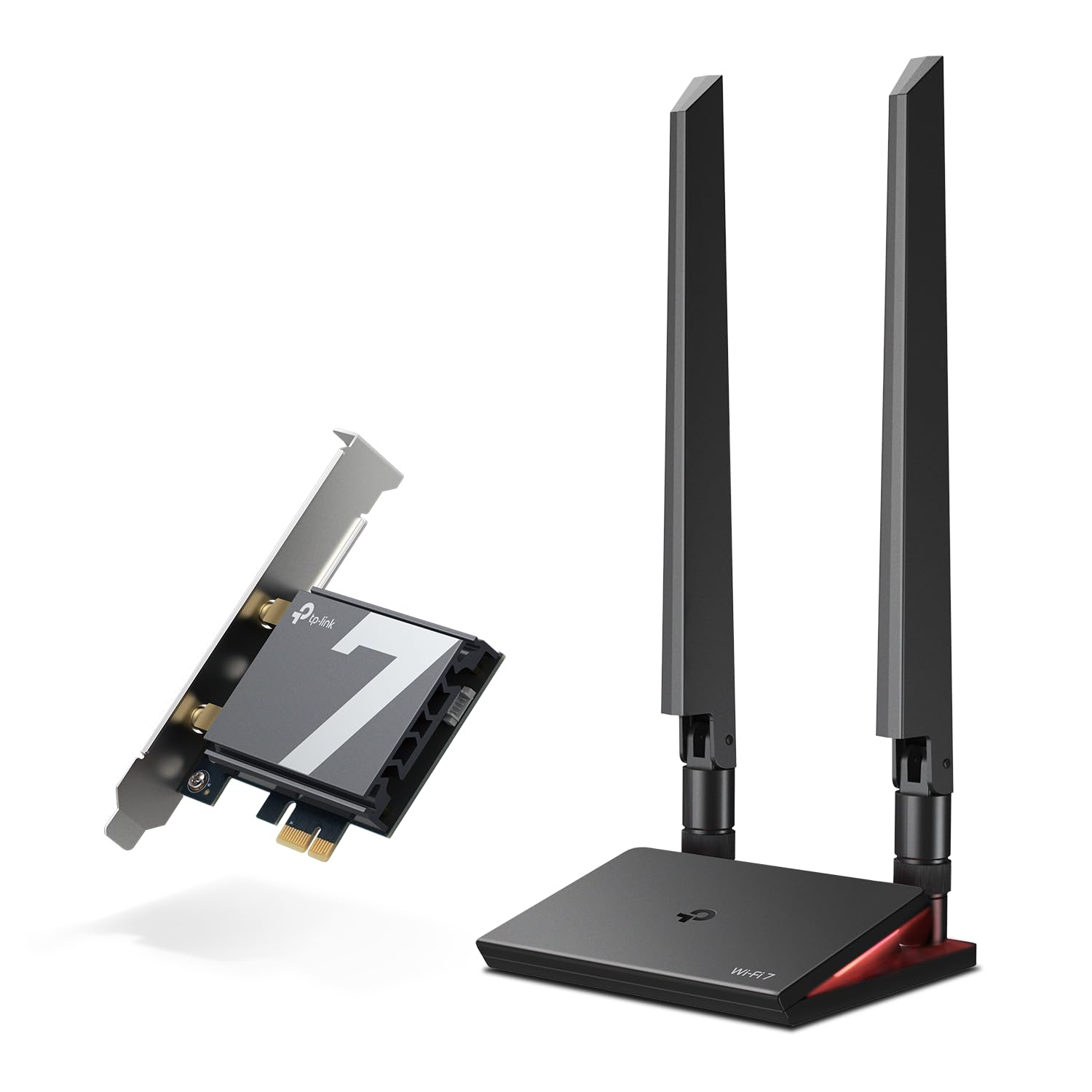
The heavy-hitter: a magnetized antenna base you can park anywhere on the desk.
When the 6GHz band is the whole point, this card takes it furthest with up to 5760Mbps on 6GHz, 2880Mbps on 5GHz and 688Mbps on 2.4GHz — a 9300Mbps total, the highest here. The practical trick is the magnetized antenna base on a braided RF cable: you stick it wherever the signal is best instead of being chained to the back of the case. Customers note speeds in the 700–900Mbps range on their setups, which is a real-world figure worth matching to your own internet plan.
The 320MHz channels and 4096-QAM modulation move a lot of data per signal. MLO carries traffic across bands to cut lag and interference, OFDMA and MU-MIMO keep a busy network calm, and the multicolor status LED on the base gives you a quick read on network state. Bluetooth 5.4 covers your controller and headset, and a USB drive in the box handles the driver.
Two constraints to weigh. It’s Windows 11 only — no Windows 10, no Linux — and this is the priciest pick of the bunch. A small number of owners also report a unit that stopped working after a month; size that as an occasional dud rather than the norm, and keep the receipt. If 5760Mbps of 6GHz headroom and a magnetic base you can park anywhere matter to you, this is the one that delivers it.
The throughput case: 9300Mbps total and a magnetic base you can place for the best reception — the most future-proofed card here on paper.
The trade: Windows 11 only, premium-tier price, and a few unlucky units. Buy from a seller with a clean return path.
Pick this when: You want the most 6GHz bandwidth on the list and can place a magnetic antenna base where the signal is strong.
Weigh it against: The TBE400E if you’d rather trade some peak speed for a lower price and proven reliability.
Know the Specs
Wi-Fi 6E vs Wi-Fi 7
Both standards open the 6GHz band, a newer slice of airspace that’s less crowded than 2.4GHz and 5GHz. Wi-Fi 6E tops out lower; Wi-Fi 7 adds MLO and wider channels for steadier throughput. For gaming, the 6GHz band is what reduces interference and keeps your ping flat, and Wi-Fi 7’s MLO is the extra step that spreads traffic across bands so a drop is less likely when your router is also Wi-Fi 7.
PCIe vs USB
A PCIe card screws into an empty slot on your motherboard and usually carries external antennas you can aim — more install effort, more consistent link. A USB 3.0 dongle plugs into a port with no case opening, so it’s the easy path for a prebuilt or a laptop. USB 3.0 keeps the throughput high enough for big advertised speeds, though the port on your machine has to be a true USB 3.0 one.
Common Questions
Will a Wi-Fi 7 card work with my older Wi-Fi 6 router?
Do I need Windows 11 for a Wi-Fi 7 PCIe card?
Is PCIe or USB better for gaming latency?
What is MLO and do I actually need it?
Will these adapters work in a laptop?
Do I need a separate Bluetooth header cable?
Why does the box speed seem higher than what I actually see?
Can a Wi-Fi adapter boost a weak signal in my room?
The Bottom Line
For most gamers, the wireless internet adapter for gaming pc winner is the WiFi 6E AX210 PCIe Card: it brings the 6GHz band, aimable antennas, Bluetooth 5.3 and WPA3 in one card that’s steady for hours of play. If you want the newest standard with the simplest setup, grab the BrosTrend BE6500 USB — Wi-Fi 7 speed from a USB port with a pre-loaded driver. And for the most future-proofed 6GHz headroom plus a magnetized base you can place anywhere, the TP-Link Archer TBE550E is the one to reach for. Whichever you pick, match it to your router’s standard and your Windows version first — that’s where the speed actually lives.
How we choose
We do not accept paid placement. Every pick is matched to a real buyer and a real use-case; we do not hands-on test units.
Sources
Specifications: manufacturer listings and product documentation. Review insights: verified customer reviews, as of November 2026. Pricing: not shown on this page (it changes often); check the current price via the retailer link.
As an Amazon Associate, Tactical Gear Guy earns from qualifying purchases. This does not affect which products we feature.