Specs are compiled from manufacturer listings and verified buyer reviews and can change over time — please confirm the key details on the product page before buying.
You do not need a second full keyboard to play better — you need one small pad that frees your mouse hand and fires your abilities without a reach. The three wireless keypads below cover that job at very different levels. Two are compact macro pads that sit beside your main board, and one is a proper leverless controller built for fighting games. Sort out which one matches your desk and your genre first, and the choice gets simple fast.
This guide is built by comparing the manufacturers’ published specifications and the patterns across verified customer reviews, so you get each pick’s real strengths and trade-offs instead of marketing spin.
Every pick here connects without a cable, but they are not interchangeable. One is a 42-key one-handed board, one is a 12-key macro pad with knobs, and one is a 15-key leverless pad with magnetic switches. Below you get the specs that actually change how each pad plays, and the honest catch on each, so you can pick the right wireless gaming keypad for your setup.
Top Picks

How To Choose The Best Wireless Gaming Keypad
A wireless gaming keypad puts a small pad of keys under your non-mouse hand, so you stop reaching across a full keyboard mid-fight. Three things decide which one fits: how many keys your game demands, if you need per-key macro memory (each key can store its own recorded command), and whether your genre punishes slow input. Get those three straight and the rest is comfort.
Count your keys before you count features
An MMO or MOBA rotation can eat a dozen bindings on its own, so a 15-key or 42-key pad keeps everything under one hand. A 12-key pad is plenty for shooters, streaming hotkeys, or one-click copy and paste at work. Extra keys you never bind just add desk footprint to work around.
Switch type changes the feel and the noise
Blue mechanical switches give a loud, clicky press — great feedback, rough on anyone sharing the room. Hall Effect switches (magnetic sensors that read how far you press a key) let you set the exact point where a press registers. If you play fighting games or anything that rewards a fast reset, that adjustability is the whole reason to spend more.
Onboard memory separates a toy from a tool
A pad that stores your macros on the device itself keeps working when you plug it into a different PC or a console. A pad that leans entirely on its desktop software stops behaving the moment you move it. Check which one you are buying, because this is the spec buyers forget and later regret.
Side-by-Side Comparison
| Model | Best For | Keys | Connectivity | Switches | Amazon |
|---|---|---|---|---|---|
| Redragon K585 PRO★ Best Overall | MMO and MOBA rotations | 42-key layout | 2.4GHz, Bluetooth, USB-C | Hot-swap Blue mechanical | Amazon |
| LUKCOZMO 12-Key Macro Pad | Desk macros and shooters | 12 keys + 2 knobs | 2.4GHz wireless, USB-C | Mechanical | Amazon |
| CORSAIR NOVABLADE PRO | Fighting games on PS5 and PC | 15 keys + 8 G-keys | 2.4GHz, Bluetooth, wired | Hall Effect magnetic | Amazon |
Detailed Reviews
1. Redragon K585 PRO Wireless Gaming Keypad
Our pick — 4.0+★ from 800+ verified ratings; the strongest balance of quality and price.
The one-handed board that puts a whole MMO rotation under four fingers and a thumb.
This is the crowd favorite of the three, and the numbers behind it are strong: 4.0+ stars across 800+ ratings. The reason is simple. A 42-key layout with 7 onboard macro keys gives you a genuinely large surface to bind, and those 7 keys hold up to 28 commands spread across 4 profiles. You press one key, the pad fires the sequence, and your rotation stops depending on finger gymnastics.
It runs on three connection modes — 2.4GHz, Bluetooth, and USB-C — and the maker rates a single charge at 15-20 hours of continuous play. Buyers routinely report the wireless range reaching across a room, with one setup described as roughly 20ft from a bed and holding fine. The magnetic wrist rest clips off when you want the smaller footprint. And the hot-swap socket takes almost any 3-pin or 5-pin switch, so the feel is not locked in when you buy it.
The catch is noise and software. The stock Blue switches are loud — the clicky type that carries through a house — and the desktop software has a reputation for being fiddly when you first set it up. A few buyers also hit input quirks after long use. The quality itself is what wins people over by a wide margin; the volume and the app are the two things to accept going in.
What earns its keep
- 42-key layout with 7 macro keys holding up to 28 commands across 4 profiles
- 15-20 hours of continuous play per charge, topped up over USB-C
- Hot-swap socket accepts 3-pin or 5-pin switches, no soldering
- Detachable magnetic wrist rest trims the footprint
What to walk in knowing
- Blue switches are loud enough to carry through a room
- The setup software takes patience on the first build
- Bigger than it looks — it eats real desk space
Settle here if: you play MMO or MOBA and want every ability under your off-hand without a reach.
Think twice if: quiet is a house rule — the Blue switches announce every press.
2. 12-Key Macro Pad Programmable Mini Mechanical RGB

Twelve keys, two knobs, and a footprint small enough to vanish into a bag.
The number that defines this pad is its size. At 5″L x 2.84″W x 1.46″H it is the smallest thing on this list — and against the Redragon’s 10.83″L x 9.06″W x 1.57″H, that is a far more portable object you can carry from desk to desk. Twelve mechanical keys plus two programmable knobs cover volume, scrolling, and one-click copy or paste without moving your hands off a map.
The wireless story is sensible: a 2.4GHz receiver for dongle play and a Type-C cable for wired mode when you want it. Setup uses a small config tool that ships on a USB drive — copy it, extract it, then run it, because launching straight from the drive fails. The real selling point is the memory function. Set your layout once on Windows and the pad carries it to another machine over plug-and-play, with no rebuild.
Here is what to be clear-eyed about. This pad leans hard on its own software — it is not QMK-based and it will not borrow macros from other apps — so it does not suit a Linux-only workstation. Linux compatibility is the recurring snag in buyer feedback, and the RGB is functional rather than striking. For a Windows or Mac desk that wants a small command cluster, though, it does the job cleanly and the build feels solid for the size.
Where it lands: the 12 keys and 2 knobs form the tightest macro cluster here, and the memory function carries your setup to a second computer without redoing it.
The honest limit: a Linux-only setup will fight the software, so this is a Windows-first pad.
Reach for it if: you want a tiny macro cluster beside a laptop that travels in a bag and remembers your binds.
Look elsewhere if: your daily driver runs Linux — the required app is built for Windows.
3. CORSAIR NOVABLADE PRO Wireless Controller
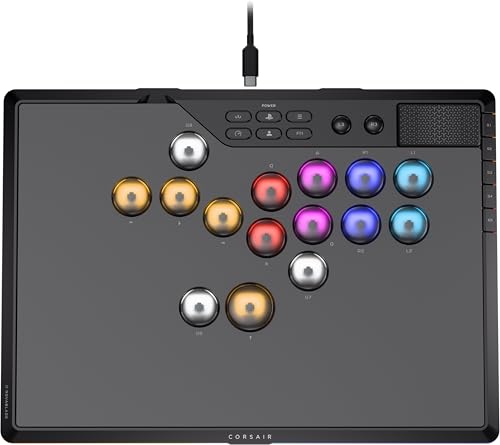
Twenty-three switchable inputs and magnetic keys you can tune to a hair-trigger press.
Here is the spec that matters if you play fighters: Its MGX Hyperdrive Hall Effect switches are rated for 150 million keystrokes, with per-key actuation adjustable from 0.1mm to 4.0mm. Hall Effect means the switch reads how far you press it — a magnetic sensor rather than a metal contact — so you choose the exact travel that registers a hit. Rapid Trigger resets from 0.1mm, which is the fast re-press that fighting games reward. Against the Redragon’s hot-swap mechanical feel, this is a different philosophy: tune the press instead of swapping the switch.
Key count is where the NOVABLADE PRO splits from the pack. You get a 15-key layout plus 8 programmable G-keys across up to 5 onboard profiles, all in a 12.6 x 9.1 x 1.17 inch frame weighing 3.9 pounds. That is a much larger, console-style deck than the 12-key LUKCOZMO — not a pocket pad. It connects over 2.4GHz, Bluetooth, or wired, and it is a PlayStation Officially Licensed product built for PS5, PS4, and PC. On PC it runs 1000Hz polling (the pad reports your presses 1,000 times a second) over 2.4GHz and wired.
Two things to weigh before buying. It is heavy and big for a keypad — this is a desk or lap controller, not something you tuck in a laptop sleeve. And it is the loudest leverless in a room, by buyer account — the trade-off for that crisp, tunable press. The build quality and smoothness of the Hall Effect buttons are the part owners keep coming back to.
The strong case: 150M-keystroke switches, 0.1mm-4.0mm per-key actuation, and FlashTap SOCD tech make it the most precisely tunable pad here for fighting games.
The trade-off: 3.9 pounds and a large frame mean it stays put on a desk — and it is not a quiet pad.
Built for: Tekken and Street Fighter players on PS5 or PC who want magnetic switches and a tournament Game Mode.
Skip if: you need something light and silent for a shared room.
Know the Specs
Actuation point and Rapid Trigger
Actuation point is how far you press a key before it counts as a press. On a Hall Effect pad you dial it in — the NOVABLADE PRO lets you set 0.1mm-4.0mm per key. Rapid Trigger resets the key from 0.1mm, so a fast tap-and-press fires again without a full travel. For fighting games, this is the difference between a command landing and dropping.
Polling rate and wireless latency
Polling rate is how often your pad reports to the PC — 1000Hz means 1,000 reports a second, the response a serious player expects. The NOVABLADE PRO hits 1000Hz over 2.4GHz and wired on PC; Bluetooth trades some of that for convenience. The Redragon and LUKCOZMO lean on 2.4GHz for latency and Bluetooth for range.
Onboard memory and profiles
Onboard memory means your macros live on the pad, not on the PC. The Redragon carries 4 profiles and 28 total macro commands on board; the NOVABLADE PRO holds up to 5 profiles. This is what lets a pad move between a desktop and a console and keep behaving.
Switch type and feel
Blue mechanical switches give a clicky, audible press. Hot-swap sockets let you change those switches later without soldering, as on the Redragon. Hall Effect switches, as on the NOVABLADE, are magnetic and tuneable rather than swappable, rated there for 150 million keystrokes.
Common Questions
Will a wireless gaming keypad work with my PS5?
How long does the Redragon K585 PRO battery last per charge?
Do I need to install software to use these pads?
Will the LUKCOZMO macro pad work on Linux?
What is the difference between Hall Effect and mechanical switches here?
How many keys do I actually need on a keypad?
Can I change the switches on the Redragon K585 PRO?
Are these keypads loud enough to bother someone in the same room?
Does the NOVABLADE PRO work over Bluetooth with a PC?
Can I carry the LUKCOZMO macro pad between computers with my settings?
The Bottom Line
For the widest slice of buyers, the wireless gaming keypad winner is the Redragon K585 PRO. It gives you a 42-key board with 7 macro keys holding up to 28 commands across 4 profiles, so MMO rotations and everyday bindings fit in one footprint. It runs 15-20 hours per charge, and its hot-swap socket lets you pull and replace each switch to change the feel later. It also holds the highest rating of the three. The CORSAIR NOVABLADE PRO is the pick if fighting games are your whole game — its 0.1mm-4.0mm Hall Effect actuation (magnetic switches that let you set how far a key travels before it registers) and 150M-keystroke switches are a level of tuning the others do not offer. And for a small travel cluster that remembers your binds, the LUKCOZMO 12-key pad slips into a bag at a fraction of the size.
If you are still on the fence, weigh what you play most. Fighters want the magnetic precision; raiding wants the key count. Match the pad to your genre and you will not look back.
How we choose
We do not accept paid placement. Every pick is matched to a real buyer and a real use-case; we do not hands-on test units.
Sources
Specifications: manufacturer listings and product documentation. Review insights: verified customer reviews, as of November 2026. Pricing: not shown on this page (it changes often); check the current price via the retailer link.
As an Amazon Associate, Tactical Gear Guy earns from qualifying purchases. This does not affect which products we feature.