Specs are compiled from manufacturer listings and verified buyer reviews and can change over time — please confirm the key details on the product page before buying.
You have a device with an Ethernet jack and no cable going to it. A wireless Ethernet network adapter solves that by grabbing your WiFi signal out of the air and handing it to the wired device through a plain RJ45 port (the standard rectangular Ethernet plug). For most people, the BrosTrend Dual Band 1200Mbps WiFi Bridge handles this best: it pairs a 1200 Mbps radio with two external antennas, and buyers report setup takes about 10 minutes. Below are nine adapters sorted by what they do well, from a tiny bridge for a printer to a pair of outdoor bridges that carry a signal 500–1000 meters.
This guide is built by comparing the manufacturers’ published specifications and the patterns across verified customer reviews, so you get each pick’s real strengths and trade-offs instead of marketing spin.
Some units here are simple one-port bridges and some are industrial boxes with serial ports and PoE. Knowing which one your device needs is the difference between a five-minute job and a return label, so the picks below are grouped by job rather than by brand.
The right wireless ethernet network adapter turns a dead Ethernet jack into a working internet connection without drilling a single hole in your wall.
Top Picks


How To Choose The Best Wireless Ethernet Network Adapter
Start with the port on your device, not the adapter’s spec sheet. A wireless Ethernet adapter exists to feed one wired jack, and the port on the adapter has to match or beat what that device can use. Get that backwards and you buy a fast radio that still feeds a slow hole.
Match the Ethernet port speed to your device
A Fast Ethernet port moves data at up to 100 Mbps. A Gigabit port moves it at up to 1 Gbps. If you are feeding a 4K TV or a desktop PC that pulls big files, a 100 Mbps port becomes the bottleneck no matter how strong the WiFi signal is. The BrosTrend AC7P uses a 1 Gbps RJ45 port to avoid exactly that ceiling, while the N300 BrosTrend model tops out at 100 Mbps on its wired side.
Decide if you need dual-band or 2.4 GHz only
2.4 GHz travels further and pushes through walls better. 5 GHz is faster but shorter-range. Several picks here are 2.4 GHz only, which is fine for a printer sitting near the router. For streaming video or a game console, a dual-band model that can ride the 5 GHz band gives you more headroom.
Check the power source before you buy
Some adapters plug straight into a wall outlet with a built-in supply, so you need no extra charger. Others take a DC barrel plug, a USB cable, or PoE (Power over Ethernet, which sends electricity down the network cable itself). The outdoor Binardat pair runs on 24V PoE or 12V DC, which matters when there is no outlet near the mounting spot.
Know which mode your job needs
Client mode turns WiFi into a wired feed for one device. Repeater mode extends your existing WiFi coverage. Access-point mode does the reverse — it takes a wired connection and broadcasts WiFi. Most people buying for a printer or TV want client mode, and several of these units switch between all three.
Side-by-Side Comparison
| Model | Best For | WiFi Rate | Wired Port | Bands | Amazon |
|---|---|---|---|---|---|
| BrosTrend Dual Band 1200Mbps WiFi Bridge★ Best Overall | Most homes, any wired device | 1200 Mbps | RJ45 Ethernet | Dual-band | Amazon |
| BrosTrend AC1200 AC7PFastest Wired Port | Fast wired devices, streaming | 1200 Mbps | 1 Gbps Gigabit | Dual-band | Amazon |
| Binardat Outdoor Bridge 2-PackBest for Cameras | Outbuildings, long distance | 100 Mbps | 2x 100 Mbps Ethernet | 2.4 GHz | Amazon |
| Vonets VAP11G-500S | Industrial PLC and printer setups | 300 Mbps | RJ45 Ethernet | 2.4 GHz | Amazon |
| Vonets VAP11S-232 | Serial devices and DVRs | 300 Mbps | 2x RJ45 | 2.4 GHz | Amazon |
| Vonets VAP11N-300 | Small IoT and scale devices | 300 Mbps | RJ45 | 2.4 GHz | Amazon |
| Quxas 1200Mbps Universal Ethernet Adapter | Budget multi-mode use | 1200 Mbps | RJ45 Ethernet | Dual-band | Amazon |
Detailed Reviews
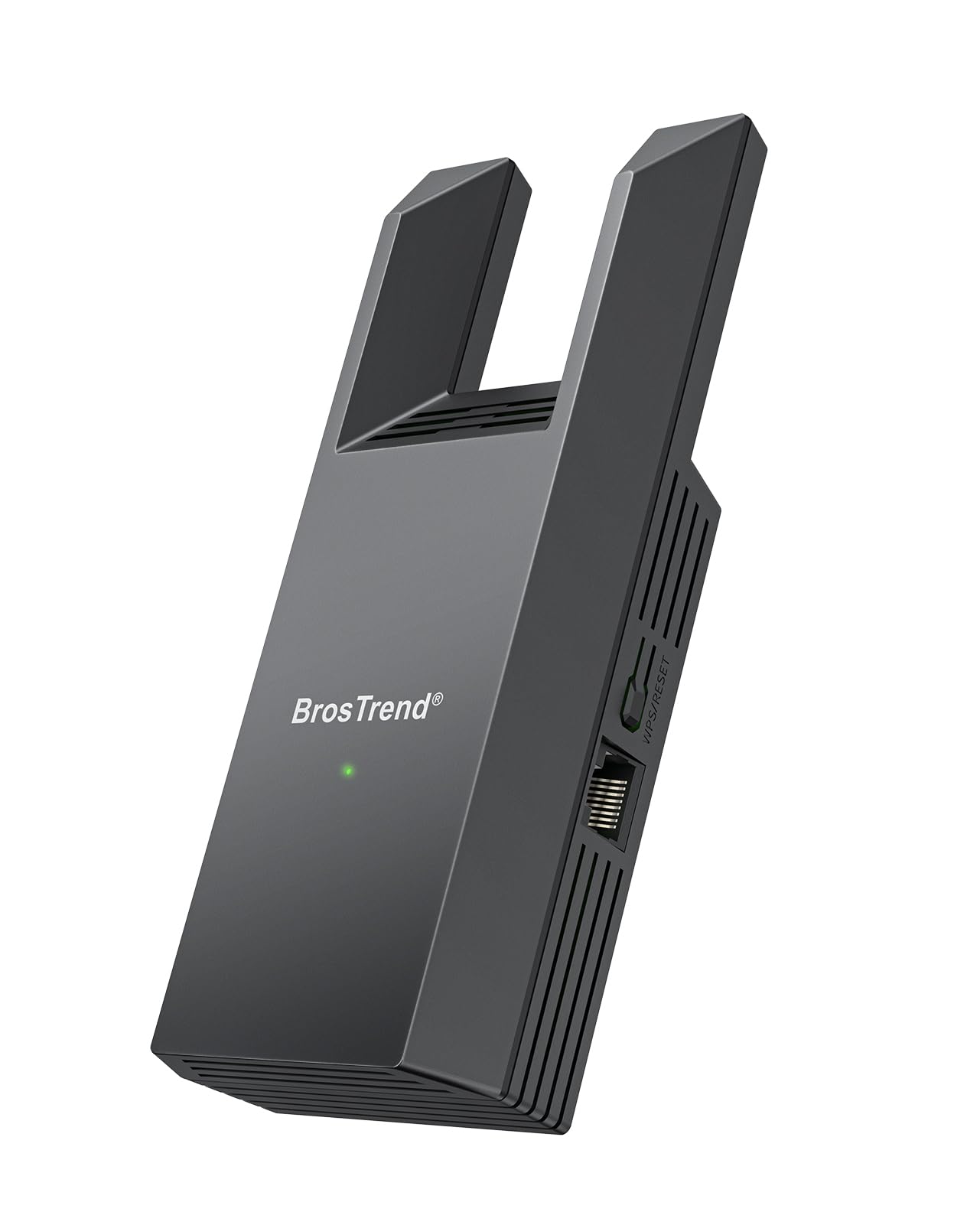
1. BrosTrend Dual Band 1200Mbps WiFi Bridge
Our pick — 4.0+★ from 850+ verified ratings; the strongest balance of quality and price.
A dual-band bridge that feeds a 1200 Mbps radio into a standard RJ45 port.
what separates it is a 1200 Mbps dual-band radio (2.4 GHz and 5 GHz) feeding a standard RJ45 Ethernet port. That radio rating is roughly four times the 300 Mbps of the Vonets VAP11N-300, so you get far more headroom for streaming and downloads. Two external antennas pull in a stronger signal than the internal antennas on smaller units, which is why it holds up through walls and floors.
Setup takes about 10 minutes: WPS pairing for the initial link, then a browser interface for network changes. WPS pairing gets you connected in seconds, and a browser-based web interface lets you pick a different WiFi network and fine-tune settings afterward. No driver install is needed, so a Raspberry Pi, a Blu-ray player, or an older smart TV all come online with the same simple steps. Owners mention the whole job takes about 10 minutes.
The honest catch: the network connection is the mixed part of this product’s story. Some buyers get a solid signal that reaches a detached outbuilding, while others find it weak over distance — so placement matters. Its 160 g body is 60% heavier than the N300 BrosTrend below, which hints at the bigger antennas and sturdier build.
What earns its keep
- 1200 Mbps dual-band radio beats 300 Mbps single-band units on raw capacity
- Two external antennas for stronger signal than internal-antenna designs
- WPS pairing plus a web interface for flexible setup
- No driver install — works from the start with TVs, printers, and PCs
Where it asks more of you
- Signal strength depends heavily on where you place it
- WPA2/WPA encryption, so it is not a newer security standard
Grab this one if: you want one adapter that handles a smart TV, printer, or games console with the speed headroom of dual-band WiFi.
Look elsewhere if: you need a Gigabit wired port for large file transfers — the AC7P below is built for that.
2. BrosTrend AC1200 AC7P WiFi to Gigabit Ethernet Adapter
The pick for anyone whose wired device deserves a full-speed port, not a 100 Mbps trickle.
The number to look at is the 1 Gbps RJ45 port. A Gigabit Ethernet port avoids the 100 Mbps ceiling that Fast Ethernet places on cheaper adapters, and BrosTrend rates it as up to 10× faster on the wired side. The wireless uplink is AC1200 dual-band — 5 GHz up to 867 Mbps plus 2.4 GHz up to 300 Mbps — so the radio keeps up with the port.
It works as advertised with no driver or software install, and the device list runs from older smart TVs to VoIP phones. It works as advertised with no driver or software install, and compatibility runs deep: older smart TVs, desktop PCs, printers, consoles, and VoIP phones all connect. WPS pairing takes seconds, and a web interface handles the rest from a phone, tablet, or computer.
Compared with the Best Overall pick above, this one trades the twin external antennas for a taller, slimmer 0.17 kg body — it leans on a strong WiFi signal rather than long antenna reach. Pair it with a router in the same room or a strong 5 GHz signal and it shines. Push it to the far end of the house and a 2.4 GHz model may hold up better.
The case for it: a wired device that moves real data — a desktop, a 4K streamer — needs this Gigabit port to breathe.
Skip the upgrade if: your device never pushes past light browsing or printing, where a 100 Mbps port is plenty.
3. Vonets VAP11AC Dual-Band WiFi Bridge
Two matched bridges that beam Ethernet across a yard, a barn, or a gate camera.
This is not a single adapter — it is a pair, and that changes the job. One bridge sits as master, the other as slave, and the two talk over 2.4 GHz across a stretch the maker rates at 500 to 1000 meters. Each side carries a 100 Mbps Ethernet port, and a 24V PoE adapter is included so power travels down the network cable when there is no outlet at the far end.
Pairing takes two steps and no software. Flip the DIP switch on one bridge to M and the other to S, then short-press the channel button until both LED screens show the same value. They match automatically and a SIG light confirms the link. A WEB interface on a PC gives you device status and wireless settings if you want to tune it further.
The link comes up reliably once the pair is matched, and network speed lands around 55 to 75 Mbps in practice at the far side. The water-resistant housing supports point-to-point and point-to-multipoint setups, and each unit can even run solo as a WiFi access point. Its 100 Mbps ceiling is the honest limit, and it is not the model for a single indoor printer.
The standout spec: a maker-rated 500–1000 meter span is by far the longest reach in this group, and the included PoE setup saves you a power run.
Best for: getting network to a detached garage, shed, or outdoor camera where a single indoor adapter cannot reach.
Not for: one wired device sitting in the same room as your router — a single bridge handles that far cheaper.
4. Vonets VAP11G-500S Industrial WiFi Bridge

A high-power 2.4 GHz box built for PLCs, printers, and factory-floor gear.
Three modes live inside this 300 Mbps bridge: router, repeater, and bridge. It can go WiFi to wired or wired to WiFi, and the maker rates point-to-point transmission at up to 200 meters in open air with small data loads, dropping under 100 meters for video. That reach comes from two built-in 2.4 GHz antennas and a 19/23 dBm transmit power rating — high enough that the maker positions it for industrial work rather than a bedroom TV.
Power is industrial-grade. Wide-voltage DC5V-24V input runs through two-stage automatic overvoltage protection capped at 27V, and it reconnects automatically to remembered hotspots. An SSA signal-strength readout plus motion-detection support round out the toolkit for machine-to-machine links like a PLC, a robot, or a network printer.
This is a specialist’s tool, and it should be bought as one. Where the BrosTrend adapters are plug-and-play, this one expects you to read the manual and understand what mode you need. If your target is a printer in a shop or a device on a production line, that trade is worth it.
Why it earns a spot
- 200-meter point-to-point rating with two built-in antennas
- Overvoltage protection up to 27V for rugged power sources
- Router, repeater, and bridge modes in one small box
Where it asks more
- Not plug-and-play — industrial setup knowledge helps
- 2.4 GHz only, so no 5 GHz speed boost
Pick it for: industrial and machine-to-machine jobs where range and rugged power beat ease of setup.
Leave it for: simple home use where a standard bridge is faster to configure.
5. Vonets VAP11S-232 WiFi Bridge with RS232

The bridge for gear that still speaks serial — DVR monitors, PLCs, and legacy hardware.
Most adapters here stop at a single Ethernet jack. This one adds an RS232 serial port plus two RJ45 ports, so it can link older serial-only equipment to a WiFi network. The 300 Mbps 2.4 GHz radio runs router, repeater, and bridge modes, with IP-layer or MAC-layer transparent transmission letting serial and network gear swap data as if cabled together.
Reach and power suit a back-office or industrial cabinet. Two external 2.4 GHz antennas push point-to-point transmission up to 200 meters with small data, and it takes wide-voltage DC5V-24V power with two-stage overvoltage protection capped at 27V. At 72.8 g it is the lightest of the Vonets units in this group. The maker lists DVRs, monitors, POS cash registers, IP cameras, robots, and medical devices as targets.
Compatibility depends on the device: it suits serial gear like DVRs and PLCs, not a plain TV Ethernet jack. It does exactly what one kind of buyer wants and frustrates another who assumed it would behave like a plug-in home adapter. Bring the manual and a clear idea of which mode your device needs.
The decisive feature: the RS232 port is the reason to pick this over every other adapter in the list — no other pick here speaks serial.
Go for it if: your device has a serial connection that has to join a wireless network.
Think twice if: all you need is a plain Ethernet jack for a TV — a simpler bridge serves you better.
6. Vonets VAP11N-300 Mini WiFi Bridge

A tiny industrial bridge that can borrow power from the very device it serves.
Three ways to power it: a DC2.5 power hole, a DC2.0 plug, or a USB interface. That USB option is the clever part — it can share power with the equipment it is connected to, and it draws under 2W across a wide DC5V-15V range. The radio is 300 Mbps on 2.4 GHz with 802.11b/g/n, and it runs as both a WiFi bridge and a repeater.
At 0.06 kg it is built for tight installs: electronic scales, DVRs, IP cameras, medical devices, robots, and network printers. Point-to-point transmission reaches up to 60 meters in open air with small data, dropping under 50 meters for video. It remembers up to 100 hotspots, includes a signal-strength readout, and takes online software updates. Setup is quick: it remembers up to 100 hotspots, so re-pairing after a move takes seconds.
Reliability is where it splits the room: some units run for years, others lose their configuration after a power cut. Some units run perfectly for years; others lose their configuration after a power cut. That is the truth to weigh — if your install can tolerate a quick re-pair after a blackout, it is a compact bargain. If it must run unattended for months, plan to check it now and then.
What it does best: a sub-2W draw plus USB power sharing makes it easy to tuck beside a small device with no spare outlet.
Made for: small IoT, scale, and camera installs where low power and a tiny footprint matter most.
Second-guess it if: the device must stay online through power cycles without a re-pair.
7. Quxas 1200Mbps Universal Ethernet Adapter

A three-mode bridge that lets you stretch the job without stretching the money.
Three modes for the entry tier: client, repeater, and access point. In client mode it grabs your WiFi and turns it into a wired signal for a PC, printer, or console through its RJ45 port — no wireless card needed. The 1200 Mbps rating matches the Best Overall bridge on paper, and a WPS button skips the password typing on setup.
Setup runs on your phone. Plug it in, join its WiFi, pick your home network from the list, enter the password, and save — then connect your device with an Ethernet cable. It also carries a 1-year warranty and spans just 3.15″ x 2.79″ x 2.05″, so it hides easily behind a TV. At 3.63 ounces it is lightweight enough to hang on a cable without strain.
At 3.63 ounces and 3.15″ x 2.79″ x 2.05″, it hides behind a TV and costs little for three modes and a 1200 Mbps rating. The reliability story is the one to weigh, since some units need more fussing with WiFi than others. Treat the 1-year warranty as your safety net and it is a sensible budget starter.
The value read: three modes plus a 1200 Mbps rating and a 1-year warranty at the entry end of this group makes it a low-cost way into a WiFi-to-wired bridge.
Choose it if: you want a multi-mode bridge for a printer or console and are comfortable with a little setup trial and error.
Pay more if: you need proven plug-and-play reliability — the BrosTrend picks carry a longer track record.
Know the Specs
WiFi Rate vs Wired Port Speed
Two numbers decide your real speed, and they are not the same. The WiFi rate (like 1200 Mbps) is the radio link between the adapter and your router. The wired port speed (100 Mbps or 1 Gbps) is the handoff to your device. Your device only ever runs as fast as the slower of the two, so a 1200 Mbps radio feeding a 100 Mbps port tops out at 100 Mbps. Match the port to what your device actually pulls.
Client, Repeater, and Access Point Modes
Client mode takes WiFi and hands it to a wired device — the usual job for a printer or TV. Repeater mode picks up your WiFi and rebroadcasts it to extend coverage. Access-point mode flips it: it takes a wired internet feed and broadcasts WiFi for phones and laptops. Many units here switch between all three, so check the mode list before you buy.
2.4 GHz vs Dual-Band
The 2.4 GHz band reaches further and pushes through walls; the 5 GHz band is faster but shorter-range. A single-band 2.4 GHz adapter is fine for a printer near the router. A dual-band model can ride the 5 GHz band when you need throughput for streaming or gaming. Dual-band costs a little more but keeps more speed available.
Power Options and PoE
Adapters power up in several ways: a built-in wall supply, a DC barrel plug, a USB cable, or PoE (Power over Ethernet, which sends electricity down the network cable). PoE matters most outdoors or on a pole where no outlet is nearby. Wide-voltage DC5V-24V inputs and overvoltage protection help these units weather whatever power source you attach.
Common Questions
Will a wireless Ethernet adapter make my smart TV or printer WiFi capable?
Does the adapter’s WiFi speed mean my device will run that fast?
Can one of these sit outdoors to reach a shed or garage?
What is the difference between client mode and repeater mode?
Do I need to install a driver for a wireless bridge?
How far can a WiFi to Ethernet adapter send a signal?
Will a 2.4 GHz only adapter work in a house full of busy WiFi networks?
Can my wired device lose its settings when the power goes out?
What does a bridge with an RS232 serial port do?
Can one of these units double as a WiFi extender for phones?
The Bottom Line
For most people wiring a single device to WiFi, the winner is the BrosTrend Dual Band 1200Mbps WiFi Bridge. It pairs a 1200 Mbps dual-band radio with two external antennas and a setup that finishes in about 10 minutes, which is why it sits at the top of this group. If your device needs a full-speed wired port, the BrosTrend AC1200 AC7P brings a 1 Gbps Gigabit port to the same job. And when the target sits hundreds of meters away, the Binardat Outdoor Bridge 2-Pack is the one that reaches that far. Start with the device you need to connect and the port speed it can use — that single check points you to the right pick.
How we choose
We do not accept paid placement. Every pick is matched to a real buyer and a real use-case; we do not hands-on test units.
Sources
Specifications: manufacturer listings and product documentation. Review insights: verified customer reviews, as of November 2026. Pricing: not shown on this page (it changes often); check the current price via the retailer link.
As an Amazon Associate, Tactical Gear Guy earns from qualifying purchases. This does not affect which products we feature.