Specs are compiled from manufacturer listings and verified buyer reviews and can change over time — please confirm the key details on the product page before buying.
If your wrists ache by 3 p.m. and your mouse hand curls inward all day, the fix is a matched pair: a wave keyboard that keeps your fingers in a natural arc and a vertical mouse that stands your palm on its side. The Logitech Wave Keys and Lift combo is the safest starting point for most people, while the ProtoArc EKM01 Plus is the better fit for big hands and full-size desk work. Below you get eight wireless ergonomic combos sorted by who each one actually suits.
This guide is built by comparing the manufacturers’ published specifications and the patterns across verified customer reviews, so you get each pick’s real strengths and trade-offs instead of marketing spin.
Here is how each combo handles those two decisions, with the wireless ergonomic keyboard and mouse options ranked by fit rather than by sticker shock.
Top Picks
How To Choose The Best Wireless Ergonomic Keyboard and Mouse
The biggest mistake buyers make is shopping for the keyboard and treating the mouse as a free extra. In practice the mouse does most of the ergonomic work, because a flat mouse keeps your forearm twisted palm-down all day. A vertical mouse rolls your hand onto its side so the forearm sits closer to neutral. Buy the combo whose mouse angle and hand size match you, then check the keyboard.
Measure your hand before you measure your desk
Small and medium hands get cramped on full-size ergonomic boards, because the reach to the outer keys stretches your fingers. The ProtoArc EKM02 publishes a hand-length ceiling of under 7.5 inches (19.05 cm) for its mouse — a rare, useful number to check against your own hand. Large hands run into the opposite problem on compact boards and do better with a full-size split like the ProtoArc EKM01 Plus.
Split versus wave: two different kinds of curve
A wave keyboard keeps the keys in one piece but curves the rows up and down, so your fingers rise and fall naturally. A split keyboard physically divides the halves so each hand types at its own angle and distance, which cuts the reach across the desk. Wave designs have almost no learning curve; true splits ask for a week or two of slower typing before they feel normal.
Cells or a charging cable
AAA and AA batteries mean zero charging routine but a mid-project dead-keyboard moment when they run out. Rechargeable lithium packs (the Nulea pair runs 500mAh in the keyboard and 300mAh in the mouse) need a cable but never leave you hunting for cells. Either way, check the auto-sleep window: a board that sleeps after 30 minutes saves more power than one that waits 60.
Side-by-Side Comparison
| Model | Best For | Keyboard Shape | Mouse Type | Power | Amazon |
|---|---|---|---|---|---|
| Logitech Wave Keys & Lift★ Best Overall | Most desk workers | Compact wave | Vertical, 57° | AAA + AA batteries | Amazon |
| SABLUTE Full Size WaveBest Value | Budget home office | Full-size wave | 6-button standard | Battery | Amazon |
| MOFII Split CurvedMost Colorful | Color and style | Split curved, round keys | Vertical optical | USB nano receiver | Amazon |
| Nulea Combo | Multi-device switching | Split curved | Sculpted, palm and thumb rests | 500mAh / 300mAh USB-C | Amazon |
| MEETION Split Curve | Split layout on a budget | Split, full-size 19.09 in wide | Vertical, 4 DPI levels | 500mAh rechargeable | Amazon |
| ProtoArc EKM02 | Small to medium hands | Compact wave | Vertical, EM11 NL | 500mAh, 2–3 hr charge | Amazon |
| ProtoArc EKM01 Plus | Full-size desk work | Full-size split, 20.75 x 11 in | Sculpted vertical | USB-C rechargeable | Amazon |
| Perixx Periduo-614US | Quiet scissor keys | Full-size ergonomic | Vertical, 4 DPI levels | USB-C, up to 1 month | Amazon |
Detailed Reviews
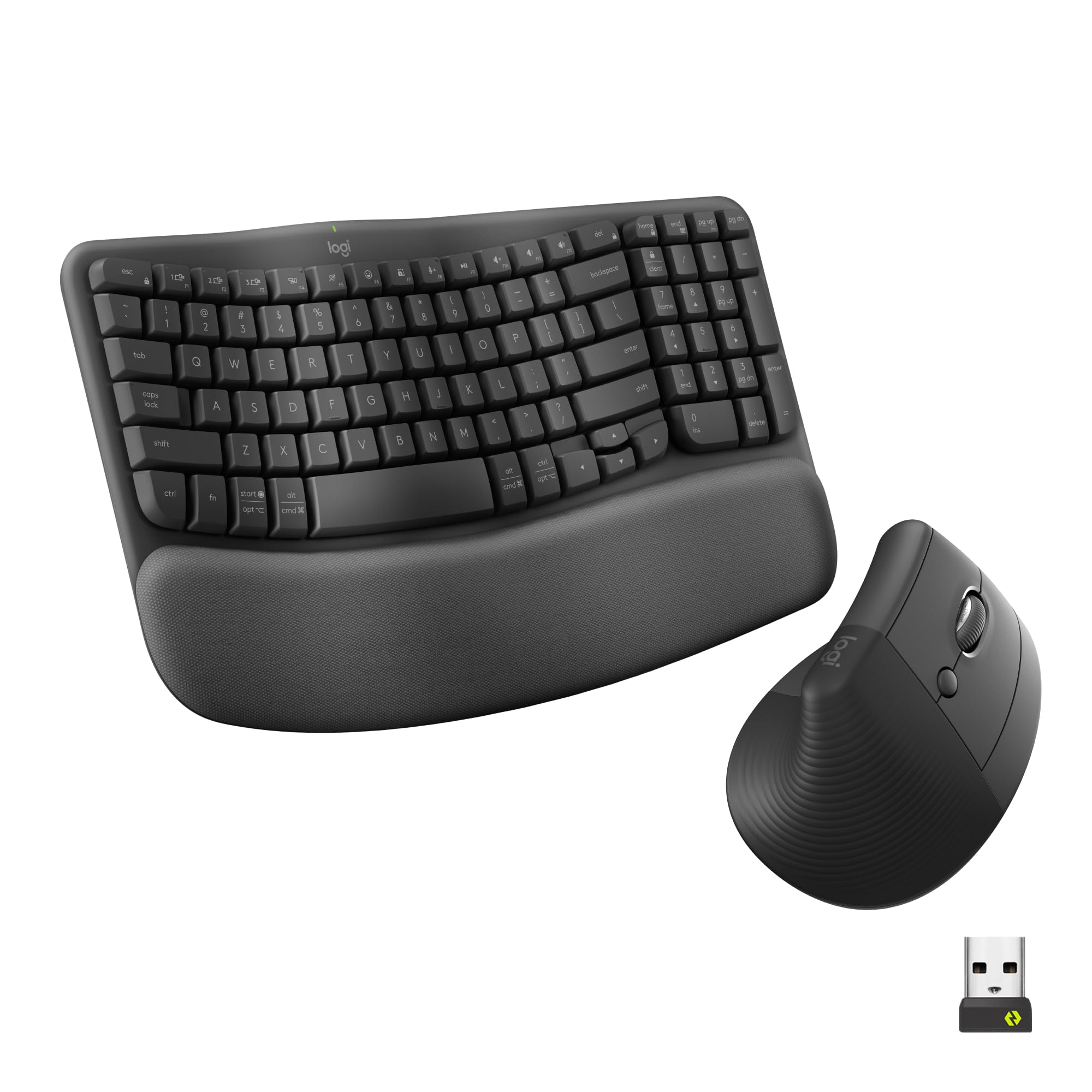
1. Logitech Wave Keys & Lift Combo
Our pick — 4.0+★ from 600+ verified ratings; the strongest balance of quality and price.
The matched pair that rolls your hand onto its side and curves your keys to meet it.
The number worth starting with is 57° — the vertical angle of the Lift mouse, which stands your palm on its side instead of flat on the desk. That 57° tilt takes pressure off the wrist and pulls your forearm closer to a neutral posture, which is the actual reason desk workers go ergonomic. The keyboard half is a compact wave design, and the plunger key switches give you a tactile, discreet press rather than a loud clack.
Both pieces are sized for small to medium hands, and the mouse is right-handed only. The cushioned memory foam palm rest runs the width of the keyboard, so your wrists stay supported through a long typing session rather than hovering. You connect over Bluetooth Low Energy or the bundled Logi Bolt USB receiver, and the whole set settles into either a PC or a Mac. Four batteries ship in the box — two AAA for the keyboard, one AA for the mouse — so it types the day it arrives.
What wins people over is the overall build quality, and the ergonomic payoff is what keeps them using it. Set-up is genuinely quick, and the Logi Options+ app lets you remap workflow shortcuts and tune the SmartWheel scrolling speed to your flick. What you are giving up is real: the compact footprint feels tight for wide hands and heavier typists, and a few report more misstrokes while adapting to the smaller key field. The graphite shell is also made partly from certified post-consumer recycled plastic — 61% in the keyboard and 70% in the mouse.
Where the pair earns its keep
- 57° vertical mouse angle puts the wrist in a relaxed, side-on posture
- Memory foam palm rest supports the wrist all day without hovering
- Bluetooth or Logi Bolt receiver — works across PC and Mac
- Whisper-quiet clicks plus SmartWheel speed that follows your scroll flick
What to weigh first
- Compact layout crowds wide hands; some need time to stop misstriking
- Mouse is shaped for the right hand only, sized for small to medium palms
Reach for it if: you want the least fussy path into vertical-mouse ergonomics and your hands are small to medium.
Think twice if: you have large hands or type at high speed on a wide key field — a full-size split like the ProtoArc EKM01 Plus below gives you more room.
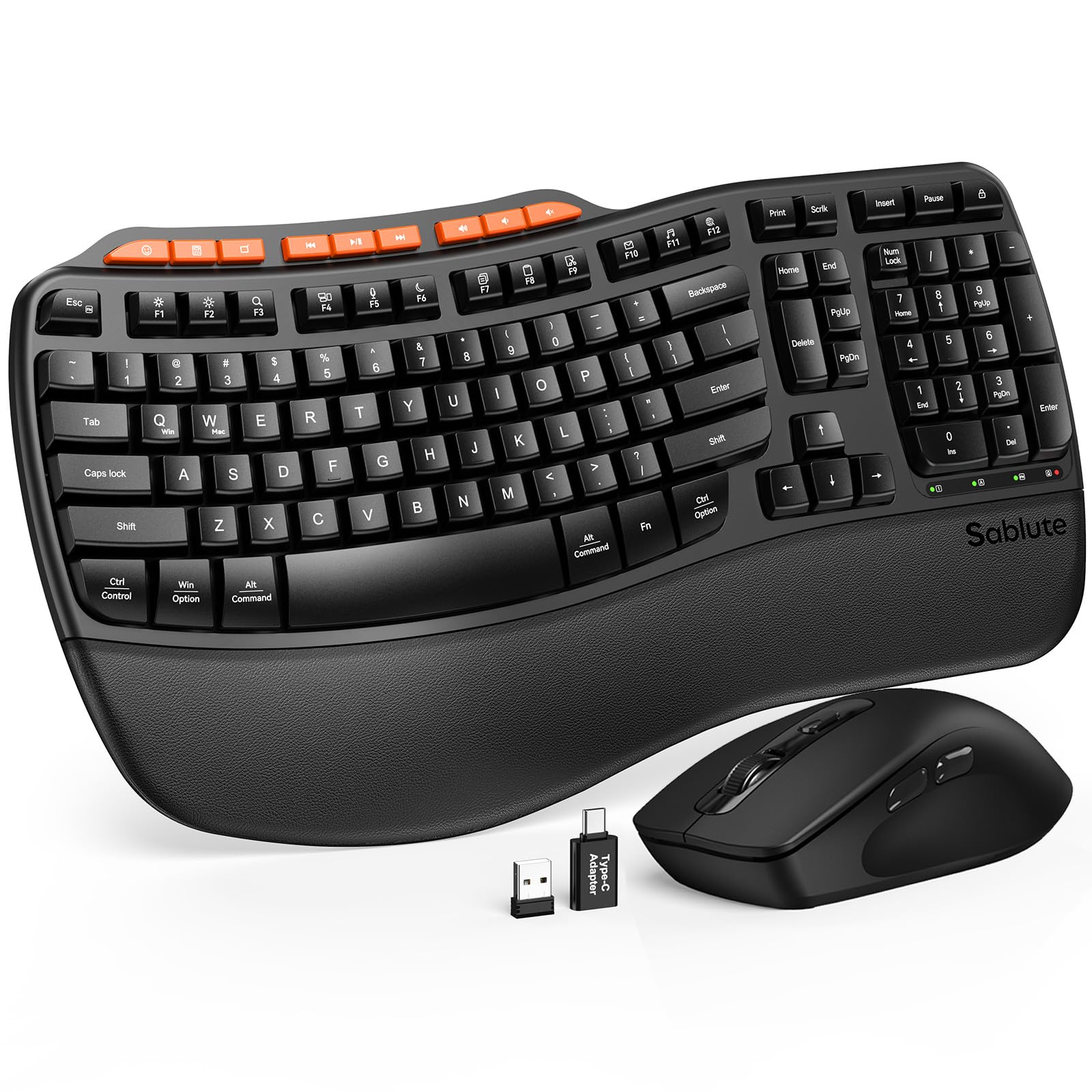
2. SABLUTE Full Size Wave Combo
Nine shortcut keys, a full-size wave board, and a sweat-resistant palm rest that wipes clean.
This one covers the most ground for a modest outlay. The keycaps follow a wave shape that tracks your fingers’ natural curve, and front and rear tilt legs let you raise the back or the front depending on whether you sit or stand. Nine dedicated shortcut keys fire off Emoji, Screenshots, Calculator and media controls without menu digging — though the Calculator and Emoji shortcuts are unavailable on macOS, so Mac users only get the media side.
The wrist rest is the piece that stands out in daily use. It is leatherette over memory foam — silky, sweat-resistant, and far easier to clean than the fabric rests common on similar boards. The mouse is a 6-button shape with smooth, lag-free cursor response, and it weighs in at 2.7 pounds for the whole set. Connection is 2.4G USB only, with a USB-A/USB-C adapter in the box, so there is no Bluetooth pairing to fiddle with.
An honest read on the catch: it is not the quietest board on the list, and some users see occasional stuck keys during heavy typing. The mouse is a standard contoured shape rather than a vertical one, so your forearm stays closer to palm-down than it would on the Logitech Lift. Owners flag the missing Bluetooth as the main trade. If you want a wired-reliable receiver setup at the entry tier and don’t need to hop between devices, this is the pragmatic buy.
What buyers notice: keyboard quality leads the conversation about this set, and comfort runs a close second. The keys get described as firm, quiet, and responsive, and the wrist pad gets singled out as better made than what usually ships on boards at this tier.
Solid choice for: a single-desk home office where one computer and one receiver covers everything.
Pass on it if: you need Bluetooth or multi-device switching — a USB-only combo will lock you to one machine at a time.
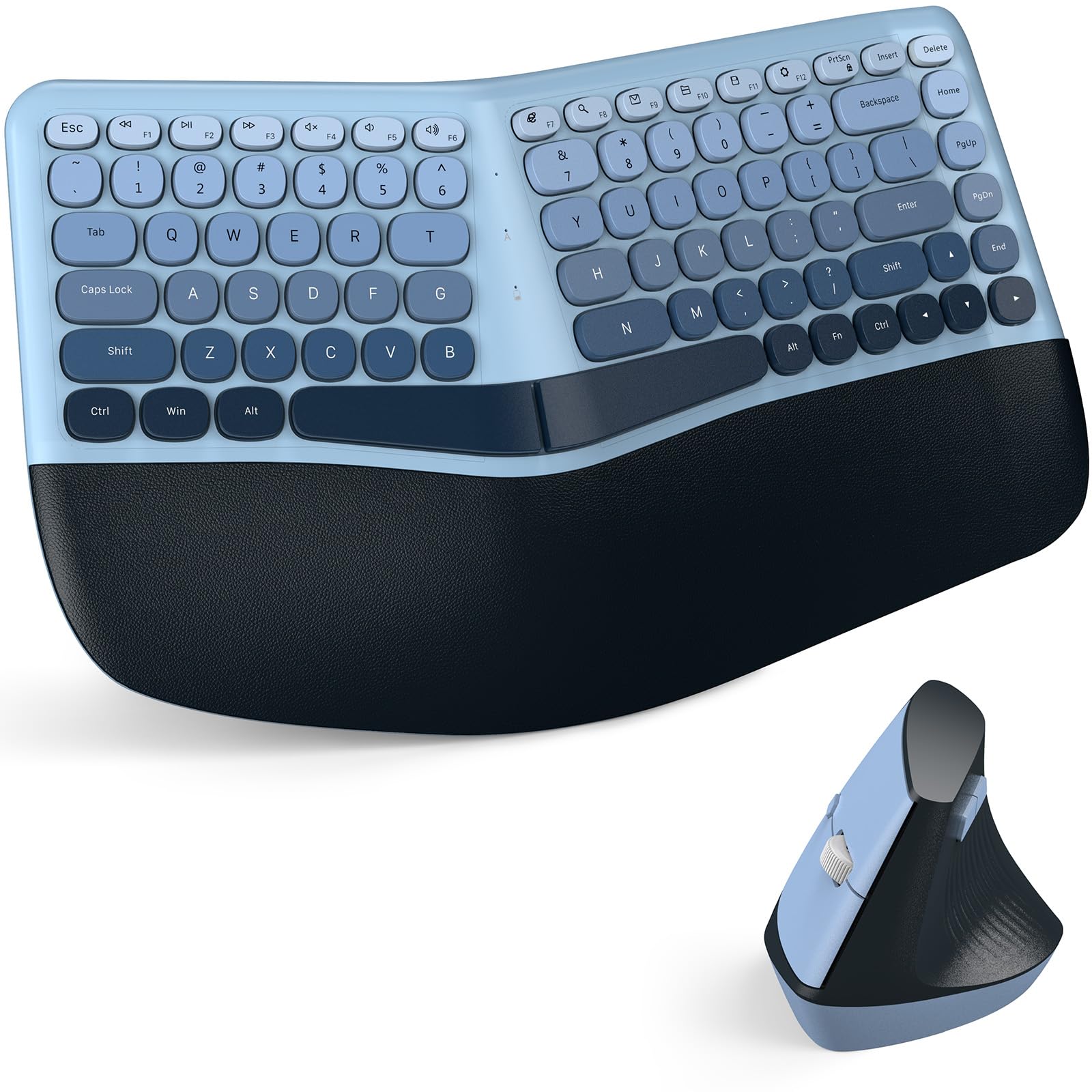
3. MOFII Split Curved Combo
Round keys, a blue gradient shell, and a typewriter click that turns heads across the office.
Start with the fact that this is the only combo here built around round keycaps on a split curved frame. The scooped round keycaps aim to ease fingertip pressure and pull tension out of the wrists and forearms, while a leather-like padded palm rest wipes clean and resists stains. The mouse is a vertical optical shape with three DPI settings — one for careful spreadsheet work, one for faster scrolling. A single USB nano receiver stored inside the mouse pairs both pieces at once, with a claimed range up to 10 meters (33 ft).
You get no drivers to install and no learning curve beyond the round keys themselves. Windows XP through 11 is the compatibility list, so this is a Windows-only purchase. The mouse is the part that trips people up — the review pages consistently note it takes a session or two to adapt to. The trade-off, stated plainly, is noise and reliability: reviewers call it loud enough that it would not be the pick for a shared quiet office, and a handful report failure within the first couple of months. The split keycaps are also not a true split-halves layout — they curve in one piece.
Where it shines: appearance and color draw the most attention after keyboard quality — people get compliments on the look, and it fits a home desk or a personal office where personality matters more than a whisper-quiet keybed.
Buy it for: the aesthetic and the click, if you work from home or a private office and want your setup to feel like yours.
Choose another route if: you need silent keys or share a quiet workspace — the click carries, and the round mouse takes getting used to.
4. Nulea Cushioned Wrist Rest Combo
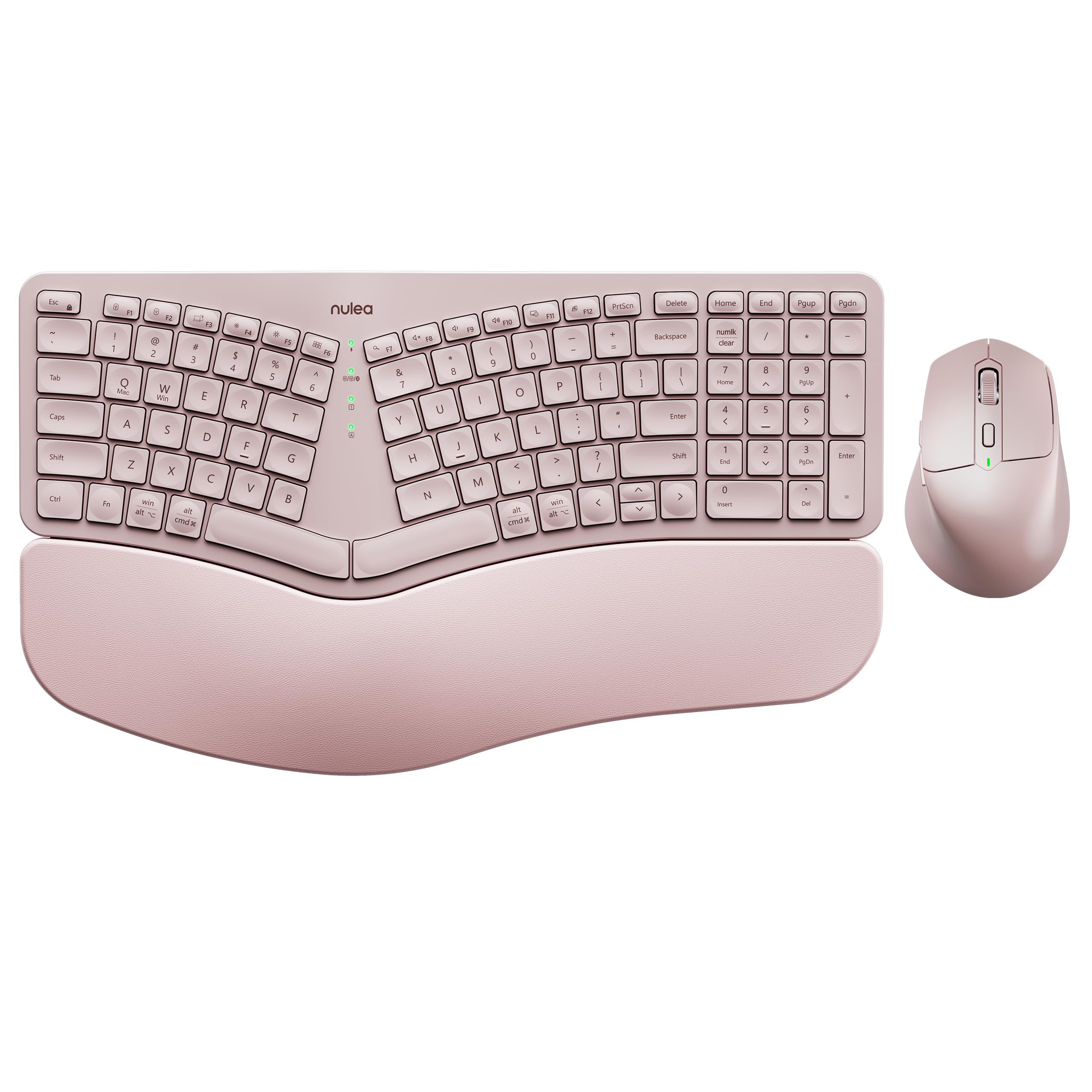
A split-frame board that hops between three computers with a single press.
The defining number here is three — the number of devices you can pair and switch between at the touch of a button, over USB cable, 2.4G receiver, or Bluetooth. For anyone shuffling between a work laptop, a home desktop, and a tablet, that is the feature that earns its place on the desk. The keyboard itself pairs a curved and split key-frame with scooped keys that cup your fingertips, plus a curved memory foam palm rest and adjustable tilt legs for seated or standing work.
Both halves are rechargeable, which is the practical difference from a battery board. The keyboard carries a 500mAh lithium pack and the mouse a 300mAh one, both topped up through the included USB-C cable. An auto-sleep mode kicks in after 30 minutes idle to stretch the charge. The mouse adds integrated palm and thumb rests, adjustable DPI, and forward/back buttons for browser navigation. Windows, Mac OS, and Android are the supported systems. This listing ships in pink.
Where it asks a little patience: split key-frames have a short break-in period before your fingers stop reaching for keys that have moved, and the sculpted mouse is a different grip shape than a vertical one. The upside is that it supports a genuinely multi-machine workflow in a way the USB-only combos above cannot. If you want one deck to rule three screens, this is the shape to beat.
Made for: the multi-machine desk where a laptop, desktop, and tablet all need the same keys.
Skip if: you want the simplest possible setup — three-device switching adds a button you have to remember to press.
5. MEETION Ergonomic Keyboard and Mouse, Split Curve Wireless Design, Purple

Two halves that let each hand type at its own angle, on a full-size board.
The keyboard splits into two halves so each hand types at a comfortable angle and distance, cutting the reach-and-twist that flat boards force. It is a full-size layout — the board measures 19.09 × 10.04 × 1.83 inches and weighs 2 pounds, wider than a standard full-size keyboard. That extra width gives your hands room to spread out, but it does take more desk space. Each key tilts slightly to follow a natural typing motion, and the concave curvature follows your palm’s contours.
The palm rest is a pillow-shaped slab of firm PU material, 18.8 × 4.9 inches, engineered not to collapse or shift mid-session. The mouse is a vertical shape with four DPI settings (800/1200/1600/2400) so you can match cursor speed to task, and it runs silent buttons with a side scroll wheel. Both pieces carry 500mAh rechargeable batteries rated for up to a month of continuous use, and the maker recommends charging before first use with a 5V 1A adapter. One USB-A receiver serves both. Note the USB-C is an adapter only — it needs the USB-A receiver to function.
Here is where you should listen to the room. Comfort for carpal-tunnel-prone wrists is the headline, but reliability is the mixed note: a couple of buyers report the USB dongle or keys failing within weeks. That is the exception rather than the rule, but it is worth registering the warranty. The purple finish also won’t suit every desk.
Why split-layout fans like it
- Genuine split halves so each hand sets its own angle and distance
- Firm PU palm rest that stays put instead of collapsing
- 500mAh batteries rated up to a month per charge
- Four mouse DPI levels and silent buttons
Points to know going in
- Wider than a standard full-size board — budget your desk space
- USB-C is only an adapter; the USB-A receiver is required
The one to pick if: a true two-halves layout is what your shoulders have been asking for and you have the desk width to seat it.
Hold off if: you are on a tight desk or need Bluetooth-only connectivity — this board wants a USB-A port and elbow room.
6. ProtoArc EKM02 Wave Keys Ergonomic Wireless Keyboard and Mouse, Black
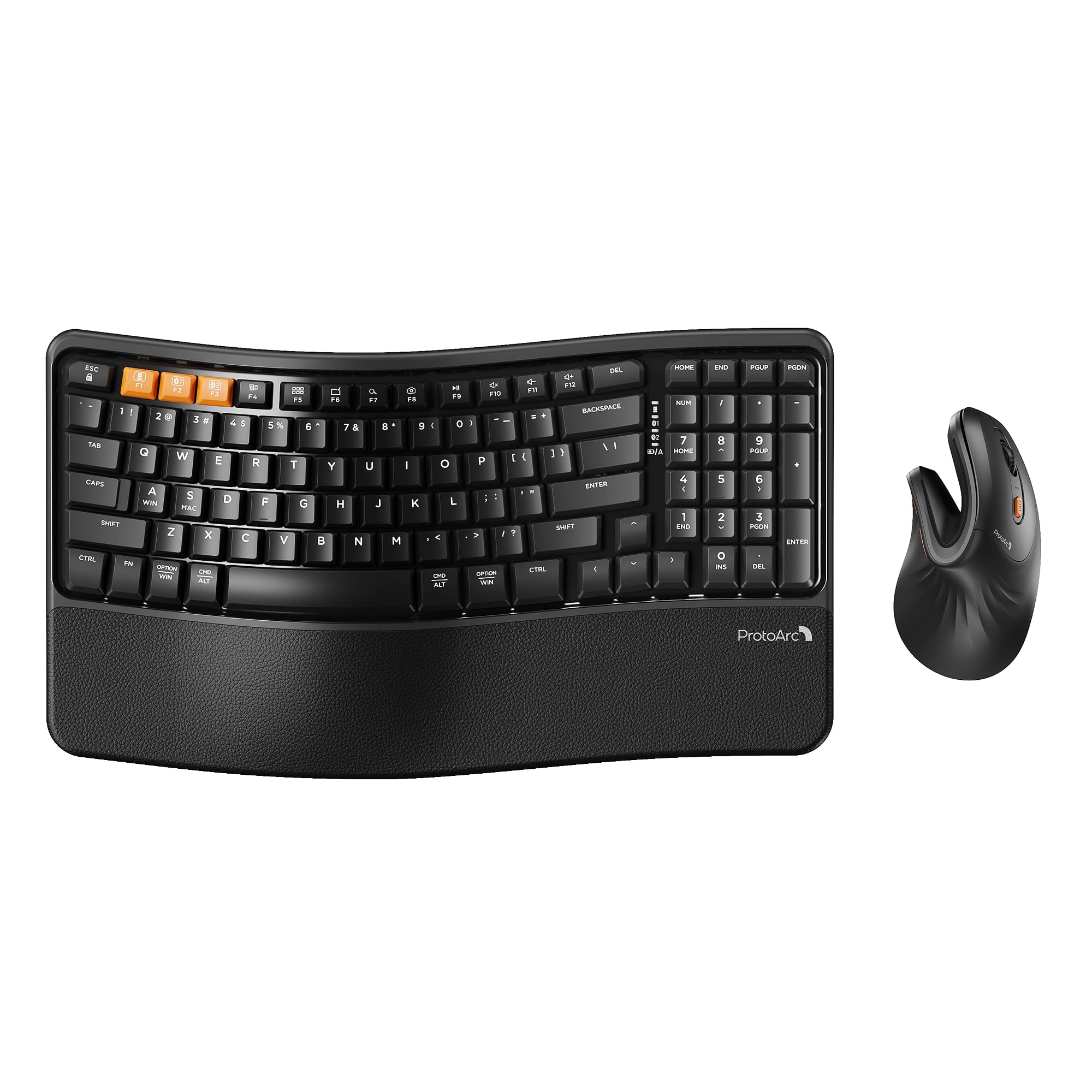
A compact wave board with a hand-size ceiling printed right on the spec sheet.
The spec that matters is the hand-length limit: the EM11 NL mouse is built for hands under 7.5 inches (19.05 cm). That should be the first thing you measure. Get that right and the rest follows — a wave-keys keyboard with a cushioned memory foam palm rest, five adjustable tilt legs so you can dial in angle for sitting or standing, and a compact layout that keeps the mouse within reach for better shoulder alignment. The keyboard is 15.6″ L x 8.9″ W, so measure your desk before ordering.
Power is generous. A 500mAh lithium pack takes 2–3 hours on USB-C and is rated for 100 hours of working, with an auto-sleep mode after 60 minutes idle. You can pair three devices over Bluetooth or the included 2.4G USB-A receiver and switch with one click, and you can flip between Windows and macOS layouts using FN+A or FN+S. LEDs are deliberately omitted to save battery and cut screen glare in bright offices. Expect a learning curve on the vertical mouse — the maker suggests 1–2 weeks to adapt.
Read the fine print on the keyboard, though. A few owners describe the big, clunky keys as slowing their typing, and some report needing a firm press to register. The compact footprint is a help on a small desk and a hindrance if you have broad hands. If your hands run large, the full-size ProtoArc EKM01 Plus below is the better-matched sibling.
The consensus, in a line: quality is the most praised aspect by a clear margin, with comfort close behind. The recurring complaint is that some keys need a firmer press than buyers expected.
Worth it for: small-to-medium-handed typists who want a compact footprint and long battery life on a shared desk.
Look elsewhere if: your hand length runs past 7.5 inches or you type at speed — the clunky key feel will frustrate you.
7. ProtoArc EKM01 Plus Combo

Full-size split keys, a real numeric pad, and a board that wants a wide desk.
The number that decides this one is 20.75″ x 11″ — the footprint of the full-size split keyboard with its integrated palm rest. If your desk can seat it, you get a genuinely roomy layout with a dedicated numeric keypad, low-profile scissor-switch keys, and a cushioned memory foam palm rest plus adjustable tilt legs. If your desk is small, this will crowd it. Measure first; the maker says so directly.
You connect through the 2.4GHz USB receiver or Bluetooth and switch between up to three devices, so a work computer, personal laptop, and tablet can all share the set. The mouse is a sculpted shape with an integrated palm and thumb rest, 800/1300/2000 DPI settings, and forward/back buttons for browsing. Both halves recharge over USB-C with power-saving auto sleep. Larger hands that feel pinched on compact boards are the target here, and the comfortable-for-large-hands note comes up in owner feedback.
The honest trade: functionality draws mixed feedback. Some owners mention keys stopping and a few find it hard to hit keys firmly enough, while others say it holds a charge through long office days. It is also a heavier, bulkier set — 1.91 kg in the box — so it stays on the desk rather than travelling. If you share a small table with a laptop, the compact Logitech up top is the easier neighbour.
What it leads on: overall quality drives the conversation, with ergonomics a strong second. Owners describe typing all day with hands and wrists resting naturally on the split layout, and the quiet scissor keys make it a good fit for shared or open-plan offices.
A natural fit for: large-handed full-size-desk workers who want a numeric pad and multi-device switching in one set.
Not the one if: you are short on desk width or want a travel-friendly combo — this board needs room and stays put.
8. Perixx Periduo-614US Combo
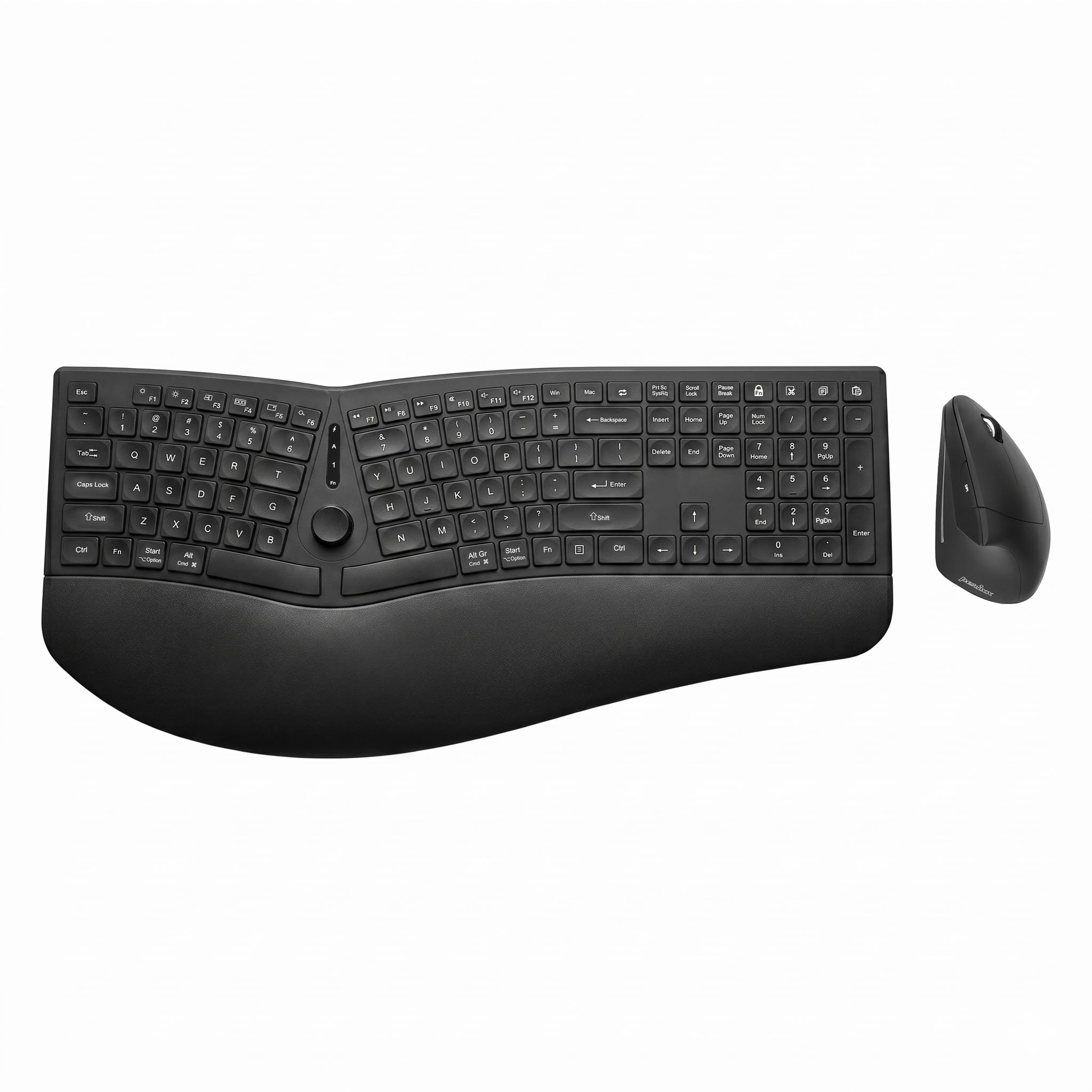
Laptop-style scissor keys and a volume knob for the person who hates a loud keyboard.
The defining feature is the key bed: laptop X-type scissor keys, which deliver a short, quiet press that won’t carry across a room. The full-size ergonomic board measures 18.23 × 8.94 × 2.60 inches, and the vertical mouse 4.92 × 2.44 × 3.03 inches, so the set sits comfortably on a standard desk. A soft cushioned palm support and curved wrist rest ease fatigue, and a detachable tilt base raises the front height for a steeper typing angle. The set pairs through one 2-in-1 USB nano receiver, with a range up to 30 ft.
A metal knob handles volume and mute with a press, and a long-press for 3 seconds switches to task management so you can launch programs without hunting. The mouse runs four DPI levels — 1000/1600/2400/3200 — with back and forward buttons for navigation. Both pieces charge over USB-C and are rated to last up to 1 month with 6–8 hours of daily use. A Win/Mac key switches systems with a long-press, and the setting survives a reboot. The set weighs about 0.35 kg and is backed by a 12-month limited warranty.
The catch is the vertical mouse — it wants a break-in period, and if you are wedded to a traditional flat grip, the neutral wrist angle will feel wrong before it feels better. The scissor keys also have a shorter travel than a plunger or membrane board, which some fast typists notice. Neither is a flaw; both are fit questions to weigh before you buy.
Get this if: you want near-silent typing, a tactile volume knob, and a wired-free rechargeable setup for a quiet office or a room shared with family.
Consider another option if: you prefer a deep, tactile key press — scissor travel is short and takes adapting.
Know the Specs
Vertical angle and DPI
A vertical mouse tilts your hand so it stands on its side, which keeps the forearm closer to a neutral, handshake-like position instead of twisted palm-down. The Lift runs at 57°. The Lift runs at a 57° angle — a real number the maker publishes, not a marketing nicety. DPI (dots per inch) sets how far the cursor travels per inch of mouse movement: lower DPI for precise spreadsheet clicks, higher for fast travel across a wide monitor. The Nulea and ProtoArc EKM01 Plus let you bump between settings so one mouse can handle both.
Wave, split, and split-halves
A wave board curves the key rows in one continuous piece, so the learning curve is almost nothing. A split key-frame divides the halves so each hand types at its own angle, which reduces reach across the desk but asks for a week or two of slower typing. All of this matters less than the mouse angle for most desk workers, but it matters more if you type for eight hours straight. Pick the gentlest shape you can tolerate, and only move to a true split if you’ve tested one.
Common Questions
Will a vertical mouse fix my wrist pain?
Do I need Bluetooth or is a USB receiver enough?
How long do the rechargeable batteries actually last?
Can I use the same keyboard on a Windows PC and a Mac?
What hand size is the ProtoArc EKM02 actually for?
Will a split keyboard fit my desk?
How long does it take to adjust to a split or vertical mouse?
Can I keep my laptop’s built-in mouse and add a vertical one?
Will a quiet keyboard still feel good to type on?
Do all these combos share one USB receiver?
The Bottom Line
For seven out of ten setups, the answer is the Logitech Wave Keys and Lift combo — the 57° vertical mouse does the real ergonomic work, the memory foam palm rest keeps your wrist supported, and Bluetooth or the Logi Bolt receiver covers PC and Mac. If you have large hands or want a full-size split with a numeric pad, the ProtoArc EKM01 Plus gives you room to spread out at 20.75″ x 11″. And if quiet typing is the priority, the Perixx Periduo-614US pairs near-silent scissor keys with a volume knob and a vertical mouse. For a single-desk home office on a budget, the SABLUTE Full Size Wave covers the basics — wave keys, a leatherette palm rest, and nine shortcut keys — without overreaching.
How we choose
We do not accept paid placement. Every pick is matched to a real buyer and a real use-case; we do not hands-on test units.
Sources
Specifications: manufacturer listings and product documentation. Review insights: verified customer reviews, as of November 2026. Pricing: not shown on this page (it changes often); check the current price via the retailer link.
As an Amazon Associate, Tactical Gear Guy earns from qualifying purchases. This does not affect which products we feature.