Specs are compiled from manufacturer listings and verified buyer reviews and can change over time — please confirm the key details on the product page before buying.
You pick up your pad and the camera drifts left on its own again. That’s stick drift, the slow death of every analog stick, and it is the single reason most Xbox One controllers get replaced. The fix is not a brand name — it’s Hall Effect sticks, a magnetic sensing design that removes the physical wear that causes drift in the first place. This guide separates the nine wireless pads genuinely worth your money, points out which ones run that drift-resistant hardware, and shows you exactly which one to buy for your budget and your hands.
This guide is built by comparing the manufacturers’ published specifications and the patterns across verified customer reviews, so you get each pick’s real strengths and trade-offs instead of marketing spin.
Some of these pads are official Microsoft builds, some are licensed third-party designs, and a couple are budget models with real caveats. Below you’ll find a full comparison table, plain-English spec explanations, and honest notes on what each controller does well. These are the wireless controllers for Xbox One that hold up under daily play.
Top Picks


How To Choose The Best Wireless Controller for Xbox One
The right pad connects the same way every time, keeps its sticks centered after hundreds of hours, and feels right in your hands for a three-hour session. That means it connects the same way every time, the sticks stay centered after hundreds of hours, and the shell feels right in your hands for a three-hour session. Before you compare models, get clear on the four things that actually decide whether a pad is worth owning.
Connection type decides lag and setup hassle
A 2.4GHz wireless controller uses its own USB dongle — a small receiver you plug into the console or PC. That dedicated link is built for low-latency gaming and avoids the pairing quirks Bluetooth sometimes throws at you. Bluetooth pads skip the dongle and pair directly, which is cleaner on a desk but can add a moment of connection delay. Xbox Wireless is Microsoft’s own low-latency radio built into official pads, and it pairs straight to the console with a press of the sync button. If you play fast shooters or fighting games, a dongle or Xbox Wireless link is the safer bet. The SZDILONG pad, for example, is dongle-only and explicitly not Bluetooth — so it works on console and Windows but not on a TV or phone.
Stick technology: the drift question
Standard analog sticks use a carbon-film potentiometer — a physical wiper that wears down as it slides. Hall Effect sticks replace that wiper with a magnetic sensor, so there is no contact surface to grind away. That’s why Hall Effect hardware is the biggest single upgrade in this category: with no wiper to wear, it eliminates the drift that most often sends a controller to the bin. TMR sticks, as on the GameSir G7 Pro, are a related magnetic design that mixes low power draw with the durability of Hall Effect. If you’ve replaced a pad because the camera kept creeping, move Hall Effect or TMR to the top of your checklist.
Wireless range, battery, and charging
Range matters more than people think. A pad that holds a link across the room lets you sit back without a cable tether, and the SZDILONG advertises a 33-foot wireless range via its 2.4GHz adapter. Battery life splits into two camps: built-in rechargeable packs you charge over USB-C, and pads that run on replaceable AA batteries. Rechargeable is simpler day to day; AA cells let you swap in fresh power instantly. A charging dock, like the one bundled with the 8BitDo and GameSir pads, keeps the controller topped up every time you set it down and removes the “dead battery mid-match” problem.
Back buttons, triggers, and customization
Pro-level pads add back paddles or mappable quick-action buttons so your thumbs never leave the sticks. Trigger locks or hair-trigger modes shorten the pull distance for faster fire in shooters; on the Victrix Pro BFG, a clutch trigger offers five stops and a dedicated hair-trigger mode. If you play competitive shooters or fighting games, back buttons and trigger locks are worth paying for. If you play casually, they’re extras you can skip without missing much. Officially licensed pads — the 8BitDo, GameSir, and Victrix carry that label — go through Xbox’s compatibility testing, which is a meaningful assurance that they’ll pair reliably.
Side-by-Side Comparison
| Model | Best For | Rating | Connection | Standout Spec | Amazon |
|---|---|---|---|---|---|
| Xbox DOOM: The Dark Ages Limited Edition★ Best Overall | Collectors and DOOM fans | 4.5+/5 | Xbox Wireless & Bluetooth | Leather-textured rubberized grips | Amazon |
| GameSir G7 Pro Wuchang EditionTop Competitor | Competitive play, drift-free sticks | 4.0+/5 | 2.4GHz, USB-C, Bluetooth 5.3 | 1000Hz polling rate, TMR sticks | Amazon |
| 8BitDo Ultimate 3-modeBest With Dock | Cross-device switching with a dock | 4.0+/5 | 2.4G, USB, Bluetooth | Hall Effect sticks & triggers | Amazon |
| Xbox Elite Series 2 Core | Tinkerers who want adjustable hardware | 4.0+/5 | Xbox Wireless, Bluetooth, USB-C | Adjustable-tension thumbsticks | Amazon |
| Turtle Beach Victrix Pro BFG | Modular customization and esports feel | 4.0+/5 | Bluetooth, USB-A, USB-C | 3 customizable modules, 11 parts | Amazon |
| Moonag Wireless Controller | Comfortable ergonomics on a budget | 3.5+/5 | 2.4GHz USB receiver | Hall Effect sticks, 3.5mm jack | Amazon |
| SZDILONG Wireless 2.4GHz | Cheap dongle-only spare pad | 4.0+/5 | 2.4GHz dongle only | Built-in 1000mAh battery | Amazon |
| NINIFEI For Xbox One | Entry-level red-shell backup | 3.5+/5 | 2.4GHz, USB-C | 16 buttons, 3.5mm jack | Amazon |
Detailed Reviews
1. Xbox Wireless Controller DOOM
Our pick — 4.5+★ from 600+ verified ratings; the strongest balance of quality and price.
The armored collectible that plays like a flagship — matte green plating, silver spikes, and leather-feel grips.
The DOOM: The Dark Ages Limited Edition takes the top spot because it works as a real Xbox pad and looks like a collectible. It’s an official Xbox controller with full Xbox Wireless and Bluetooth, so it connects to your console and PC without a dongle. The matte green armor shell carries 3D silver helmet spikes and plated sheathing across the top case, so it stands out on a shelf. The rubberized grips have a leather-like texture, which gives you a firmer hold during long sessions. A red thumbstick matches the DOOM Slayer’s chest port, and the ABXY buttons use the green Sentinel alphabet. It’s a limited edition that keeps full Xbox Wireless, Bluetooth, and USB-C connectivity under the armor.
Under the styling it’s a full-featured Xbox controller. It pairs over Xbox Wireless to your console, Bluetooth to PC and mobile, or USB-C for wired play, and it’s compatible with Android, iOS, Windows, Xbox One, Xbox Series S, and Xbox Series X. Fans of the series get a digital bonus: a downloadable DOOM Slayer Executioner Skin for DOOM: The Dark Ages, with the game sold separately. The build, the texture, and the tactile buttons are what people talk about most — the grip finish in particular feels a step above a standard controller.
Here’s the honest trade-off: this is a premium-priced limited edition, and not everyone will love paying a premium for cosmetic armor. If you want a plain workhorse pad, a standard Xbox controller does the same job for less. But if you want a display piece that doubles as a daily driver, the armor and leather-texture grips earn the premium. One more note: it uses standard analog sticks, not Hall Effect, so if drift-resistance is your priority, look at the GameSir or 8BitDo picks below. At 6.91 x 5.61 x 2.76 inches it’s a full-size pad — noticeably larger in footprint than the compact SZDILONG at 3.94 x 3.15 x 1.97 inches.
What plays in its favor
- Official Xbox pad with Xbox Wireless, Bluetooth, and USB-C connectivity
- Leather-textured rubberized grips give a firm, premium hold
- 3D silver helmet spikes and plated sheathing make it a genuine collectible
- Includes the DOOM Slayer Executioner Skin DLC
Where it asks more of you
- Limited-edition pricing carries a premium over standard pads
- Standard analog sticks, not Hall Effect, so drift protection isn’t built in
- Full-size footprint is bigger in the hand than compact budget pads
Best for: DOOM fans and collectors who want a display-worthy pad that still plays at flagship level.
Think twice if: you’re chasing Hall Effect drift resistance or you’d rather not pay extra for cosmetic armor.
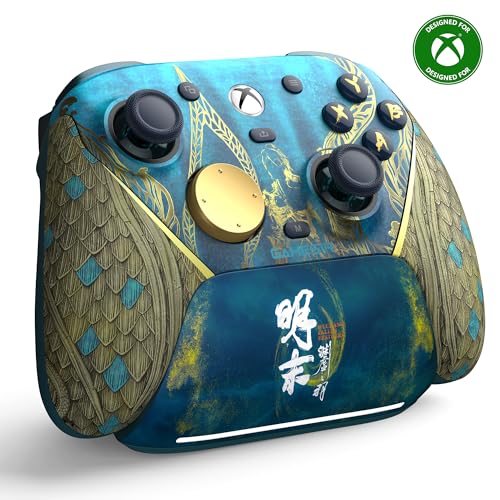
2. GameSir G7 Pro Wuchang: Fallen Feathers Edition
The drift-killer: TMR sticks, a 1000Hz polling rate, and a charging dock for competitive play.
If stick drift is your number-one fear, the G7 Pro is the controller to beat. It runs GameSir’s Mag-Res TMR sticks (a magnetic sensor design that mixes the precision and low power draw of traditional potentiometer sticks with the durability of Hall Effect), so there’s no wearing wiper inside to grind into drift. It also runs a 1000Hz polling rate, meaning the pad reports its position to the console 1000 times a second for smoother, more instant input. If a twitchy shooter has ever felt mushy on your current pad, this upgrade targets that directly.
The triggers get the same treatment: Hall Effect analog triggers with zero-drift operation and a mechanical micro-switch for a tactile, zero-latency press. Hold the M+LT/RT buttons and the Hair Trigger Mode kicks in for a shorter pull and faster fire. Connectivity is genuinely tri-mode: a 2.4GHz dongle for Xbox and PC, USB-C for wired play, and Bluetooth 5.3 for Android. A one-press wake-up turns the console on and connects before you’re settled. The bundled charging station starts topping up the 1200mAh battery the moment you set the controller down, and its built-in compartment stores the wireless receiver.
Build-wise it’s a lighter, tighter package than the official pads, at 9.6 ounces and 2.28 x 5.98 x 4.09 inches. What buyers report most is straightforward excellence — great quality and an ergonomic shape that feels right in hand, with the stick stability and lack of drift getting real praise. The honest note: the 1000Hz polling and TMR hardware are aimed at players who’ll notice them, and the Wuchang edition’s price sits in premium territory. Casual players will get the same enjoyment from a cheaper pad.
Where it earns its keep
- TMR magnetic sticks plus Hall Effect analog triggers — drift protected end to end
- 1000Hz polling rate for smooth, lag-light response
- Tri-mode: 2.4GHz, USB-C, and Bluetooth 5.3
- Smart auto start-stop charging station with receiver storage
Worth knowing before you buy
- Premium-priced special edition — the pro hardware is the reason
- Casual players may not notice the 1000Hz advantage
The competitor to beat: esports-minded players who want drift-proof hardware, hair-trigger mode, and a dock in one box.
The one snag: it’s premium-priced, so only pull the trigger if you’ll actually use the polling-rate and trigger advantages.
3. 8BitDo Ultimate 3-mode Wireless Controller
8BitDo’s first 2.4GHz Xbox pad, with a dock that recharges it every time you set it down.
Officially licensed by Xbox and Rare Ltd., this 40th Anniversary edition is 8BitDo’s debut 2.4G wireless Xbox controller — and the integrated charging dock is the feature that makes it feel different from the pack. Set the pad in its cradle and it charges; lift it out and it automatically reconnects. That habit alone removes the low-battery scramble. Under the blue shell sit Hall Effect joysticks and Hall Effect triggers, so both the sticks and the trigger pulls are built on drift-resistant magnetic sensing rather than mechanical wipers.
It’s a genuine multi-device pad. Connect to your Xbox or Windows PC over 2.4G wireless or wired USB, and to Apple or Android devices over Bluetooth. Two Pro back paddle buttons, a golden metal tactile D-pad, and a 3.5mm audio jack round out the controls, and you get three custom profiles plus support for 8BitDo Ultimate Software X. Impulse trigger and vibration work only on Xbox and Windows, so phone play is more basic. The D-pad in particular has a deliberately metallic, tactile feel that fans of precise directional input will appreciate.
Owners describe it as excellent, pointing to responsive buttons and great feedback, with the connectivity and cross-device value standing out. The battery life is the one spot where opinions split — some get solid longevity, others find it short. If you’ll mostly play docked at a desk, the dock’s constant top-ups make the runtime difference far less important. Compared with the Xbox Elite Series 2 Core’s adjustable-tension sticks, this one leans on its Hall Effect hardware and dock instead of physical tuning.
The dock difference: an integrated charging cradle plus Hall Effect sticks and triggers make this the easiest pad to keep ready to play, and it works across Xbox, PC, Apple, and Android.
The battery question: runtime divides opinion — if you’re rarely near the dock, factor that in.
Who it fits: players who want Hall Effect protection and a no-thought charging routine across multiple devices.
Who should pass: anyone who needs marathon battery away from the dock.
4. XBOX Elite Series 2 Core | White

Adjustable-tension sticks and hair-trigger locks — the pro pad for players who want to tune feel.
The Elite Series 2 Core is Microsoft’s answer to the player who wants to adjust the hardware, not just the software. You can dial the tension on the thumbsticks to your taste, and the shorter hair-trigger locks shorten the pull for faster fire. A wrap-around rubberized grip keeps the shell locked in your hands, and you get up to 40 hours of battery life alongside refined components. This Core version ships with the controller, a USB-C cable, one D-pad, two standard thumbsticks, and a thumbstick-adjustment tool.
Customization runs deep through the Xbox Accessories app. You can remap buttons, pick which color the Xbox button lights up with, and save up to three custom profiles on the controller itself, switching between them on the fly. It plays across Xbox Series X|S, Xbox One, and Windows via Xbox Wireless, Bluetooth, or the included USB-C cable. There’s a 3.5mm stereo headset jack and compatibility with the Xbox One Stereo Headset Adapter and other Microsoft accessories. If you want the Complete Component Pack for even more options, that’s sold separately.
The honest picture is mixed on the reliability front. Many owners call it the best controller they’ve used, while some report the bumpers failing after months of heavy use — the recurring gripe to watch. The quality is real, but at the top of the price ladder it’s a pad for people who’ll use the adjustable hardware. If you just want drift resistance without the tuning, the GameSir or 8BitDo Hall Effect pads are simpler choices.
Why tinkerers pick it
- Adjustable-tension thumbsticks and shorter hair-trigger locks
- Up to 40 hours of battery life
- Save up to 3 custom profiles and switch on the fly
- Plays across Xbox, Windows, and Bluetooth devices
The honest downside
- Premium price at the top of the ladder
- Some report bumpers failing after months of heavy use
- Complete Component Pack sold separately for full customization
Built for: players who want to tune stick tension and trigger pull and switch profiles mid-session.
Not for: anyone who wants a no-fuss pad and would rather not pay for hardware they won’t adjust.
5. Turtle Beach Victrix Pro BFG Reloaded
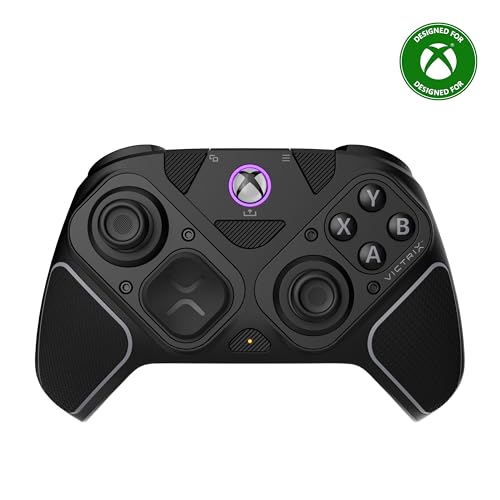
Swap modules, not controllers — 11 interchangeable parts and a built-in fightpad for the tinkerer.
The Victrix Pro BFG Reloaded is the most configurable pad on this list, full stop. It ships with three customizable modules built on Hall Effect technology, and a total of 11 interchangeable components let you reshape the layout to your game. The headline alternate is the ergonomically enhanced 6-button fightpad module with Kailh microswitches — a genuine fit for fighting games, where a standard D-pad layout feels clumsy. Officially licensed by Xbox, it’s the pad for someone who wants to experiment rather than settle.
The triggers are 5-stop Hall Effect clutch triggers with a hair-trigger mode, giving you gradations of pull for shooters and a fast throw for twitchy moments. Four mappable quick-action buttons let your thumbs stay put, and the built-in 3.5mm audio jack comes with a lifetime subscription to Dolby Atmos. Connectivity runs wired or wireless with up to a 20-hour rechargeable battery, and the free Victrix Control Hub companion app works on Xbox and PC. It includes a carrying case and a module tool, so the swap parts travel with you.
At 9.28 ounces and 2.4 x 6.3 x 4.1 inches it’s a compact, tool-box-style controller. The quality is what owners praise most, with the sheer customizability close behind — this is a pad that lets you build toward your own grip. The trade-off to know: the extra buttons and fightpad module can get in the way of regular play if you don’t use them, and the trigger and button feel draws mixed takes. It’s the specialist pick — brilliant if you’ll use the modules, overkill if you won’t.
The customization edge: three Hall Effect modules, 11 interchangeable parts, and a 6-button fightpad with Kailh microswitches make it the most adaptable pad here.
The specialist caveat: those extra buttons and modules can clutter standard play — the buyer who’ll use them wins most.
The right buy for: fighting-game players and hardware tinkerers who want a modular layout with Kailh microswitches.
The wrong buy for: anyone who wants a simple plug-in-and-play pad and won’t swap a single module.
6. Moonag Wireless Controller for Xbox

Hall Effect sticks and two silicone grips in a pad built around comfortable hands.
The Moonag earns its place by doing the two things budget shoppers need most: drift-resistant sticks and a comfortable hold. It runs Hall Effect joysticks designed to minimize drift and keep input accurate across long sessions, and it includes two silicone joystick caps that improve grip comfort and help reduce finger fatigue. The shell carries a black finish and a 3.5mm headphone jack for private audio and in-game chat, with dual vibration motors in the side grips and pulse trigger buttons for tactile feedback.
Connection is a 2.4GHz wireless link through the included USB receiver, aimed at a strong, stable, low-latency connection on Xbox consoles and PC. It’s compatible with Xbox Series X|S, Xbox One, and Windows PC. Custom button mapping lets you rearrange the layout for different genres, which is a lot of flexibility at this tier. What shoppers tend to rave about is comfort and ergonomics — it feels great in the hands and makes a noticeable difference over a plain pad, with the buttons and connectivity backing that up.
The genuine caveat is that Hall Effect sticks and a comfortable shell are where the money went, so expect a solid-but-not-luxury feel elsewhere. It’s the pick for a player who wants drift protection and hand comfort without the premium price. Compared with the official DOOM limited edition, you trade the collectible shell and leather-texture grips for Hall Effect hardware that resists the drift the standard sticks can develop.
What shoppers like
- Hall Effect joysticks designed to resist drift
- Two silicone thumb caps for grip comfort and less finger fatigue
- 3.5mm jack, dual vibration, and pulse triggers
- Custom button mapping for different genres
What to weigh
- Budget build — comfortable, but not a luxury shell
- Dongle-based connection; no Bluetooth phone support noted
Worth grabbing if: you want Hall Effect drift protection and hand comfort at a budget-friendly tier.
Worth skipping if: you need Bluetooth pairing to a phone or a premium-feel shell.
7. SZDILONG Wireless 2.4GHz Controller

A 1000mAh battery, seven RGB colors, and back paddles at the entry tier.
The SZDILONG packs a surprising amount into a budget pad. The built-in 1000mAh lithium battery charges over USB-C in 2-3 hours and is rated for 10-14 hours of play, and the 2.4GHz wireless link claims a delay-free 33-foot range through its adapter. It’s also the smallest pad here, at just 3.94 x 3.15 x 1.97 inches — a tidy, compact footprint compared with the 6.91 x 5.61 x 2.76 inches of the DOOM limited edition.
You get more features here than the tier suggests. The ML and MR back buttons map to basic keys like A/B/X/Y, LB/RB, L3/R3, and the D-pad, giving you 1-16 combination assignments. A Turbo function can be set per button for auto-fire, so you can hold a button down and let it repeat. The RGB system offers four lighting modes and seven colors, from a steady monochrome glow to a breathing sequence that cycles blue, ice blue, green, orange, yellow, red, and pink. There’s a 3.5mm stereo jack for headphones and a mic, so you get audio in and out at once.
Know this before you order: the pad is 2.4GHz dongle-only and has no Bluetooth, so it needs its receiver plugged into a console or a Windows 7-or-above PC. It won’t work with a TV or phone. Reliability is the recurring note in buyer reviews — some say it works well, while others report it stops working correctly or the battery refuses to charge. Buy it as an affordable spare rather than your only pad. At the entry tier, that’s the honest trade.
The value read: a 1000mAh battery, RGB modes, and mappable back buttons make it a lot of pad for the money.
The must-know limit: dongle-only with no Bluetooth and no TV or phone support — it’s a console-and-PC spare.
Suits you if: you want a feature-packed budget spare for a Windows PC or an Xbox console.
Pass if: you need Bluetooth, phone pairing, or a pad you’ll rely on as your only controller.
8. NINIFEI For Xbox One Controller

A red-shell pad with 16 buttons and a 3.5mm jack — an entry-level spare with setup steps to learn.
The NINIFEI is the simplest, most budget-minded route to a second controller. It uses a 2.4G wireless adapter to pair with Xbox One X|S, Xbox Series X|S, Xbox One, and Windows PC, and the red shell carries 16 buttons plus a 3.5mm audio headset jack for chat. It plugs in via USB-C for direct play to a console or PC. The battery is not included, so you’ll supply your own cell before you can go wireless — worth knowing before it arrives.
Setup takes a little patience. After you insert the battery, press the reset button on the back of the controller and re-pair it with the charger and console; the same steps apply for PC. If it doesn’t respond, plug the receiver into the console, press the button on the receiver, then press the HOME button on the pad, and wait for both lights to flash at the same time. Learn those two routines once and it behaves like a normal pad.
At this tier, connectivity and reliability are where buyers get let down. Some reviewers call it excellent for the money, while others hit connection trouble or a short lifespan, so treat it as an entry-level backup for a second setup. If you’re buying your main controller, the official pads and the Hall Effect picks above are the safer places to put your money. If you just need a cheap second pad for a spare room or a second console, it does that job.
What you get
- 2.4G wireless adapter works with Xbox One X|S, Series X|S, and PC
- 16 buttons plus a 3.5mm audio jack
- USB-C for direct plug-and-play to console or PC
What to weigh
- Battery not included — you supply your own
- Pairing needs a manual reset-and-repair routine
- Connectivity and lifespan are the common let-downs at this tier
Worth it for: a cheap second pad in a spare room or on a second console where the setup routine is fine once learned.
Skip it for: a main controller you need to trust every session — the premium picks above are safer.
Know the Specs
Hall Effect and TMR Sticks
Most sticks use a carbon-film potentiometer — a physical wiper that wears as it moves, which is what creates drift over time. Hall Effect sticks swap that wiper for a magnetic sensor with no contact surface to grind, so the drift that normally kills a pad is addressed at the source. TMR sticks, used on the GameSir G7 Pro, are a related magnetic design that mixes low power draw with Hall Effect-level durability. If you’re replacing a pad because the camera kept creeping, this is the spec to prioritize.
Polling Rate
Polling rate is how often the controller reports its position to the console, measured in hertz. A 1000Hz rate — the GameSir G7 Pro’s figure — means more reports per second for a smoother, more immediate feel. In a fast shooter the difference shows up as inputs landing when you expect them to. Casual play may not reveal much difference, so weigh this against price if you’re not chasing every millisecond.
2.4GHz vs Bluetooth vs Xbox Wireless
A 2.4GHz link uses its own USB dongle for a dedicated low-latency connection; the SZDILONG requires its receiver and won’t pair over Bluetooth at all. Bluetooth is dongle-free and pairs directly to PCs, phones, and tablets — the 8BitDo and Victrix pads use it for cross-device play. Xbox Wireless is Microsoft’s built-in low-latency radio in official pads, pairing straight to the console. For latency-sensitive play, a dongle or Xbox Wireless link is the safer pick.
Battery Life and Charging
Rechargeable controllers split into built-in battery packs charged over USB-C and pads that run on replaceable AA cells. The SZDILONG’s 1000mAh pack rates 10-14 hours per charge; the GameSir packs a 1200mAh cell; the Ice Breaker and Elite Series 2 Core advertise up to 40 hours. A charging dock, like those on the GameSir and 8BitDo picks, tops the pad up every time you set it down — the easiest way to never hit a dead controller mid-session.
Common Questions
Will a third-party wireless controller work with my Xbox One?
What causes stick drift and how do Hall Effect sticks prevent it?
Is a 2.4GHz controller better than Bluetooth for gaming?
How long does a wireless Xbox controller battery last per charge?
Do I need back buttons and trigger locks?
Can I use a wireless controller with my PC as well as my Xbox One?
Does a charging dock actually help or is it just a stand?
Will a limited-edition controller feel different from a standard one?
Which controller is the safest choice if I’ve had drift problems before?
The Bottom Line
For most players, the wireless controller for Xbox One worth owning first is the Xbox DOOM: The Dark Ages Limited Edition. It pairs officially licensed Xbox Wireless and Bluetooth connectivity with leather-textured rubberized grips and a genuinely collectible shell. If runtime is what you care about, grab the Xbox Ice Breaker Special Edition for its up-to-40-hour battery and textured triggers. And if drift has ever cost you a controller, the GameSir G7 Pro is the one to reach for, with TMR sticks, Hall Effect triggers, and a 1000Hz polling rate built to keep the sticks centered.
The pattern across these nine is simple: official pads give you the cleanest console pairing, while the Hall Effect and TMR models solve the drift problem that sends most controllers to the bin. Decide which of those two matters more to you, confirm the connection type fits your setup, and you’ll land on the right pad without overpaying for hardware you won’t use.
How we choose
We do not accept paid placement. Every pick is matched to a real buyer and a real use-case; we do not hands-on test units.
Sources
Specifications: manufacturer listings and product documentation. Review insights: verified customer reviews, as of November 2026. Pricing: not shown on this page (it changes often); check the current price via the retailer link.
As an Amazon Associate, Tactical Gear Guy earns from qualifying purchases. This does not affect which products we feature.