Specs are compiled from manufacturer listings and verified buyer reviews and can change over time — please confirm the key details on the product page before buying.
You want a keyboard that just works the second you plug it into your laptop — no pairing, no charging, no cursor freezing mid-sentence. That is the whole appeal of a wired board, and the picks below all connect over a plain USB cable. The differences that actually matter are key travel, footprint, how loud the keys clack, and whether the layout fits beside your laptop. wired keyboard for laptop buyers mostly get burned by one thing: a board that is too wide for a small desk, or keys that feel mushy after a month.
This guide is built by comparing the manufacturers’ published specifications and the patterns across verified customer reviews, so you get each pick’s real strengths and trade-offs instead of marketing spin.
Below you will find nine wired boards sorted by what they do best, from a retro typewriter that makes typing fun to a compact Mac-friendly slab that frees up desk space. Every pick plugs into a standard USB port, so your laptop sees it instantly. Here is the honest breakdown of the best wired keyboard for laptop setups.
Top Picks


How To Choose The Best Wired Keyboard for Laptop
Start with your desk, not the spec sheet. A laptop usually sits on a small table or a shared workspace, so the first question is whether a full-size board with a number pad will even fit beside it. Measure the space before you fall in love with a layout.
Match the key count to your desk
A full-size board carries 104 keys including the number pad. That pad is great for spreadsheets and data entry, but it adds width. A compact board like a 78-key layout drops the number pad and the outer cluster, so it takes far less room and sits closer to your laptop. If you rarely touch numbers, compact saves you real desk space.
Decide how loud you can live with
Membrane keyboards use a rubber dome under each key and tend to be quieter. Mechanical keyboards use a physical switch per key, which gives a crisper, springier response but can be louder. If you share a room or take calls while typing, pick a quiet membrane board or a mechanical board built with silent switches.
Check the plug before anything else
Most wired boards end in a standard USB-A plug, the rectangular one. Slim laptops and MacBooks often have only USB-C ports, the small oval ones. Some boards ship with both plugs built in, which saves you hunting for an adapter. Confirm the connector first — a great keyboard you cannot plug in is useless.
Side-by-Side Comparison
| Model | Best For | Key Count | Switch / Key Type | Footprint | Amazon |
|---|---|---|---|---|---|
| MOFII Wired Retro Round★ Best Overall | Retro looks and fun typing | 104 | Round membrane keys | 17.71″L x 6.29″W | Amazon |
| Perixx PERIBOARD-426 MiniBest for Tiny Desks | Tiny desks and travel | 80 | Low-profile membrane | 10.87″L x 5.43″W | Amazon |
| EDJO Wired ComboBest Combo Value | One-box keyboard and mouse set | 104 | Membrane | Full size | Amazon |
| SABLUTE K31PRO | Big letters and backlight | 104 | Membrane, quiet | 16.85″L x 7.44″W | Amazon |
| KOPJIPPOM Backlit | Dark rooms and spill worry | 104 | Membrane, spill-resistant | 17.4″L x 7.4″W | Amazon |
| Dilter Typewriter Pink | Style with a number pad | 104 | Round membrane keys | Full size | Amazon |
| Macally Compact USB-C | MacBook and USB-C laptops | 78 | Scissor switch, low profile | Compact, 12 oz | Amazon |
| AULA F2088 | Typing feel and gaming | 104 | Blue mechanical switches | 17″L x 7.5″W | Amazon |
| Cherry KC 200 MX | Long workdays, quiet mechanical | 108 | Silent Red mechanical | 16.93″L x 4.76″W | Amazon |
Detailed Reviews
1. MOFII Wired Keyboard
Our pick — 4.5+★ from 600+ verified ratings; the strongest balance of quality and price.
A typewriter look that turns an everyday laptop desk into something you actually enjoy typing on.
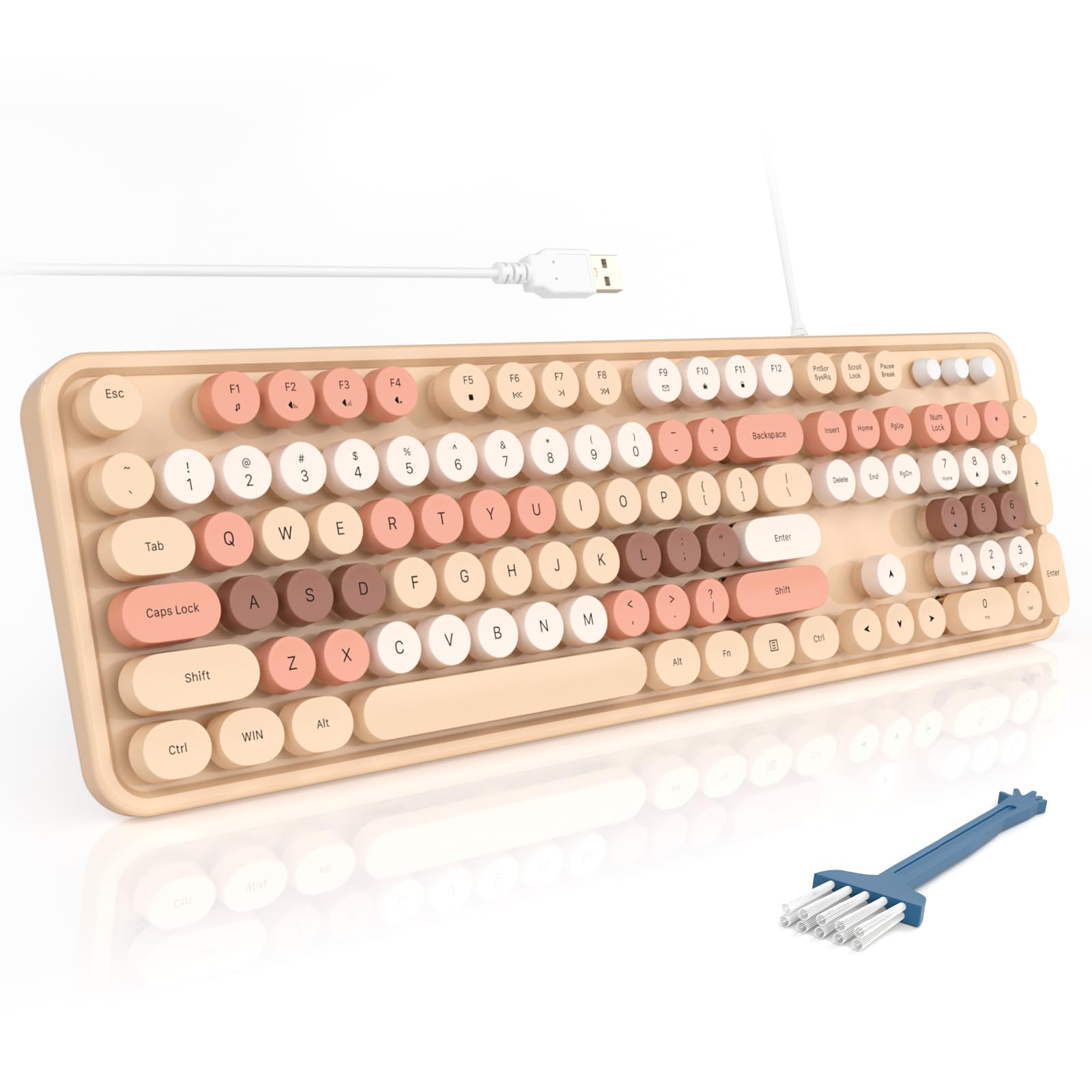
This is the crowd favourite — 4.5+ stars across 600+ owners — and the reason is cosmetic before it is technical. The round keycaps and the milk-tea colour scheme are what win people over, and they are the single most discussed feature of the whole board. You get 104 keys, so the number pad is there for spreadsheets, plus 12 multimedia shortcuts for volume, music and email.
The typing itself is gentle. Owners describe the key feel as super soft with satisfyingly soft clicks, and the sound is not loud enough to annoy a colleague. It also measures 17.71 inches long, which makes it the widest board here by a clear margin — the compact Perixx below is just 10.87 inches, so if desk space is tight this one eats it. The foldable stands and anti-slip pads give you a slight typing angle, and there is even a dust brush in the box.
The catch is responsiveness. A few buyers find the round keys occasionally miss a fast keystroke, so it suits a relaxed writing pace better than competitive gaming. Setup is genuinely plug and play — one USB-A cable, no drivers, no battery to think about.
What buyers fall for
- Distinctive retro round keycaps in a milk-tea colourway that stands out on any desk
- Soft key feel with quiet clicks that suit shared rooms and open offices
- Full 104-key layout with number pad plus 12 multimedia shortcuts
- True plug and play over USB-A — no drivers, no charging, no wireless dropouts
Where it gives ground
- At 17.71 inches long it is the widest pick here — small laptop desks will feel it
- Some fast typists notice the round keys occasionally miss a rapid keystroke
- No backlight, so late-night typing relies on room light
Settle on this one: You want a laptop keyboard that makes typing feel like a small daily pleasure and you have the desk width for a full-size board.
Look elsewhere: Your desk is narrow or you need backlit keys after dark — the SABLUTE solves both.
2. Perixx PERIBOARD-426 Wired Keyboard
Roughly the footprint of a paperback book, so it tucks beside a laptop without a fight.
Measure it against the MOFII and the difference is stark. This board is 10.87 inches long and 5.43 inches wide — the MOFII runs 17.71 inches long and 6.29 inches wide. In height terms it sits at 0.55 inches against the SABLUTE’s 1.42 inches. That shallow profile is the point: low-profile keys with short travel distance, so your fingers barely move to register a press.
You trade the number pad for that size, dropping from 104 keys to 80. Owners rate the build quality highest of anything about it, and the compact size that fits neatly on a desk is the clear second theme. Eight hot keys handle media control, and it connects over a plain USB cable to any Windows 7, 8 or 10 machine with no setup step.
Be realistic about the trade-off. A number of buyers experience intermittent key failures down the line, and the backspace key has been known to stick in the down position. Most owners are happy, but this is the pick to weigh carefully if you type many hours a day and need long-term certainty.
Size is the whole story: At 10.87 by 5.43 inches it is the smallest full-typing board on this list, which makes it the obvious match for a cramped laptop corner or a bag you carry around.
Keep in mind: The 80-key layout removes the number pad entirely, and reliability over years has been uneven for a minority of owners.
Reach for this if: Your laptop lives on a narrow table and you want low-profile keys with short travel.
Think twice if: You run spreadsheets daily or need a board to last many years of heavy typing.
3. EDJO Wired Keyboard and Mouse Combo
One cable for the board and one for the mouse, and your whole laptop desk is wired up.
If you are starting from nothing, this bundle covers both hands at once. The keyboard has a full 104-key layout with a palm rest and foldable stands, and the included optical mouse tracks on a smooth surface without a mouse pad. Both are wired, so neither needs charging or pairing.
What owners prize most is the build. Quality is the top theme and reliability follows close behind — it works from the start and stays working. The keys are quiet with a nice feel, which matters when the laptop desk sits in a shared room. Twelve multimedia shortcuts cover music, volume, computer and mail, with caps lock and number lock indicators in the upper right corner.
One honest note worth knowing: some buyers report the shift keys sticking over repeated use. It is a minority issue on a board that most people find dependable, but if you hammer the shift key for capitals all day, keep it in mind. At 0.84 kg it is essentially the same weight as the SABLUTE, so neither is a travel pick.
Two devices, one order: A full-size wired keyboard plus a symmetrical optical mouse makes this the simplest way to complete a laptop workstation in a single click.
The honest caveat: A sticking shift key has been reported by some owners over time — fine for casual use, less ideal if you type heavy capitals constantly.
Best for: Empty desks that need keyboard and mouse together with no charging routine.
Rethink it if: You already own a mouse you love, or a sticking shift key would drive you up the wall.
4. SABLUTE K31PRO Wired Keyboard
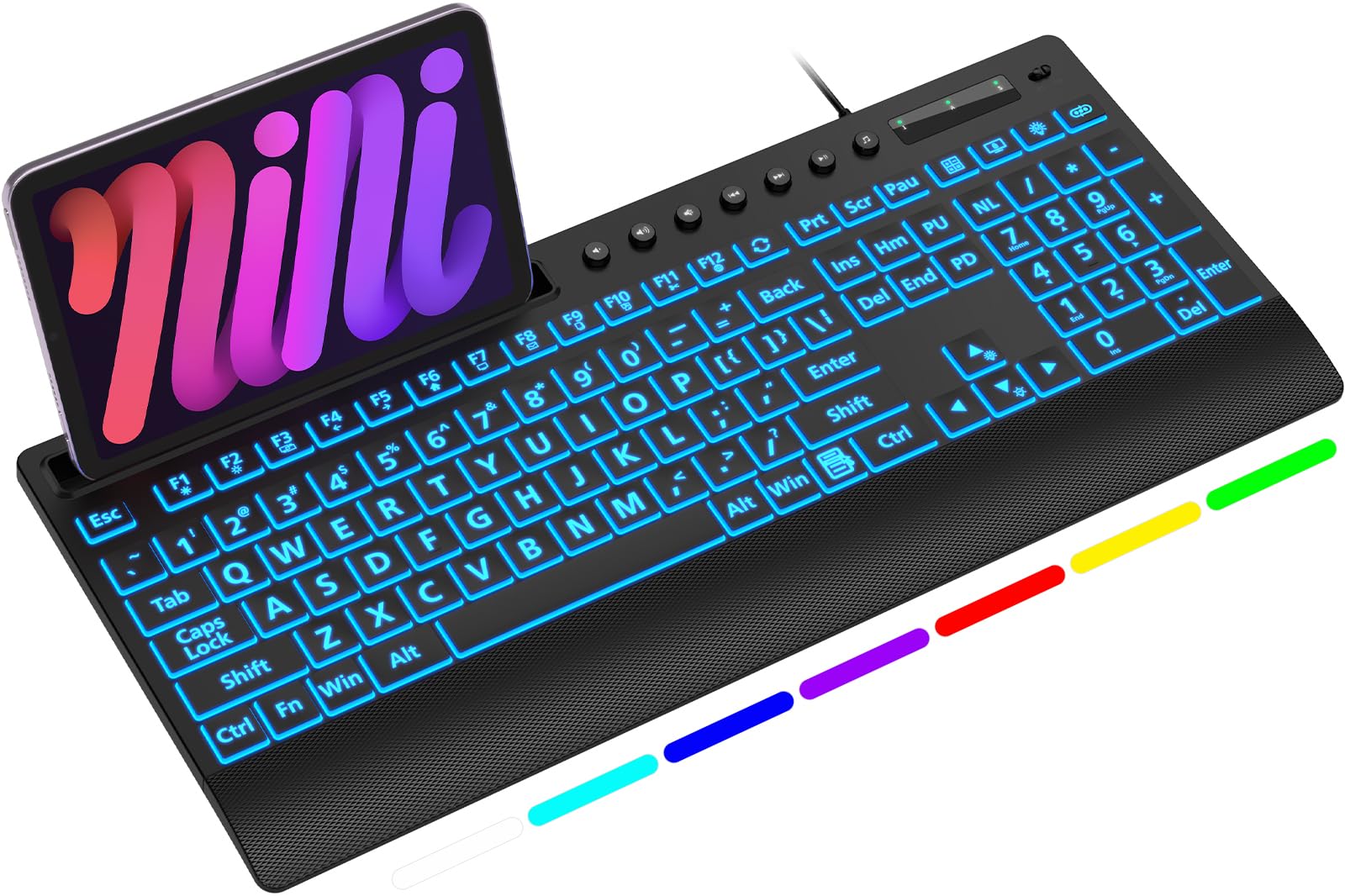
The lettering is three times bigger than normal, and the whole board lights up in seven colours.
Readability is the defining spec here. The high-contrast block letters run three times larger than standard characters, which speeds up typing and cuts mis-keys in a dim room. That is why owners mention key size so heavily — you can see every legend without leaning in or reaching for reading glasses. Build quality still earns the most praise of all, with the backlighting right behind.
The lighting is practical, not just decorative. A single dedicated key cycles 7 vivid backlights and 3 brightness levels, and a memory function restores your last setting every time the system reboots. There is also a clever top slot that holds a phone or tablet under 11.5 inches at a viewing angle, which frees desk space beside your laptop.
Size is the trade-off. At 16.85 inches long and 7.44 inches wide — 1.42 inches tall — it is a substantial board, and it weighs 0.85 kg. It is also note that while the standard keys work on both Windows and Mac, some top-row multimedia shortcuts may not respond fully on a Mac. The integrated wrist rest and foldout stands are there to keep your wrists neutral through long shifts.
Why it earns the desk
- Letters three times larger than standard, so legends stay readable without glasses
- 7 backlight colours with 3 brightness levels and a memory function that holds your setting
- Built-in top slot holds a phone or tablet under 11.5 inches at a comfortable angle
- Quiet membrane keys with a soft touch and integrated wrist rest
Weigh before you commit
- 16.85 by 7.44 inches with a 1.42-inch height — it claims real desk space
- Some top-row multimedia shortcuts may not work fully on Mac
- At 0.85 kg it is a stay-put board, not one you toss in a bag
Made for: Dim desks, tired eyes, and anyone who wants to read every key at a glance.
Skip if: Your laptop tray is shallow — this board needs room and stays where you put it.
5. KOPJIPPOM USB Wired Keyboard

Coffee gets spilled on laptop desks every week — this board is built to shrug it off.
The spill-resistant design is the reason to pick this one over the SABLUTE. A splashed drink on a normal board can end its life; here the membrane and housing are shaped to let liquid run off. The large keys are slightly spaced with big print letters to lower the chance of hitting a wrong key, and the rainbow backlight has both permanently-on and automatic breathing modes with adjustable brightness.
Quality earns the most praise from owners — 167 mentions — with key size and colour options right after it. The whole board is a full QWERTY 104-key layout with a numeric keypad, foldable feet to ease hand fatigue, and a wrist rest. Setup is plug and play over USB-A with no drivers, compatible with Windows 2000 through 10, plus Raspberry Pi 3 and 4.
Do weigh durability honestly, because this is the one real weakness in the pattern. A share of owners mention the board failing after a week, and durability is the recurring negative theme. That is a minority against a large base of happy buyers, but it is the reason to consider an extended plan or a board with a longer track record if longevity is your top priority.
Built for accidents: Spill-resistant construction, spaced large-print keys and a breathing backlight make this a forgiving choice for a busy desk.
The fair warning: Reliability has been uneven — a minority of boards quit after a week, so long-term confidence is the concern.
Worth it for: Anyone who eats and drinks at the desk and wants some protection from a spill.
Look past it if: You need a board you can trust for years — the reliability record is the weak link.
6. Dilter Wired Keyboard

The pink round-key board that makes typing feel like a small ritual rather than a chore.
The retro look is the pull, but the sound is the surprise. Crisp and sweet, the clicks land with a satisfying knock, and owners describe it as pleasant rather than annoying. Enjoyment is the feature buyers talk about most, with the colour right behind it — the pink finish holds up and does not fade with use.
Everything is standard for plug and play. One USB cable, no software to install, no batteries to swap. The 104-key QWERTY layout has a number pad, caps indicators and foldable stands, and the keycaps are detachable so you can lift them off and clean underneath. Wide compatibility covers Windows 7, 8, 10, XP and Vista, plus Mac OS and iOS, though it is noted as not fully compatible with the Apple system.
The honest limit is durability. Some customers note the board breaking inside a week, and durability is the mixed theme in the feedback. Most buyers get a keyboard they enjoy using, but if reliability ranks above fun, look at the Cherry below instead. It also has no backlight, so it is a daylight desk companion.
Personality over polish: A detachable-cap, pink typewriter board with candy-like clicks and a full number pad for spreadsheet work.
The straight answer: Durability is the risk — a minority fail early, so buy this for the feel and the look, not for long-term service.
Choose it for: A cheerful, clicky typing feel and a colour that lifts a plain laptop setup.
Choose differently if: You type after dark or need the board to last many years of daily use.
7. Macally Small Wired Keyboard

Two plugs built into one cable, so a modern MacBook and an old desktop both connect without an adapter.
Slim laptops with no rectangular USB port are the reason this board exists. The built-in USB-C plug and the USB-A plug mean it goes straight into a MacBook, iMac, iPad or an older PC. The compact 78-key design keeps every essential key while shortening the width — no number pad, so it frees up desk space for a laptop and a notebook.
Typing mirrors a MacBook. Scissor switches give a short, stable press with reduced noise, and the whole board weighs just 12 ounces so it travels easily. Thirteen shortcut keys cover Mission Control, brightness, media and volume. Owners rate the build quality highest and the soft-touch key feel next, and setup on Mac Mini devices is quick.
Compatibility is where the caveat sits. Some reviewers point out that it does not work through adapters, so use the matching plug directly rather than nesting another dongle. It is also the price you pay for compactness — the number pad is gone, and if you need one, the SABLUTE or MOFII above are the answer.
The Mac-friendly essentials
- Built-in USB-C and USB-A plugs — no adapters needed for MacBook, iMac, iPad or PC
- 78-key compact layout with 13 shortcuts for Mission Control, media and volume
- Low-profile scissor switches that feel like a MacBook keyboard and stay quiet
- Just 12 ounces, so it slips into a laptop bag
Know before you buy
- Some owners find it does not work through third-party adapters
- No number pad — spreadsheet users will want a full-size board
- Premium price for a compact board with fewer keys
A natural fit: MacBook or USB-C laptop owners who want a small, quiet board that plugs straight in.
Not the one if: You rely on a number pad or often connect through a hub or adapter.
8. AULA F2088 Wired Keyboard

Blue mechanical switches give you a springy, crisp press on every keystroke — and a proper clack to go with it.
This is the board for someone who wants to feel the key bottom out. The mechanical blue switches deliver a quick, springy response with crisp tactile feedback, and the stepped floating keycaps sit right under your fingertips. Owners love the typewriter style and the sound, which they describe as satisfyingly clacky. Keyboard quality is the thing they rate most, with appearance close behind.
There is more here than looks. A control knob handles volume, track switching and playback, and a three-second press toggles it into lighting mode. The board offers 19 backlighting modes with adjustable brightness and speed, plus 3 personalised profiles you can save. Full N-key rollover registers every key even when several are pressed at once, and a magnetic wrist rest snaps onto the front.
Two things to plan for. The clicky switches are loud, so this is not a board for a quiet shared office or a call-heavy day. And the aluminium top panel means the whole board is on the heavier side, so it is a desk fixture rather than a travel piece. Reliability and value both read as mixed in the feedback, so treat it as a feel-first choice.
Feel and theatre: 19 backlight modes, 3 saved lighting profiles, a metal top panel and full N-key rollover make this the most tactile board here.
What you give up: The blue switches are noisy, and reliability is not the strongest suit — pick it for typing feel, not for silence.
The right call for: Typists and casual gamers who love a loud, clicky mechanical press and a vintage look.
Wrong call if: You share a room, take calls while typing, or carry the board between places.
9. Cherry KC 200 MX Wired Keyboard

Silent mechanical switches rated for more than 50 million presses per key.
This is the pick for long workdays on a laptop dock where you want mechanical feel without the clatter. The CHERRY MX2A Silent Red switches give a smooth, linear press with no click, rated for more than 50 million actuations per key. Add full N-key rollover and anti-ghosting, and fast typing registers every key cleanly.
The metal plate underneath is anodised, which gives the board a solid, planted feel and a bronze-coloured look that owners call attractive. White status LEDs sit inside the caps lock, scroll lock and num lock keys, and four extra keys jump to the calculator or adjust volume. Laser-etched keycaps resist wear, and two non-slip fold-out feet hold it steady.
Value is the honest question. It is the most premium investment here by a wide margin, so it makes the most sense for someone who types many hours a day and wants a board to last. The compact Macally is the opposite end of that trade-off — smaller, lighter, less money — but it cannot match the quiet mechanical feel.
The long-haul choice: Silent linear switches rated past 50 million presses, anodised metal plate and full N-key rollover make this a workhorse for a docked laptop.
Worth knowing: It is a premium board with fewer owners behind it, and the 108-key layout adds width over a standard full-size.
Pick this when: You want a quiet mechanical board that lasts through years of daily typing.
Hold off if: You only type a little each day — the money is better spent on a simpler full-size board.
Know the Specs
Key Count and Footprint
Key count tells you how much the board does and how wide it is. A 104-key layout includes the number pad, which is handy for data entry but adds width on a laptop desk. A 78-key board drops the pad and the outer cluster, which frees space beside a laptop. Measured length is the real number to check — the Perixx runs 10.87 inches long while the MOFII runs 17.71 inches, and that gap decides whether it fits your table.
Switch Type and Key Travel
Switch type decides feel and sound. Membrane keys use a rubber dome and are usually quieter and cheaper. Mechanical keys use a physical switch per key, giving springier feedback but often more noise. Low-profile scissor switches, like those on the Macally, shorten travel so fingers move less. If silence matters, a silent linear switch — such as the Cherry’s Silent Red — gives mechanical feel without the clack.
Connection and Compatibility
All these boards are wired, so check the plug. USB-A is the rectangular port common on older laptops and desktops; USB-C is the small oval one on modern MacBooks and slim laptops. A board with both plugs built in, like the Macally, avoids adapters. Also confirm the operating system — some boards note that their top-row multimedia keys may not work fully on Mac even though standard keys do.
Backlight and Readability
A backlight lets you read every legend in a dark room without turning on a lamp. The SABLUTE and KOPJIPPOM both offer multiple colours with adjustable brightness, and the SABLUTE remembers your last setting after a reboot. Large-print lettering, where characters run larger than standard, helps you see every legend without leaning in. Neither feature matters in a bright office, but both earn their place on a dim evening desk.
Common Questions
Will a wired USB keyboard work with my MacBook that only has USB-C ports?
Do wired keyboards need drivers or software to work on a laptop?
Is a full-size 104-key keyboard too wide for a laptop desk?
Are mechanical keyboards too loud for an office or shared room?
What does spill-resistant actually protect against?
Can I use a wired keyboard with a gaming console or smart TV?
How long do wired keyboards typically last before keys fail?
Do I need a backlit keyboard if I work at night?
Does a wired keyboard use less power than a wireless one?
Can I detach the keycaps to clean a wired keyboard?
The Bottom Line
For most laptop owners, the wired keyboard for laptop that wins is the MOFII Wired Retro Round — it turns typing into a small pleasure, keeps the full 104-key layout, and plugs in with zero setup. If your desk is narrow, the Perixx PERIBOARD-426 shrinks that footprint to 10.87 inches. On a USB-C-only MacBook, the Macally Compact connects without an adapter, and if you want quiet mechanical feel for long workdays, the Cherry KC 200 MX is the one to reach for. Every pick here is a wired board that plugs in and works — now you know which one fits your desk.
How we choose
We do not accept paid placement. Every pick is matched to a real buyer and a real use-case; we do not hands-on test units.
Sources
Specifications: manufacturer listings and product documentation. Review insights: verified customer reviews. Pricing: not shown on this page (it changes often); check the current price via the retailer link.
As an Amazon Associate, Tactical Gear Guy earns from qualifying purchases. This does not affect which products we feature.