Specs are compiled from manufacturer listings and verified buyer reviews and can change over time — please confirm the key details on the product page before buying.
You want a keyboard that plugs straight into your iPad and just types — no pairing screen, no low-battery warning halfway through an essay. The catch is that iPad keyboards split into two worlds: Lightning-port models for older iPads and USB-C models for newer ones, and buying the wrong plug is the single most common mistake here. Below you get eight genuinely wired keyboards, sorted so you know which one fits your tablet’s port and your typing habits before you spend anything.
This guide is built by comparing the manufacturers’ published specifications and the patterns across verified customer reviews, so you get each pick’s real strengths and trade-offs instead of marketing spin.
The crowd favourite in the data is the little Macally compact board, and digging into owner feedback shows why. Here is the practical breakdown of the best wired keyboard for iPad by port, layout and typing feel.
Top Picks


How To Choose The Best Wired Keyboard for iPad
The first thing to settle is not brand or key feel — it is the port on your iPad. A wired keyboard connects through a cable that draws its power from the tablet itself, so there are no batteries and no Bluetooth pairing to fail mid-sentence. But that cable has to physically match your tablet’s socket. Get that wrong and nothing else matters.
Match the plug to your iPad’s port
Older iPads use a Lightning connector, and newer ones use USB-C. A Lightning keyboard plugs into the small oval port on older iPad Air, mini and standard models. A USB-C keyboard plugs into the rounded-rectangle port on the newer generation. Some keyboards here ship with a dual plug — both USB-A and USB-C on the same cord — which lets the same board serve a Mac, an iPad and an older computer without hunting for an adapter. That dual plug is the most useful single feature on this list, because adapters are where most complaints start.
Full-size keys versus low-profile scissor keys
If you type long documents and miss the feel of a desktop board, full-size keys give you that. They sit taller with more travel (the distance a key moves down), so each press has a definite bottom-out. Low-profile scissor keys (the flat, laptop-style mechanism) sit shallow with a shorter press, closer to a laptop. Neither is better. It depends on if you want a chunky desktop feel or a slim, quiet laptop feel on a small desk.
Do you need a built-in stand
A keyboard with an integrated stand holds your iPad upright behind the keys, turning the tablet into a mini laptop. That is a real convenience for classroom desks and shared tables. If you already use a separate case with a kickstand, a stand on the keyboard just adds bulk you do not need.
Shortcut keys and durability
Shortcut keys let you fire off brightness, volume and media controls without reaching for the screen. Count them — some boards here carry a handful, others carry more than twenty dedicated Mac shortcuts. Durability matters in shared settings too: look for spill resistance and drop ratings if the keyboard lives in a school bag or library.
Side-by-Side Comparison
| Model | Best For | Connection | Key Count | Weight | Amazon |
|---|---|---|---|---|---|
| Macally Small Wired Keyboard (Dual USB C + A)★ Best Overall | Everyday compact typing | USB-C + USB-A | 78 keys | 12 ounces | Amazon |
| Belkin B2B130 Wired Tablet KeyboardTesting Ready | Testing and classroom use | Lightning | 78 keys | — | Amazon |
| Kensington Compact iPad Keyboard (K75505US)Featherweight Pick | Lightweight daily carrying | Lightning | 14 shortcut keys | 8 ounces | Amazon |
| Belkin USB-C Wired Keyboard w/Stand | Rough classroom handling | USB-C | — | — | Amazon |
| Logitech Wired Keyboard iPad with Lightning | Spill-prone desks | Lightning | 78 keys | — | Amazon |
| Macally USB C Wired Full Size Keyboard | Quiet Mac-style typing | USB-C + USB-A | 107 keys | — | Amazon |
| Satechi Slim W3 Wired Keyboard | Backlit number crunching | USB-C | 78 keys | — | Amazon |
Detailed Reviews
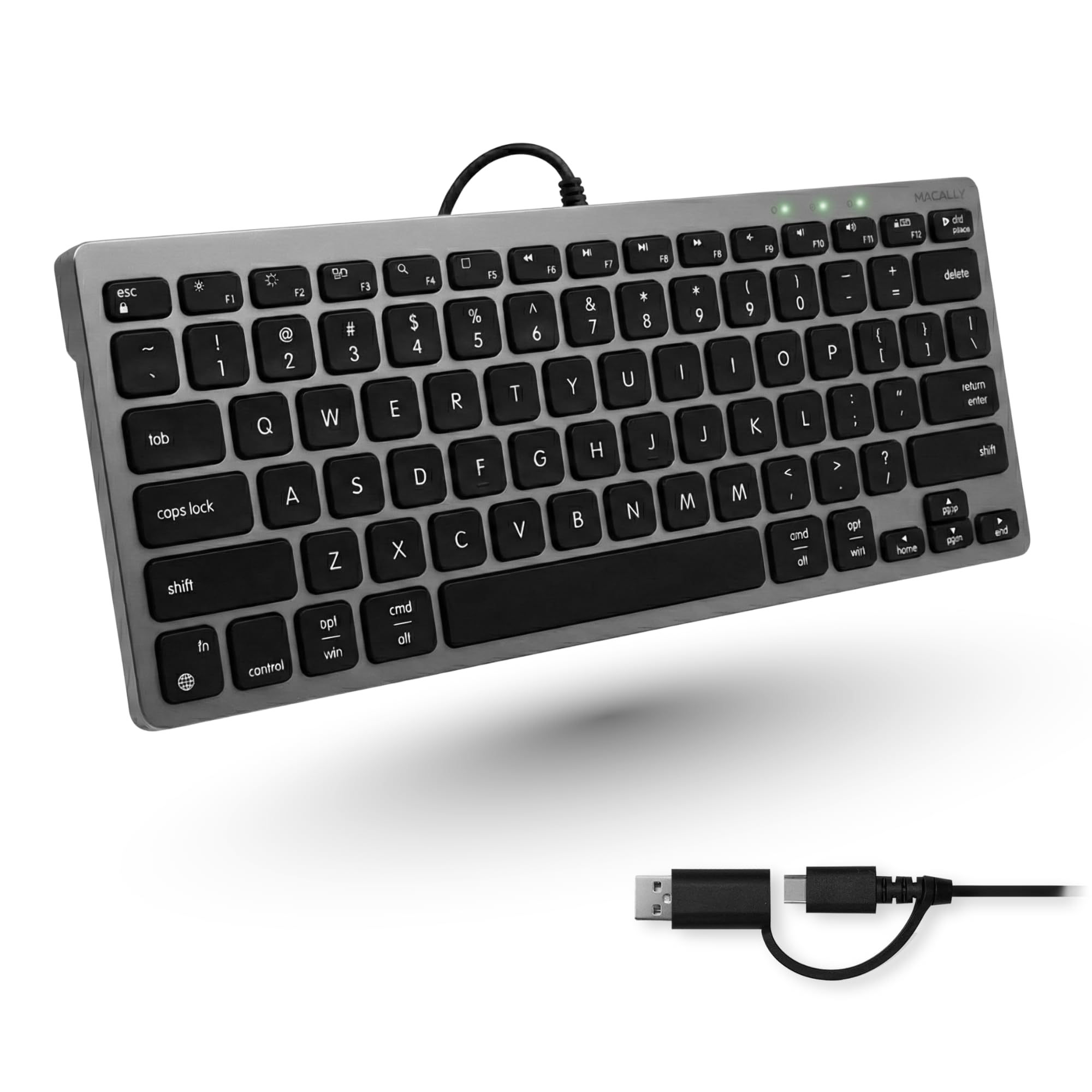
1. Macally Small Wired Keyboard for Mac and PC (Dual USB C + A)
Our pick — 4.0+★ from 650+ verified ratings; the strongest balance of quality and price.
One cable, two plugs, so your iPad and your old laptop both work without an adapter hunt.
The dual plug is the reason this one takes the top spot. It carries both a USB-C connector and a USB-A connector built into the same cord, so it plugs into a modern iPad or Mac as well as an older computer with no dongle in between. If you swap between a tablet and a desktop through the week, that single feature removes the most common source of frustration in this category.
Space is the second win. The 78-key layout keeps every essential key while slimming the footprint, which matters when your iPad is propped on a small desk or a shared table. At 12 ounces versus the Kensington K75505US at 8 ounces, that extra heft is the trade you make for the sturdier build owners keep coming back to. The scissor-switch keys sit low and press quietly, close to a MacBook feel.
Thirteen dedicated shortcut keys cover Mission Control, brightness, media and volume, so you rarely touch the screen. What wins people over is the build — it is far and away the most-discussed strength, and the key feel runs a clear second. The honest catch is compatibility: the board is built for the Apple ecosystem, and the input data notes it is Windows-compatible on paper, but adapters are a reported weak point. Buy the right cable end and it is a smooth ride; try to force it through a hub and results vary.
What earns it first place
- USB-C and USB-A plugs on one cord, so no adapter is needed across devices
- 78-key layout saves desk space without dropping essentials
- 13 shortcut keys for Mission Control, brightness, media and volume
- Low-profile scissor keys type quietly
Where it asks you to be careful
- Built for the Apple ecosystem, and adapters are a reported weak spot
- 12 ounces is heavier to carry than the lightest picks here
Reach for this one if: you type across a Mac and an iPad and want one cable to serve both.
Hold off if: your whole setup runs through a hub and you need guaranteed adapter behaviour.
2. Belkin B2B130 Wired Tablet Keyboard
A full-size board with a stand built in — your iPad props up behind the keys like a tiny laptop.
This is the practical choice for exam days and test centers. It connects through a built-in Lightning cable, needs no software, and is SBAC and PARCC testing compliant. Nothing about it depends on a battery or a pairing sequence, so there is one less thing to fail when you are already nervous.
The 78 full-size keycaps are well spaced, so typing stays comfortable when you switch between this and a desktop. The integrated stand holds your iPad in landscape and works whether or not it is still in a case. Owners describe it as a pleasant, sturdy typing experience with a good fit when the iPad sits in its cover, and the no-charging, no-battery point comes up as a genuine relief.
The one constraint to know about is the plug. This is a Lightning keyboard, so it will not work with iPads that have a USB-C port — a newer iPad simply will not connect. Check your port before you buy, because that is the whole decision in a sentence.
Why test centers like it: the built-in Lightning cable and wireless-free design mean no pairing failures mid-exam.
The plug caveat: Lightning only — newer USB-C iPads are out of reach here.
Reach for this if: you have an older Lightning iPad and need a stand and keyboard in one piece.
Look elsewhere if: your iPad has a USB-C port.
3. Kensington K75505US Compact iPad Keyboard
At 8 ounces it is one of the lightest boards here — slip it in a bag and forget it is there.
Portability is the whole argument. At 8 ounces it is an easy board to carry in a school bag every morning. Full-sized scissor keys keep typing precise despite the small body, and the 14 shortcut keys fire off common iOS commands without you dropping into menus.
A small cap-lock indicator tells you at a glance when you are in capitals. The Lightning connection is plug-and-play with no software or batteries, and Kensington notes MFi certification so the board is safe to connect to an iPad or iPhone. A two-year warranty backs it, and it clears the same testing privacy requirements as the Belkin board. The catch is durability in heavy use — this is a compact board built for classroom duty, so treat the cable end with care rather than yanking it free. Testing data on long-term wear is thinner than on the bigger boards, so it suits the light-to-medium carry role best.
Carry weight: 8 ounces makes it the easiest board on this list to pack.
Where it sits: best as a second keyboard for travel, not as the daily desk anchor.
Best for: students and commuters who need a Lightning board that disappears into a backpack.
Skip if: you want a heavy-duty desk keyboard for all-day typing.
4. Belkin USB-C Wired Keyboard w/Stand, Plug & Play iPad
The board that shrugs off drops and spills — built for shared desks and busy classrooms.
Durability is where this Belkin earns its place. It carries Mil-STD 810G drop protection plus IP51 dust and water resistance, the toughest durability specs on this list. Those two specs are why it makes sense in schools, libraries and learning labs where the keyboard gets handed around all day. Easy-clean surfaces and pry-resistant keys help stop tampering, and a protective membrane coating adds another layer against repeated use.
It is a USB-C board, aimed at newer iPads including the 10th generation and the A16 model, and it needs iPadOS 16 or later. Dedicated shortcut keys handle brightness, media and volume, and you can switch the hot keys off when you want fewer distractions during focused work. Low-profile keys give a tactile, responsive feel that suits students and teachers alike.
The trade-off is that all that armour makes it a workstation board rather than a travel one — this is the one you leave on the desk. And because it is USB-C only, an older Lightning iPad will not connect.
Built for abuse: Mil-STD 810G drop protection and IP51 dust/water resistance are the toughest specs on this list.
Desk-bound reality: it is a USB-C-only workstation board, not something you toss in a bag.
Reach for this if: the keyboard lives on a shared or school desk and needs to survive rough handling.
Look elsewhere if: your iPad uses Lightning or you need something to carry daily.
5. Logitech Wired Keyboard iPad

Coffee on the desk and a keyboard that tolerates it — a small spill is not the end of the day.
The headline spec is spill resistance: it tolerates up to 60 ml of liquid, roughly a tipped mug rather than a full glass. That said, Logitech is clear that you should not immerse the keyboard in liquid — this is splash tolerance, not swimming. For anyone who eats or drinks at their desk, it is a real comfort.
Logitech rates the keys for over 5 million keystrokes, and the 78 full-size keys give a traditional desktop typing feel. Integrated shortcut keys map to iPad functions so you can adjust things without leaving the keys. It connects through a Lightning cable and draws its power straight from the tablet, so no charging or batteries are involved. Owners describe nice quality, straightforward plug-and-play connectivity and a full-size feel in a compact package.
What keeps it from the top spot is that the durability record is mixed in the feedback — most boards run fine, but longevity is the point to watch. Treat it as a solid everyday board with a spill advantage, not an indestructible one.
The practical edge: 60 ml spill tolerance and a 5-million-keystroke rating make it forgiving of real desk life.
The honest note: durability feedback is mixed, so plan on careful use rather than rough handling.
Best for: Lightning-iPad users who type at a desk where drinks happen.
Skip if: you need a USB-C board or want the most rugged option here.
6. Macally USB C Wired Keyboard

A full 107-key board with 22 Mac shortcuts, built to type quietly all day.
This Macally is the wide-desk answer. The 107-key layout gives you a complete set of keys and 22 dedicated Mac shortcuts for screenshots, emoji and media, so most iOS and Mac functions are one press away. That is a big jump in shortcut coverage compared to the compact 13-shortcut Macally board at the top of this list — useful if you work inside menus a lot.
Where it differs from a laptop-style board is the key feel. Each key uses a soft membrane domed design that produces smooth, semi-quiet keystrokes — good for shared rooms and late-night typing. It ships with both USB-C and USB-A plugs on the same connection, so it works with newer and older devices without a separate adapter. The core appeal buyers report is that the shortcuts behave just like an Apple keyboard, and the tactile response gets consistent praise.
The catch is size: at 107 keys it is the widest full-size board reviewed here, which is great on a dedicated desk and cramped on a tray table. That trade is fine for a fixed workstation and less so for a bag.
Shortcut depth: 22 Mac shortcuts plus 107 keys make it the most control-rich board at this size.
Space cost: full width suits a desk, not a lap or a cramped tray.
Best fit: a fixed desk setup where quiet typing and lots of shortcuts matter.
Pass on it if: your iPad shares a small surface with everything else.
7. Satechi Slim W3 Wired Keyboard

The only board here that lights up — three brightness levels for dim rooms and a full number pad.
Two features stand out. First, the backlit keys. You get three levels of brightness, which helps in a dim room or a late-night session. Second, the extended QWERTY layout with a numeric keypad — a real advantage if you punch numbers into spreadsheets or accounting apps on your iPad.
The body is finished in aluminium, and the built-in USB-C cable plugs into a port and starts typing with no install step. MacOS function keys are built in, and the 78-key board pairs a slim profile with responsive keys. Owners consistently describe an Apple-like key feel and quality, which is exactly what you want if you are moving off the iPad’s on-screen keys.
The honest caveat is backlighting behaviour: while the lighting is a plus for many, some note that light creeps out from under the keys. Reliability is the other point to weigh — most boards run perfectly, but occasional reports of keys not working appear. It is a fine premium board, best bought knowing those two quirks.
what separates it: you can keep typing in a dim room and still enter numbers fast, because it has three backlight levels (brightness settings for the keys) and a numeric keypad (the number block on the right). It is the only board here with both.
What to know: light can bleed from beneath the keys, and reliability feedback is mixed.
Reach for this if: you work in low light and need a dedicated number pad.
Look elsewhere if: you want zero-light bleed or the simplest possible unlit board.
Know the Specs
Lightning vs USB-C Connection
A wired iPad keyboard connects through a cable that carries both data and power, so there is no battery and no Bluetooth pairing. Lightning is the older oval connector on earlier iPads; USB-C is the newer rounded connector. The two are not interchangeable, so the connector is the first and most decisive spec — pick the wrong one and the keyboard simply will not connect. A dual-plug board that offers both USB-A and USB-C covers more devices without an adapter.
Key Count and Shortcut Keys
Key count tells you how much of a desktop layout you get. A compact 78-key board keeps the essentials in a smaller footprint; a 107-key board adds a full number pad and more function keys. Shortcut keys are separate from the main count and let you fire off brightness, volume and media controls directly. More shortcuts mean less reaching for the screen, which is why a board with 22 shortcuts feels more like a full Mac keyboard than one with 13.
Key Feel: Scissor vs Membrane
Scissor switches use a small scissor mechanism under each key, giving a short, stable press close to a laptop. Membrane keyboards use a soft dome under the keycap that produces a smoother, quieter press. Neither is objectively better — scissor gives crisper feedback, membrane gives a softer and quieter feel. For shared rooms and late-night work, quieter membrane or low-profile scissor keys help.
Weight, Spill and Drop Ratings
Weight is your portability budget. An 8-ounce board slips into a bag; a 12-ounce board feels more planted on a desk. Spill ratings tell you how much liquid a keyboard tolerates — a 60 ml figure means a small splash, not a dunking. Drop ratings like Mil-STD 810G indicate the board survived a standardized knock test, and an IP rating covers resistance to dust and water. These matter most when a keyboard is shared or moved around a lot.
Common Questions
Will a Lightning keyboard work with a USB-C iPad?
Do these keyboards need charging or batteries?
How much liquid can a spill-resistant keyboard take?
What does MFi certified mean on an iPad keyboard?
Can I use a Mac keyboard shortcut layout on an iPad?
Is a full-size keyboard or a compact one better for iPad?
Which boards are safe for standardized testing use?
Do any of these keyboards add extra USB ports?
What does a Mil-STD 810G drop rating actually mean?
Will the backlit keyboards light up every key?
The Bottom Line
For most people, the best wired keyboard for iPad is the Macally Small Wired Keyboard, because its dual USB-C and USB-A plug ends the adapter hunt and its 78-key scissor layout types quietly in a small footprint. If you need a stand and testing compliance on an older iPad, the Belkin B2B130 handles both. And for dim-room work with a number pad, the Satechi Slim W3 is the backlit board to reach for. Whichever port your iPad has, pick the matching plug first — everything else is a typing-feel preference after that.
How we choose
We do not accept paid placement. Every pick is matched to a real buyer and a real use-case; we do not hands-on test units.
Sources
Specifications: manufacturer listings and product documentation. Review insights: verified customer reviews, as of November 2026. Pricing: not shown on this page (it changes often); check the current price via the retailer link.
As an Amazon Associate, Tactical Gear Guy earns from qualifying purchases. This does not affect which products we feature.