Specs are compiled from manufacturer listings and verified buyer reviews and can change over time — please confirm the key details on the product page before buying.
If you want a keyboard and mouse that simply respond the instant you press or click, a wired set removes the two things that ruin fast play: battery drop-off and wireless delay. The tension is that most corded combos bundle a genuinely good keyboard with a throwaway mouse, or the reverse. This guide separates the sets where both halves earn their spot on your desk, and it tells you exactly which one to grab for your setup.
This guide is built by comparing the manufacturers’ published specifications and the patterns across verified customer reviews, so you get each pick’s real strengths and trade-offs instead of marketing spin.
You will see which layouts save desk space, which switches feel right for typing versus fragging, and where each combo cuts corners. Here is the honest breakdown of the best wired gaming keyboard and mouse for your money.
Top Picks


How To Choose The Best Wired Gaming Keyboard and Mouse
Start with the desk, not the spec sheet. A corded set lives in a fixed spot, so the physical size of the keyboard decides how much room your mouse hand actually gets. Get that wrong and no amount of DPI rescues your aim.
Layout size decides your mouse room
A full-size board runs 104 keys and includes the number pad, which suits spreadsheet work and MMO hotbars. A compact 60% board trims to the essentials and hands that saved space straight to your mouse arm. If you swing wide in shooters, the smaller board is the practical choice.
Switch feel: linear, tactile, or membrane
Mechanical switches use a real spring and stem under each cap. Linear ones press straight down with no bump, which suits rapid repeated taps. Membrane boards use a rubber dome under the keys — quieter and softer, but with a mushier bottom-out. Neither is better; they fit different rooms and different hands.
The mouse half matters as much as the keyboard
Check the sensor ceiling and whether the mouse has a physical DPI button for on-the-fly sensitivity changes. A programmable button set helps if you map actions in-game. Many bundles treat the mouse as filler, so a combo where the mouse carries its own real sensor is the one worth paying for.
Side-by-Side Comparison
| Model | Best For | Keys | Mouse Max DPI | Keyboard Type | Amazon |
|---|---|---|---|---|---|
| Redragon S176★ Best Overall | Small desks and fast mouse swings | 63 (60%) | 10,000 | Mechanical | Amazon |
| MageGee K1Budget Champion | Budget full-size with number pad | 104 | 3,200 | Membrane | Amazon |
| AULA T102Most Versatile | Office and gaming on one desk | 104 | 7,200 | Membrane (mechanical feel) | Amazon |
| MSI Forge GK110 | Quiet shared-space gaming | 26 | 12,800 | Membrane | Amazon |
| Redragon S177 | Macro and lighting tinkerers | Full size | 10,000 | Mechanical | Amazon |
| MageGee Typewriter | Retro looks and clicky typing | 104 | 3,200 | Mechanical (blue) | Amazon |
| Lenovo Legion KM310 | Silent late-night sessions | Full size | 8,000 | Membrane (silent) | Amazon |
| Logitech G502 Hero + G213 | Heavy customization and macros | Full size | 25,600 | Mech-dome | Amazon |
| Logitech G413 SE + G502 Hero | Long-haul mechanical durability | Full size | 25,600 | Mechanical | Amazon |
Detailed Reviews
1. Redragon S176 Wired Mechanical Keyboard and Mouse
Our pick — 4.5+★ from 300+ verified ratings; the strongest balance of quality and price.
The compact mechanical set that gives your mouse arm the desk back.
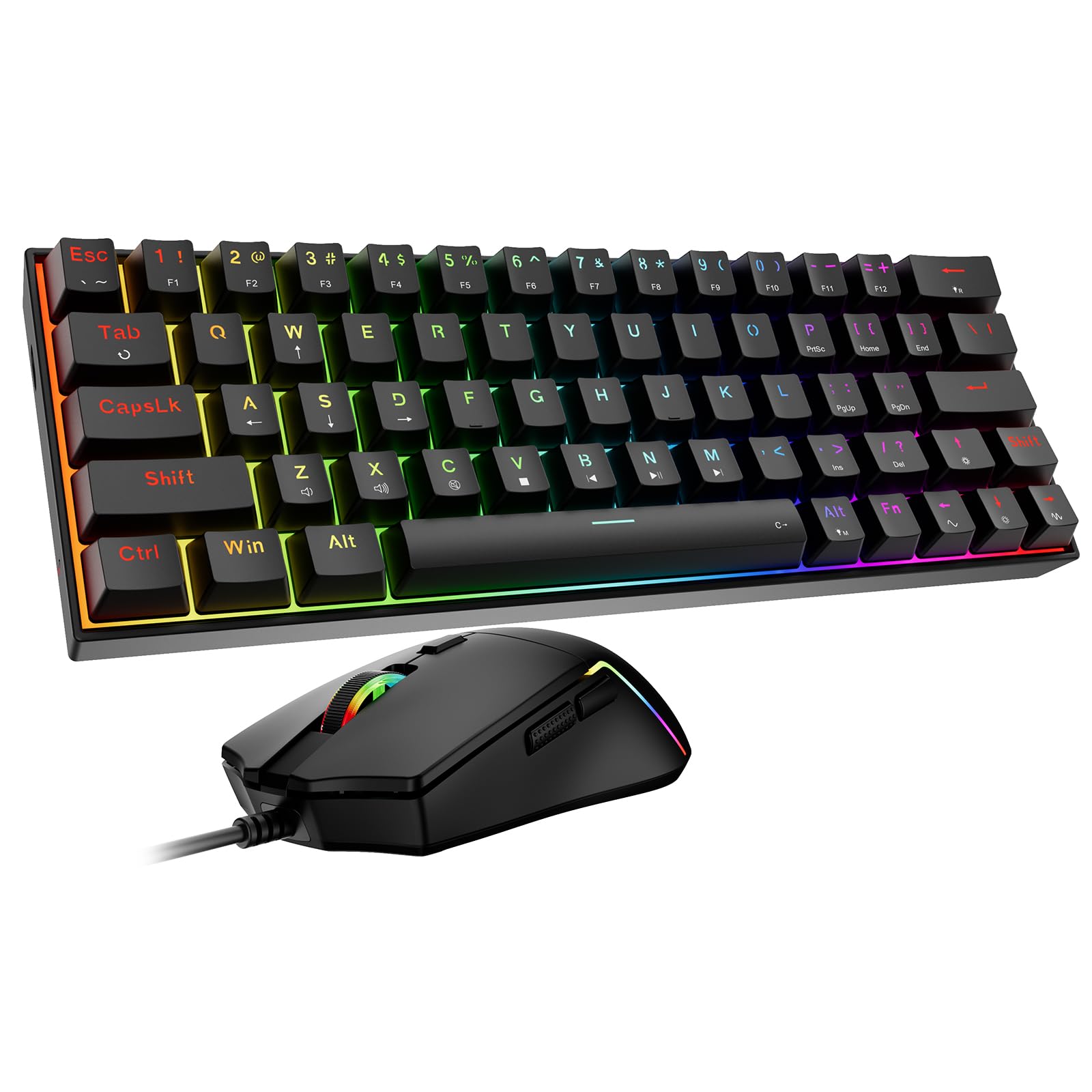
This is the set to buy if you aim with a low sensitivity and keep bumping your mouse into the side of a big keyboard. The S176 uses a compact 60% layout — a trimmed deck that keeps only the essential keys — so the board takes up far less width than a full-size model and leaves you more room to swing the mouse. Both halves run on USB, so there is no battery to watch and no pairing to redo mid-match.
The keyboard uses pre-lubed linear switches, meaning the stems come greased from the factory so each press glides instead of scraping. That gives you smooth, consistent keystrokes for both gaming taps and long typing sessions. On the mouse side you cycle five sensitivity levels with the physical DPI button, and the bundled software lets you push sensitivity up to 10K DPI and the polling rate up to 1,000 Hz — that polling figure is how often the mouse reports its position per second, and 1,000 Hz keeps cursor motion tight rather than stepping. The software also handles macro creation, key remapping, and RGB lighting for both halves.
What wins people over is simply how much desk the compact deck frees up, paired with a mouse that tracks with real precision rather than the token sensor most bundles ship. It holds 4.5+ stars across 300+ ratings, and a two-year warranty covers the mechanical deck. The trade-off is real, though: a 60% board drops the number pad and the dedicated function row, so anyone who lives in spreadsheets or MMO hotbars will feel the loss immediately. Set against the MageGee K1, this board is heavier at 2.2 pounds versus 2 pounds, a difference you notice mainly when you carry it between desks.
What earns its spot
- Compact 60% deck frees real mouse-swing room on a narrow desk
- Pre-lubed linear switches deliver smooth, consistent presses
- Mouse runs to 10,000 DPI with a 1,000 Hz polling rate
- Factory software covers macros, key remapping, and RGB for both halves
Where it asks you to adapt
- No number pad and no dedicated function row on the 60% layout
- Macro and lighting tuning requires downloading the Redragon software
Reach for this if: you play shooters at low sensitivity and want a mechanical deck that stays out of your mouse arm’s way.
Think twice if: your day job leans on a number pad — the trimmed layout takes it away.
2. K1 RGB LED Backlit Wired Keyboard
A full-size backlit set that plugs in and lights up without fuss.
For an entry-level desk build, the K1 hands you a 104-key full-size board with the number pad and F-key row intact, plus a backlit mouse in the same box. It is plug-and-play — no driver download, no software to wrestle with — and it runs on USB, so there is nothing to charge. The keyboard carries 8 light colors, 5 light modes, and adjustable brightness and speed, all reachable through key combos like FN + O/L for brightness. The caps are double-shot injection molded, which is a molding method that keeps the lettering from rubbing off over time.
The mouse steps through 6 sensitivity levels — 600, 800, 1200, 1600, 2400, and 3200 — with a side-and-middle-button combo that locks the breathing backlight on your favorite color. Gold-plated connectors and an anti-interference magnet ring on the cable help hold a steady signal. The keycaps are floating and removable, and the ergonomic high-low cap layout eases the wrist during long sessions.
The honest catch sits on reliability, not day-one feel. A small share of these boards go quiet after about a month, so treat it as a first setup or secondary machine rather than a lifetime centerpiece. The mouse tops out at 3,200 DPI — fine for strategy and casual play, short of what a fast-twitch shooter fan might want. Against the AULA T102, this board is lighter at 2 pounds versus 2.2 pounds, and it costs less desk fatigue to set up.
Value read: You get a full 104-key backlit deck and a working mouse in one box for an entry-level outlay, and the soft, smooth key feel and bright base lighting are what people keep bringing up.
The caveat to weigh: Reliability is the weak link — treat this as a starter set that may need replacing down the road, not a buy-once piece of kit.
Best for: a first gaming desk or a budget second station where a number pad and instant plug-in matter more than long service life.
Look elsewhere if: you expect the same keyboard to still be clacking three years on.
3. AULA T102 Keyboard and Mouse Combo
Brushed aluminum looks with a membrane board that handles both work and play.
If one desk has to serve your day job and your evening games, this is the set that splits the difference. It is a full-size 104-key layout with the number pad and F-keys, wrapped in an aluminum alloy brushed panel that gives it a sturdier feel than the all-plastic budget boards. The board is rated to survive the average liquid spill, and the white keycaps with a silver panel make it the one set here that does not read as generic black plastic.
The RGB system runs 16 lighting effects across 16.8 million colors, so you can dial the glow to your room. The bundled mouse is where this set pulls away from cheaper rivals — it steps through 4 sensitivity levels (1200, 2400, 4800, and 7200) and registers 26 keys pressed at once, which is the anti-ghosting ceiling that stops simultaneous presses from cancelling each other. Compare that to the MageGee K1’s 3,200 DPI mouse and the AULA clearly leads on sensitivity headroom.
Quality is the thing people praise most about this set, and it shows in the metal top plate. Two mixed notes are worth knowing before you commit: the lighting is rated mixed, and when the room lights are off, the key labels on a dimmed board become harder to read. A few long-term owners also report the right side giving out around the seven-month mark, so it rewards gentle handling. The spacebar and the switch feel are the other long-run wear points to keep an eye on.
Reasons it stands out
- Aluminum brushed panel gives it a sturdier feel than budget plastic boards
- Mouse hits 7,200 DPI across 4 levels with 26-key anti-ghosting
- Full 104-key layout covers both number-crunching and gaming
- Rated to survive the average liquid spill
Points to weigh
- Dimmed backlight makes key labels hard to read in the dark
- A few buyers report the right side failing around seven months
Pick this one if: one board has to look sharp on a shared desk and still game at night.
Give it a pass if: you need labels legible with the lights fully off.
4. MSI Forge GK110 Combo
A silenced membrane deck with a sensor that punches higher than its class.
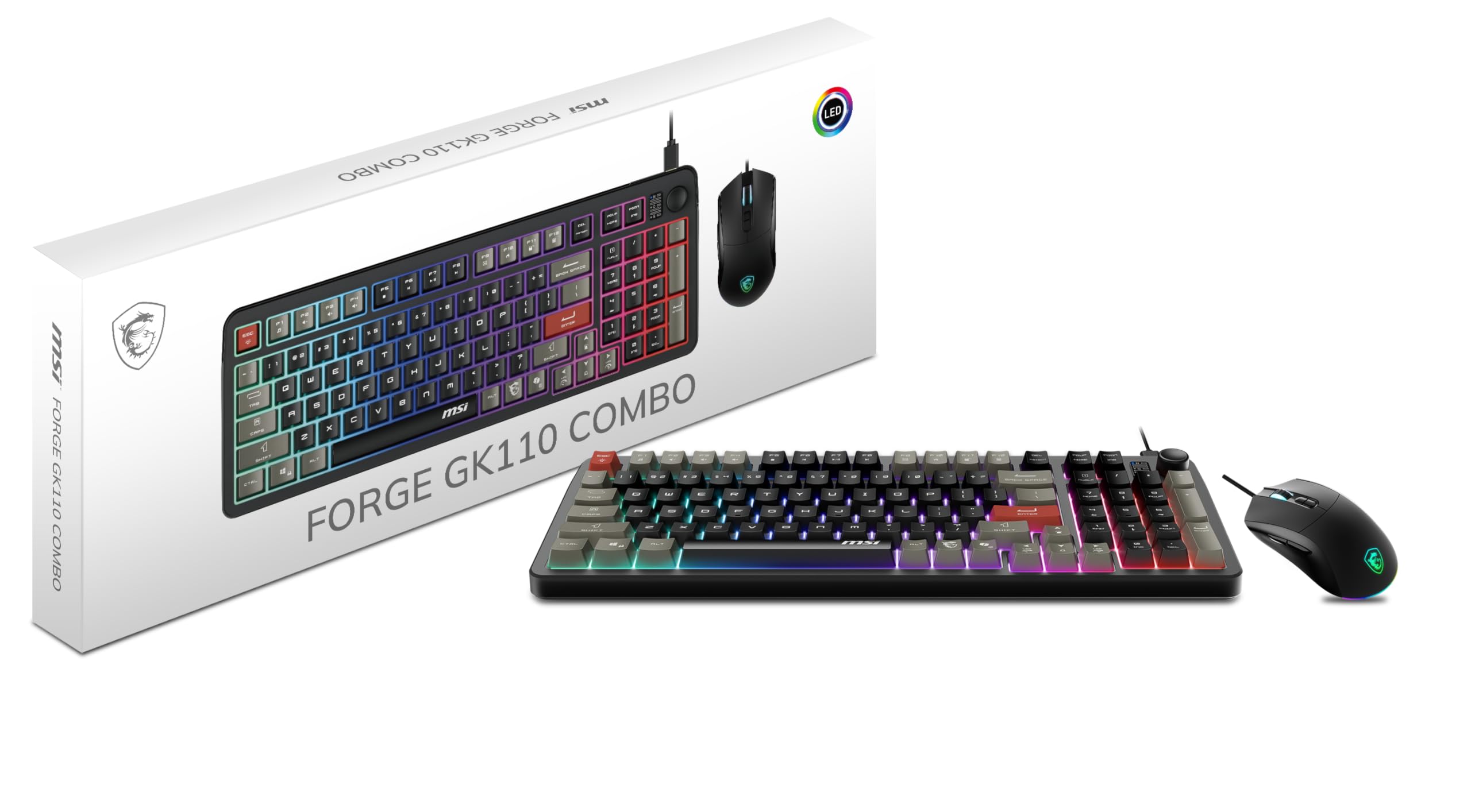
Anyone gaming in a shared room or after the house has gone quiet should start here. The GK110 uses quiet membrane switches — a rubber-dome board that presses softly and consistently without the hollow clatter of cheap boards — so keypresses stay muted through a late session. There is a dedicated volume scroll wheel on the deck, which is the kind of small touch that saves you from alt-tabbing just to change audio.
The mouse is the surprise: an optical sensor rated up to 12,800 DPI, which is the highest sensitivity ceiling of any set in this roundup’s compact tier and a step past the AULA T102’s 7,200 DPI. The mouse switches are rated for over 20 million clicks, well past the wear most bundled mice see. RGB effects are preloaded on both halves and can be swapped via hotkeys.
One number on this listing deserves a straight look: the key count is listed as 26, far short of a full-size board — so treat this as a compact deck and confirm the layout matches your habits before you commit. It is the most compact board of the group by key count, which suits a tight desk but not a heavy shortcut user. If you want a full number pad in the same spirit, the Lenovo Legion KM310 is the fuller-size quiet alternative.
Where it shines: the quiet typing feel and the 12,800 DPI sensor together make it a genuinely good fit for shared spaces and late-night play.
The honest limit: the 26-key count means a trimmed layout, so check you can live without the full key set.
Suited to: quiet rooms, shared desks, and anyone who wants a high-DPI mouse bundled in.
Not the one for: shortcut-heavy players who need every key present.
5. S177 Wired Mechanical Keyboard and Mouse Combo
A mechanical deck built for tinkerers who want to remap everything.
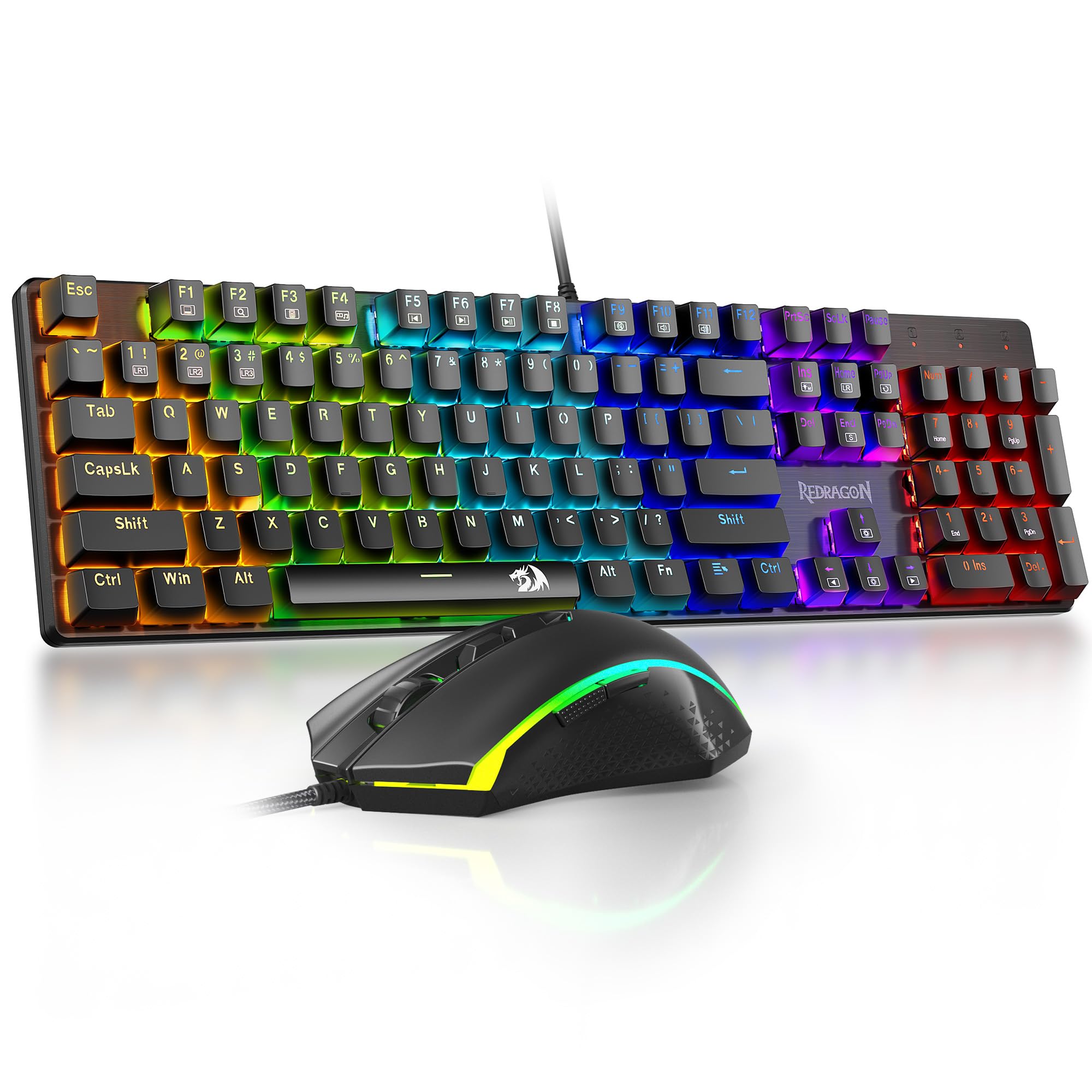
This is the set for the player who treats their keyboard like a project. It is a mechanical full-size board with 12 multimedia function keys, and it supports hot-swappable switches — meaning the switches pop out so you can swap them without soldering — plus a foldable stand and a skin-friendly coating under the keycaps. The mouse reaches 5,000 DPI through its button, and up to 10,000 through the Redragon software, with the polling rate adjustable to 1,000 Hz.
The software side is the real draw. You can remap keys, build macros, tune DPI and report rate, and set RGB effects for both halves. The keyboard runs 6 RGB lighting modes and the mouse 8 effects, each with adjustable speed and brightness. There is a 24-month warranty and a 24-hour support channel behind it, which matters if you plan to lean on customization.
The honest read: functionality and value here draw mixed feedback — some units ship with a non-working component, and quality control is the thing to watch. A few owners also note the top three key rows are dimmer than the bottom three, and a small set report keys double-clicking over time. Buy it for the software depth and the hot-swap flexibility, and check the full bundle is working when it lands.
Reasons to pick it
- Hot-swappable mechanical switches let you swap feel without soldering
- Mouse climbs to 10,000 DPI with 1,000 Hz polling via software
- 12 multimedia keys and full macro remapping through Redragon software
- Backed by a 24-month warranty
Keep in mind
- Quality control is uneven — some bundles ship with a faulty part
- Top key rows glow dimmer than the bottom rows
Choose it when: customization is the whole point and you want hot-swap switches plus deep macro software.
Steer clear if: you want zero fuss and would rather not check a bundle for faults on arrival.
6. MageGee Typewriter Mechanical Keyboard and Mouse Combo

Typewriter looks with a clicky soundtrack you can hear across the room.
This is the set for someone who wants their desk to have a personality, not blend into it. The MageGee wears round punk keycaps and blue mechanical switches that produce a sharp clicky-clack with every press — the sound most people picture when they imagine typing on a typewriter. The board is a full 104-key layout with anti-ghosting, so simultaneous presses register, and it sits on an aluminum alloy panel with a matte texture that resists scratches.
The mouse brings 7-color breathing backlighting with the same 6 speed levels as the K1 set — 600, 800, 1200, 1600, 2400, and 3200 — plus an anti-skid scroll wheel for steady control. The keyboard lights up through multiple rainbow modes, with Fn-key combos for brightness and speed. Double kickstand feet let you set the tilt, and the high-low round key layout is shaped to keep fingers comfortable through long sessions.
Sound quality is what owners praise most about this board, and the clicky typing is the love-it-or-leave-it core of the whole set. Where it asks for care: durability draws negative marks, with a few reporting the silver caps break and come off and letters stop working after about a year. Treat it as a desk statement to enjoy, not a board to hammer for a decade.
Personality pick: the typewriter styling and the deep click do more for desk character than any spec on the sheet, and the mouse matches with its own color-cycling glow.
Honest caution: the round caps and long-run durability are the trade-off — this is a looks-first board.
Made for: desk setups that want retro flair and a loud, satisfying click.
skip it if: you share a quiet room or need a board that shrugs off years of heavy use.
7. Lenovo Legion KM310 Keyboard & Mouse Combo

A near-silent membrane deck with a featherweight mouse that glides.
Two things separate this Lenovo set from the budget crowd: a keyboard built to be quiet and a mouse built to be light. The K310 uses silent membrane switches with a compact, water-resistant design — a rubber-dome board tuned to cut noise so late sessions stay discreet. The board carries 5-zone RGB illumination with pre-programmed colors and Fn lighting effects, plus Fn volume and multimedia controls.
The M300S mouse is where the engineering shows. At 57 grams it is a genuinely light body, and it rides on 100% PTFE feet — a low-friction plastic that lets the mouse glide smoothly across a pad — with a 220 IPS tracking speed and 30g acceleration. It adjusts sensitivity across 5 levels up to 8,000 DPI and gives you 6 programmable buttons (left, right, wheel, DPI, and two side buttons). It is shaped for claw and fingertip grips rather than a palm rest.
The durability numbers back the price tier: 20 million click lifecycles on the keyboard and an Omron mechanical microswitch rated to the same 20 million clicks in the mouse. Against the Logitech pairing below, the Lenovo’s mouse tops out at 8,000 DPI while the G502 Hero reaches 25,600 — so the Lenovo is the lighter-feeling, lower-max option rather than the high-sensitivity one. Pick it for silent play and a light mouse, and know that the compact layout and membrane feel are the deliberate trade.
What it brings to the desk
- Silent membrane keys keep late-night sessions quiet
- 57g mouse body with 100% PTFE feet glides with little effort
- 6 programmable buttons and 5-level DPI up to 8,000
- 20 million click lifecycles rated on both keyboard and mouse
What to expect
- Membrane switches mean a softer bottom-out than mechanical
- 8,000 DPI ceiling sits well below the Logitech pairing’s 25,600
Best fit for: players who want quiet keys and a light, fast-gliding mouse in one box.
Consider otherwise if: you chase the highest possible sensitivity or a crisp mechanical press.
8. Logitech G502 Hero Mouse and G213 Keyboard

The combo for players who want to tune the mouse down to its weight.
This pairing puts a heavily configurable mouse next to a fast, tactile keyboard. The G502 Hero runs the HERO 25K sensor with 1:1 tracking across a 100–25,600 DPI range — the highest sensitivity ceiling in this roundup — and carries 11 programmable buttons for mapping every action you need. Five 3.6g weights let you add or shed mass to tune how the mouse feels in hand, which is a level of physical customization none of the other sets here offer.
The G213 keyboard uses tactile mech-dome keys — a hybrid that gives a springy, responsive press with a defined bump — and an anti-ghosting gaming matrix so simultaneous key presses all register. It is spill-resistant, includes an integrated palm rest with adjustable feet, and has dedicated media controls for play, pause, and mute right on the board. LIGHTSYNC RGB ties the keyboard and mouse glow together and syncs with other Logitech G gear.
The counterpoint is the keyboard’s construction: mech-dome is not the same as full mechanical, so if you want swappable or fully mechanical switches, the G413 SE bundle below is the mechanical twin of this mouse. It holds 4.5+ stars across 50+ ratings, the highest score in the group, though the budget picks carry far more reviews. That makes it the choice for a buyer who trusts the strongest rating over the largest crowd.
Standout spec: a 25,600 DPI sensor with five swappable weights and 11 buttons is the most tunable mouse setup on this list.
The fine print: the keyboard is mech-dome, not full mechanical — great feel, but not the swappable-switch experience.
Go for it if: you want a highly adjustable mouse and a fast, spill-resistant keyboard from one trusted brand.
Pass if: full mechanical switches are non-negotiable for you.
9. Logitech G413 SE Keyboard and G502 HERO Mouse

The mechanical keyboard paired with the same flagship sensor mouse.
If durability is what you are buying, the G413 SE is the board to beat in this group. It uses PBT keycaps — a heat- and wear-resistant plastic that resists the shine and wear that cheaper ABS caps pick up — and tactile mechanical switches for a defined, mechanical press. The full-size deck sits on a metal enclosure, which gives it a more solid feel than the plastic boards here. The 11-button, 25,600 DPI HERO mouse is the same high-ceiling sensor as the G502 pairing above.
The mouse side brings LIGHTSYNC RGB that syncs with your gaming gear, 11 programmable buttons, and a dual-mode hyper-fast scroll wheel for flicking through long menus or weapon lists. Zero smoothing, filtering, or acceleration on the HERO sensor means the tracking stays true to your hand movement rather than being processed on the way to the screen.
This is the mechanical upgrade path over the G213 bundle — you trade the mech-dome feel for real tactile mechanical switches and the wear-resistant PBT caps. It holds 4.5+ stars across 50+ ratings, a strong score on a modest review pool. The one thing to know is that the setup expects a reasonably current OS, with Windows 11 or Mac OS 14 Sonoma listed as the minimum. If you want the most durable keyboard in the roundup paired with a top-ceiling mouse, this is the pairing.
Why it holds up
- PBT keycaps resist wear and shine better than ABS caps
- Tactile mechanical switches with a metal enclosure
- HERO sensor reaches 25,600 DPI with zero smoothing or acceleration
- Dual-mode hyper-fast scroll wheel and 11 programmable buttons
Worth knowing
- Wants a current OS — Windows 11 or Mac OS 14 Sonoma listed as minimum
- Full-size metal deck takes up real desk width
The smart buy for: long-term players who want wear-resistant PBT caps and a real mechanical press paired with a top-tier mouse.
The catch: the full metal deck claims desk space, so tight setups should measure first.
Know the Specs
DPI and polling rate
DPI is how far the cursor travels per inch of mouse movement — higher counts mean faster travel from the same wrist motion. Polling rate is how many times per second the mouse reports its position, and 1,000 Hz keeps the motion tight. A high DPI ceiling matters most for high-sensitivity players; a steady polling rate matters for everyone.
Switch type and keycaps
Mechanical switches use a real spring and stem, giving a crisp press you can feel. Linear switches press straight down; tactile ones add a bump. Membrane and mech-dome boards use rubber domes, which run quieter and softer. Keycap material matters too — PBT resists the shine and wear that ABS caps pick up over time.
Common Questions
Do I need a wired keyboard and mouse or is wireless fine for gaming?
Does a 60% keyboard lose any keys I actually use?
Is a high DPI mouse better for gaming?
What is anti-ghosting and why does it matter?
Will these combos work with my laptop or Mac?
Why does the bundled mouse sometimes feel like an afterthought?
Can I replace or swap the mechanical switches?
How long should a wired gaming keyboard last?
Does a backlit keyboard drain my laptop battery faster?
What is the difference between mechanical and membrane switches?
The Bottom Line
For most desks, the best wired gaming keyboard and mouse here is the Redragon S176 — the compact 60% deck frees your mouse arm, the pre-lubed linear switches stay smooth, and the mouse reaches a 10K DPI ceiling with 1,000 Hz polling. If you need the number pad and want a high-DPI mouse bundled in, reach for the AULA T102. And for pure mechanical durability with the wear-resistant PBT caps and a 25,600 DPI mouse, the Logitech G413 SE bundle is the long-haul pick — a strong rating earned on a small pool of owners, worth trusting when build quality outranks crowd size.
How we choose
We do not accept paid placement. Every pick is matched to a real buyer and a real use-case; we do not hands-on test units.
Sources
Specifications: manufacturer listings and product documentation. Review insights: verified customer reviews, as of November 2026. Pricing: not shown on this page (it changes often); check the current price via the retailer link.
As an Amazon Associate, Tactical Gear Guy earns from qualifying purchases. This does not affect which products we feature.